Claude Code consistently produces functional interfaces that suffer from a distinct, repetitive aesthetic. This "AI-generated UI" look is a byproduct of the model reaching for statistically probable defaults: the Inter font, nested card-in-card layouts, purple gradients, and that ubiquitous rounded icon tile sitting above every section heading.
The solution is not longer prompting, but injecting opinionated design skills into the Claude environment. These are local, system-level instructions that override generic training data with specific engineering heuristics. By defining design opinions at the architectural level, you force the agent to bypass the "default mean" and produce interfaces that feel deliberate rather than generated.
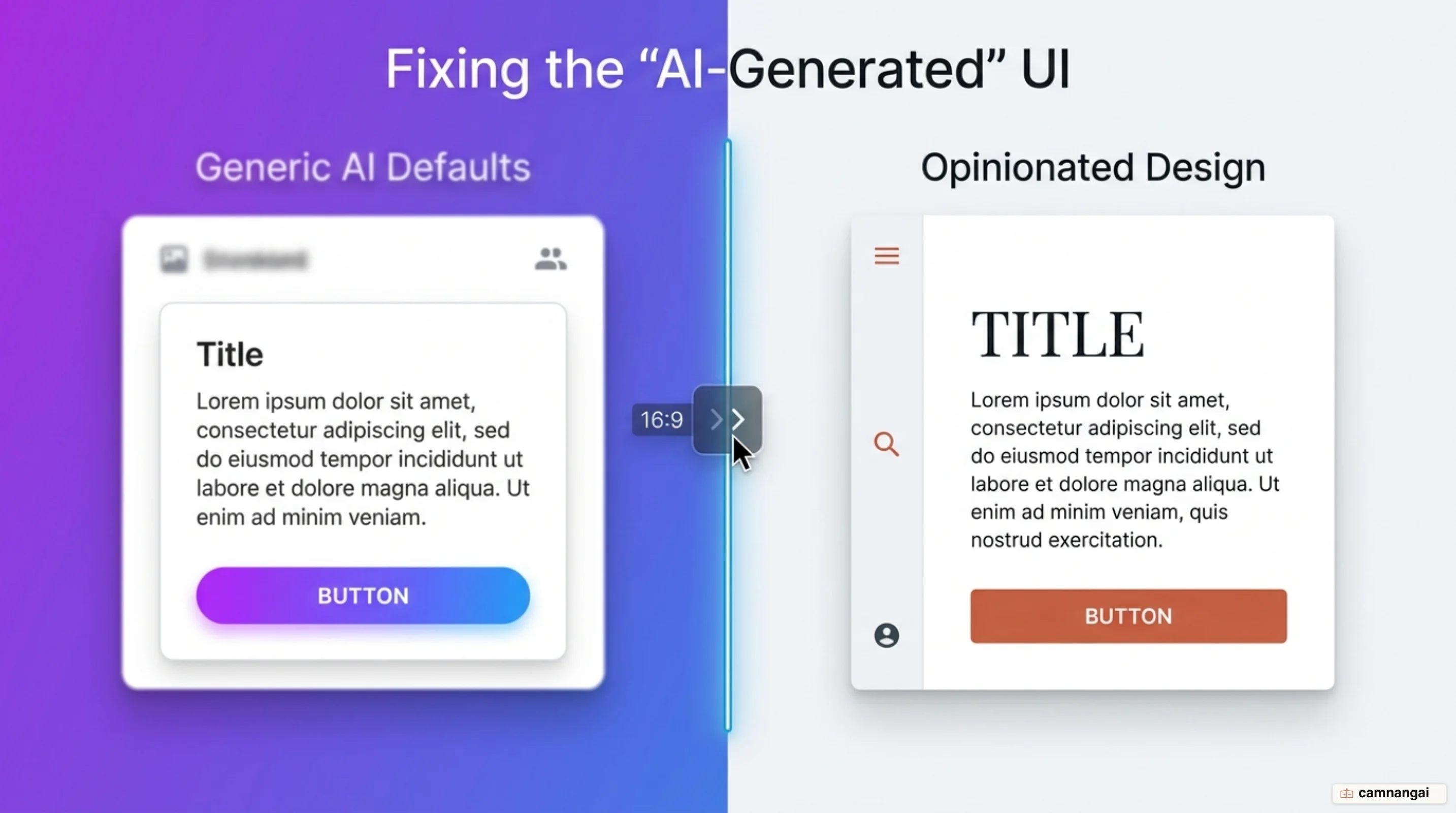
Why does AI-generated UI always look the same?
AI-generated UI is the result of a "default mean" problem. Large language models are trained on massive datasets of SaaS templates and documentation; when asked to build a "modern" interface without technical constraints, the model experiences a token-system collision. It defaults to the most common patterns it has seen: Inter typography, 01/02/03 numbered lists, and high-probability layout clusters.
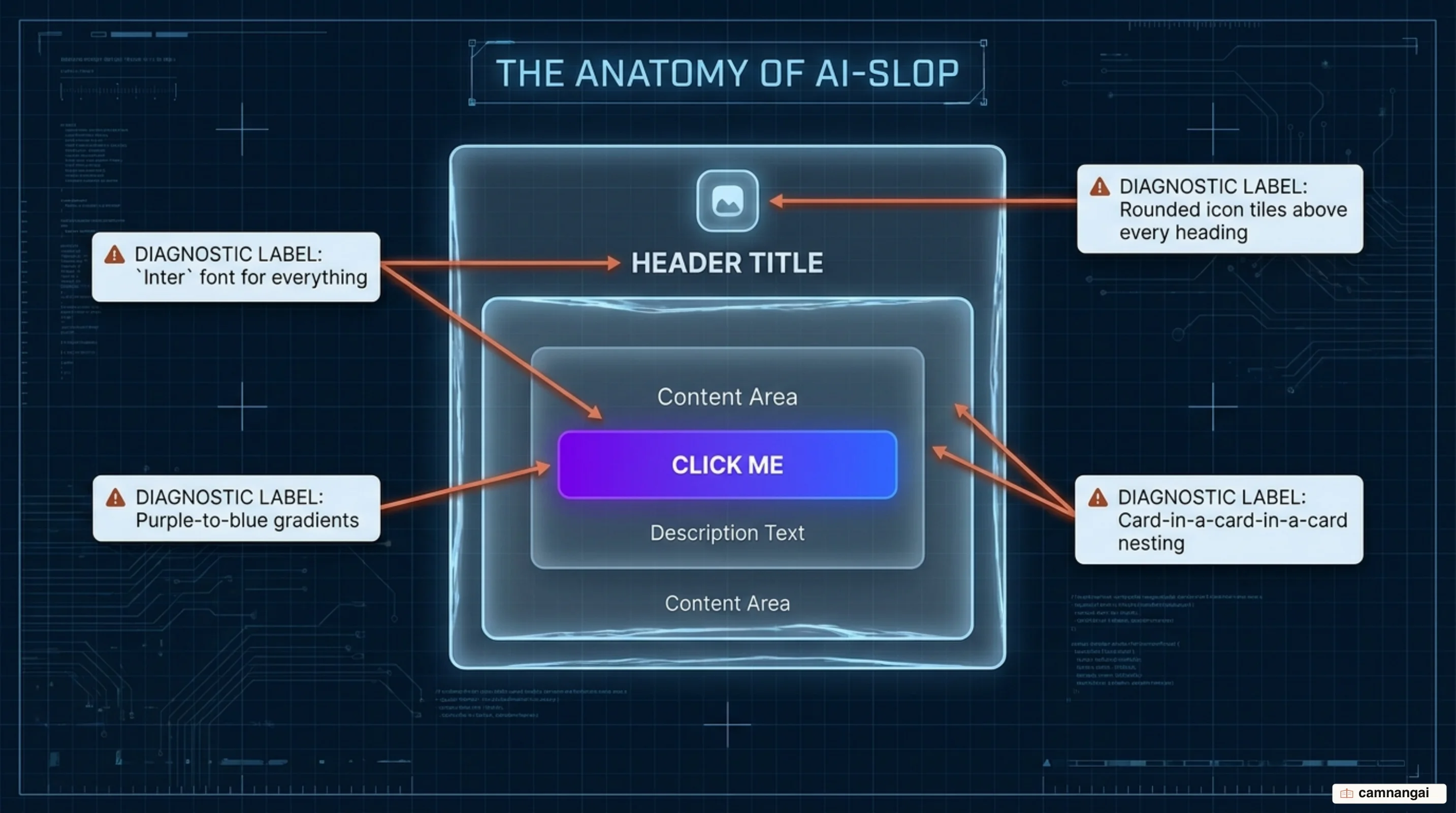
Prompting harder with adjectives like "sleek" or "clean" usually fails because the AI interprets these terms through the filter of its existing training data. Without a hard "design opinion," Claude defaults to safety. This results in the "AI slop" aesthetic, which often clusters around three predictable looks: a warm cream background (#F4F1EA) with high-contrast serifs, near-black backgrounds with a single acid-green accent, or broadsheet-style layouts with zero border-radius and hairline rules.
The shift to design engineering skills moves the workflow from prompt-based negotiation to architectural enforcement. These skills establish a set of non-negotiable rules and anti-patterns. By defining a project's brand voice and technical constraints before the first line of code is written, you prevent the agent from defaulting to high-probability boredom. That framing is duller than "prompt engineering", and it is also the only one that survives a second session, because a rule sitting in a file outlives whatever you typed last week.
The emil-design-eng skill: taste for motion and interaction
Developed by Emil Kowalski (animations.dev), the emil-design-eng skill translates high-level interaction expertise into a format Claude Code can execute. This skill focuses on the subtle motion physics that separate professional products from generic ones, and it prioritizes "snappy" responses and physical realism over arbitrary fixed-duration easings.
The skill enforces specific motion principles: springs are used instead of linear durations to ensure elements settle naturally, and tooltips are programmed to skip delays when grouped to maintain interface speed. It instructs the agent that releases should feel snappy even if the initial user press was deliberate, ensuring a responsive feel that "clicks."
This tool includes a "review-animations" feature that scans for "AI-slop motion" — unnecessary blur-on-entrance effects, pulsing dots, or indiscriminate hover-scaling. This audit intelligence is context-aware; it weighs different design philosophies against the project type, ensuring a productivity dashboard doesn't receive the same "playful" treatment as a consumer-facing app.
git clone https://github.com/emilkowalski/skills
cp -r skills/emil-design-eng ~/.claude/skills/
This skill triggers automatically within Claude Code whenever an interaction or animation context is detected. Motion is also the one part of a UI I have never managed to fix by prompting, because "make the animation feel right" is not an instruction, while a spring is.
The Impeccable skill: the overall visual system and PRODUCT.md
Impeccable, authored by Paul Bakaus, is a framework consisting of 23 commands and 46 deterministic detector rules. These rules explicitly block known AI-generated tells, such as overused fonts, gray-on-color text, and pure black/gray tints that lack brand-specific color injection, which is a lot of inherited taste, and it makes the generated DESIGN.md worth reading before you agree to live under it.
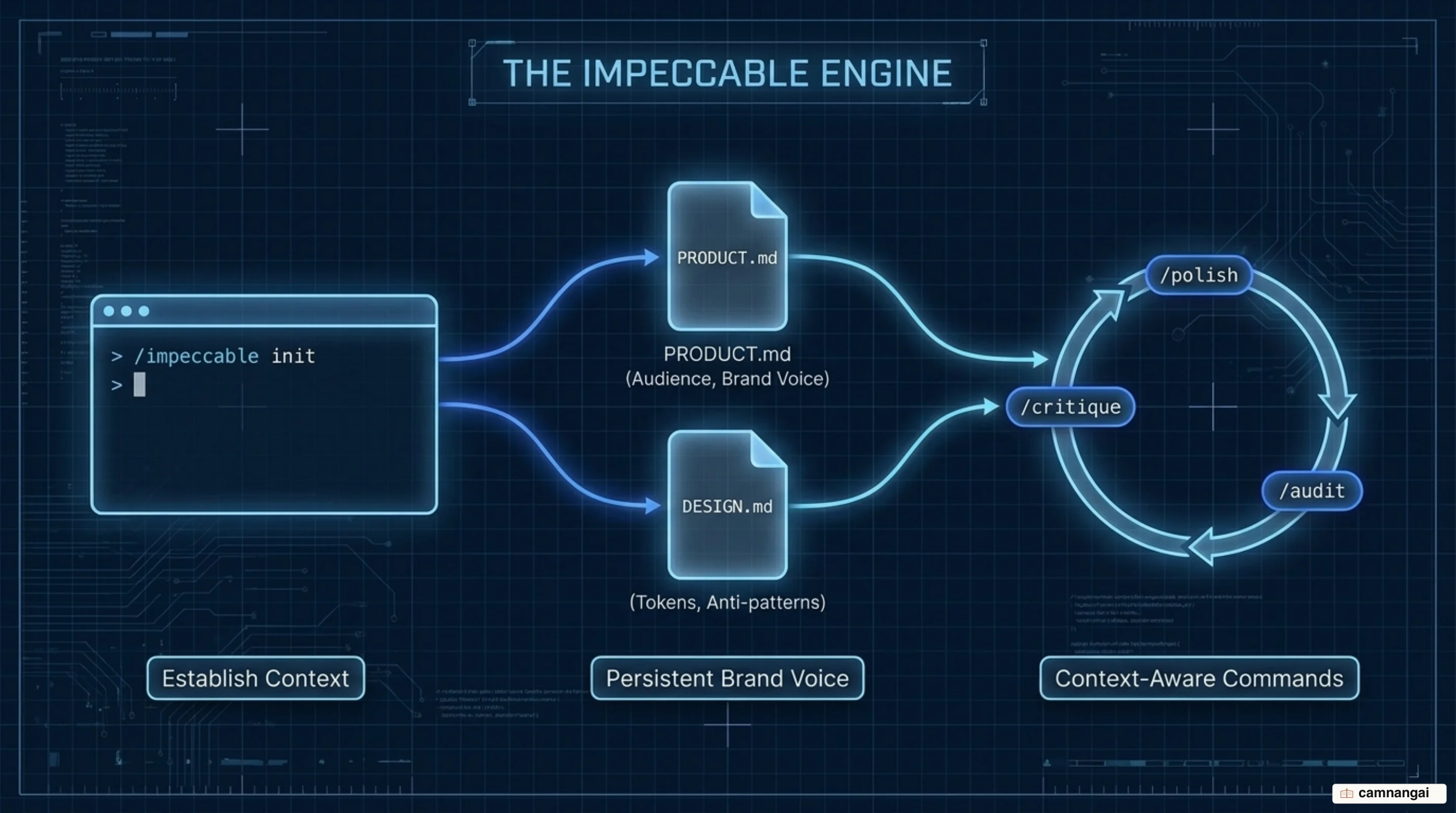
The core of the workflow is the /impeccable init command, which must be run inside the Claude Code environment after the npx installation at the project root. This process generates PRODUCT.md and DESIGN.md files. These files are the single source of truth for brand voice and "anti-references" — specific visual styles the agent is forbidden from using. Every later command, such as polish or audit, references these files to maintain system-wide consistency.
Impeccable provides a shared vocabulary of 23 commands that Claude understands natively. Commands like bolder, quieter, distill, and critique allow the engineer to direct visual changes without long-winded explanations. This turns the AI into a "second pair of eyes" capable of flagging issues that mirror those raised in professional design reviews.
npx impeccable install
# Inside Claude Code
/impeccable init
Taste Skill: layout and typography variance from your brief
Leonxlnx's Taste Skill is an "anti-slop" framework that focuses on layout and typography variance. When added via npx, it installs under the name design-taste-frontend. It prevents Claude from defaulting to centered layouts by interpreting the industry, audience, and mood of the project brief before generation.
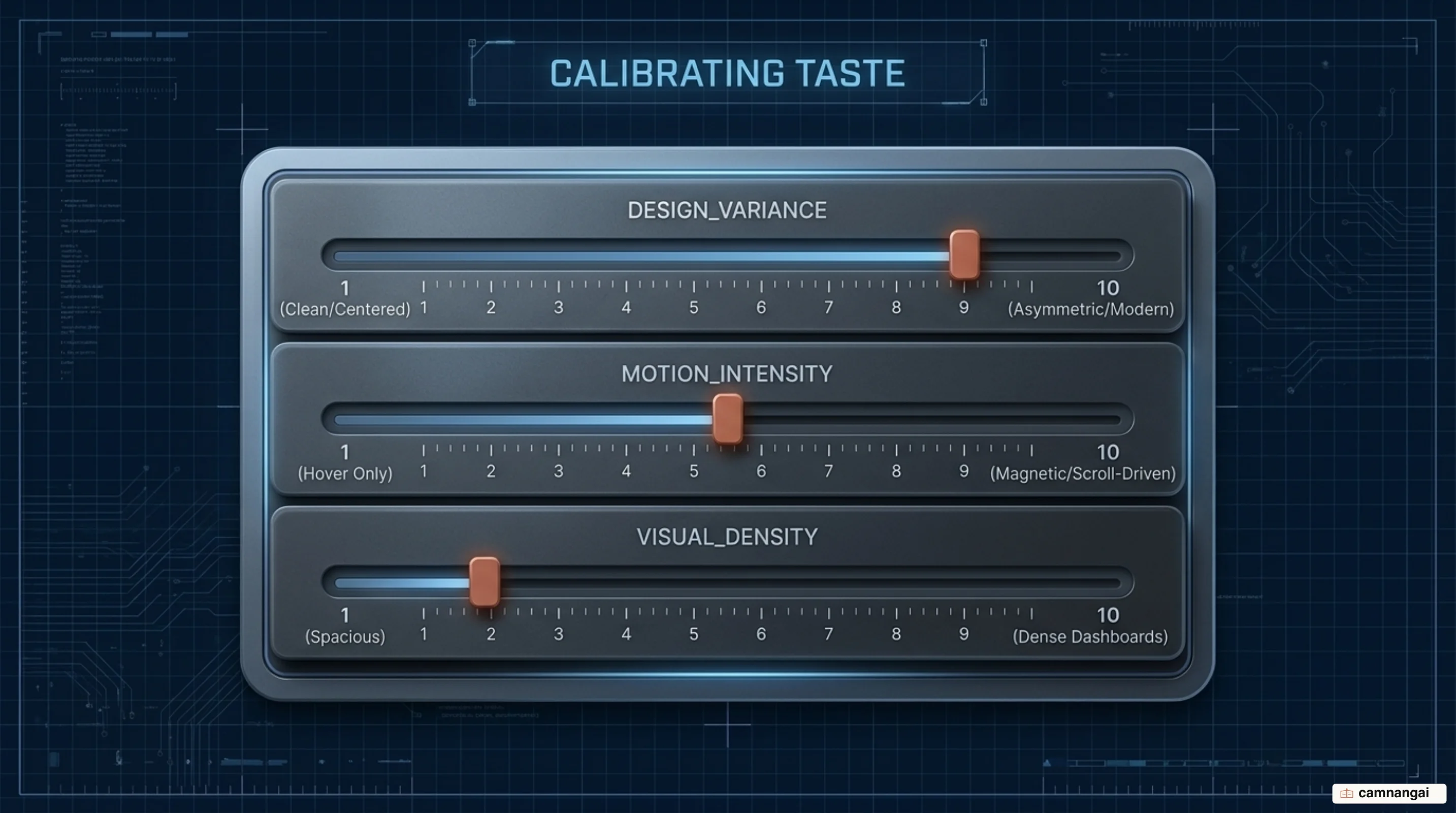
The skill uses three primary "dials" to calibrate the output: DESIGN_VARIANCE (layout experimentation), MOTION_INTENSITY (depth of animation), and VISUAL_DENSITY (information scaling). By adjusting these 1–10 parameters, engineers can force the AI to produce specific styles ranging from "Swiss-typography" and "minimalist" to "editorial" vibes reminiscent of Linear or Notion.
Taste Skill also incorporates strict "anti-laziness" rules. These are designed to stop the agent from leaving placeholder comments or truncating code blocks in long files. This ensures that the agent delivers fully realized components and page sections rather than skeletal fragments. The anti-laziness rules are the least interesting thing in the skill and probably the part that saves the most time, because a truncated file is a bug you only find twenty minutes later.
npx skills add leonxlnx/taste-skill --agent claude-codeThe frontend-design skill: straight from Anthropic
Anthropic's frontend-design skill forces Claude to adopt the persona of a "Design Lead" at a boutique studio. This persona is inherently opinionated and is constrained to "take one real aesthetic risk you can justify." The primary goal is to ensure that the hero section is the thesis for the entire project.
The skill mandates a two-pass process. In the first pass, Claude must brainstorm a compact token system and an ASCII wireframe. The AI is required to define a Signature: the single unique element this page will be remembered by. If the AI detects that any part of the plan looks like a generic default, it must revise the plan before generating code.
Under this skill, typography is treated as the primary vehicle for personality rather than a neutral delivery mechanism. The skill also enforces "Chanel's advice": a principle of restraint where the agent must review the completed design and remove one unnecessary accessory or decoration to ensure a more polished, professional result, and the fashion analogy earns its place here, because subtraction is the move an agent almost never makes on its own.
The ui-ux-pro-max skill: an industry-aware design-system engine
The ui-ux-pro-max skill is a high-level design-intelligence engine that uses 161 industry-specific reasoning rules. It offers 67 UI styles (including Bento Grids and Brutalism) and 57 font pairings. Note that Python 3.x is a prerequisite for the search scripts used by this skill to match your project brief against its internal design database, which makes this the one skill here with a real install story rather than a file you drop into a folder.
The skill generates tailored design systems in seconds, providing stack-specific guidelines for 22 different technical stacks. It explicitly lists anti-patterns for specific sectors, such as avoiding "AI purple" in banking applications to preserve a sense of authority and trust.
For large-scale projects, it uses a "Master + Overrides" pattern. This architectural setup allows for hierarchical retrieval, where a global MASTER.md defines system rules, but specific sub-files can override those rules for unique page-level requirements. This ensures the design system persists and scales across complex project directories.
npm install -g ui-ux-pro-max-cli
uipro install
How to combine them, and which skill to start with
Running all design skills simultaneously results in "instruction bloat" and context-window noise, which degrades the agent's performance. You must follow a specific sequencing requirement:
- Taste Skill first: use this during the scaffolding phase to establish the layout and density before any components exist.
- Impeccable second: run
/impeccable initto set up thePRODUCT.mdand lock in the brand voice and design vocabulary. - emil-design-eng last: layer in interactions and motion only after the static UI is established.
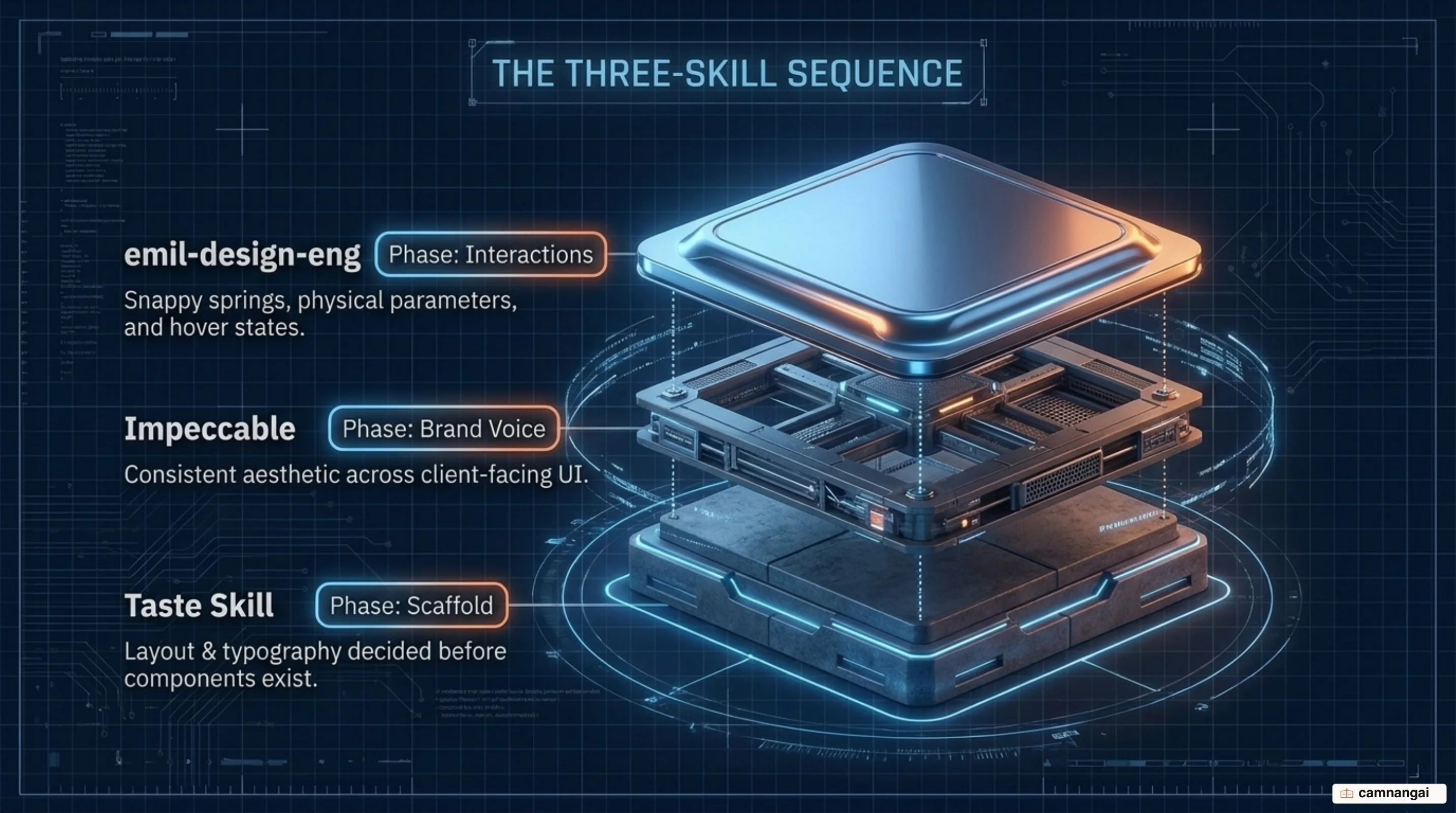
The choice between ui-ux-pro-max and frontend-design depends on the project's nature. Use ui-ux-pro-max for complex, data-heavy dashboards that require industry-standard functional patterns. Reserve frontend-design for unique, studio-style landing pages where the goal is a distinctive, "risky" visual thesis.
Stop fighting the defaults, start enforcing them
To eliminate the "AI-generated" look, stop relying on increasingly long system prompts and switch to local design skill files. The technical "click" moment occurs when you run a design audit on an old project and see exactly which elements — the nested cards, the Inter font, the icon tiles — the AI flags as generic slop. You will recognize most of that list, which is the uncomfortable part of running it.
References
- 3 Free Claude Code Skills That Fix 90% of That "AI-Generated" UI Look — Nitin Gavhane (Medium)
- emilkowalski/skills — Skills for Design Engineers
- pbakaus/impeccable — The design language that makes your AI harness better at design
- Leonxlnx/taste-skill — Gives your AI good taste, stops generic slop
- anthropics/skills — frontend-design SKILL.md
- nextlevelbuilder/ui-ux-pro-max-skill — Design intelligence for building professional UI/UX