Skip to content
Developers

CLAUDE.md vs AGENTS.md vs SKILL.md: How to Combine All Three

How CLAUDE.md vs AGENTS.md vs SKILL.md split by loading model — decide where every instruction goes, protect your context budget, and cut agent runtime.

Tuan Tran Van
10 min read
Contents (8 sections)
  1. Three files, three context-loading models
  2. What CLAUDE.md owns
  3. What AGENTS.md owns
  4. How SKILL.md's description gate works
  5. The decision table: where does a new instruction go?
  6. Why you must protect the always-on context budget
  7. Which file, when?
  8. References

CLAUDE.md vs AGENTS.md vs SKILL.md is not a fight over which standard wins — it is a question of how each file is loaded into the agent's context, and that loading model is what decides where a given instruction belongs.

It is a decision you make once. CLAUDE.md and AGENTS.md provide "always-on" injected context — concatenated into the system prompt at the start of every session — while SKILL.md uses a gated "progressive disclosure" model that only opens when its description matches the task in front of you.

Use AGENTS.md as the universal standard every tool reads, CLAUDE.md as the Claude-Code-specific layer, and SKILL.md as the packaged unit for complex, conditional workflows (procedural memory). Put an instruction in the wrong file and you do not just pay in tokens — you dilute the model's attention and invite reasoning noise between sessions.
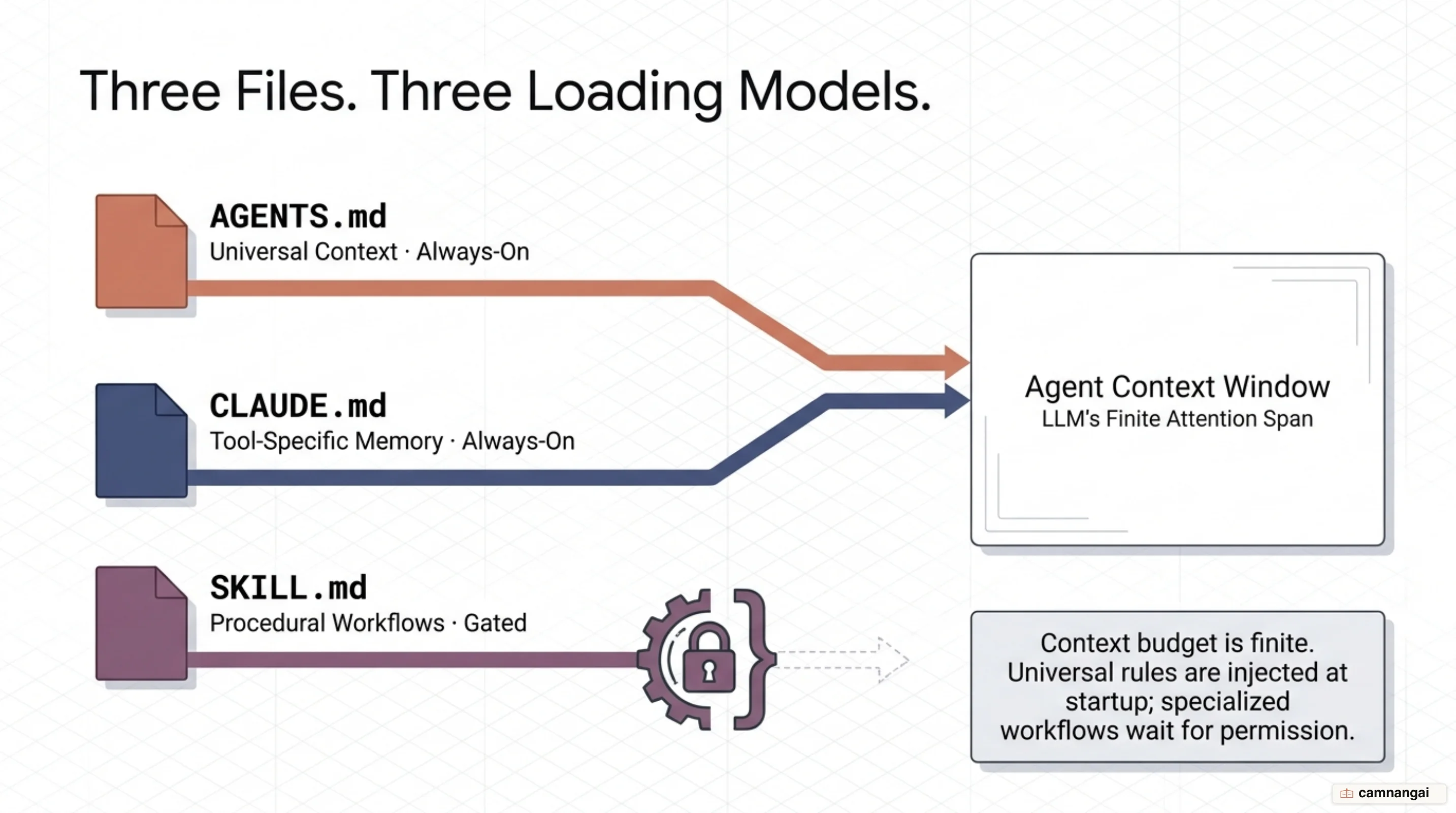
Three config files CLAUDE.md, AGENTS.md and SKILL.md with their three context-loading models: always-on injection versus a gated model.

Three files, three context-loading models

The current split was forged during the "context reshuffle" of late 2025. In August 2025, the AGENTS.md specification launched as a tool-agnostic "README for agents" — one place to define build commands, testing rules, and architecture that Cursor, Copilot, and independent agents could all read. Two months later, in October 2025, Anthropic introduced Agent Skills, shifting from a flat instruction file to modular directories with their own metadata, scripts, and reference documents. By December 2025 both formats had become open standards: the skills standard was published at agentskills.io, and AGENTS.md moved under the Linux Foundation to anchor the Agentic AI Foundation.

That history created a technical split: injected context (always-on) versus gated context (just-in-time). Injected files like CLAUDE.md and AGENTS.md are automatically concatenated into the system prompt at the start of every session. They are foundational, but they carry a fixed operational overhead on every turn. Gated context stays dormant until a user's intent matches a skill's metadata, at which point the full instructions are loaded. More than 60,000 repositories now manage tiered standards this way.

Without these files, an agent is a fresh hire every time you press Enter. They provide a machine-readable map that stops the agent from hallucinating library usage or running the wrong test runner. But dumping everything into a single always-on file triggers "context saturation," where the agent spends attention complying with a wall of instructions instead of resolving the actual bug.

One gap still stands: as of today, Claude Code does not read AGENTS.md natively, despite more than 4,300 engineers requesting it. Anthropic's own documentation ships the workaround — a symlink that keeps a single source of truth without duplicating content:

bash
ln -s AGENTS.md CLAUDE.md

What CLAUDE.md owns

CLAUDE.md is the primary mechanism for eliminating "AI amnesia" inside the Claude Code environment. It carries tool-specific directives that only make sense when Claude Code is the active agent — for instance, stopping it from reaching for npm when the team has standardized on pnpm. Unlike universal documentation, this file exists to shape Claude's terminal behavior specifically.

Four-level CLAUDE.md stacking hierarchy: Managed Policy, User, Project and Local — the nearest layer wins because it sits last in the context window.

It uses a bottom-up loading hierarchy that uses recency bias so project-specific rules carry the most weight. Instructions stack from Managed/Enterprise Policy, down to User (~/.claude/CLAUDE.md), then Project (./CLAUDE.md), and finally Local overrides (./CLAUDE.local.md). Because local instructions are appended last, they land at the end of the context window — the reliability "sweet spot" where instruction-following is strongest.

To combat judgment failures, a production-grade CLAUDE.md can enforce the Karpathy 4 behavioral guidelines. These four principles — don't assume (surface tradeoffs), minimum code (no speculative abstraction), surgical diffs (touch only what is necessary), and defined success criteria (loop until tests pass) — act as hard guardrails. They push the AI to operate like a senior engineer rather than a junior developer who over-engineers a simple fix.

A lean CLAUDE.md focuses on "gap content" and imports universal rules to avoid duplication. Below is a minimal implementation that uses the @AGENTS.md import plus an <important> tag to override Claude's internal relevance gate for a high-stakes procedure. Note the instruction budget: Claude reliably follows roughly 150–200 instructions, and the default system prompt already consumes about 50 — so your project rules have a tight ceiling before adherence starts to slip.

markdown
# Project memory
 
@AGENTS.md
 
<important if="deploying to production">
- Run `scripts/validate-build.sh` before any git tag creation.
- Prefer surgical diffs in the `/api` route; no speculative abstractions.
- Success is a 100% pass rate on `vitest --run`.
</important>

What AGENTS.md owns

AGENTS.md is the universal foundation for AI coding assistants, now anchored by the Linux Foundation's Agentic AI Foundation. It is tool-agnostic — the baseline briefing that Cursor, Copilot, and Claude Code all consume — and its job is to define the project architecture, package managers, and build commands that are not obvious from the file tree alone.

Adding the file does not automatically make agents smarter; the source of its content does. A study from ETH Zurich (arXiv:2602.11988) found that human-authored context files provide about a 4% gain in task resolution, whereas LLM-generated versions actually lower success rates by 0.5–2%. The failure mode is almost always redundancy: auto-generated files repeat information already in the repository, which adds noise and confuses the agent's reasoning. A separate study of repository-level context files (arXiv:2601.20404) found that a well-formed AGENTS.md cut total agent runtime by 28.64% and output tokens by 16.58% while holding completion rates steady — by giving the agent direct execution paths instead of letting it guess the build sequence.

Overusing AGENTS.md produces the "exploration paradox": agents with too much context read more files and generate more reasoning tokens, yet take 2–4 more steps to reach the target code, not fewer. Every injected token is a tax on the model's attention, so restrict the file to "gap content" — non-default flags, specialized CI/test configuration, and architectural constraints a reader cannot discover with ls or find.

For monorepos, AGENTS.md follows a "nearest-file-wins" precedence rule: a file in a subdirectory is read first and overrides the root. OpenAI runs an 88-file monorepo structure this way, keeping context windows tight so an agent fixing a frontend CSS bug is not distracted by backend rules it will never touch.

How SKILL.md's description gate works

SKILL.md extends an agent with procedural memory — the recipes, the multi-step workflows — without flooding the context window. Where MCP provides the wiring to tools and RAG retrieves facts, skills supply the how: the 47-step audit, the specific TDD pattern. The format works in three tiers — discovery (metadata), activation (full instructions), and execution (external scripts and resources).

SKILL.md's three-tier progressive-disclosure mechanism: Discovery (metadata), Activation (when the description matches) and Execution (scripts), gated by the description field.

The gatekeeper is the YAML frontmatter's description field. At startup the agent loads only each skill's metadata, consuming roughly 50–100 tokens per entry. Only when a prompt matches the semantic intent of a description does the gate open, injecting the full procedural logic into the active context. A database-migration guide is present only when the agent is actually touching the database.

Authors control the gate with plain-English TRIGGER and SKIP conventions inside the description. These are not schema-defined fields — they are functional instructions that tell the agent exactly when the skill is relevant. Clear boundaries ("SKIP for read-only queries") prevent skill bleed, where an agent misapplies a specialized procedure to a task it does not fit.

yaml
---
name: db-migration
description: |
  TRIGGER when the user asks to change a Postgres schema or run a migration.
  SKIP for read-only SELECT / EXPLAIN queries or routine data reporting.
---

One security note before you route sensitive data through a skill: Agent Skills are not eligible for Zero Data Retention (ZDR) — data processed through the feature is retained under the standard policy. In finance or healthcare environments that require ZDR, that is a real constraint to weigh.

The decision table: where does a new instruction go?

Once the loading models are clear, placement is nearly mechanical — ask whether the rule must fire on every turn.

CriterionAGENTS.mdCLAUDE.mdSKILL.md
AudienceMulti-tool (Cursor, Copilot, agents)Claude Code onlySpecialized workflows
LoadingAlways-onAlways-onGated (conditional)
ContentsBuild/test, shared project contextMemory imports, Claude-only rulesMulti-step workflows, domain vocab
StrengthCut runtime by 28.64%Tuned for the terminal CLISaves tokens, reduces noise

Rules the agent needs every turn — build and test commands, style guides, shared architecture — belong in AGENTS.md. Directives specific to Claude Code go in CLAUDE.md. Specialized workflows that apply only to particular tasks (say, "how to rotate API keys") must sit behind a SKILL.md gate. The most common hazard to prune is a directory tree or codebase overview: agents already have ls and find, so that content is redundant noise that degrades performance.

Why you must protect the always-on context budget

The efficiency gains of AGENTS.md only hold while the context stays relevant to the current task. Dump a 500-word migration guide into the root file and the agent has to read about Postgres lock modes while fixing a frontend state bug — spending attention on the wrong problem. Excessive always-on context also raises reasoning tokens by roughly 14–22% per step without a matching gain in accuracy.

This "instruction bloat" leads to Uniform Decay: as instruction count climbs, the model's ability to follow any of the rules declines. For large thinking models the decay is roughly linear; for smaller models it turns exponential once the count passes about 150–200 instructions. Since the default system prompt already spends around 50, your project-specific always-on budget is tight.

The fix is to aggressively move situational workflows into SKILL.md, preserving the model's finite attention for the foundational rules that must fire every turn. And never ship an auto-generated context file without manual pruning — human curation is what removes the redundancy that quietly degrades the agent.

Which file, when?

If you work only in Claude Code, start with a minimal CLAUDE.md that imports @AGENTS.md, and keep the shared rules in AGENTS.md. In a multi-tool shop, invest in AGENTS.md as the foundation — but hold it under about 150 instructions to avoid Uniform Decay, and apply "nearest-file-wins" on large repos. Every repeatable or precision-critical workflow becomes a SKILL.md that stays dormant behind its gate until the task calls it.

There is one golden rule: if an agent can find something with ls or by reading README.md, it does not belong in a context file. Choosing a file is a context-architecture optimization, not a matter of taste. Put each instruction where its loading model fits, and you pay tokens only for what the task actually needs.

References

Read more

Share this article