React is a component-based JavaScript library designed for building user interfaces.
It is used mainly to build fast, scalable single-page applications (SPAs) out of small, isolated pieces of code. React abstracts away much of the manual work of updating the browser's Document Object Model (DOM), so you can focus on the structure and logic of your interface.
React is technically a library — an add-on feature rather than a primary support system — but the web development community usually calls it a framework. You will often see it used alongside other libraries to render to specific environments, such as the web via ReactDOM or mobile devices via React Native.
As an engineer, you should view React as a system for predictable state management. It gives you a structured flow for how data moves through your application and how the interface responds to user interactions, which reduces the likelihood of bugs in large-scale frontend projects.

What is React?
React is a JavaScript library used to build user interfaces for web and native applications. It was designed to help developers create reusable UI elements, such as buttons or navigation bars, that compose into larger, more complex interfaces. This modular approach speeds up development and keeps the code maintainable over the long run, because each piece of the UI is treated as an independent, self-contained unit.
In practice, you must distinguish between the core React library and environment-specific renderers. To build for the web, you use React alongside ReactDOM, which provides the methods required to interact with the browser's DOM. If you are building mobile applications, you use React Native. That flexibility lets you apply the core logic of React—building and managing components—across different platforms.
The primary goal of React is to minimize the bugs that occur when you build user interfaces. It does this by abstracting the rendering process. Instead of writing instructions to manually update every element on a page when data changes, you describe how the UI should look at any given moment based on the current data. React then handles the complex work of updating the screen to match that description.
React does not enforce strict code conventions or a specific file organization. This flexibility allows your team to adopt React in the way that best fits your project. You can use it to power a single interactive button on an existing page, or to run the entire user interface of a massive web application.
Why React exists: from the real DOM to the virtual DOM
The traditional way of updating a webpage means manipulating the browser's Actual (Real) DOM. But the Real DOM is often slow under frequent updates, because browsers must recalculate the entire layout and repaint the screen whenever a change occurs. Those bottlenecks on the browser's main thread make manual updates hard to track and lead to inefficient UI behavior.
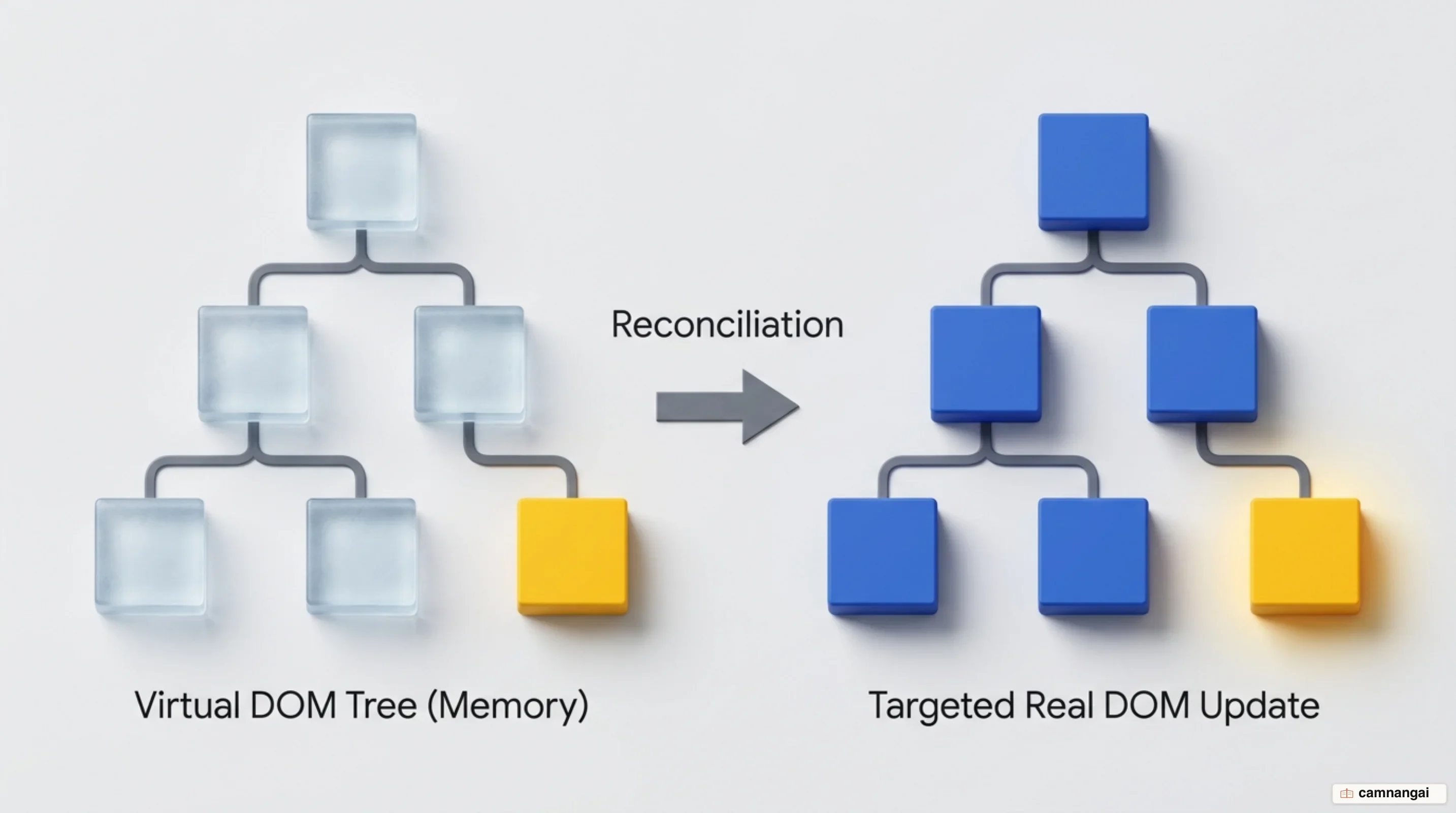
To solve this, React uses a "Virtual DOM," an in-memory representation used to track UI state. When data changes, React creates a new version of this Virtual DOM. Updating this lightweight representation is much faster than triggering layout and repaint costs in the browser's Real DOM. React then performs "Reconciliation," comparing the previous Virtual DOM with the new one to identify specific differences (diffing) and updating only the affected elements.
The React Compiler pushes that efficiency further — a separate, opt-in build-time tool rather than a part of React 19 itself. It installs as a Babel plugin, works with React 17 and up, and reached its stable 1.0 release in October 2025. Once enabled, it optimizes your components at build time automatically. By reading your logic, the compiler works out the most efficient way to handle updates, so you can spend your time on features instead of hand-tuning performance.
By minimizing DOM operations and automating optimization, React keeps even data-heavy applications responsive. Moving from imperative DOM manipulation to a declarative, compiler-optimized system is what lets React scale across thousands of components without a matching rise in manual maintenance or performance loss.
Components: the building blocks of every React interface
React interfaces are built using a component-based architecture. A component is a reusable, independent module that encapsulates its own structure and behavior. In a React application, these components form a hierarchical tree where a parent component can contain multiple child components, each responsible for a specific part of the user interface.
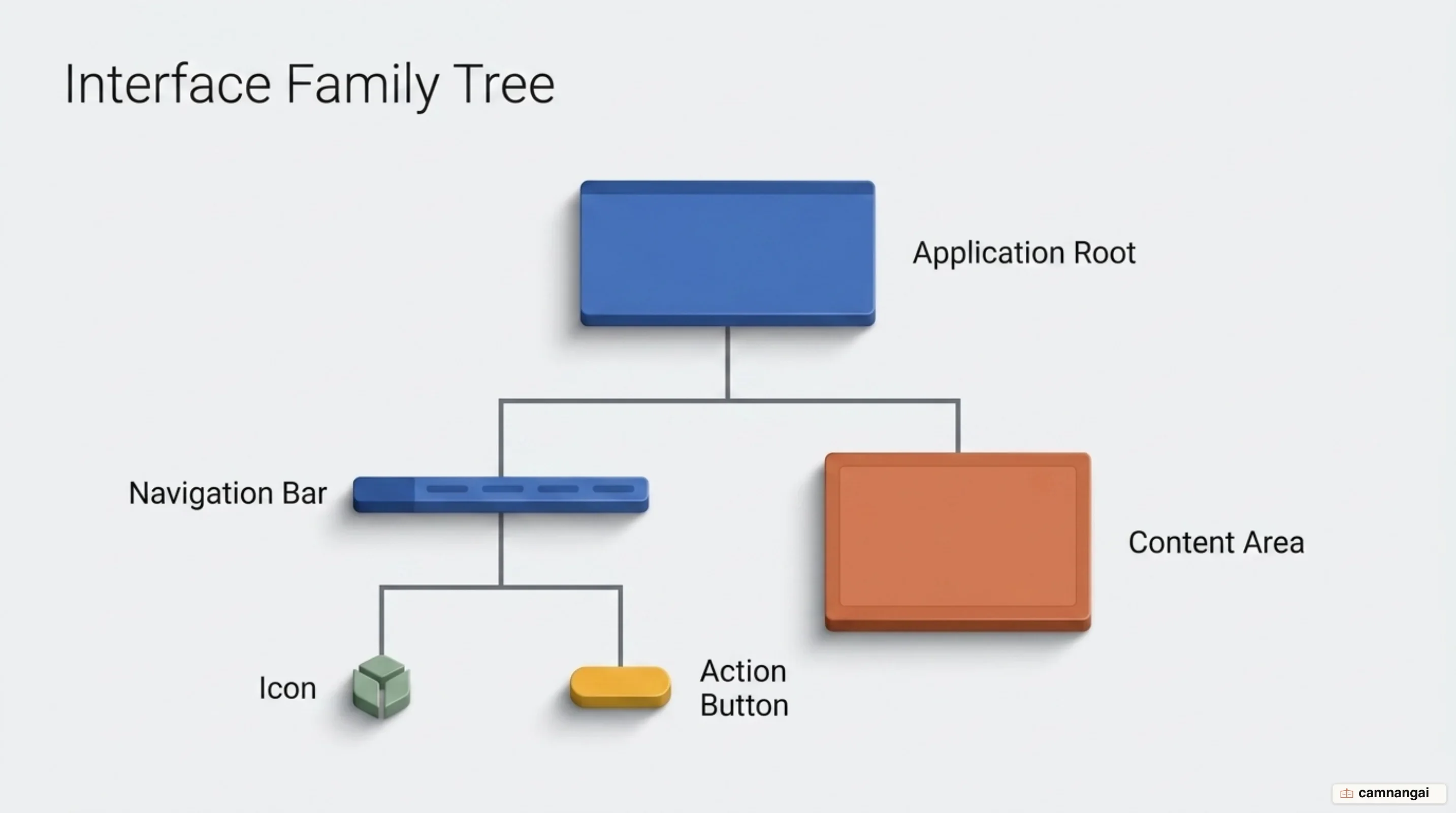
Modern React development primarily uses functional components, which are JavaScript functions that return a description of the UI. One strict rule you must follow is that React component names must use PascalCase (starting with a capital letter). The capital letter is what lets the library tell standard HTML tags apart from your custom React components, and it prevents naming conflicts in the global namespace.
Using components allows you to develop and test parts of your UI in isolation. For example, you can
build a Button component once and use it in ten different places throughout your app. If you need
to change the button's style or behavior, you update one file and the whole system stays consistent.
function Welcome(props) {
  return <h1>Hello, {props.name}!</h1>;
}

export default Welcome;
JSX: writing your interface inside JavaScript
JavaScript XML, or JSX, is a syntax extension for JavaScript that allows you to write HTML-like code directly within your JavaScript files. It looks like HTML, but it lets you describe your UI with the full logic of JavaScript behind it. JSX puts markup and logic in a single place, which makes the relationship between the two easier to follow.
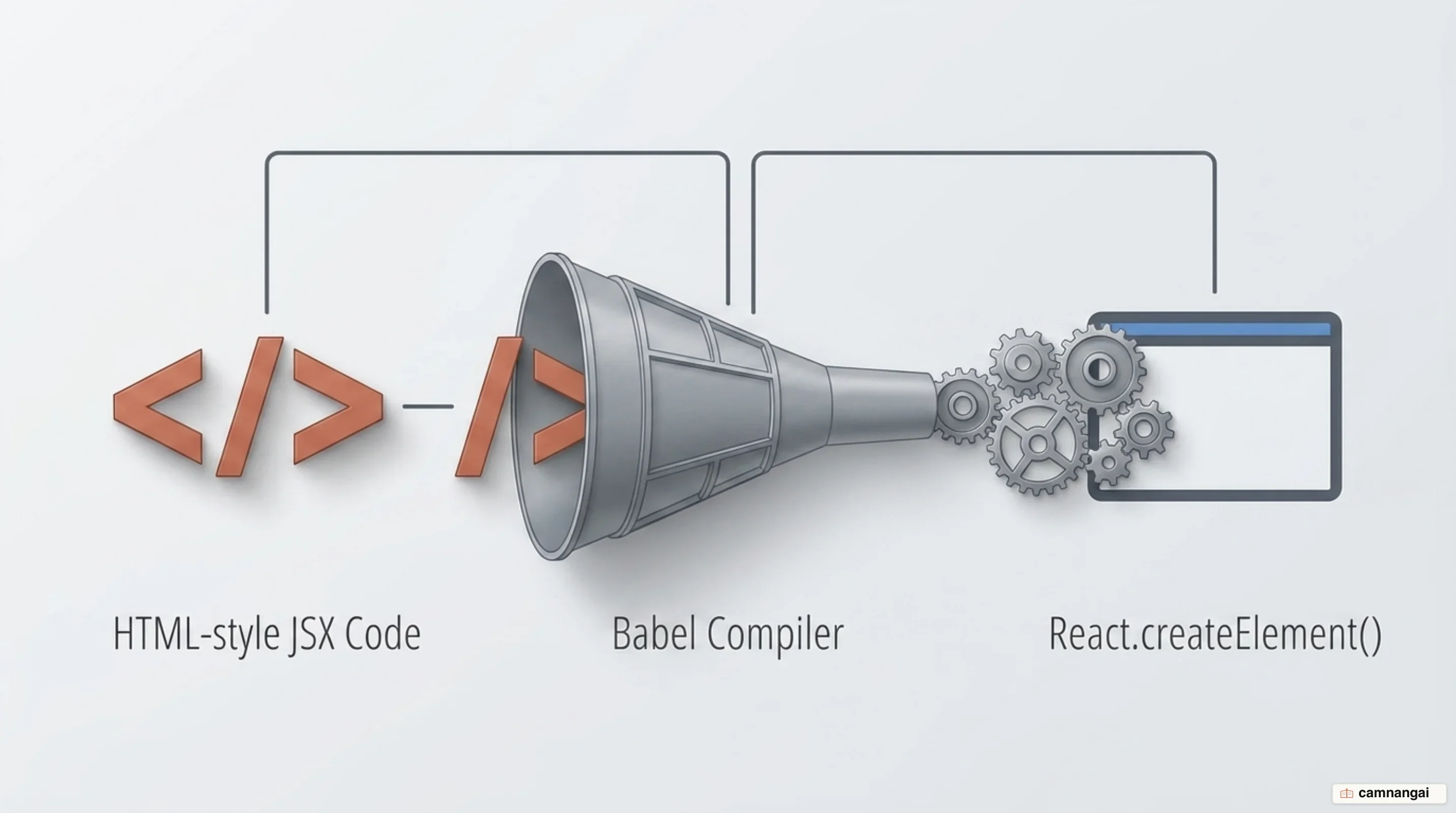
Browsers cannot read JSX directly. To make it work, you must use a compilation tool like Babel. This
tool transforms your JSX code into standard React.createElement() calls that the browser can
understand. You could write these calls yourself, but JSX is preferred because it is far more
readable and its declarative style simplifies complex UI structures.
Inside JSX, you can embed any valid JavaScript expression by wrapping it in curly braces {}, which
is how you display dynamic data or run logic directly inside your markup. Note that a component must
return a single element; if you have several elements to return, wrap them in a parent element or
use a "Fragment" (<> </>) to avoid unnecessary nodes in the Real DOM.
// JSX syntax: Readability for developers
const element = <h1 className="greeting">Hello, World!</h1>;

// Compiled JavaScript (via Babel): What the browser actually executes
const element = React.createElement("h1", { className: "greeting" }, "Hello, World!");
Props and state: how data flows one way
React handles data through two primary concepts: props and state. "Props" (properties) are external pieces of data passed from a parent component down to a child. They are read-only for the child, which is what keeps the one-way data flow predictable. It also makes it easier to track how data moves through your application and where it came from — which matters a lot when you are debugging a complex system.
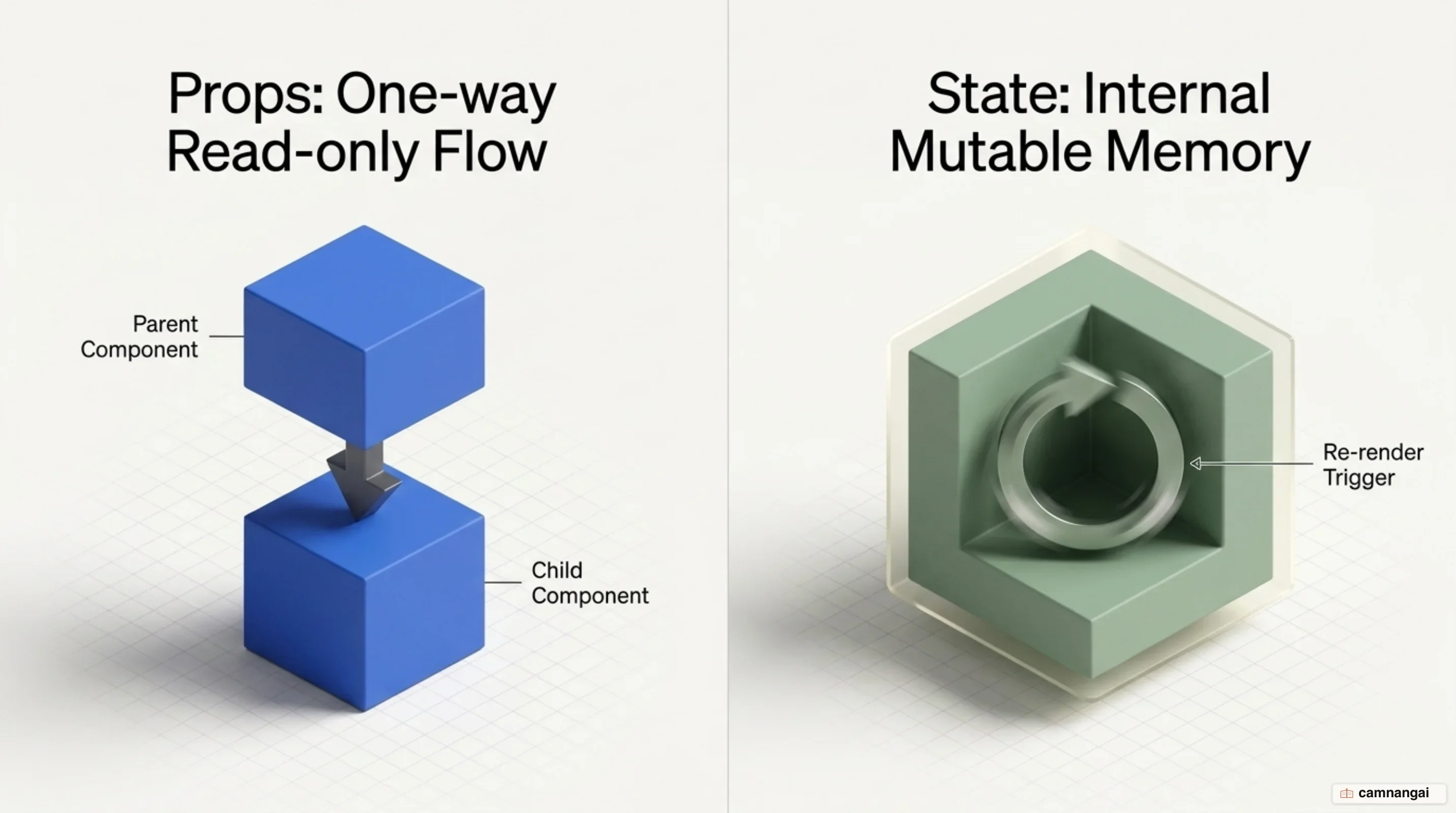
"State" is a component's internal memory. Unlike props, which are passed in, state lives inside the component itself and holds data that changes over time, such as input values or counters. When you update state using its specific setter function, React automatically triggers a re-render of that component and its children to reflect the new data in the UI.
The lifecycle of a component's UI involves four distinct phases:
- Trigger: Specifying the component that needs to be displayed (initial load or state update).
- Render: React calling the component function to determine what the UI should look like.
- Commit: React updating the Real DOM to match the rendered output.
- Paint: The browser repainting the screen so the user sees the changes.
function Parent() {
  // Passing a "greeting" prop to the Child component
  return <Child greeting="Hello from Parent" />;
}

function Child(props) {
  return <p>{props.greeting}</p>;
}
Hooks: what useState, useEffect and useRef do
React Hooks are functions that let you use React features like state and lifecycle methods within
functional components. The useState hook is your primary tool for adding interactivity — it is how
you declare state variables. For "side effects"—operations like API calls or timers that happen
outside the normal rendering logic—you use useEffect, which keeps those external interactions in
sync with the React rendering cycle.

The useRef hook stores a mutable value that persists across renders but does not trigger a new
render when it changes. You will commonly use it to access DOM elements directly, or to store
information that doesn't need to be visible to the user. In React 19, the use() hook lets you read
resources like Promises and Context conditionally, which simplifies data fetching and resource
management.
React 19 also makes data mutations easier through "Actions." This pattern includes the
useActionState hook for managing form submission states and useOptimistic for instant UI feedback
while you wait for server responses. And useFormStatus lets child components read the pending
status of a parent form without prop drilling, which saves real work in complex forms.
import { useState, useEffect } from "react";

function Counter() {
  const [count, setCount] = useState(0);

  // Syncing the document title with the state (a side effect)
  useEffect(() => {
    document.title = `Count: ${count}`;
  }, [count]);

  return <button onClick={() => setCount(count + 1)}>Clicked {count} times</button>;
}
What is React actually used for?
React is designed for building interactive, data-driven applications where the UI must reflect changing state frequently. Its most common use is the single-page application, which feels fluid because it updates content dynamically instead of forcing a full page refresh. That makes it the standard choice for modern web platforms with a lot of user interaction.
You will find React powering some of the most complex web interfaces in use, including Netflix, Atlassian, and Instagram. These companies use React to manage thousands of components and huge amounts of data while keeping the experience responsive and consistent. At that scale, minimizing DOM operations and managing independent modules are what keep performance and stability intact.
Large teams adopt React for developer productivity and consistency. Airbnb, for example, maintains extensive component libraries so hundreds of developers can build features from standardized, pre-tested UI blocks. That cuts bugs and keeps the interface consistent across different parts of the platform, even as the codebase grows to millions of lines of code.
Beyond the web, React reaches mobile development through React Native, so your existing React skills carry over to native apps for iOS and Android. Because React is modular and efficient, it suits any project where the UI is complex and needs frequent, predictable updates driven by user input or real-time server data.
What you need before you start with React
Before you begin with React, you must have a solid foundation in core web technologies: HTML for structure and CSS for styling. More importantly, a deep understanding of modern JavaScript (ES6+) is essential. You must be comfortable with variables, functions, objects, and arrays. You should master ES6 features like arrow functions, destructuring, and spread operators in particular, since those patterns show up everywhere in React code.
A modern React project also needs a few tools on your machine. You must have Node.js 20.19 or later (or 22.12 or later) installed, which includes npm (the Node package manager). You need to be comfortable in the terminal too, since that is where you install dependencies, run development servers, and manage your project's build pipeline.
To set up a new project, reach for a modern build tool like Vite rather than the older methods. Vite gives you a fast development environment and compiles JSX and other assets for you, so more of your time goes into component logic and less into configuring build infrastructure.
What order should you learn React in?
The most effective way to master React is to take it in order. Start with JavaScript fundamentals, then move to JSX syntax to understand how to describe your UI. Once comfortable, learn to build static components and master the flow of data through props. Finally, implement interactivity by learning state management and hooks, followed by more advanced React 19 features like Actions and Server Components.
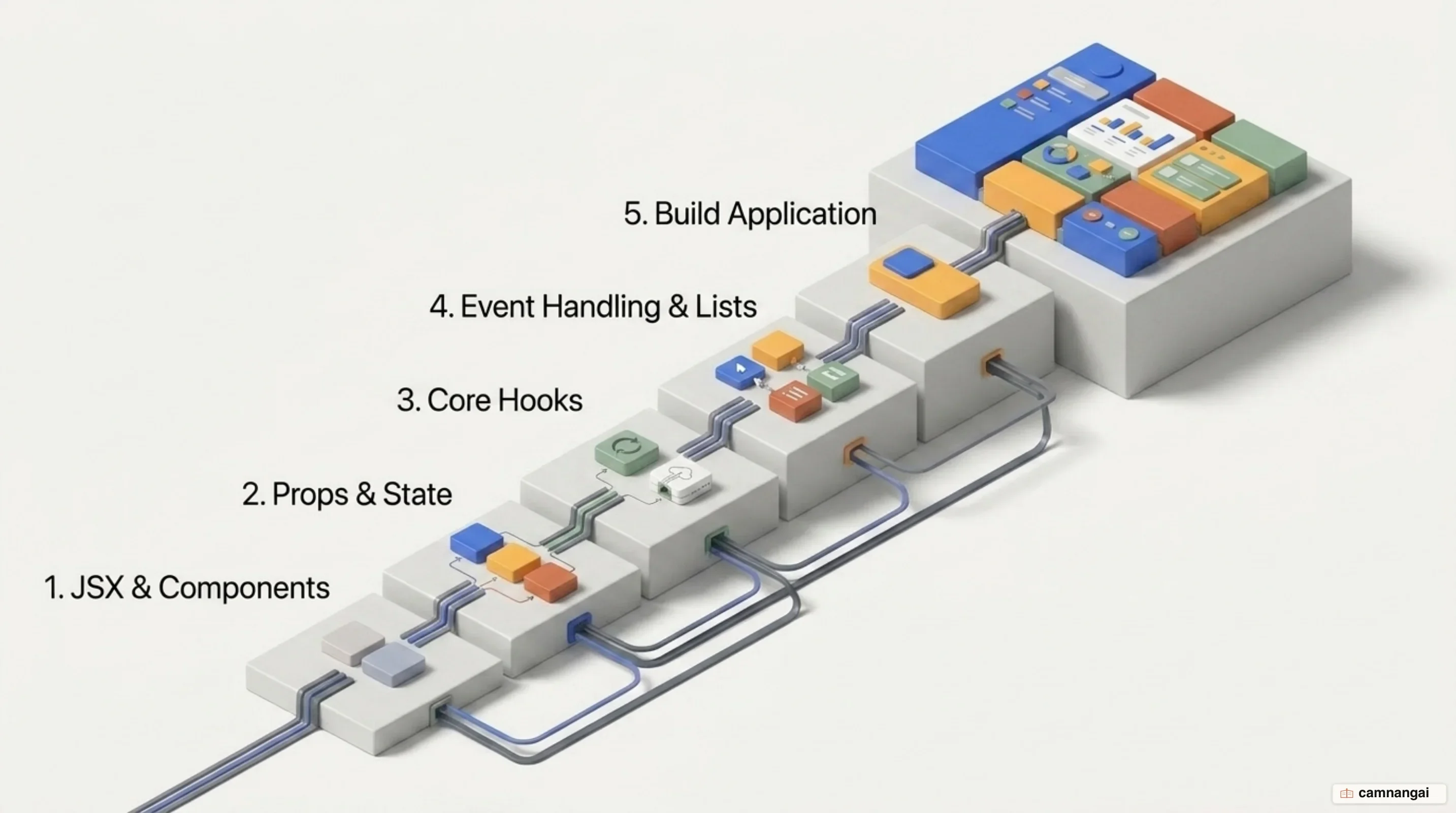
Choose React when you need a modular, maintainable UI that can scale with complex data requirements. Independent components, plus the automatic optimizations of the opt-in React Compiler, make it one of the most capable tools available for modern frontend engineering.