HTML (HyperText Markup Language) is the most basic building block of the Web. It is the standard markup language used to define the meaning and structure of web content across the World Wide Web.
Every document you encounter on the internet relies on HTML to organize data — text, images, and embedded media — into a format a web browser can interpret and render.
To understand what is HTML, it helps to see it as the structural foundation of a document. Other technologies handle how a page looks or how it reacts to the user, but HTML is what sets the hierarchy of the content — the frame that the later layers of style and logic attach to.
On a modern web page, HTML works closely with CSS (Cascading Style Sheets) and JavaScript. If a web application were a human body, HTML would be the skeleton. CSS is the skin and the aesthetic features; JavaScript is the internal systems — circulatory, nervous — responsible for behavior and dynamic response.
What is HTML?
The abbreviation HTML stands for Hypertext Markup Language, a name built from three ideas. "Hypertext" refers to a system of links that connect web pages to one another, whether hosted on the same server or across separate domains. That linking is what makes the World Wide Web work: you move through a global network of information by clicking text or media.
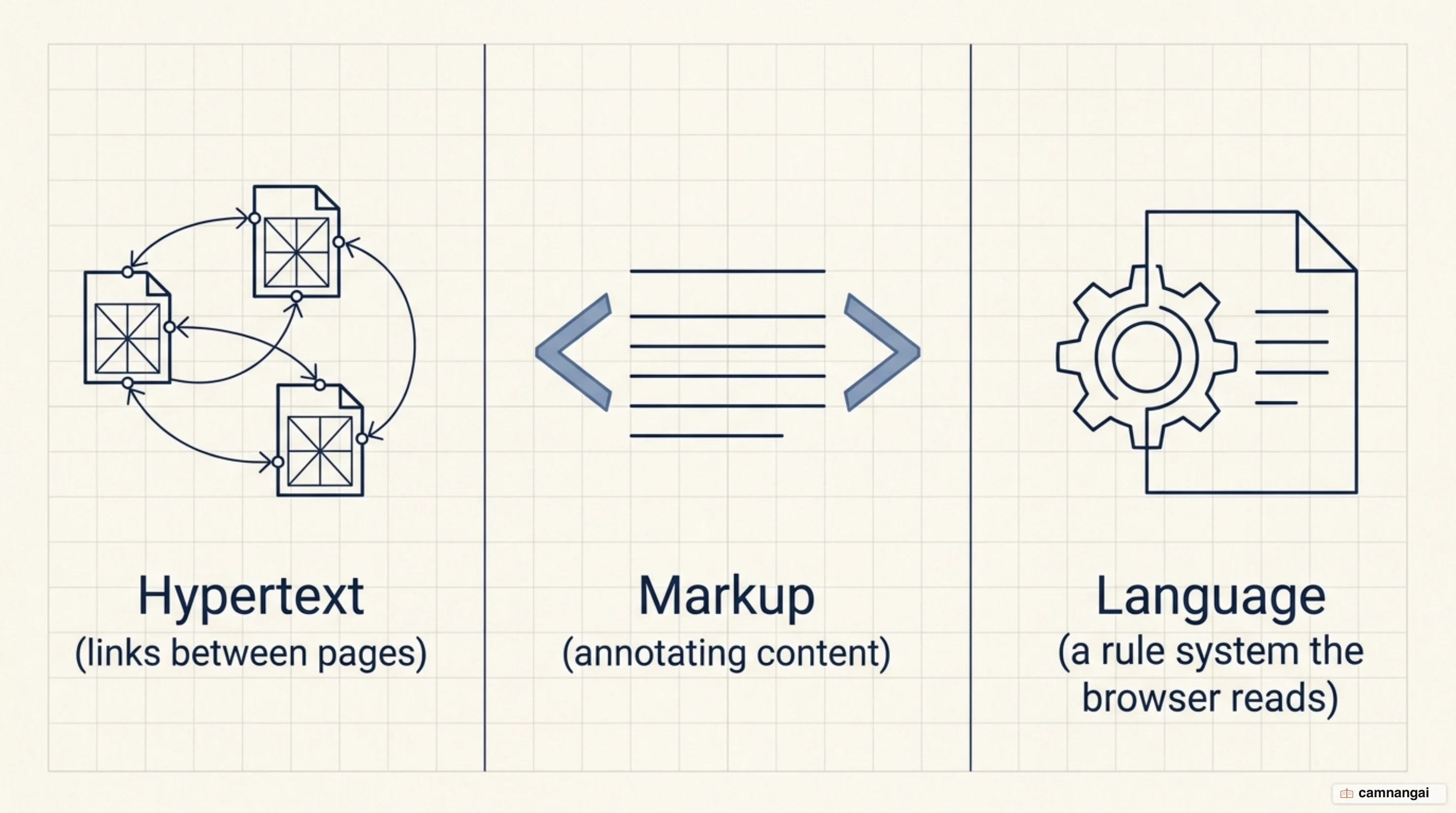
"Markup" means annotating content so a browser's rendering engine knows how to process and display it. Markup started as a style guide for typesetting printed documents; in a digital context it works as a set of instructions for the software client. "Language" means it is a formal system a computer reads to parse the structure the developer intended.
HTML also sets a strict hierarchy of information. Because the markup labels each piece of data, the browser can tell a top-level heading from an ordinary paragraph from the boundaries of an unordered list. Without it, the browser would get one unorganized stream of text — nothing to tell the parts apart on screen, and no semantic meaning for assistive technologies.
Just as the load-bearing walls of a house decide where the rooms go before anyone picks the interior design, HTML places the content before CSS skins the document or JavaScript adds interactivity. It is the main tool for arranging data logically, which is what keeps content accessible and structurally sound.
Tags, elements and attributes: three things people mix up
A tag is the specific code marker — opening or closing — used to mark off a component, such as
<h1> and </h1>. An element is the entire structural unit: the opening tag, the content it
wraps, and the closing tag. An attribute is a name/value pair that sits only inside the opening
tag and supplies configuration data for that element.
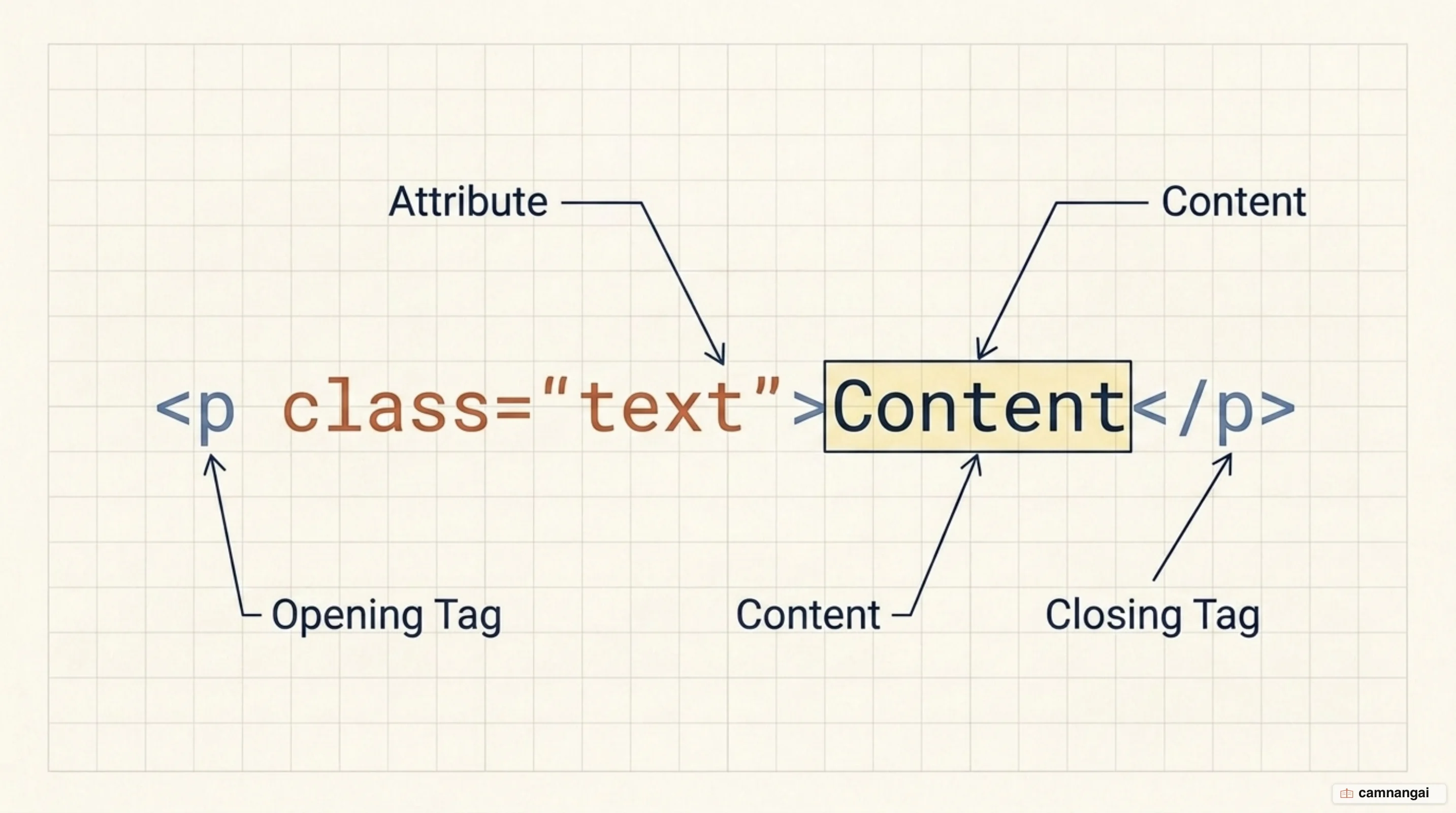
In the anchor element <a href="https://example.com">Visit Site</a>, the <a> and </a> markers are
the tags, "Visit Site" is the content, and the whole string is the element. The
href="https://example.com" segment is an attribute, where href is the name and the URL is the
value. HTML element names are case-insensitive, but certain attribute values — specifically id and
class names — are case-sensitive when accessed through CSS selectors or the Document Object Model
(DOM) API.
Elements are categorized by how they render and behave. Non-replaced elements wrap text or
sub-elements to provide formatting or semantic context, such as paragraphs or headers. Replaced
elements are substituted by an external object instead — a graphical UI widget or an image file.
Those elements, including <img> and <input>, often carry a default appearance dictated by the
browser or by the external resource itself.
Elements also divide into void and non-void types. Non-void elements need a closing tag to
wrap their content. Void elements — <br>, <img>, <input> — cannot contain text or nested nodes,
so they take no closing tag. The two categories don't line up neatly: most replaced elements are
void, but some (like <iframe>) are non-void, and some void elements (like <meta> and <link>) are
non-replaced, existing only to supply document-level metadata rather than render a visual widget.
How is an HTML page structured?
A standard HTML document follows a strict tree structure so browsers and web crawlers can parse it
efficiently. Every document begins with the <!DOCTYPE html> declaration. This is not an HTML element
but a required preamble that triggers standards mode in the browser, signaling that the file is an
HTML5 document. Next comes the <html> root element, the top-level container for the entire node
tree.
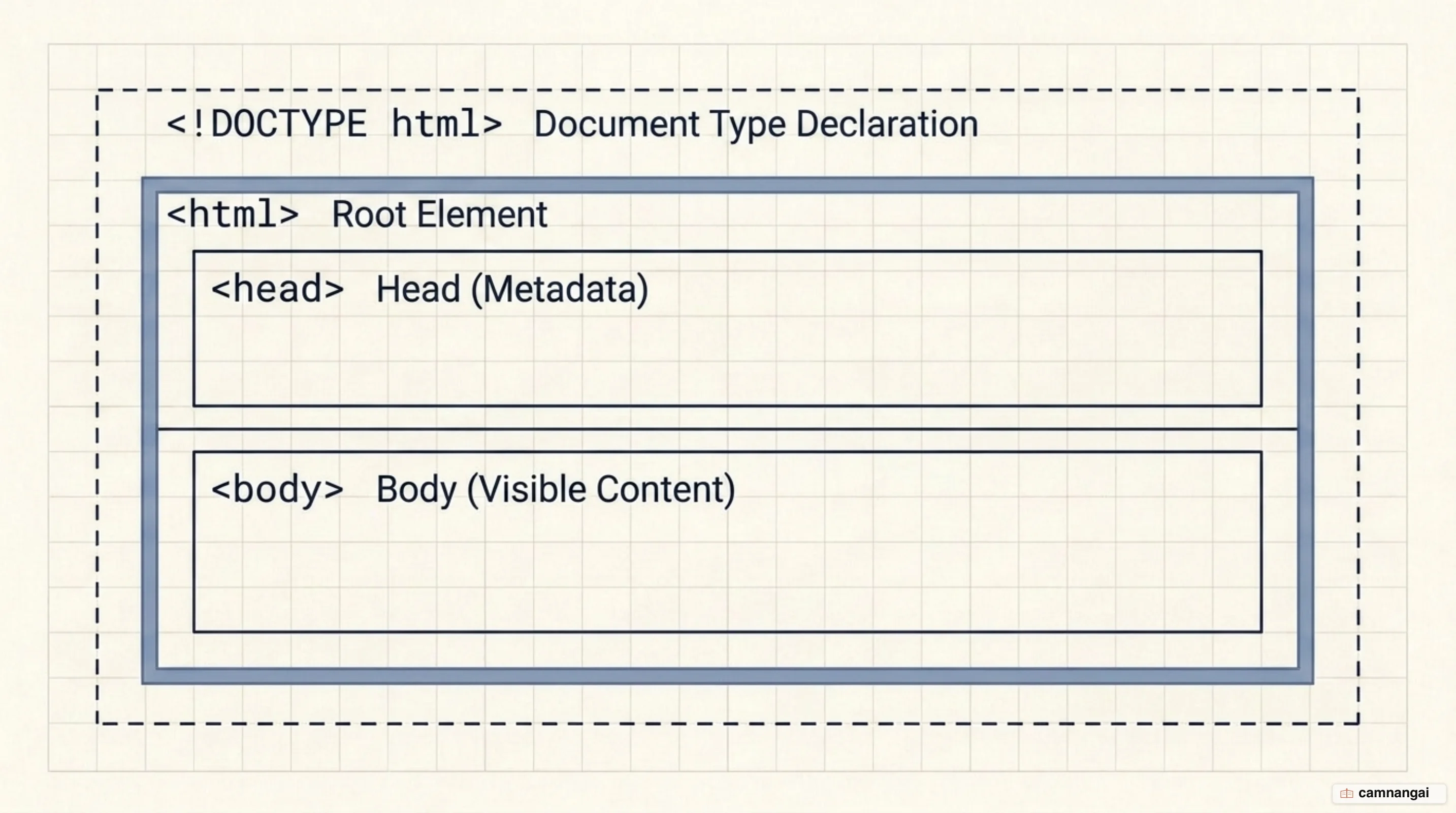
The document splits into two parts: the <head> and the <body>. The <head> holds
meta-information that is generally invisible to the reader but critical for machines. That includes
the <title>, which names the document in browser tabs, and <meta> elements specifying character
encoding (typically UTF-8), viewport configuration for mobile, and SEO data.
Web crawlers and search algorithms lean on the data in the <head> to index a document's relevance.
<title> provides the primary identifier in search results, while <meta name="description">
influences the snippet shown to users, which feeds directly into discoverability. That metadata is
what lets automated systems categorize what the document actually contains.
The <body> element is the container for all visible content — the substance a user interacts with.
There can be only one <body> per document. Organizing it properly keeps the page readable across
devices and preserves structural integrity. The block below is the basic skeleton of a valid HTML5
document:
<!doctype html>
<html>
  <head>
    <meta charset="UTF-8" />
    <title>Systems Documentation</title>
  </head>
  <body>
    <h1>Standard Document Header</h1>
    <p>This is a paragraph of visible content within the body.</p>
  </body>
</html>
How does HTML differ from CSS and JavaScript?
HTML, CSS, and JavaScript are the three pillars of web technology, and each handles a distinct layer. HTML is responsible for structure and meaning, defining the identity of content components like headers, footers, or navigation blocks. CSS handles presentation and appearance — typography, color, grid layouts. JavaScript manages functionality and behavior, letting the document respond to state changes and user events.
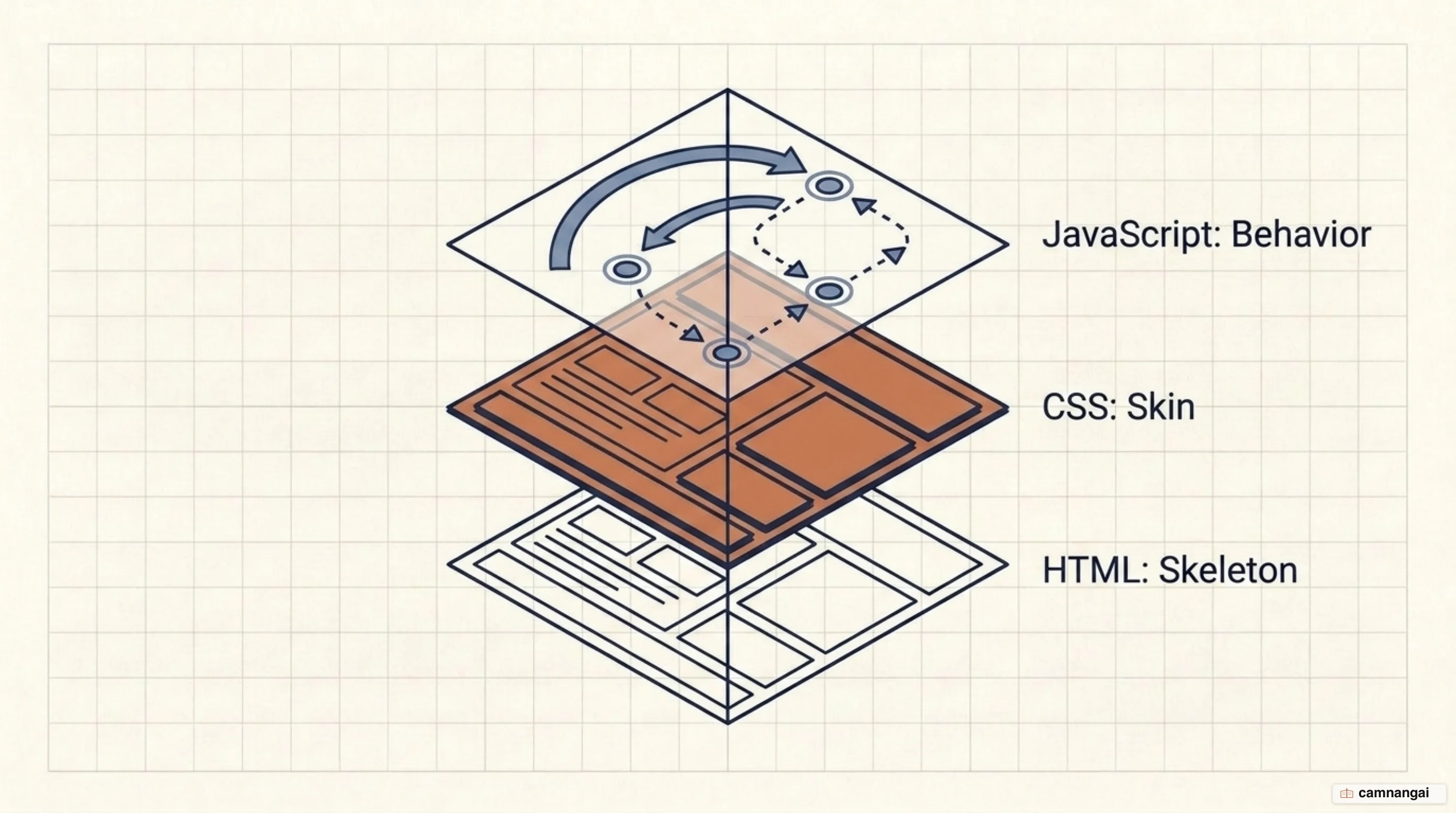
In building terms, HTML is the foundation and framing, CSS is the finish and decor, and JavaScript is the electrical and plumbing. That separation of concerns is a fundamental engineering principle: isolate structure from styling and you can change an application's entire visual interface through a single CSS file without touching the underlying data structure in the HTML.
Modern standards say HTML should never be used for styling. Legacy versions included elements that
influenced appearance — <font> among them — and those are deprecated in favor of CSS. Elements like
<strong> and <em> are now defined by their semantic weight rather than their default visual
weight. Keeping the layers separate produces cleaner, more maintainable code, and keeps the document
usable if the style layer fails to load.
The layered approach also makes a document resilient. If a network error stops CSS or JavaScript from arriving, the reader can still get at the core information, because the HTML supplies a logical, readable hierarchy. Building this way — progressive enhancement — keeps the essential information available regardless of browser capability or connection quality.
Semantic HTML: why picking the right tag matters
Semantic HTML is the practice of using tags that accurately describe the nature and role of the
data they wrap. Instead of reaching for generic containers like <div> (block-level) or <span>
(inline), you use specific elements: <header>, <nav>, <main>, <article>, <section>,
<footer>. Those tags communicate the functional purpose of the content to the browser and to
assistive technologies.
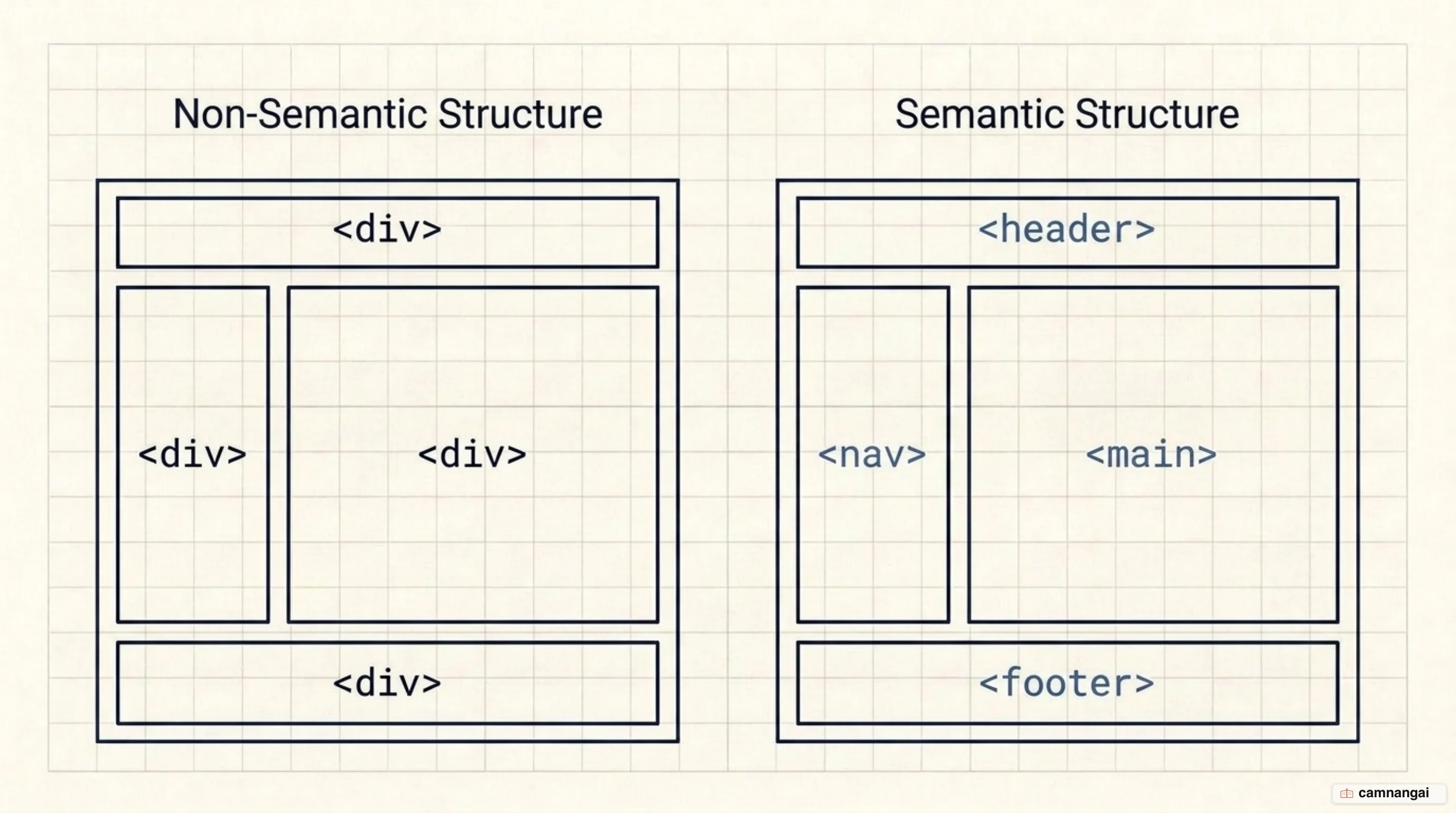
The main reason to write semantic markup is accessibility. Screen readers rely on these tags to build a
map of the page. A screen reader can identify a <nav> element and let a user skip past repeated
navigation links to reach the primary content. Semantics matter for search too: crawlers use these
landmarks to work out the hierarchy and relative importance of different content blocks.
You can technically build a layout out of nothing but <div> tags and CSS positioning, and the result
is a meaningless document tree. Semantic elements provide a standardized map that makes a codebase
easier for other engineers to maintain and for automated tools to process. That structural clarity is
what separates a professional, durable application from one that merely renders.
A simple semantic layout shows how each tag declares its purpose inside the document:
<body>
<header>
<h1>Project Alpha</h1>
<nav>
<ul>
<li><a href="#docs">Docs</a></li>
<li><a href="#api">API</a></li>
</ul>
</nav>
</header>
<main>
<article>
<h2>System Overview</h2>
<p>Data processing logic defined here.</p>
</article>
</main>
<footer>
<p>© 2024 Systems Architecture Group</p>
</footer>
</body>How does a browser turn HTML into a web page?
A web browser is a specialized interpreter for HTML documents. When a client requests a page, the browser parses the raw markup and translates the tags into rendering instructions. The tags themselves are never displayed; they are hidden metadata that determines the layout and styling of the text and media on screen.
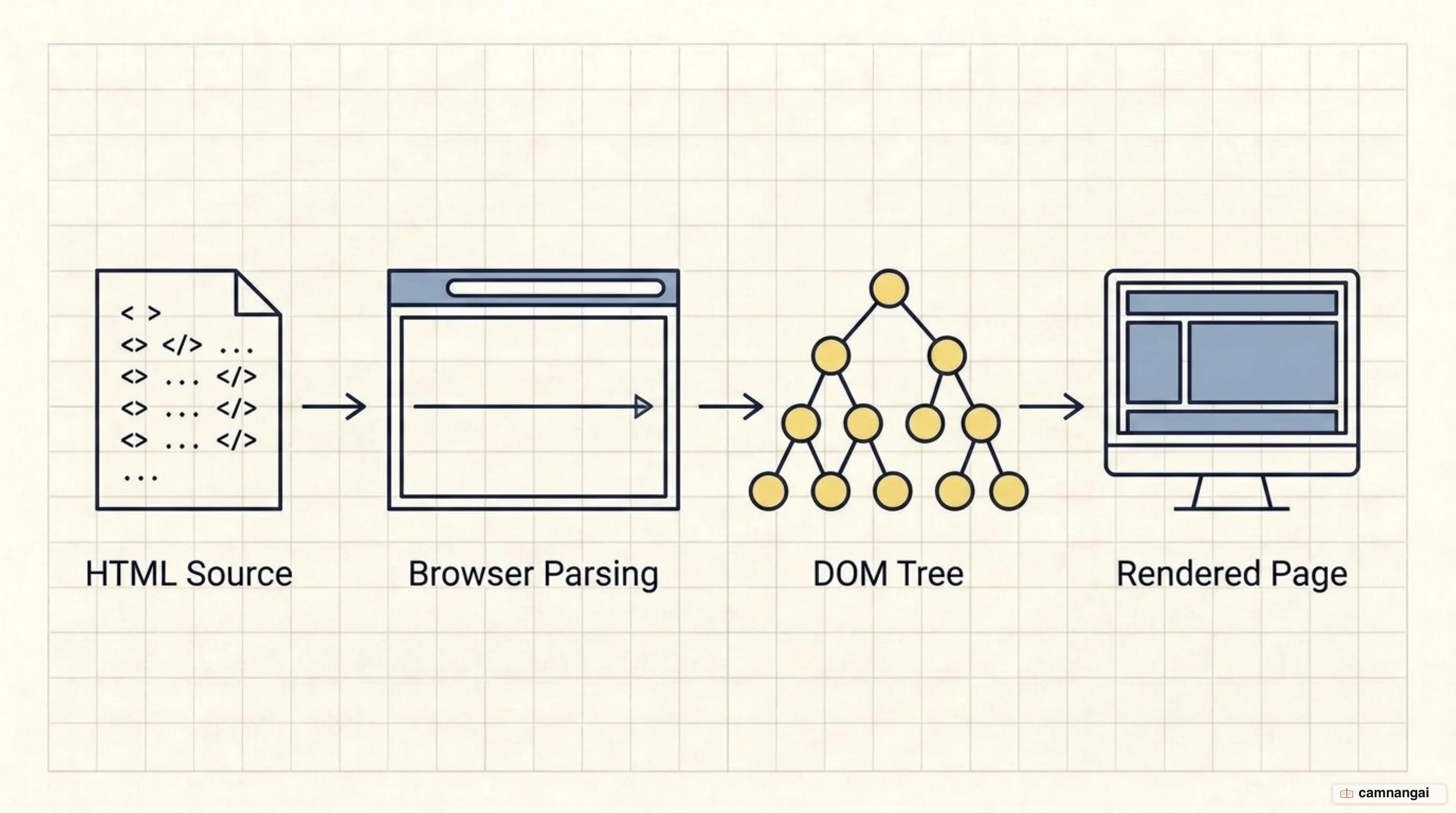
During parsing, the browser builds a representation of the document known as the Document Object
Model, or DOM. The DOM is a node tree: every HTML element becomes an element node and every
segment of text becomes a text node. The tree lets the browser track nested relationships — which
<li> nodes descend from a particular <ul> parent, for instance.
Every HTML element is defined by the HTMLElement interface, and more specific elements inherit from
it
(the HTMLAnchorElement interface for <a> tags, for example). That object-oriented representation
is what lets JavaScript interact with the document through the HTML DOM API. You can modify node
properties, respond to pointer events, or inject new nodes into the tree without a full page reload.
The DOM represents the live state of the document, which is not always the same as the file you wrote.
If the source markup is malformed or missing optional tags, the parser will often infer and inject
them — adding a <tbody> into a <table>, say — to produce a valid node tree. Grasping that shift —
static markup in, a live tree of objects out — is what makes advanced debugging and front-end
performance work possible.
From HTML 1.0 to a living standard: how the spec changed
HTML began in 1989 with Tim Berners-Lee's invention of the World Wide Web, followed by the first official specification in 1991. The 1990s brought rapid versioning: HTML 2.0 (1995), HTML 3.2 (1997), HTML 4.01 (1999). In that era you had to include a complex Document Type Definition (DTD) to declare which exact version and flavor of the language your document followed.
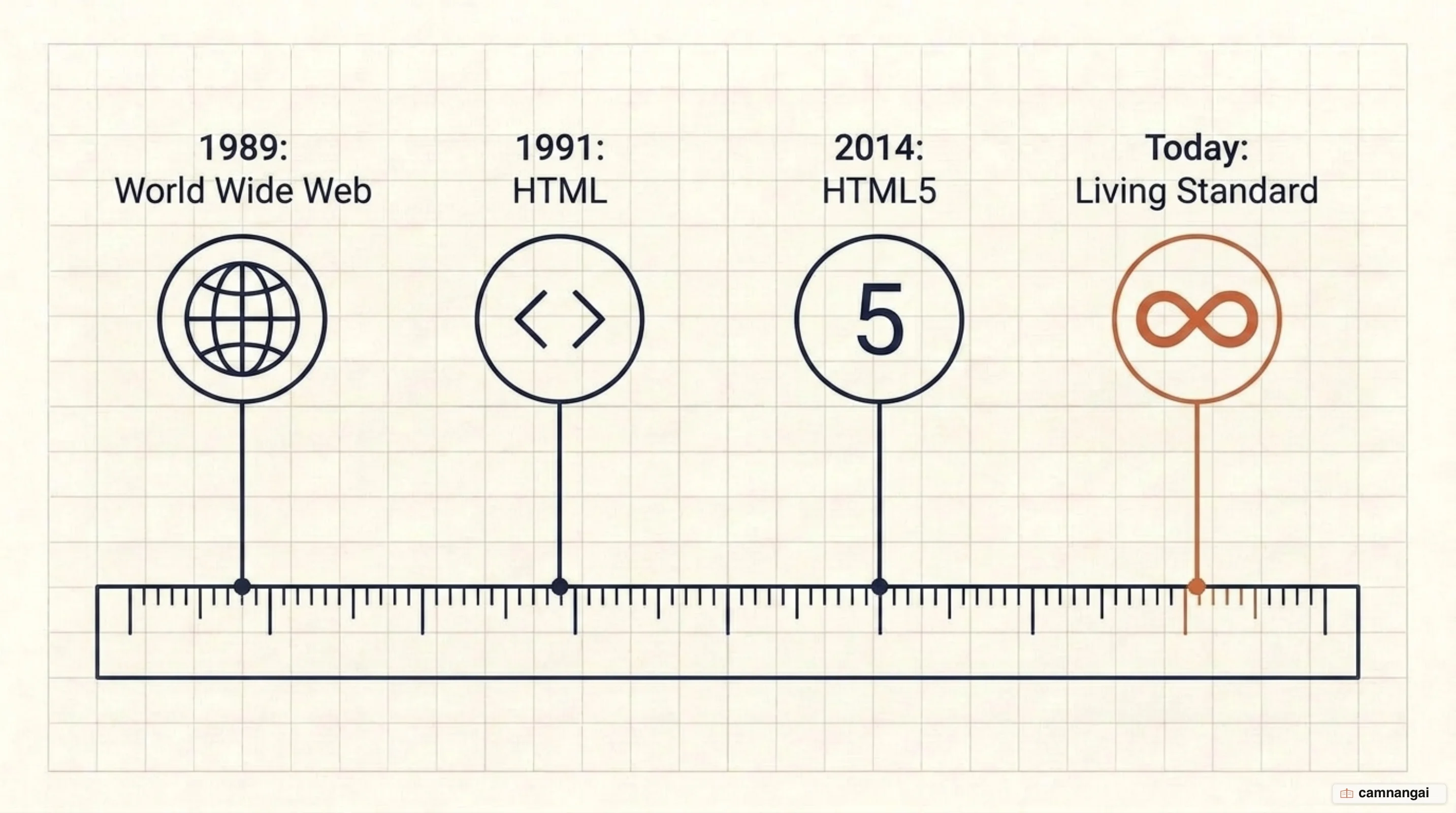
The shift came with HTML5, which began as a WHATWG draft in 2008 and became a W3C Recommendation in 2014. HTML5 abandoned rigid versioning in favor of a Living Standard. The modern <!DOCTYPE html>
declaration no longer points at a version number; it says the document follows the current
specification, which the WHATWG keeps updating.
The Living Standard model lets new features and APIs enter the language as they reach browser stability, rather than waiting for a monolithic HTML6 release. The language can adapt to modern requirements — advanced multimedia handling, mobile-first responsive design — while keeping backward compatibility with legacy web content.
The specification is now the definitive authority on web structure. Using the streamlined HTML5 doctype means your documents are parsed under the most current rules and algorithms. It also removed the historical complexity of managing multiple version declarations, which makes behavior more predictable across compliant browsers.
What can modern HTML do?
Modern HTML does natively what used to require third-party plugins like Flash. The <audio> and
<video> elements embed multimedia directly, with standardized browser controls. They handle a range
of media formats without help, which cuts both the attack surface and the performance overhead that
came with external browser extensions.
Beyond media, HTML gives you access to high-performance interactive APIs. The <canvas> element
renders 2D and 3D graphics programmatically in the browser through JavaScript. The Geolocation API
allows user-permitted location tracking, and the Web Storage API stores data locally, which cuts the
need for server-side state management on simple data tasks.
The language is built for extensibility through data attributes. Using the data-* prefix, you
can store custom metadata directly on standard semantic elements. That data stays hidden from the user
but is reachable through the dataset property in JavaScript, which lets you drive interactions and
hold state without breaking the semantic validity of the document.
Native form handling has grown sophisticated too. Elements such as <datalist> and <progress>, and
specific <input> types including date, color, and range, provide built-in UI controls and
client-side validation. These move the burden of common interface patterns off custom scripts and onto
the browser's optimized internal engine, which improves both performance and accessibility.
How much HTML is enough?
HTML is the non-negotiable first step in web engineering. It sets the structure of every document on the web, so a real grasp of its element hierarchy, attribute system, and semantic rules comes before the behavioral layers. It is what connects your content to the global network of the World Wide Web.
Browsers are forgiving — they infer missing tags and correct improper nesting — but forgiveness is not a standard to write to. Valid, properly nested, semantic markup is the only way to get cross-browser stability and long-term accessibility. Write it that way and your application keeps working for both human readers and automated systems as the platform underneath it keeps changing.