The internet is a global network of interconnected networks and computers that communicate using standard protocols like Transmission Control Protocol and Internet Protocol (TCP/IP).
Every time you load something online, your device joins a distributed system that connects over 4.5 billion users and 1.8 billion websites. Understanding how the internet works means understanding the infrastructure that carries data, streams media, and delivers services across the globe.
To communicate, your computer or mobile device connects to a local area network (LAN), which in turn connects to larger wide area networks (WAN) managed by Internet Service Providers (ISPs). Those networks are physically linked by fiber optic cables, copper wires, and satellite links. Because the system is decentralized, there is no single control center. What holds it together is a set of standardized rules — protocols — that let every device encapsulate and read data no matter who made it or where it sits.
The whole process is nearly instantaneous: a round trip usually takes 20 to 200 milliseconds. Whether you are sending a plain email or high-definition video, your data is translated into pulses of electricity or light, known as bits, and routed through a global hierarchy. Specialized hardware, software layers, and physical media working together are what keep that 20-to-200-millisecond trip reliable enough to build everything else on top of.
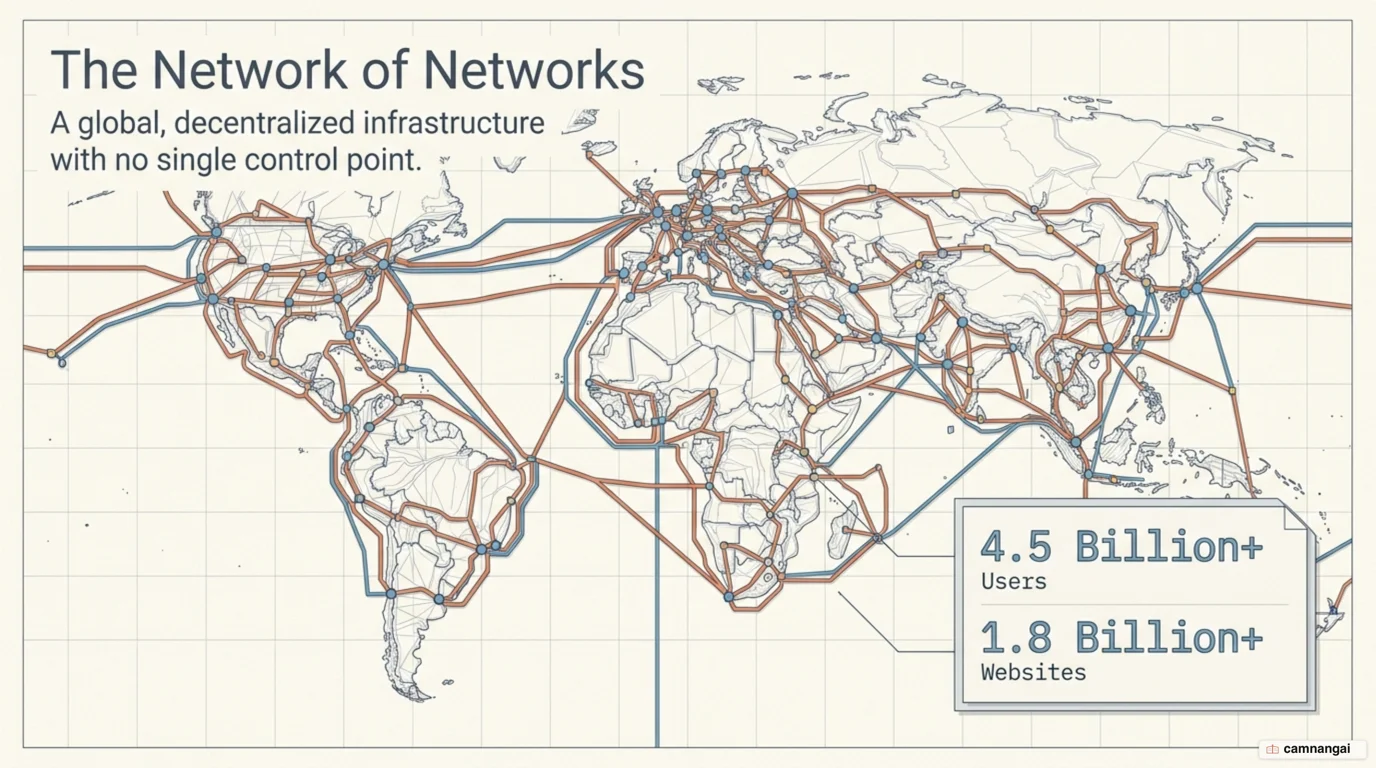
What is the internet? A network of networks with no control center
The internet is the foundational technical infrastructure that makes services like the World Wide Web possible. While a local network might connect devices inside a single home or office, the internet is a "network of networks" — a sprawling collection of private, public, academic, and government networks that are all interconnected. This architecture allows a device in one part of the world to communicate with a server thousands of miles away as if they were directly linked.
What defines this global system is that it is distributed. There is no central hub or "off switch" for the internet; instead it is made of countless individual machines and networking nodes that follow the same communication standards. That design makes the network unusually resilient: if a single server, a data center, or even an entire region's infrastructure fails, dynamic routing keeps traffic moving through alternative, redundant paths. It is also why "the internet is down" is nearly always a smaller claim than it sounds, because what went down is one provider or one cable and the rest of the mesh routes around it.
The distinction between the "Internet" and the "Web" matters. The internet refers to the physical and logical infrastructure — the hardware, cables, and protocols like IP. The World Wide Web is merely one of many services built on top of that infrastructure. Other services running on the same internet backbone include electronic mail (SMTP), instant messaging (IRC), and file transfer (FTP).
Decentralization is also why the system scales. Because any computer or piece of hardware that speaks the correct protocols can join the network, the internet has grown from a small military research project into a global utility. With no central authority, the network organizes itself: individual ISPs and Network Service Providers (NSPs) coordinate through peering agreements to keep the whole thing connected.
From two computers to switches, routers, and ISPs
When you connect two computers, you can link them directly with a single cable. Add more devices and point-to-point connections become impossible to manage. That is what a switch is for: it connects many devices inside a single local network. A switch works like a railway signaler — it reads the destination of a message and forwards the data only to the target device on that local segment, instead of broadcasting it to every machine.
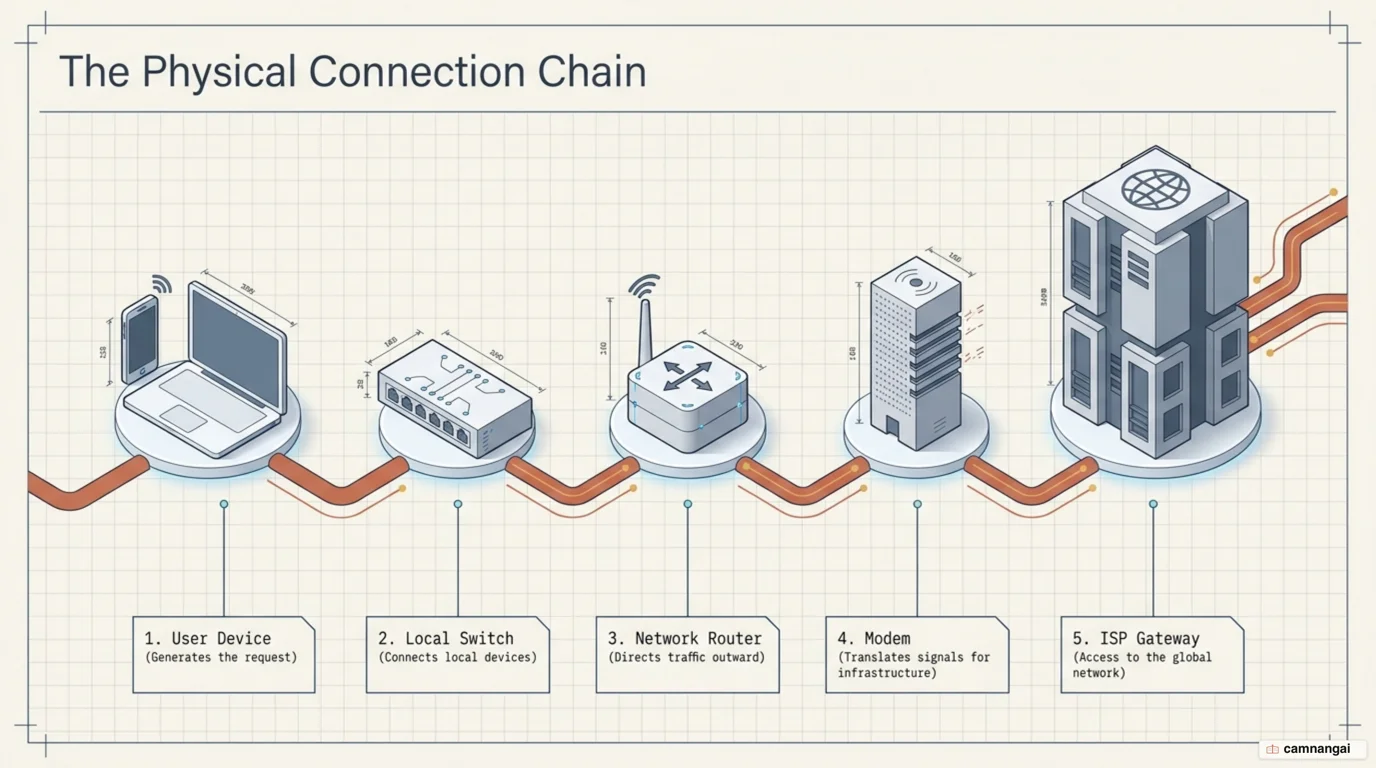
To move data beyond a local network, you need a router. Routers are the "traffic cops" of the internet, operating at the network layer to forward data packets between different networks. A router reads the destination IP address on an incoming packet, then checks its routing table for the most efficient path onward. In most homes, the box your ISP hands you is all three at once: a switch, a router, and a modem, which I suspect is why so few people can tell one of them from another.
Connecting your local infrastructure to the global grid requires an Internet Service Provider (ISP). The ISP runs large-scale routers and links them to other ISPs to carry transit traffic. Between your local digital network and the physical line the ISP provides — copper telephone wire or coaxial cable, say — sits a modem. Its job is to modulate and demodulate signals, turning digital data into the electrical or optical signals the ISP's infrastructure can carry.
These ISPs are organized hierarchically, eventually connecting to high-speed backbones run by tier-one providers. That hierarchy lets data move from a small home network, through a regional ISP, and onto massive intercontinental links. Linked together, those tiers give data a continuous path across the globe, whatever the physical distance between the sender and the receiver.
Packets: how your data is split up and sent
Whenever you send data over the internet, the information does not travel as a single, contiguous block. It is broken down into small segments called packets. Each packet typically ranges from 1000 to 1500 bytes. This method is called packet switching, and it is what makes the network efficient. It allows "multiplexing," where thousands of users share the same physical cables at once; because no single stream of data holds the entire connection for long, the line stays available for everyone.
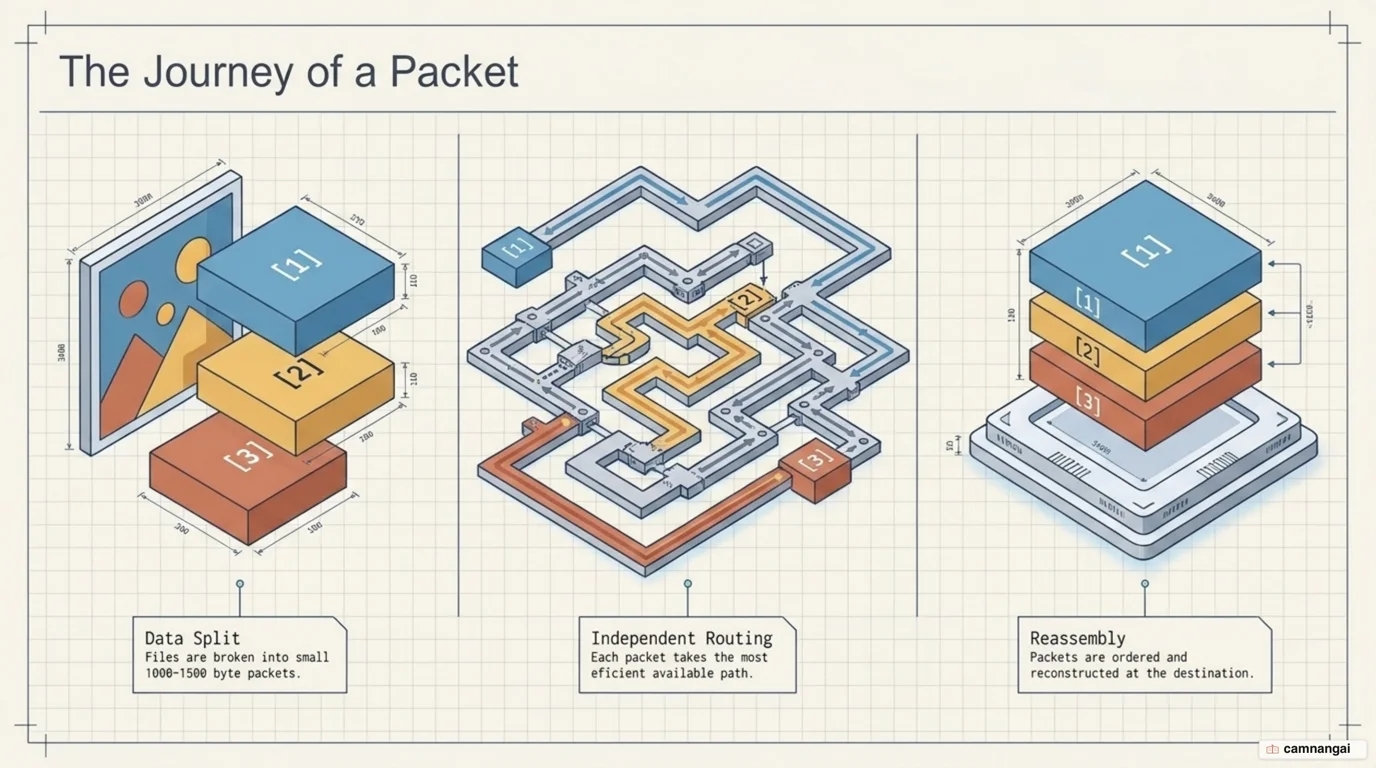
Every packet includes a header, which is both a shipping label and a set of assembly instructions. It carries the source IP, the destination IP, and sequence numbers. The Statue of Liberty made the trip from France to the United States much the same way. Too large to ship in one piece, it was taken apart into hundreds of components, each with specific instructions on how they should be reassembled on arrival in New York.
Once these packets reach their destination, the receiving device's protocol stack uses the information in the headers to put the pieces back in the correct order. Because routers process packets independently, different packets from the same message may take entirely different physical paths to reach you. So if one path becomes congested or fails, the remaining packets still get through by an alternative route.
That packet-based architecture is where the modern internet gets its resilience and its ability to scale. If a packet is lost or corrupted during transit, the receiving device asks for that one chunk again rather than the entire file. This "best-effort" delivery system, handled at the lower layers, is flexible enough to carry the traffic generated by billions of concurrent users. The cost of the arrangement shows up when loss gets bad enough that the re-requests pile up, which is what you are actually watching when a video stalls to buffer.
TCP/IP and protocols — the common language every device speaks
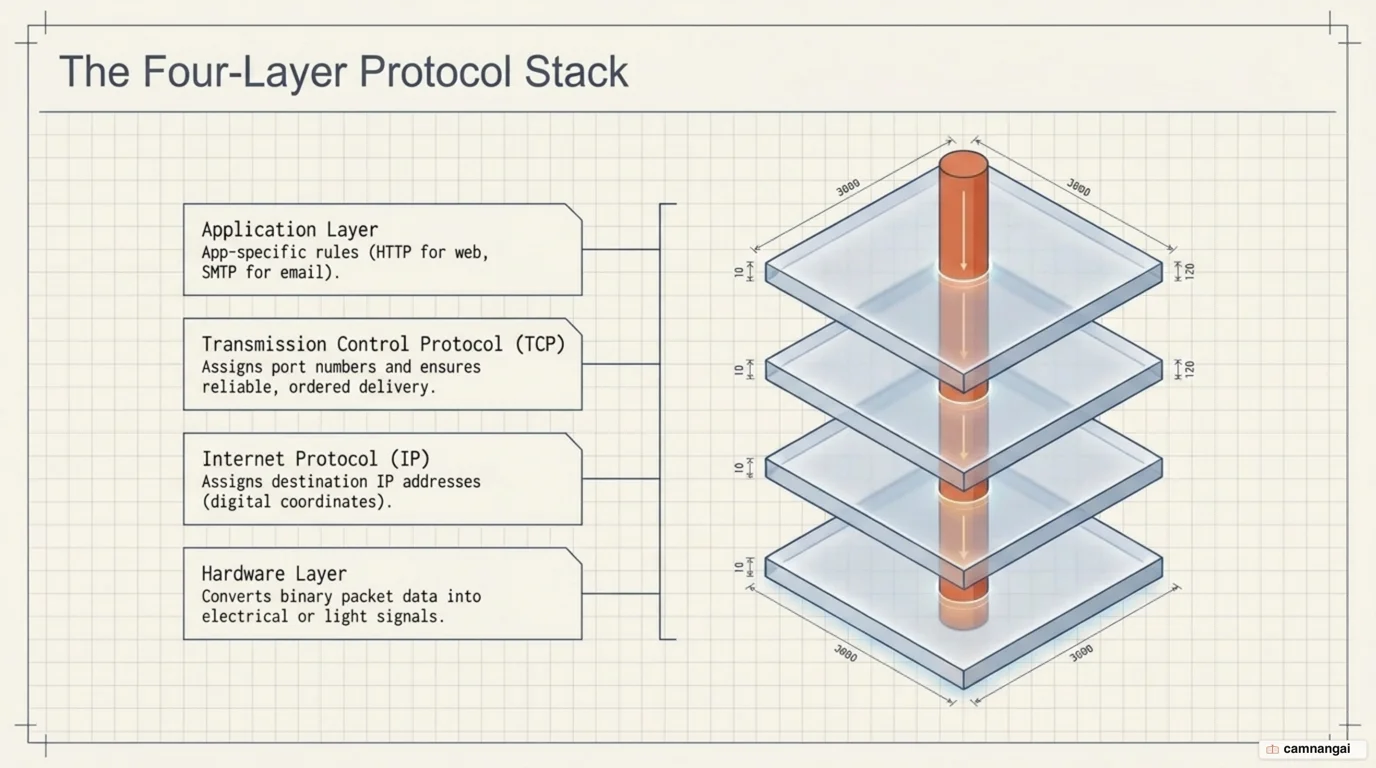
For the internet to function, every connected device must follow a standardized set of rules known as protocols. They are what lets a server running one operating system talk to a smartphone running another. The main framework for this is the TCP/IP protocol stack, which uses "encapsulation" to pass data through four distinct layers:
- Application Layer: Where high-level protocols like HTTP (web), SMTP (email), and FTP (files) operate to format data for the user.
- Transmission Control Protocol (TCP) Layer: Handles reliable, connection-oriented delivery. It segments data and assigns port numbers so traffic reaches the correct application (e.g., port 80 or 443 for web traffic).
- Internet Protocol (IP) Layer: Moves packets between computers on a "best-effort" basis using IP addresses, with no guarantee of delivery.
- Hardware Layer: The physical layer that converts binary data into electrical pulses, light signals, or radio waves for transmission over mediums like Ethernet or Wi-Fi.
The split that matters most here is between TCP and the User Datagram Protocol (UDP). TCP is a connection-oriented service: it opens with a handshake and acknowledges every packet it receives, and if a packet goes missing, TCP resends it. That makes it ideal for web browsing and file transfers where data integrity matters most. UDP, by contrast, is a "fire-and-forget" protocol that never waits for acknowledgments, which makes it much faster and a better fit for real-time services like VoIP, streaming video, and online gaming.
As data moves down the stack on the sender's side, each layer adds its own header information (encapsulation). On the receiver's side the process runs in reverse (decapsulation): each layer strips off the corresponding header until the original message is back. That modularity is why the internet absorbs new technology so easily — as long as the hardware layer can turn bits into a physical signal, the higher-level protocols keep working unchanged. Layering sounds like a filing convention, and it is the best design decision anywhere in this article.
IP addresses and DNS: how computers find each other
Every device connected to the internet is assigned a unique identifier known as an IP address. This numeric address allows the network to route packets to the correct destination. The most common format, IPv4, consists of four numbers (octets) separated by dots, where each number must be between 0 and 255 (e.g., 192.0.2.172). Because IPv4 tops out at about 4.3 billion unique addresses, the industry is moving to IPv6, whose 128-bit addresses give an address space nobody expects to exhaust.
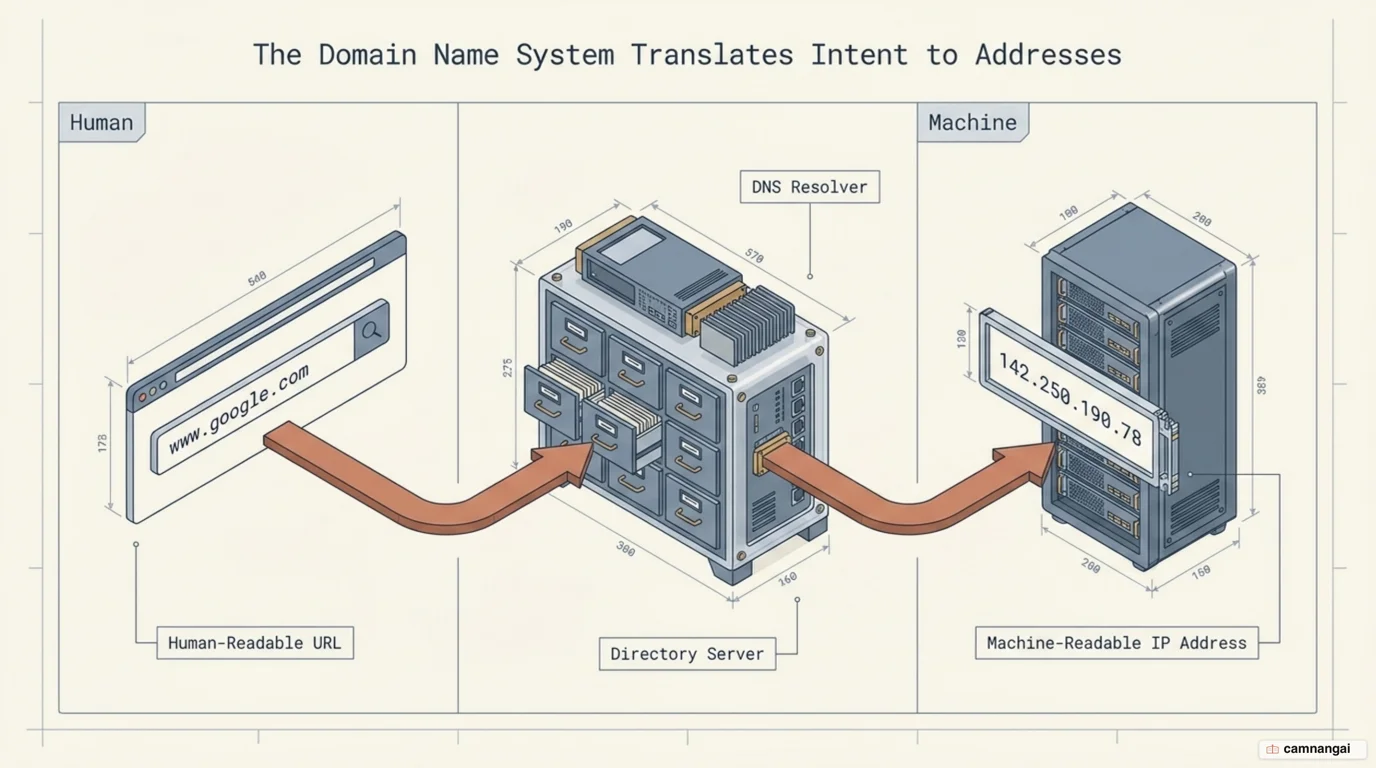
Nobody wants to memorize numbers, so the Domain Name System (DNS) is the internet's distributed directory. DNS maps human-readable domain names, like google.com, to the numeric IP addresses that routers require. When you enter a URL, your browser sends a DNS query. This is a hierarchical process: if your local DNS server does not have the record, the query moves "up" the tree to more authoritative sources until the address is resolved.
The hierarchy is built for reliability and speed. At the top of the tree are the root servers, which direct queries to Top-Level Domain (TLD) servers (like those for .com or .org). Finally, the query reaches an authoritative DNS server, which holds the definitive IP record for the specific domain. Because the database is distributed, no single server is responsible for the entire internet's naming records — there is no single point of failure, and local caches can answer nearby queries with less latency.
Knowing how this resolution process works pays off when you are diagnosing connectivity issues. When DNS fails, you might find that you can reach a website by typing its IP address directly into a browser, even if the domain name no longer works. That tells you the underlying IP routing infrastructure is fine and the hierarchical "phone book" service is what is down or misconfigured. It is the first check I run when something will not load, because it costs nothing but pasting an address into the URL bar.
Physical infrastructure and the global routing hierarchy
Network Service Providers (NSPs) run the highest level of the internet's physical architecture. These tier-one providers, such as UUNet or SprintNet, own and operate the massive, high-speed fiber optic backbones that span continents. NSPs connect with one another through a process called "peering." Those exchanges happen at specialized facilities known as Network Access Points (NAPs) or Internet Exchange Points (IXPs), where vast amounts of traffic jump from one backbone to another.
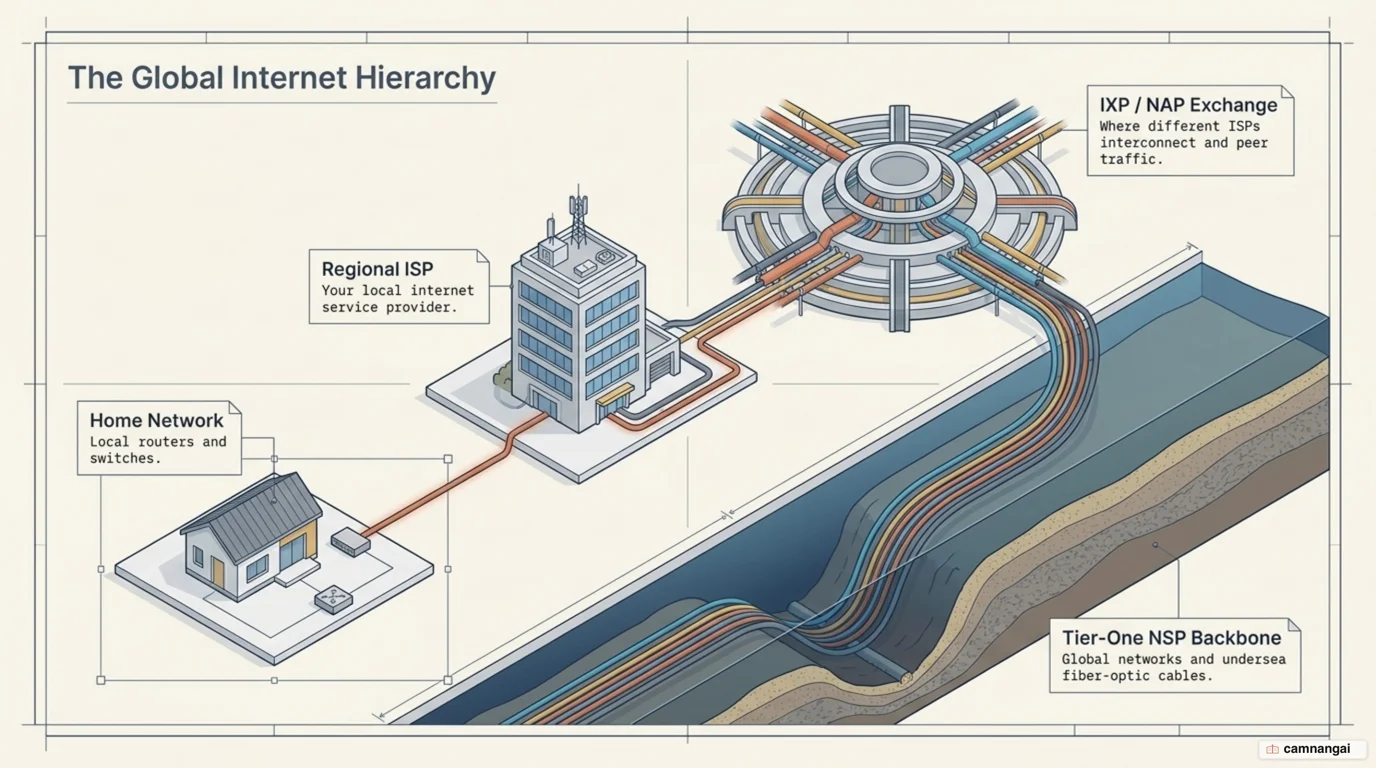
Every hop across this global hierarchy is decided by a routing table. Every router in the system keeps a table of known networks and the "cost" or distance to reach them. When a packet arrives, the router checks the destination IP. If the destination is within its own local sub-network, it delivers it directly. If not, the router sends the packet "up" a default route to a larger network. Routers sitting on the NSP backbones hold the most comprehensive routing tables, so they can direct packets across the global transit grid.
Two things get attention when operators chase better performance and lower latency: the "last mile" and where IXPs sit. The last mile is the final leg of the connection between the ISP and the end user's building. It often runs on older copper lines or shared cable bandwidth, which makes it the usual bottleneck for speed. Putting IXPs closer to urban centers lets NSPs hand off traffic sooner, so data travels a shorter physical distance and the connection feels faster to the user. The last mile is the part nobody can route around, though: you can buy a faster plan and still be limited by the copper running into your building.
The physical mediums themselves vary with the requirements of the environment. Fiber optic cable is the standard for backbones, using light to carry terabits of data over thousands of miles with minimal signal loss. In more remote areas, satellite links or long-range radio waves carry the data instead. Glass strand or the vacuum of space, the underlying routing logic stays the same across the entire global hierarchy.
What happens when you open a web page?
Type a URL into your browser and a sequence of technical operations runs within milliseconds to fetch and render the page. It begins with a DNS query, where your computer contacts a resolver to translate the domain name into an IP address. With the IP in hand, your device opens a TCP handshake — three steps in which your browser and the web server agree on sequence numbers and establish a reliable, connection-oriented session for data transfer.
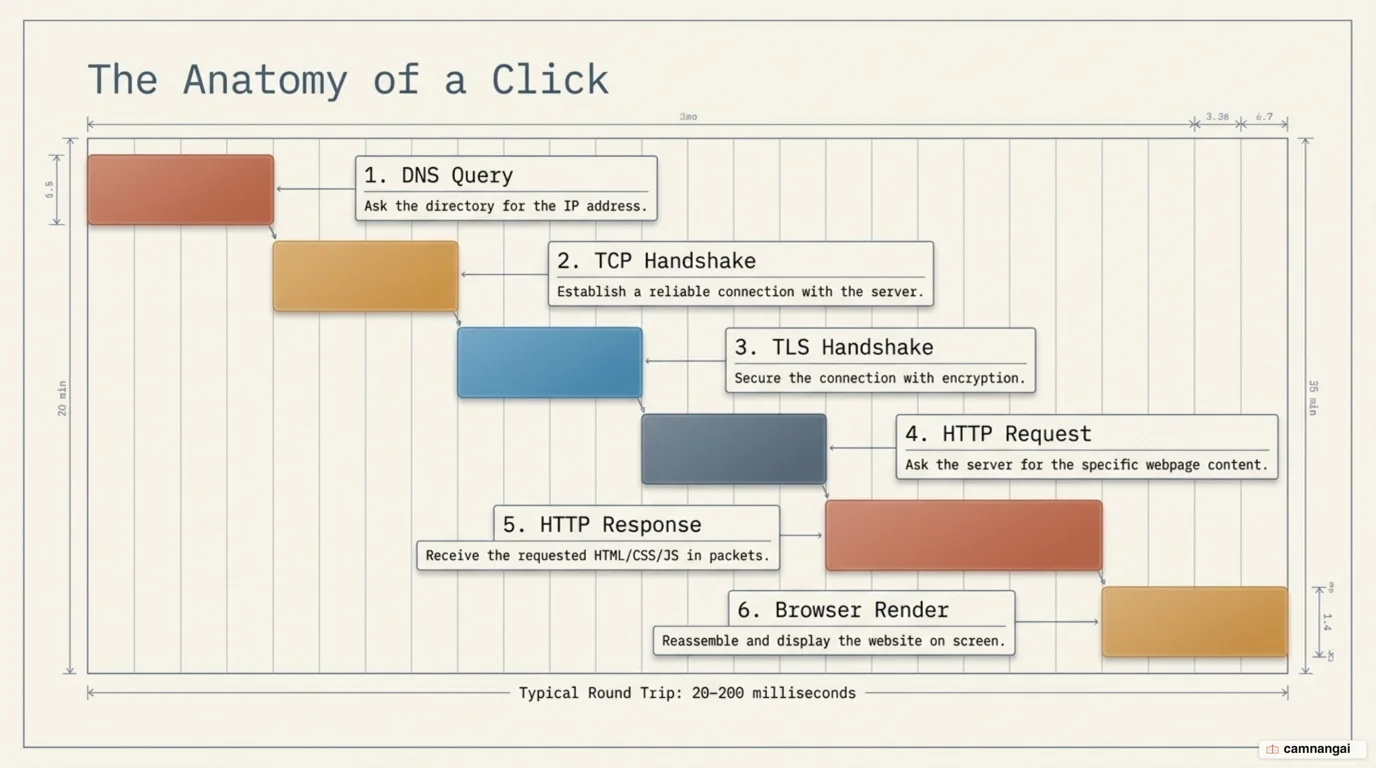
Once that raw connection is up, any site using HTTPS runs a TLS handshake (Transport Layer Security). During this phase, the client and server exchange encryption keys and verify digital certificates so the connection is secure from eavesdropping or man-in-the-middle attacks. Only once that secure "pipe" exists does the browser send an HTTP request, asking the server for the HTML file and associated assets of the requested webpage.
The server processes this request and starts sending the data back as an HTTP response. The website's code — HTML, CSS, and JavaScript — is broken into thousands of packets and sent across the internet via the routing hierarchy. As your device receives these packets, the TCP layer reassembles them in the correct order, checking for errors or missing segments. Constant acknowledgments between your device and the server are what turn "best-effort" delivery into a reliable stream of data.
The final stage is browser rendering. As the packets are reassembled, the browser's engine interprets the HTML to build the structure of the page, applies CSS for styling, and executes JavaScript for interactivity. Because modern pages often require dozens of separate elements like images and scripts, the browser may open multiple simultaneous connections to the server to download these assets in parallel. The whole series of handshakes, lookups, and transfers typically completes in a fraction of a second. Three of those steps (the DNS query, the TCP handshake, and the TLS handshake) finish before the server sends a single byte of content, which is why a page that feels slow is often slow before it has sent you anything at all.
What should you learn next?
The architecture of the internet is still changing, mostly to deal with the exhaustion of IPv4 addresses and the need for greater security at the protocol level. A logical next step is IPv6 itself: how it handles neighbor discovery, and how its simplified header compares with IPv4's.
From there, explore how application-specific protocols such as SMTP for mail or BGP (Border Gateway Protocol) for backbone routing run on top of the foundational TCP/IP stack. Understanding how these protocols handle specific types of traffic is what turns a mental model of the internet into something you can debug.