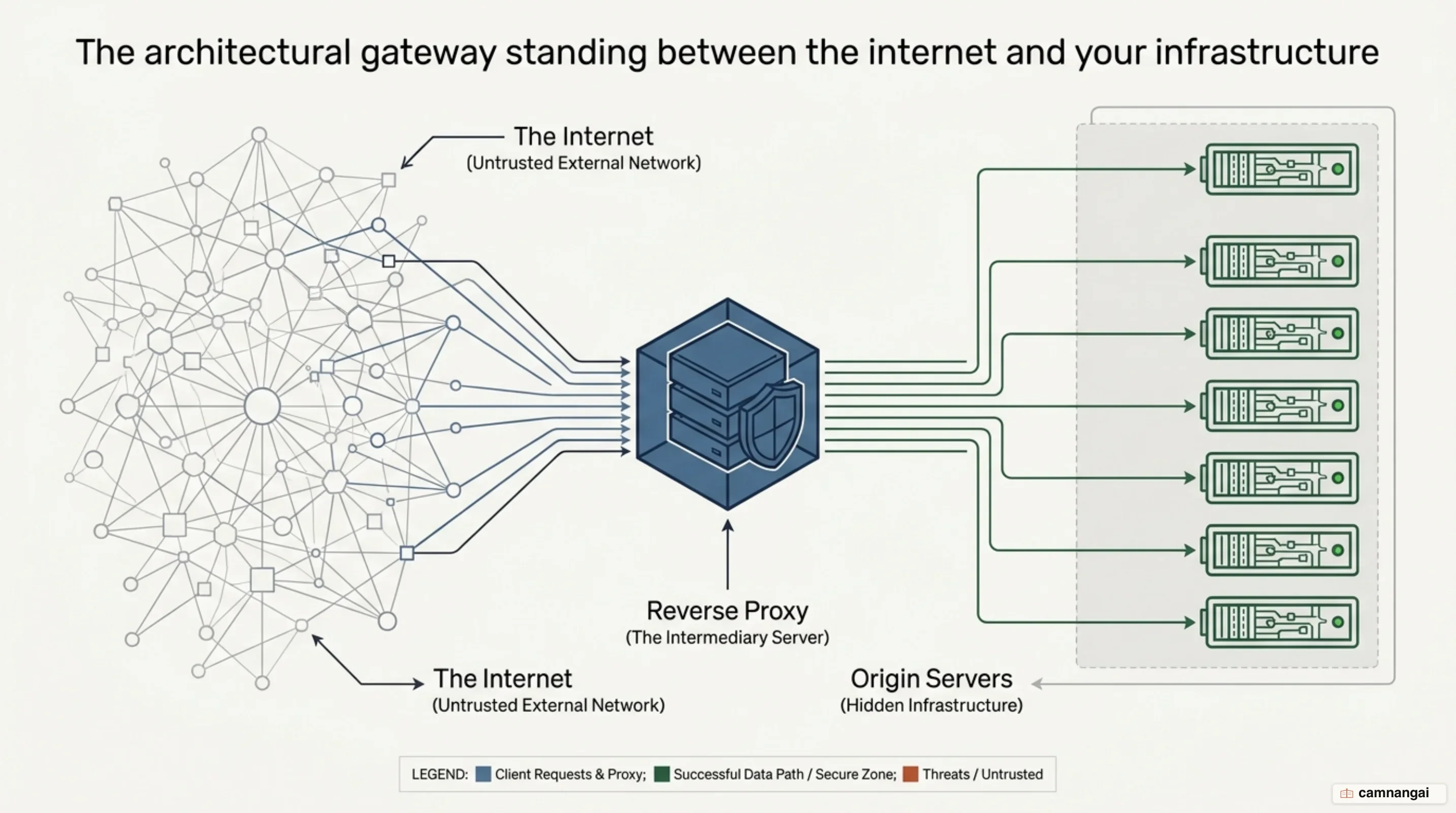
A reverse proxy is a server that sits between client devices and one or more backend web servers, acting as an intermediary that intercepts and forwards incoming requests.
In production environments, this server is the public face of the network, isolating the origin servers from the public routing table. Instead of a browser communicating directly with an origin, the reverse proxy receives the request at the network edge. From there it retrieves resources from the appropriate backend service.
This architecture creates a layer of abstraction that separates the internal network from untrusted traffic. By intercepting requests at the edge, you can implement centralized security controls, traffic optimization, and request filtering before packets ever reach your application servers. Your internal infrastructure stays hidden, because origin servers only communicate with the proxy rather than directly with clients on the open web.
The reverse proxy keeps backend operations completely transparent. Because the proxy acts as the single point of entry, you can change backend IP addresses, migrate services between servers, or perform maintenance without updating DNS records or client-side code. It is a gateway that keeps your application's external interface stable while allowing complex horizontal scaling and service distribution.
What is a reverse proxy?
A reverse proxy is a server that sits in front of backend web servers to intercept and manage client requests. In a standard direct connection, a user's machine reaches out to the origin server where the data lives. When you deploy a reverse proxy, all client traffic hits the proxy first. The proxy then establishes its own connection to the origin, retrieves the response, and passes that data back to the client as if the proxy itself were the source.
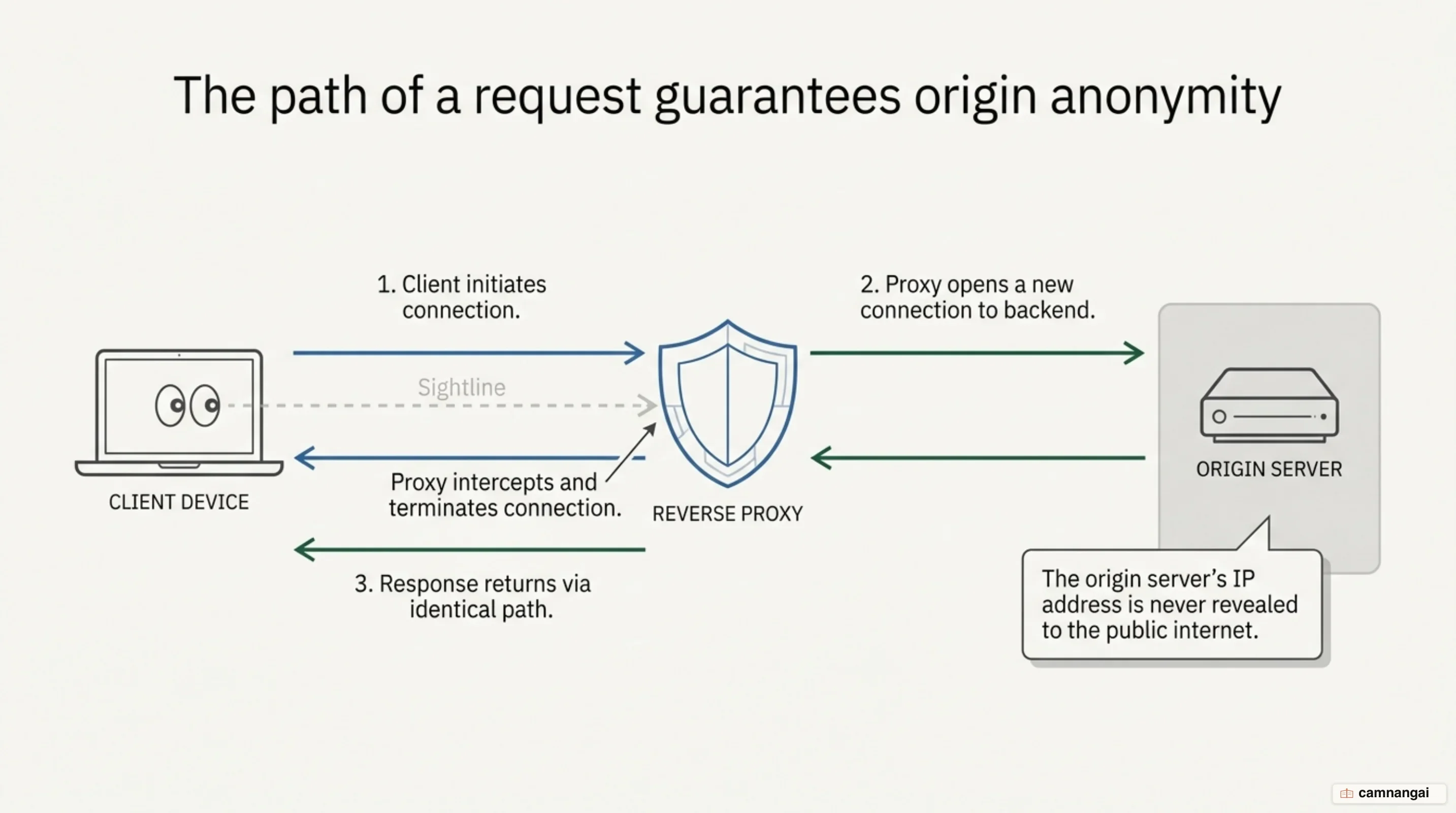
In this configuration, the origin server never communicates directly with the client. This isolation is a standard requirement for production environments because it hides individual server IP addresses and internal network topology from the public internet. By intercepting traffic at the network edge, the proxy allows you to apply security policies and performance optimizations globally before traffic hits your application logic.
The reverse proxy manages resources from one or many servers, presenting them to the client under a single domain or IP address. To a web browser, the proxy appears to be the actual web server. This abstraction is what allows you to handle backend tasks, such as distributing traffic across a pool of nodes or serving cached data, without the end user being aware of the underlying hardware or deployment strategy.
Implementing a reverse proxy is necessary for high-traffic environments that require multi-node deployments to handle load. As a gateway, the proxy ensures that traffic is managed efficiently and that no single origin node becomes a bottleneck. It also provides a failover mechanism; if backend hardware fails, the proxy can reroute traffic to healthy nodes, maintaining application availability without manual intervention.
How is a reverse proxy different from a forward proxy?
A forward proxy sits in front of a group of client machines to act as an intermediary for requests directed at the internet. You typically see forward proxies used in institutional settings like schools or offices to enforce content filtering or bypass regional browsing restrictions. In these cases, the forward proxy ensures that no origin server communicates directly with a specific client, effectively shielding the user's identity or controlling their access.
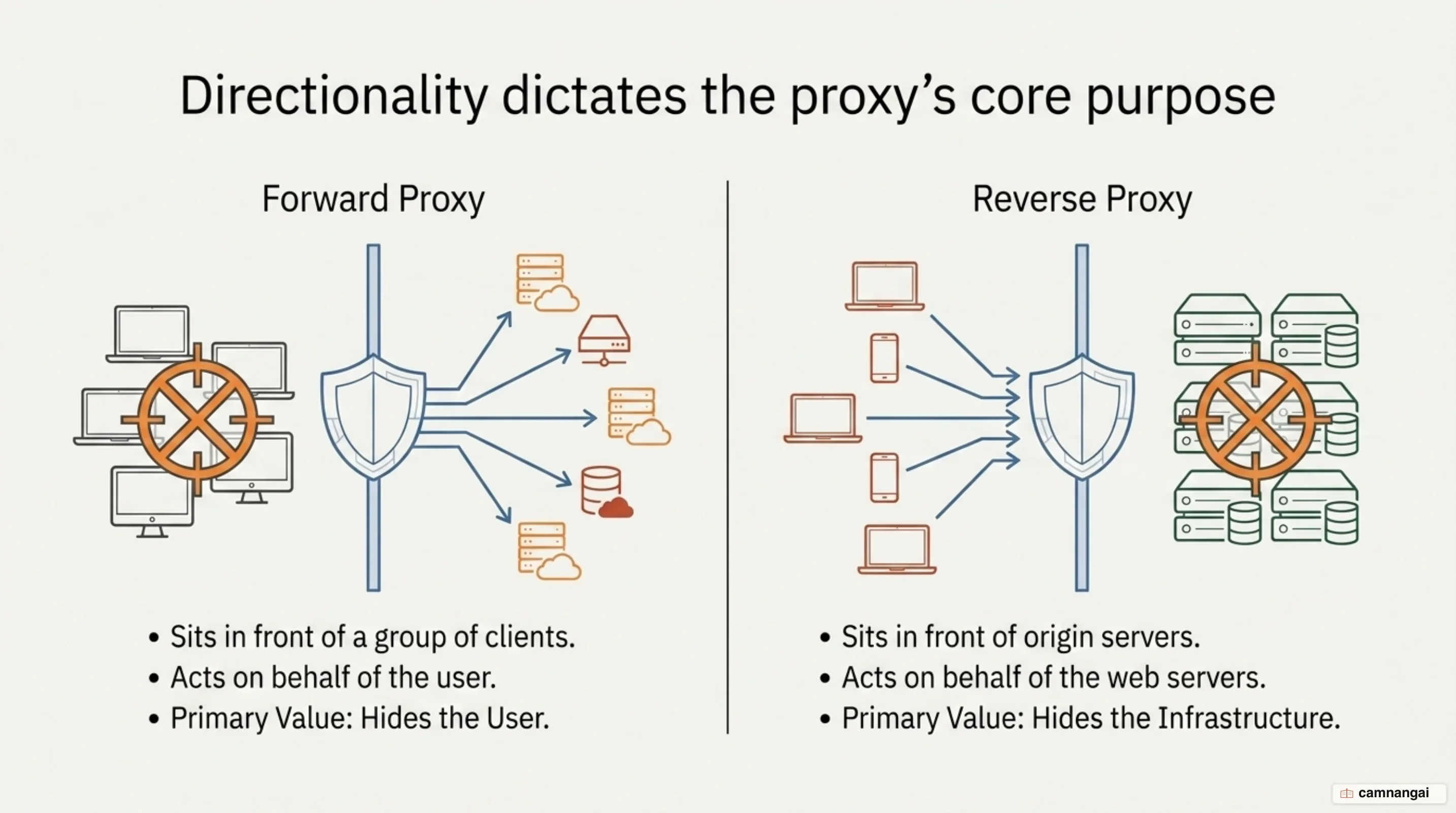
A reverse proxy sits in front of origin servers to protect the backend. While a forward proxy protects the client, the reverse proxy protects the server infrastructure. The technical distinction lies in their network placement: a forward proxy resides at the edge of the client's network, whereas a reverse proxy resides at the edge of the server's network. This determines whose identity is being abstracted and what traffic is being optimized.
Use cases for forward proxies often involve anonymity for political dissidents or administrative control over internal users, such as a school network blocking social media. The reverse proxy focuses on server-side requirements like SSL termination, hiding true origin IPs to prevent targeted attacks, and optimizing content delivery. It is a tool for the service provider, not the end user.
Traffic flow direction is the most reliable way to distinguish the two. In a forward proxy setup, traffic flows from a known group of users out to any number of sites on the internet. In a reverse proxy setup, traffic from any number of unknown users on the internet flows through the proxy to reach a specific set of backend servers. One hides the client from the server; the other hides the server from the client.
What problems does a reverse proxy solve?
Security is the main problem a reverse proxy solves. By acting as the sole entry point, the proxy prevents you from having to reveal the IP addresses of your origin servers. This isolation makes it difficult for attackers to launch targeted DDoS attacks or exploit vulnerabilities directly on the origin hardware. Proxies, particularly those used in CDNs, are built with specialized resources and hardened configurations specifically to absorb and mitigate these attacks at the edge.
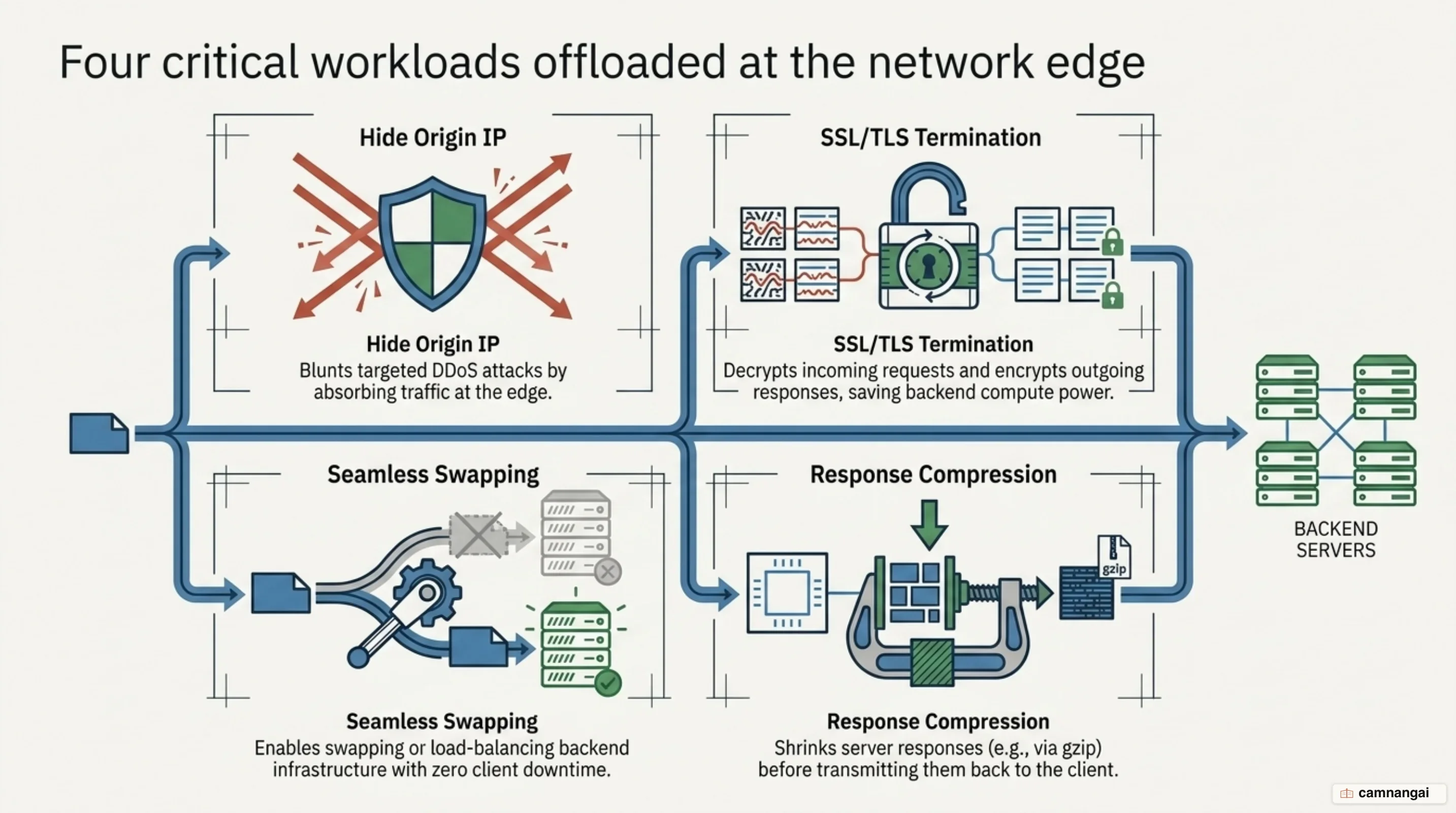
Performance improves through SSL/TLS termination offloading. Encryption and decryption are CPU-intensive tasks. You can configure a reverse proxy to handle the SSL handshake and traffic decryption, passing the decrypted traffic to the origin over a secured internal network. This frees up origin server CPU cycles to focus on application logic and database operations, reducing the computational load on your backend.
Global Server Load Balancing (GSLB) improves reliability and latency. You can distribute your application across several global regions, and the reverse proxy will route users to the geographically closest server. This reduces the physical distance data must travel, minimizing round-trip times. If a server in one region becomes unavailable, the proxy reroutes traffic to functional nodes in other regions, ensuring continuous service.
You scale by using the proxy as a gateway for multiple backend nodes. When a single origin server can no longer handle incoming volume, you can scale horizontally by adding more servers to the pool. The reverse proxy distributes incoming requests across these nodes, preventing any single server from becoming a bottleneck. This allows the infrastructure to handle high traffic spikes while maintaining a consistent response time for the client.
How does caching work at the reverse proxy?
Caching saves origin server responses to a local disk at the proxy level. When a later request for the same resource arrives, the proxy fulfills it from the disk rather than making a new request to the backend. This reduces origin load and decreases latency. NGINX manages this via two background processes: the cache manager and the cache loader.
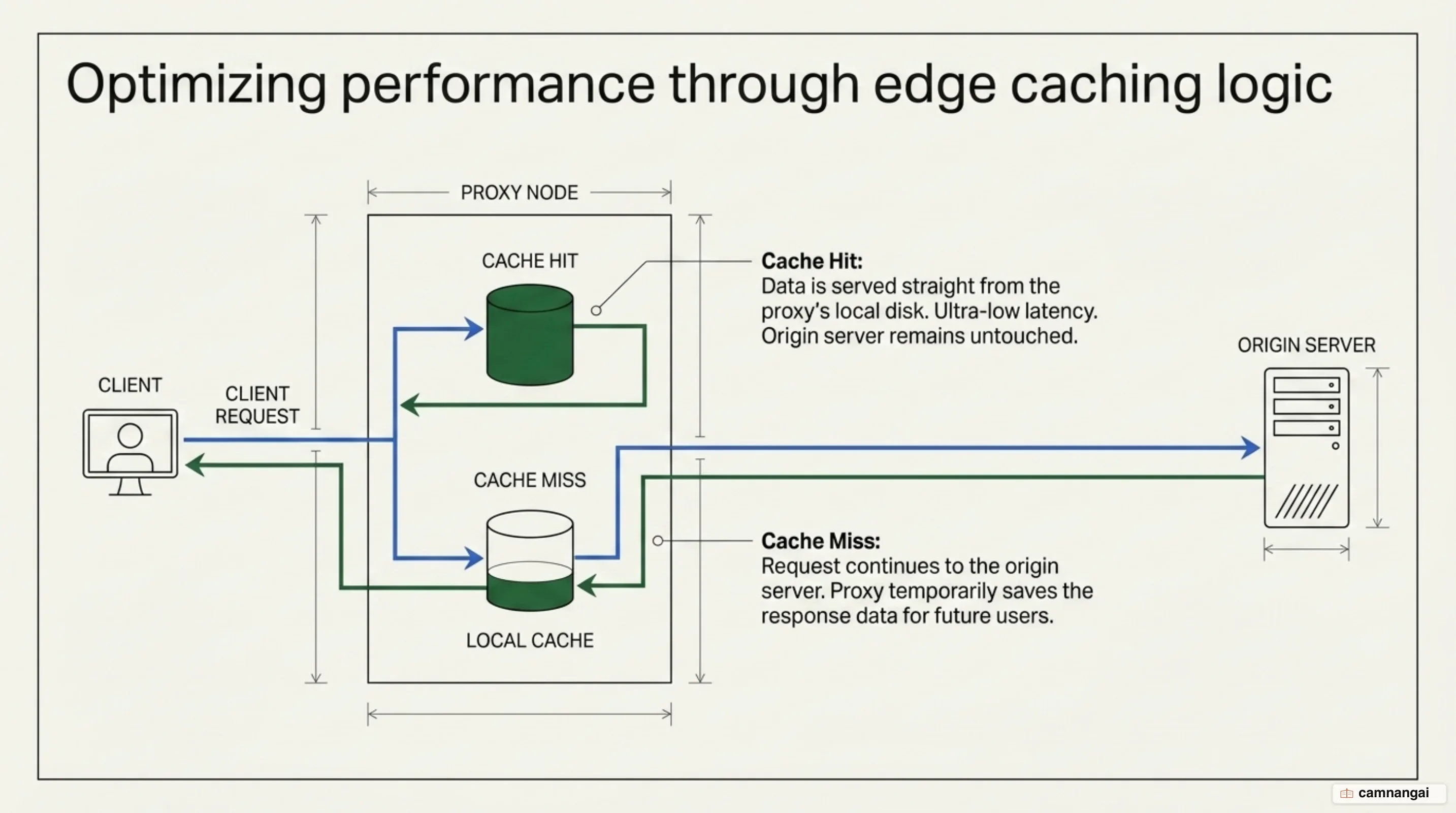
The NGINX cache manager runs periodically to verify the state of the cache. It monitors the total data stored against the max_size parameter defined in the proxy_cache_path directive. If the disk usage exceeds this limit, the manager deletes the least recently used (LRU) data. Cache size can temporarily exceed max_size between manager activations, as the deletion process is not instantaneous.
The cache loader runs once at NGINX startup. It loads metadata about the cached files into a shared memory zone defined by the keys_zone parameter. The keys_zone size only limits the metadata (keys) stored in memory; it does not limit the actual response data stored on the disk. You can configure the loader to run iteratively using loader_threshold and loader_files to prevent it from consuming excessive system resources during the startup phase.
For large assets like video files, reverse proxies use byte-range caching, or slicing. This technique divides large files into smaller sub-units. When a client requests a specific range of a file, the proxy only downloads and caches the slices required to satisfy that request. This prevents a single large download from blocking the proxy and allows the cache to be populated gradually, which is more efficient for high-bandwidth content delivery.
Reverse proxy or load balancer: what is the difference?
The difference between a reverse proxy and a load balancer depends on the OSI layer at which they operate. A load balancer's primary function is distributing requests across a pool of servers to maximize utilization and eliminate single points of failure. While a reverse proxy can stand in front of a single server to provide security and caching, a load balancer is explicitly for multi-server environments.
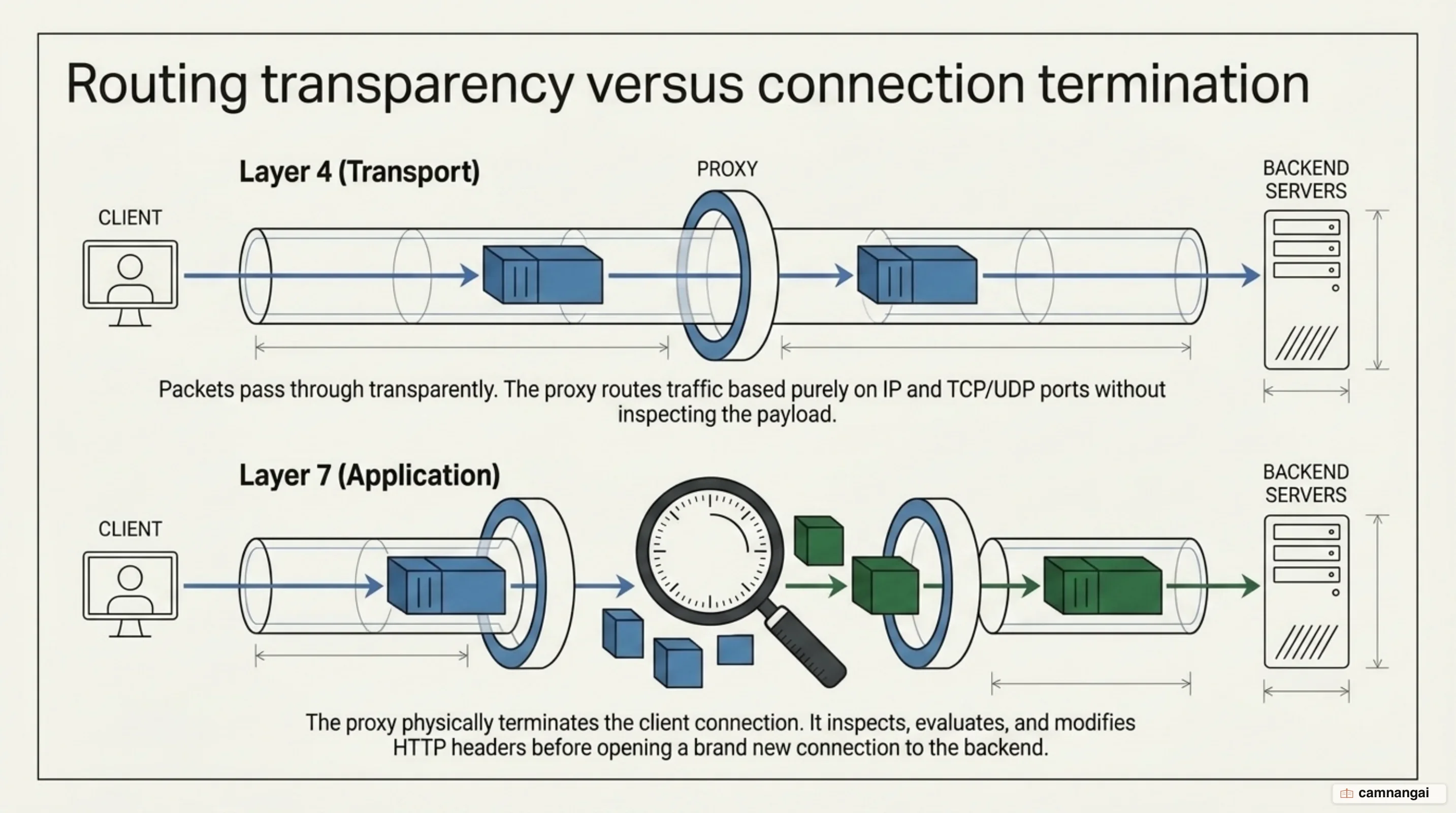
When a load balancer operates at Layer 7 (the application layer), it is a true reverse proxy. In this content-aware mode, the balancer terminates the client connection, inspects the HTTP headers, and initiates a new connection to a backend node. This allows for intelligent routing based on URLs, cookies, or headers. This intermediary role — where the balancer acts as a full termination point — is the definition of a reverse proxy.
Layer 4 load balancing, using NAT, Direct Routing (DR), or Tunneling (TUN), works differently and is not a reverse proxy. At Layer 4, the device acts as a traffic director or packet-level router at the transport layer. The communication is transparent; the client effectively talks directly to the backend servers without application-level termination. Because the device does not inspect or manage the application data, it is not acting as a proxy.
The goals of these technologies overlap, but their priorities differ. A reverse proxy focuses on being the public face that provides SSL termination, caching, and origin cloaking. A load balancer focuses on distributing workload across identical backend nodes. Modern software like NGINX Plus provides both, so you can deploy a single tool that handles application-level proxying and high-performance load balancing.
What does a reverse proxy configuration look like?
In NGINX, you use the proxy_pass directive inside a location block to define where traffic should be forwarded. You should also use proxy_set_header to pass metadata, such as the original host or client IP, to the backend application.
location /api/ {
    proxy_set_header Host $host;
    proxy_set_header X-Real-IP $remote_addr;
    proxy_buffers 16 4k;
    proxy_buffer_size 2k;
    proxy_pass http://localhost:8000;
}
In the example above, proxy_buffers defines the number and size of buffers used for the response body. This controls the total memory allocated for a single request's response, while proxy_buffer_size is typically smaller as it only handles the initial response header. By default, NGINX uses proxy_buffering on to store the response until it is fully received. This is a performance optimization for slow clients, as it lets the backend finish the request quickly while NGINX handles the slow transmission to the user.
Caddy needs much less configuration. A single line in a Caddyfile can establish a proxy to a backend on port 9000. Caddy also provides automatic HTTPS for hostnames; if you specify a domain, Caddy will manage certificates and TLS termination by default.
example.com {
    reverse_proxy :9000
}
If the hostname on your proxy differs from the backend server's expected host, you may need the --change-host-header flag in the command line or equivalent Caddyfile logic. This resets the Host header to match the backend, which is often necessary for successful TLS handshakes when proxying to an internal HTTPS service. For interactive applications that require immediate data delivery, you should disable buffering via proxy_buffering off in NGINX to ensure the response is passed to the client as it arrives from the origin.
Why does the client IP get lost behind a reverse proxy?
Because a reverse proxy initiates its own TCP connection to the backend, the origin server's immediate socket only sees the proxy's IP address. In many languages, the RemoteAddr variable will return the proxy IP rather than the user's. To address this, proxies use the X-Forwarded-For (XFF) header, a comma-separated list that appends the IP of each proxy the request passes through.
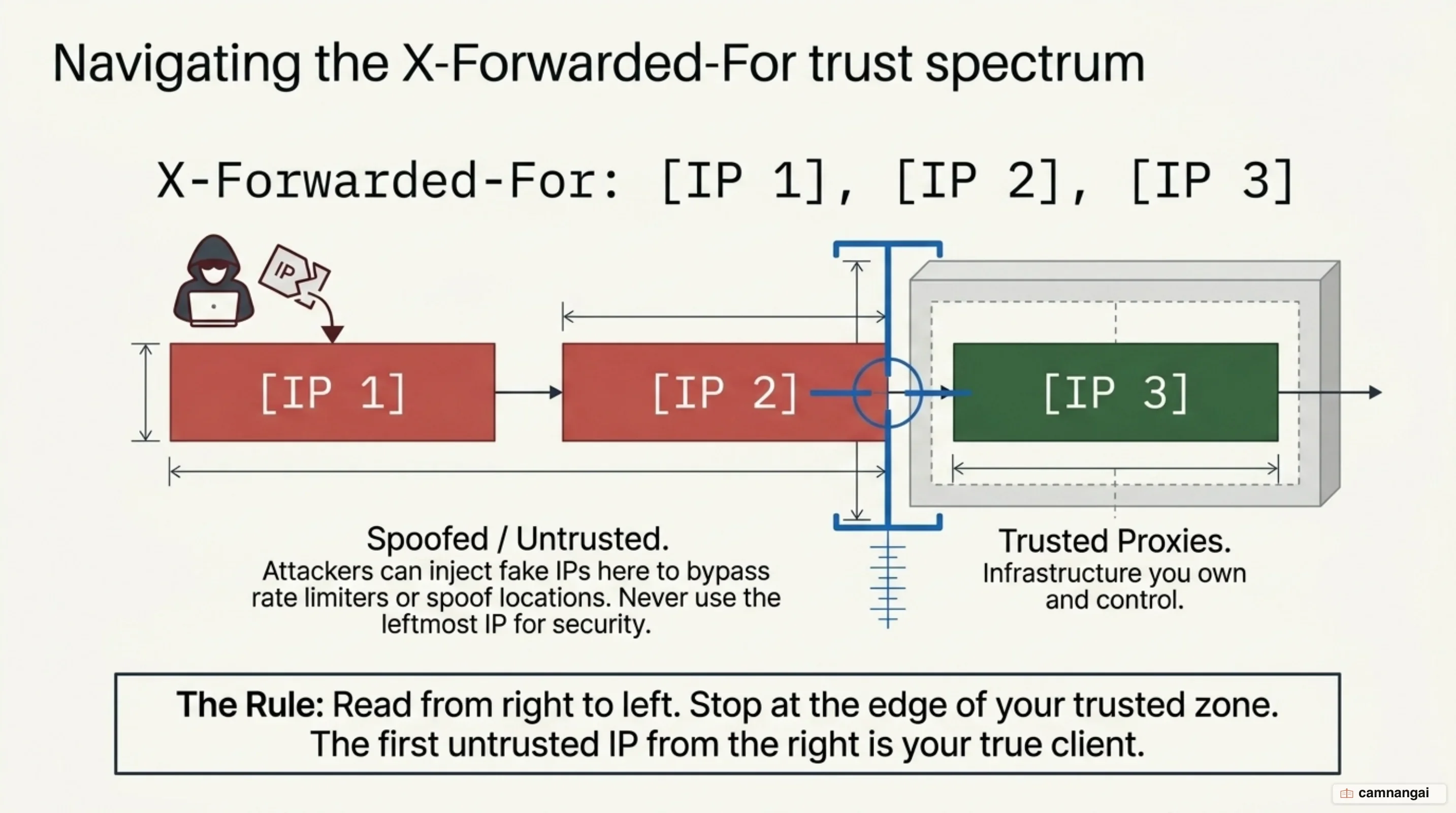
The XFF header is inherently untrustworthy because any client can spoof it by manually setting the header before sending the request. When your proxy receives a request with an existing XFF header, it appends the actual IP it sees to the end. The leftmost IP in the list — often wrongly assumed to be the real client — could therefore be a fake string provided by an attacker to bypass security controls.
To determine the real IP securely, you must use a rightmost-ish algorithm. This involves identifying the first IP added by a proxy you actually control. There are two common strategies: trusted proxy count, where you count back a specific number of steps from the right, or trusted proxy list, where you compare IPs against a CIDR allow-list of known proxy addresses. The first IP that does not match your trusted list is the only one you can trust for security-sensitive tasks like rate limiting.
Improper XFF handling creates stability risks. If your rate limiter keys off spoofed, random strings in the XFF header, an attacker can provide unique, long strings for every request. This can lead to rapid memory exhaustion as the limiter tries to track thousands of fake identities. You must ensure your rate limiting logic only uses the validated, rightmost-ish IP to prevent these memory-based exhaustion attacks.
When should you put a reverse proxy in front of your application?
You should implement a reverse proxy whenever your application requires SSL/TLS offloading, isolation from direct internet exposure, or a plan for horizontal scaling. It is a requirement for production-grade environments where you need to decouple the public-facing interface from the internal application logic. By offloading encryption and handling caching at the network edge, you free up resources for your core application processing.
For ease of maintenance, you should generally avoid complex nested DMZ or two-arm setups. These configurations often lead to connectivity issues and increased troubleshooting time without providing significant security gains. A one-arm mode (SNAT) is usually the more practical choice for internal networking. A single, well-hardened reverse proxy layer provides the necessary security and performance optimizations while keeping the network architecture manageable.
References
- What Is A Reverse Proxy? Proxy Servers Explained — Cloudflare
- NGINX Reverse Proxy — NGINX Documentation
- Reverse Proxy Quick-Start — Caddy Documentation
- NGINX Content Caching — NGINX Documentation
- Reverse Proxy vs. Load Balancer — F5
- What Exactly Is a Reverse Proxy? — Loadbalancer.org
- X-Forwarded-For Header — MDN Web Docs
- The Perils of the "Real" Client IP — adam-p