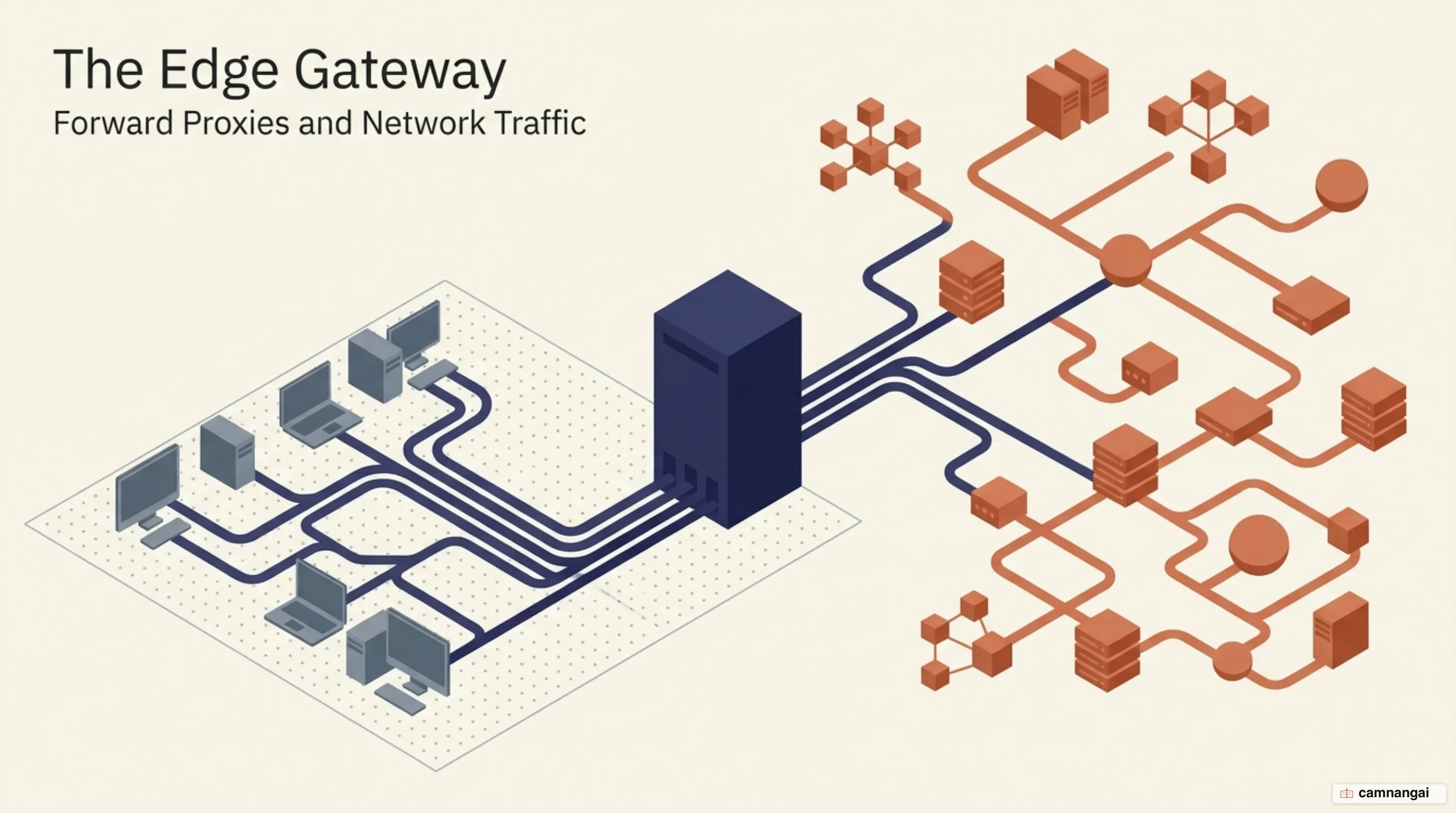
A forward proxy is an intermediary server that sits between a group of clients on a private network and the public internet, acting as the single point of exit for their requests.
When you deploy a forward proxy, it accepts requests from your internal machines, forwards them to external SaaS applications or websites, and then delivers the server's response back to the client. This architecture creates a buffer between the internal host and the external network, so no direct connection exists between your private subnet and the public web.
By acting as a central gateway, the forward proxy isolates computers inside a protected network to shield them from outside attacks. All outbound traffic can then be monitored, authenticated, and filtered at one place.
Because the proxy performs requests on behalf of the client, it masks the internal IP address of the requesting host.
In a modern enterprise you will typically find forward proxies deployed to manage internet egress for workstations that have no direct route to the web, whether by air-gapped design or by restrictive firewall rules. The proxy keeps necessary web services reachable through a governed point of control, and it enforces administrative requirements such as bandwidth conservation via caching and content filtering before any packet leaves the local network.
What is a forward proxy?
In large enterprise environments (banks, insurance firms, government agencies), office workstations are almost never allowed to connect directly to the internet. Those machines sit on an isolated private network that protects sensitive corporate assets and prevents unauthorized movement of data out of the protected subnet. A forward proxy is the component that gives those isolated computers internet access. It sits at the edge of the private network, intercepting outbound requests and acting as the official representative for internal clients talking to external resources.
The defining trait is that it acts on behalf of the client, not the server. When you reach a website from inside a bank's network, your browser does not open a connection to the destination server; it opens one to the proxy. The proxy then completes the request using its own IP address and socket, which hides your internal identity. Beyond security, these servers are heavily used for traffic optimization: by storing local copies of frequently requested objects and DNS records, the proxy serves content straight from cache, cutting the bandwidth the organization consumes and improving response times.
You should distinguish these managed gateways from the open proxies scattered across the public internet. Hundreds of thousands of open forward proxies exist for personal use, whether that means bypassing a local filter or hiding an IP address, but an enterprise forward proxy is strictly managed infrastructure. Corporate proxies exist to enforce uniform security standards and make sure every user follows the organization's browsing policy. They give administrators a single point of inspection where no internal host can talk to a malicious external domain without passing through a vetted security stack.
How does a request travel through a forward proxy?
A packet's path through a forward proxy is a hop-by-hop process that terminates the client's original connection. When you start a web request, your machine sends the packet to the proxy's IP address on a specific port, 3128 by default for Squid and 8080 in many other setups. The proxy receives it, terminates the TCP connection from your machine, and opens a completely new connection to the destination server. That separation is exactly what lets the proxy inspect the request and check it against your Access Control Lists (ACLs) before any data reaches the public web.
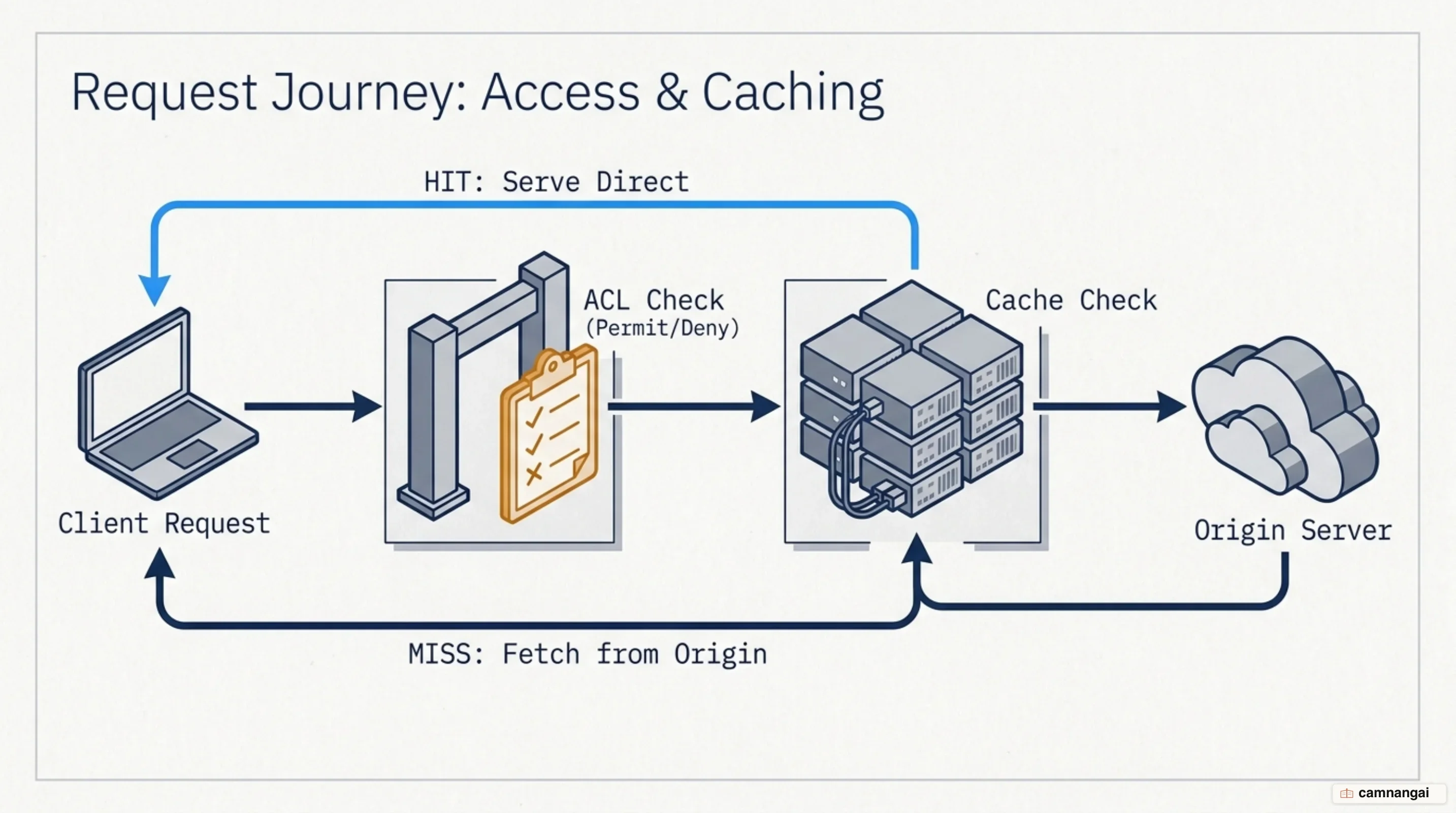
To give the destination server the metadata it needs, specific HTTP
headers are added to the request. The proxy may append a Via header identifying itself and the
protocol version in use; that header appears in both request and response, so it traces the data's
path. If your administrator has configured the proxy to disclose the original requester for logging
or location-dependent content, it uses X-Forwarded-For to carry the originating IP address. These
headers are what make debugging and usage statistics possible at all.
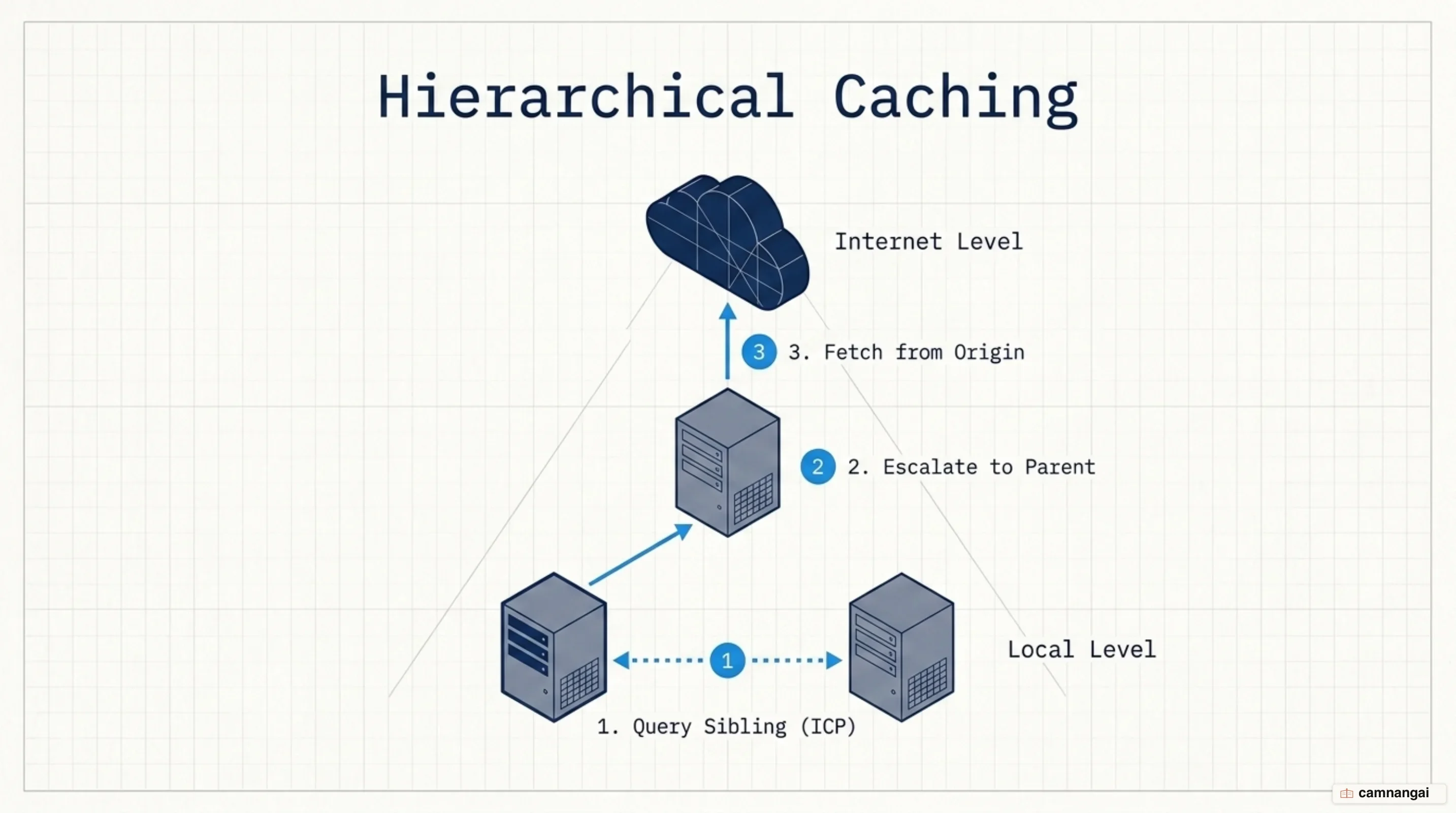
Because proxies are hop-by-hop intermediaries, they can be arranged in hierarchies of parents and siblings. If your network runs several of them, say a branch-office proxy feeding a regional parent, the request passes from one inbound proxy to the next until it finally leaves the corporate perimeter. That structure spreads the processing load and keeps cached content near the users who need it. On the way back the process reverses: the proxy receives the response, may cache it, and returns the data to your client over the original internal connection.
The headers that manage this flow are:
- Forwarded — the standardized header carrying information from the client-facing side of the proxy that would otherwise be lost.
- X-Forwarded-For — the de-facto standard for identifying the originating IP address of a client connecting through a proxy.
- X-Forwarded-Host — identifies the original host the client requested.
- X-Forwarded-Proto — identifies the protocol (HTTP or HTTPS) the client used to reach the proxy.
- Via — discloses the proxy server's identity, in both request and response headers.
How is a forward proxy different from a reverse proxy?
The fundamental distinction is which side of the connection each one protects, and which direction the traffic runs. A forward proxy handles egress: it is the exit point for users on a private network who need to reach the public internet, and its focus is protecting internal clients. A reverse proxy handles ingress. It is the single point of entry for external users trying to reach web servers or databases that live in a hidden, private subnet.
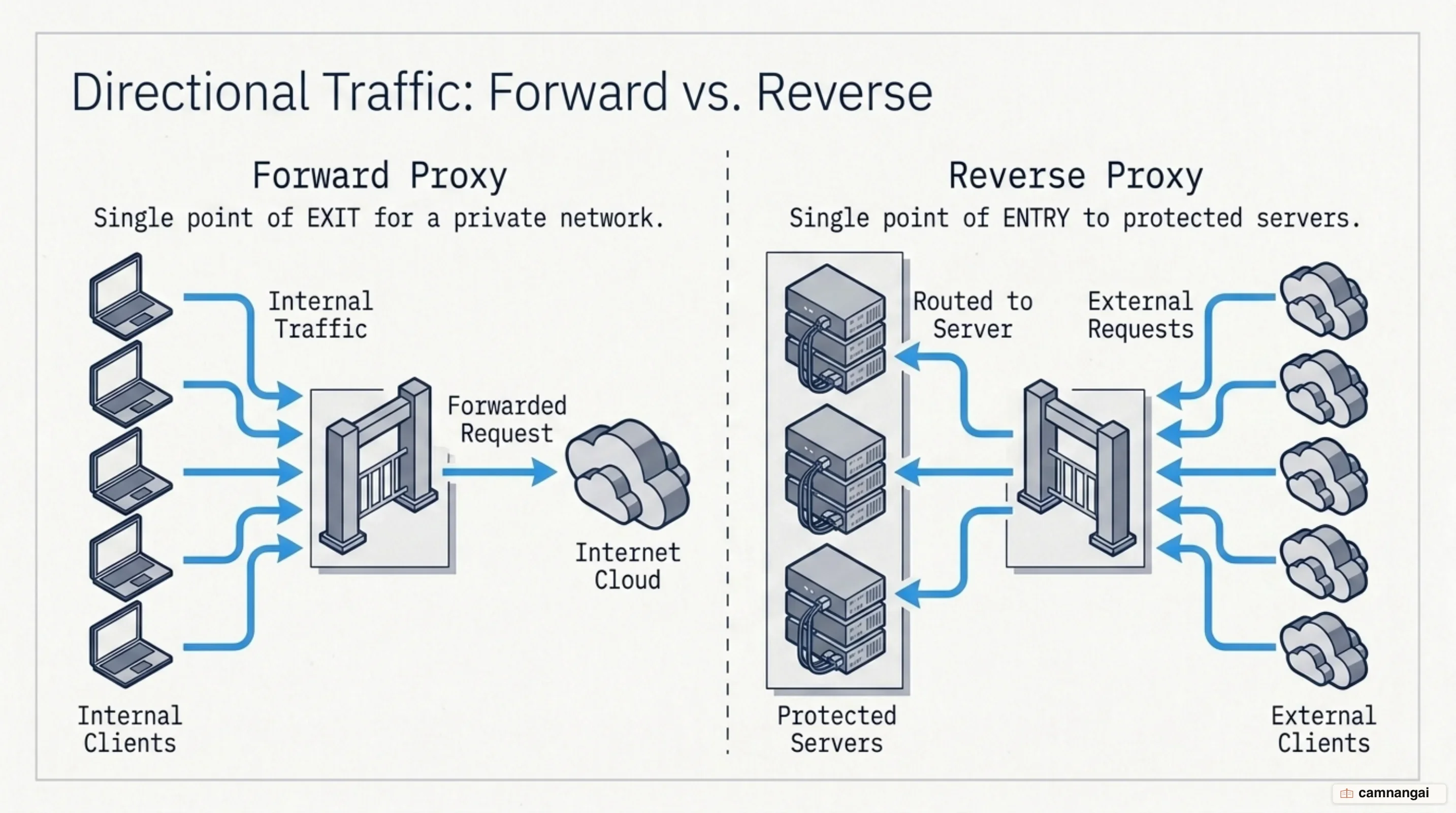
Deployment requirements differ just as sharply. A forward proxy generally requires manual configuration on every client device: each laptop or desktop must be told the gateway's IP address and port. A reverse proxy requires no client-side configuration at all. When you visit a public website you are hitting a publicly accessible reverse proxy, which intercepts your traffic to keep the origin servers behind it from direct exposure.
A bank makes the contrast concrete. When an employee uses their office workstation to reach a SaaS platform, the request is routed through a forward proxy on its way out. When a customer checks their balance, they connect to the bank's public login page — served by a reverse proxy that forwards the credentials to authentication servers hidden behind a firewall. The forward proxy is deployed to protect the user; the reverse proxy is deployed to protect the server.
How does HTTPS pass through a proxy?
When you reach an HTTPS site through a forward proxy, a normal GET request is not enough, because the
proxy cannot read the encrypted payload to work out where the packet is headed. HTTP solves this with
the CONNECT method, which establishes a tunnel to the destination. The client sends CONNECT to
the proxy with a host and port number, usually 443. If policy allows the connection, the proxy
returns a 2XX response such as 200 Connection Established and immediately switches into tunnel
mode.
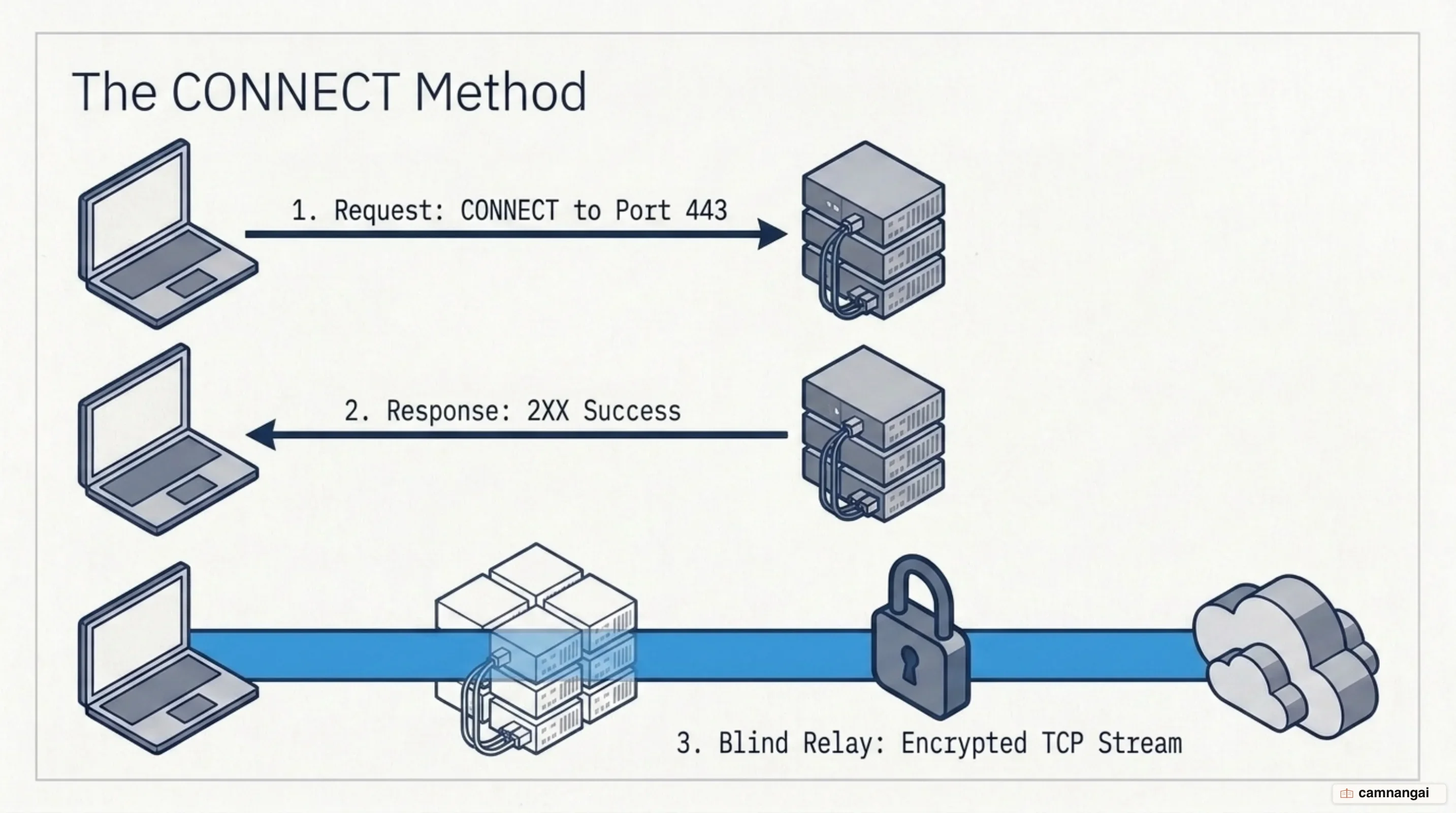
In tunnel mode the proxy opens a TCP connection to the destination on the client's behalf and stops acting as an HTTP processor altogether. It becomes a blind relay, forwarding the raw TCP stream in both directions without inspecting or modifying anything. The TLS handshake therefore happens directly between your browser and the origin server, and end-to-end encryption stays intact. For the life of that session the proxy is just a bridge moving bits across a network boundary.
Because the mechanism creates a generic TCP tunnel, it can carry non-HTTP protocols that firewalls
would normally block — SSH or FTP encapsulated inside HTTP to slip through a proxy that only permits
ports 80 and 443. That versatility is powerful and it is a liability: you must restrict CONNECT to
a known set of safe ports. A loosely configured proxy that allows tunnels to arbitrary ports can be
abused to relay SMTP spam or to bypass other network controls.
A standard CONNECT request looks like this:
CONNECT server.example.com:443 HTTP/1.1
Host: server.example.com:443
How does a client know where to find the proxy?
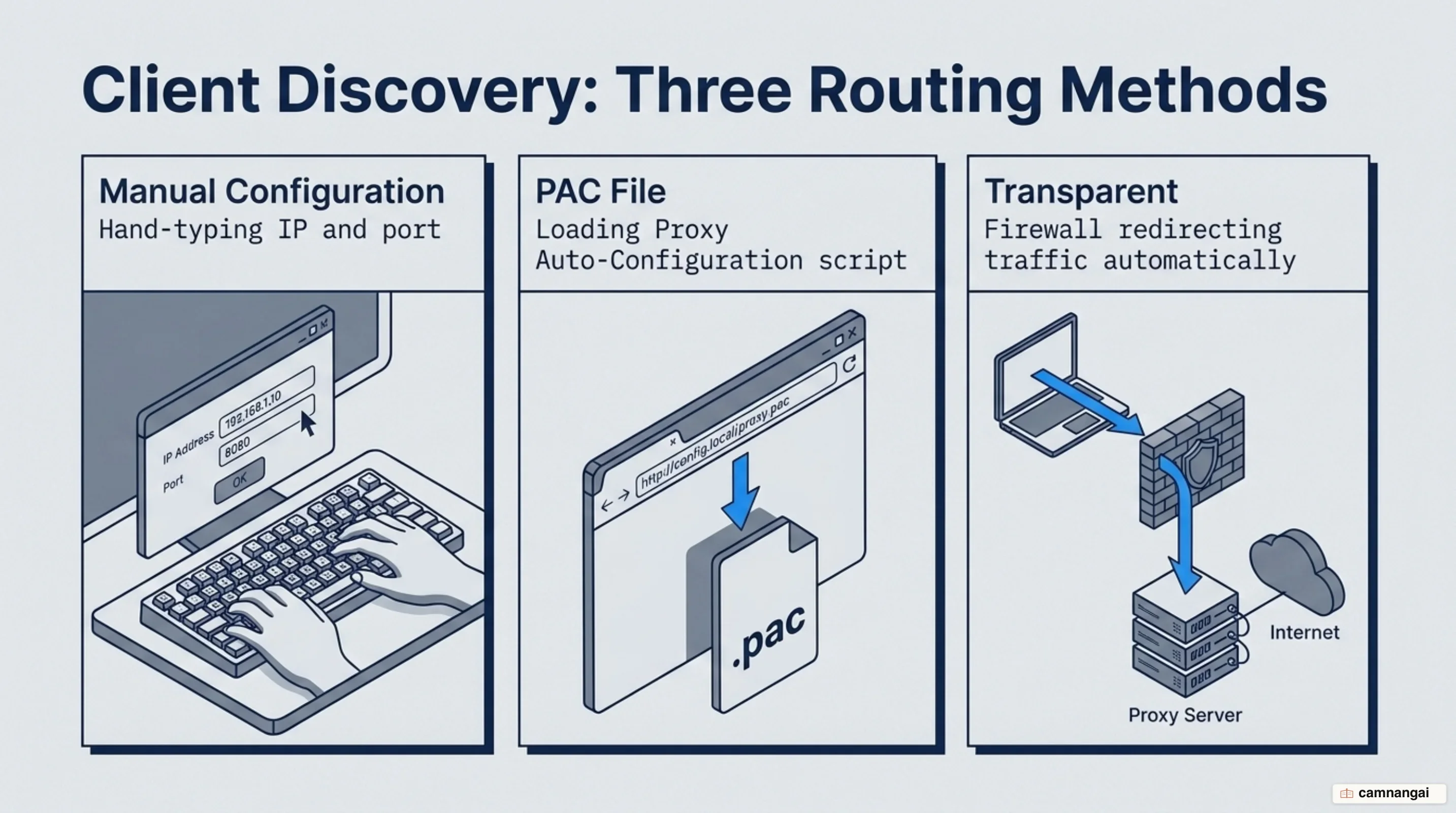
Clients find the egress gateway either by manual entry or by automated discovery. Manual
configuration means an administrator types the proxy's IP address and port into the operating system
or browser settings of every machine in the fleet, which is secure but painful to manage as the
organization grows. The alternative is Proxy Auto-Configuration (PAC), introduced in Netscape
Navigator 2.0 at the same time as JavaScript. A PAC file is a
standalone JavaScript file containing a FindProxyForURL(url, host) function that tells the browser
whether to go direct or use a specific proxy for each request.
The logic inside a PAC file allows fairly granular routing. isPlainHostName() checks whether you
are reaching an internal resource such as http://intranet/; if it returns true, the file returns
DIRECT and you connect without the proxy hop. isInNet() checks whether the destination IP falls
inside a given subnet, and dnsDomainIs() keeps traffic bound for the corporate domain on the local
network. The file is served with the MIME type application/x-ns-proxy-autoconfig and conventionally
saved as proxy.pac.
I avoid isInNet(), isResolvable() and dnsResolve() in my own PAC files unless a rule genuinely
needs them, because they all require the client to consult DNS to evaluate the rule — and if the rule
then returns a proxy, that proxy performs its own lookup, doubling the impact on your DNS servers.
Across thousands of clients the latency adds up fast. The remaining autoconfig functions are plain
string-matching that needs no DNS at all, and most of the time they are enough to get the result you
want.
function FindProxyForURL(url, host) {
  // If host has no dots or belongs to the internal domain, bypass the proxy
  if (isPlainHostName(host) || dnsDomainIs(host, ".internal.corp")) {
    return "DIRECT";
  }
  // Use the primary proxy, fall back to a secondary, then direct
  return "PROXY proxy1.internal.corp:3128; PROXY proxy2.internal.corp:3128; DIRECT";
}
Server-side configuration: ACLs and caching in Squid
Squid is the standard caching proxy on Linux, and its performance is dictated mostly by hardware choice. Unlike servers where raw throughput is the headline metric, Squid leans on random read performance and RAM capacity. The RAM you need correlates directly with the number of objects in the cache, since Squid keeps object references in memory for fast retrieval; once it is forced onto swap because RAM ran out, performance drops sharply. Prioritize SSDs with low seek times over high-capacity spinning disks — seek time matters more here than data throughput.
For the storage backend, avoid software RAID5 and similar parity setups, where the cost of computing
parity works against random writes. Mounting the cache filesystem with noatime is a cheap win:
Squid keeps its own timestamps, so there is no reason for the filesystem to record an access time for
every object. And while Squid uses multiple cores, it is tuned for 4–8 high-performance physical
cores; virtual cores from hyperthreading can actively hurt it. That last point catches people out,
because almost every other capacity conversation in a datacenter runs the other way.
Access control lives in squid.conf as Access Control Lists, processed in order. You define an ACL
by source IP (src), destination domain (dstdomain), or time of day, then apply it with an
http_access directive. Caching freshness is governed by the Last-Modified and Expires headers,
which Squid uses to decide whether a stored object is still valid. Size the disk cache at 50% to at
most 80% of available disk space; when it fills, Squid runs a Least Recently Used (LRU) algorithm to
evict the oldest, least-requested objects.
# Define the source subnet for the students group
acl students src 192.168.7.0/24

# Allow web access for the defined student group
http_access allow students

# Final rule: deny all traffic that doesn't match a previous rule
http_access deny all
What do companies actually use a forward proxy for?
Companies deploy forward proxies first for centralized egress control and bandwidth economics. In a large network, downloading the same software update or media file thousands of times wastes the external link. With hierarchical proxying, where branch proxies feed a regional parent, a piece of content is fetched from the internet once and every later request is served locally. That inter-proxy conversation runs over the Internet Cache Protocol (ICP), which lets a proxy ask its siblings for an object before escalating to a parent or the origin server.
Security enforcement is the second driver. Put the proxy in a DMZ (demilitarized zone), pair it with a firewall, and you have a single manageable choke point: configure the firewall to block all outbound web traffic except what originates from the proxy's IP address, and every user is forced through a path where traffic can be authenticated and inspected. The same position lets the proxy perform port and protocol switching, which obscures your internal users' access patterns from outside observers.
Finally, forward proxies supply the monitoring and content filtering that compliance demands. Because the proxy terminates every request, it can produce detailed statistics on which sites are visited — used both to assess browsing habits and to surface policy violations. Administrators restrict access to specific pages or whole content categories through ACLs or external helper applications, and can spot shadow IT: unsanctioned devices and cloud applications give themselves away by calling out to external servers through the one path that logs everything.
Decrypting HTTPS: the price of seeing the traffic
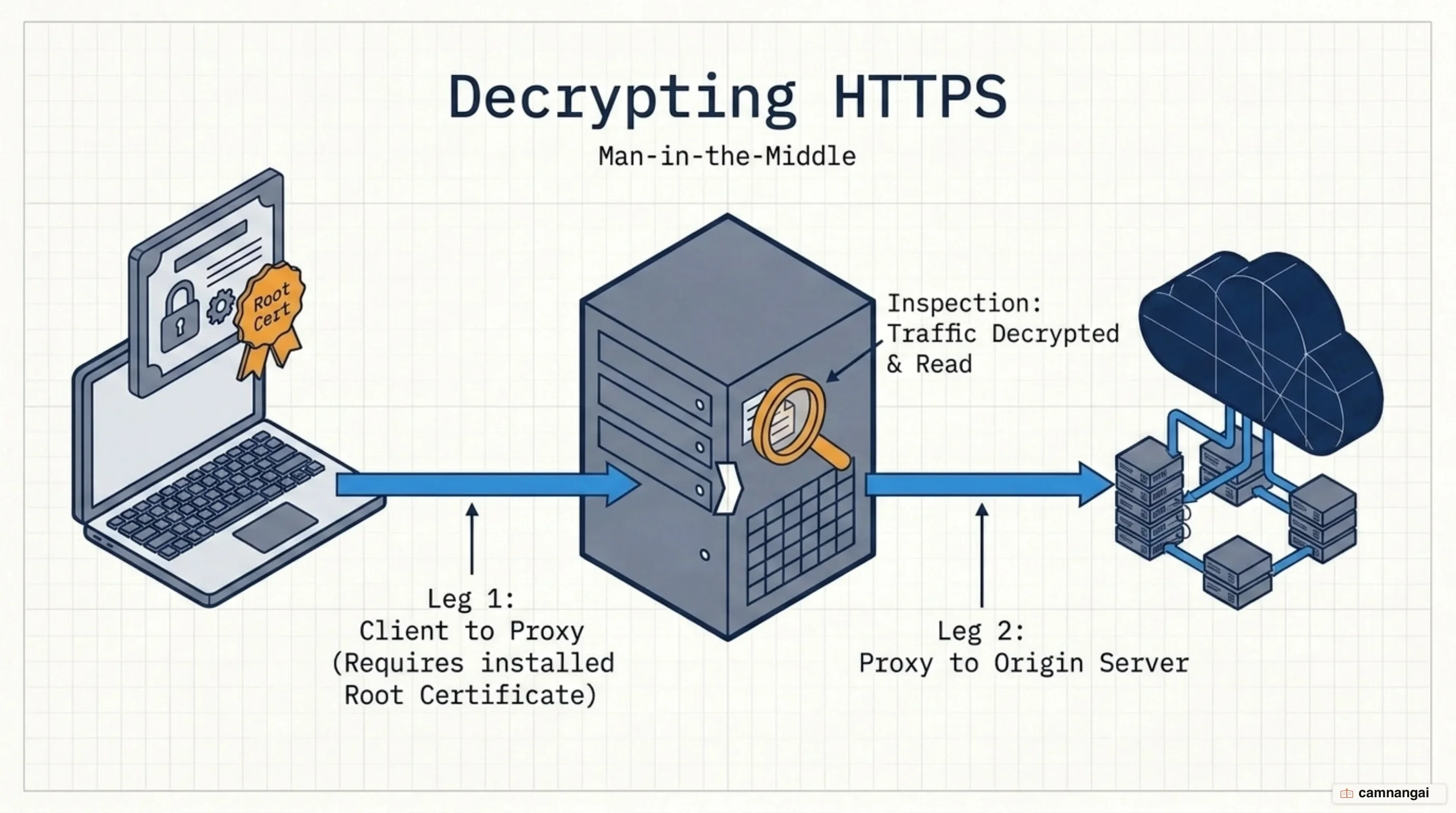
CONNECT lets encrypted traffic cross the proxy, but it creates a blind tunnel — the proxy cannot
inspect that data for malware or data exfiltration. To get visibility back, some organizations
implement TLS interception, usually sold as SSL inspection. The proxy terminates the encrypted
connection from the client and opens a separate encrypted connection to the destination. The cost is
real: you break the end-to-end tunnel, you must install a trusted root certificate on every client
device, and any failure by the proxy to reproduce the origin server's security parameters becomes a
vulnerability your users cannot see.
Loosely configured proxies carry a second class of risk. If yours allows CONNECT tunnels to
arbitrary non-web ports, an attacker can relay traffic that was never meant for the web through it —
the classic case being SMTP relay, which quietly turns your infrastructure into a spam source and
your address range into a blacklist entry. Restrict CONNECT to a known list of safe ports, normally
443, or to an approved set of destinations. A strict configuration here is what keeps your proxy from
becoming the tool someone else uses to hide their tracks.
Transparent proxying is the deployment alternative worth knowing about. Outbound traffic is intercepted at the firewall and redirected to the proxy — port 80 to 3128, say — with no client awareness at all, which removes the need for PAC files or per-machine settings. It is easier to roll out, but it demands careful network engineering so it does not break applications that are not proxy-aware, and redirecting secure traffic this way is meaningfully more complex.
When do you actually need a forward proxy?
You need a forward proxy when your objective is the security, isolation, and management of users on a private subnet. It is the right tool if you require centralized egress control to prevent unauthorized data movement, or identity masking for internal clients. Where the network design mandates that workstations stay isolated from the public internet, a forward proxy is the only governed, monitored way to give those machines access to the web services they still need.
The verdict is about which side you are defending. Use a forward proxy to defend the client side of the connection; if your goal is instead protecting a public-facing server or spreading load across a farm of origin servers, what you want is a reverse proxy. Deploy it only where someone can own the ACL rules and the hardware tuning — a carelessly configured proxy becomes the single bottleneck every request in the company has to pass through.
References
- Proxy servers and tunneling — MDN
- CONNECT request method — MDN
- What Is a Forward Proxy? — Zscaler
- Proxy Auto-Configuration (PAC) file — MDN
- Squid caching proxy server — SUSE Linux Enterprise Server 15 SP6
- TLS Interception and SSL Inspection — TLSeminar
- Forward proxy vs. reverse proxy: What's the difference? — TheServerSide
- What is a Forward Proxy? — Check Point Software