The Domain Name System (DNS) is the standard protocol that translates human-friendly domain names into the numerical Internet Protocol (IP) addresses that computers use to identify each other on a network.
While you navigate the web using memorable names like google.com, web browsers interact through
these unique identifiers to load resources. DNS is the phonebook, or contact list, for the
internet — it lets your browser load content via identifiers like 192.168.1.1 (IPv4) or
2400:cb00:2048:1::c629:d7a2 (IPv6). This name-to-address resolution happens across a global,
distributed database in milliseconds.
This resolution process sits behind nearly every online action, from sending an email to streaming video. It runs as a transparent network in the background, primarily using UDP port 53 for speed, though it switches to TCP for larger data transfers or zone updates.
Without DNS, you would be forced to memorize complex 32-bit or 128-bit numerical strings for every service you want to use, making the modern internet virtually unusable for the average person.
DNS is a client/server application-layer protocol. Your device is the client, sending a query that triggers a chain of events across multiple server types. The system is built to scale, handling billions of requests per day through a combination of hierarchical organization and aggressive caching strategies that reduce latency and minimize traffic on the internet's core infrastructure.
What is DNS?
The Domain Name System is the fundamental protocol for machine-to-machine identification across the global internet. While humans find it easier to remember alphabetical names, networked devices communicate using numerical identifiers known as IP addresses. DNS does the name-to-number conversion, bridging human intent and machine execution. Every device connected to the internet — from your smartphone to an industrial refrigerator — is assigned a unique IP address, which works much like a street address for a specific home.
The DNS infrastructure supports two main address formats. The legacy IPv4 format consists of 32-bit addresses, traditionally written as four sets of numbers ranging from 0 to 255. To accommodate the exhaustion of IPv4 space, the newer IPv6 format uses 128-bit alphanumeric strings, providing a virtually inexhaustible supply of addresses. Because these strings are far too complex for users to manage, DNS automates the mapping, so you can reach a server like Amazon's by typing a URL rather than a raw 128-bit identifier.
The entire process happens behind the scenes the moment you make a network request. When you enter a domain name into your browser, the browser and the underlying operating system start the lookup without requiring anything further from you. The search widens from your local memory to a global network of servers until it finds the right resource record. Once the translation is done, the browser uses that IP address to connect to the host server and load the content you asked for.
How is the domain name system organized into a hierarchy?
The DNS namespace is organized into a hierarchical, inverted tree structure designed for high
availability and distributed management. At the very top of this hierarchy is the Root Level,
represented by a trailing dot (.) that is usually hidden from the user. The root level is managed
by 13 root nameserver "identities" or "authorities," labeled A through M. These identities are not
just 13 physical machines; they are logical groupings mirrored across the globe using Anycast
addressing, which routes your query to the topologically nearest available instance for maximum
reliability.
Directly below the root are the Top-Level Domains (TLDs), which define the final portion of a
domain name. TLDs split into generic TLDs (gTLDs) like .com, .org and .net, which
designate the purpose of the organization, and country-code TLDs (ccTLDs) like .uk or .jp,
representing specific geographic regions. Each TLD is managed by a specific registry that maintains
the nameservers responsible for directing queries to the next level of the tree.
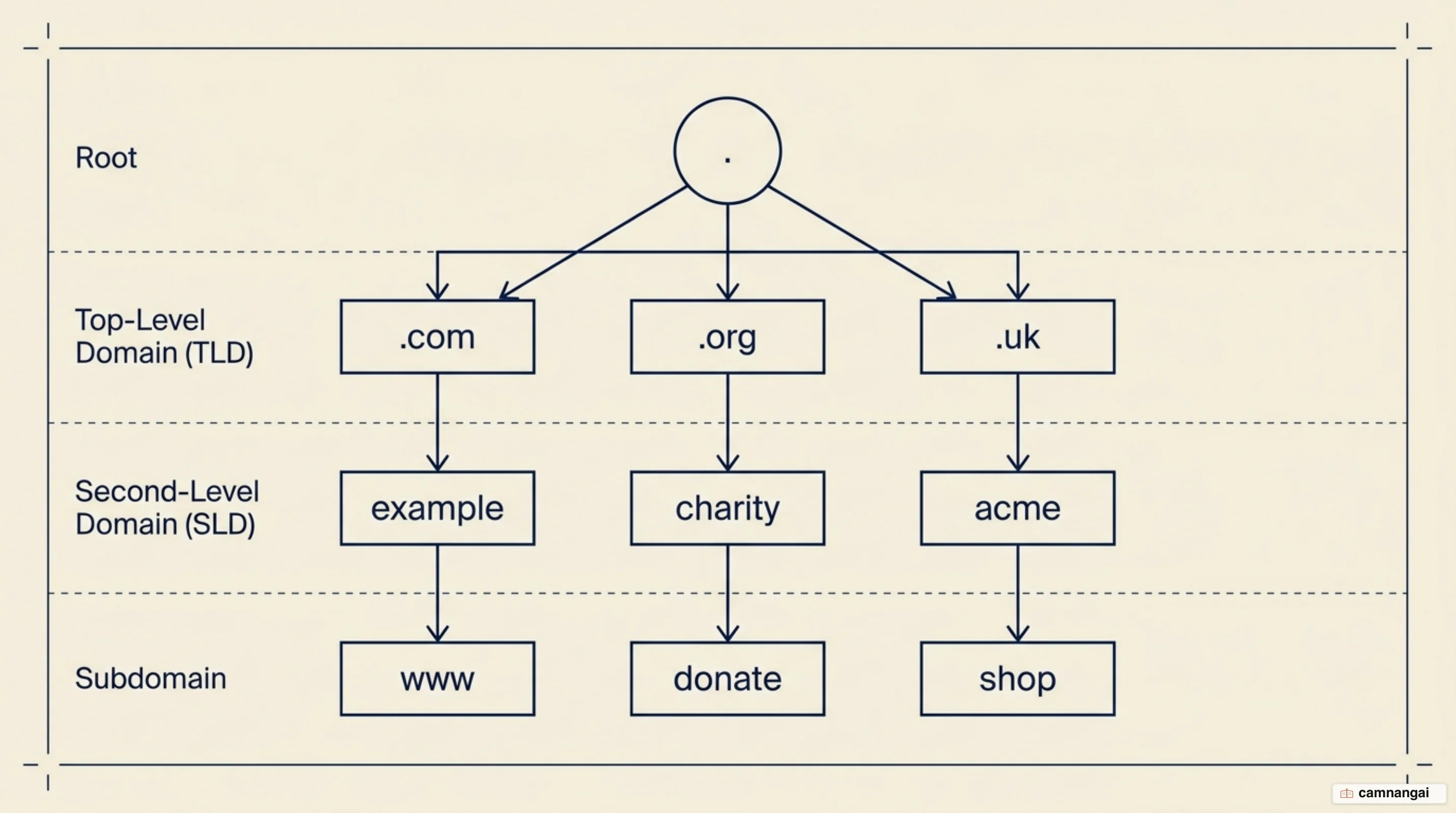
The next level is the Second-Level Domain, the unique name you register through a registrar —
example in example.com. Below this, administrators can create Subdomains to structure
internal resources, such as www for web traffic or mail for SMTP servers. Hostnames are the
specific identifiers for individual servers or devices. This structured delegation gives
decentralized control: an organization can manage its own internal records without updating a
central global registry for every minor change.
The four kinds of servers in a single lookup
Resolving a domain name takes four types of DNS server working together, each with a distinct job in the resolution pipeline. The process begins with the DNS Recursor (Recursive Resolver), often provided by your ISP or a public provider like Cloudflare. Think of the recursor as a librarian; it is the server doing the asking. It receives the initial recursive query from your device and then tracks down the answer by querying other servers on your behalf.
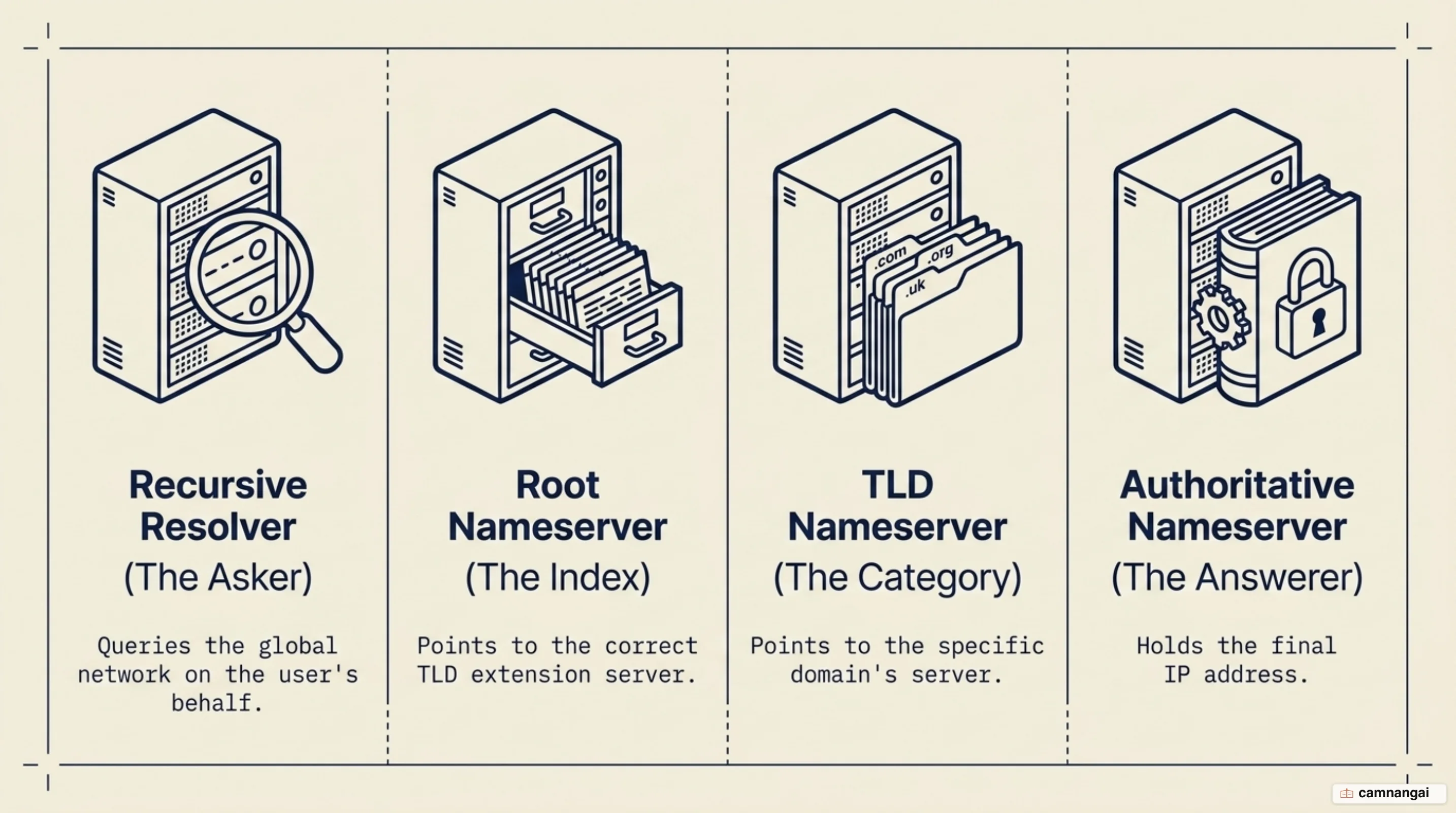
The recursor first contacts a Root Nameserver. These servers are the global index for the
DNS, pointing the resolver toward the correct TLD based on the domain extension. The TLD
Nameserver is the next stop; it maintains information for all domains within a specific extension,
such as .com. While the TLD server doesn't know the final IP address, it knows which
Authoritative Nameserver is responsible for that specific domain and provides its address to the
resolver.
The Authoritative Nameserver is the final source of truth. It holds the actual resource records — A or AAAA records — within its zone file. If the authoritative server has the requested record, it returns the IP address to the recursor. The recursive resolver manages the complexity of the search; the authoritative server gives the definitive answer from its own local data, without querying any other source.
What are the eight steps of a DNS query?
When a DNS record is not found in your local cache, the system performs a full lookup, which typically follows an eight-step sequence. This process relies on different query types: recursive queries, where the client demands a complete answer from the resolver, and iterative queries, where the resolver asks a server for the best information it has, often resulting in a referral to another server further down the hierarchy.
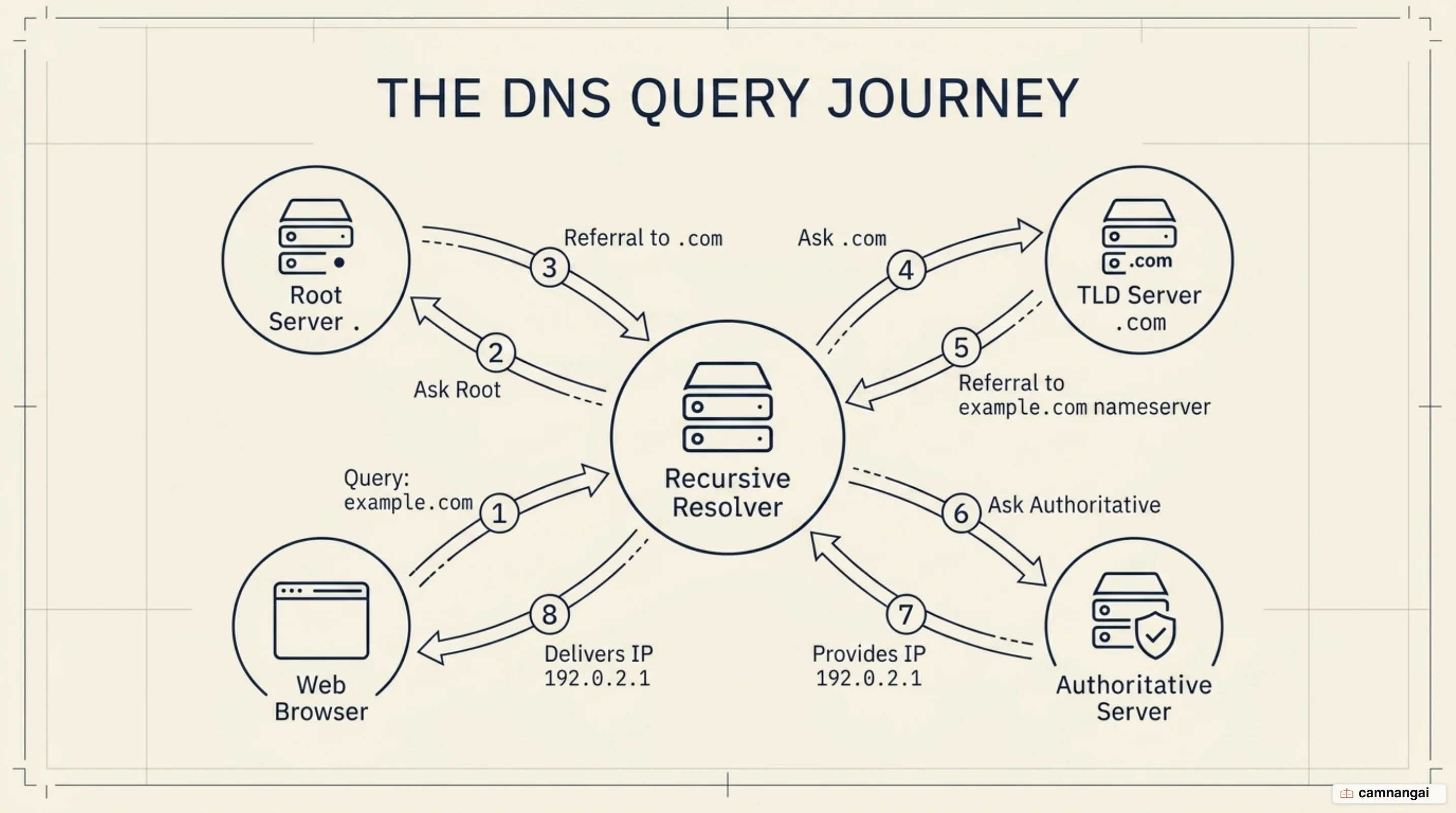
- Query to Resolver: Your browser sends a recursive query for a domain (e.g.
example.com) to the recursive resolver. - Resolver to Root: The resolver sends an iterative query to one of the 13 root nameserver identities.
- Root Response: The root server responds with a referral to the
.comTLD nameserver. - Resolver to TLD: The resolver sends an iterative query to the
.comTLD server. - TLD Response: The TLD server refers the resolver to the authoritative nameservers for
example.com. - Resolver to Authoritative: The resolver queries the authoritative nameserver for the specific record.
- Authoritative Response: The authoritative server retrieves the IP address from its zone file and returns it to the resolver.
- Resolver to Browser: The resolver delivers the IP address to your browser and caches the result.
Once the DNS resolution is complete, the browser takes over the session. It sends a standard HTTP or HTTPS request straight to the retrieved IP address to fetch the website's data. If the record had been found in a local cache — a non-recursive query — these steps would be skipped entirely, and the response would come back immediately, cutting page load times.
DNS records and zone files: A, AAAA, CNAME, MX, TXT
A zone file is a text-based database stored on an authoritative nameserver that maps hostnames to resources within a specific administrative boundary. Every zone file must include a Start of Authority (SOA) record, which identifies the primary authoritative server and technical parameters for the zone, and NS (Nameserver) records, which list the servers authorized to answer queries for that domain.
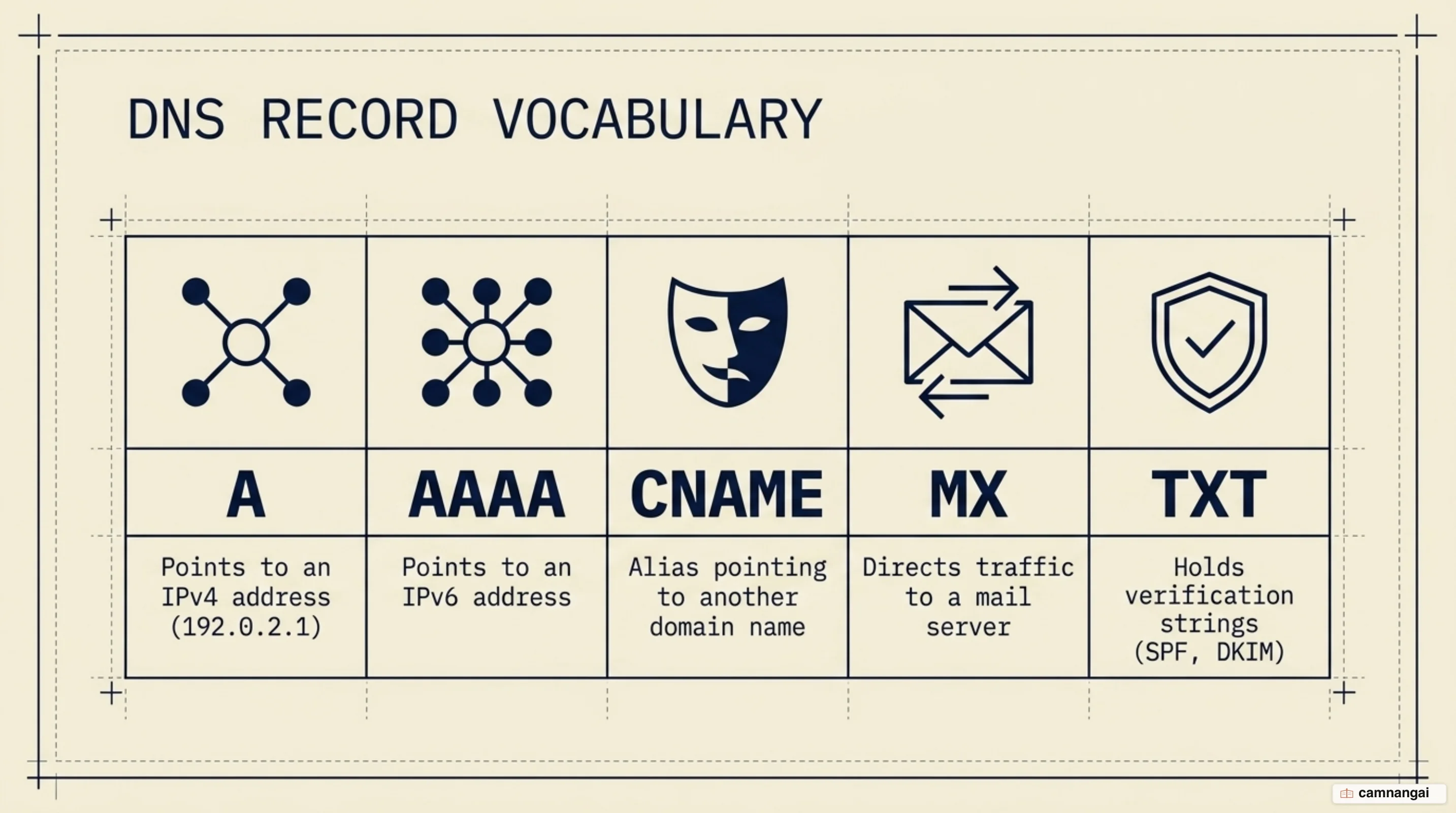
The translation itself happens through several resource record types:
- A: Maps a hostname to a 32-bit IPv4 address.
- AAAA: Maps a hostname to a 128-bit IPv6 address.
- CNAME (Canonical Name): Aliases one domain to another —
www.example.compointing toexample.com. - MX (Mail Exchanger): Points to the SMTP servers responsible for the domain's email.
- TXT (Text): Stores machine-readable data, essential for SPF records and domain ownership verification.
- PTR (Pointer): Used in reverse DNS lookups to map an IP address back to a hostname, primarily for network diagnostics and email security.
A typical zone file looks like this:
example.com.      IN  SOA   ns1.example.com. admin.example.com. ( ... )
example.com.      IN  NS    ns1.example.com.
example.com.      IN  A     192.0.2.1
example.com.      IN  AAAA  2001:db8::1
www.example.com.  IN  CNAME example.com.
example.com.      IN  MX    10 mail.example.com.
example.com.      IN  TXT   "v=spf1 include:_spf.google.com ~all"
1.2.0.192.in-addr.arpa. IN PTR example.com.
Caching, TTL and waiting for DNS to propagate
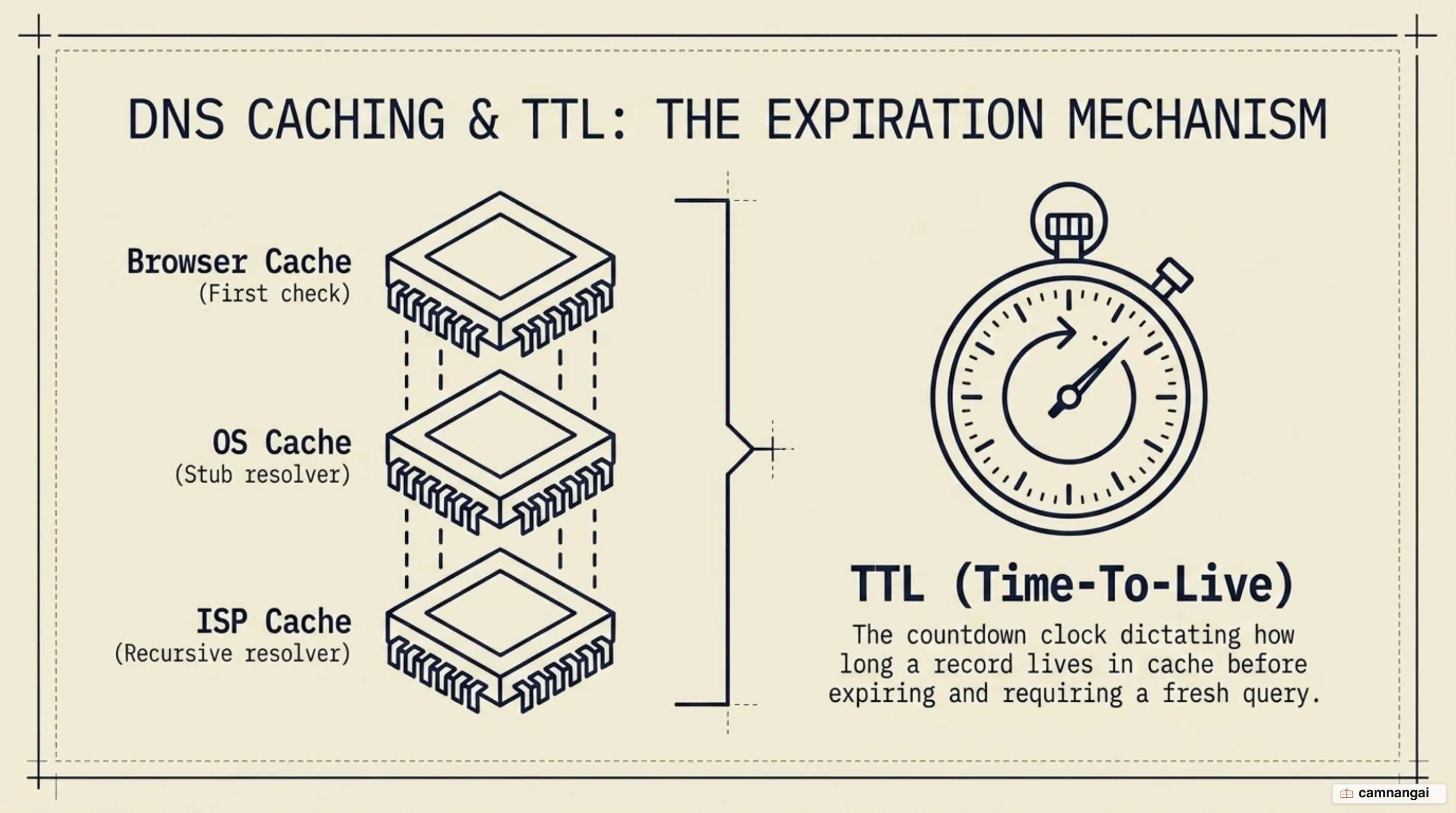
DNS caching is a performance-optimization technique that stores records in temporary memory to reduce lookup latency. Caching occurs at multiple layers: the browser cache is the first stop, followed by the operating system cache, managed by a stub resolver. If the record is not found locally, the recursive resolver at the ISP level checks its own cache before sending a query to the global hierarchy.
The time-to-live (TTL) value, set by the authoritative nameserver in seconds, controls how long a cached record lives. A high TTL reduces server load but makes updates slower to reach users, while a low TTL lets changes take effect quickly at the cost of extra query traffic. Once the TTL expires, the cached record is purged, and the resolver must do a fresh lookup to make sure the data is still accurate.
When you change your nameservers or IP addresses, you must account for DNS propagation. This is the time it takes for ISP nodes and recursive resolvers worldwide to expire their old cached records and fetch your new data. Many updates take effect in minutes, but the standard engineering window for full global propagation is 48 to 72 hours. That delay is why network engineers often lower TTL values 24 hours before a planned migration, to make the transition faster.
What are the security risks of DNS?
DNS was originally designed for functionality rather than security, which leaves it vulnerable to several technical threats. DNS spoofing (cache poisoning) occurs when an attacker injects fraudulent records into a resolver's cache, redirecting your traffic to a malicious IP. Another severe threat is the DNS amplification attack, a type of distributed denial-of-service (DDoS) attack where attackers send small, spoofed queries to open resolvers that result in massive responses directed at a victim, overwhelming their network capacity.
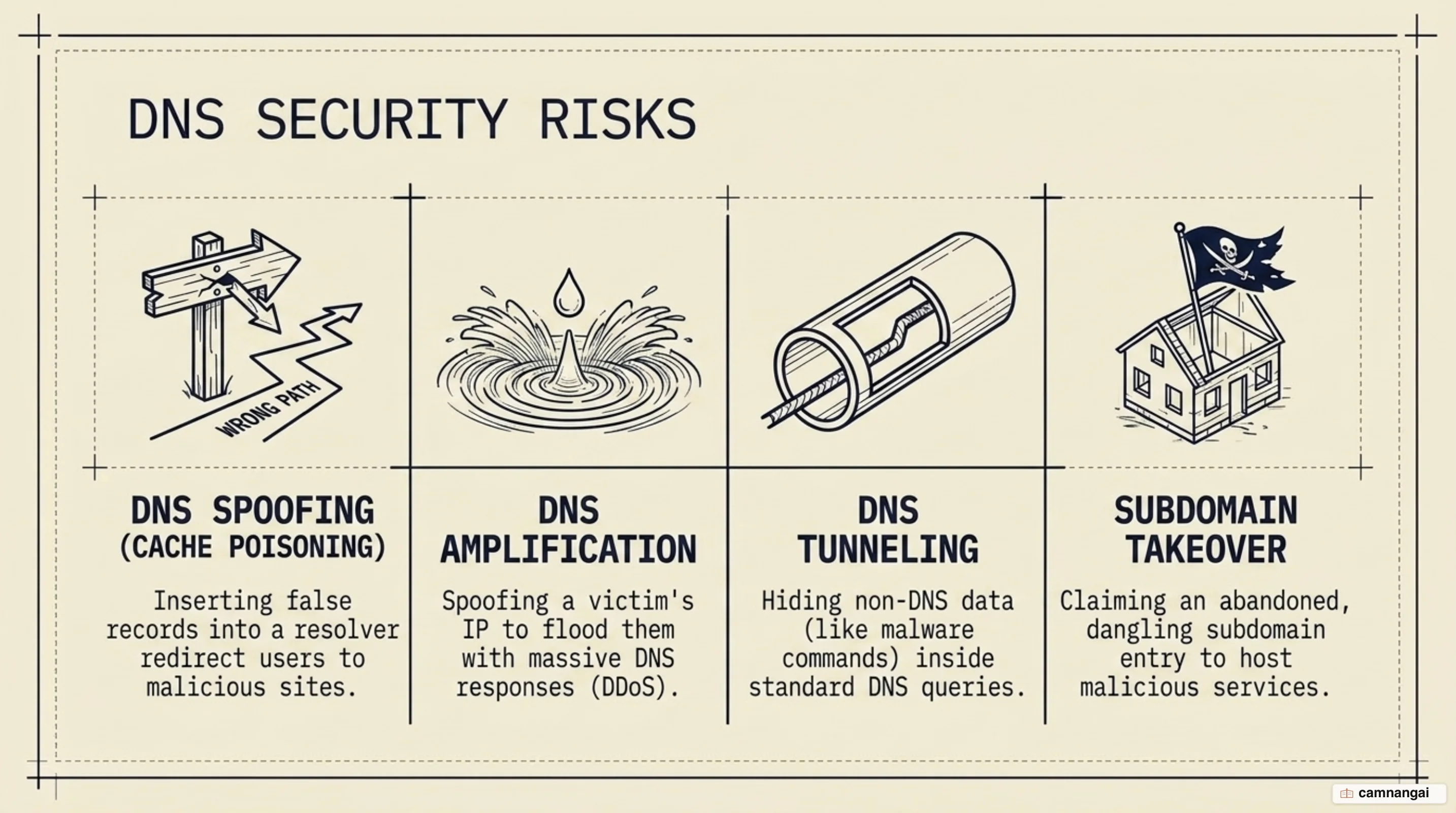
Security teams also monitor for DNS tunneling, a technique where attackers encapsulate non-DNS traffic — HTTP, or malware command-and-control data — within DNS queries and responses to bypass firewalls. Subdomain takeover is a common risk where a CNAME record points to a decommissioned cloud service. If the cloud resource is released but the DNS record remains, an attacker can claim that resource and host malicious content on your legitimate subdomain.
To harden the infrastructure, engineers deploy DNSSEC (DNS Security Extensions), which uses digital signatures to verify the integrity and origin of DNS data, preventing spoofing. Rate limiting on servers cuts down their part in DDoS attacks, and two-factor authentication (2FA) on registrar accounts is a baseline control that prevents unauthorized nameserver changes. Modern protocols like DNS over HTTPS (DoH) and DNS over TLS (DoT) are becoming standard to encrypt queries and protect user privacy from local eavesdropping.
Where you actually touch DNS in practice
In professional networking, you need to tell public DNS resolvers and managed DNS apart.
Public resolvers, like Google (8.8.8.8) or Cloudflare (1.1.1.1), are recursive services used by
clients for fast, private internet resolution. Managed DNS, in contrast, is authoritative
hosting — an organization pays a provider to host its actual zone files on a high-availability
Anycast network, often with extras like advanced failover and load balancing.
For internal corporate networks, you can run private DNS to resolve resources on closed networks, keeping internal IP addresses invisible to the public. A more advanced setup is split-horizon DNS, where the system gives different answers depending on where the query comes from — internal employees get private IP addresses for a hostname, while public users get the external IP. When choosing a provider, prioritize low latency, Anycast distribution, and support for modern encryption like DoH, so your infrastructure stays both resilient and secure.