A caching server is a dedicated system or software service that stores copies of frequently accessed data in temporary storage to speed up retrieval.
By keeping that data closer to the user or application, it avoids repeatedly fetching the same information from the origin server, which cuts latency and backend load. You use these servers to deliver resources at memory speeds rather than waiting on disk-bound databases or complex application logic.
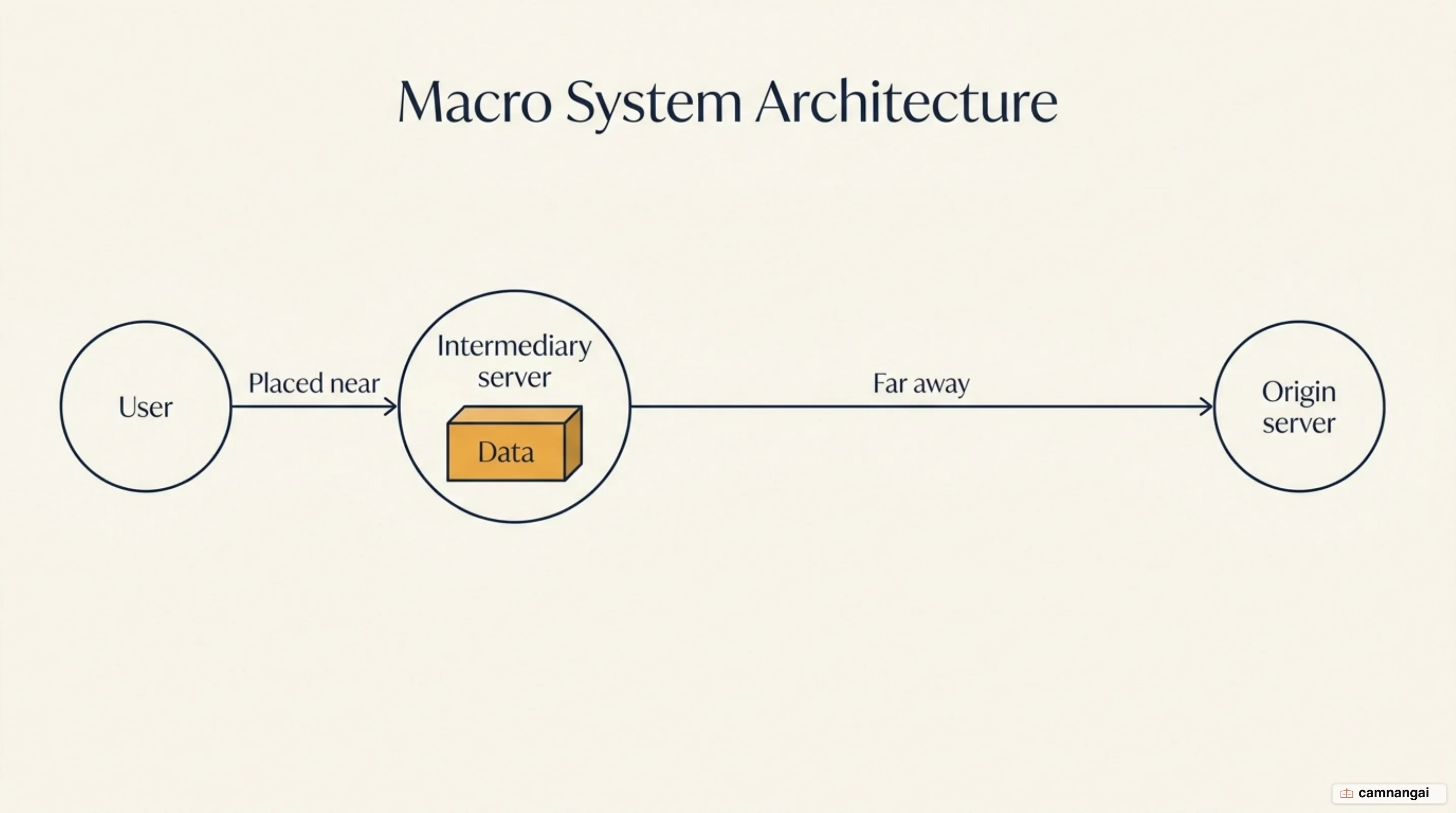
In a typical workflow, the caching server sits between you and the source of truth. When you request a file or data point, the server checks its local storage. If the data is present and valid, it is served immediately. If not, the server records a miss, retrieves the data from the origin, delivers it to you, and retains a copy for the next requester.
The stability argument is the one people undersell. A cache prevents hotspots where a single viral resource overwhelms a backend, and it cuts cost by reducing the compute cycles and bandwidth the origin has to spend, so the same hardware absorbs a traffic spike it would otherwise fall over on.
What is a caching server?
A caching server acts as a high-performance intermediary between the client and the origin server — the primary source where data is permanently stored or generated. While origin servers handle complex tasks like database queries and template rendering, the caching server specializes in rapid delivery. Memory-speed storage wins because it avoids the overhead of parsing requests, restoring sessions, and executing backend code for every identical request.
Heuristic caching is the part that surprises people, so account for it early. If a response carries no explicit Cache-Control directives, a cache may still decide to store it on its own, based on the Last-Modified header — a common heuristic keeps the response fresh for 10% of the time that has elapsed since the resource was last modified. In other words, sending no caching instructions is not the same as saying "don't cache this", and that gap is where a surprising number of stale-content bugs start.
The primary architectural benefits include:
- Lower latency: Physical proximity and RAM-based storage reduce time-to-first-byte (TTFB).
- Higher throughput: Your system can sustain higher request volumes by offloading repetitive work.
- Reduced backend load: You protect your primary databases and application servers from resource exhaustion.
- Prevention of hotspots: Popular content is distributed at the edge, preventing single-server failure during traffic spikes.
How a caching server handles a request
Modern caching servers use a readthrough cache interface, meaning the cache sits in the request path and fills itself on the way through rather than waiting for your code to populate it. It manages the movement of HTTP requests and responses automatically, and the logic follows a standardized path:
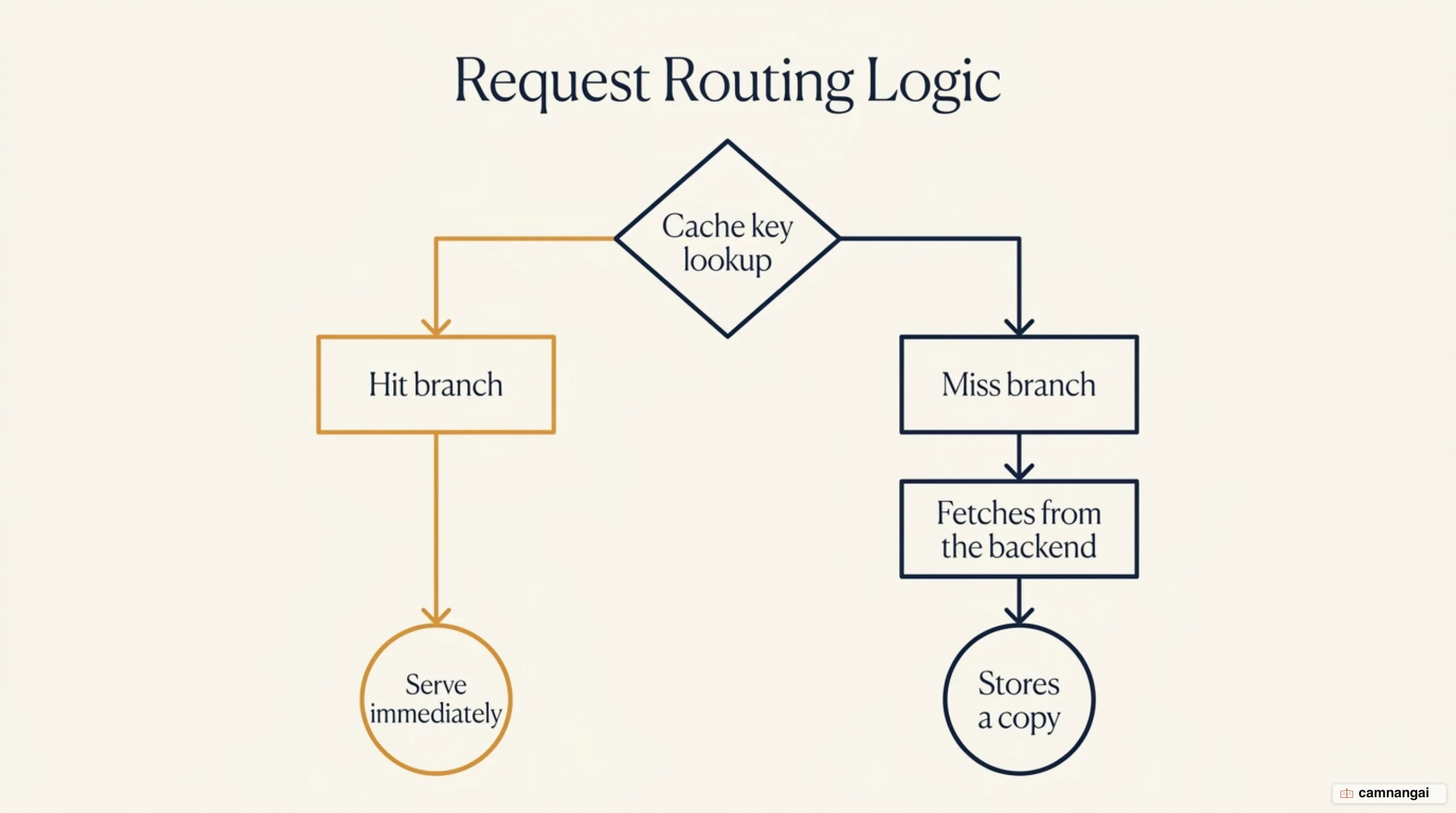
- Lookup: The server calculates a cache key and checks its storage.
- Hit: The valid data is found and served to you instantly.
- Miss: The data is absent. The server forwards the request to the backend.
- Fetch and store: The server retrieves the backend response, serves it, and saves a copy.
- Pass (bypass): You can configure specific requests to pass or bypass the cache. Marking a request as a pass does not just skip storage; it also skips automatic request transformations, such as ranged request handling and collapsing.
The main types of caching server
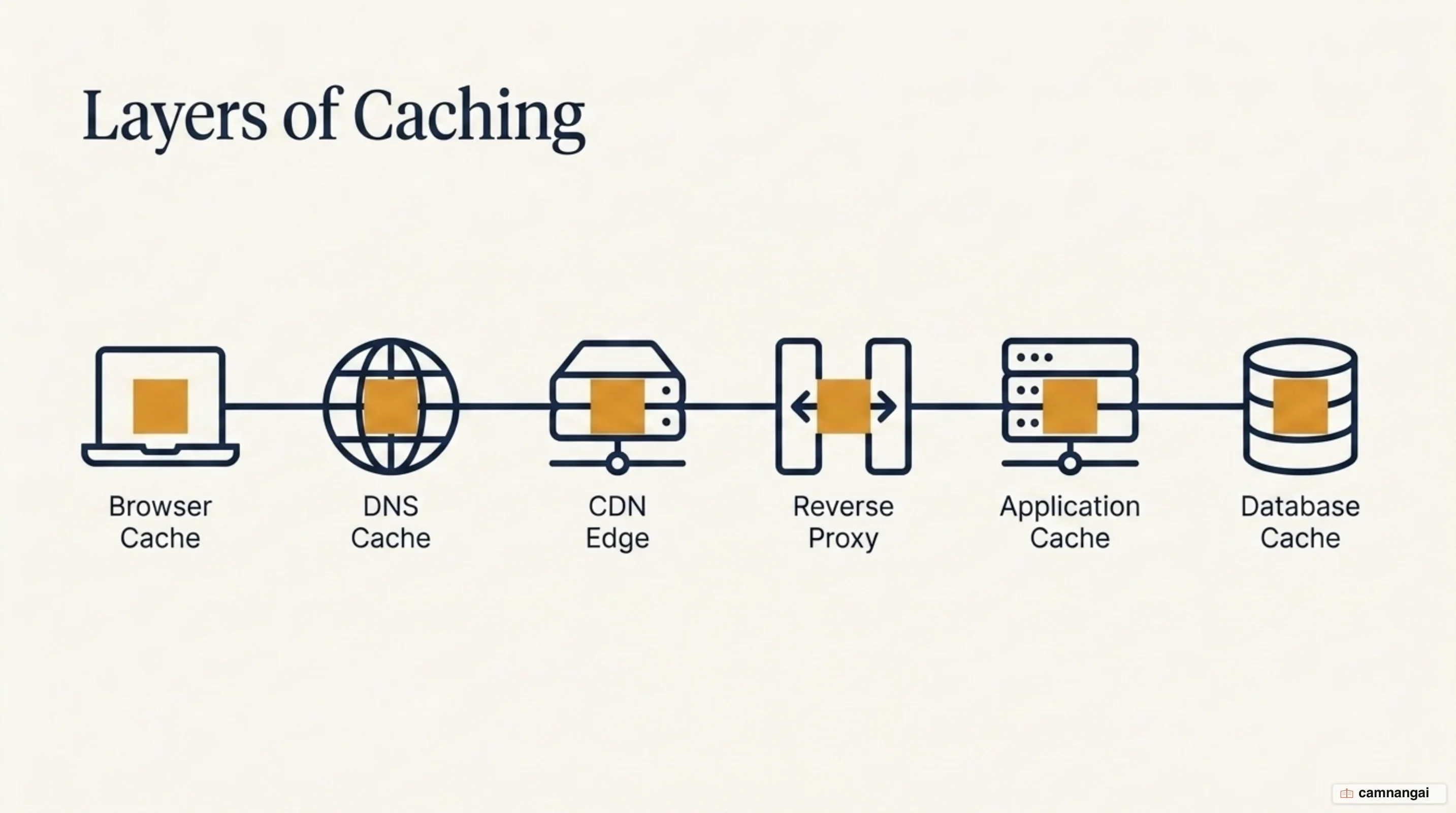
Caching occurs at multiple layers of your infrastructure. You must distinguish between them to manage data consistency effectively.
Web caches and reverse proxies
These sit in front of your web servers to offload HTTP traffic.
- Reverse proxies: Tools like Nginx and Varnish are deployed directly in your environment. Varnish, specifically, uses Varnish Configuration Language (VCL) to define complex caching logic.
- CDN (content delivery network) edge caches: Services like Fastly distribute content across a global network of points of presence (POPs) to minimize geographical latency.
Application and database caches
These store specific data objects or query results to speed up application logic.
- In-memory stores: Redis and Memcached are the standard for application caching. While a reverse proxy like Varnish caches entire HTTP responses, Redis caches granular data structures used by your code.
Client and DNS caches
- Browser cache: A private cache on your device that stores personalized content.
- DNS cache: Specialized systems that store IP address mappings to accelerate network lookups.
Cache keys, TTL and freshness
The cache key is the unique identifier for a stored object, typically composed of the URL and the Host header. The Vary header lets you create a composite key, which splits the cache for the same URL based on headers like Accept-Language or Accept-Encoding.
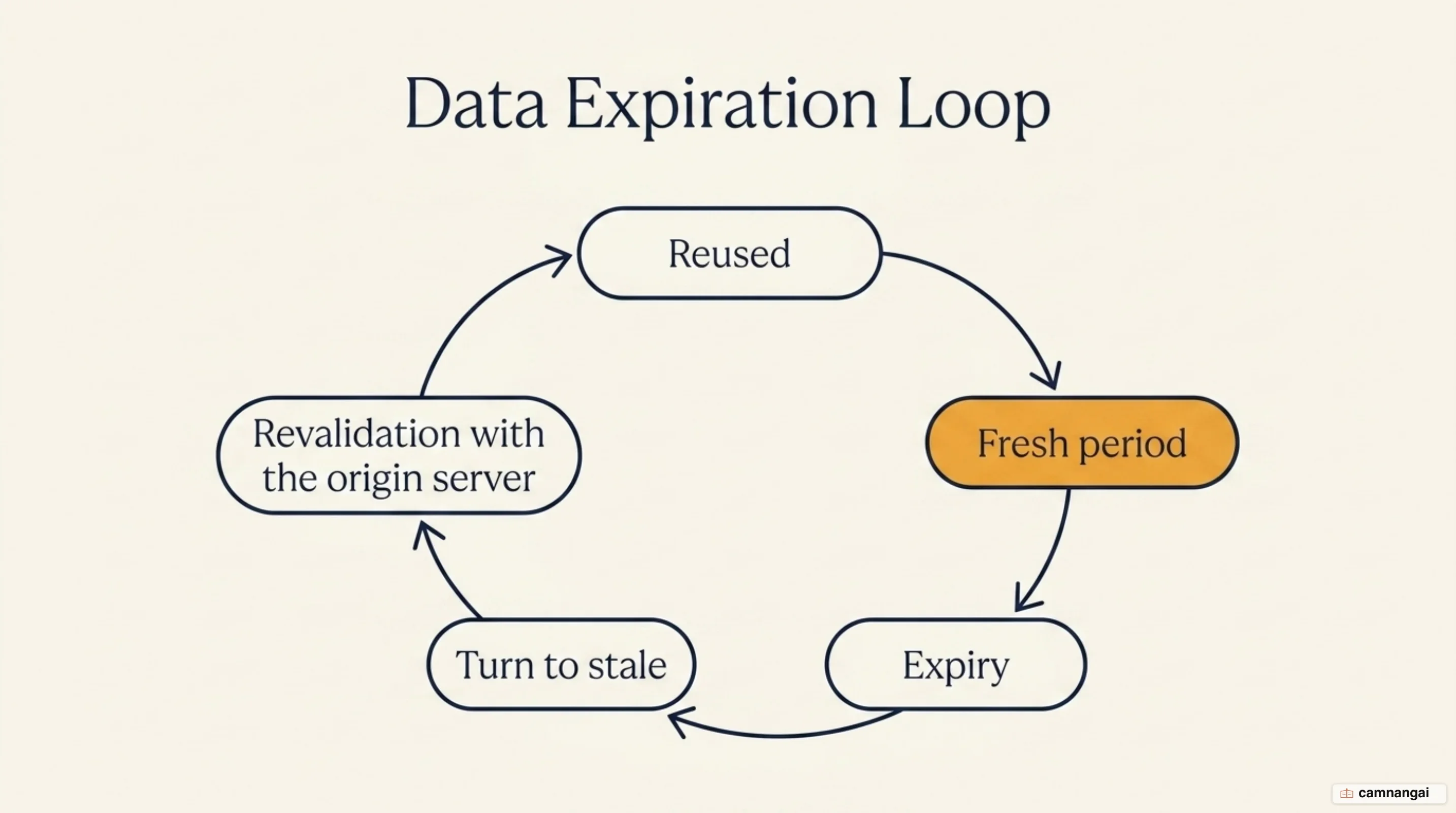
Data exists in two primary states:
- Fresh: The age of the data is within its time to live (TTL) and it can be served without revalidation.
- Stale: The data has expired.
You control these states via Cache-Control directives, and you must distinguish between no-cache and must-revalidate. The no-cache directive forces the cache to revalidate the response with the origin every single time before serving it. In contrast, must-revalidate allows the cache to serve fresh content normally but strictly forbids using a stale response if revalidation fails or the origin is unreachable.
Revalidation uses conditional requests with validators:
- ETag: A unique hash of the content used in
If-None-Matchrequests. - Last-Modified: A timestamp used in
If-Modified-Sincerequests. - stale-while-revalidate: Allows the server to deliver stale content immediately while fetching a fresh version in the background.
Cache invalidation and purging
Invalidation is the act of declaring cached data invalid before its TTL expires. This is often done via purging.
While purging is necessary to reflect source changes immediately, it carries risks. Common failure modes include serving stale data because a write path never triggered its invalidation, and purging far more than you meant to, which empties the cache and sends the whole load back to the origin at once. Caching for too long is more dangerous than not caching enough — but dropping the TTL until the problem goes away is not the fix either, which is why targeted invalidation exists.
Reverse proxies and CDNs provide more targeted tools than a single-URL purge:
- Bans: Expression-based invalidation that clears groups of objects matching specific criteria.
- Tag-based invalidation (surrogate keys): You label multiple related objects with a tag and purge them all with a single command.
Caching strategies at the application layer
Application-layer caching, particularly with Redis, requires a choice between reactive and proactive patterns.
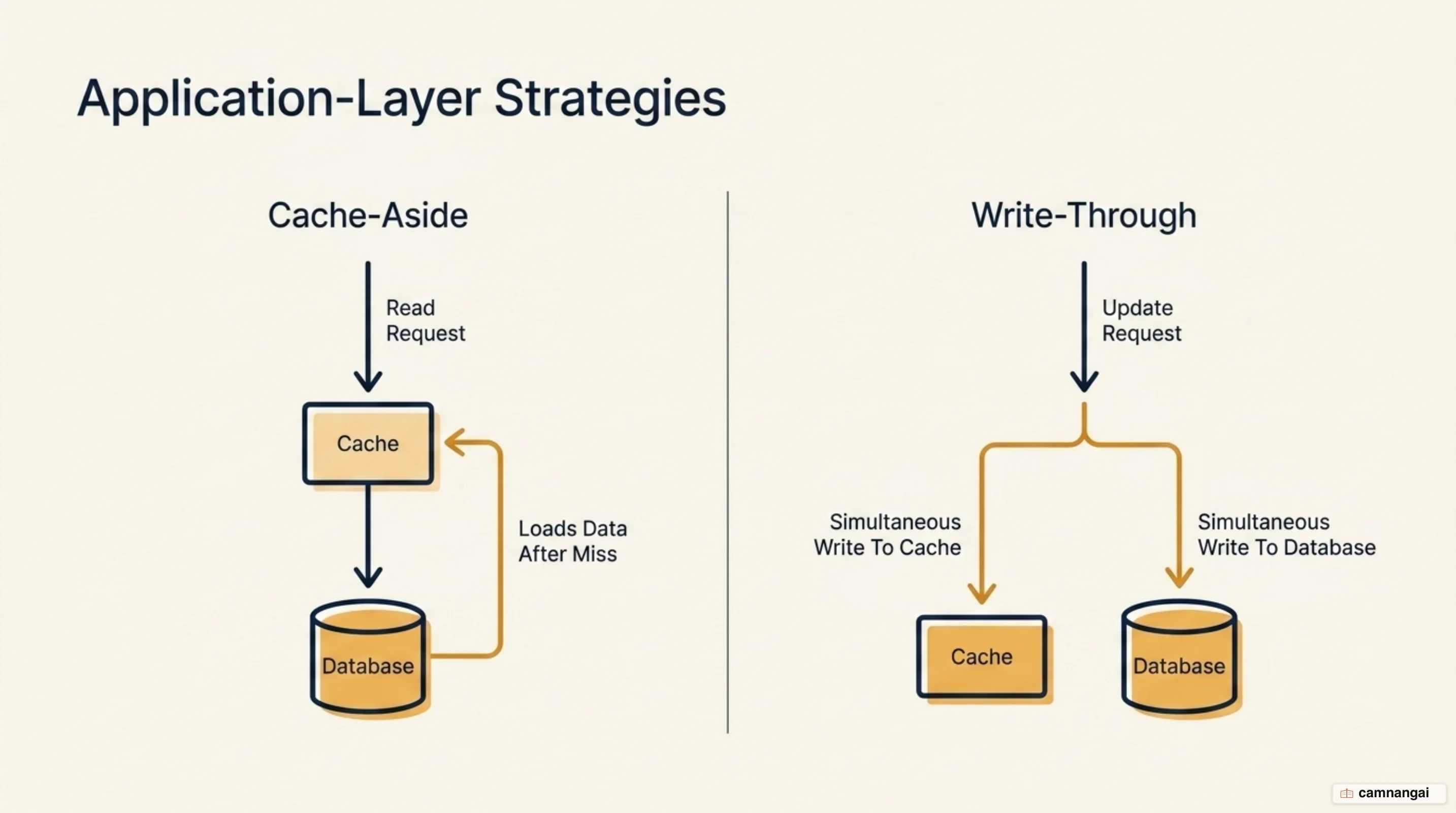
| Strategy | Logic | Trade-offs |
|---|---|---|
| Cache-aside (lazy loading) | App checks cache; on a miss, it fetches from the database and updates cache. | Pros: cost-effective, only active data is cached. Cons: overhead on the initial miss. |
| Write-through | App updates the database and the cache at the same time. | Pros: data is always fresh. Cons: wastes space on infrequently used data. |
The two are usually implemented together rather than as alternatives: write-through keeps the cache aligned with the database on every write, while cache-aside handles the misses that expirations create.
When the cache hits its maxmemory limit, it triggers eviction policies:
- LRU (least recently used): Evicts the keys that haven't been accessed for the longest time.
- LFU (least frequently used): Identifies and keeps hot keys by evicting those accessed least frequently, regardless of their age.
Cache hit ratio and the stampede problem
The cache hit ratio measures efficiency — the percentage of requests served from the cache. A low ratio points to fragmented keys or TTLs that are too short.
A cache stampede (dog-piling) occurs when a popular item expires and multiple parallel processes try to recompute or fetch it from the backend simultaneously. This can lead to congestion collapse. The cruel part is the timing: the stampede hits your most popular object at your busiest moment, because that is exactly the object enough clients are waiting on to knock the backend over.
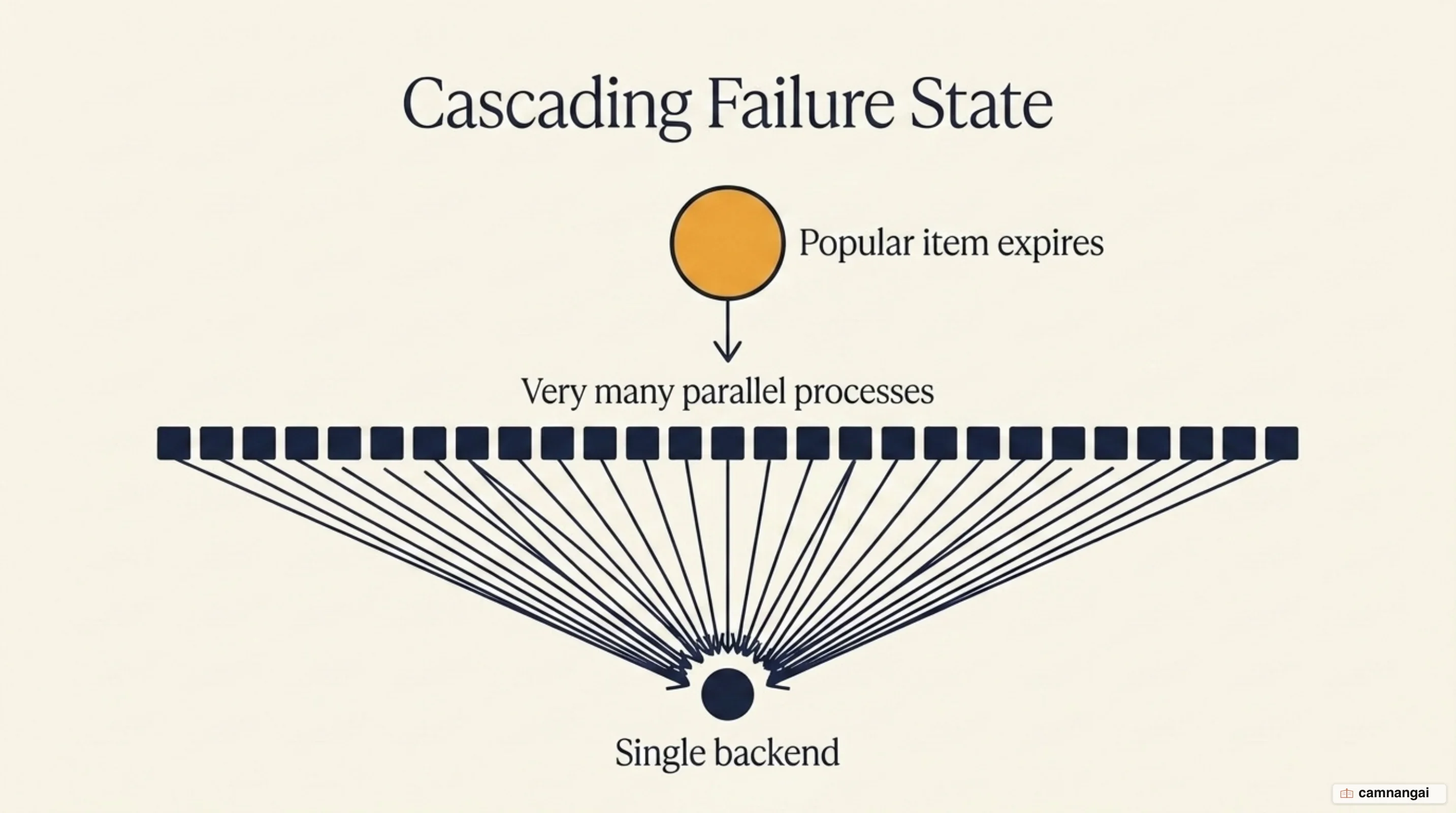
This is also why the instinctive fix makes things worse. If you shorten the TTL to keep data fresher, you have not removed the expiry — you have scheduled more of them, and each one is another chance for the herd to charge.
Mitigations include:
- Locking: The first process to see a miss acquires a lock to recompute the value; others wait or use a stale version.
- Request collapsing: The caching server identifies simultaneous requests for the same missing resource and makes a single backend fetch that satisfies all of the waiting clients.
- Probabilistic early expiration: Randomly refreshing the cache shortly before it officially expires to stagger the recomputation load.
Trade-offs and when a caching server does not help
Caching buys speed with consistency, and that is a real price rather than a rounding error. I would treat a caching server as the second thing you reach for, after you have checked that the slow query is actually slow for a reason you can't fix at the source — because a cache in front of a bad query hides the problem instead of solving it. There are also cases where it earns you nothing:
- Highly personalized data: Shared caches cannot serve data that is unique to a single user, unless the response is explicitly marked as private.
- Rapidly changing data: If the data churns faster than the hit ratio can pay for, the caching layer adds complexity without buying speed.
- Operational complexity: You are adding a moving part that requires specific invalidation logic and monitoring.
Data in these systems is also ephemeral. Because caches live in RAM or temporary storage pools, any key can be evicted at any time to make room for more frequently accessed resources.
References
- What is Caching and How it Works — AWS
- Web cache — Wikipedia
- HTTP caching — MDN Web Docs
- NGINX Content Caching — NGINX Documentation
- Introduction: How Does Varnish Work? — Varnish Cache
- Caching Content with Fastly — Fastly Documentation
- Caching Patterns — Database Caching Strategies Using Redis, AWS
- Key Eviction — Redis Documentation
- Cache stampede — Wikipedia