Superpowers is a Git-based skills framework for agentic IDEs that enforces Test-Driven Development and Socratic design.
It is a collection of Markdown-based methodologies that installs into tools like Claude Code to replace "vibe-coding" with technical discipline.
It improves AI coding by holding agents to senior engineering standards through explicit constraints rather than raw model capability.
You use it to prevent the agent from skipping planning or writing untested code.
The framework works as a state machine for the agent. By providing a library of 14 interconnected skills, Superpowers ensures the agent stops to clarify requirements, produces a verifiable plan, and executes work through isolated subagents.
What Superpowers is and why it's different
Coding assistants default to unstructured output. They frequently prioritize implementation over verification, patching symptoms without investigating root causes. Superpowers provides a discipline layer that prevents this behavior. It is not a proprietary SDK or a fine-tuned model; it is a repository of 14 interconnected skills stored as plain Markdown files.
The framework uses "Iron Laws" and "Red Flags" to prevent agent rationalization. For example, the TDD skill mandates: NO PRODUCTION CODE WITHOUT A FAILING TEST FIRST. If the agent attempts to write code before a test exists, the instructions require the agent to delete that code and restart the cycle. Red Flags like "tests passing on first run" or "just this once" are codified to alert the agent when it is deviating from the methodology.
Standard assistants fail when they spend 40,000 tokens solving the wrong problem because they skipped requirements gathering. Superpowers manages this by refusing to code until you have participated in a Socratic brainstorming session and approved a Design Document. That way, the agent understands the technical requirements before it touches the codebase.
How Superpowers works: skills and progressive disclosure
Each methodology is defined in a SKILL.md file containing YAML frontmatter and step-by-step instructions. The frontmatter includes the skill name and a description that acts as a trigger. Because these are plain text, you can audit and modify the instructions to match your team's specific conventions or architectural requirements.
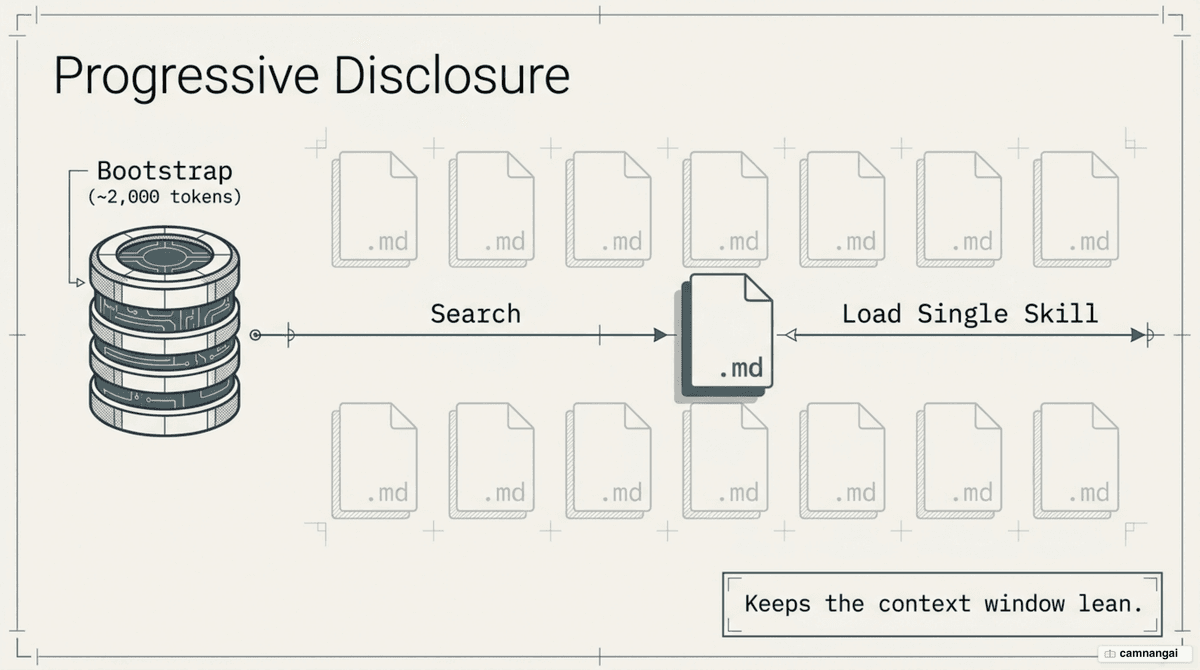
To maintain a lean context window, Superpowers uses "Progressive Disclosure." Loading all 14 skills at once would bury the agent in instructions. Instead, the framework starts with a bootstrap document, getting-started/SKILL.md, which is about 2,000 tokens. This document teaches the agent to use a shell script to search for and load only the full instructions of the specific skill required for the current task.
The system triggers itself via a session hook. You do not need to manually prompt the agent to use the framework. When you start a session in a supported harness, the bootstrap prompt is injected automatically. This prompt informs the agent that it has specialized skills and must search for the relevant methodology before doing any engineering work.
The 14 skills in Superpowers
The entire framework is just 14 SKILL.md files — one skill each, loaded on demand. Here is the full set, grouped by role in the workflow:
| Group | Skill | When the agent uses it |
|---|---|---|
| Bootstrap | using-superpowers | At the very start of every session |
| Bootstrap | writing-skills | Creating, editing, or verifying a skill |
| Ideation & planning | brainstorming | Before starting any new work |
| Ideation & planning | writing-plans | You have a spec, before touching code |
| Execution | executing-plans | Running a written plan |
| Execution | subagent-driven-development | Hand tasks to subagents, in-session |
| Execution | dispatching-parallel-agents | Several independent tasks, in parallel |
| Execution | using-git-worktrees | Need an isolated workspace |
| Code quality | test-driven-development | Before writing code: failing test first |
| Code quality | systematic-debugging | On any bug or test failure |
| Review & wrap-up | requesting-code-review | Feature done, before merging |
| Review & wrap-up | receiving-code-review | When taking review feedback |
| Review & wrap-up | verification-before-completion | Before claiming "done" |
| Review & wrap-up | finishing-a-development-branch | Code done, choosing how to integrate |
Because each skill is plain Markdown, you can open one up, adapt it to your team's conventions, or drop the ones you don't need. They interlock into one closed loop — the next section walks through that sequence.
The workflow: from brainstorm to verify
The workflow starts with the /superpowers:brainstorm command. This skill enforces a Socratic design session where the agent identifies ambiguities in your request. The output is a formal Design Document. This document is a strict prerequisite for the next phase. You must approve the design before moving to the planning stage using /superpowers:plan.
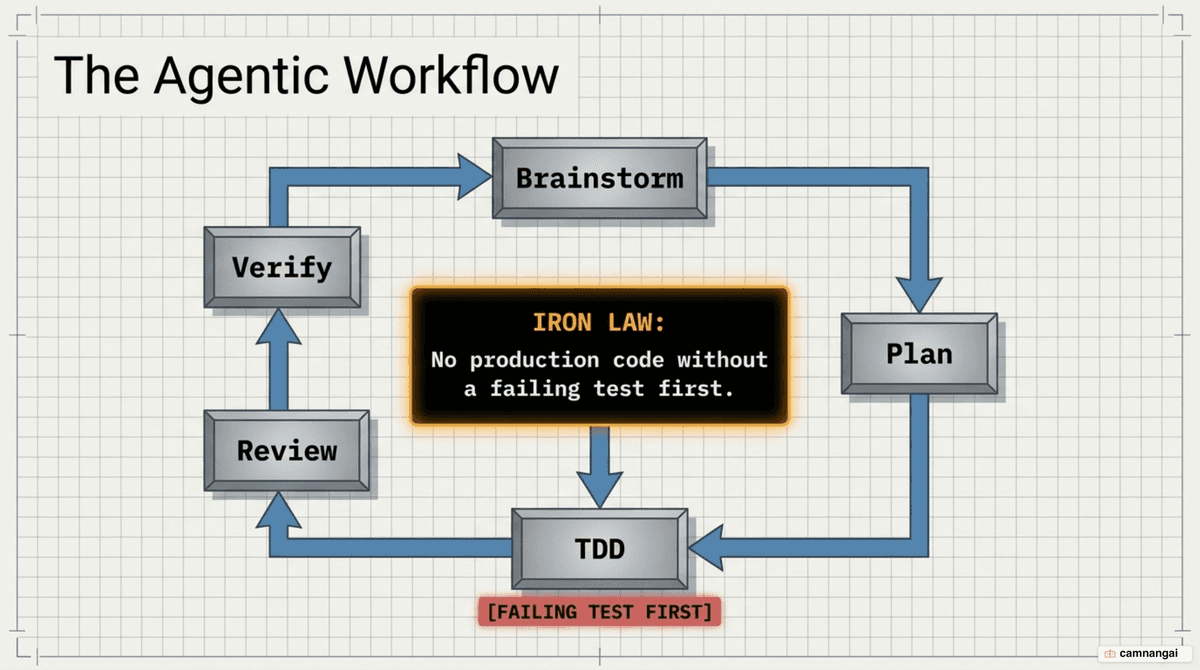
In the planning phase, the agent breaks the Design Document into "bite-sized" tasks estimated at 2–5 minutes each. These tasks specify exact file paths and verification steps. Once you approve the plan, you trigger /superpowers:execute-plan. The orchestrator then uses git worktrees to isolate the workspace on a new branch, ensuring a clean test baseline and preventing parallel tasks from clobbering each other.
Implementation follows a subagent-driven model. The orchestrator dispatches fresh agents to handle individual tasks. This prevents the primary context window from becoming bloated with implementation details. Every task must pass a two-stage review:
- Spec Compliance: Ensuring the code does exactly what the plan requested.
- Code Quality: Verifying naming conventions, style, and architectural consistency.
Installing it and your first session
For Claude Code, install the framework directly from the official marketplace:
/plugin install superpowers@claude-plugins-officialFor manual installation or to use the framework globally across different projects, clone the repository and use the Claude CLI:
git clone https://github.com/obra/superpowers.git
claude plugins install --global ./superpowers
After restarting your agent, the session hook activates, and you will see a "Superpowers active" message. When you first request a feature, the agent will not write code. It will execute the getting-started/SKILL.md instructions, trigger the brainstorming skill, and begin questioning your requirements. The agent will refuse to proceed until a design and plan are stored in your project directory.
What's new in Superpowers 6
Superpowers 6 focuses on performance gains derived from Anthropic's Fable model research. The update cuts wall-clock time by 50% and token spend by 60% compared to Version 5. These optimizations make the structured methodology viable for developers concerned with the cost and latency of agentic workflows.
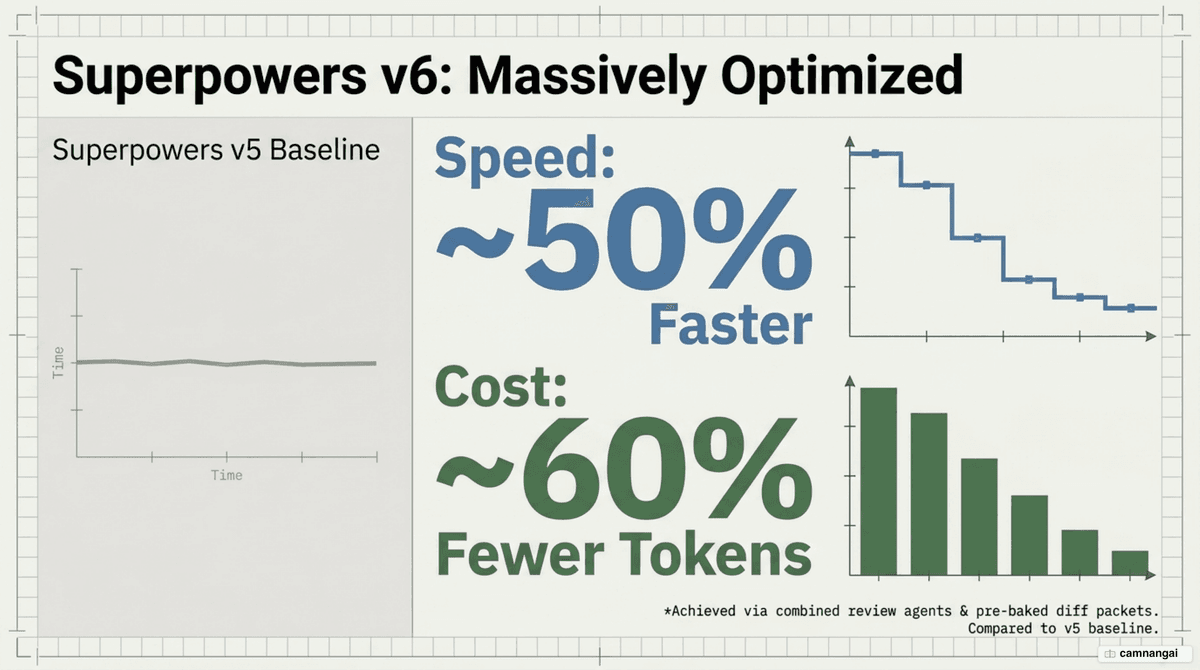
The architectural improvements in Version 6 reduce overhead by combining the previously separate spec-compliance and code-quality review agents into a single, unified reviewer. The system now uses pre-generated shell-script review packets. These packets contain formatted diffs and metadata, preventing the reviewer from wasting tokens by running multiple manual git commands to inspect the workspace.
Support has expanded to a broader range of harnesses. Superpowers 6 provides native support for Pi, Antigravity, and Kimi Code. It also includes improved reliability for Codex, OpenCode, and Cursor.
When to use it, and when to skip it
The complexity threshold for Superpowers is production-grade code. You should use it for multi-file features, architectural changes, and tasks requiring long-term maintenance. The planning and review overhead is the cost of ensuring the agent does not introduce regressions or technical debt.
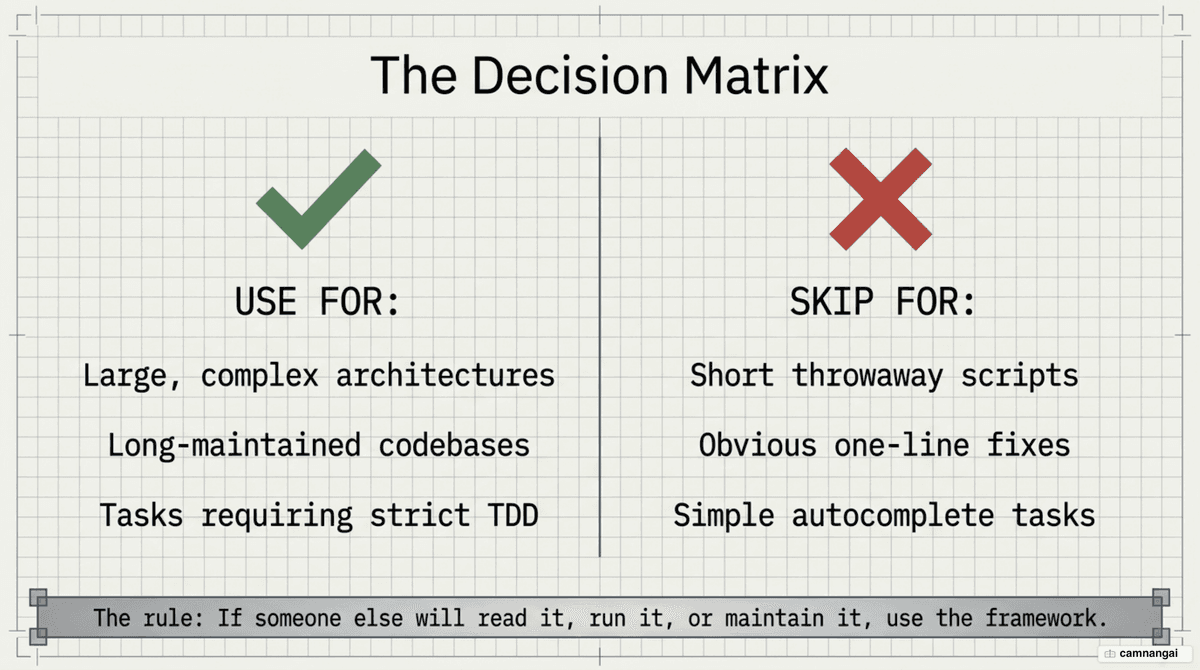
Skip the framework for one-line fixes, throwaway scripts, or simple prototypes. The Socratic brainstorming and TDD mandates are "overkill" when the planning overhead exceeds the execution time of the task. For these scenarios, a standard assistant session is more efficient.
Your edge as a developer shifts from "prompting" to "equipping." Instead of writing repetitive instructions, you manage a library of skills. This methodology ensures the agent follows the Iron Laws of engineering every time it touches your code, turning it from a chatbot into a disciplined contributor.
References
- GitHub - obra/superpowers: An agentic skills framework & software development methodology that works
- Superpowers: How I'm using coding agents in October 2025 — Jesse Vincent
- Superpowers 6 — Massively Parallel Procrastination
- Superpowers — Simon Willison
- Superpowers: The Claude Code Skills Framework Shipped as Markdown — Marc Nuri
- Claude Code Superpowers: Structured AI Development Plugin — DataCamp
- Superpowers Plugin Claude Code: An Honest Review — Mejba Ahmed
- Claude Skills, Explained: The 200K-Star Repo Everyone's Installing (Superpowers) — YouTube