Obsidian is a local-first, plain-text note-taking application built for long-term data durability and dense interlinking between notes.
You use it by managing a local directory of Markdown (.md) files that the application parses into
an interconnected knowledge base. Your notes stay under your direct control, in a format any
standard text editor can read.
Approach Obsidian as a "Second Brain" — a system for connecting thoughts rather than merely collecting them, and the manual foundation for an AI second brain that can recall your knowledge on demand. Traditional applications focus on isolated data storage; Obsidian prioritizes the relationships between data points. Bidirectional linking turns static notes into a dynamic network, so you retrieve information through association rather than through rigid hierarchies.
The whole system rests on local-first data ownership. Because it operates on standard files on your own hardware, it removes the risks that come with cloud dependency and proprietary databases. This pragmatic design prioritizes technical utility and data longevity, keeping your notes functional and accessible regardless of the software's commercial future.
What is Obsidian?
Obsidian is a local-first, plain-text note-taking application that structures your notes the way a code editor structures source files. It is built on the "Vault" concept, which is technically just a standard folder on your hard drive containing .md (Markdown) files. This treats your notes as individual files rather than entries in an opaque, centralized database, keeping a clear separation between the interface and your data.
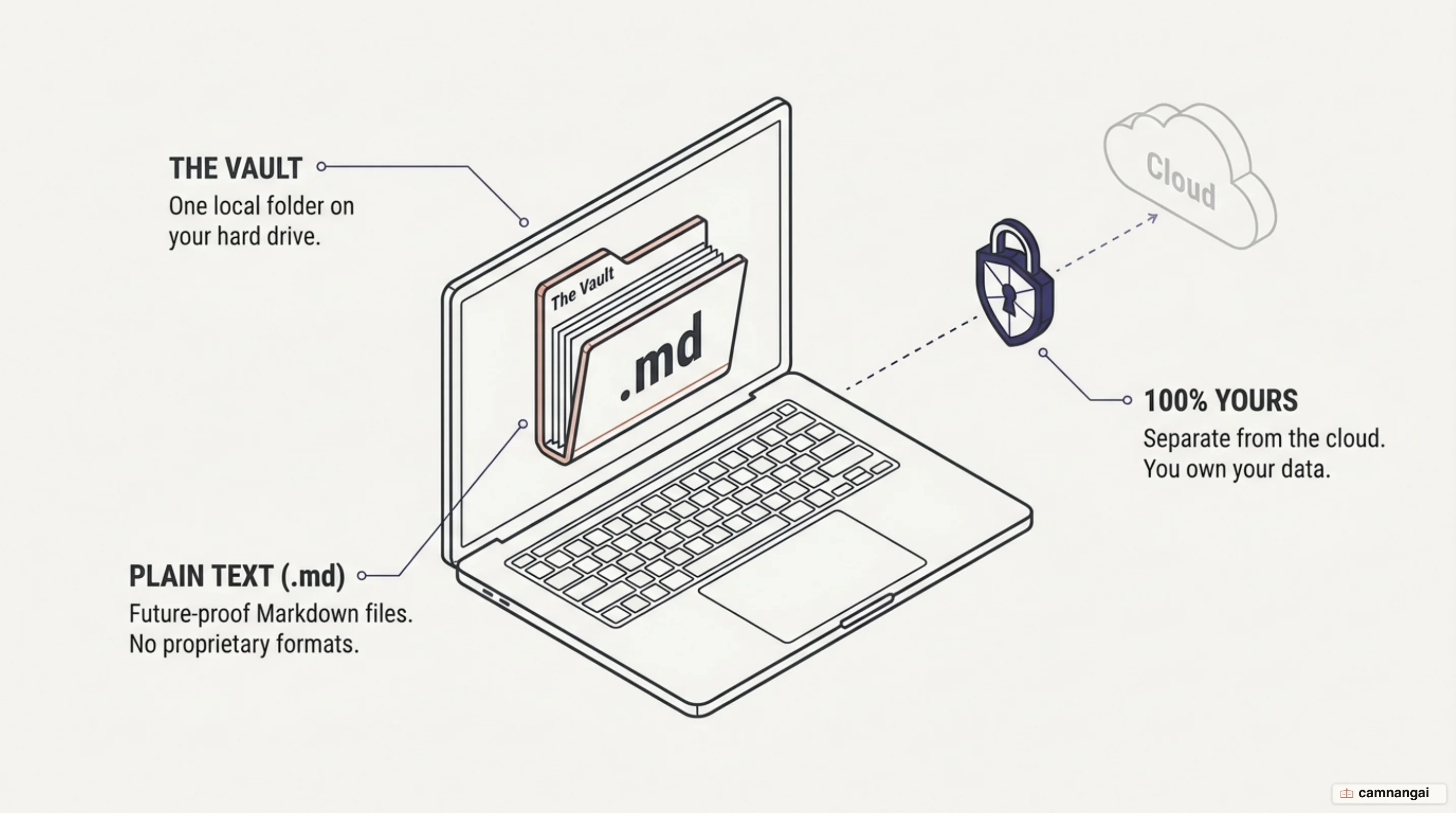
The primary technical advantage is open-standard Markdown. Markdown uses simple symbols — such as # for headers and [[ ]] for links — to add structure without any proprietary code. That makes your work future-proof: even if the Obsidian application disappears, your files stay readable by any system that supports plain text, which has been an industry standard for decades.
This contrasts sharply with database-driven or cloud-dependent tools that effectively "hold notes hostage" through proprietary formats and server-side silos. In Obsidian, you keep full control over your data. There is no vendor lock-in because there is no proprietary file format. You can move your entire library to another system with no switching cost and no data loss.
Because the system is local-first, it also gives you stronger privacy and offline reliability. Your data is not stored on a third-party server by default, so it is inaccessible to anyone but you. This design enables instant search and high-speed indexing, since the application never has to negotiate with a remote API to retrieve or save your content.
Why choose Obsidian?
Performance is a core advantage. Because each note is a lightweight text file, Obsidian stays light on system resources. Unlike heavy applications such as Evernote, which grow sluggish as their database swells, Obsidian stays responsive even with thousands of files. That responsiveness matters for holding a flow state during intensive research or writing.
Portability comes from the absence of vendor lock-in. Many competitors use proprietary schemas that make data migration painful. Obsidian's reliance on generic Markdown lets you sync your files with any standard protocol — Git, Dropbox, or Syncthing — and open them in any Markdown editor. You are never dependent on a single provider for your long-term knowledge management.
Privacy is inherent to the local-first architecture. Since your files live on your device, they are not exposed to the security vulnerabilities or data-mining practices of cloud providers. For anyone managing sensitive or proprietary work, that is a level of security cloud-native applications cannot match without significant encryption trade-offs.
The interface keeps visual overhead low while exposing advanced functionality through the Command Palette. You start in a clean text-editing environment and scale complexity as your needs grow — a robust framework for organizing content without the clutter of more marketing-oriented productivity tools.
The core features you'll actually use
The primary engine of Obsidian is the internal link and backlink system. Using the [[Note Name]] syntax, you create a bidirectional connection between files. When you link Note A to Note B, Obsidian tracks the relationship and shows you every note that references the current one. A flat file structure becomes a "personal Wikipedia" where concepts are linked by relevance.
![Diagram of links and backlinks in Obsidian: note A points to note B with [[ ]] syntax, and B automatically shows a backlink to A](/articles/huong-dan-su-dung-obsidian-cho-nguoi-moi/03-en.webp)
Visual thinking is supported by Canvas and Graph View. Canvas is an infinite whiteboard for brainstorming and diagramming, where you lay out notes and media visually. Graph View is an interactive map of your vault's topology, letting you spot conceptual clusters or "orphan" notes that are not yet integrated into your broader knowledge base.
Templates let you automate the structure of recurring note types. You define standard formats for project logs, meeting notes, or book summaries, so data stays consistent across your vault. That reduces the friction of starting a new entry and ensures the necessary fields are captured at the point of creation.
To create a link and see how the system tracks connections, use this syntax in your editor:
Review the [[Project Roadmap]] for current technical specifications.

# This note now appears as a 'backlink' inside the Project Roadmap file.
Getting started without the overwhelm: write first, organize later
A common error among new users is "setup hell" — over-designing the vault's hierarchy before you've written anything. Adopt a "write first, organize later" mindset instead. Traditional software forces top-down organization, but Obsidian is optimized for emergent structure. Prioritize writing over structural perfection so you never paralyze your own workflow.
The search engine is fast and thorough, locating information by text, tags, or file path almost instantly. Deep folder hierarchies aren't necessary at the start. Begin with a flat structure and let the volume and nature of the notes you actually write decide your structure.
Avoid the trap of mass-installing community plugins before you understand the core application. Every plugin adds a layer of complexity and potential technical debt. Start with the core functionality and extend the system only when you hit a specific bottleneck the native tools cannot address. That keeps your environment stable and focused on the work.
Remember that a vault is an evolving system. It is far more efficient to organize a collection of existing thoughts than to build a rigid architecture for notes that do not yet exist. By focusing on the writing, you let natural patterns emerge, which you can then formalize through links and indices.
Setting up your first vault: MOCs, Daily Notes, and folders
To keep order without rigid hierarchies, use "Maps of Content" (MOCs). An MOC is a non-hierarchical index — a single note that acts as a central hub for a topic. A "Systems Architecture MOC," for instance, would collect links to all your related notes on hardware, networking, and security, serving as the primary entry point for that domain.
Enable the "Daily Notes" core plugin to create a chronological landing zone for fleeting thoughts and task tracking. These notes double as a journal and a technical log. Over time they form a searchable record you can periodically review, pulling out permanent concepts and linking them into your MOCs.
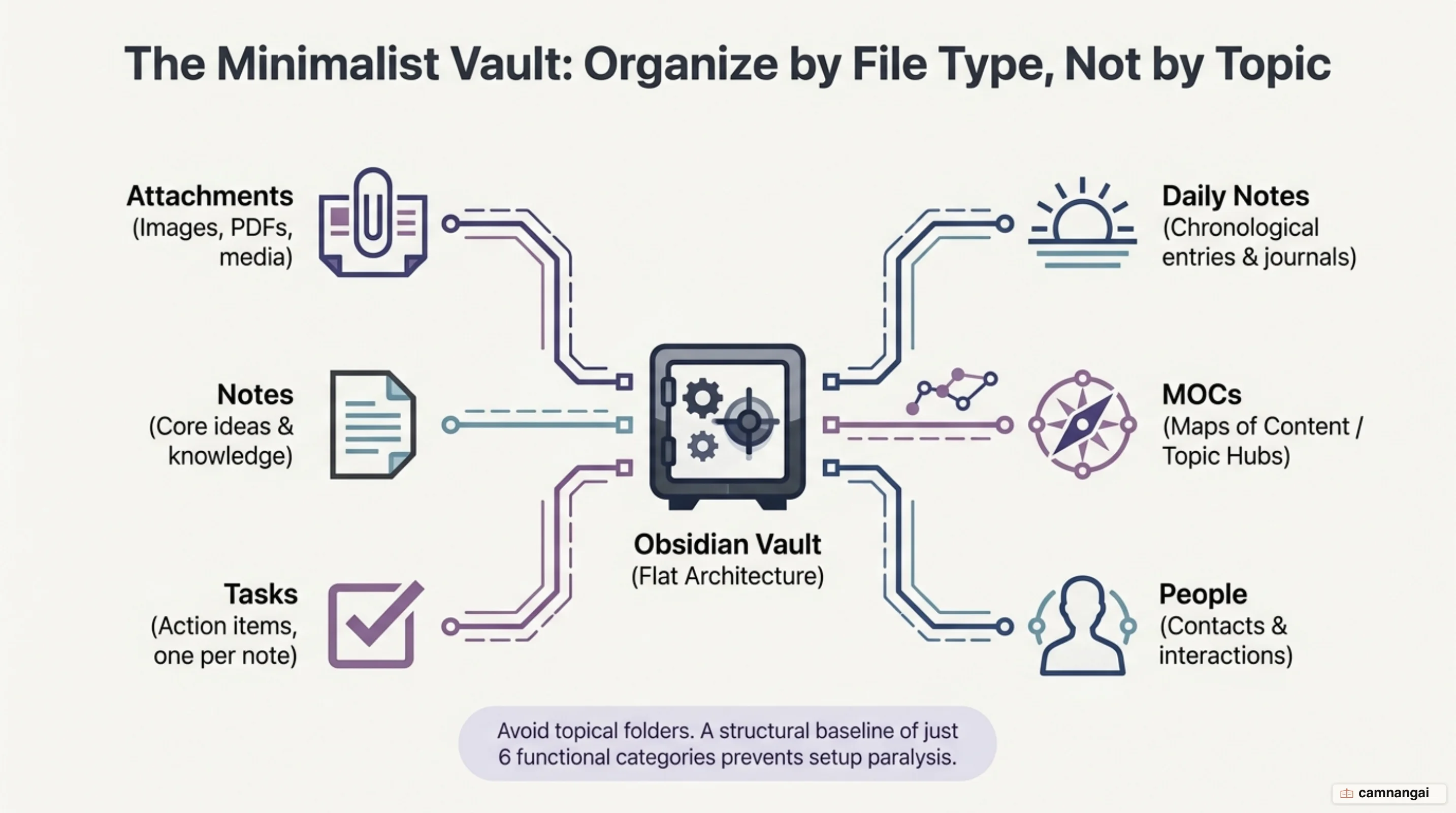
Keep the folder structure minimal — roughly six functional categories. A workable set: Daily Notes, MOCs, People, Tasks, Attachments (for non-text media), and a general Notes folder. This organizes files by their "type" rather than their "topic," which is a more stable long-term strategy for a local file system.
To cut the cognitive load of switching between mouse and keyboard, learn a few essential hotkeys:
Cmd/Ctrl + N New Note
Cmd/Ctrl + O Quick Switcher (rapid note retrieval)
Cmd/Ctrl + P Command Palette (access every system function)
Cmd/Ctrl + T Insert Template
Folders or tags? How to organize your notes
The "folder problem" is a limitation of physical file systems: a note can only live in one place. If a note on "Computational Chemistry" sits in a "Chemistry" folder, its relationship to "Computer Science" is obscured. You solve this with tags and links to MOCs, which let a single note belong to multiple conceptual categories at once.
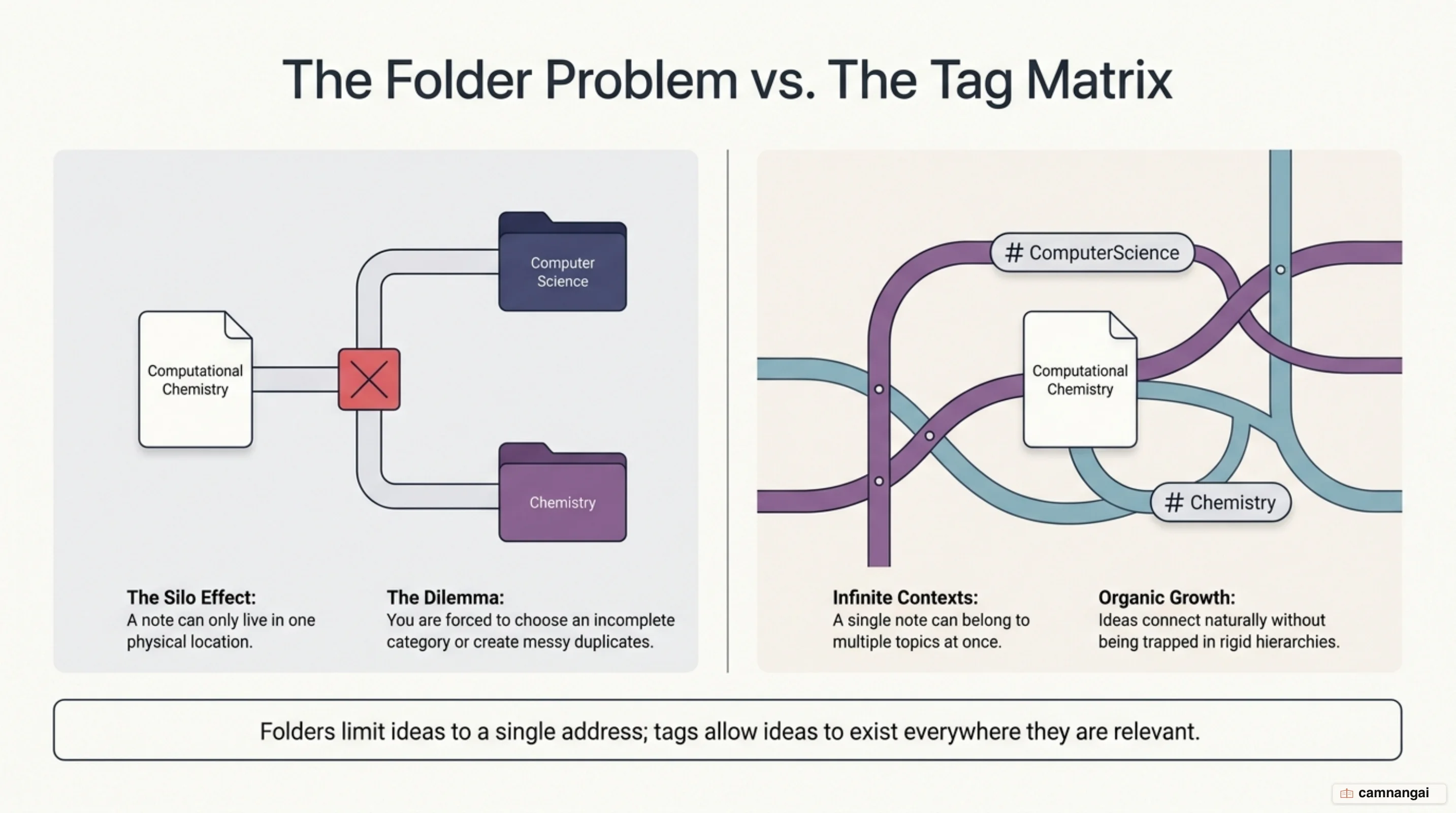
Frameworks like PARA (Projects, Areas, Resources, Archives) are popular, but treat them as optional schemas rather than rules. Many power users prefer "double-dipping" — broad folders for file types, specific tags for cross-functional indexing. In the UI you can filter by several tags at once (for example #research and #active), giving you a dynamic view that folders alone cannot.
When naming notes, mind the 255-character limit. Shorter titles are faster to browse; longer, descriptive titles carry more context when the note is linked elsewhere. Since the title is what appears in your links and in Graph View, put the most important information there to keep your knowledge web readable at a glance.
Use tags mainly as aliases for your MOCs or for status tracking. When a tag doubles as a topic marker, Obsidian treats it as both a searchable filter and a clickable connection in the graph. This hybrid approach gives you the organizational benefits of a database with the performance and portability of a flat file system.
How people actually use Obsidian
Researchers often use the Zettelkasten method, writing "atomic" notes that each hold a single, discrete idea. By linking those atomic notes, they build a personal wiki that supports high-volume output — the same Markdown groundwork an LLM wiki turns into a knowledge source for AI — effectively outsourcing memory to a system that surfaces connections between pieces of research written years apart.
Daily journaling and "weekly retrospectives" are common workflows for keeping a running log. Templates standardize the weekly review questions, so you can track progress and spot recurring bottlenecks. Because the data is plain text, finding a decision or insight from months ago is a few keystrokes rather than a manual dig through archives.
Project knowledge bases work well for managing complex documentation. You aggregate meeting notes, specifications, and research into a single vault, then link the documents so every piece is reachable through its conceptual neighbors — a durable reference system for the whole project.
Content creators use the app for "content architecture." They start with a note representing a story idea and populate it with links to research and quotes already stored in the vault. This lets them assemble new work from a pre-existing library of verified material, cutting the time it takes to draft.
Extending Obsidian: plugins, Sync, and Publish
The ecosystem offers over 2,000 community plugins for specialized workflows. "Kanban" enables visual task management, "Dataview" lets you query your notes with a SQL-like syntax, and "Calendar" ties navigation to your daily notes. These are modular additions — install them only when you have a concrete need.
"Obsidian Sync" is a paid convenience service that provides end-to-end encrypted synchronization across devices, with a version history that lets you recover earlier iterations of a note. You can also sync with third-party tools like Git, but the native service is tuned for the Obsidian environment.
"Obsidian Publish" turns a subset of your vault into a public-facing website — a digital garden or technical documentation — handling hosting and performance for you. And the built-in "Web Clipper" lets you capture online content cleanly into Markdown files.
These services and plugins are strictly enhancements. The core function of creating and linking plain-text files stays free and fully operational with no external dependencies, keeping the system lightweight and focused on managing your notes.
The downsides, and who Obsidian is for
The most prominent trade-off is the learning curve. Obsidian hands you a blank canvas rather than a guided experience. The lack of native real-time collaboration is a deliberate architectural choice, made to prioritize local encryption, data ownership, and offline performance. If your main requirement is simultaneous multi-user editing, a cloud-based tool like Google Docs fits better.
The application itself is proprietary, but your data lives in open-standard Markdown, which limits the risk of vendor lock-in. You own the content and can move to any other text-based system at any time. That separates Obsidian from platforms where your data is inseparable from the software.
Obsidian is the right choice for researchers, writers, and engineers who value data ownership and conceptual connection. It rewards people willing to build and maintain their own system over time. If you need a tool whose files stay readable and functional for decades, regardless of platform shifts or subscription models, Obsidian is the correct technical solution.
Plain-text files remain the most durable format for storing information. Specific software will eventually become obsolete, but your directory of .md files will stay accessible on your hardware for the foreseeable future. Using Obsidian is an investment in keeping your knowledge accessible for the long term.