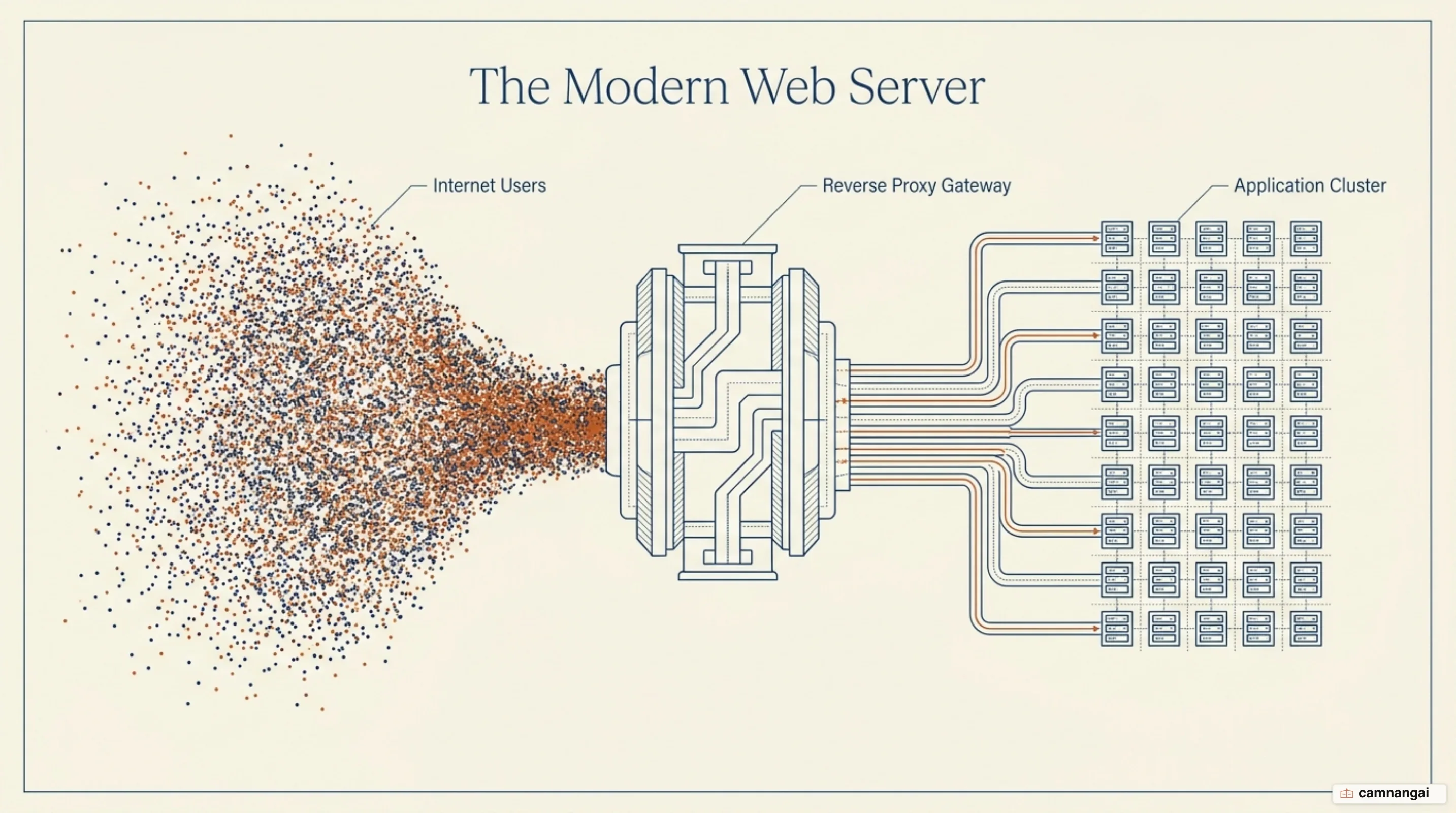
Nginx (pronounced "engine x") is an asynchronous, event-driven web server, reverse proxy, and load balancer.
Its role in modern infrastructure is defined by its ability to handle massive concurrency with minimal resource consumption. Originally developed by Igor Sysoev in 2002 and released publicly in 2004, the software was specifically architected to address the limitations of process-based architectures.
Current metrics confirm Nginx's status as a foundational component of the internet. As of August 2026 it runs 31.3% of all sites whose web server is known, ahead of Apache at 22.6%. Its performance profile is rooted in its non-blocking architecture, which allows a single process to manage thousands of simultaneous connections without the overhead of spawning a new thread for every request.
Technically, what is Nginx can be summarized as a high-performance edge-layer tool. It is written in C and operates as a modular framework, enabling it to scale nonlinearly as traffic increases. By offloading resource-intensive tasks such as SSL termination, compression, and caching from application servers, Nginx ensures high availability and low latency for complex web architectures.
What is Nginx?
Nginx is a high-performance, open-source web server written in C and released under the 2-clause BSD license. Its identity is defined by its focus on efficiency and scalability, serving as a specialized edge-layer tool rather than just a simple file server. It is frequently deployed to offload SSL/TLS termination, data compression, and content caching, which allows backend application layers to focus on executing dynamic logic.
The software uses a modular, event-driven, and non-blocking architecture. This design is a stark departure from traditional models that consume significant memory per client connection. By running a single-threaded run-loop, Nginx manages thousands of concurrent requests within a predictable memory footprint. This predictable resource consumption makes it highly suitable for environments where hardware efficiency is a primary constraint.
Beyond its role as a web server, Nginx is a versatile reverse proxy. It sits between the client and backend applications, such as Node.js or PHP-FPM, managing network communication and protecting the application layer from traffic spikes. Its modularity allows for the integration of various functional modules that handle tasks like load balancing and media streaming without requiring modifications to the core codebase.
How widely is Nginx used?
Current market data establishes Nginx as a dominant force in web infrastructure. As of August 2026 it runs 31.3% of all websites whose web server is known, ahead of Apache at 22.6%. Its lead is wider at the top of the market: among the 1,000 most visited sites it holds 30.5% against Apache's 9.9%. Its adoption was driven by the shift from delivering simple static HTML to modern "always-on" communication. Today's internet landscape involves billions of mobile and desktop clients maintaining persistent connections for live feeds, social media updates, and real-time alerts.
This transition in browser behavior and application complexity necessitated the move from the traditional LAMP stack (Linux, Apache, MySQL, PHP) to the LEMP stack. In this newer configuration, Nginx (represented by the "E" for Engine x) replaces Apache as the front-facing server. Its ability to serve static content with extremely low overhead while managing the "slow client" problem made it the preferred choice for scaling large-scale digital services.
Nginx's status as the most widely deployed open-source web server is a result of its reliability across diverse operating systems, including Linux, FreeBSD, and Solaris. It has moved from a tool used purely for offloading static content to a ready-to-deploy, full-featured web server. Its widespread presence in cloud services and enterprise environments shows how much it matters as a building block for scalable web architectures that stay up.
Why Nginx exists: the C10K problem
Nginx was designed to solve the C10K problem, a term coined by engineer Dan Kegel to describe the challenge of handling 10,000 simultaneous connections on a single server. In the early 2000s, traditional web servers ran a process-per-request or thread-per-request model. While functional for low traffic, this architecture led to "thread thrashing", where the CPU spends excessive time on context switching rather than request processing, causing performance to degrade as connection counts rose.

A significant bottleneck in older architectures was the "slow client" problem. In a process-based model, if a client on a slow connection takes ten seconds to receive a 100 KB file, that dedicated server process and its memory — often 1 MB or more — are tied up for the entire duration. With 1,000 such clients, a server could easily exhaust 1 GB of RAM just to send a few megabytes of data. Although increasing OS kernel socket buffers can offer some relief, this is not a general solution and often introduces undesirable side effects.
Nginx eliminates these inefficiencies by using an asynchronous, event-based approach. A worker process does not wait for a network transmission to finish; it triggers an event, handles the immediate task, and returns to the run-loop. This ensures that system resources are only consumed when there is actual work to perform. This architecture allows Nginx to maintain high performance and low memory usage even when managing tens of thousands of simultaneous slow or persistent connections.
How the master and worker processes work
Nginx architecture relies on a single master process and several worker processes. The master process is the orchestrator; it reads and validates configuration files, binds the necessary network sockets, and manages the lifecycle of the worker processes. It also handles non-stop binary upgrades and configuration reloads. If a configuration is updated, the master verifies the syntax, starts new workers, and gracefully shuts down the old ones after they finish serving existing requests.
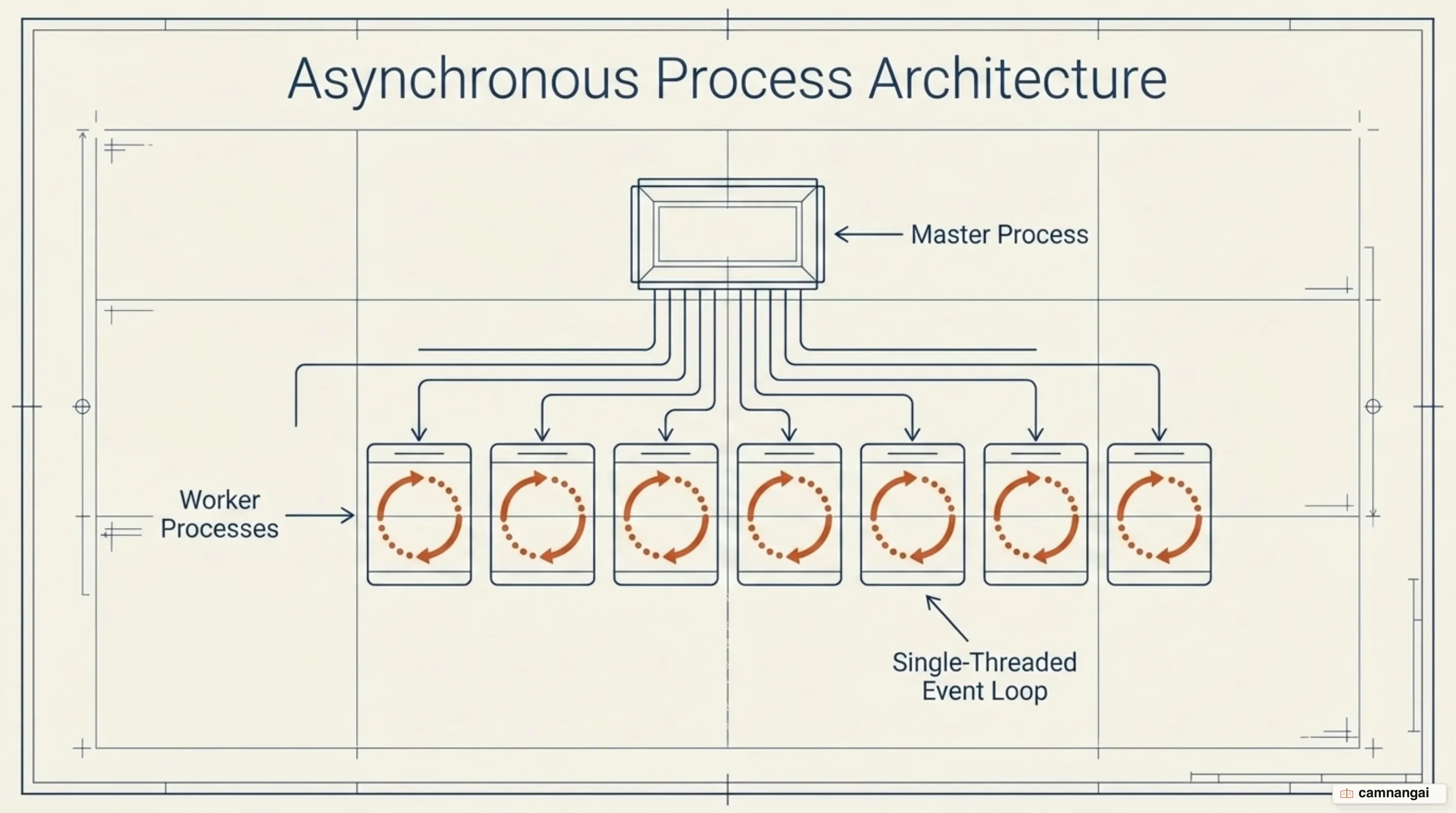
The worker processes handle the actual request processing. Each worker is single-threaded and executes a highly efficient, non-blocking run-loop. These workers lean on OS-specific multiplexing mechanisms — such as epoll on Linux or kqueue on BSD — to monitor thousands of connections simultaneously. When the kernel notifies a worker of a network event, the worker executes the associated callback function and immediately returns to the loop, ensuring that no single connection can block others.
To get the most out of the hardware, the number of worker processes is usually configured to match the number of available CPU cores. This prevents context switching overhead and thread thrashing. However, if the workload is disk I/O bound, such as in heavy proxying or serving large files from storage, it is recommended to set the worker count to 1.5x or 2x the number of cores. While Nginx uses optimizations like sendfile and AIO to mitigate disk blocking, this increased worker count provides better performance under heavy I/O load.
How an Nginx configuration file works
Nginx uses a centralized configuration system with a C-style syntax. The configuration is structured using simple directives and block directives. A simple directive consists of a name and parameters followed by a semicolon (;), while a block directive uses braces () to enclose additional instructions. Block directives that contain other directives are referred to as contexts, such as the main, http, server, and location contexts.
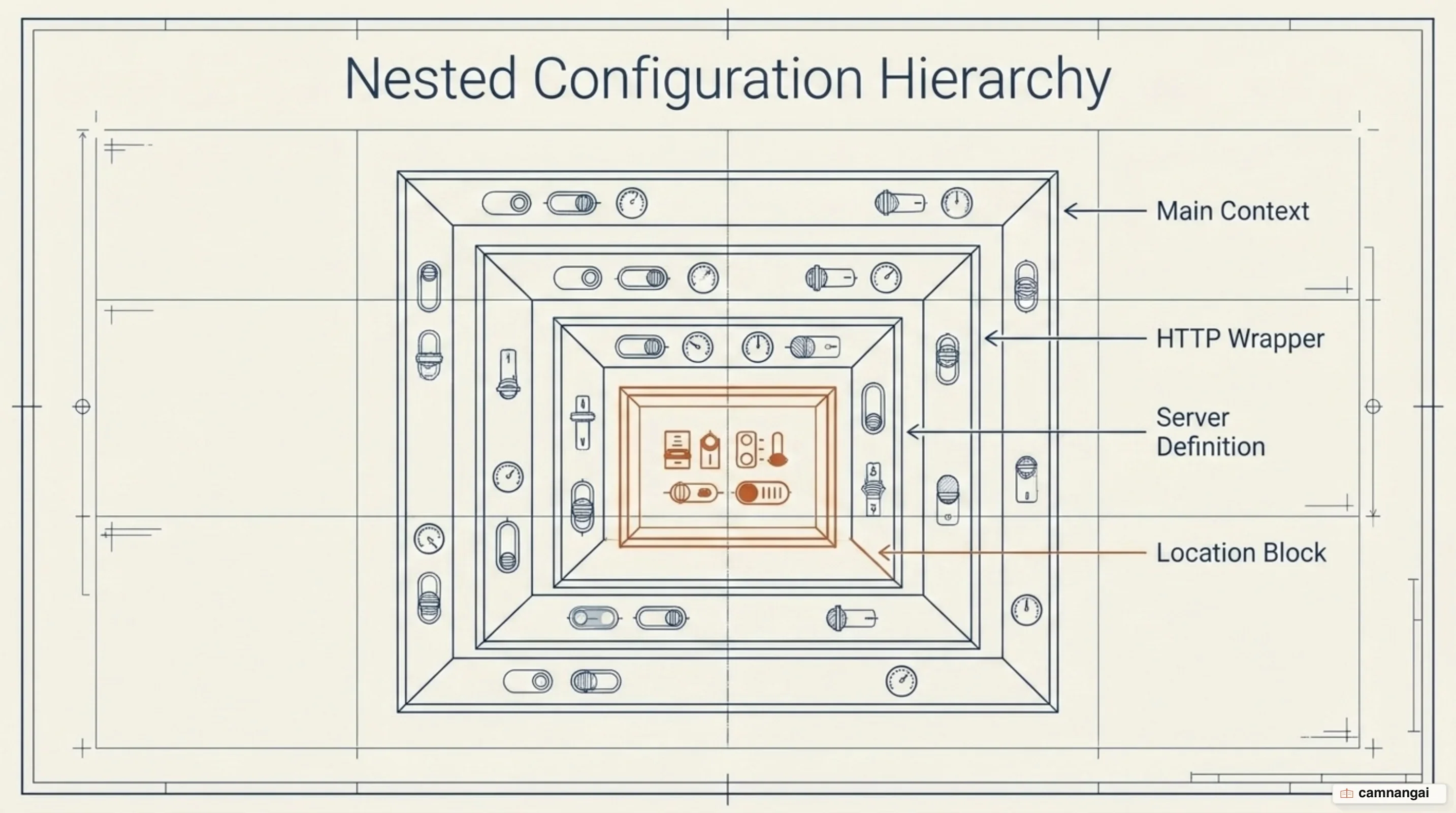
Inheritance in Nginx follows an "outside-in" or downward rule. A child context inherits settings from its parent but will completely override them if the same directive is redefined locally. Directives in child contexts are not additive; the child value replaces the parent value. Furthermore, Nginx does not support Apache-style decentralized configuration through .htaccess files. All configuration must reside in a centralized set of files, which the master process verifies as a compiled read-only form before forking worker processes.
A standard configuration structure typically follows this format:
events {
    worker_connections 1024;
}

http {
    include mime.types;

    server {
        listen 80;
        server_name example.com;

        location / {
            root /srv/www;
            index index.html;
        }
    }
}
In this example, the events context sets global connection limits, the http block defines web traffic parameters, and the server block defines a virtual host. This centralized model reduces the attack surface and eliminates the performance penalty associated with checking for directory-specific configuration files on every request.
What else Nginx does besides serving static files
Nginx is widely used as a reverse proxy, sitting between clients and backend applications like Node.js or PHP. In this capacity, it handles SSL termination and caching, ensuring that backend processes are protected from the latency of slow clients. Because Nginx does not embed a dynamic language processor, it communicates with dynamic backends via protocols like FastCGI, SCGI, or uwsgi. This is typically implemented using the proxy_pass directive within a location block to forward requests to a local or remote service.
As a load balancer, Nginx distributes traffic across a pool of backend servers using disciplines like Round-robin or IP-hash. IP-hash is often used for session persistence, but it fails in environments where all traffic originates from a single /24 CIDR block — such as behind certain firewalls or gateways — because the first three octets of the IPv4 address are identical. In these scenarios, the solution is to use the hash $binary_remote_addr consistent directive, which captures the complete client address in a binary representation to ensure proper load distribution.
Nginx also provides real health checks and failure detection for upstream groups. If a backend server becomes unresponsive, Nginx can automatically re-route traffic to healthy servers in the pool. This functionality, combined with its ability to serve as an HTTP cache, significantly reduces the load on the application layer. By managing these edge-level tasks, Nginx enables horizontal scalability, allowing administrators to add more backend servers to a pool and use Nginx to distribute requests across them.
How Nginx and Apache differ
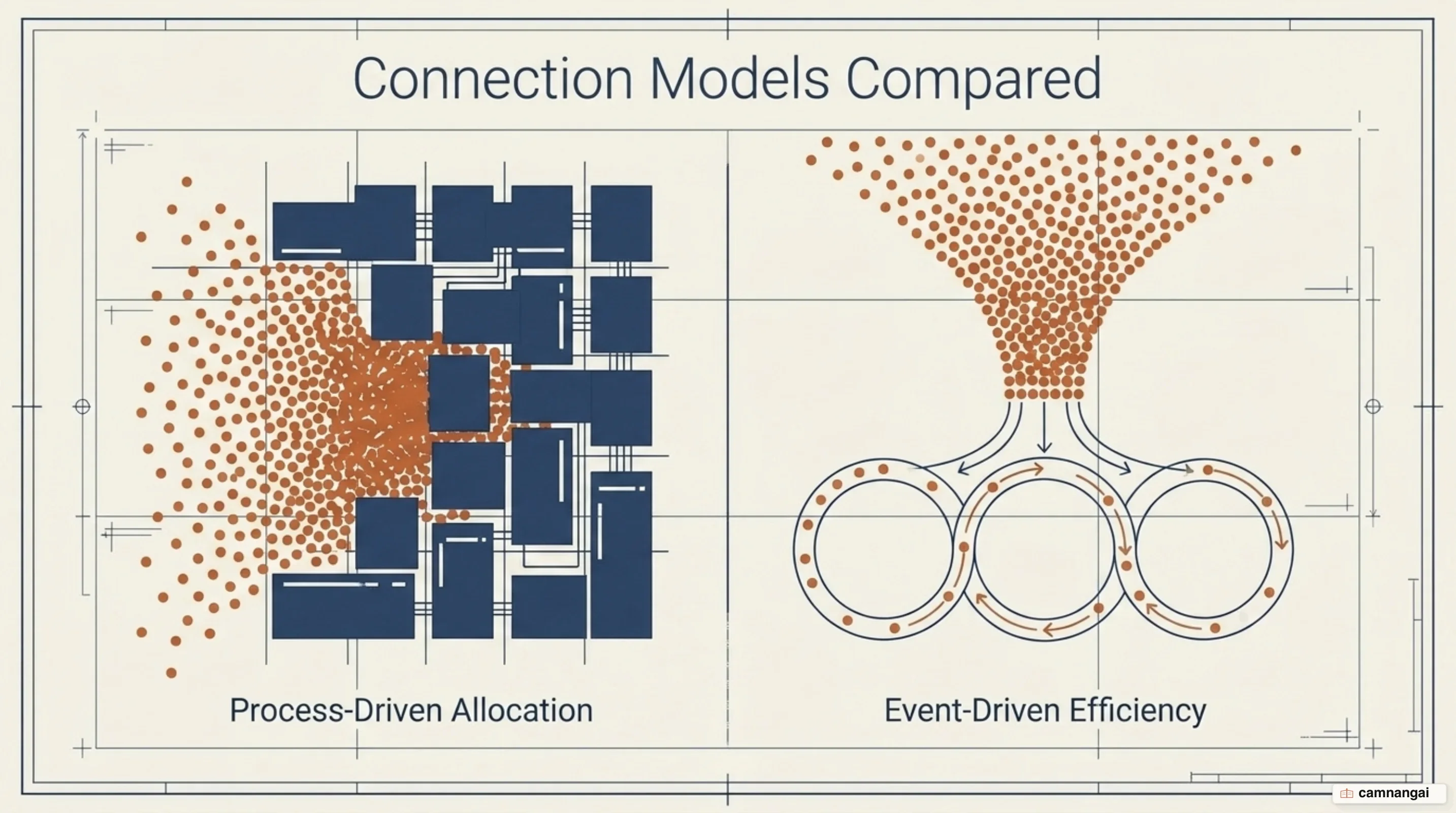
The primary architectural difference between Apache and Nginx is how they handle connections. Apache traditionally uses a process-per-request or thread-per-request model (via modules like mpm_prefork or mpm_worker). While flexible, this leads to higher CPU and memory overhead as connection counts increase. Nginx uses an event-driven, asynchronous model where a limited number of worker processes handle thousands of connections, resulting in a much smaller memory footprint — an idle keepalive connection in Nginx consumes only about 550 bytes.
Configuration management also presents a major contrast. Apache allows decentralized configuration via .htaccess files, which provides flexibility for non-privileged users but incurs a performance penalty because the server must search the filesystem for these files on every request path. Nginx uses a centralized configuration system that is inherently faster and more secure. Because Nginx lacks .htaccess support, it avoids the overhead of constant filesystem lookups, contributing to its superior speed in serving static content.
Resource use and performance benchmarks further highlight these differences. Nginx often outperforms Apache in high-concurrency environments, sometimes serving significantly more requests per second by a factor of five or more. While Apache has introduced modules like mpm_event to improve scalability, Nginx remains optimized for density and efficiency. Nginx is the superior choice for high-concurrency and edge-layer tasks, whereas Apache remains valued for its universal applicability and its ability to embed language processors directly into its workers.
Common mistakes beginners make configuring Nginx
A frequent error in Nginx configuration is failing to allocate enough file descriptors for worker processes. Every connection to a client or upstream server consumes a file descriptor. While the worker_connections directive sets the connection limit, the OS also imposes a limit on file descriptors per process. To prevent Nginx from refusing connections during traffic spikes, administrators must use the worker_rlimit_nofile directive in the main context to increase this limit to at least twice the value of worker_connections.
The use of the if directive within location blocks is another common pitfall. Known as "If is Evil", this directive often behaves in unexpected ways because of how Nginx evaluates its configuration. Using if in location blocks can lead to segmentation faults (segfaults) or incorrect data returns. Experts recommend safer alternatives like the map or try_files directives. Furthermore, beginners often disable proxy_buffering to reduce latency, but this forces backend servers to wait for slow clients, degrading overall system throughput.
Security oversights regarding metrics and logs are also prevalent. Many users enable the stub_status module for monitoring but fail to restrict access via allow and deny directives, exposing sensitive load data to the public. Additionally, there is no "off" parameter for the error_log directive; including error_log off; actually creates a file named "off" in the configuration directory. To effectively disable error logging when disk space is critically limited, the correct syntax is error_log /dev/null emerg;.
Which build to run: mainline, stable, or NGINX Plus
Choosing the correct Nginx build depends on the stability and feature requirements of the environment. The mainline version is the active development branch, containing the newest features and bug fixes. The stable version does not receive new features and only includes critical bug fixes. The two are distinguished by the second number in the version string: odd for mainline, even for stable — as of August 2026 that meant 1.31.4 on mainline and 1.30.4 on stable. If you are still learning, the gap between the two branches matters less than it looks.

For enterprise requirements, F5 offers NGINX Plus, a commercial version with advanced capabilities. NGINX Plus supports dynamic module loading, allowing functionality to be added without recompiling the core. It also provides a real-time activity monitoring API, a web-based dashboard, and advanced health checks that can verify application-level health beyond simple TCP connectivity. Other Plus-exclusive features include a "slow start" mechanism to prevent newly recovered servers from being overwhelmed by a sudden flood of traffic.
Operating system selection is critical for production performance. While Nginx is available for Microsoft Windows, the port is currently a "proof-of-concept" with significant architectural limitations. The Windows version suffers from decreased performance, a lower limit on concurrent connections, and the complete absence of caching and bandwidth policing features. For production environments requiring high scalability and the full feature set of the server, Nginx should always be deployed on a Unix-based system like Linux or FreeBSD.
Where to start with Nginx
When implementing Nginx, use it if you expect high traffic or are working with limited hardware resources. Its non-blocking architecture is specifically designed for these scenarios, serving as a high-performance gateway that manages resource-intensive networking tasks at the edge of your infrastructure.
If your existing application depends on Apache-specific modules or decentralized .htaccess files, a hybrid approach is the most effective strategy. Deploy Nginx as a reverse proxy in front of Apache. This allows Nginx to handle concurrency, SSL termination, and static content delivery, while Apache handles the dynamic backend logic. This configuration plays to the strengths of both servers to create a scalable and secure web environment. The part I would learn properly first is not the directive list, but how Nginx picks the server and location block for each request.
References
- Beginner's Guide — nginx Documentation
- How nginx processes a request — nginx Documentation
- nginx — The Architecture of Open Source Applications, Volume 2
- The NGINX Handbook — freeCodeCamp
- A detailed comparison between Apache and Nginx web server — Site24x7
- Nginx — Wikipedia
- Usage Statistics and Market Share of Nginx — W3Techs
- Avoiding the Top 10 NGINX Configuration Mistakes — F5
- nginx news: 2026 — nginx.org