Docker is an open-source platform that packages your application code together with its exact dependencies into an isolated, portable unit called a container.
If you have ever built software, you know the "works on my machine" problem: your development environment — the specific operating system version, libraries, and configuration — is rarely an exact match for the testing or production servers. Understanding what is Docker begins with viewing it as the platform that removes those inconsistencies.
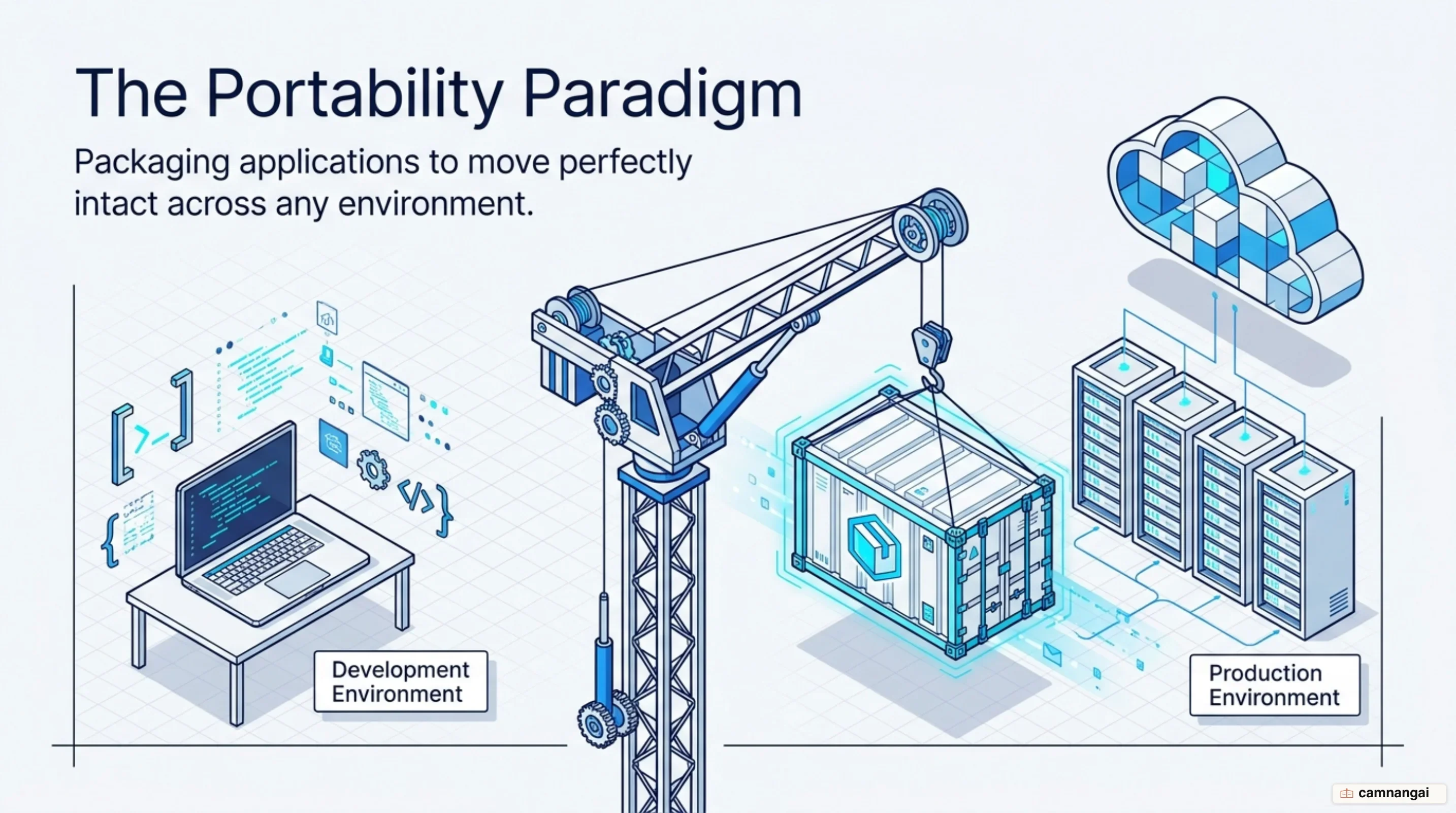
That packaged unit functions identically on a laptop, a corporate server, or a cloud provider. It shifts your focus from managing complex server configurations to managing the application itself: if it runs in your container, it runs anywhere.
What problem does Docker solve?
Software deployment traditionally faces significant hurdles as applications move through the lifecycle of development, testing, and production. You may develop a feature on a specific Linux distribution only to find it fails on a Windows-based testing server. These failures are often the result of "dependency hell," where mismatched library versions or conflicting operating system configurations cause the application to crash or behave unpredictably.
Docker provides a predictable and repeatable environment by ensuring the application carries its requirements with it. A useful analogy is putting an astronaut in a spacesuit. Instead of trying to recreate the Earth's entire atmosphere on another planet, you provide the astronaut with a self-sufficient suit that contains everything they need to survive. Docker containers act as that spacesuit for your code, allowing it to function in virtually any environment without requiring the host system to be modified.
This approach increases productivity for both developers and systems engineers. Developers no longer spend hours debugging environment-related issues, and sysadmins can maintain a uniform infrastructure. It also simplifies moving applications from on-premises data centers to the cloud, because the containerized application is indifferent to the underlying hardware.
Worth being clear about what Docker does and does not fix, though: it makes your environment identical everywhere, not correct. A broken Dockerfile breaks the same way on all hundred servers.
What is a container, and how does it differ from a virtual machine?
While both containers and virtual machines (VMs) provide isolation, they operate at different levels of the system stack. A virtual machine is a digital copy of a physical machine that virtualizes the hardware. Each VM requires its own full guest operating system, including its own kernel, libraries, and binaries. Because of this, VM image files are large — often measured in gigabytes (GB) — and can take several minutes to boot. VMs rely on a hypervisor to manage communication between the guest and host systems.
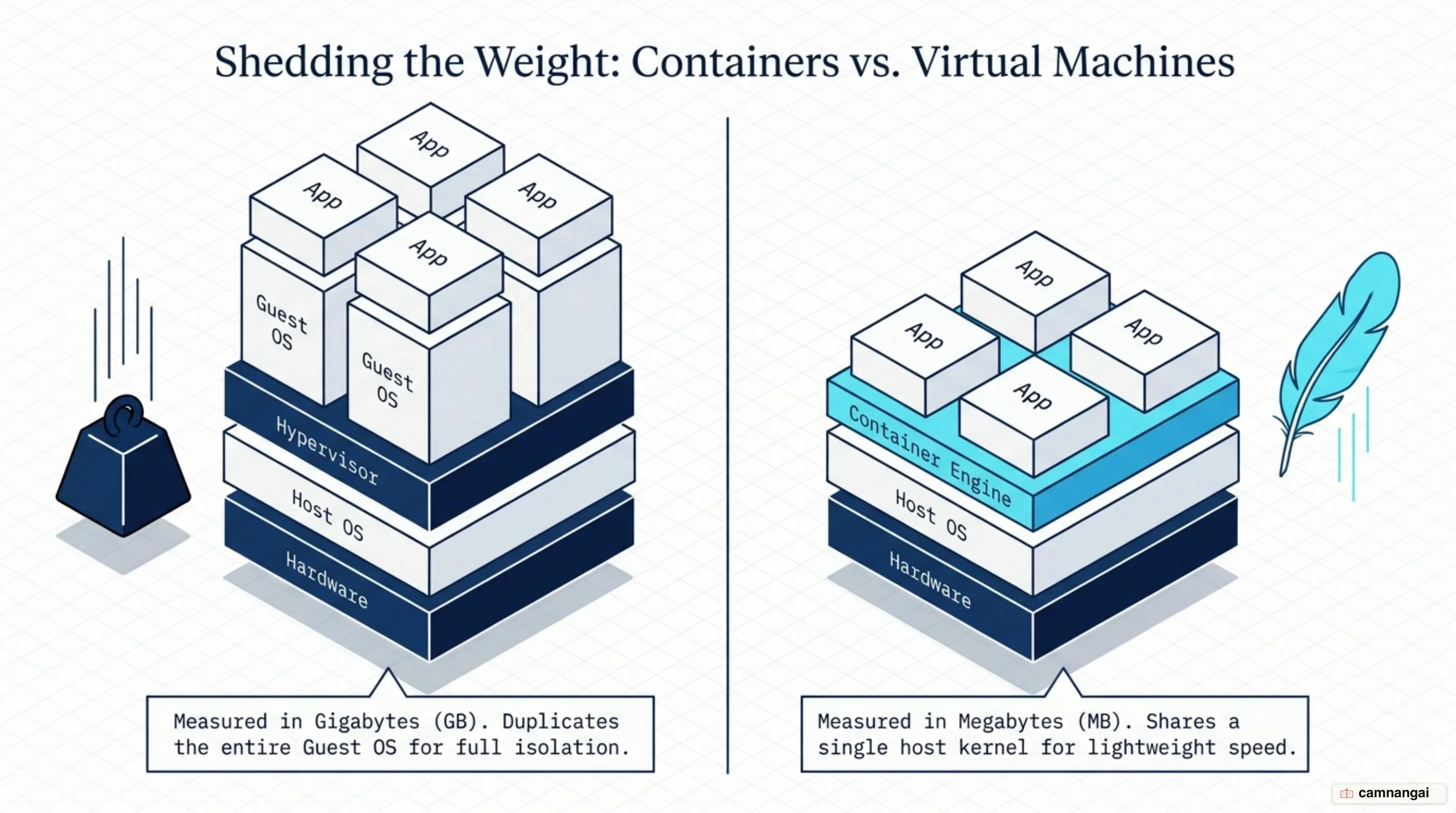
Containers, by contrast, virtualize the operating system rather than the hardware. They sit on top of a single host operating system and share the host's kernel while staying isolated from one another, which makes them measurable in megabytes rather than gigabytes.
Because they do not need to boot a full operating system, they start almost instantly.
In a containerized setup, a container engine or runtime acts as the intermediary agent between the containers and the host OS, managing system resources. Docker is the most widely used open-source container engine for this purpose. VMs are excellent for virtualizing entire servers and networks; containers are designed to package and run individual applications with maximum efficiency.
The cost of that lightness sits in the word "share." Because every container runs on one kernel, the wall between two containers is thinner than the wall between two VMs. You trade some isolation for the speed.
Images, containers, and registries: three concepts beginners confuse
To use Docker effectively, you must distinguish between three core components: images, containers, and registries. An image is a read-only template that contains the instructions for creating a Docker container. It includes the application code, libraries, and configuration files. Images are built in layers; if you update your application, only the affected layer needs to be rebuilt. Immutability means that once an image is created it cannot be altered, which guarantees consistency.
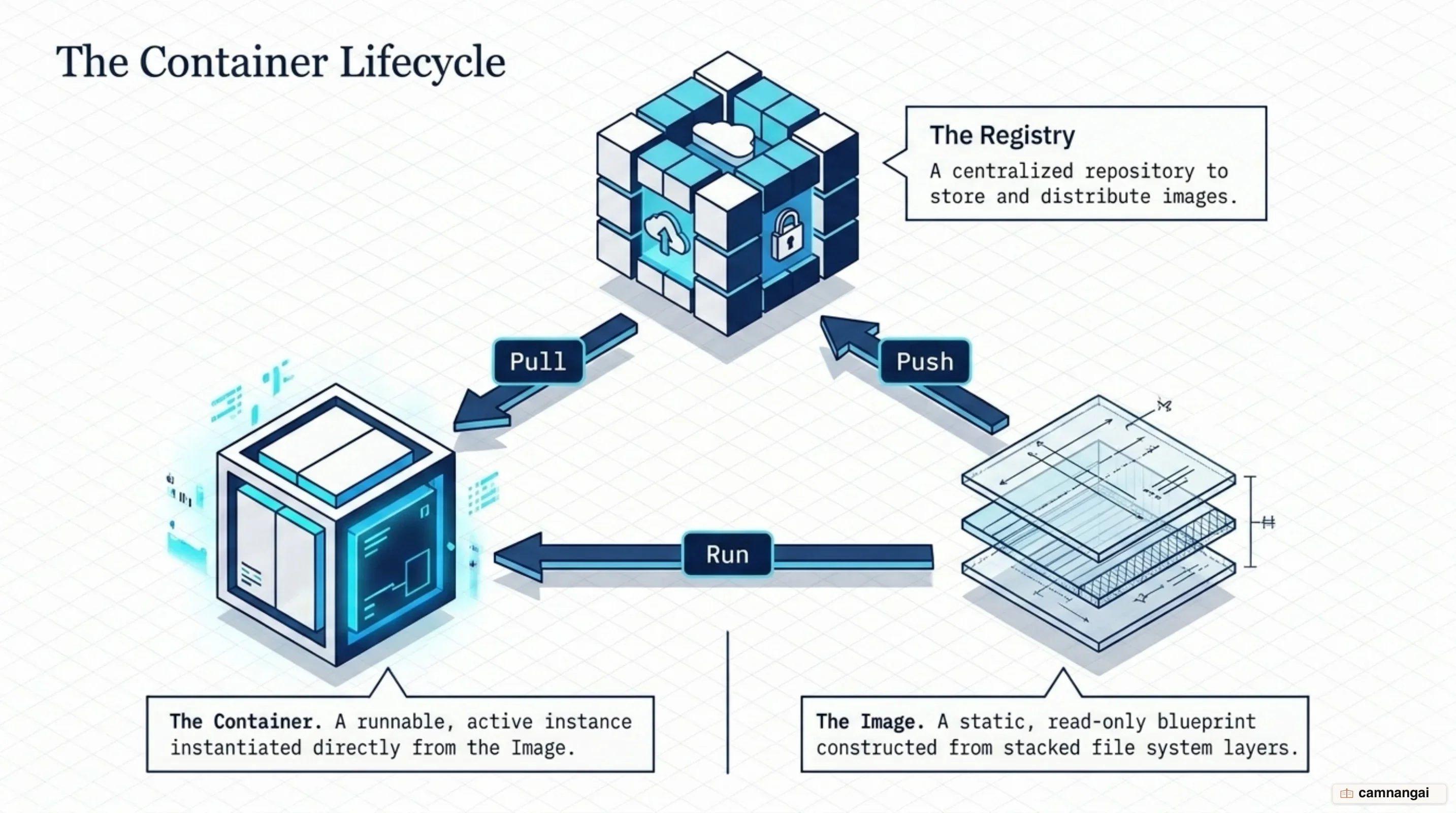
A container is the runnable instance of an image. If the image is the blueprint, the container is the building. You can start, stop, move, or delete a container using the Docker CLI. Because images are read-only, Docker adds a thin writable layer on top of the image layers when a container launches. That layer lets the application write data or modify files during execution without changing the underlying image.
Registries are the storage and distribution points for these images. Once you build an image, you push it to a registry so others can pull it and run it on their own infrastructure. Docker Hub is the default public registry, offering pre-built images for databases, web servers, and programming languages.
Dockerfile: the recipe that builds an image
A Dockerfile is a text document: the recipe for your image. It contains a sequential
list of instructions that the Docker Engine uses to assemble the image automatically. Instead of
manually configuring a server, you write those instructions into the Dockerfile and run
docker build to produce the final image.
The following example shows a typical Dockerfile structure for a Node.js application:
FROM node:22
ENV NODE_ENV=production
COPY . /app
RUN npm install --production
EXPOSE 3000
CMD ["node", "/app/server.js"]
To create an image from this file, run:
docker build -t my-web-app .Each instruction serves a specific purpose in the build:
- FROM: defines the base image, the starting point for your application.
- ENV: sets environment variables the application can use at runtime.
- COPY: moves files from your local machine into the image's filesystem.
- RUN: executes commands during the build, such as installing packages.
- EXPOSE: documents which network ports the container intends to listen on.
- CMD: specifies the default command that executes when the container starts.
How Docker runs: the client, the daemon, and the Linux kernel
The architecture of Docker is based on a client-server relationship. The Docker Client is the
command-line interface where you type commands. The client does not run containers itself; it
communicates over an API with the Docker Daemon (dockerd). The daemon is a persistent
background process that does the heavy lifting of building, running, and managing your containers.
Beginners often meet Docker Desktop first, but the Docker Engine — currently at version 29 — is
the core technology managing these processes.
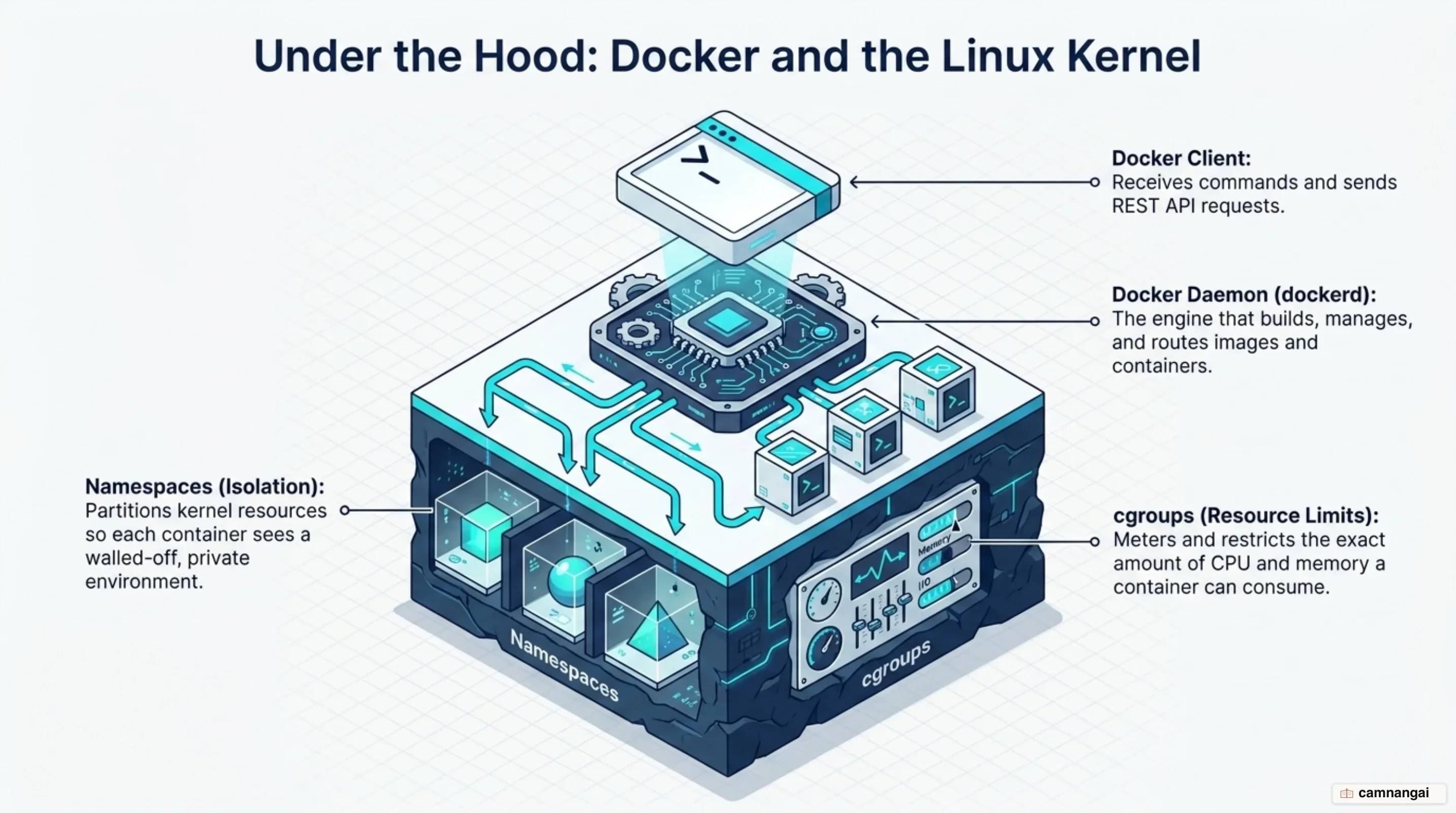
The daemon relies on two features of the Linux kernel to maintain isolation:
- Namespaces: these give each container a private view of the system. The
PIDnamespace ensures a container only sees its own processes, while theNetworknamespace gives it its own isolated network stack. - Control Groups (cgroups): these manage and limit resources such as CPU, memory, and disk I/O. By enforcing limits, cgroups stop a single container from consuming every system resource and taking the host down with it.
Docker Engine 29 continues to evolve these core features. It adds an experimental
embedded-containerd mode that runs containerd inside the daemon process, promotes the image mount
type out of experimental status, and makes the containerd image store the default for fresh installs.
Experimental support for an nftables firewall backend is available behind a daemon option.
When Docker is the right tool, and when it isn't
Docker is the strongest option for modernizing application deployment, particularly for microservices and DevOps pipelines. Reach for it when you need to scale individual components of an application independently, or when code has to move from development to production with zero environment-related friction.
Docker is not a universal replacement for virtual machines. When a workload needs direct access to specialised hardware, or kernel-level isolation for security, a VM is still the correct tool.
The same applies to heavy experimentation where you need to snapshot a full OS state and restore it repeatedly: Docker gives you static, version-controlled definitions once the right settings are known, while a VM lets you modify an entire operating environment on the fly.
If I had to compress this into one line for someone starting out, it would be that you learn Docker not to replace virtual machines, but to stop rebuilding your environment by hand every time you change machines.
References
- What is Docker? | Docker Docs
- What is a container? | Docker Docs
- What is an image? | Docker Docs
- What is a registry? | Docker Docs
- Dockerfile overview | Docker Docs
- Docker Engine version 29 release notes | Docker Docs
- Containers vs VM — Difference Between Deployment Technologies | AWS
- What Are Namespaces and cgroups, and How Do They Work? — NGINX