Agent Skills are modular capabilities — filesystem-based packages of instructions, metadata, and scripts — that extend Claude's functionality.
They give AI agents a standard way to carry specialized procedural knowledge and repeatable workflows. Unlike conversation-level prompts you paste in again every session, Agent Skills are persistent, version-controlled resources that an agent discovers and loads on its own — moving the detailed guidance out of the main system prompt and into discrete units it reaches for only when it needs them.
That on-demand model is the point. Break the guidance into filesystem-based units and an agent can hold a huge library of skills without flooding the context window, staying focused on the task in front of it while the rest stays dormant but reachable. For a systems architect, this is the "procedural memory" plain LLM setups lack: once a workflow is written down — a 47-step financial compliance audit, a particular TDD pattern — the agent runs it the same way every time, across platforms and sessions, instead of guessing the sequence.
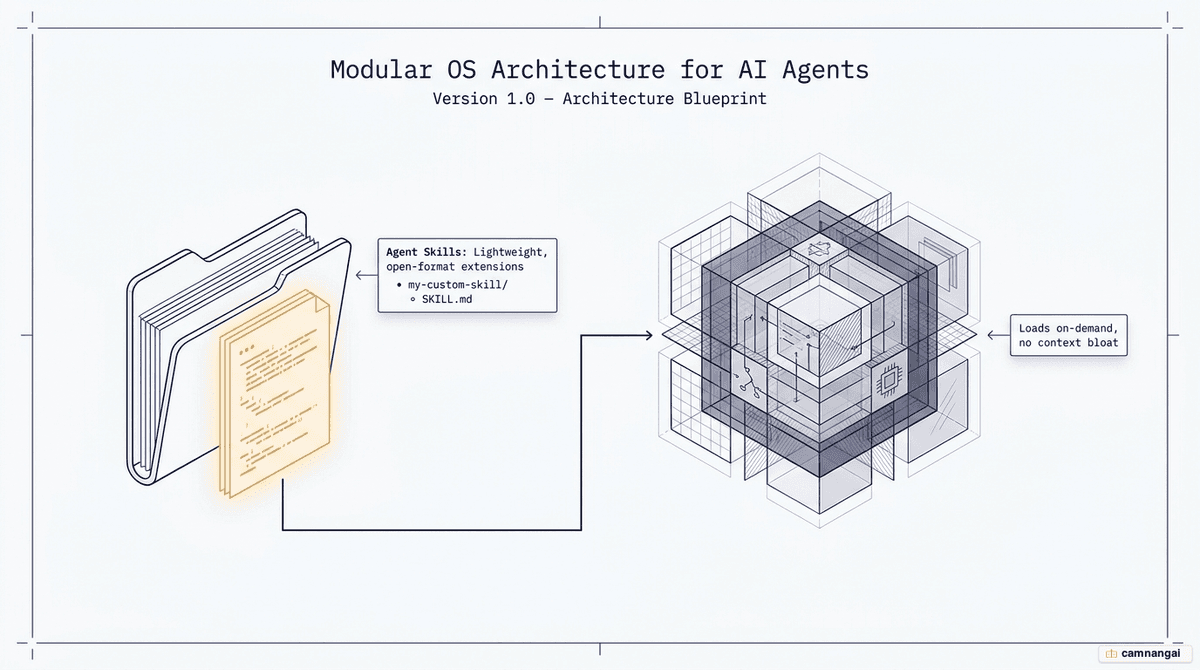
What Agent Skills are and the problem they solve
Large language models are good at "semantic memory" — recalling facts and general world knowledge. What they lack is "procedural memory": the specific know-how of how work gets done inside one organization. Faced with a 47-step workflow, an agent has historically had two bad options — the user spells out every step, every session, or the agent guesses the right sequence of actions.
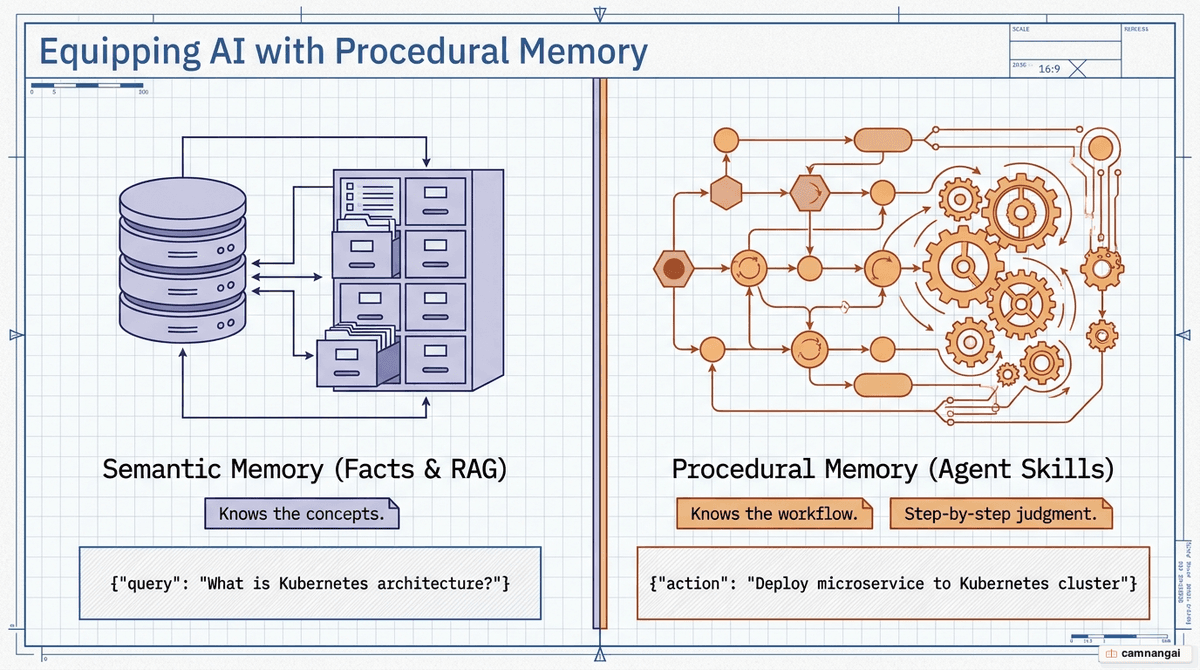
Manual prompting drags on both sides: it is repetitive, and those large instructions sit in the context window even while the agent is doing something unrelated. Agent Skills fix this by moving procedural knowledge into reusable, version-controlled folders that hand the agent domain expertise only when the current task calls for it. Instead of conversation instructions that vanish when the session ends, a skill gives it a capability layer that sticks around — and the units travel: a skill built for one project works in another without rewriting the prompt logic underneath.
The filesystem layout is what keeps token use in check. Because agents discover and load these files on demand, you can give an agent hundreds of possible skills without burning through the context window at startup. It stays fast, spending tokens only on the instructions the current task actually needs.
Inside a Skill: the structure of a SKILL.md file
An Agent Skill is a directory on a filesystem, and at its core is the SKILL.md file. That file is
mandatory and the name is case-sensitive: spellings like skill.md or SKILL.MD get ignored.
SKILL.md is the entry point — it holds the metadata and instructions the agent needs to understand,
trigger, and run the capability.
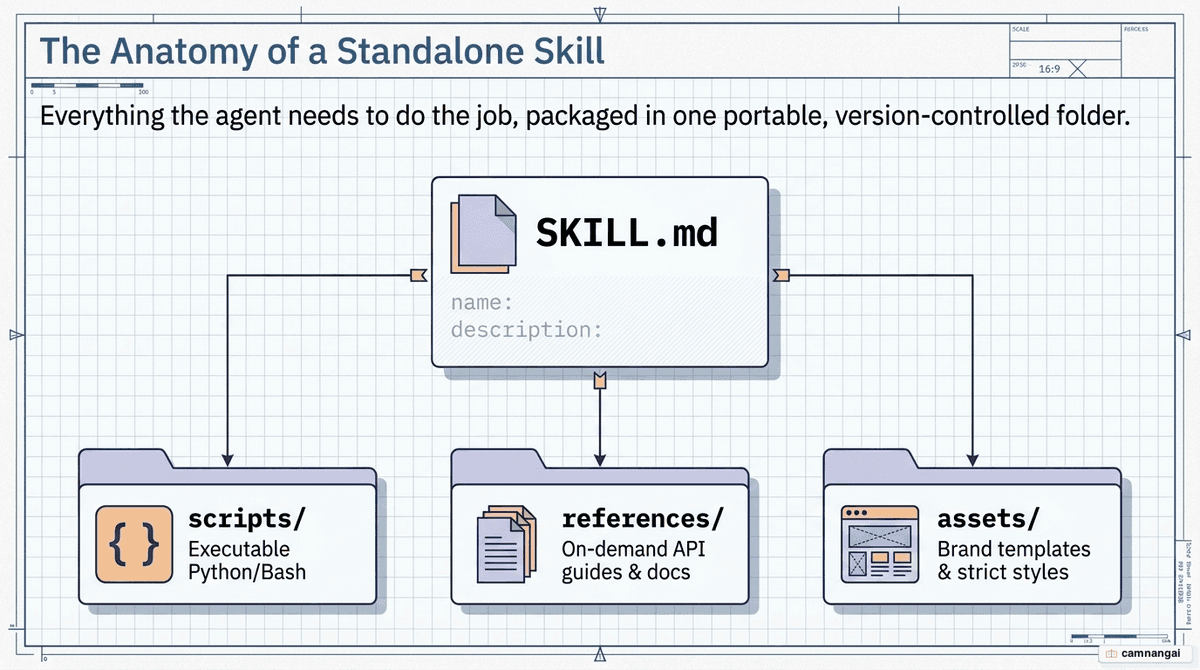
Alongside it sit optional subdirectories: scripts/ for executable code (Python, Bash, JavaScript)
the agent runs for deterministic tasks, references/ for supplementary docs or API specs it loads
when it needs more context, and assets/ for static resources like output templates. The metadata
lives in YAML frontmatter at the top of SKILL.md and must include a name (kebab-case, matching
the directory name) and a description. The description matters most for discovery: it is the
trigger that tells the agent when the skill fits a request.
---
name: [skill-name-in-kebab-case]
description: [Clear, actionable description of what the skill does and when to use it.]
---

# [Skill Title]

## Instructions

1. [First major step]
2. [Sequential logic or rules]
3. [Expected output format]

## Examples

- User Request: "[Example prompt]"
- Action: "[How the agent should respond]"
How Skills work: progressive disclosure
Agent Skills load in three tiers, an approach called progressive disclosure. It gives the agent a high-level map of a large skill library while keeping the context window lean, so at each stage the agent spends only the tokens it needs to decide what to do next.
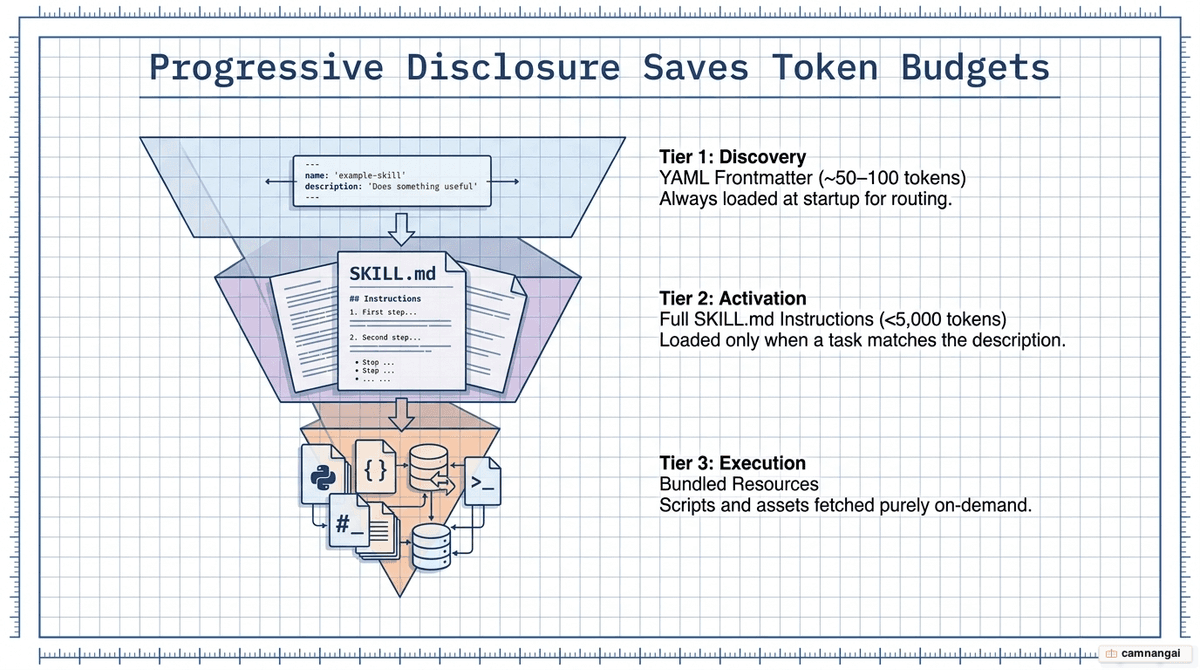
Tier 1 (Discovery) happens at startup: the agent loads only the metadata — the YAML frontmatter — for every available skill. That runs about 50 to 100 tokens per skill, so it can catalog hundreds of them without much overhead, knowing each one exists and what it is for without yet holding the steps.
Tier 2 (Activation) is driven by intent matching. When a user sends a prompt, the agent compares
the request against every discovered skill's description; on a match, it reads the whole SKILL.md
body into context — the step-by-step instructions it needs for that task. This just-in-time loading
keeps the agent focused, free of guidance from skills that don't apply.
Tier 3 (Execution) loads resources on demand. If the instructions tell the agent to run a script
from scripts/ or check a document in references/, it loads those specific files only during
execution. Heavy reference material and large code blocks enter the context window only at the moment
a sub-task needs them — which is what keeps the main SKILL.md under ~5,000 tokens and inference
cheap at scale.
Where you can use Agent Skills
Agent Skills run on a few main surfaces. On Claude.ai (web and desktop) you
upload custom skills as .zip files from the settings menu, on Pro, Team, or Enterprise plans. For
terminal work, Claude Code discovers skills
automatically in ~/.claude/skills/ (global) or .claude/skills/ (project-specific), resolving
name clashes by a strict order — Enterprise > Personal > Project. And you can manage them
programmatically through the Claude API's /v1/skills endpoint or the Agent SDK (running skills with
code requires the code-execution-2025-08-25 beta header).
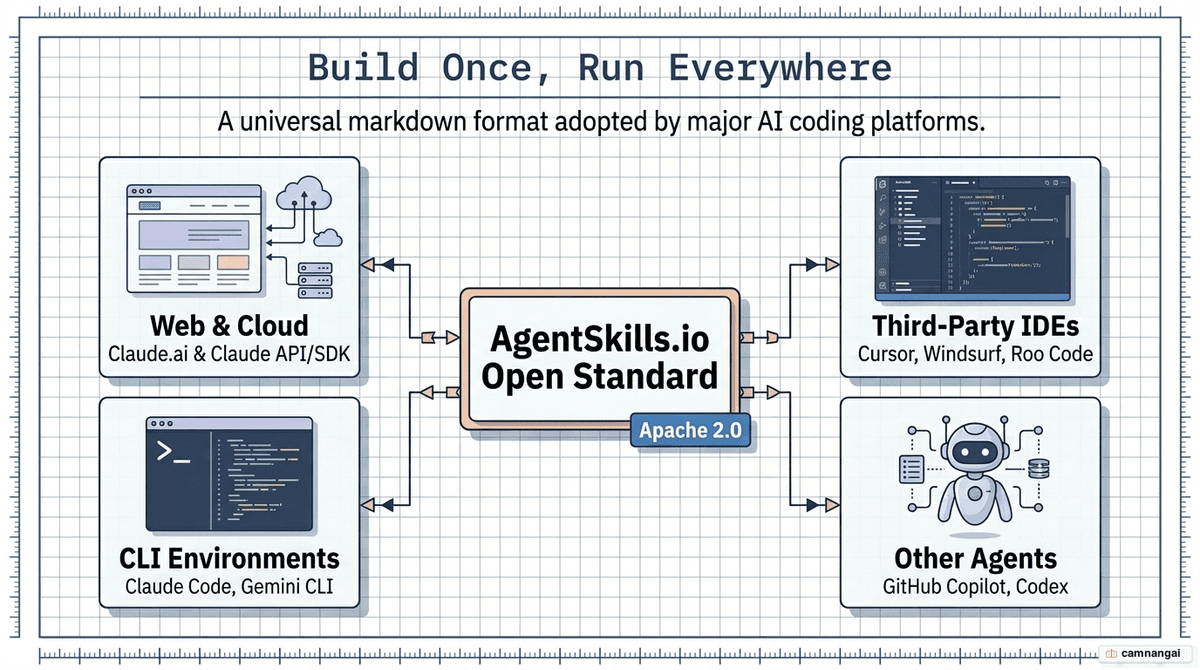
What matters most is portability, and that comes from the AgentSkills.io open standard (Apache 2.0).
A skill written for Claude is not locked to one ecosystem: the SKILL.md format works with Cursor,
GitHub Copilot, VS Code, Gemini CLI, and OpenAI Codex. Write the workflow once and use it everywhere,
so your engineering practices stay consistent across IDEs and agentic clients. There is already a
large community layer too — 25,000+ contributed skills across hubs like skills.sh, where you can
install a ready-made "pack" in one step.
Skills vs prompts, commands, subagents, plugins, and MCP
To design a system well, keep these extension types straight. Against a plain prompt, Skills win
on durability: a prompt is a one-off instruction scoped to a single conversation, while a Skill is a
filesystem-level resource built for reuse. Using prompts for repeated workflows is like writing code
straight into main instead of building reusable libraries.
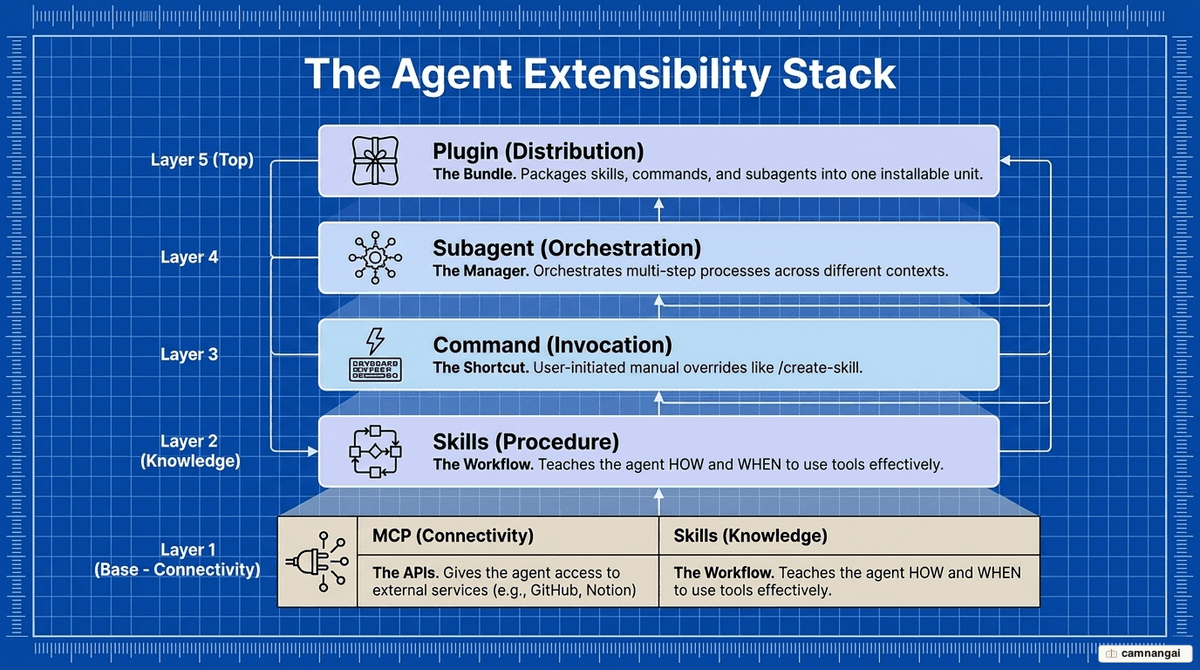
The key contrast is with MCP (Model Context Protocol): MCP provides the "tools" — the wiring that
lets an agent reach external APIs like Notion or GitHub — answering what an agent can reach. Skills
provide the "recipes," the procedural logic for how it should act once it has them. They also
differ from RAG, which retrieves static facts but can't teach a multi-step
procedure. As for the rest: a command is a slash-command shortcut the user fires manually, a
subagent is an orchestrator that forks a task into a new environment (though a Skill can itself
run as one via context: fork), and a plugin is the
distribution unit that bundles Skills, commands, and subagents into one installable package. The
clean stack: MCP connects, Skills supply expertise, Plugins distribute.
How to build your own Skill and best practices for writing them
A good skill starts from a repeated pattern: when you keep giving the AI the same instructions, or
fixing the same kind of logic error, that's the signal to package a Skill. The fastest route is the
built-in skill-creator agent — it interviews you about the workflow, then generates the directory
structure and SKILL.md. Get a concrete task working in conversation first, then extract that logic
into the skill.
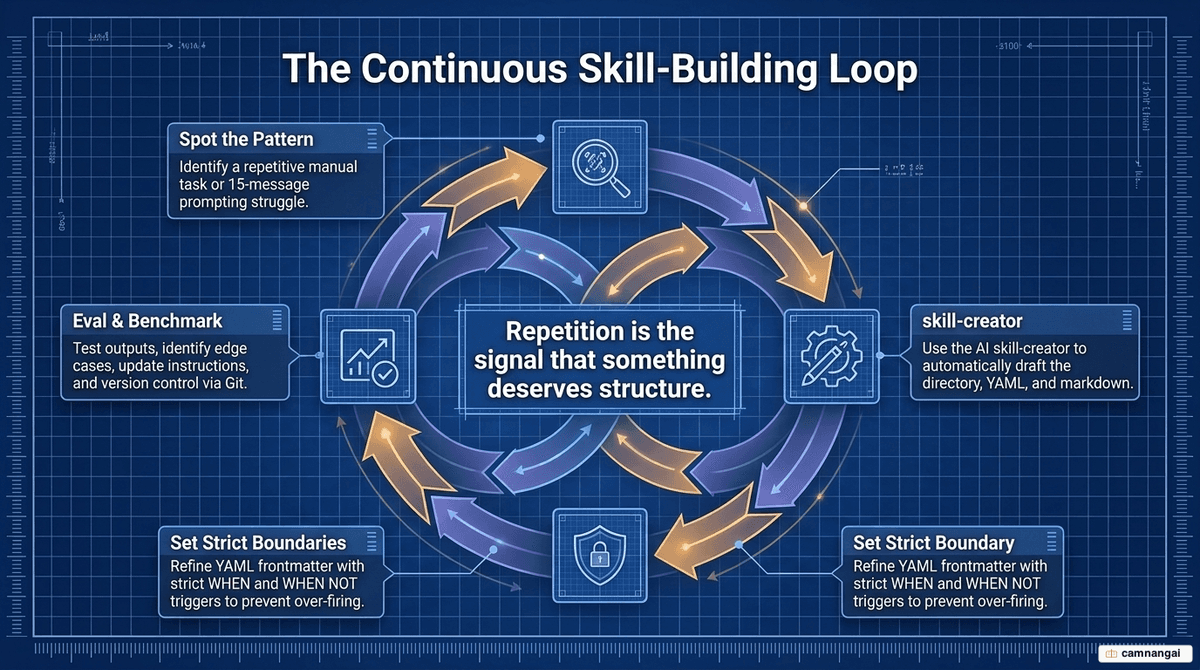
The most important rule is to write the trigger as WHEN + WHEN NOT. Clear boundaries stop the
agent from firing the skill in the wrong context, which saves tokens and avoids logic slips — e.g.
"Use when the user asks for statistical regression on CSV files. Do NOT use for simple data
visualization or Excel formatting." Keep each skill single-purpose ("Add meta descriptions to blog
posts," not "Content marketing helper"), and hold SKILL.md under ~5,000 tokens by pushing detailed
specs and error-code lists into references/.
Finish by testing through three modes — Eval, Improve, and Benchmark. Eval runs single prompts to
check the skill triggers and executes correctly; Improve uses A/B comparison to tune the wording
from feedback; Benchmark, the one that matters for production, runs each configuration at least
three times to measure variance. Controlling variance is what guarantees your 47-step workflow runs
the same way regardless of the model's randomness. And for high-stakes checks, push the logic into a
scripts/ file — code runs the same every time, where natural language leaves room for the model to
get "lazy" or misread it.
Security and the limits you should know
Agent Skills are a high-risk capability because they can carry executable scripts. A skill runs in a virtual machine (VM) with access to the host filesystem, environment variables, and API keys — so an untrusted third-party script is a real liability, and running one calls for a zero-trust posture. Audit a third-party skill with the same caution you'd give an unknown software dependency, and prefer an approved internal repository over installing straight from a public marketplace.
Agent Skills are also NOT eligible for Zero Data Retention (ZDR): data processed through the feature is kept under the standard retention policy. If you work somewhere with strict data sovereignty or privacy rules that require ZDR, that conflict is a real constraint — weigh which data can go through Skills and which must stay on-premise.
Finally, mind the mechanics. A skill works through two channels — instruction injection (reasoning
level) and script execution (VM level) — both open to prompt injection, tool poisoning, and malware
hidden in scripts. Always read a SKILL.md file and its scripts/ directory before deploying,
especially from an unverified hub, and design in error handling for missing permissions or a failed
MCP connection so the agent can recover and report cleanly.
FAQ
Is data used with Agent Skills covered by Zero Data Retention (ZDR)? No. The feature is excluded from ZDR. Data is kept under the standard retention policy.
Can I use a skill I wrote for Claude Code in GitHub Copilot or Cursor? Yes. Agent Skills follow
the AgentSkills.io open standard, so any platform that supports it can load and run your SKILL.md
file and its structure.
How do Skills affect my token usage? They keep it low. Only the metadata loads at startup; the full instructions and resources load only when the agent triggers the skill for your request.
What is the difference between personal and project skills? Personal skills (in
~/.claude/skills/) are available in every session on your machine. Project skills (in
.claude/skills/) are local to a repository and version-controlled with the codebase.
References
- Agent Skills Overview — AgentSkills.io
- Agent Skills — Claude Docs
- The Complete Guide to Building Skills for Claude — Anthropic
- Claude Agent Skills: Complete Getting-Up-To-Speed Guide
- Skills Are Claude Code's Cheat Code. Here's How to Use Them
- Understanding Claude Code: Skills vs Commands vs Subagents vs Plugins
- I Tested Anthropic's Skill-Creator Plugin on My Own Skills
- What AI Agent Skills Are and How They Work — IBM Technology