AI agent hooks are user-defined handlers that run at specific lifecycle points to observe, modify, or block actions inside coding agents like Cursor, Codex, VS Code Copilot, and Claude Code.
They give you a deterministic layer of control over probabilistic model behavior by intercepting structured JSON events directly in the agent's native execution environment. By placing these gates in the "hot path" between a model's decision and the actual system execution, you can enforce security and operational policies that system prompts cannot guarantee.
In a production environment, hooks function as a programmable control plane for AI governance. Unlike traditional network-layer proxies, hooks keep full visibility into local shell commands, tool arguments, and file-system edits without requiring SSL termination or certificate installation. They let organizations shift from a model of trusting an LLM to one of verifying its actions against hard-coded organizational boundaries.
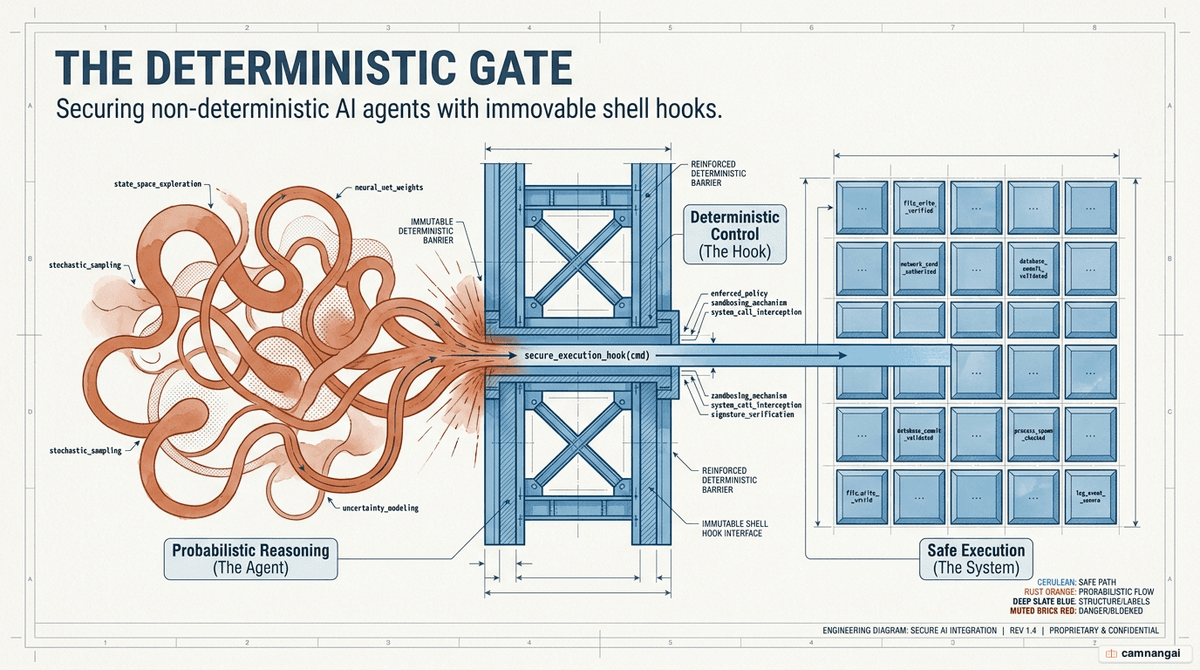
What is an AI agent hook?
An AI agent hook is a technical primitive for governing AI agents that sits between the agent's reasoning process and the execution of tools or commands. It is a lifecycle handler that receives a structured JSON payload containing the session context — prompts, tool arguments, and file paths — and returns a JSON decision to allow, deny, or modify the operation.
This interface is exposed today by the primary developer-focused AI platforms, including Claude Code, Cursor, Codex, and VS Code Copilot. Hooks provide four fundamental capabilities:
- Observe: capture every prompt, tool call, and file edit as a structured JSON event.
- Enforce: return values that block destructive actions or rewrite tool inputs in real time.
- Route: dispatch event data to local shell scripts, remote HTTP endpoints, or subagents.
- Fail-open: if a hook script errors or times out, the agent proceeds, preventing the security layer from becoming a single point of failure.
Why hooks: deterministic control over non-deterministic AI
LLMs are inherently probabilistic, which means they follow system instructions inconsistently. Prompt-based guardrails like "never delete files" are merely suggestions; complex multi-step reasoning or adversarial inputs can push a model past those instructions. Hooks are deterministic execution gates instead. They are hard-coded boundaries that fire every single time, without exception, regardless of the model's intent.
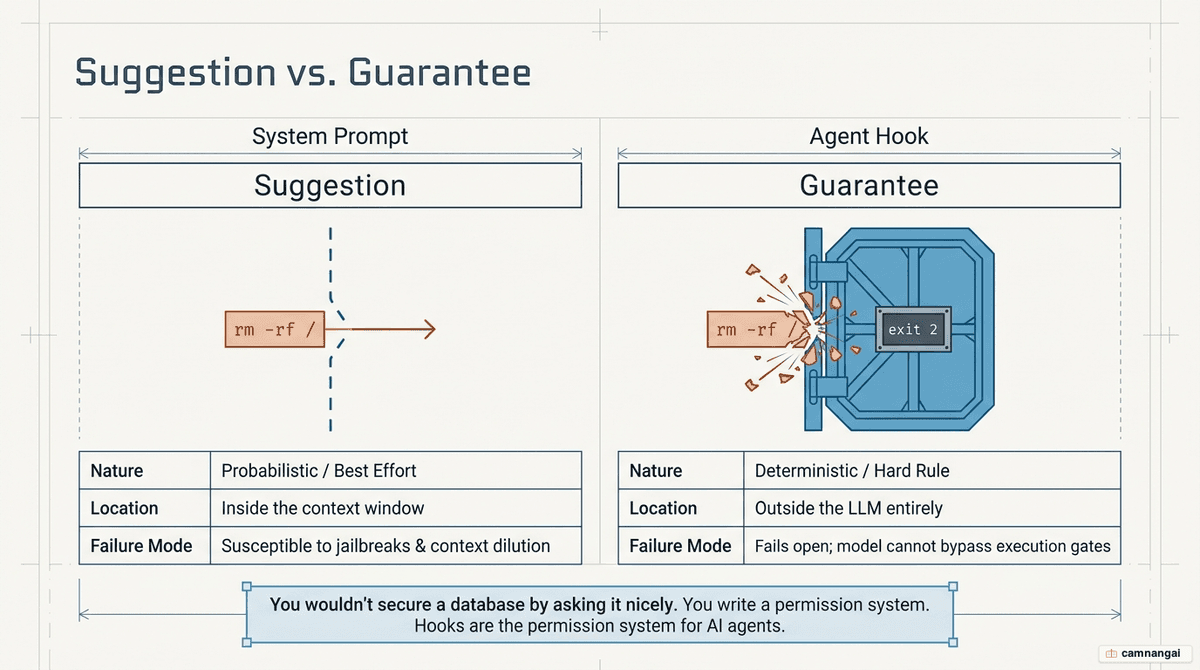
The relationship between an agent and its hooks mirrors that of a "brilliant new hire" and "company policy." The agent supplies creative labor and reasoning; the hooks supply the non-negotiable rules it must follow. Because hooks run in the hot path of the agent loop, they see the precise command string or tool argument before it reaches the operating system. That reliability is unattainable through prompt engineering alone — a hook effectively creates a permission system the model cannot reason its way around.
How hooks work
The hook lifecycle follows a predictable sequence: an event trigger fires, optional matcher or if filtering decides whether a specific handler should run, the handler executes its logic, and the results resolve into a merged decision. When several hooks match the same event, they run in parallel.
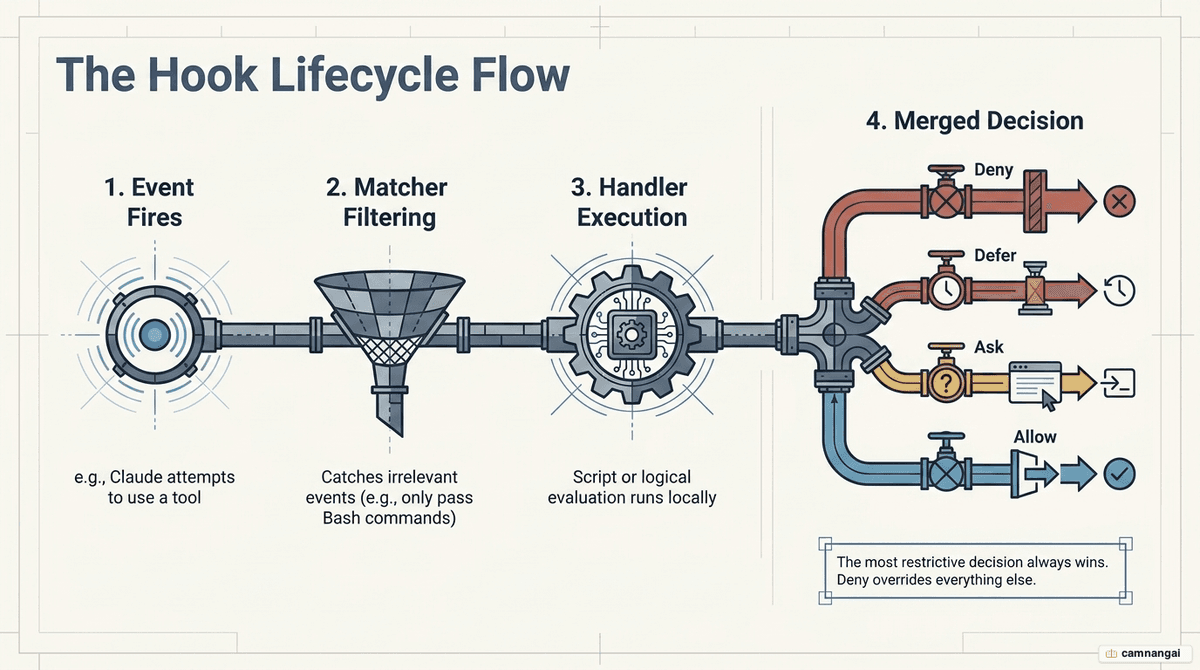
Claude Code and similar agents merge parallel results using a "most restrictive wins" order: deny > defer > ask > allow. If any single hook returns a deny decision (exit code 2), the tool call is blocked even if other hooks — or the agent's bypassPermissions mode — would allow it. Communication runs over standard streams: the agent passes JSON to the hook's stdin, and the hook returns its decision and any extra context on stdout.
Example: a PreToolUse guardrail
This shell script intercepts Bash commands and blocks destructive deletions with exit code 2:
#!/bin/bash
# .claude/hooks/block-rm.sh
# Extract the command from the JSON input on stdin
COMMAND=$(jq -r '.tool_input.command' <&0)

if [[ "$COMMAND" == *"rm -rf"* ]]; then
  echo "Blocked: destructive deletion detected." >&2
  exit 2 # Signals a hard block
fi
exit 0 # Signals no objection
Types of hooks: command, HTTP, MCP, prompt, agent
Teams use a "decision ladder" to balance speed, cost, and reasoning depth across five handler types:
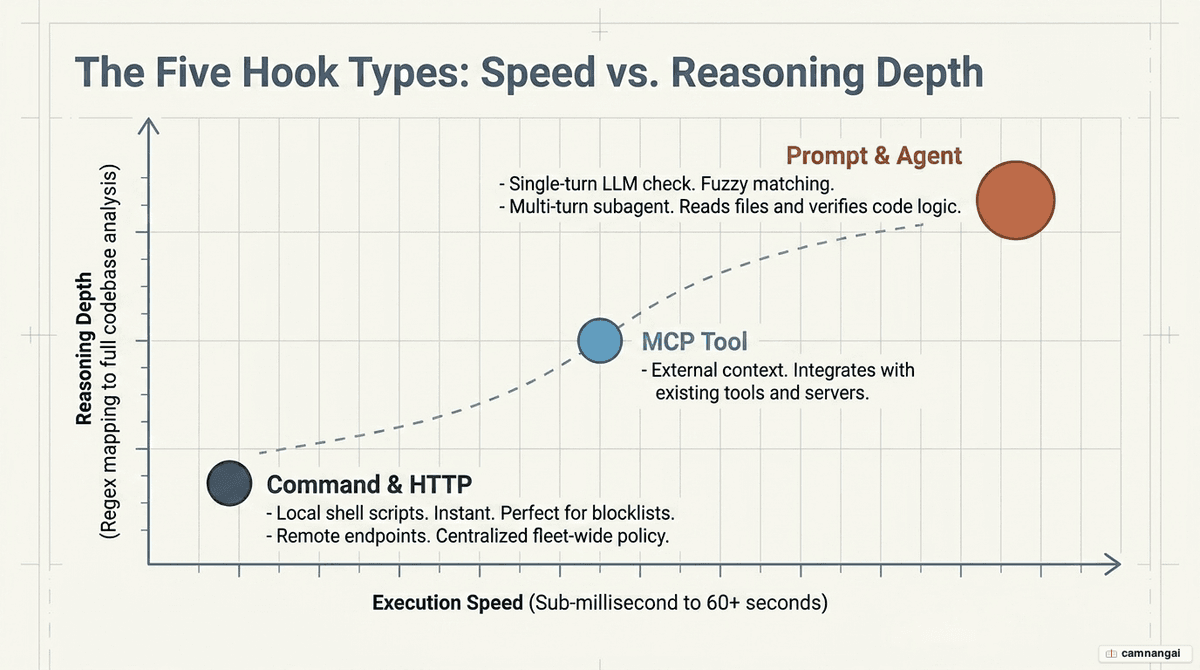
- Command: fast, local shell scripts (Bash, Python). Best for deterministic, sub-millisecond regex checks and secret detection.
- HTTP: remote endpoints that centralize logic across a fleet of machines. Used to ship structured telemetry to a SIEM or to query a centralized policy engine.
- MCP: calls specific tools on Model Context Protocol servers to verify system state or check databases.
- Prompt: single-turn LLM evaluations (for example, Claude Haiku) for fuzzy judgment calls like "Does this plan appear to exceed the original project scope?"
- Agent: experimental multi-turn subagents that can read files and run tests. They perform deep verification, such as confirming a refactor didn't break the build before allowing the session to end.
The standard practice is to start with "free" command hooks and graduate to prompt or agent hooks only when verification needs reasoning that code cannot easily express.
Lifecycle events you can hook into
Governance work usually focuses on the "big four" events that capture the entry, exit, and action points of a session:
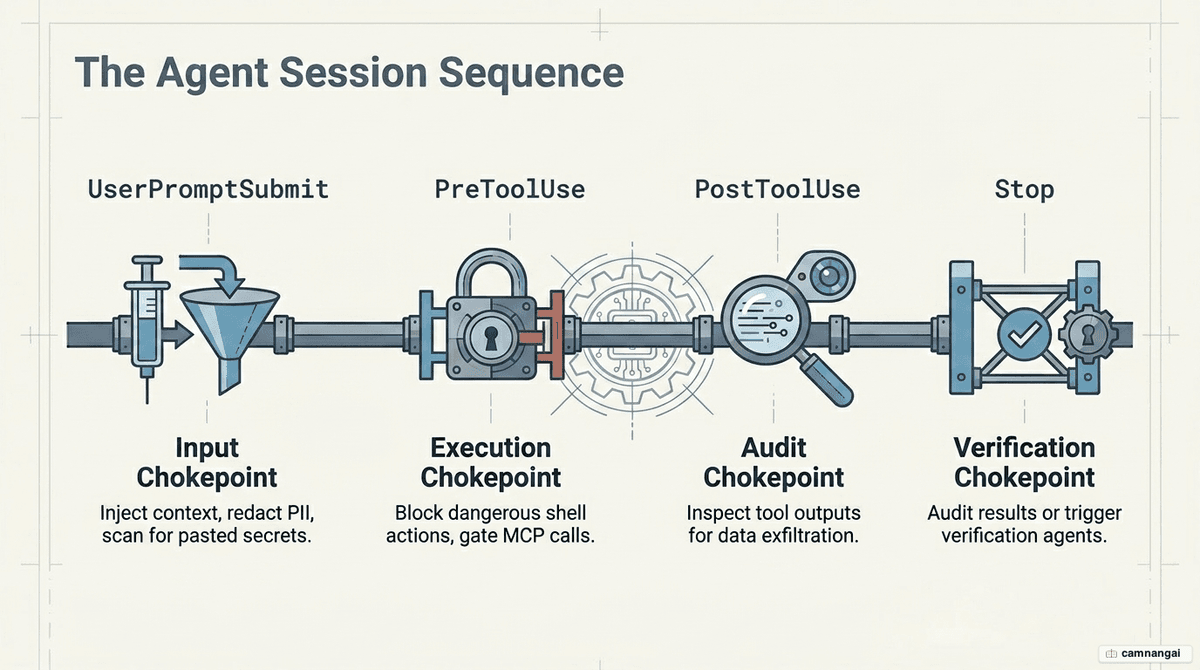
- UserPromptSubmit: the chokepoint for inbound text. Hooks here scan for PII, redact secrets, or inject organizational style guides into the prompt.
- PreToolUse: the gate for outbound actions. This is where you block dangerous shell commands (
rm,docker prune) or restricted file writes. - PostToolUse: the inspection point for results. It is critical for exfiltration detection, since a hook can see the content of a
cator read command before the model incorporates it. - SessionEnd (or Stop): the primary observability hook. It captures the full transcript for shipping to a central audit store.
Additional automation events include ConfigChange for auditing settings, CwdChanged for reloading environment variables (for example, via direnv), and FileChanged for triggering background tasks when the working tree is modified.
Where and how to configure hooks
Hooks are defined in JSON settings files located globally (~/.claude/settings.json) or at the project level (.claude/settings.json). Configurations use a matcher to filter by tool name and an if field (Claude Code v2.1.85+) to filter by specific tool arguments using permission-rule syntax.
The if field is a critical addition: it lets a hook fire only when a Bash command matches a pattern like git push *, avoiding the overhead of spawning a hook process for every harmless directory listing.
{
  "hooks": {
    "PreToolUse": [
      {
        "matcher": "Bash",
        "if": "Bash(git *)",
        "hooks": [
          {
            "type": "command",
            "command": "sh .claude/hooks/check-git-branch.sh"
          }
        ]
      }
    ]
  }
}
Common usage patterns
Real-time policy enforcement
Hooks are the only reliable way to prevent "autopilot" errors, where a developer approves a destructive command without reading it. By blocking commands like npm publish or docker system prune with a PreToolUse hook, the organization enforces safety at the infrastructure level. Hooks can also strip API keys and credentials from prompts before they leave the local machine, so secrets never reach external LLM providers.
When a hook blocks an action, the agent receives the error message from stderr as feedback. The model can then understand the boundary and try an alternative, safe approach instead of simply failing — effectively training the agent to work within the company's specific safety constraints.
Observability and audit
Every event a hook intercepts can become a structured telemetry stream shipped to a SIEM like Splunk or Datadog. That turns data previously trapped on individual developer laptops into a unified feed for forensic analysis. Governance teams can then run retroactive queries such as "Find every session where a customer record was read from the database" or "Identify users triggering the most security blocks."
This observability is non-intrusive. Because hooks fail open, the telemetry stream can be pushed to a central control plane like Speakeasy without risking agent downtime if the logging endpoint becomes unreachable.
Code safety
Hooks can automate the inner loop of security by triggering scanners after file edits. A PostToolUse hook matching the Edit or Write tools can automatically run Prettier for formatting or Semgrep for vulnerability scanning. If the scanner finds an issue, the hook feeds the error back into the session context.
This creates a high-speed feedback loop where the agent is forced to fix its own linting or security errors before the developer even sees the code. By wiring tools like Endor Labs or Snyk into npm install hooks, the environment can also prevent vulnerable dependencies from being introduced in real time.
Workflow automation
Hooks can inject context an agent would otherwise lack. A SessionStart hook can run git status and inject the result into the conversation via additionalContext, so the agent is immediately aware of local changes. Hooks can also manage the agent's environment by writing to CLAUDE_ENV_FILE.
In projects that use direnv, a CwdChanged hook can update environment variables automatically as the agent moves between directories. Tool calls then always run with the correct project-specific credentials or configuration, removing a common source of agent failure.
Hooks on other platforms (Cursor, Codex, Copilot)
The concept of agent hooks is becoming a standard, but the implementation surfaces differ:
- Claude Code: the broadest surface, including events for
TeammateIdle,WorktreeCreate, andInstructionsLoaded. It uses PascalCase event names and wraps decisions in ahookSpecificOutputenvelope. - Cursor: focused on agent-loop introspection. It is the only platform offering
afterAgentThoughtandafterAgentResponseto intercept the model's internal reasoning chain, plus highly granular file hooks likebeforeTabFileRead. - Codex: simplifies the surface by collapsing file operations, shell commands, and MCP calls into generic PreToolUse events. That requires more sophisticated regex matchers to tell tool types apart.
- VS Code Copilot: largely tracks the PascalCase vocabulary and schema established by Claude Code, which makes most hook scripts portable between the two.
Security, limits, and best practices
Exit code 2 is the most important technical detail in hook implementation: it is the only code that signals a hard block. Every other non-zero exit code is treated as a warning and logged, but does not stop the action. To protect developer productivity, hooks should follow the fail-open requirement. Command and HTTP hooks typically allow a 10-minute timeout, though UserPromptSubmit is often restricted to 30 seconds to keep the UI responsive.
At scale, manual hook configuration becomes a liability that leads to "shadow AI." A common enterprise practice is to distribute hook configurations through MDM solutions like Jamf or Intune. Organizations should adopt a two-tier strategy: run cheap, deterministic regex rules locally for sub-millisecond protection, while shipping the full event stream to an AI control plane like Speakeasy for reactive, complex analysis across the fleet.
FAQ
Do hooks slow down the agent? Deterministic local hooks (shell scripts) are sub-millisecond and run offline. Remote HTTP hooks may add 50–200ms depending on network latency. Use local scripts for blocking and remote hooks for asynchronous telemetry.
Can hooks modify inputs? Yes. A hook can return updatedInput to rewrite tool arguments (for example, redirecting file writes to a sandbox) or additionalContext to inject text into the model's context window.
What happens if a hook script errors? Hooks fail open. If a script is missing or fails, the agent logs a warning but proceeds with the action, so a broken script does not break the entire AI workflow.
How do hooks relate to permission modes? Hooks can tighten restrictions but never loosen them. A hook returning deny blocks a tool call even when the agent is running in bypassPermissions mode.
References
- Agent Hooks Are Claude Code's Most Powerful Feature — Medium
- Intercept and Control Agent Behavior with Hooks — Claude Docs
- Automate Actions with Hooks — Claude Docs
- AI Agent Hooks: The Interface for Governing AI Agents — Speakeasy
- Claude Code Hooks — Cobus Greyling
- Completely Understand Hooks in Less Than 20 Minutes — Burke Holland (YouTube)
- Hooks in Claude Code — Anthropic (YouTube)