Claude Code memory is a layered system — CLAUDE.md files you write and auto-memory Claude keeps itself — that carries project knowledge across sessions that would otherwise start blank.
Large language models are stateless by design: every session is a fresh API call with an empty context window. Claude Code starts each one as a clean whiteboard, with no record of last night's debugging, your architectural decisions, or your naming conventions. The memory system exists to close that gap.
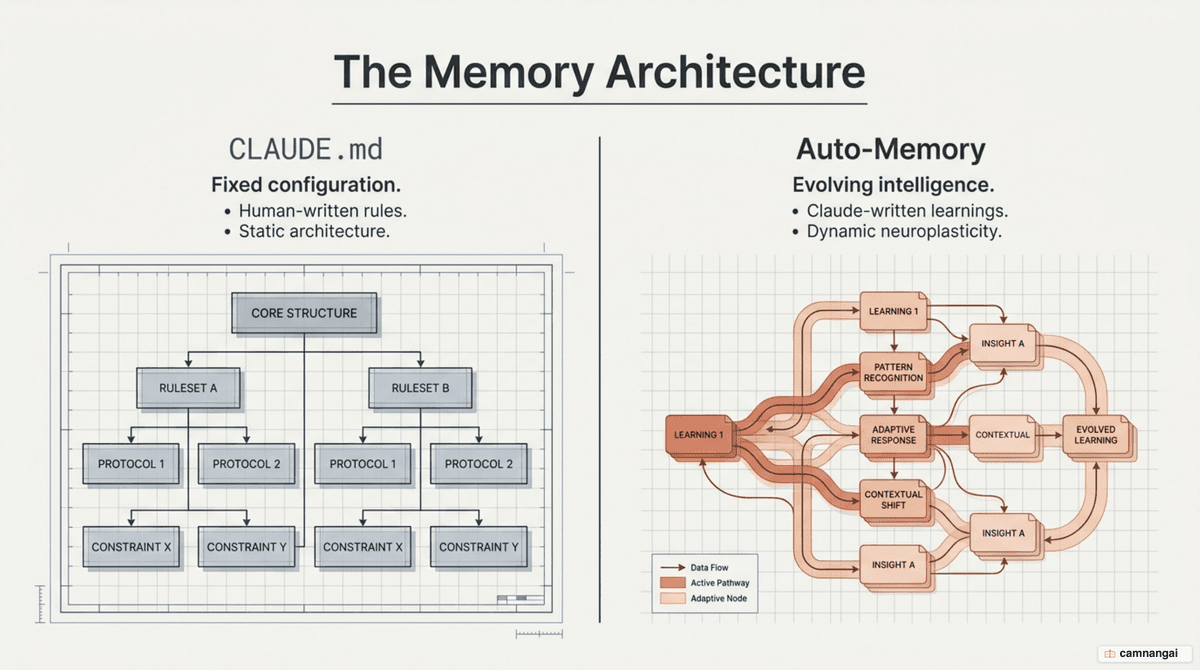
Getting it right removes the "Repetition Tax" — the tokens and attention you burn re-establishing your job, your project rules, and your environment in every new terminal session. Instead of one sprawling instruction file, Claude Code splits memory into two layers: the fixed rules you write (CLAUDE.md) and the lessons Claude accumulates (auto-memory).
For an engineer, understanding each layer's precedence and physical limits is what separates a memory setup that steers the agent from one that quietly drifts out of date.
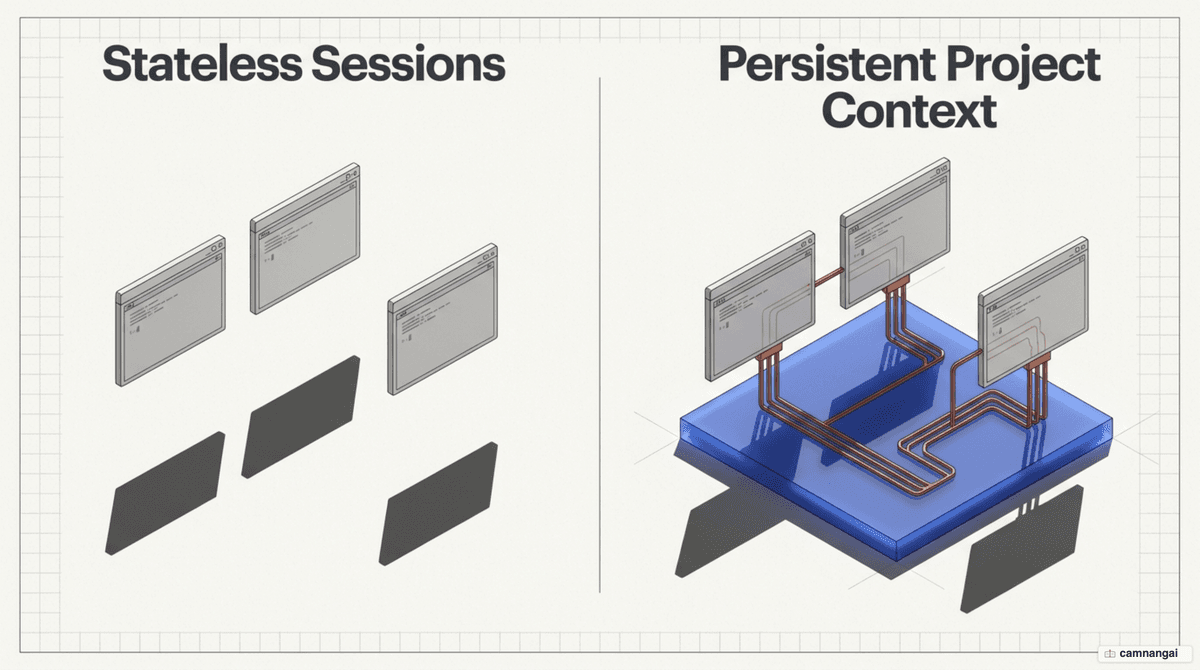
Why does each Claude Code session start with no memory?
Every Claude Code session is bounded by a context window, and at startup that context is empty.
Rebuilding it by hand each time is the "Repetition Tax": you spend tokens and focus retyping
constants like "this project uses TypeScript" or "API handlers live in src/api".
This is not a limit you beat by pasting more into the top of each session. The fuller the context window, the less room is left for the model to reason about the complex code tasks that follow — manually stuffing context erodes the quality of what comes back.
So Claude Code needs an automatic briefing: it loads the infrastructure facts (build commands, directory layout, conventions) at startup and keeps temporary conversation memory separate from stable long-term memory. That separation is what lets Claude respond consistently no matter which session of the project you are on.
Two memory systems: CLAUDE.md and auto-memory
You need to separate instructions (rules you write) from lessons (state Claude accumulates). Both load at the start of every conversation as context — not as hard-enforced configuration. To block an action regardless of what Claude decides, reach for a hook, not a CLAUDE.md line.
| Feature | CLAUDE.md | Auto-memory |
|---|---|---|
| Nature | Behavioral rules (you write) | Accumulated lessons (Claude writes) |
| Content | Rules, standards, project layout | Working build commands, fixed bugs, prefs |
| Scope | Project, user, or org | Per repository, shared across worktrees |
| Loaded into | Every session, in full | First 200 lines or 25KB of the index file |
CLAUDE.md is the project's constitution: what Claude must do. Auto-memory is more like a running logbook, letting Claude recognize patterns it has hit before so it does not repeat old mistakes. Use CLAUDE.md when you want to steer behavior; let auto-memory distill what it learns from the corrections you give it. For the wider picture of how CLAUDE.md, rules, skills, and hooks work together to steer Claude, see Claude memory files and how they steer Claude.
CLAUDE.md: writing effective instructions
For CLAUDE.md to work, think configuration, not prose. Instructions should be concrete
enough to verify. Replace "format code nicely" with "use 2-space indentation, run npm test before
committing." The vaguer the line, the more freely Claude misreads it.
The 200-line limit is a threshold worth respecting. Past it, adherence starts to slip and
instructions buried mid-file get dropped. If your guidance is growing, split it into
.claude/rules/ or @import other files rather than cramming everything into one place. The
minimum worth having: build and test commands, the layout of the load-bearing directories, and any
project-specific naming conventions.
A tight CLAUDE.md can look like this:
### Build & Test

- Build: `npm run build`
- Test: `npm test` (requires local Redis on port 6379)

### Conventions

- Use 2-space indentation; prefer async/await over callbacks
- API handlers live in `src/api/handlers/`
- Every new endpoint ships with an integration test
For a deeper look at writing and tuning a CLAUDE.md file, see CLAUDE.md: optimizing context for Claude Code.
Where CLAUDE.md files live: scopes and load order
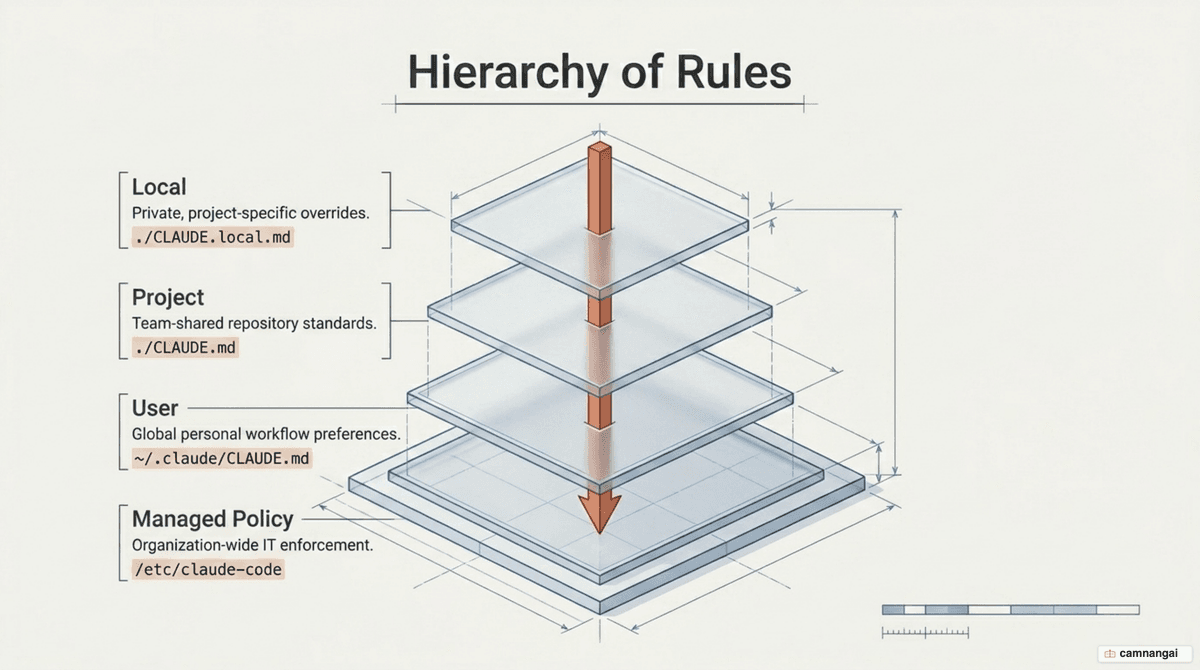
Claude Code loads instructions hierarchically, from broad to specific. A file at a more specific scope loads later and takes precedence, overriding the broader scope on conflicts:
- Managed Policy (org level) — governed by IT/DevOps to enforce security and compliance across
the company; users cannot exclude it.
- macOS:
/Library/Application Support/ClaudeCode/CLAUDE.md - Linux/WSL:
/etc/claude-code/CLAUDE.md - Windows:
C:\Program Files\ClaudeCode\CLAUDE.md
- macOS:
- User —
~/.claude/CLAUDE.md, personal preferences applied to all your projects. - Project —
./CLAUDE.mdor./.claude/CLAUDE.md, committed to Git and shared with the team. - Local —
./CLAUDE.local.md, highest precedence, usually gitignored for sandbox URLs or test data of your own.
Claude discovers these by walking up the directory tree from your working directory to the root and concatenating them into context, so the instructions closest to where you launched are read last.
Organizing instructions: imports and rules
To stay under the 200-line limit, modularize. Use the @path/to/file syntax (for example
@README.md or @package.json) to reference existing files without copy-pasting. Note the
trade-off: imported files still load in full at launch, so @import helps organization, not token
cost.
For rules that only apply to part of the codebase, use the .claude/rules/ directory. Each file
covers one topic, and YAML frontmatter with a paths field scopes it to matching files. That is the
version that actually saves context, because the rule only loads when Claude touches a matching file:
---
paths:
  - "src/api/**/*.ts"
---

# API rules

- Every endpoint must include input validation
- Return responses in the standard { data, error } shape
Auto-memory: cross-session learning
Auto-memory is Claude Code's self-written learning store, on by default since v2.1.59. It is
machine-local, kept at ~/.claude/projects/<project>/memory/ and shared across every worktree of
the same repository. Unlike the slot-limited memory in the Claude web app, auto-memory here is
file-based and unbounded: it writes plain markdown you can read and edit at any time.
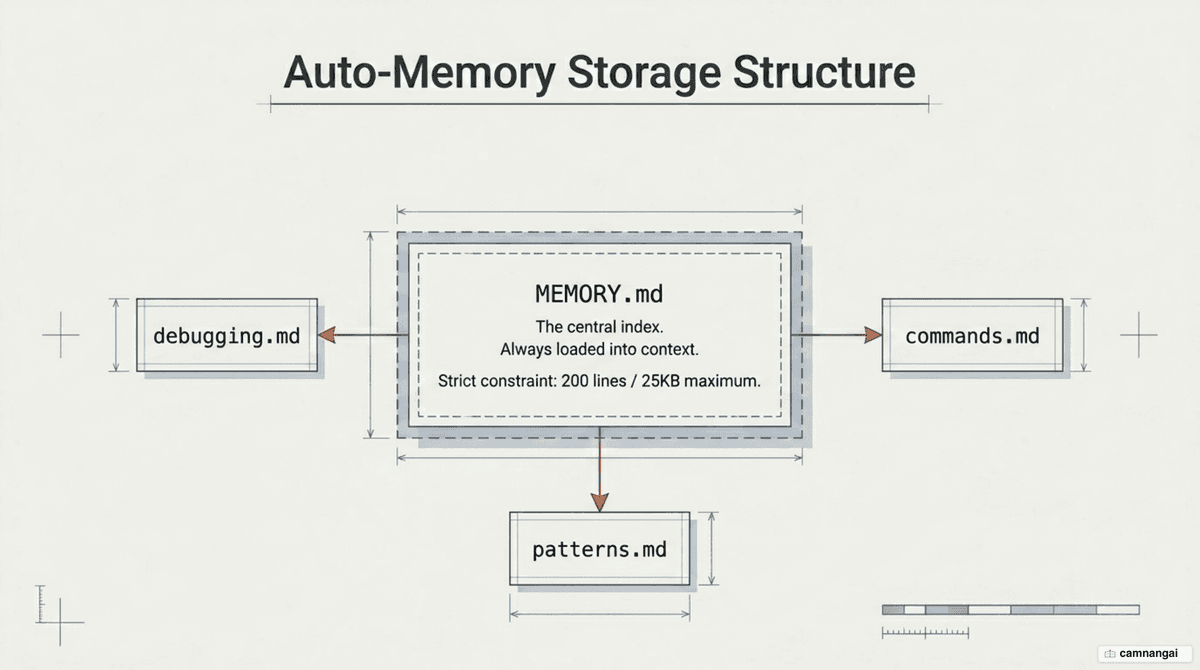
A MEMORY.md file acts as the index. At startup Claude loads only its first 200 lines or 25KB to
save context; detailed notes live in topic files like debugging.md and are read on demand via tool
calls. When you see "Writing memory" or "Recalled memory" in the UI, Claude is updating or reading
this directory. It does not save something every session — it decides what is worth keeping for a
future conversation, and you can disable it entirely with CLAUDE_CODE_DISABLE_AUTO_MEMORY=1.
Maintenance: the dreaming cycle
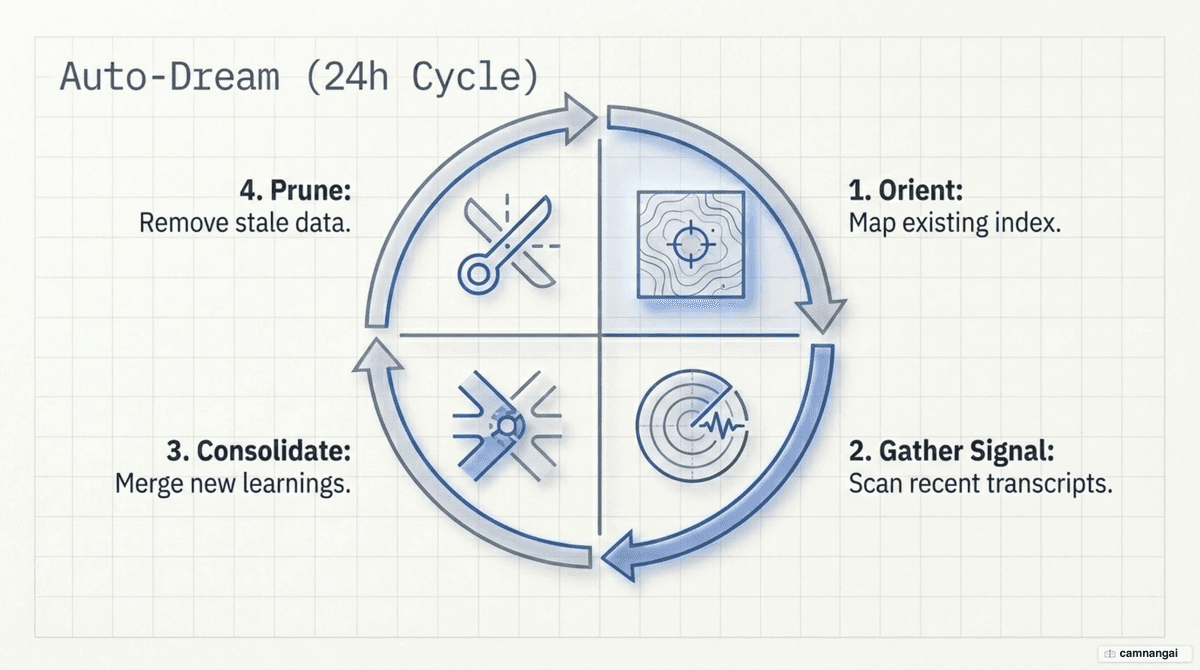
Memory decays as a project's requirements move; a note that was right last month can be wrong after one refactor. Some setups add a background maintenance step — often called "dreaming" — that runs a reflective pass roughly every 24 hours. Because it runs out-of-band, it keeps memory upkeep off the critical path and adds no latency to your active sessions.
The pass typically moves through four phases:
- Orient — read the index to establish what is currently remembered.
- Gather signal — scan local conversation logs for corrections and new patterns.
- Consolidate — merge information, delete contradictions, and convert relative dates to absolute timestamps.
- Prune — trim stale entries so the
MEMORY.mdindex stays within its limit and performance holds.
Whether or not your setup runs a dreaming pass, the discipline is the same: open the memory directory periodically and delete what has gone stale. It is all markdown, so you stay in control.
Memory for self-learning agents: the API Memory Tool
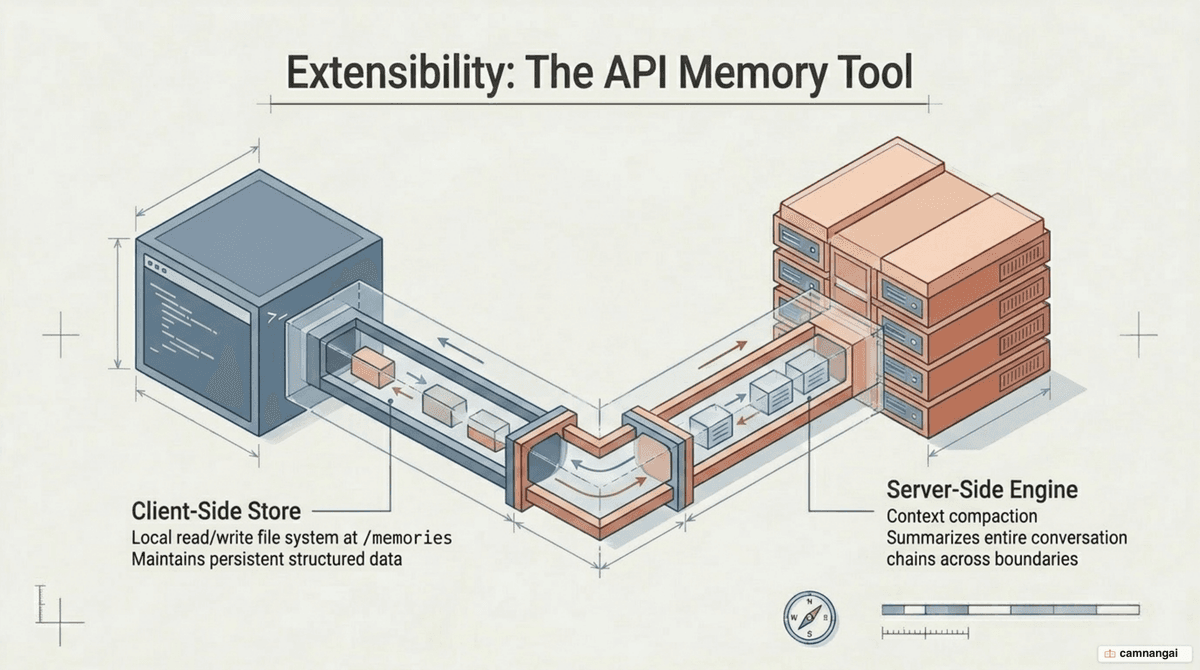
If you are building autonomous agents on Anthropic's API rather than using Claude Code, the API
Memory Tool gives you a client-side read/write filesystem at /memories. Claude issues tool calls
to create, read, update, and delete memory files, and your application executes them. Unlike
auto-memory, you own the storage, define the schema, and decide what persists.
The practical payoff is an agent that picks up where it left off: a coding agent that remembers session-one architecture decisions, a research agent that accumulates verified facts. The technique worth adopting is pairing the Memory Tool with context compaction: when the context window fills, compaction summarizes the conversation server-side, while the Memory Tool ensures the hard facts survive that summarization boundary. The two are designed to work together.
The /memory command and workflow
The /memory command is your control panel: it lists every CLAUDE.md, CLAUDE.local.md, and rules
file loaded in the session, lets you toggle auto-memory, and opens the memory directory to inspect or
clean it. When you say "remember to always use pnpm, not npm," Claude saves it to auto-memory; to
write it into CLAUDE.md instead, just say "add this to CLAUDE.md."
On a new project, run /init to generate a baseline CLAUDE.md from the codebase, then refine from
there. A good habit for long sessions is to end with a sub-agent that reviews the whole transcript
and proposes what belongs in memory — it keeps the store sharp and avoids accumulating context
clutter.
Troubleshooting memory failures
When Claude starts ignoring instructions, work through this checklist:
- Load audit. Run
/memory; if a file is not listed, Claude cannot see it. - Line count. Confirm the file is under 200 lines — adherence drops as it grows.
- Path scoping. A rule in a subdirectory CLAUDE.md only loads when Claude reads a file in that directory; move "always-on" rules to the root.
- After
/compact. If instructions vanished after/compact, they were likely conversation-only or in a nested CLAUDE.md that has not reloaded. The project-root CLAUDE.md is re-read automatically, so put anything critical there.
Finally, remember the line between guidance and enforcement. CLAUDE.md is context, not a hard
barrier. For things that must run at a specific point — lint before every commit, or blocking a
dangerous command — use a PreToolUse hook instead of a written instruction. To see exactly which
files load and why, configure the InstructionsLoaded hook to log every instruction file at
startup.
References
- How Claude remembers your project — Claude Code Docs
- Give Claude Permanent Memory — Faisal Haque (Plain English)
- Stop Re-Introducing Yourself to Claude — Substack
- Claude Code Memory Management: The Complete Guide 2026 — Data Science Collective
- You're Using 1 of 3 Memory Systems in Claude Code — Substack
- How Memory Works in Claude Code Harness — Kanav Anand
- Memory and Dreaming for Self-Learning Agents — YouTube