Claude memory files are the architectural mechanism for giving an AI agent project-level persistence and steering.
Without a structured memory system, Claude Code starts every session from zero, wasting tokens and forcing you to repeat architectural constraints. A well-designed setup treats Claude as programmable infrastructure that keeps the context you care about across sessions, so you are not babysitting it by hand.
To stop Claude from forgetting context, you engineer three pillars of memory: storage, injection, and recall. Storage determines how information is written during a session; injection defines what is pushed into the system prompt at start; and recall establishes a framework for recovering long-term facts. Progressive disclosure keeps context lean — you retrieve information only when the task actually needs it.
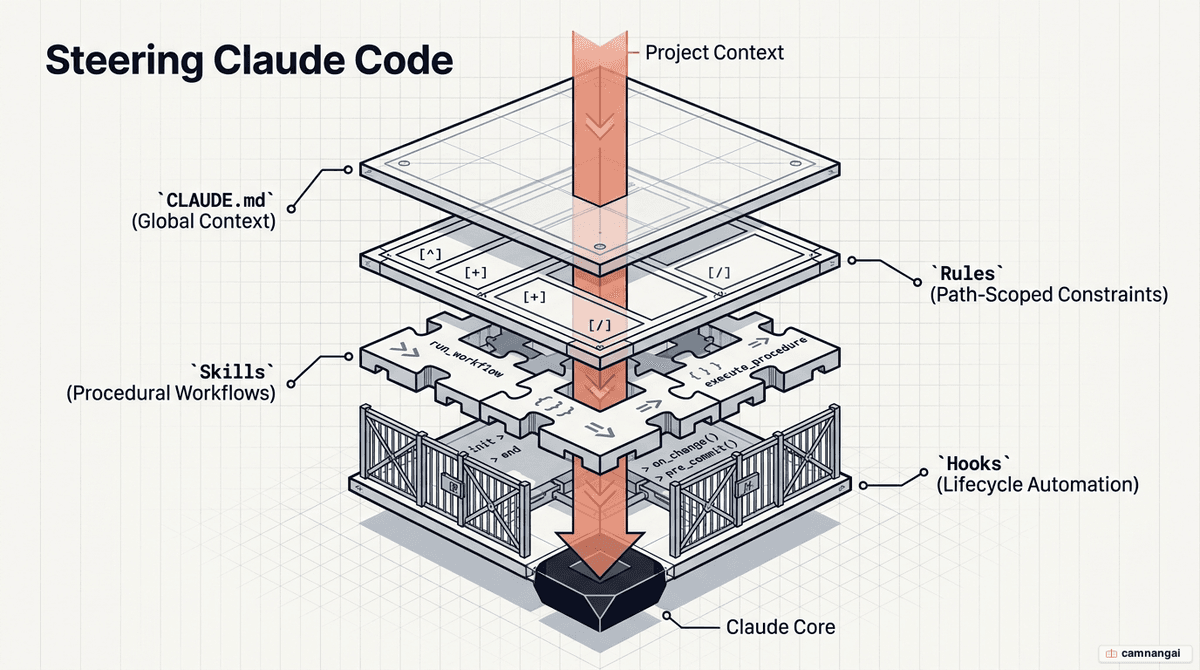
Why you need memory files for Claude
Out-of-the-box memory in Claude Code lags behind current open-source community solutions. Standard behavior is often selective, capturing only what the agent deems "important," which leads to lost decision-making context. A good setup solves this by answering three questions: how information is saved (storage), how it is pushed to the agent (injection), and how it is recovered (recall).
Efficient memory management relies on "frozen snapshots" and "progressive disclosure." Instead of loading tens of thousands of tokens, you provide lean, curated files as snapshots of the current state. Long-term recovery uses a four-tier recall system:
- Tier 0: Check existing context (e.g.,
memory.mdor daily logs). - Tier 1: Semantic match in a local vector database.
- Tier 2: Metadata expansion for surrounding context.
- Tier 3: Raw dialogue retrieval for exact transcripts.
This hierarchy lets Claude retrieve meaning — such as "monetization" when you ask about "pricing" — without cluttering the primary context window with raw logs.
The types of Claude memory and steering files
Instructional files follow a strict hierarchy of authority. Global files in ~/.claude/CLAUDE.md
apply everywhere, while project-root and subdirectory files provide localized context. Use extreme
caution with output styles; these carry the highest weight but will strip critical default
engineering instructions — like security checks and test verification — unless you explicitly set
keep-coding-instructions: true.
The following table summarizes the primary steering methods:
| Method | When it's loaded | Compaction behavior | Context cost | When to use |
|---|---|---|---|---|
CLAUDE.md (root) | Session start | Memoized; re-read after compaction | High | Build commands, directory layout, team norms |
CLAUDE.md (subdir) | On-demand (dir touch) | Lost until dir touched again | Low | Module-specific conventions |
| Rules | Start or path-match | Re-injected on compaction | Medium | Specific constraints (e.g., API validation) |
| Skills | Name/desc at start | Oldest dropped first when budget exceeded | Low | Procedural workflows (e.g., deploy checklists) |
| Subagents | Metadata at start | Only final summary returns | Low | Isolated parallel tasks (e.g., security audits) |
| Hooks | Lifecycle events | Bypass compaction entirely | Low | Deterministic automation (e.g., linters) |
| Output styles | Session start | Never compacted | High | Total role changes (e.g., teacher mode) |
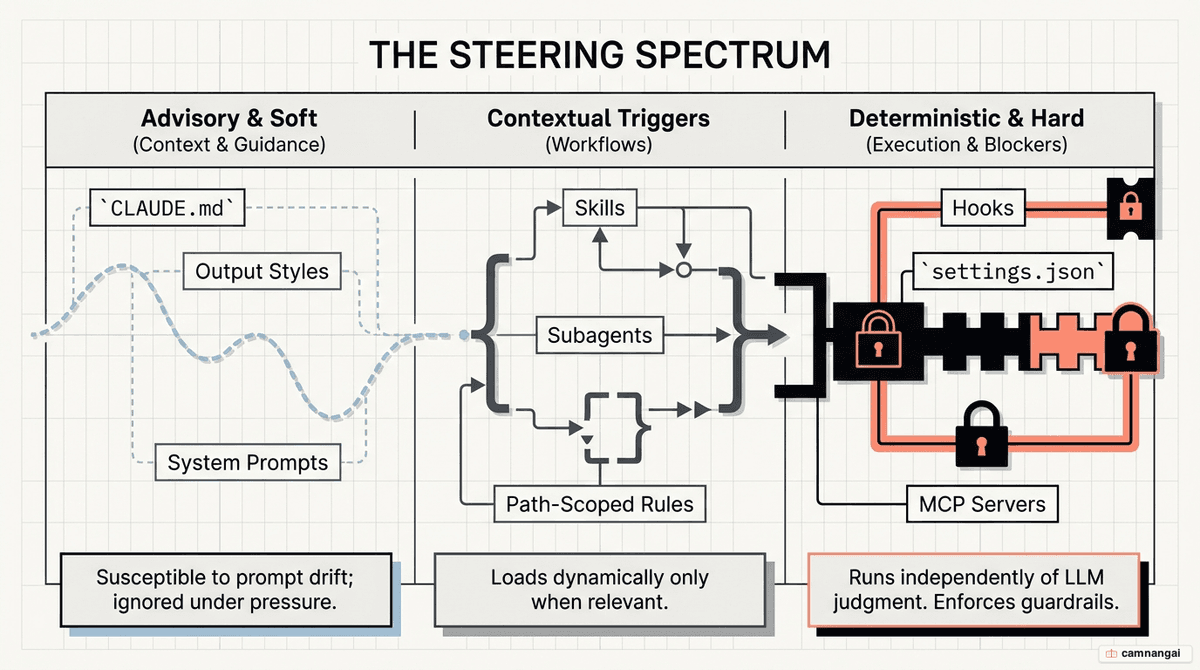
How CLAUDE.md works
The CLAUDE.md file is the project's permanent memory. Root-level versions are "memoized" — read
once and cached for the session, only re-read after compaction. Subdirectory CLAUDE.md files, by
contrast, load "on-demand" only when a file within that path is touched. This lets monorepo teams
load only the conventions relevant to their module, saving thousands of tokens.
Every line in CLAUDE.md is a budget. Files exceeding 150–200 lines trigger instruction dropout, where
Claude ignores earlier directives. A "minimum viable CLAUDE.md" focuses only on facts the model
cannot infer:
### Project: Analytics API

#### Stack

- Node.js 22, Redis 7, Drizzle ORM
- See @package.json for dependencies

#### How to work

- Run tests: npm test
- Lint: npm run lint

#### Things to get right

- Always use ESM imports
- Auth middleware must run BEFORE rate limiting
- Redis keys must use v2:user:{id} prefix
For a deeper look at writing and tuning a CLAUDE.md, see CLAUDE.md: optimizing context for Claude Code.
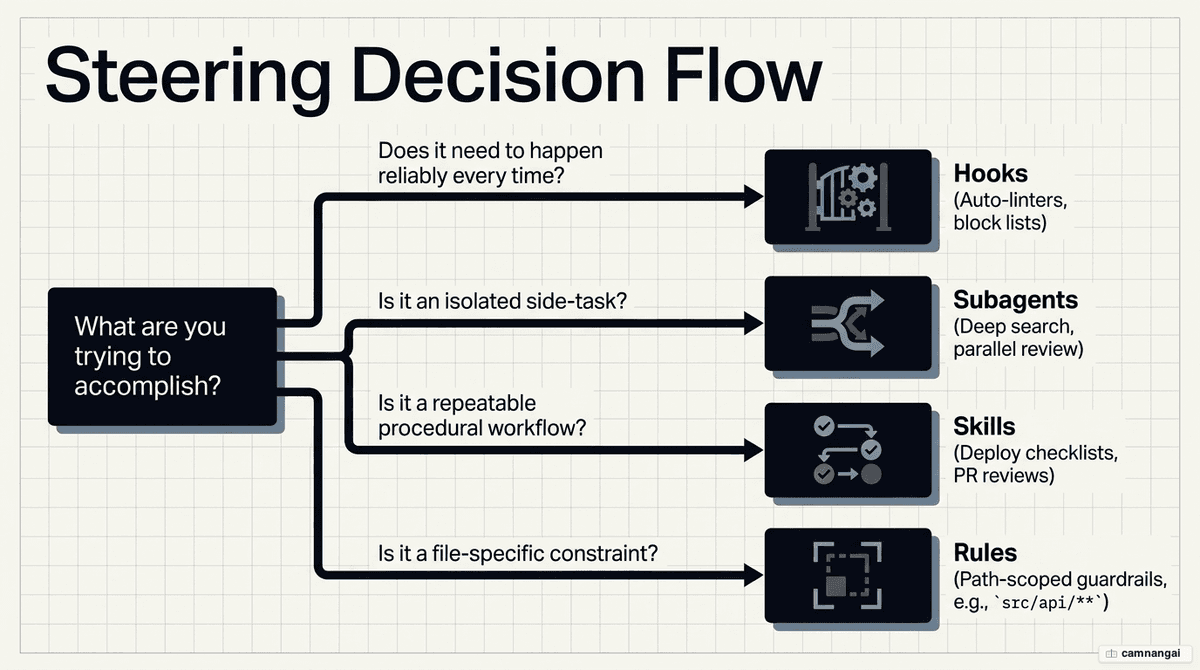
Choosing the right mechanism: rules, skills, subagents, or hooks?
Decisions here come down to determinism and orchestration scale.
- Rules: Best for cross-cutting constraints. Use path-scoped rules (e.g.,
src/api/**) so API-specific conventions stay out of context during frontend work. - Skills: Use for multi-step procedures. A skill loads its full instructional body only when invoked, keeping the main conversation thread clean.
- Subagents: Use for isolation. Subagents can nest five levels deep and keep intermediate results in script variables rather than the main context — essential for tasks like deep search where raw logs would otherwise bloat the session.
- Hooks: Use for deterministic automation. Markdown instructions are advisory and can be ignored
under pressure; hooks are code-level triggers. A
PreToolUsehook can inspect a command and use exit code 2 to deny it and send feedback to Claude.
Best practices for setting them up
The "CLAUDE.md test" is simple: if Claude wouldn't make a mistake without a specific line, delete it.
Spend your budget on corrections, not confirmations. For an expert-level setup, adopt hybrid memory:
capture raw transcripts automatically via a nightly vector-search index job, but maintain curated
markdown files — soul.md, user.md, and memory.md — for facts that must be immediately available.
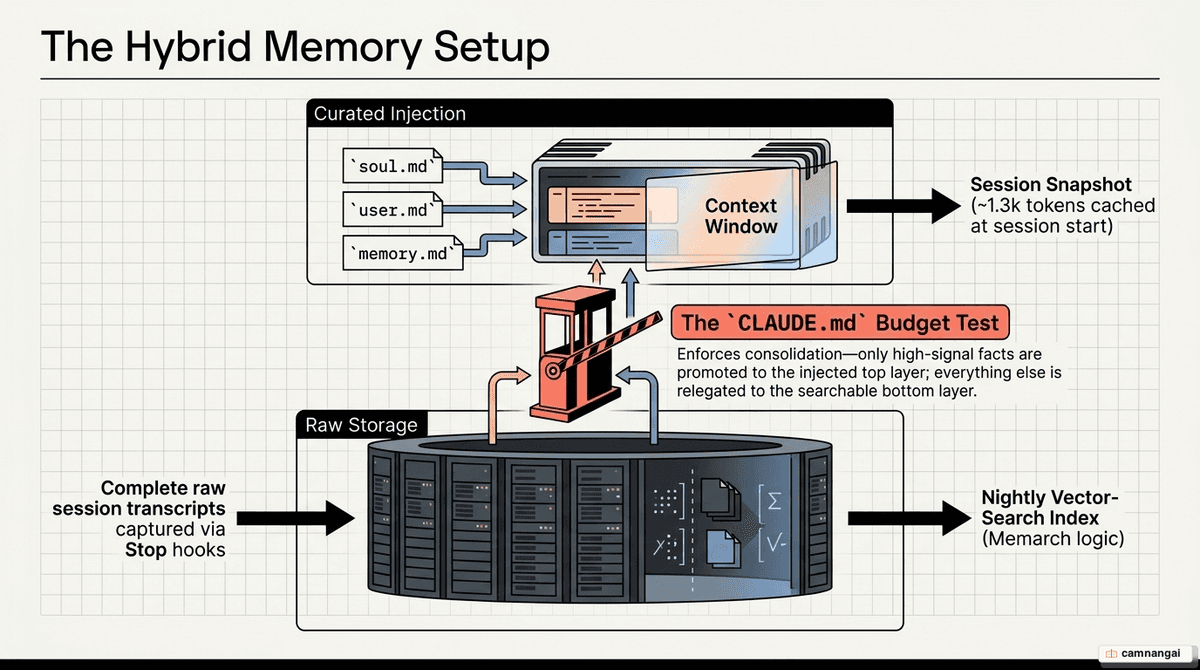
Manage compaction aggressively. Run a manual /compact when context usage hits 50% to keep control
over preserved state. Use CLAUDE.md to tell Claude explicitly what to retain during compaction, such
as the list of modified files or the current test status.
To implement deterministic guardrails, configure hooks in .claude/settings.json. This example runs
a linter with auto-fix after every file write:
{
  "hooks": {
    "PostToolUse": [
      {
        "matcher": "Write",
        "hooks": [{ "type": "command", "command": "npm run lint --fix" }]
      }
    ]
  }
}
FAQ
When should I use a subdirectory CLAUDE.md instead of the root? Use subdirectory files for
module-specific conventions in large projects or monorepos. They load "on-demand" only when Claude
touches a file in that directory, keeping your root instruction budget free of irrelevant details.
What is the difference between a skill and a subagent? A skill runs its procedure directly in your main thread, so you see and steer every step. A subagent runs in an isolated context window, keeping intermediate logs and search results out of your main session and returning only a final summary.
Why does Claude ignore some of my instructions in long sessions? This is instruction dropout. When
combined instructions exceed 200 lines, Claude may treat chunks as irrelevant. Keep CLAUDE.md concise,
use path-scoped rules, and move procedural runbooks into skills to keep the budget lean.
How do hooks improve security? Hooks are deterministic logic, not advisory text. A PreToolUse
hook can run a script that checks commands against a blocklist; if the script exits with code 2, the
command is blocked regardless of Claude's intent.
What is the two-Claude review pattern? One session implements a feature with full context. A second session reviews the diff "cold," without that context. This forces an honest evaluation: the second model surfaces shortcuts or assumptions the first took for granted during implementation.