Follow this guide to install Claude Code and get a terminal-based agent that reads your codebase, runs shell commands, and edits files when you tell it to. If you want the background first, read What is Claude Code?.
Before you start, you need a supported machine and a paid account. Claude Code runs on macOS 13.0+, Windows 10 (1809+) or Windows Server 2019+, and modern Linux (Ubuntu 20.04+, Debian 10+, or Alpine 3.19+), on 4 GB+ RAM and an x64 or ARM64 processor. You also need a paid Claude subscription (Pro, Max, Team, or Enterprise) or a Claude Console account with credits — the free Claude.ai plan does not include Claude Code.
 Screenshot: Claude Code 2.1.220
Step 1 — Install Claude Code on your machine
Pick one — skip the others.
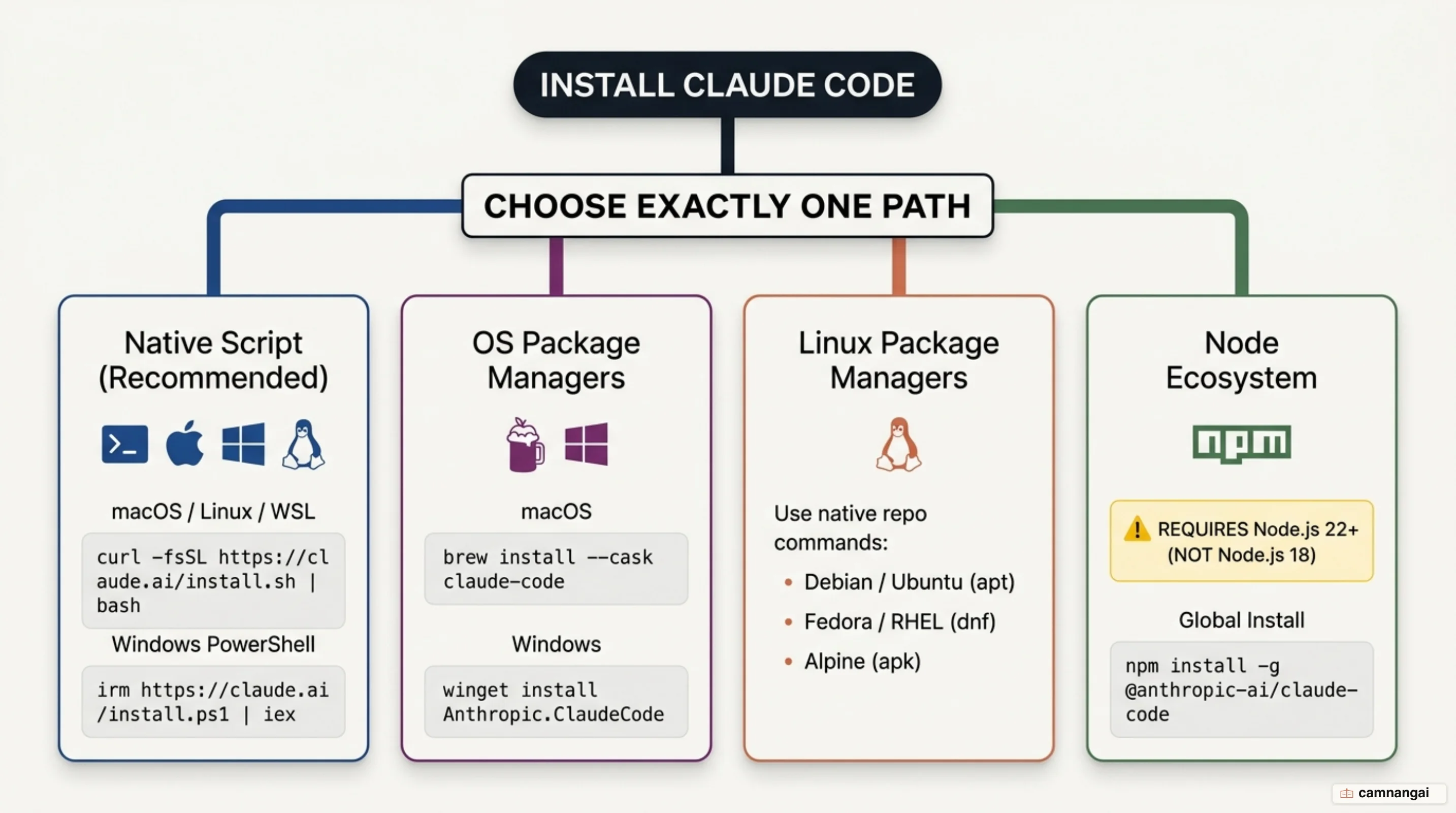
Native install (recommended)
macOS, Linux, WSL:
curl -fsSL https://claude.ai/install.sh | bashWindows PowerShell:
irm https://claude.ai/install.ps1 | iexWindows CMD:
curl -fsSL https://claude.ai/install.cmd -o install.cmd && install.cmd && del install.cmdNative installations update automatically in the background. On native Windows, install Git for Windows so Claude Code can use the Bash tool; without it, Claude Code falls back to PowerShell.
Homebrew (macOS)
brew install --cask claude-codeThe claude-code cask tracks the stable channel, roughly a week behind and skipping releases with major regressions. Use claude-code@latest to get every release as it ships. Homebrew installs do not auto-update.
WinGet (Windows)
winget install Anthropic.ClaudeCodeWinGet installs do not auto-update either; run winget upgrade Anthropic.ClaudeCode periodically.
Linux package managers (apt, dnf, apk)
Claude Code publishes signed apt, dnf, and apk repositories. On Debian and Ubuntu, install the signing key into /etc/apt/keyrings/, register the repository in /etc/apt/sources.list.d/claude-code.list, then run sudo apt update && sudo apt install claude-code. On Fedora and RHEL, create /etc/yum.repos.d/claude-code.repo and run sudo dnf install claude-code.
Alpine needs its dependencies first, since the base image ships without bash or curl:
apk add bash curl libgcc libstdc++ ripgrepThen open settings.json and add the USE_BUILTIN_RIPGREP environment variable so search works on musl. It belongs inside the env block, not at the top level:
{
  "env": {
    "USE_BUILTIN_RIPGREP": "0"
  }
}
npm (Node.js 22+)
npm install -g @anthropic-ai/claude-codeAs of v2.1.198 the npm package requires Node.js 22 or later. Do not run this with sudo — it causes permission problems and security risks.
Step 2 — Check that Claude Code installed correctly
Print the installed version:
claude --version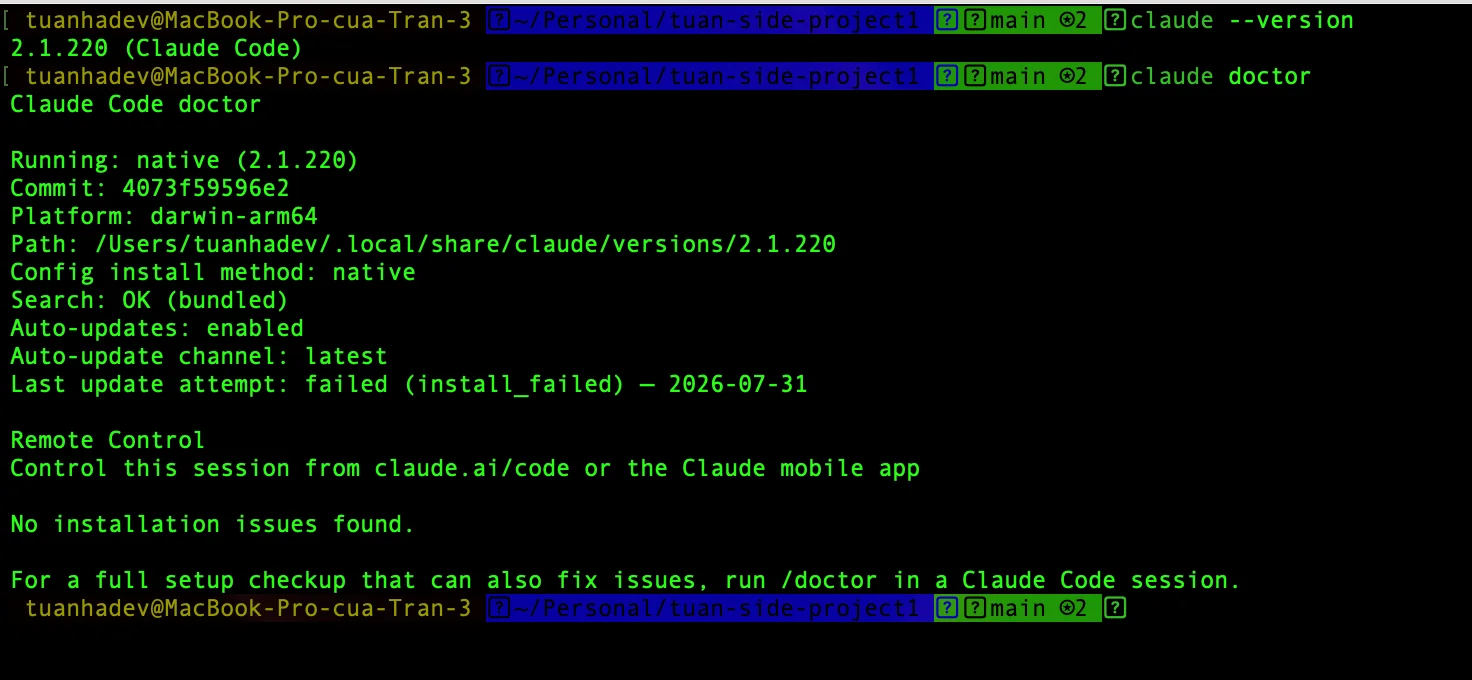 Screenshot: Claude Code 2.1.220
A working installation prints a version number followed by the tool name, such as 2.1.220 (Claude Code).
Then run the diagnostic:
claude doctorIt prints read-only diagnostics — install health, settings-file validation errors, and warnings with suggested fixes — without starting a session.
Step 3 — Log in to your Claude account
Start Claude Code:
claudeYour browser opens for authentication. The terminal prints Login successful when it completes.
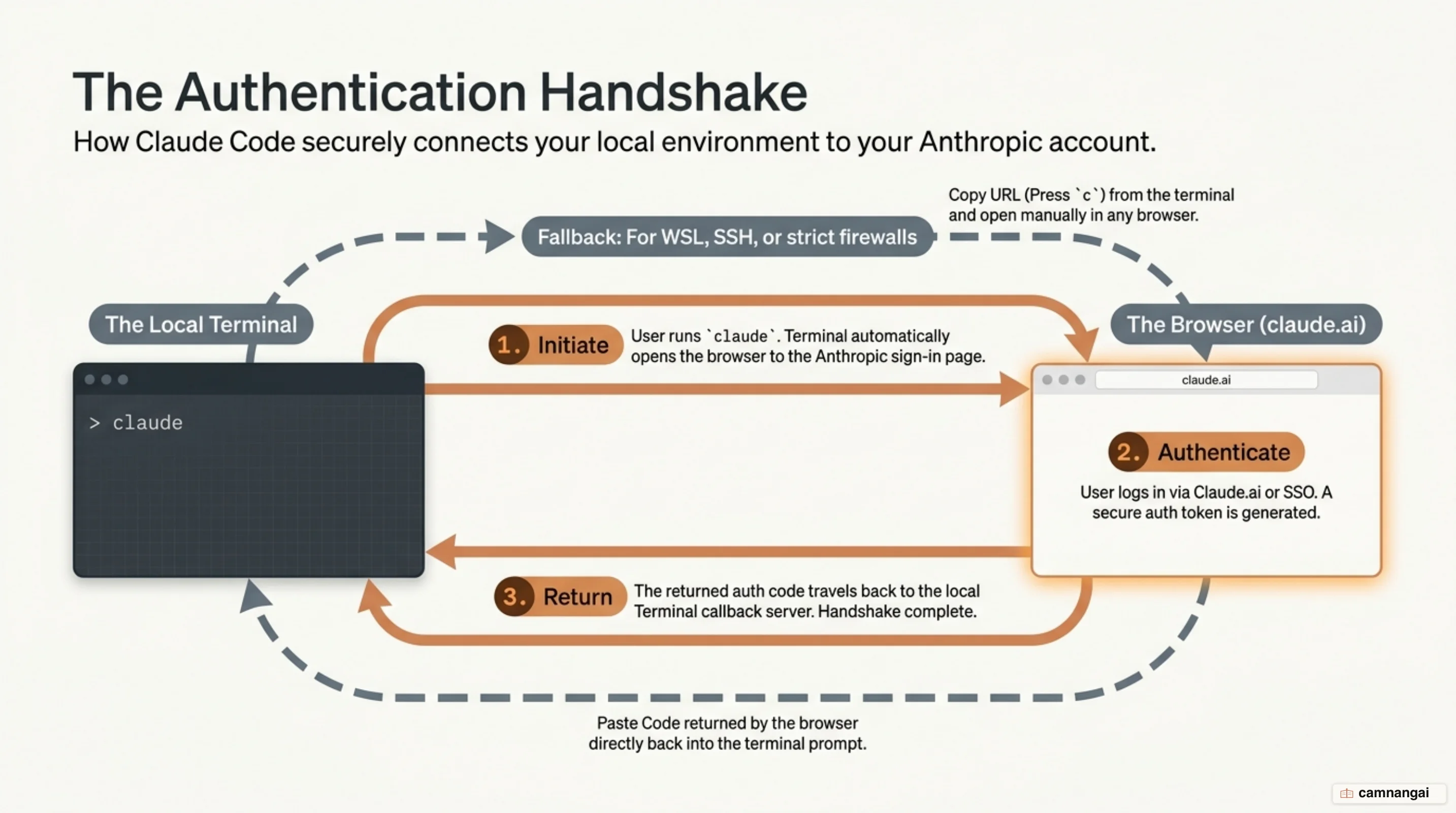
If the browser does not open — common over SSH, in WSL2, and in containers — press c to copy the
login URL.
Sign in from any browser, then paste the returned code into the terminal at the Paste code here if prompted prompt.
If ANTHROPIC_API_KEY is set in your environment, Claude Code skips the browser and asks you to approve that key instead.
Step 4 — Open your first session in a project
Move into your project:
cd /path/to/your/projectStart the session:
claudeThe prompt appears with the version, the active model, and the working directory shown above it. That header confirms Claude Code opened against the right project.
Step 5 — Give Claude its first task
Start by letting Claude read the project:
what does this project do?Then try a real change:
add a hello world function to the main fileClaude Code shows you the proposed change and waits for approval before touching a file.
Press Shift+Tab to cycle permission modes: the default asks before each change, acceptEdits
auto-approves file edits, and plan lets Claude propose without editing.
 Screenshot: Claude Code 2.1.220
No terminal? Install the desktop app
The desktop app runs the same engine as the CLI behind a graphical interface, with no terminal required. Download it for macOS or Windows; on Linux, install it with apt.
Run the installer, sign in with your Anthropic account, then open the Code tab, choose Local, and select your project folder. The desktop app includes Claude Code, so you do not need Node.js or a separate CLI install — but if you want to run claude from a terminal, install the CLI as well.
Commands to remember in your first session
| Command | What it does |
|---|---|
/help | Show available commands |
/clear | Clear conversation history |
/model | Switch the active model |
/init | Generate a CLAUDE.md for the project |
/resume | Continue a previous conversation |
/exit | Exit Claude Code (or press Ctrl+D twice) |
Also: Tab completes commands, the up arrow walks command history, and Esc interrupts Claude mid-run. The full list lives in the Claude Code commands cheatsheet.
Fixing installation and login problems
| Error | Cause | Fix |
|---|---|---|
command not found: claude | The install directory is not on your PATH. | Add export PATH="$HOME/.local/bin:$PATH" to ~/.zshrc or ~/.bashrc, then open a new terminal. |
'claude' is not recognized | Same problem on Windows. | Append $env:USERPROFILE\.local\bin to your user PATH in PowerShell, then open a new window. |
syntax error near unexpected token '<' | The install URL returned a web page instead of the script. | Run the command again; if it persists, install with Homebrew. "App unavailable in region" means your country is unsupported. |
irm is not recognized | You are in CMD, not PowerShell. | Open PowerShell, or use the CMD-specific install command. |
Could not establish trust relationship for the SSL/TLS secure channel | Older Windows 10 without TLS 1.2 enabled. | Run [Net.ServicePointManager]::SecurityProtocol = [Net.SecurityProtocolType]::Tls12, then retry the install. |
dyld: cannot load or built for Mac OS X 13.0 | Your macOS is older than the minimum Claude Code supports. | Check About This Mac; update macOS if it is below 13.0. |
A permission error (400 or 403) after a successful login | An ANTHROPIC_API_KEY in your environment overrides the account you just signed in with. | Run unset ANTHROPIC_API_KEY, then check /status to confirm which credential is active. |
What to do next
Run /init to generate a CLAUDE.md file. Use it to record the build commands, test runners, and conventions Claude cannot infer on its own, and commit it so your whole team shares the same rules. For what belongs in that file, see CLAUDE.md best practices.
References
- Terminal guide for new users - Claude Code Docs
- Advanced setup - Claude Code Docs
- Quickstart - Claude Code Docs
- Troubleshoot installation and login - Claude Code Docs
- Authentication - Claude Code Docs
- Get started with the desktop app - Claude Code Docs
- How to Use Claude Code (Beginner Guide) - Builder.io
- Troubleshoot Claude Code installation and authentication - Claude Help Center