The .claude folder is the primary configuration entry point for managing Claude Code's behavior within a repository. Efficient project management requires a hierarchical configuration structure that prioritizes low token overhead and high instruction adherence.
A high-performance setup uses a multi-layered approach: a lean, memoized root CLAUDE.md for baseline context, path-scoped rules for modularity, skills for on-demand workflows, and a settings.json for deterministic tool control. By separating instructions based on frequency of access and technical concern, you optimize the context window for actual development tasks.
Well-structured configurations prevent context drift during long-running sessions. By loading specific instructions only when they are relevant to the active file path, you minimize the risk of the model ignoring critical constraints or spending compute on irrelevant data.
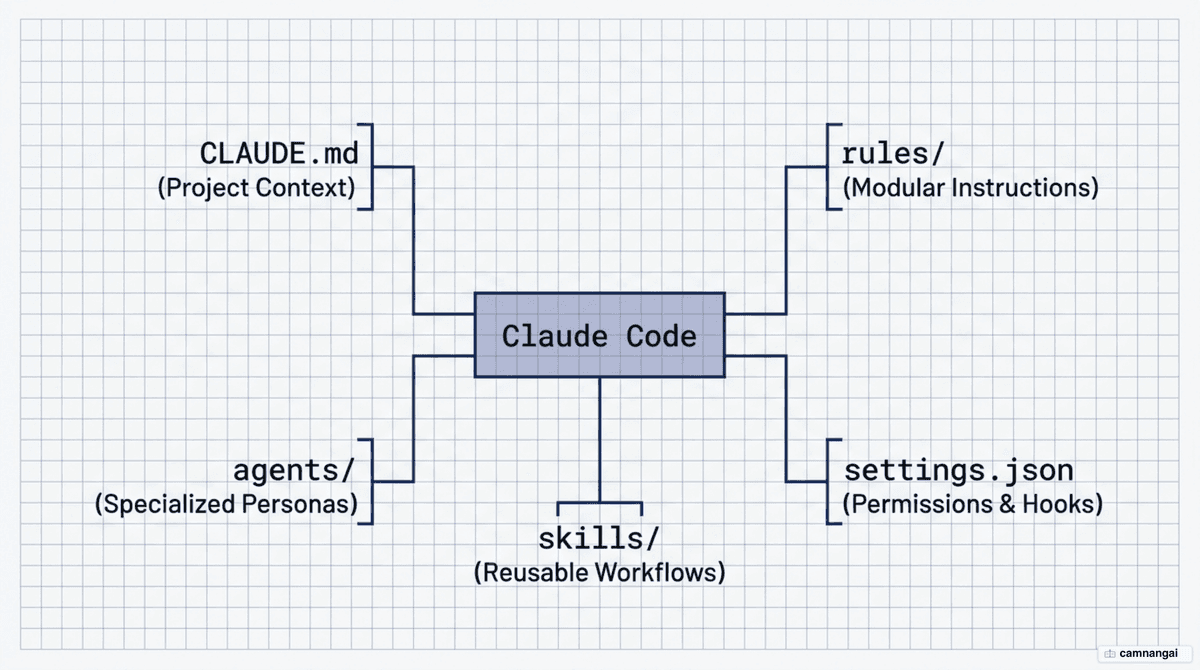
Two .claude folders: project scope and global scope
You manage two distinct .claude directories to balance team standards with personal environment needs. The project-level .claude/ directory, located in the repository root, should be committed to Git to ensure consistent behavior across the engineering team. The global ~/.claude/ directory (at %USERPROFILE%\.claude on Windows) manages personal state, including session history and machine-specific auto-memory.
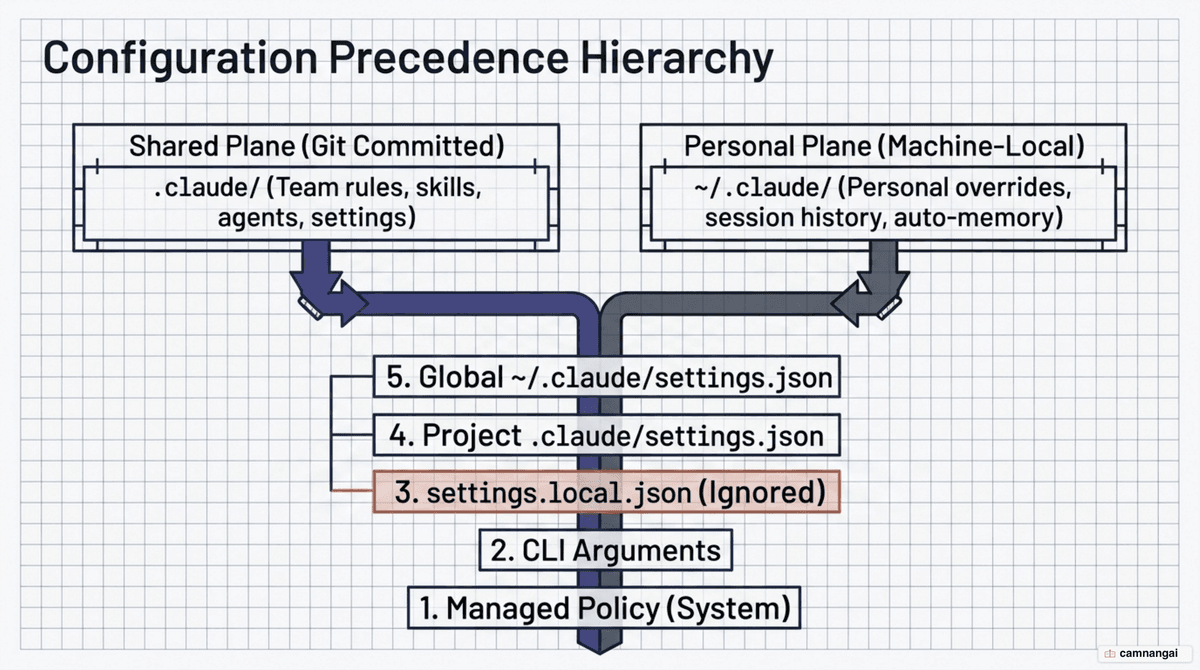
Claude Code resolves settings through a strict precedence cascade. Higher-priority levels override lower-priority configurations.
| Priority | Source | Location |
|---|---|---|
| 1 (Highest) | Managed Policy | System-level (deployed via MDM or config management) |
| 2 | CLI Arguments | Command-line flags passed at invocation |
| 3 | Local Overrides | .claude/settings.local.json |
| 4 | Project Settings | .claude/settings.json |
| 5 (Lowest) | User Settings | ~/.claude/settings.json |
For project-specific preferences that should not be shared — debug flags, local paths — use .local files. CLAUDE.local.md and settings.local.json are automatically ignored by the Claude Code Git integration, so personal overrides never pollute the shared repository.
CLAUDE.md — the foundation file, keep it under 200 lines
CLAUDE.md is the initial context for every session. It is memoized — read once and cached for the duration of the session — and the cache is only cleared and re-read after a conversation compaction. Include high-level technical data here: build and test commands, tech-stack specifics, core architecture decisions, and the critical "gotchas" Claude can't infer from code.
Strictly hold to a 200-line limit. Excessive length increases token costs and causes the model to ignore instructions. If the file grows past this limit, migrate specific conventions into path-scoped rules.
Root files load at startup. Subdirectory CLAUDE.md files (e.g. src/api/CLAUDE.md) load on demand when Claude accesses files within that path. In monorepos, this ensures teams only consume tokens for their own modules.
# Project: Analytics API

## Commands

- Build: docker-compose build
- Test: pytest
- Lint: ruff check .

## Architecture

- FastAPI with SQLAlchemy (PostgreSQL)
- Business logic lives in app/services/
- Schemas use Pydantic v2 in app/schemas/

## Conventions

- Use file-scoped dependencies for Auth
- Async methods must use the Async suffix
- Return types must use the ApiResponse wrapper
rules/ — split instructions by module and by path
To keep the root CLAUDE.md lean, move cross-cutting concerns or module-specific instructions into .claude/rules/. Path-scoped rules allow granular loading, ensuring that specialized constraints — like API validation rules — only consume tokens when Claude is working on matching files.
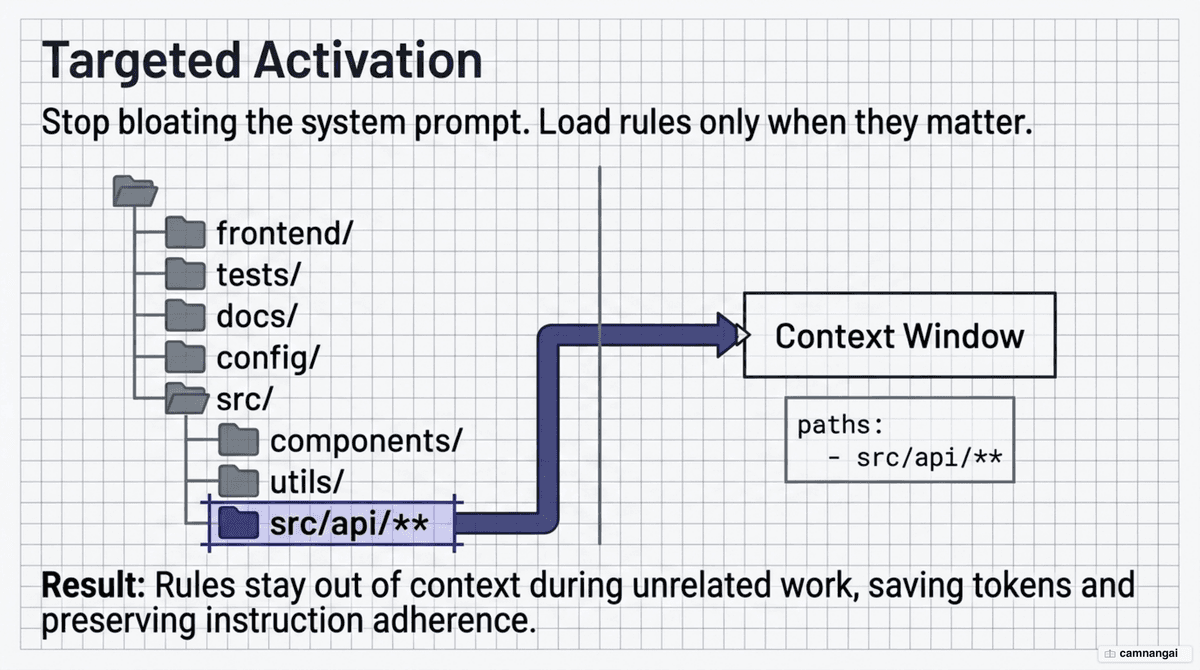
| Pattern | Matches |
|---|---|
**/*.ts | All TypeScript files in the project |
src/api/**/*.py | Python files under the API directory only |
src/**/*.{ts,tsx} | Both TypeScript and React files |
**/*DbContext*.cs | Any file name containing "DbContext" |
---
paths:
  - "app/api/**/*.py"
  - "app/schemas/*.py"
---

### API Design Rules

- All handlers must use Pydantic validation.
- Never expose 500 errors; catch and return the InternalError schema.
commands/ — repeatable slash commands on demand
Files in commands/ become custom slash commands: a file named review.md becomes the /project:review command. They function as prompt templates — if you want a starting point, a Claude Code commands cheatsheet lists the built-in ones. Use shell injection via !backticks to insert dynamic system data, such as !git diff, into the prompt before the model processes it.
description: Pre-flight review of current changes.

## Changes to Review

!git diff --name-only main...HEAD

## Detailed Diff

!git diff main...HEAD

Review the above changes for hardcoded credentials and SQL injection.
Generate a report with severity ratings.
While commands are useful for simple, manual tasks, they are being replaced by the skills system, which supports auto-invocation via model-matching. If you have both a /project:deploy command and a deploy skill, Claude Code runs the skill.
skills/ — auto-invoked expertise that saves tokens
Skills are folder-based instruction packs that Claude auto-invokes based on task relevance. They use "progressive disclosure": at session start, Claude reads only the skill's name and description (~200 tokens); the full instruction set loads only when the skill is triggered.
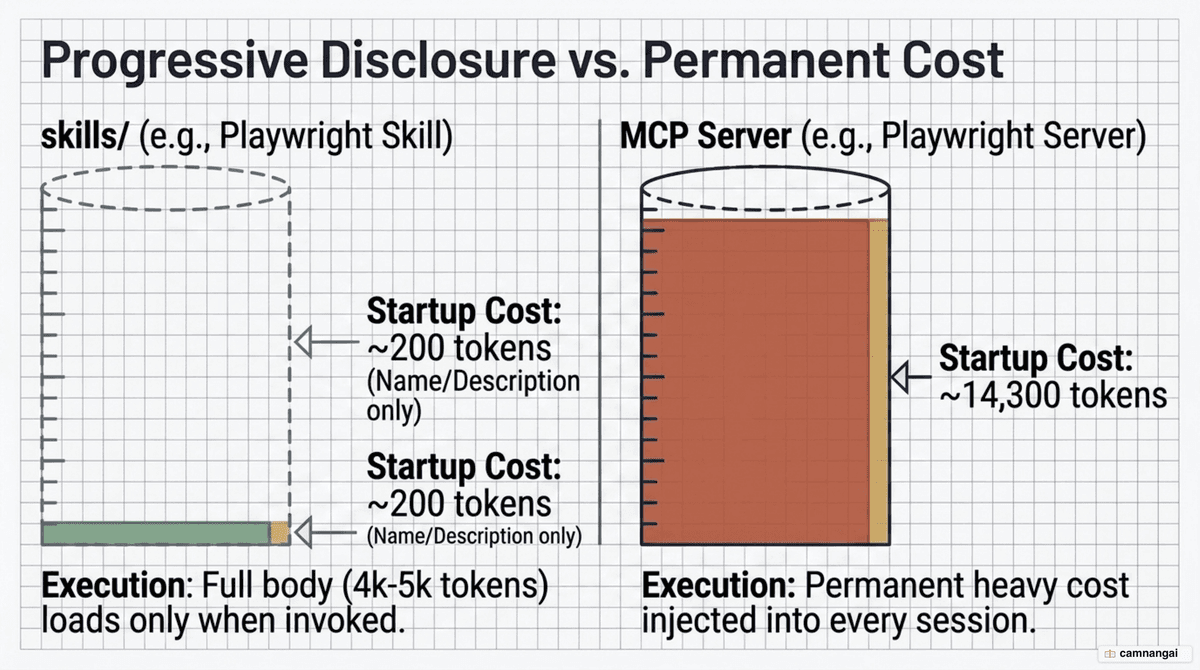
This is far more token-efficient than MCP servers. A Playwright skill costs ~200 tokens at startup, whereas an equivalent MCP server can consume over 14,000 tokens of startup context. That gap is the difference between a suffocated context window and one that still has room for real work.
| Feature | Rules | Skills |
|---|---|---|
| Trigger | Passive (always-on / path-scoped) | Active (auto-invoked / manual) |
| Purpose | Constraints ("how to behave") | Workflows ("what to do") |
| Loading | Startup or file access | On demand when matched |
---
name: ship-app
description: Use to scaffold and deploy a new application feature.
allowed-tools: Read Bash Write
---
1. Generate the database schema based on requirements.
2. Create the API endpoints and verify with tests.
3. Deploy the changes to the staging environment.
The payoff is that you package expertise once and reuse it forever, at almost no token cost until it is actually needed. That is why skills are steadily replacing both commands and lighter MCP servers.
agents/ — specialized subagents that run in isolation
Subagents are isolated personas with separate context windows. They enable context isolation: a subagent can perform deep research — consuming perhaps 50k tokens — while returning only a concise summary to the main session. This keeps the parent conversation free of intermediate logs and file reads.
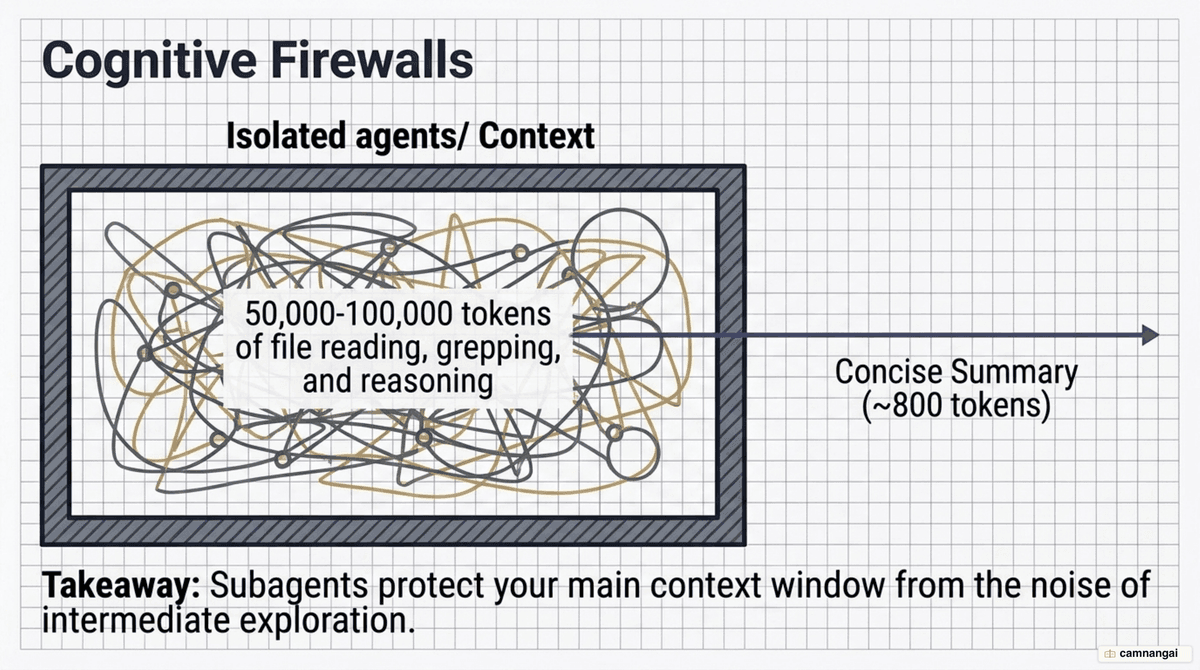
Configure each agent through YAML frontmatter: pick a model (e.g. Haiku for cheap, wide exploration), restrict tools (e.g. read-only Read/Grep/Glob for a reviewer), and set isolation: worktree so the agent works on a copy of the repository. That isolation is what makes it safe to let an agent check out a different branch or delete files to experiment, without touching your working directory.
---
name: code-reviewer
description: Expert reviewer for quality and performance.
model: sonnet
tools: Read Grep Glob
isolation: worktree
---
You are a senior engineer. Review the provided diff for race conditions
and architectural consistency. Return a summary of findings.
Subagents are also the best way to run an adversarial review — letting a second AI evaluate the first one's output in a clean context, unbiased by the reasoning that produced it.
settings.json and hooks — permissions and deterministic enforcement
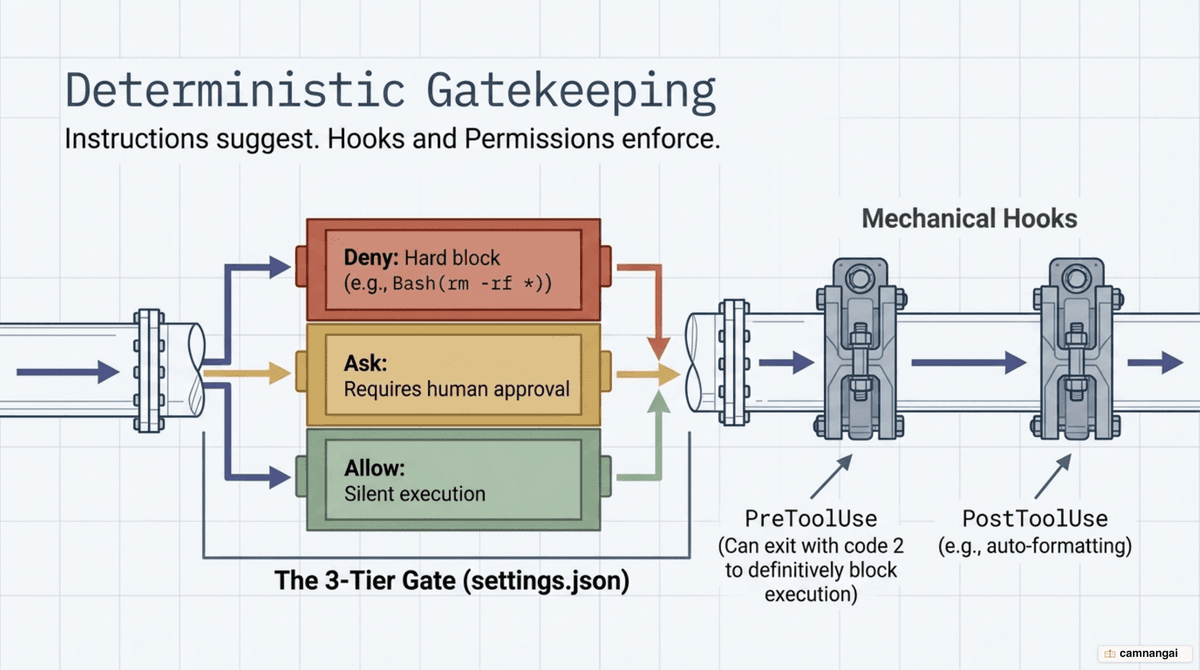
Instructions are suggestive; settings.json provides deterministic enforcement. The AI can forget a prompt instruction, but a hook runs every time. Include the $schema line to enable autocomplete and validation.
{
  "$schema": "https://json.schemastore.org/claude-code-settings.json",
  "permissions": {
    "allow": ["Bash(npm test)", "Bash(git status)"],
    "deny": ["Read(.env)", "Bash(rm -rf *)"]
  },
  "hooks": {
    "PostToolUse": [
      {
        "matcher": "Write|Edit",
        "hooks": [{ "type": "command", "command": "npx prettier --write $EDITED_FILE" }]
      }
    ]
  }
}
Permissions use three tiers evaluated in order — deny, ask, allow — and the first matching rule wins. Hooks execute outside the model's reasoning loop, which makes them immune to instruction drift. Use PreToolUse for security gates that block dangerous commands, PostToolUse for auto-formatters and linters, and Stop for quality gates that run before a task is finalized. One technical detail matters most: in a hook script, exit code 2 is the only code that blocks execution and forces Claude to self-correct — exit code 1 is treated as a non-blocking error.
Separate team configuration from personal configuration
Commit the following to Git for team consistency: .claude/settings.json, rules/, skills/, agents/, and the root CLAUDE.md. Exclude via .gitignore: .env files, .claude/settings.local.json, and CLAUDE.local.md. The rule of thumb is ownership — if a configuration helps the whole team work consistently it belongs in the project; if it only reflects one person's habits it belongs in a .local file or the global directory.
In large monorepos, use the claudeMdExcludes setting to stop Claude from loading irrelevant instructions from other teams' directories. For organization-wide standards, a centrally managed CLAUDE.md deployed via MDM keeps the policy consistent and beyond individual override.
A setup path and the mistakes to avoid
Follow a staged progression rather than building everything at once. Stage 1: a lean CLAUDE.md and basic tool permissions. Stage 2: path-scoped rules to handle cross-cutting concerns without bloating context. Stage 3: skills for repetitive, multi-step workflows, to use progressive disclosure. Stage 4: specialist agents for isolated research or security auditing.
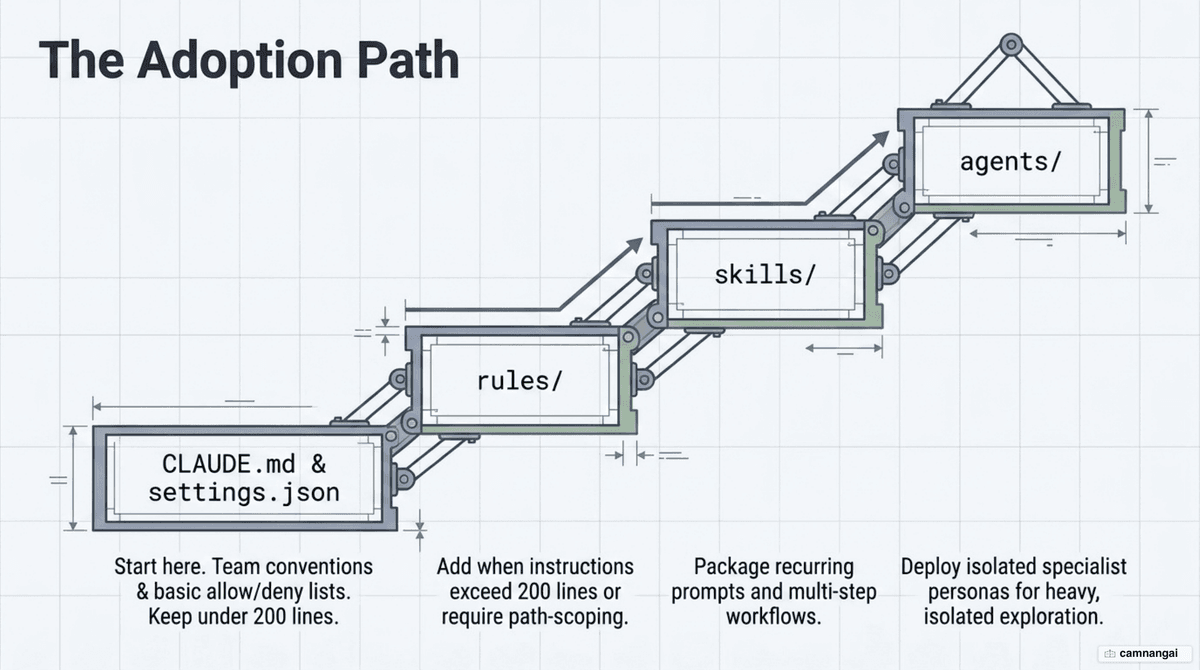
The most efficient setup is one where every file has a documented purpose. Avoid "kitchen sink" sessions where unrelated tasks accumulate in the context window, and prune instructions ruthlessly: if the model already follows a convention without an explicit instruction, delete the instruction and save the tokens. A smaller, sharper .claude folder beats a bigger one every time.
References
- How to Structure the .claude Folder for Maximum Efficiency — Youssef Hosni
- The .claude Folder: Anatomy of a Cognitive System — Nuno Roberto
- Explore the .claude directory — Claude Code Docs
- Anatomy of the .claude/ folder — Akshay Pachaar
- Best practices for Claude Code — Claude Code Docs
- Steering Claude Code: when to use CLAUDE.md, skills, hooks, and subagents — Anthropic
- Anatomy of the .claude Folder — Every File Explained (2026) — Mukesh Murugan
- Claude Code Skills in 2026: The Complete Guide — Totalum