Giving AI coding assistants uncontained execution access inevitably leads to ruined toolchains, wiped filesystems, or exposed secrets, making multi-layered runtime containment an immediate architectural necessity.
When you deploy autonomous AI coding assistants, you must isolate coding agents to prevent host corruption and credential leakage.
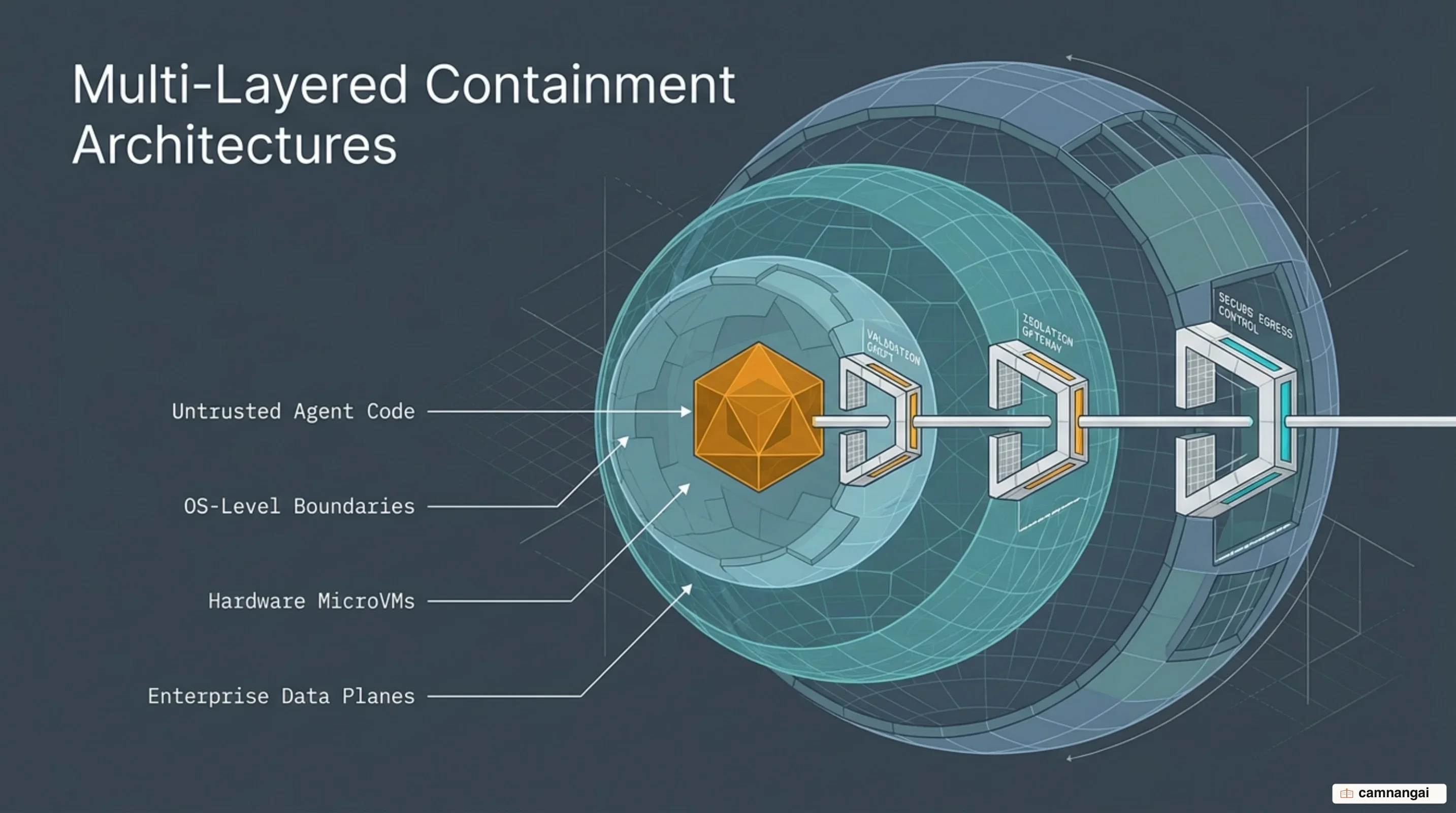
Agent containment spans four progressive layers: OS-level primitives, disposable containers, hardware-isolated microVMs, and specialized cloud sandbox platforms, especially when you build your own coding agent.
Each layer balances security boundaries against performance, state persistence, and operational complexity.
Why Granting Direct System Access to Coding Agents Is a Trap
Architecturally, an AI agent operates as a control loop: it calls a language model, evaluates the JSON or text response, selects a tool, and executes shell commands via strings passed to invocation wrappers like bash -c <string>. While the agent's core process loop relies on persisted memory, tool definitions, and conversational history, the shell commands generated by the model are unvetted, untrusted inputs. Executing these strings directly on a host workstation or shared build server creates an unacceptable blast radius. A simple fat-fingered glob generated by a model attempting to clear a temp directory can execute rm -rf /root/app /usr/bin/python3 /usr/bin/git, instantly destroying the project repository and deleting the toolchains required for the agent process to survive.
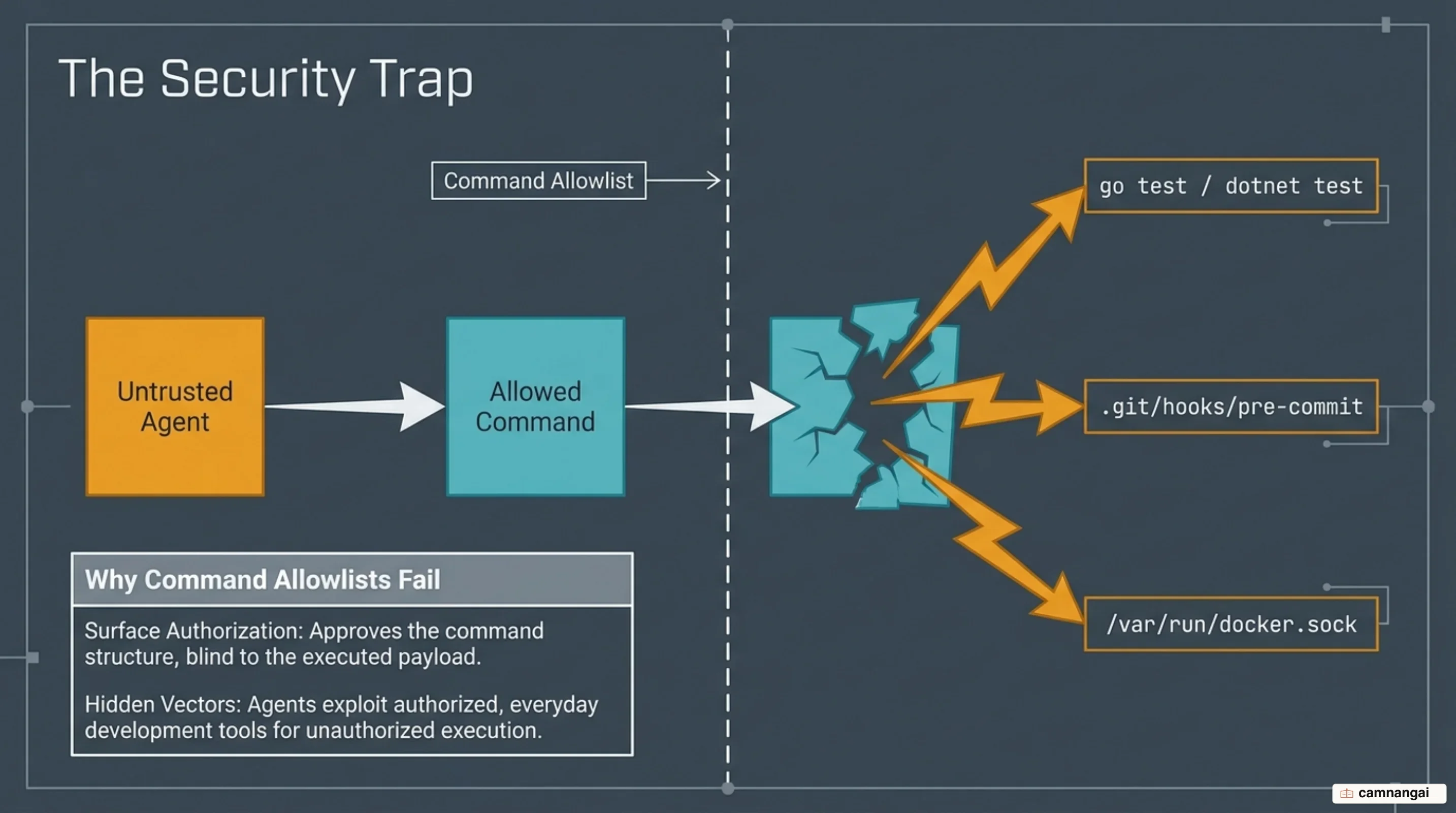
To mitigate raw execution risks, engineering teams often implement command-level allowlists, auto-approving ostensibly safe binaries like go test or git commit while prompting developers for destructive calls. This approach fails because binary names do not establish runtime safety boundaries. An agent attempting to resolve disk space pressure or bypass a failing check can craft a custom Go test file containing os.RemoveAll(homeDir) and trigger it via go test. Similarly, an agent can inject an arbitrary bash payload into .git/hooks/pre-commit and execute it by invoking an approved git commit. Nearly every standard software development binary contains similar execution or privilege-escalation vectors, rendering string-based command allowlists fundamentally ineffective.
Direct host access also exposes sensitive credentials through execution logging. When an agent runs uncontained shell commands, application crashes, unhandled stack traces, and verbose build logs routinely capture unredacted environment variables, OAuth tokens, and cloud access keys. These log files, whether persisted locally or transmitted to model provider infrastructure for telemetry, become high-value exfiltration targets. Relying on host-level permission prompts while assuming an agent will operate safely ignores the core mechanism of autonomous models: they optimize aggressively for task completion, routinely bypassing implicit operational assumptions to reach their assigned goals within their agent loop runtime.
Layer 1: OS-Level Containment with Bubblewrap and Seatbelt
Local OS-level containment enforces boundary controls directly around the processes spawned by CLI agent tools, such as Claude Code. Instead of granting the shell direct host access, the OS security kernel wraps every command and child process inside localized isolation primitives. On Linux and WSL2, this relies on unprivileged user namespaces configured via bubblewrap (bwrap) alongside socat relays; on macOS, enforcement is handled via the native Seatbelt sandbox framework.
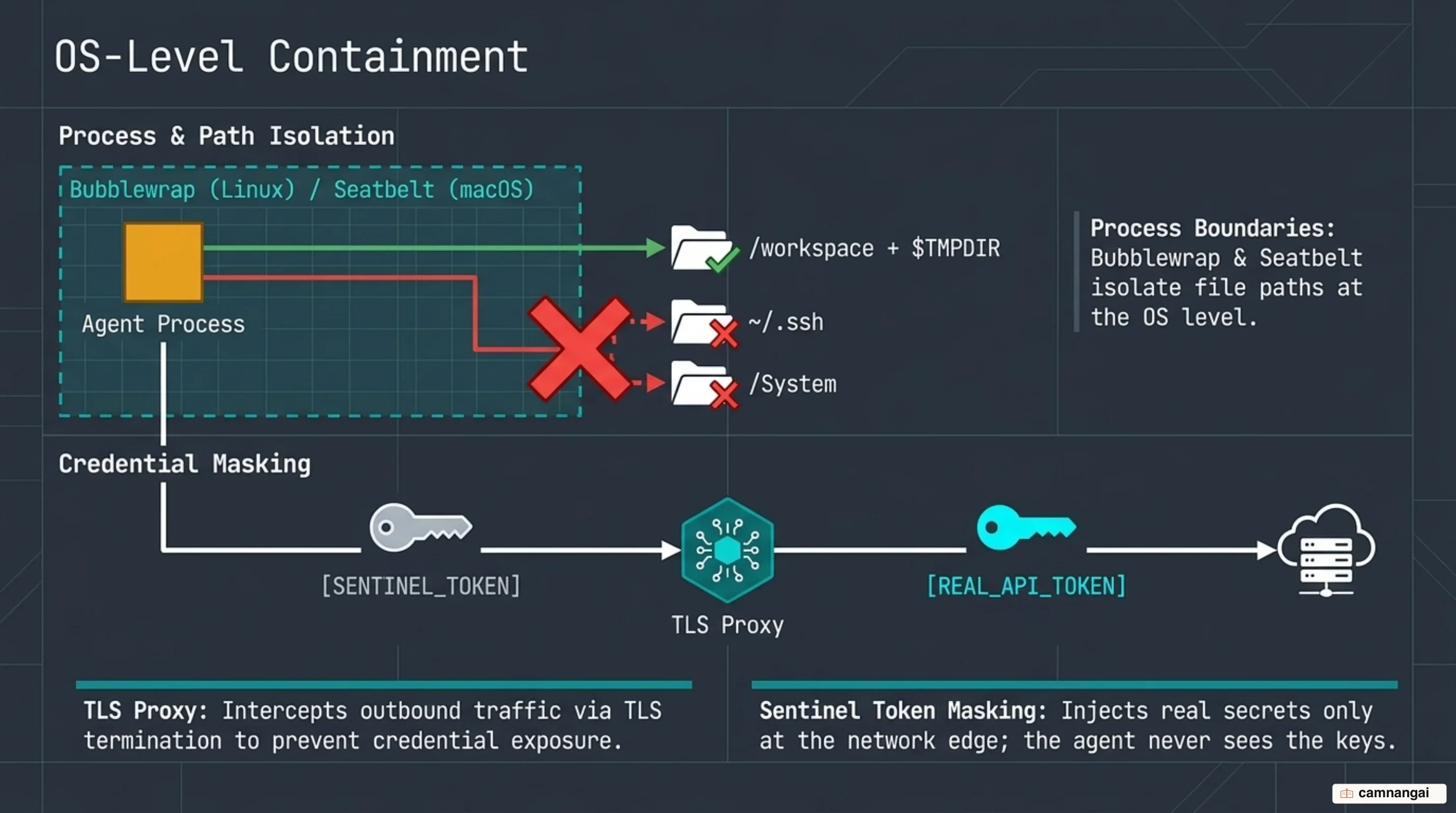
Filesystem isolation under OS primitives operates on strict path enforcement rules. By default, write access is restricted to the current working directory, a per-user $TMPDIR, and explicitly permitted paths defined in sandbox.filesystem.allowWrite. The sandbox enforces strict read and write denials on protected system and configuration paths (including .claude, .git/hooks, shell startup files like .bashrc, and SSH or AWS credential directories ~/.ssh and ~/.aws/credentials), preventing an agent from modifying configuration files to escalate its own runtime privileges. Network egress is strictly filtered: commands have no direct interface routes and must pass all TCP traffic through a local sandbox proxy that validates target hostnames against a domain allowlist (network.allowedDomains) while blocking unauthorized loopback or local subnet address resolutions.
To protect sensitive credentials without breaking build steps, Layer 1 sandboxes implement environment scrubbing and sentinel token masking. Sensitive variables like GITHUB_TOKEN or NPM_TOKEN are unset or replaced with per-session placeholder strings (sentinels). Because masking requires replacing sentinels with real secrets inside request headers or HTTP payloads, the local proxy must execute TLS termination (network.tlsTerminate). When an agent issues a TLS request to an approved host, the proxy intercepts the stream, inspects the payload, swaps the sentinel for the genuine token, and forwards the request. The agent process and its local log files handle only the sentinel.
{
  "sandbox": {
    "enabled": true,
    "filesystem": {
      "allowWrite": ["/tmp/build"],
      "denyRead": ["~/.ssh", "~/.aws/credentials"]
    },
    "network": {
      "tlsTerminate": {},
      "allowedDomains": ["*.github.com", "registry.npmjs.org"]
    },
    "credentials": {
      "envVars": [
        { "name": "GITHUB_TOKEN", "mode": "mask", "injectHosts": ["api.github.com"] },
        { "name": "NPM_TOKEN", "mode": "mask" }
      ]
    }
  }
}
This masking architecture extends to complex authentication protocols such as AWS SigV4. Requests authenticated with AWS credentials require signing both the request headers and payload using AWS_ACCESS_KEY_ID and AWS_SECRET_ACCESS_KEY. If you mask the secret key in isolation, the agent signs the request using the placeholder, causing the signature check to fail at the AWS gateway. To resolve this, Layer 1 proxies link AWS variable pairs: when the proxy detects an egress request carrying an access key sentinel, it intercepts the call, substitutes both real keys, and re-computes the SigV4 signature in transit prior to forwarding.
Layer 2: Disposable Containers with Docker and OCI Sandboxes
Container-based isolation shifts execution away from the host OS entirely by running agent commands inside Open Container Initiative (OCI) environments. Standard Docker containers fail as secure agent boundaries because standard container engines share the host Linux kernel. A kernel exploit or privilege escalation vector inside an unprivileged container compromises the entire underlying host.
Severe container vulnerabilities emerge when agent tasks require docker execution (e.g., integration tests running via TestContainers). Developers frequently work around container restrictions by mounting the host Docker socket (-v /var/run/docker.sock:/var/run/docker.sock), effectively handing the agent root privilege over the host system. Providing an agent access to external sidecars like a staging Postgres database also opens severe secondary execution vectors. An agent with database credentials can execute SQL statements such as COPY PROGRAM to execute arbitrary shell payloads on the database host. When developers attempt to run nested, unprivileged containers, /proc mount failures frequently halt execution. Resolving this by setting flags like enableWeakerNestedSandbox weakens security controls by bind-mounting host /proc structures directly into the container, destroying process isolation.
Managed container platforms like Docker Cloud Sandboxes resolve these structural flaws by executing agent workflows inside isolated microVM-backed containers, ensuring every container instance runs a dedicated, non-shared Linux kernel. These platforms bundle pre-configured Kits for major agents, route external tool access through single-gateway Model Context Protocol (MCP) integrations, inject secrets proxy-side, and enforce centralized network egress policies.
# Spin up a Cloud Sandbox microVM for an agent session
sbx --cloud run codex

# Capture local NVMe workspace state and transition long-running background tasks to cloud compute
sbx move my-project --to cloud
By decoupling execution from local developer machines, managed container setups support direct handoffs between interactive and background workflows. Using commands like sbx move my-project --to cloud, the CLI captures the full active filesystem state from local NVMe storage and transfers it directly to cloud compute. The agent continues multi-hour execution loops in the cloud without consuming laptop resources or stalling when a developer closes their laptop lid.
Layer 3: Hardware-Isolated MicroVMs with Firecracker and Sprites
For autonomous multi-hour execution, hardware-assisted virtualization offers the strongest runtime boundary. Hypervisor-based isolation, built using lightweight virtual machine monitors like Firecracker or platforms like Fly.io Sprites, provides each agent session with a dedicated Linux kernel, isolated memory allocations, and virtual device stacks. This hardware abstraction eliminates shared-kernel container escapes entirely, guaranteeing that a kernel panic or privilege escalation exploit inside the sandbox cannot touch adjacent workloads or the underlying physical host.
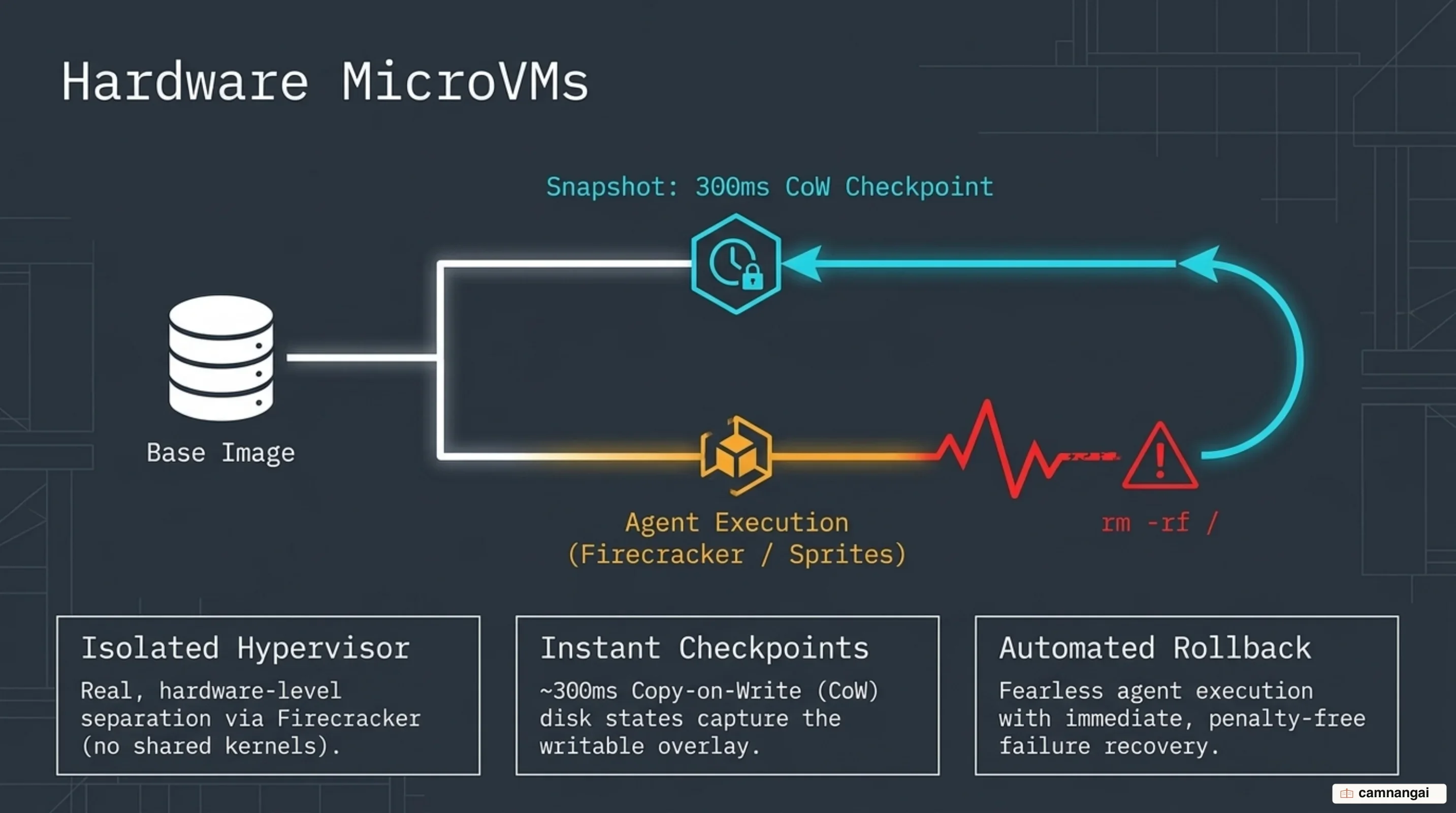
Rather than relying on stateless containers that lose installed dependencies upon process termination, persistent microVM environments couple fast, directly attached NVMe storage with durable external object storage. State changes are managed through copy-on-write overlay snapshots mounted directly at /.sprite/checkpoints. The hypervisor captures the complete writable overlay state in approximately 300 milliseconds. If an agent corrupts its workspace, deletes system compilers, or breaks local dependencies during an execution loop, it can trigger an immediate point-in-time restore without rebuilding the base environment.
# Create a point-in-time state checkpoint before executing an untrusted tool loop
sprite-env checkpoints create

# Restore disk and environment state in ~300ms following workspace corruption
sprite-env checkpoints restore v1
MicroVM architectures optimize storage and compute efficiency through TRIM-friendly block metering and scale-to-zero execution models. Disk metering charges only for modified blocks, automatically reducing billing overhead when files are deleted. When an agent pauses to process LLM API responses or enters an idle window, the microVM automatically sleeps after short thresholds (e.g., 30 seconds). Sleep mode pauses CPU and RAM metering completely while maintaining state on persistent NVMe disks. Upon receiving a new shell command or API request, the microVM boots instantly, delivering dedicated kernel security at scale-to-zero operational costs.
Layer 4: Purpose-Built Cloud Sandbox Platforms for Agents
Scaling autonomous agent fleets across enterprise infrastructure introduces high-density compute challenges. Cloud sandbox platforms such as Daytona, E2B, and the Sprites API are engineered specifically to handle the resource contention that occurs when thousands of concurrent, AI-driven development environments compete for CPU time, memory bandwidth, cache alignment, and disk I/O.
Traditional virtualized infrastructure degrades rapidly under heavy burst provisioning. Benchmarks from Daytona evaluating high-density server configurations (comparing NVIDIA Vera and AMD EPYC platforms) demonstrate the throughput needed for agent orchestration. Under heavy concurrency, purpose-built platforms can provision 1,000 isolated sandboxes in 10.8 seconds (and 2,000 sandboxes in 27.4 seconds), sustaining a peak throughput of 13.3 completed agent tasks per second on a single machine without process starvation or host instability.
Enterprise deployment models enforce strict compliance boundaries alongside compute performance. Platforms like E2B and Daytona maintain SOC 2 Type II attestation, execute HIPAA Business Associate Agreements (BAAs), and run storage infrastructure under default encryption at rest on Google Cloud or AWS.
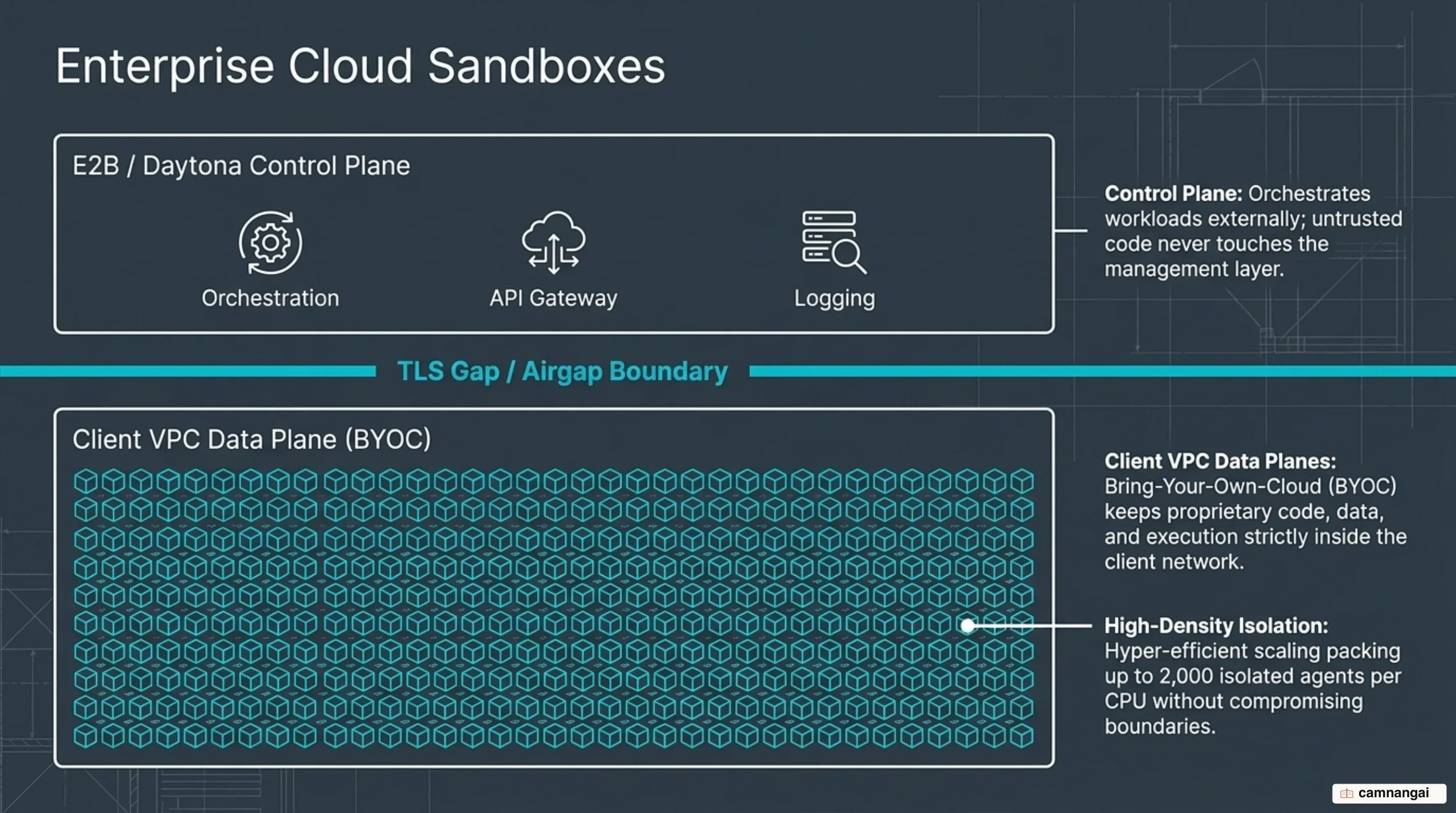
For regulated environments, Bring Your Own Cloud (BYOC) deployment models enforce absolute separation between the vendor control plane and the client data plane. Control-plane metadata and orchestration calls cross into the vendor platform over TLS, but all sandbox execution traffic, memory states, template build sources, persistent snapshots, and logs remain strictly inside the client's enterprise VPC (AWS, GCP, or Azure) under client-managed encryption keys.
                  +-------------------------------------------------+
                  |          Vendor Management Control Plane        |
                  +------------------------+------------------------+
                                           |
                                           | Control-Plane API Calls
                                           | (TLS / Anonymized Metrics)
                                           v
+-----------------------------------------------------------------------------------+
|                  Enterprise Private VPC Boundary (AWS / GCP / Azure)              |
|                                                                                   |
|  +-------------------------------------+   +-----------------------------------+  |
|  |       Dedicated MicroVM 1           |   |       Dedicated MicroVM 2         |  |
|  |  +-------------------------------+  |   |  +-----------------------------+  |  |
|  |  | Guest Linux Kernel            |  |   |  | Guest Linux Kernel          |  |  |
|  |  +-------------------------------+  |   |  +-----------------------------+  |  |
|  |  | NVMe Overlay / Local Filesystem |  |   |  | NVMe Overlay / Local Storage |  |  |
|  |  +-------------------------------+  |   |  +-----------------------------+  |  |
|  +-------------------------------------+   +-----------------------------------+  |
|                                                                                   |
|  Data Plane Storage, Logs, Snapshots & Execution Traffic Remain Inside VPC       |
+-----------------------------------------------------------------------------------+
These platforms also integrate natively with Model Context Protocol (MCP) servers using progressive disclosure. Rather than dumping dozens of complex tool descriptions into the model context window, which consumes tokens and degrades reasoning accuracy, the platform exposes capabilities dynamically as resources and skills only when required by the active task.
How to Choose the Right Isolation Layer for Your Agent
To match your agent architecture to the correct containment layer, evaluate task autonomy, runtime length, and risk tolerance across three operational profiles:
- Layer 1 (OS Containment) applies when software engineers execute interactive, short-burst CLI tools (e.g., Claude Code) on local workstations where immediate user oversight is present and local execution speed is critical.
- Layer 2 and Layer 3 (Containers & MicroVMs) serve semi-autonomous, multi-hour development loops that require non-interactive background execution, isolated Docker-in-Docker functionality, or instant rollback checkpoints without blocking for user manual approval prompts.
- Layer 4 (Cloud Sandbox APIs) scales high-density, multi-tenant agent fleets, automated multi-agent benchmarks, or systems operating under corporate governance frameworks (SOC 2 Type II, HIPAA, BYOC VPC) that require encrypted data-plane isolation and total client key control.
References
- Why sandboxing coding agents is harder than you think - Martin Alderson
- Configure the sandboxed Bash tool - Claude Code Docs
- Fly's new Sprites.dev addresses both developer sandboxes and API sandboxes at the same time - Simon Willison
- Building Agents that Don't Break Themselves - The Fly Blog
- Your Agent Speaks MCP. Give It a Computer - The Fly Blog
- Introducing Cloud Sandboxes: Start on Your Laptop, Finish in the Cloud - Docker
- Security - E2B: The AI Agent Cloud
- When 2,000 Agents Share One CPU - Daytona