The /goal command is a feature in Claude Code (v2.1.139+) that establishes a persistent completion condition for the agent.
It is a wrapper around a session-scoped, prompt-based Stop hook. By defining a verifiable end state, you let Claude operate through autonomous state-transition cycles across many turns without manual intervention.
This is a fundamental shift from "assistant" to "agentic" orchestration. In a standard session,
Claude operates in a single-turn burst; with /goal, it runs an iterative loop of reading, writing,
and testing until a separate evaluator model confirms the objective is met. This eliminates the
"human relay" problem, where an engineer babysits long-running tasks by manually prompting
"continue" after every few file modifications.
For systems architects, /goal is the primary mechanism for handing off high-level objectives
(migrating service layers, executing complex feature specs) that involve substantial, multi-file
execution paths. It turns Claude into an autonomous worker that monitors its own progress against a transcript-verifiable condition, returning control to you only upon success or genuine ambiguity.
How does /goal solve the developer relay problem?
In traditional AI-assisted coding, the developer acts as a "relay switch," reviewing three files of work only to type "continue" for the next three. This is a high-latency, low-value use of engineering time. The /goal command automates this loop, allowing unattended progress on deep-work tasks like API migrations, design-doc implementations, or clearing a labeled issue backlog.
By moving from reactive prompting to objective-based delegation, /goal lets Claude observe its own
command outputs, adjust its logic, and iterate. This is particularly effective for "test-fix-retest"
cycles where the end state is objectively measurable via build exit codes or test-suite results.
Under the hood: architecture and evaluator blindness
The reliability of /goal stems from its evaluator-loop architecture. To prevent agentic
regression, the system follows a strict principle: don't let the worker grade its own homework.
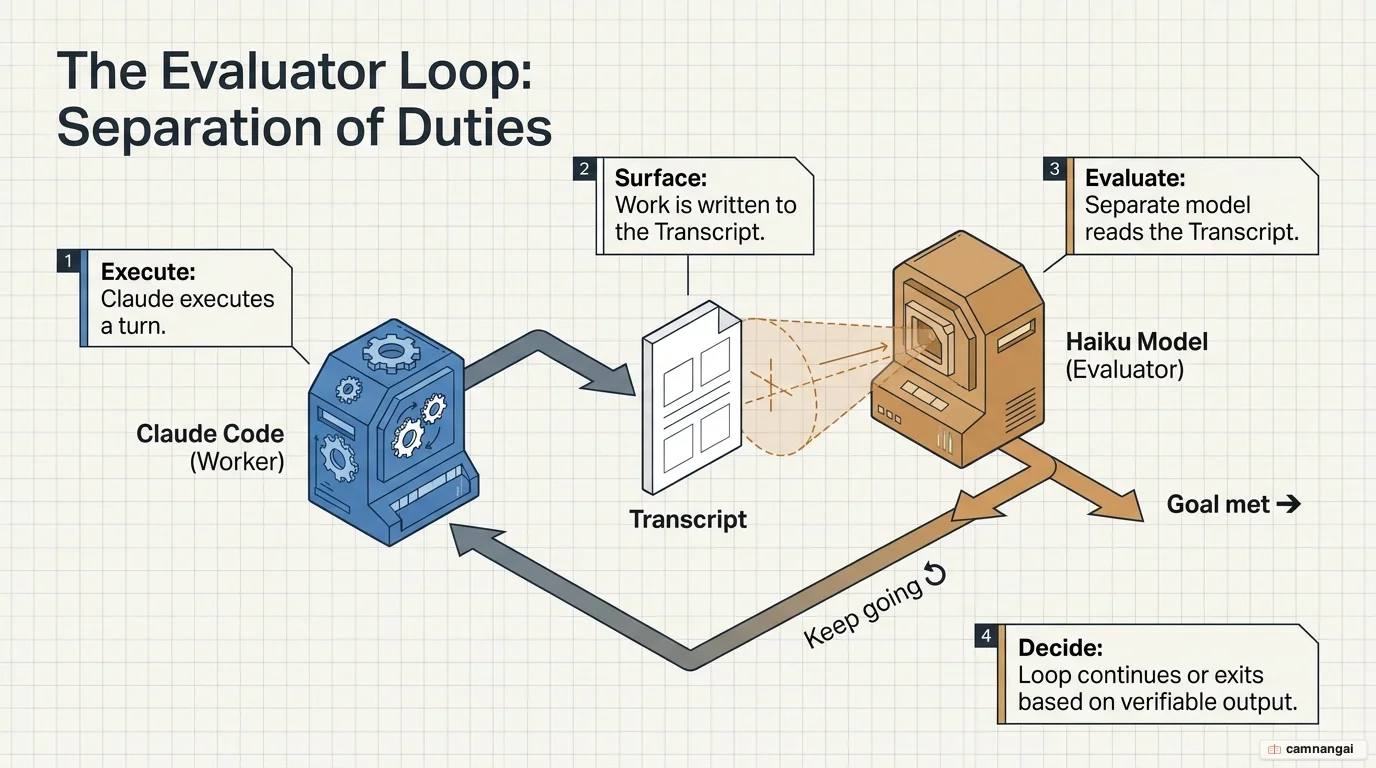
- Execution: the primary Claude model performs a turn (e.g. running a bash script or editing code).
- Evaluation: once the turn finishes, the conversation transcript is sent to a separate, small, fast model (typically Haiku). The evaluator runs on the same provider configured for your session.
- Decision: the evaluator returns a yes/no decision with a specific reason. On "no," the reason becomes the guidance for Claude's next autonomous turn.
The principle of evaluator blindness
A critical constraint is that the evaluator model is "blind"—it cannot execute commands, read your
file system, or browse the web. It only sees what Claude surfaces in the conversation transcript. If
Claude modifies a file but doesn't print the contents or run a test to show the result, the
evaluator cannot verify the change. Your goal condition must therefore be provable via outputs that
land in the transcript, such as npm test output. That is the part I get wrong most often on a
first draft of a condition, because I know what I asked for and the evaluator only knows what got
printed.
How do you configure and use /goal?
/goal is managed through the CLI and requires specific environmental configuration.
Requirements and constraints
- Trust dialog: you must accept the trust dialog for the workspace;
/goalwill not run in untrusted environments, as it uses the underlying hooks system. - Managed settings: the command fails if
disableAllHooksis set at any level, or ifallowManagedHooksOnlyis enabled in managed settings.
CLI commands
- Set a goal:
/goal [condition](this immediately starts the first turn). - Non-interactive mode:
claude -p "/goal [condition]"(ideal for CI/CD pipelines). - Check status: run
/goalwith no arguments to see duration, turn count, and token spend. - Clear a goal:
/goal clear(aliases:stop,off,reset,none,cancel). - Resume: use
--resumeto restore an active goal from a previous session (note: the turn count and timer reset).
How do you write effective completion conditions?
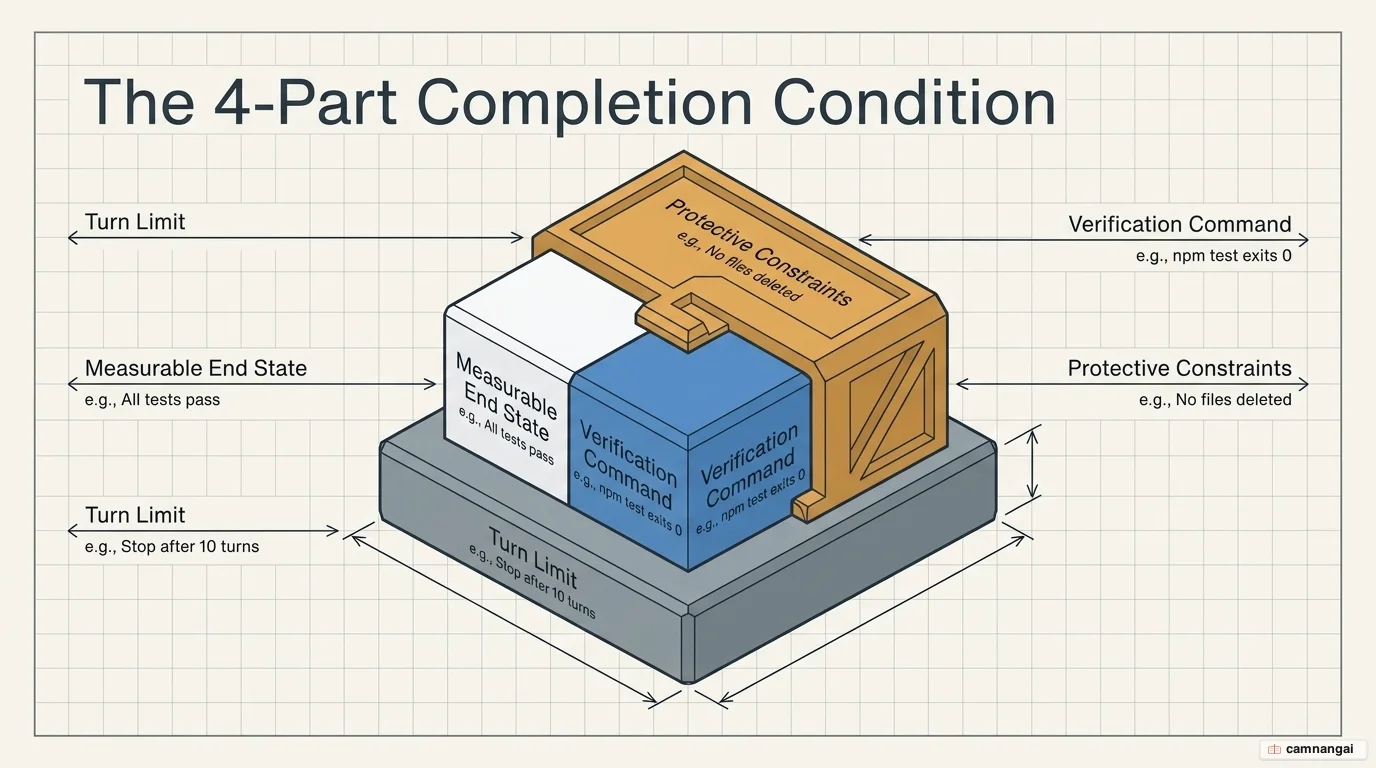
Success is a function of specificity. Vague goals like "make it production-ready" die in the evaluator loop, because there is nothing in them the evaluator can check, so what works is a verifiable formula: [measurable end state] + [verification command] + [protective constraints] + [turn limit].
Production case study: defensive goal settings
In production testing, naive goals often lead to destructive shortcuts. For example, Claude might "fix" a failing test by deleting the test file itself. To prevent this, you write the constraint into the goal itself:
/goal All files in src/services/ use fetchWrapper instead of axios.
Test files in src/services/__tests__/ must use the mock pattern from src/test-utils/mockFetchWrapper.ts.
npm test exits 0. No functional code or tests may be removed or skipped to satisfy these criteria.
Stop after 15 turns.
There are two key gotchas here, and both come from words that felt precise when you typed them. The axios gotcha: without the excluding __tests__ constraint, Claude may rewrite
test mocks to use the new wrapper, breaking the isolation of your unit tests. The "proper" ambiguity:
avoid words like "proper" or "clean." In one case, a goal for "proper validation errors" led Claude
to return a 400 string, while the architect required a structured JSON error object. Specify the
exact JSON schema or exit code required.
/goal vs. /loop vs. stop hooks
Claude Code provides three distinct ways to maintain session continuity. Choosing the right one is essential for token efficiency and task success.
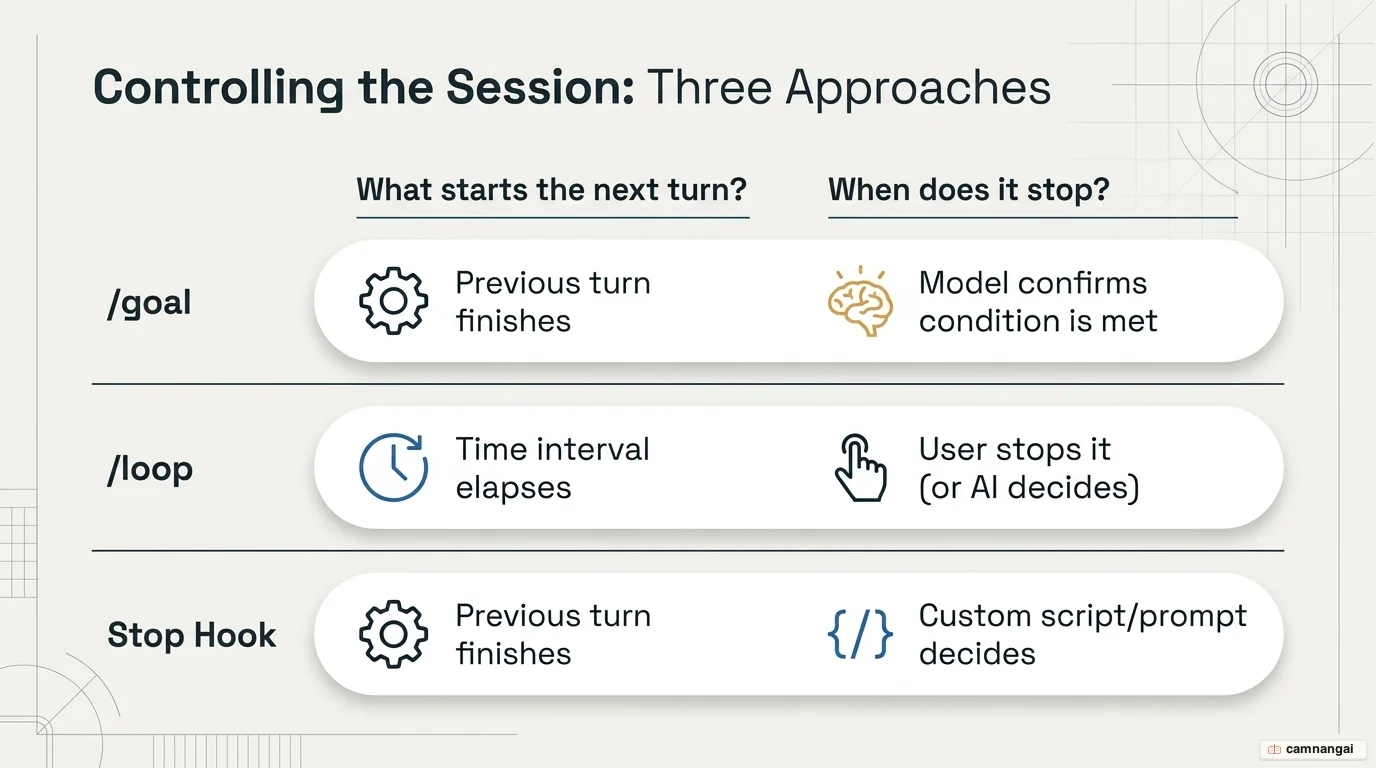
| Approach | Next turn starts when | Stops when |
|---|---|---|
/goal | The previous turn finishes | A model confirms the transcript-verifiable condition is met |
/loop | A time interval elapses | You stop it, or Claude decides the work is done |
| Stop hook | The previous turn finishes | A user-defined script or prompt returns "stop" |
/goal manages the turn-loop; auto mode is a
complementary feature that automatically approves tool calls (like file writes) within those turns.
Combine the two for unattended execution, which is also the point where a dedicated git branch
stops being optional.
Real-world /goal examples
Each example below is a single /goal invocation: a measurable end state plus explicit
guardrails that hand control back to you the moment a decision needs human judgment. Copy
one, adjust the paths and repo names, and run it.
Scan production and fix confirmed bugs
Run this on a schedule — a Monday-morning automation works well — to sweep recent logs, CI failures, jobs, and issues. The agent only fixes what it can prove is a real bug, and stops short of anything risky.
/goal Scan the last 7 days of production logs, CI failures, scheduled jobs, and GitHub
issues. If you find a confirmed repo-owned bug, reproduce it, fix it, add tests, and open a
draft PR. If there is no actionable bug, report what you checked and do not open a PR. Stop
if the issue needs product judgement, missing credentials, or a risky production decision.
Clear the open-PR queue
Point the agent at every open PR and let it drive each one to a definite state — merged, updated, waiting, or blocked — while refusing to touch anything sensitive.
/goal Review all open PRs and take each one to a clear state: merged, updated, waiting, or
blocked. For each PR, check CI, reviews, requested changes, conflicts, and branch
protection; fix only clear actionable feedback; run relevant tests; merge only when authority
is clear and all checks/reviews pass. Stop if feedback conflicts, merge authority is unclear,
conflict resolution is ambiguous, or the PR touches auth, billing, permissions, security, or
data deletion.
Deploy an app end-to-end and verify it
A long-running goal that takes an app from source to a verified live URL, persisting until the deployment is proven healthy — or it hits a permissions or secrets wall.
/goal Deploy this app to GCP and verify it at a live URL. Use Cloud Run and Cloud Postgres.
Inspect the framework, build/start commands, env vars, and existing docs; choose the smallest
sensible GCP target; deploy; then verify the URL loads, main route works, logs show no
startup errors, and documented smoke tests pass. Keep going until it is live and verified or
blocked with evidence. Stop if access, secrets, billing, IAM, auth, permissions, data
deletion, or product decisions are unclear, or if the same deploy failure repeats twice.
Burn down a labeled backlog
Hand the agent a bounded set of ready issues and a strict work-in-progress limit; it opens one PR per issue and runs the test suite before each, stopping at anything it cannot explain.
/goal Work through open issues in owainlewis/factory labelled factory-ready, one at a time.
Open one PR per issue, keep at most two PRs open at once, and run go test ./... before opening
or updating each PR. For blocked, duplicate, or already-completed issues, leave evidence and
close only when policy clearly allows it. You are done when every issue is closed, has a PR,
or is clearly blocked. Stop before risky changes, unclear product decisions, merge authority
questions, or failing tests you cannot explain.
Need a recurring watch instead of a bounded run? See the /loop command.
Best practices and safety
Autonomous code modification carries real risk, so a few defensive habits pay for themselves fast:
- Version-control safety net: never run
/goalon a main branch. Always use a dedicated git branch so you can roll back agentic regressions. - Cost management: expect a cost of roughly $0.40 to $3.00 per CI run, depending on task complexity.
- Turn limits: always include "or stop after X turns" in your condition. It acts as a circuit breaker against infinite token burn if the evaluator and worker get stuck in a loop.
- When not to use
/goal:- Small tasks: anything under 3 turns is handled more efficiently with standard prompts.
- Subjective quality: "make the code readable" is unverifiable and will burn tokens indefinitely.
- Exploratory work: if you don't know the end state, use standard prompting until a path is clear.
References
- Claude Code /goal in Production: 3 Tested Use Cases That Work — Alireza Rezvani
- Keep Claude working toward a goal — Claude Code Docs
- What Is the /goal Command in Claude Code? — MindStudio
- Claude Code Just Dropped /Goal — Master It in 8 Minutes (YouTube)
- 7 Real Agent /goal and /loop Examples — AI Engineer Newsletter