Ubuntu is an open-source Linux distribution developed by Canonical Ltd., and one of the foundations of the global Linux ecosystem.
Based on the Debian architecture, it provides a complete operating system suitable for cloud computing, enterprise servers, and personal desktops. Since 2004, it has become a primary choice for developers and system architects thanks to its focus on usability, security, and a predictable release schedule.
Ubuntu is a bridge between complex open-source upstream projects and the end user. By integrating the Linux kernel with a curated set of software, utilities, and a graphical user interface, Canonical delivers a production-ready environment. Today it is the most widely used Linux distribution for web servers and public cloud workloads across all major providers.
What is Ubuntu?
The Ubuntu project began in April 2004, when Mark Shuttleworth — a South African entrepreneur and former Debian developer — gathered a small team to design a new kind of Linux distribution. To fund and manage the project, Shuttleworth founded Canonical Ltd. The goal was a distribution that was accessible to beginners, updated on a strict schedule, and free of licensing costs. In 2005, the Ubuntu Foundation was established with a $10 million fund to ensure the project's continuity regardless of Canonical's commercial status.
The project is guided by the philosophy of "Ubuntu," a Nguni concept meaning "humanity toward others" or "I am what I am because of who we all are." In practice, that means a meritocratic governance model where community contributors and Canonical employees collaborate through a transparent development process.
Ubuntu's reach is extensive. Canonical reported over 40 million desktop users in 2015, and a 2020 W3Techs survey put Ubuntu on 47.3% of all websites running Linux. It remains the dominant guest operating system in the cloud, with a large footprint across Amazon Web Services (AWS), Microsoft Azure, Google Cloud, IBM Cloud, and Oracle Cloud.
How Linux, distributions, and Ubuntu fit together
To understand Ubuntu, you have to separate the Linux kernel from a distribution. The Linux kernel is the engine of the operating system: it manages hardware and system resources. A "distribution" (or distro) is the complete package — the kernel plus system utilities, a desktop environment, and application software.
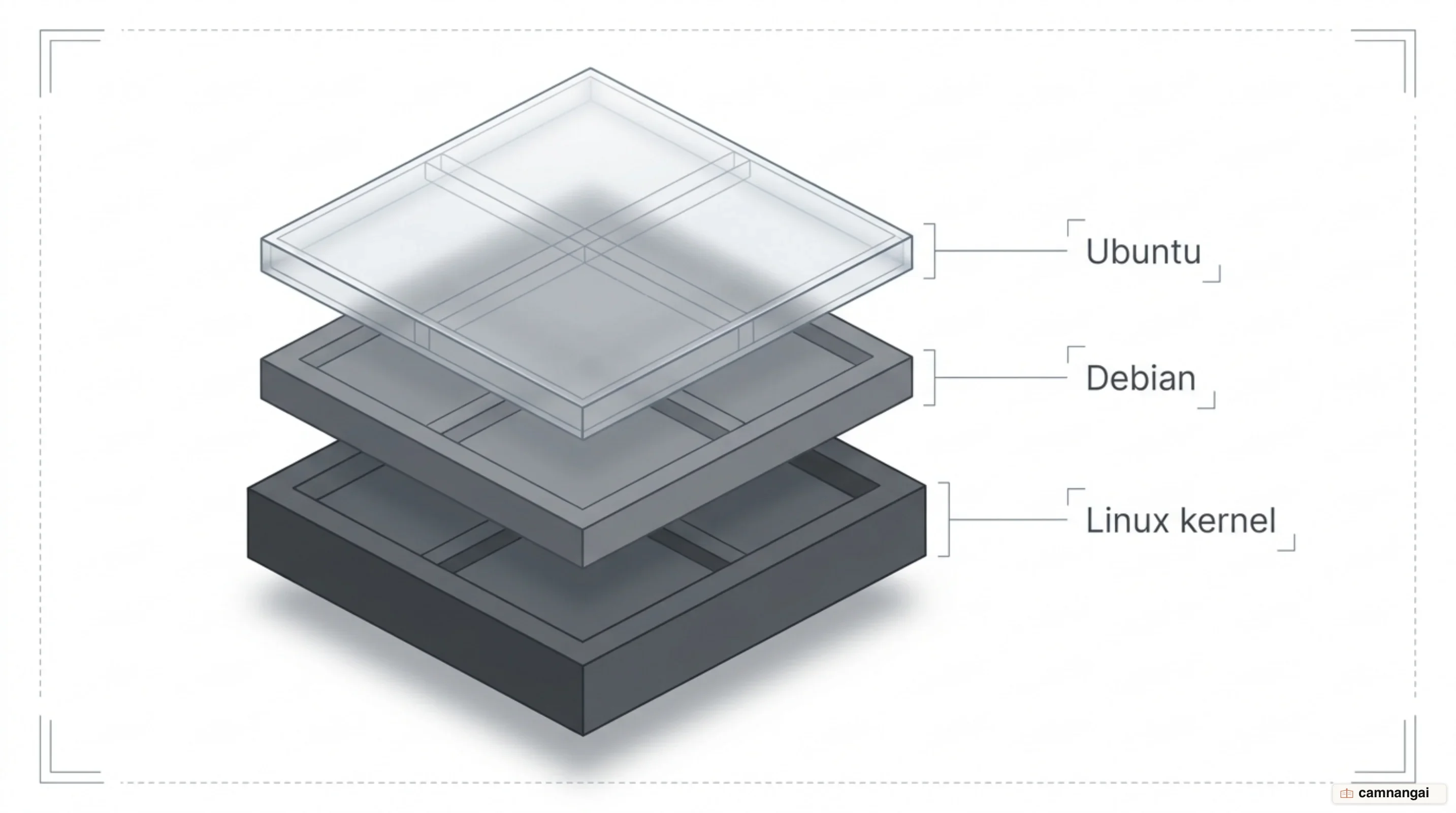
Ubuntu is built on the architecture of Debian, specifically pulling packages from Debian's "unstable" (Sid) branch. Ubuntu is a stabilization filter: it merges these bleeding-edge packages, applies specific patches, and subjects them to a six-month testing cycle before release. That is how you get modern software without the volatility of an unstable upstream branch.
The "Ubuntu stack" is a vertical integration designed for enterprise stability. It links the infrastructure layer (the kernel and drivers), the security layer (AppArmor, Livepatch, and disk encryption), and the application layer (Snap and Apt) into one environment. For organizations, Landscape — Canonical's systems management tool — manages that whole stack from one console.
Software within Ubuntu is organized into four components based on licensing and support:
- Main: Free software officially supported by Canonical.
- Restricted: Proprietary drivers and firmware supported for hardware compatibility.
- Universe: Community-maintained free software.
- Multiverse: Software that is not free and may carry legal or patent restrictions.
How Ubuntu differs from Windows and macOS
Ubuntu operates under a licensing model centered on the GPL (General Public License), which grants you the freedom to modify and redistribute source code. That contrasts with the proprietary End User License Agreements (EULAs) of Windows and macOS, which restrict your ability to inspect or alter the OS internals.
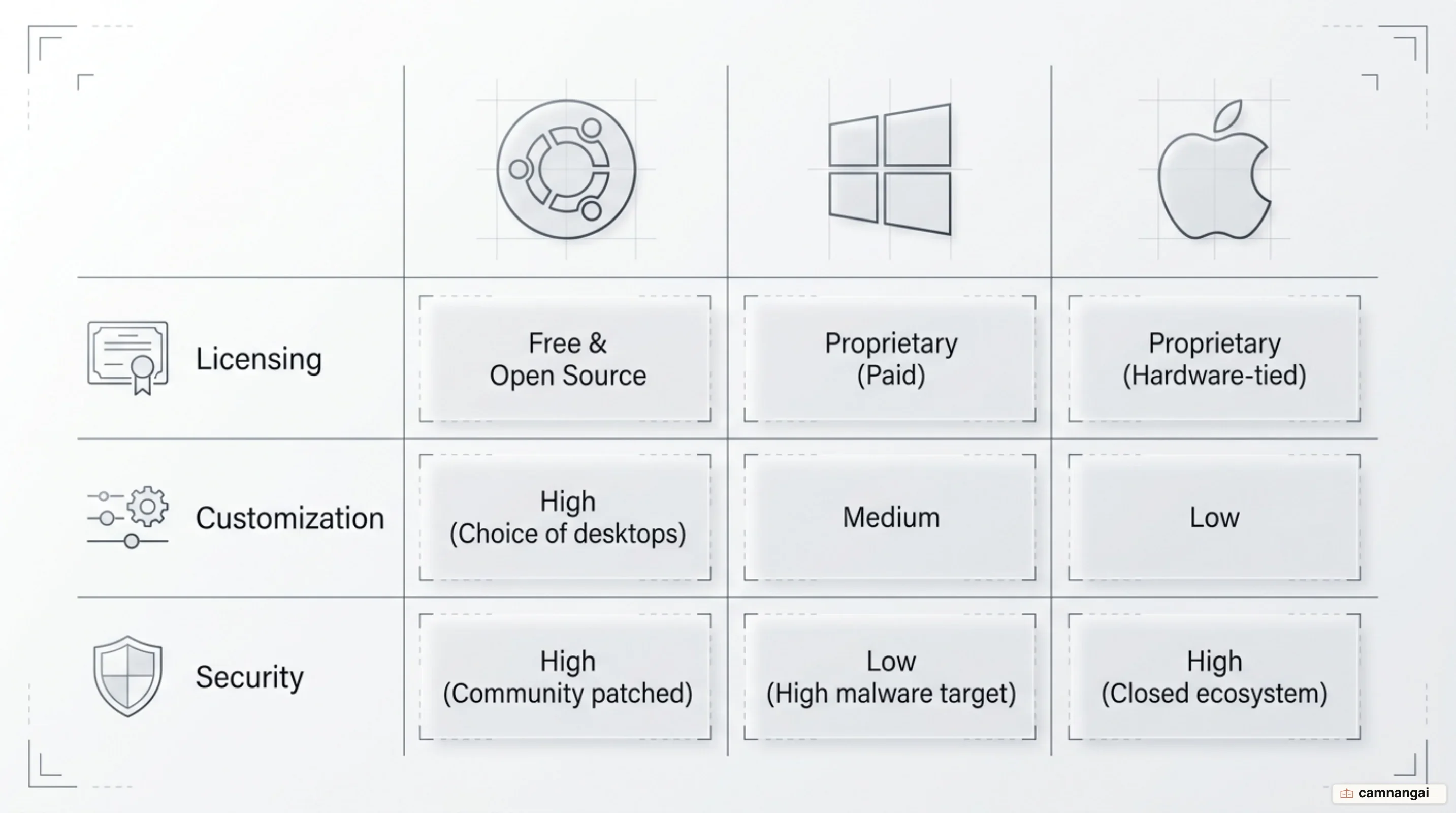
Ubuntu is secure by default. It applies the principle of least privilege: user programs run with
low permissions, and administrative tasks require the sudo tool. This keeps the root account
locked and prevents accidental system-wide corruption. Ubuntu also ships with most network ports
closed, which minimizes the attack surface.
On hardware and telemetry, Ubuntu has drawn criticism in the past — the "shopping lens" Amazon suggestions and terminal-based advertising for Pro services are the usual examples — but data collection is optional and requires explicit user consent.
For interoperability, Ubuntu uses the Samba suite for Windows file sharing and Wine or Proton for running Windows applications. It also powers the Windows Subsystem for Linux (WSL), which lets Ubuntu's userland run directly on the Windows kernel.
What LTS means, and why the version number matters
Ubuntu follows a strict YY.MM naming convention. Version 26.04 was released in April 2026. New versions are published every six months, in April and October.
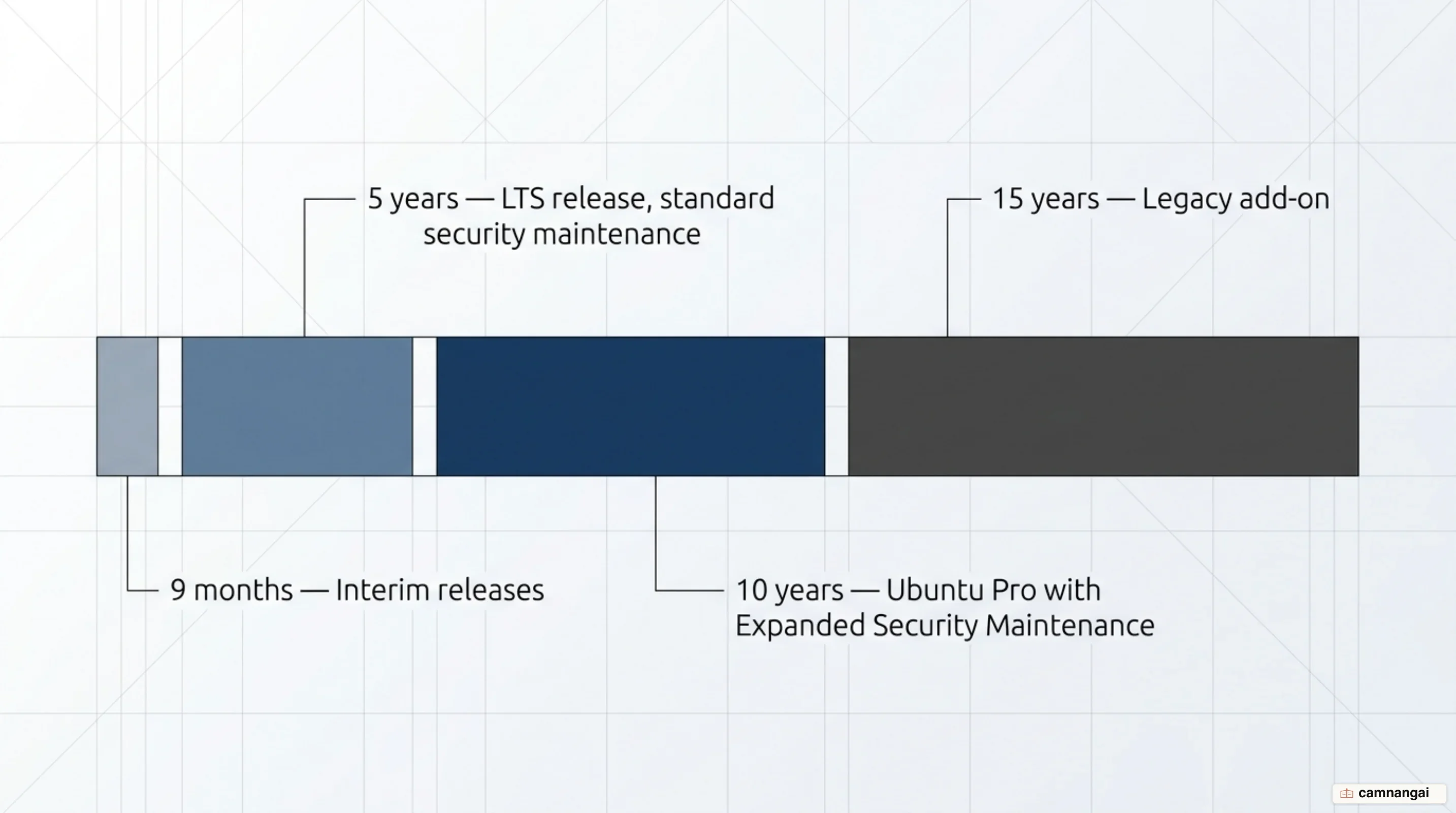
Releases fall into two tiers:
- Interim releases: Published every six months and supported for nine months. They are testbeds for new features.
- Long-Term Support (LTS) releases: Published every two years in April. They receive five years of standard security maintenance and are the industry standard for production environments.
Support can be extended beyond those five years. Ubuntu Pro with Expanded Security Maintenance (ESM) takes an LTS release to 10 years of security updates, and the Legacy add-on extends it further, to 15 years in total. Ubuntu Pro is free for personal use on up to five machines.
Most engineers wait for the first point release of an LTS — 26.04.1, for example — before rolling it out widely. By then the small faults that surface in the initial release have been fixed.
What's new in Ubuntu 26.04 LTS Resolute Raccoon
The April 23, 2026 release of "Resolute Raccoon" is the eleventh LTS and the first to ship with Linux Kernel 7.0. It is also a major toolchain step, bringing the latest stable versions of Python, Go, and Rust. That reduces the need to rely on external PPAs (Personal Package Archives), which can compromise system stability in enterprise environments.
Key technical milestones include:
- Silicon optimization: Targeted support for Intel Core Ultra Series 3 (codenamed Panther Lake), covering the integrated NPU (neural processing unit) and Intel Xe3 graphics for AI workloads.
- Memory safety: Foundational utilities replaced with Rust-based reimplementations, including
sudo-rsanduutils(a memory-safe coreutils). - Display server: This release completes the shift to Wayland, removing the legacy X.org windowing system entirely.
- TPM-backed encryption: Full-disk encryption tied to the hardware's Trusted Platform Module is now generally available.
- AI toolkits: NVIDIA CUDA and the AMD ROCm platform are distributed natively in the official repositories.
- Arm64 Livepatch: Rebootless kernel patching now covers Arm-based servers.
- Industrial networking: Native integration of the IgH EtherCAT Master for real-time robotics and industrial automation.
Which Ubuntu do you pick?
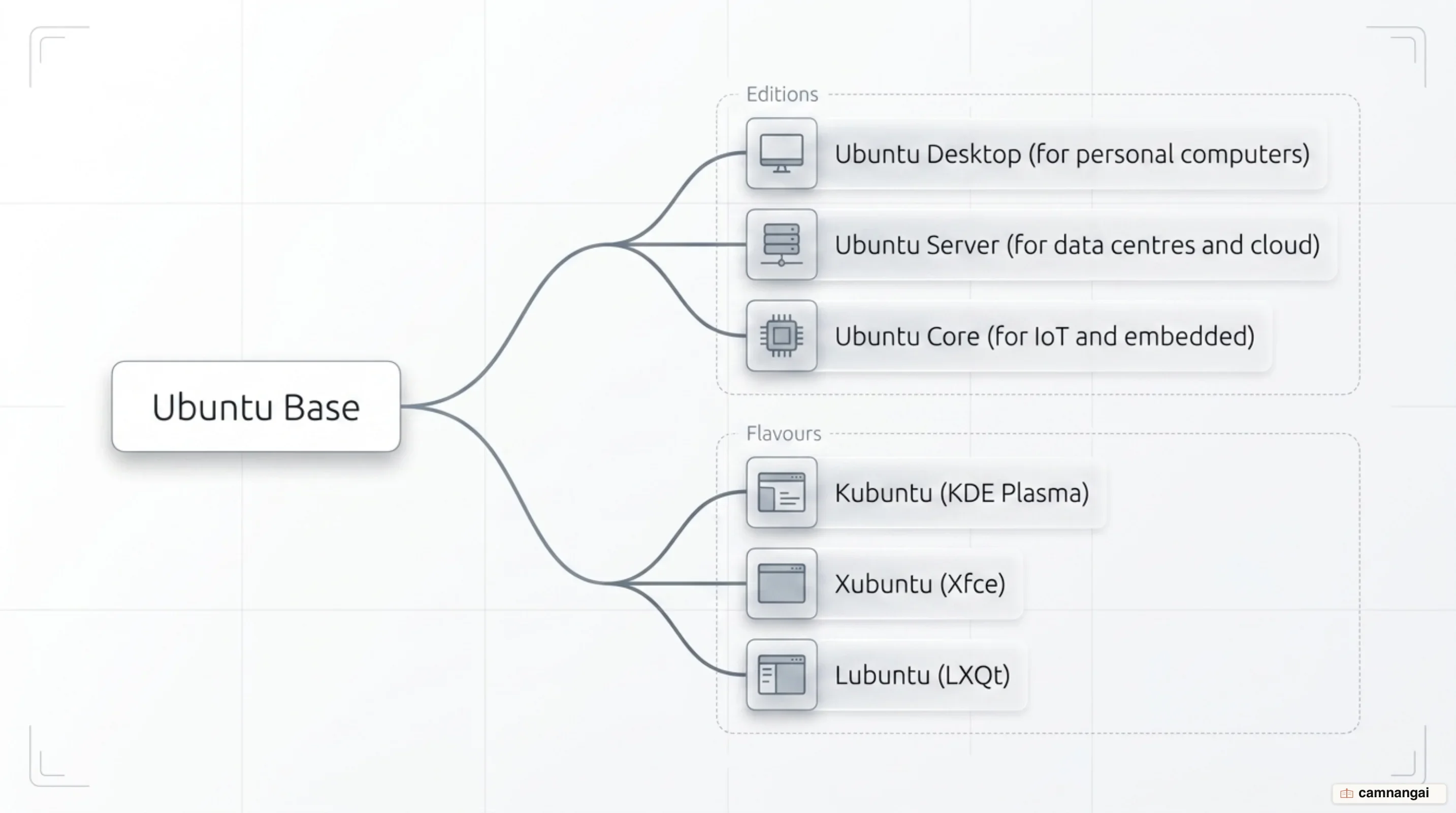
Desktop, Server and Core editions
- Ubuntu Desktop: The standard GNOME-based version for personal computers, with a graphical installer.
- Ubuntu Server: A headless version for data centers, with no GUI and a character-based installer that minimizes resource overhead.
- Ubuntu Core: An immutable, containerized version designed for IoT. It is managed through model assertions and relies entirely on Snap packages.
Architecture matters too. Ubuntu runs on x86-64 for ordinary computers and Arm64 for devices such as the Raspberry Pi, and it also supports RISC-V (to the RVA23 baseline), PowerPC for IBM servers, and s390x for mainframes. Download the ISO that matches your chip.
The flavours (Kubuntu, Xubuntu, Lubuntu and the rest)
Flavours share the same core repositories but ship different desktop environments:
- Kubuntu: Uses KDE Plasma (Qt-based) for high customizability.
- Xubuntu: Uses Xfce, optimized for efficiency on older hardware.
- Lubuntu: The lightest version, using LXQt for systems with limited RAM.
- Ubuntu Studio: Tailored for multimedia creators, with audio and video tools preinstalled.
- Ubuntu MATE: A traditional desktop layout.
- Edubuntu: Built for educational settings, with a specialized software set.
All of these are official Canonical flavours, so they receive security updates in step with the main Ubuntu release.
Installing software on Ubuntu: App Center, apt, and snap
Ubuntu uses a unified App Center that handles both traditional Debian (.deb) packages and
containerized Snaps. For a newcomer it is the shortest path to installing common applications.
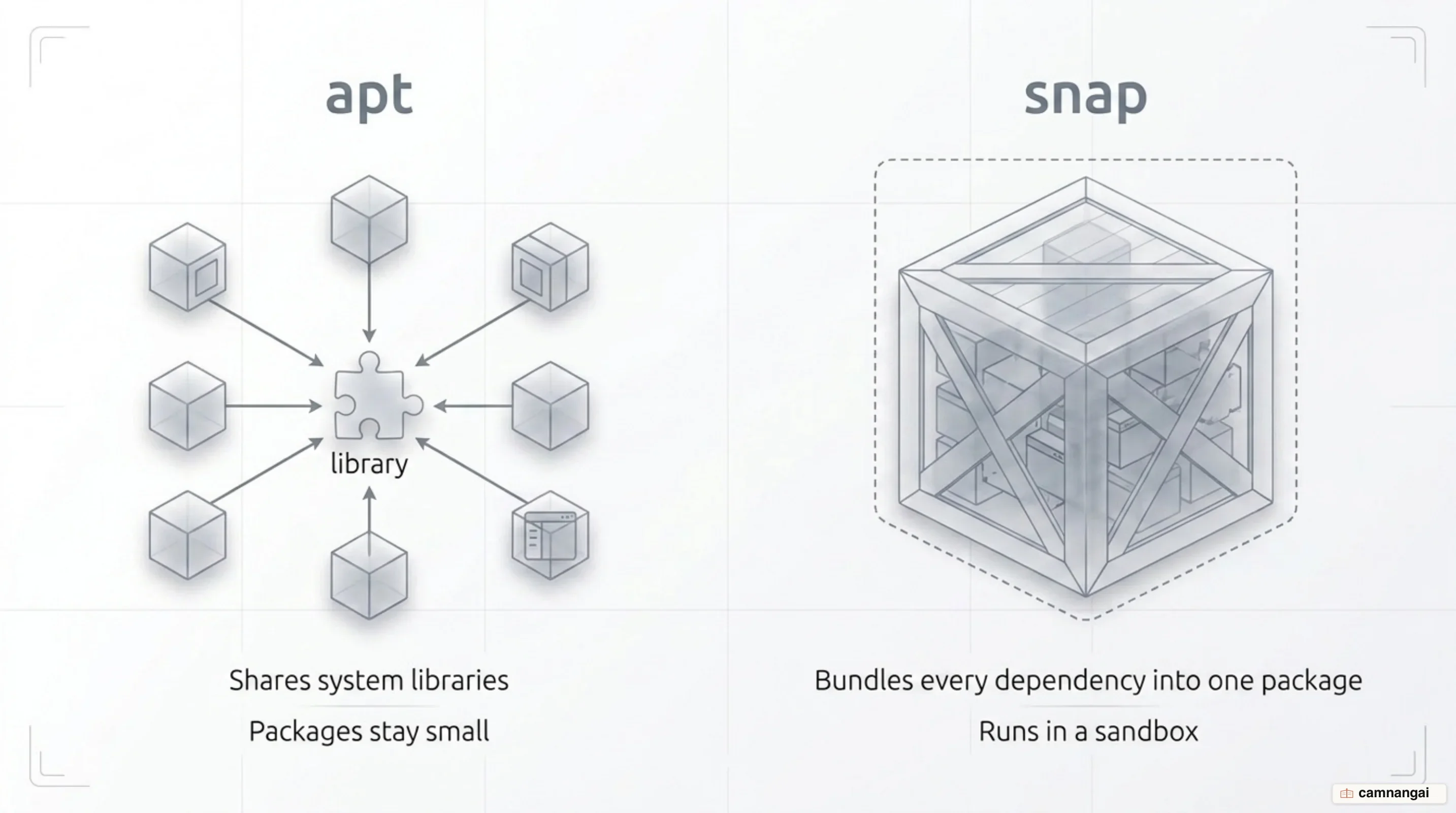
Two tools handle package management from the command line. APT (Advanced Packaging Tool) is the standard for packages from the official Ubuntu repositories; those packages are small because applications share system libraries. Snap, developed by Canonical, bundles every dependency into one package and runs it in a sandbox, which avoids dependency conflicts and lets you install the newest version of an application on an older Ubuntu release.
# Update the package list and install with apt
sudo apt update && sudo apt install vlc

# Install an application with snap
sudo snap install [application-name]
Pick apt when disk space and startup time matter. Pick snap for complex applications, for
sandbox isolation, or when you need machine learning
toolkits at their newest version. For software outside the official repositories, you can also use
PPAs hosted on Launchpad.
What you need to install Ubuntu
To run Ubuntu 26.04 LTS Desktop, the recommended hardware is:
- A 2GHz dual-core processor or better.
- 4GB of system memory (RAM).
- 25GB of free storage space.
- An 8GB USB drive for the installation media.
Before you start, work through a short checklist. Back up critical files to external storage. Create the bootable USB with Rufus on Windows, balenaEtcher on macOS, or Disks on Linux. Then, in BIOS/UEFI, make sure Intel RST and Windows BitLocker are disabled — these proprietary technologies can stop the Ubuntu installer from accessing or partitioning the disk during a dual-boot setup.
Use the "Try Ubuntu" live mode before committing. It runs the operating system from the USB without touching the data already on the machine, which is the fastest way to check that Wi-Fi, audio, Bluetooth, and screen resolution all work on your hardware.
Who Ubuntu is for, and who it isn't
Ubuntu is the primary choice for developers, cloud architects, and home users who want a stable alternative to a proprietary OS. Its vertical integration and support for modern toolchains make it a common baseline for AI and machine learning work.
It is a poor fit if you depend on software that only exists on Windows or macOS — Adobe Creative Cloud is the usual example — or on hardware old enough to be 32-bit only. If you are running production servers, 26.04 LTS is worth the move for the memory-safe Rust utilities and TPM-backed security; if you are already on 24.04 LTS and not waiting on Kernel 7.0, there is no urgency before the 26.04.1 point release.
References
- Ubuntu — Wikipedia
- Canonical releases Ubuntu 26.04 LTS Resolute Raccoon — Canonical
- Ubuntu release cycle — Ubuntu
- Install Ubuntu Desktop — Ubuntu Desktop documentation
- Ubuntu flavors — Ubuntu
- Explained: Which Ubuntu Version Should I Use? — It's FOSS
- Windows vs macOS vs Linux — Operating System Handbook — freeCodeCamp
- Ubuntu snap vs. apt: Which package manager to use and when — TechTarget