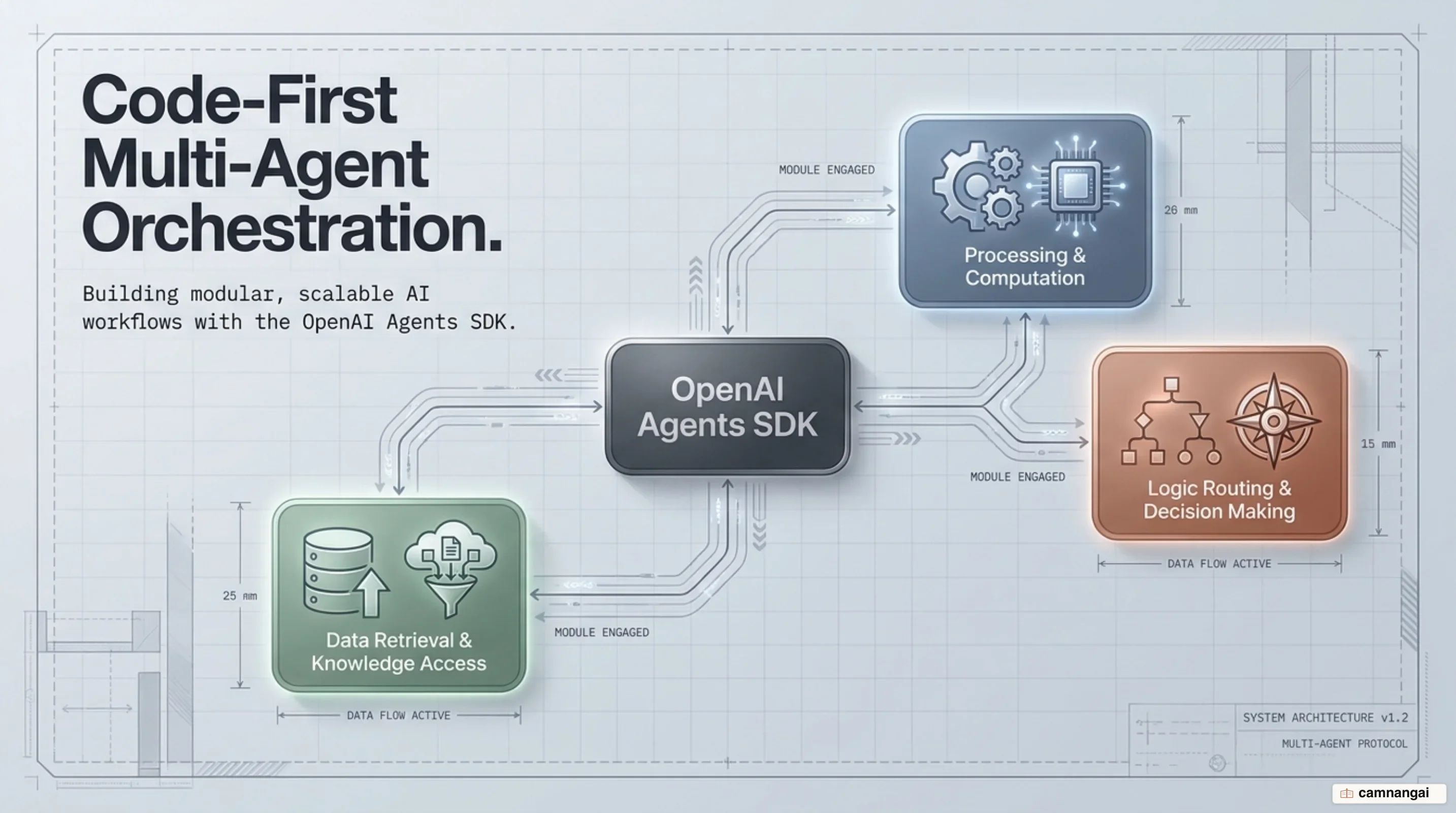
The OpenAI Agents SDK is a lightweight, production-ready framework designed to build workflows with minimal core primitives. Evolving as a production upgrade from OpenAI's experimental Swarm project, it provides essential building blocks—specifically Agents, Handoffs, and —without imposing rigid framework abstractions.
At its core, the OpenAI Agents SDK automates turn management, tool execution loops, context preservation across runs, dynamic agent delegation, and safety checks. While it uses the OpenAI Responses API by default for OpenAI models, it is provider-agnostic, natively supporting the Chat Completions API as well as 100+ third-party via any-llm and LiteLLM adapters.
Design Philosophy and Why It Differs from the Responses API
The driving philosophy behind the OpenAI Agents SDK is to deliver enough core primitives to solve multi-step orchestration while remaining transparent and easy to inspect. Rather than relying on complex graph engines, declarative Directed Acyclic Graphs (DAGs), or proprietary state-machine domain languages, the SDK is Python-first. You control execution and agent state transitions directly using native language constructs—such as standard if/else branching, for loops, dynamic callbacks, and try/except exception handling. Evolving as a production-grade upgrade from OpenAI's experimental Swarm project, it maintains this minimal abstraction layer while introducing production primitives including robust session backends, native execution tracing, and sandboxed workspace execution.
You can easily decide when to use the OpenAI Responses API directly versus when to adopt the Agents SDK. You should use the raw Responses API directly if you want to write and maintain the model loop yourself, if your application requires custom tool dispatch, or if your workflow is short-lived and primarily concerned with returning a single model completion. Conversely, you should adopt the Agents SDK when you want the runtime to handle multi-turn execution loops, validate and execute function tools, transfer control across agents via handoffs, enforce programmatic input and output guardrails, manage persistent session memory across turns, or execute workspace tasks inside isolated sandbox environments.
The framework provides complete provider independence alongside deep ecosystem integration. While OpenAI models default to the Responses API, the SDK integrates with third-party models and alternative provider endpoints using optional adapters such as any-llm and LiteLLM. The SDK requires Python 3.10 or newer. You can install the base package or include optional dependency extras such as [voice] for speech pipelines, [redis] for shared Redis session storage, [dapr] for cloud-native state stores, [mongodb] for document-backed memory, or [docker] for containerized sandbox client execution.
# Basic package installation using pip or uv
pip install openai-agents
# Alternatively, using uv:
# uv add openai-agents

# Install with optional extras (e.g., redis, voice, dapr, mongodb, docker)
pip install "openai-agents[redis,voice]"

# Environment setup for authentication
export OPENAI_API_KEY=\"sk-...\"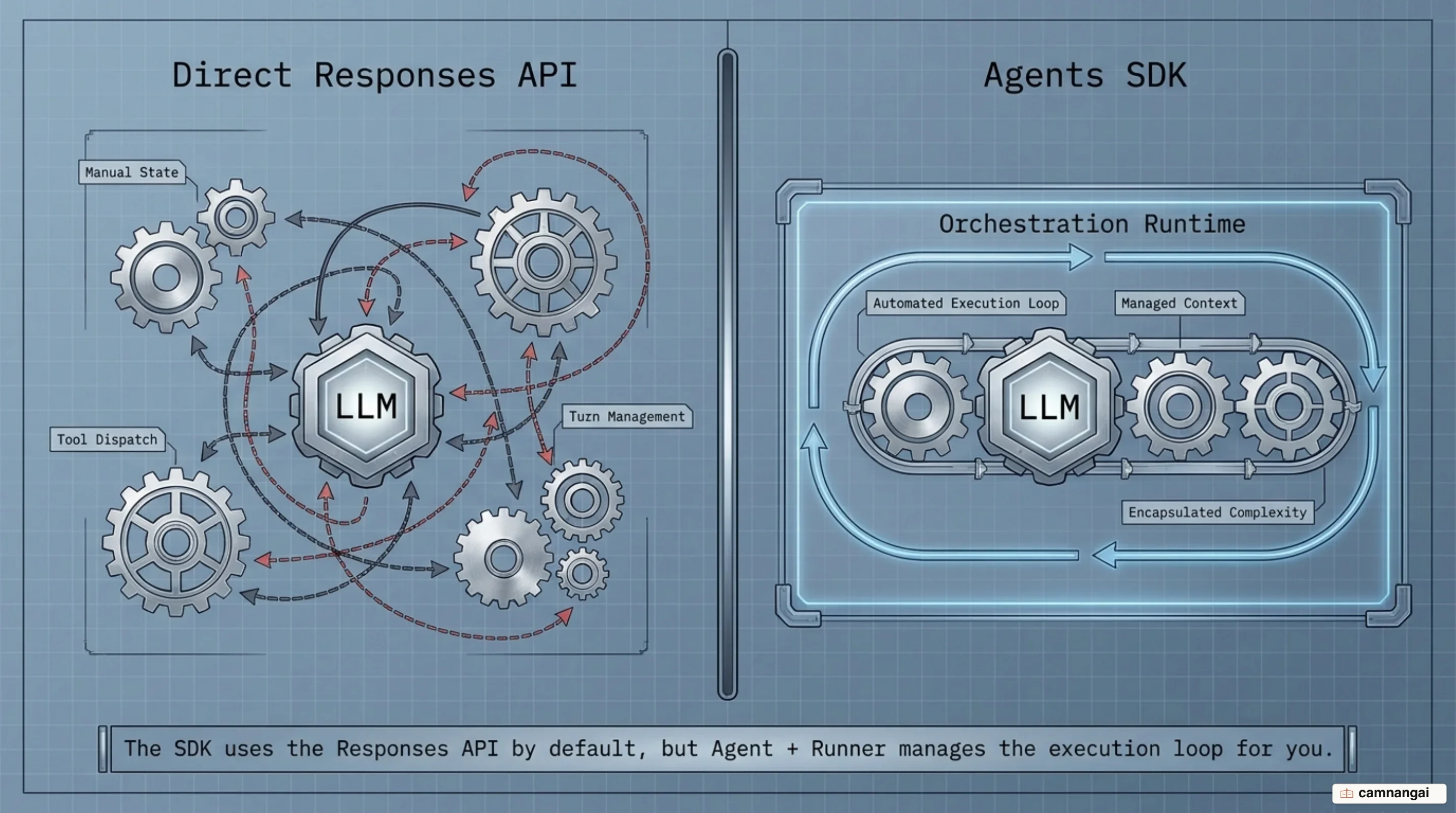
Core Primitives: Agent, Runner, and the Execution Loop
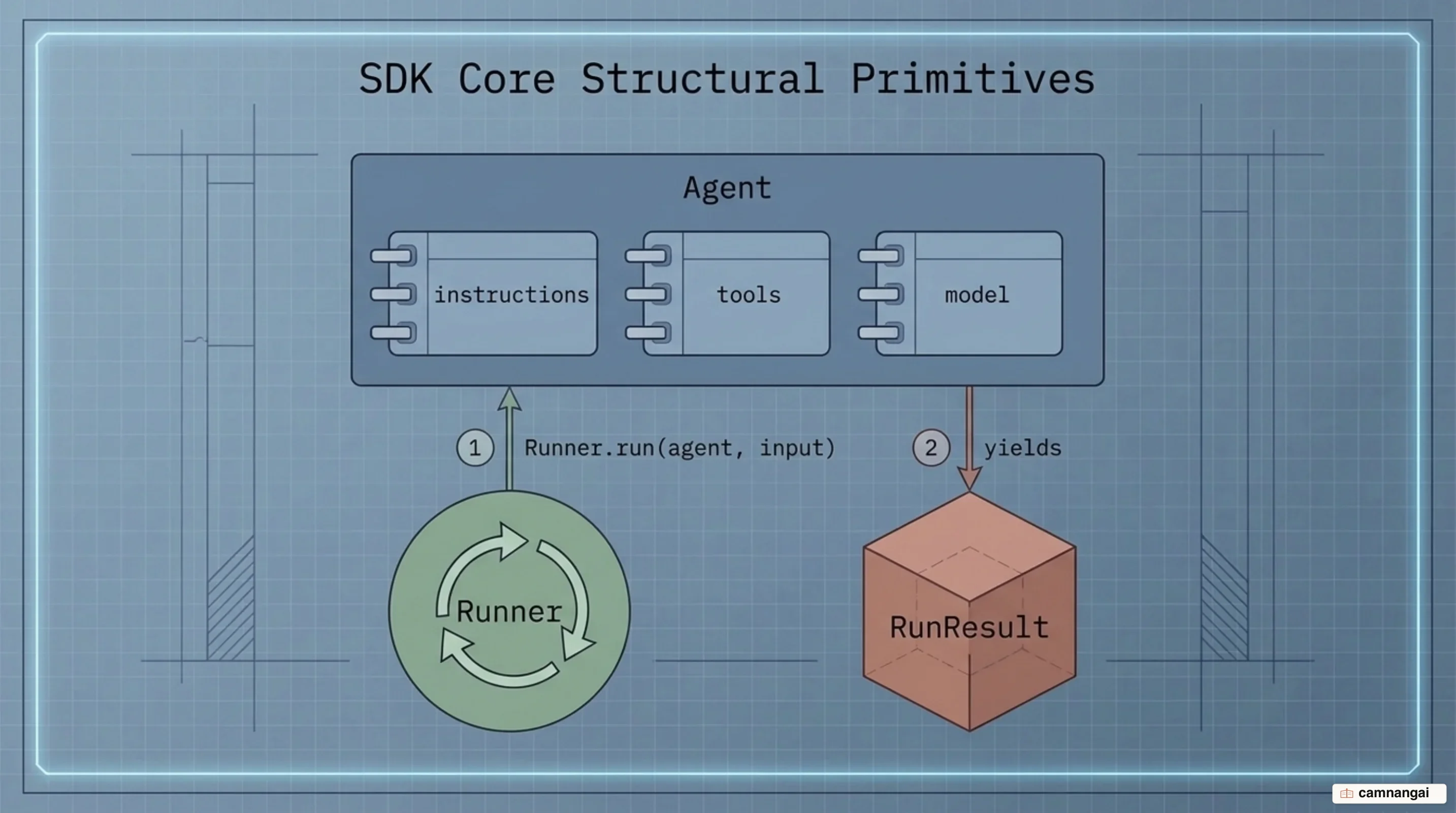
The Agent primitive is the primary building block of the framework. Essential parameters of an Agent include name (the only required string parameter), instructions (system prompts provided as static strings or dynamic functions), and model. You can reference platform-managed prompt templates via prompt, attach local Python functions or servers to tools, set safety parameters in input_guardrails and output_guardrails, or configure structured responses using output_type (which accepts Pydantic models, dataclasses, TypedDicts, or any type supported by Pydantic's TypeAdapter). Model tuning parameters such as temperature, top_p, and tool_choice are configured via ModelSettings.
Execution is driven by the Runner primitive through asynchronous calls (Runner.run) or synchronous wrappers (Runner.run_sync). When invoked, the Runner manages an iterative turn loop: it inspects available tools, calls the model, validates generated function arguments, executes local tool code, and passes tool outputs back into the model context. This loop iterates automatically until the model emits a terminal response or hits a configured stopping condition.
You can explicitly control how tool execution loops behave using tool_use_behavior. By default ("run_llm_again"), tool outputs feed back into the model to complete the turn. Setting "stop_on_first_tool" halts execution immediately after the first tool call and uses its output as the final response. You can also pass StopAtTools(stop_at_tool_names=[...]) or provide a custom ToolsToFinalOutputFunction callback to inspect FunctionToolResult payloads and determine whether to end the run. To force tool invocation, set ModelSettings.tool_choice to auto, required, none, or a specific tool name. To prevent infinite execution loops when tool_choice is forced to a specific tool or required, Agent.reset_tool_choice defaults to True. This automatically resets tool_choice back to "auto" immediately after the tool is successfully executed, preventing the model from re-invoking the forced tool repeatedly on subsequent turns.
from pydantic import BaseModel
from agents import Agent, Runner, ModelSettings
from agents.decorators import tool

class WeatherReport(BaseModel):
    city: str
    temperature_summary: str

@tool
def get_current_weather(city: str) -> str:
    """Retrieves current weather status for a target city."""
    return f"The weather in {city} is 72 degrees Fahrenheit and sunny."

weather_agent = Agent(
    name="Weather Assistant",
    instructions="You provide concise weather updates.",
    tools=[get_current_weather],
    output_type=WeatherReport,
    model_settings=ModelSettings(tool_choice="auto"),
)

# Synchronous run execution
result = Runner.run_sync(
    weather_agent,
    "What is the weather like in San Francisco right now?"
)

print(f"City: {result.final_output.city}")
print(f"Summary: {result.final_output.temperature_summary}")
Handoffs and Multi-Agent Orchestration
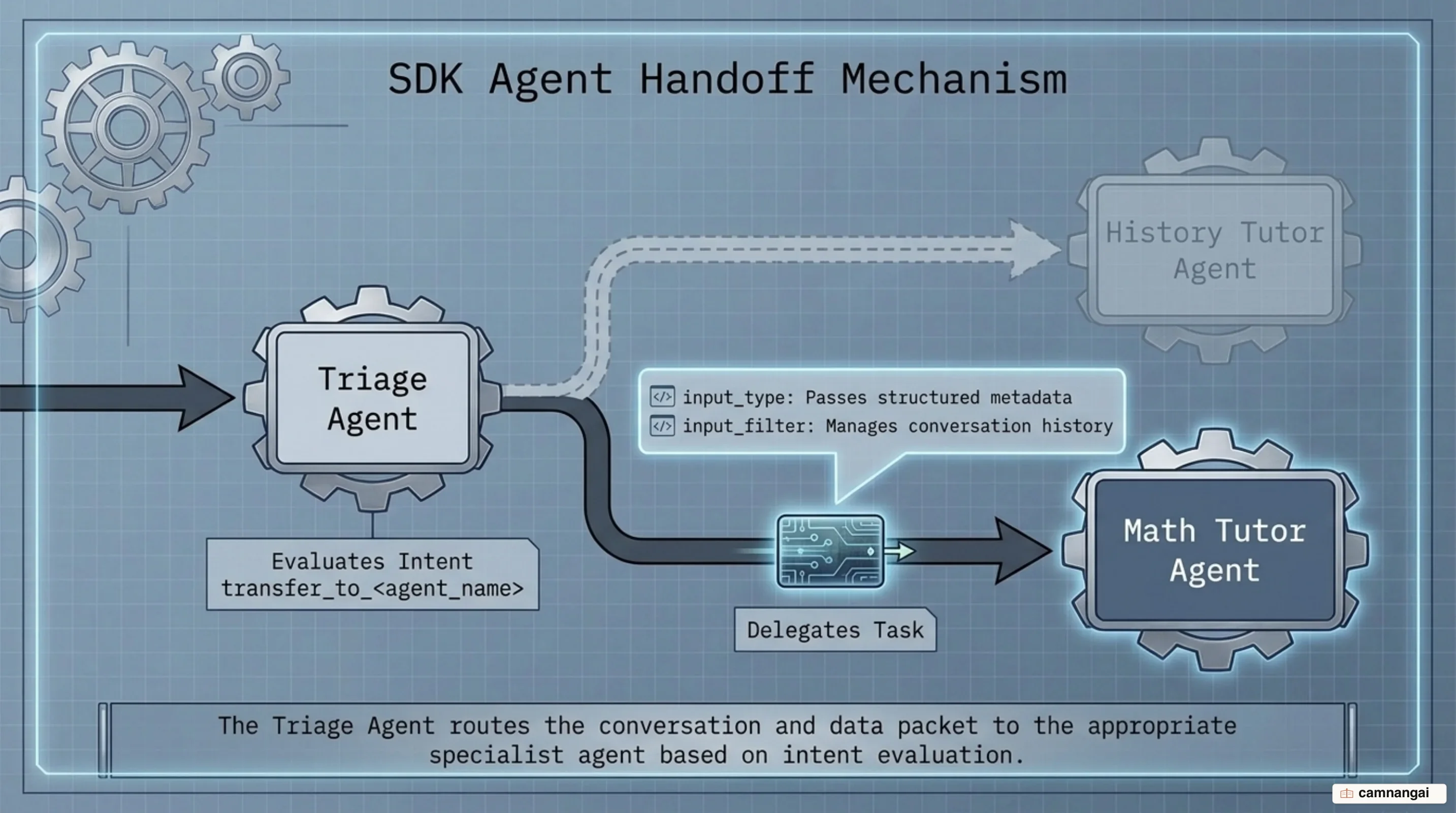
The SDK natively supports two primary multi-agent orchestration patterns: Manager and Handoffs. In the Manager pattern, a central manager agent retains conversational control and invokes specialized as tools by wrapping them with Agent.as_tool(). In the Handoffs pattern, peer agents execute decentralized delegation, handing off full conversational control to specialist agents that take over the run loop.
Mechanically, handoffs are exposed to the LLM as function tools named transfer_to_<agent_name>. You can pass an Agent instance directly into the handoffs=[...] list or wrap it using the handoff() helper function for granular customization. Customization options include overriding the generated tool name (tool_name_override), customizing its prompt representation (tool_description_override), setting runtime evaluation flags (is_enabled), attaching lifecycle callbacks (on_handoff), configuring nested history compaction (nest_handoff_history), or defining structured transfer parameters (input_type). Passing a Pydantic model to input_type forces the LLM to generate structured transfer metadata—such as reason or priority—which is validated locally and passed to the on_handoff callback before control transfers to the recipient agent. To help LLMs perform handoffs reliably, you can include agents.extensions.handoff_prompt.RECOMMENDED_PROMPT_PREFIX in your or call prompt_with_handoff_instructions().
When a handoff takes place, conversation transcripts propagate to the recipient agent. By default, the full conversation history is forwarded. You can modify what history the recipient agent receives by attaching an input_filter (such as handoff_filters.remove_all_tools). Alternatively, you can enable opt-in nested history compaction via RunConfig.nest_handoff_history or Handoff.nest_handoff_history. When enabled, the runner compacts prior assistant turns into ordered summary segments wrapped in <CONVERSATION HISTORY> tags while preserving original message items intact for session tracking. Note that server-managed conversations using conversation_id or previous_response_id do not support handoff input filters; applications requiring explicit history filtering must manage conversation state client-side.
from pydantic import BaseModel
from agents import Agent, handoff, RunContextWrapper, Runner
from agents.extensions import handoff_filters

class RefundMetadata(BaseModel):
    reason: str
    priority: str

def log_transfer(ctx: RunContextWrapper[None], input_data: RefundMetadata):
    print(f"Delegating to refund specialist. Reason: {input_data.reason}, Priority: {input_data.priority}")

refund_agent = Agent(
    name="Refund Agent",
    instructions="Process customer refund requests according to policy.",
    handoff_description="Handles all customer requests regarding refunds and billing disputes."
)

triage_agent = Agent(
    name="Triage Agent",
    instructions="Analyze customer queries and hand off to specialists when required.",
    handoffs=[
        handoff(
            agent=refund_agent,
            on_handoff=log_transfer,
            input_type=RefundMetadata,
            input_filter=handoff_filters.remove_all_tools,
        )
    ],
)

# Example invocation triggering delegation
result = Runner.run_sync(triage_agent, "I was double charged for my subscription and need a refund immediately.")
print(result.final_output)
Enforcing Safety Boundaries with Guardrails
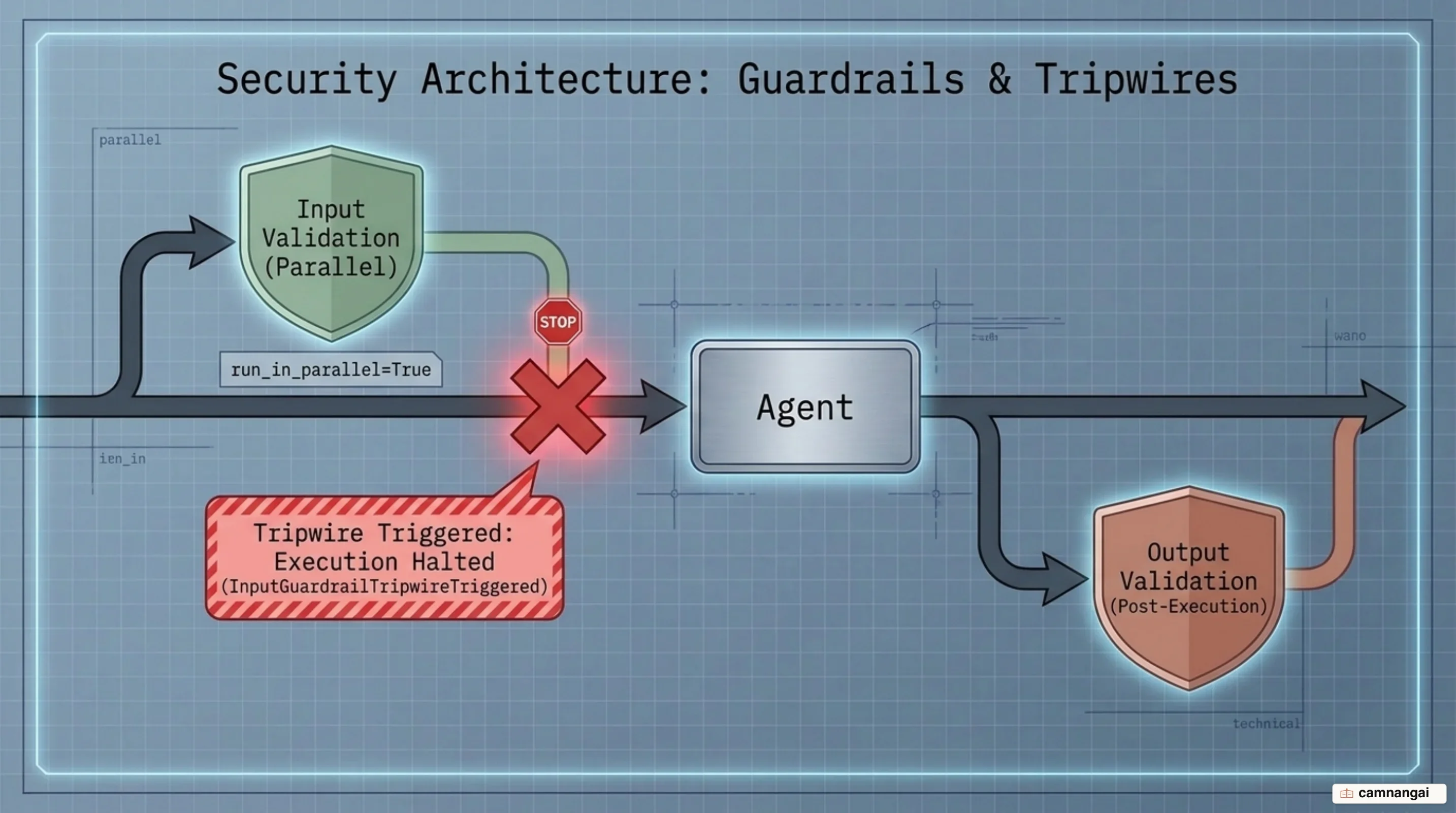
Guardrails provide programmatic safety boundaries operating across user inputs, agent outputs, and tool invocations. Evaluating data using fast, cheap classifier models or deterministic Python validation logic within a guardrail lets you fail fast before consuming on expensive primary models or executing state-changing tool code.
Input and output guardrails attach directly to Agent definitions. Input guardrails run specifically on the initial user input sent to the starting agent of a chain. They support two execution modes to balance latency against token consumption: parallel (run_in_parallel=True, the default), which runs the guardrail concurrently with model invocation for minimal overall latency (though the model may begin consuming tokens before cancellation), and blocking (run_in_parallel=False), which forces the guardrail to complete prior to model invocation, preventing token burn and tool execution if blocked. Output guardrails inspect candidate agent responses after turn completion. If a guardrail triggers a tripwire by returning GuardrailFunctionOutput(tripwire_triggered=True), the runner halts execution and raises an InputGuardrailTripwireTriggered or OutputGuardrailTripwireTriggered exception.
When tool_use_behavior turns a terminal tool result into the final response and an output guardrail tripwire rejects it, the SDK retains the validated function call arguments to preserve replay validity, but replaces the retained function_call_output payload with "Output withheld by an output guardrail.". You can customize this placeholder string or provide a synchronous formatting callback using RunConfig.output_guardrail_blocked_message (note that async formatter functions are rejected during RunConfig construction).
Tool Guardrails attach directly to FunctionTool instances or local MCP server configurations via tool_input_guardrails and tool_output_guardrails. Input tool guardrails evaluate tool arguments after call approval but prior to function execution, allowing you to validate inputs, allow calls, or raise a ToolInputGuardrailTripwireTriggered exception. Output tool guardrails inspect and sanitize tool return values prior to passing them back into the agent loop.
import json
from agents import (
    Agent,
    Runner,
    GuardrailFunctionOutput,
    ToolGuardrailFunctionOutput,
    InputGuardrailTripwireTriggered
)
from agents.decorators import input_guardrail, tool, tool_input_guardrail

@input_guardrail
async def homework_checker(ctx, agent, input_text) -> GuardrailFunctionOutput:
    """Blocks inputs requesting math homework assistance."""
    is_homework = "solve for x" in str(input_text).lower()
    return GuardrailFunctionOutput(
        output_info={"detected": is_homework},
        tripwire_triggered=is_homework
    )

@tool_input_guardrail
def prevent_api_key_leak(data):
    """Inspects tool arguments for sensitive credentials."""
    args_str = json.dumps(data.context.tool_arguments or {})
    if "sk-" in args_str:
        return ToolGuardrailFunctionOutput.reject_content("API credentials detected in tool arguments.")
    return ToolGuardrailFunctionOutput.allow()

@tool(tool_input_guardrails=[prevent_api_key_leak])
def execute_query(query: str) -> str:
    """Executes a query against internal database systems."""
    return f"Query result for: {query}"

guarded_agent = Agent(
    name="Secure Assistant",
    instructions="Help users with general queries.",
    input_guardrails=[homework_checker],
    tools=[execute_query]
)

try:
    result = Runner.run_sync(guarded_agent, "Can you solve for x: 3x + 9 = 21?")
except InputGuardrailTripwireTriggered:
    print("Execution halted: Input guardrail tripwire triggered.")
State Management and Conversation Continuity with Sessions
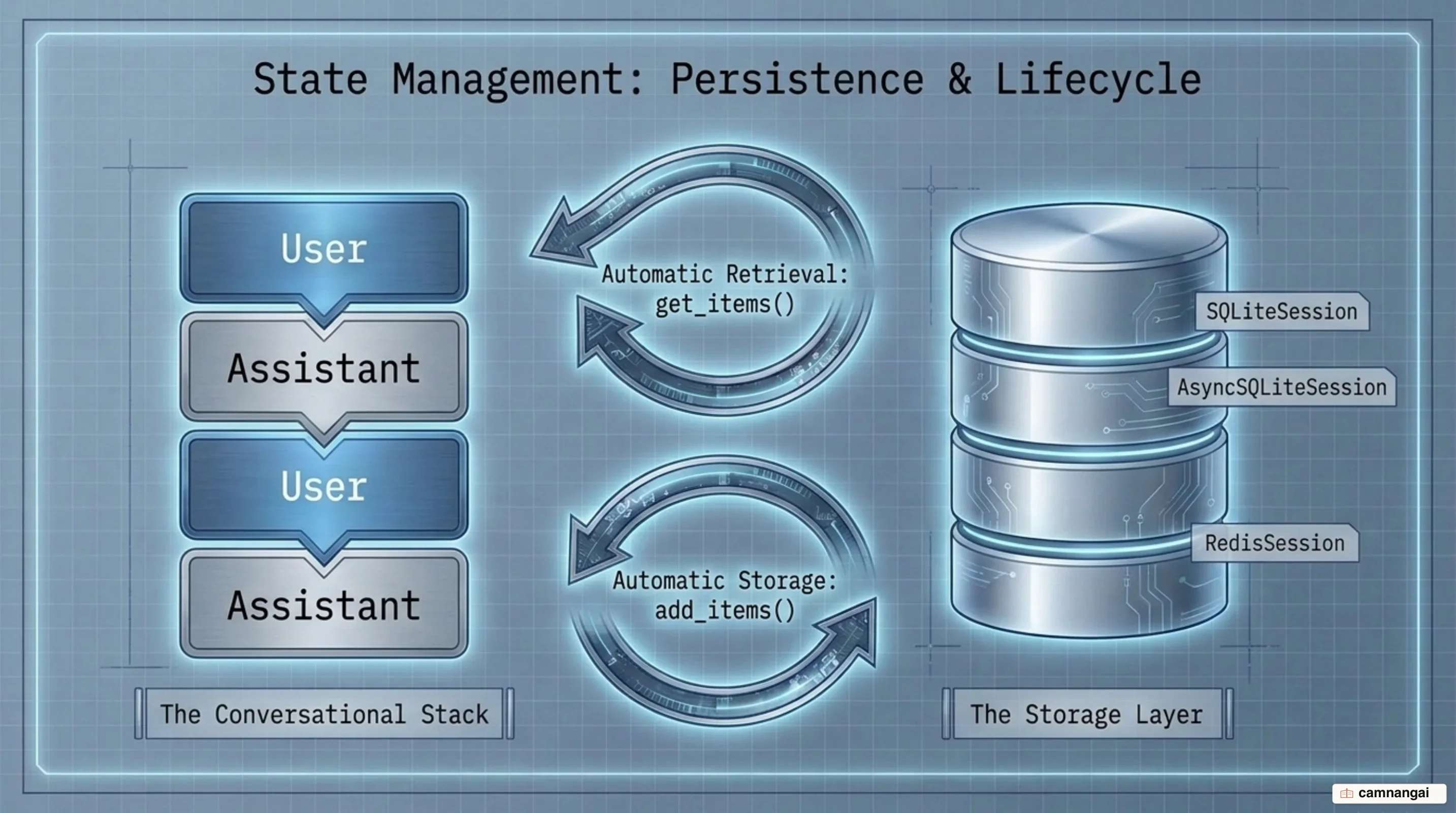
The Agents SDK features built-in session memory to automatically manage multi-turn history tracking across sequential Runner.run calls. Sessions retrieve stored conversation history before a run begins and persist user inputs, assistant outputs, and tool calls after the run completes. Client-side sessions operate independently from OpenAI server-managed continuation mechanisms (conversation_id, previous_response_id) and cannot be combined with server continuation parameters within the same run.
The SDK includes a comprehensive set of built-in session backends tailored for different operational requirements:
- SQLiteSession / AsyncSQLiteSession: Lightweight local storage using SQLite file databases or in-memory instances (with
aiosqlitesupport for async runtimes). Note thatSQLiteSessionoperates under a trust boundary that assumes the application trusts the database file; it performs no row authentication or tamper detection, and rows containing un-decodable JSON are skipped during retrieval rather than raising an integrity error. - RedisSession: Shared, low-latency session storage leveraging Redis key-value stores for distributed microservices.
- SQLAlchemySession: Production SQL storage using any database engine supported by SQLAlchemy (e.g., PostgreSQL, MySQL).
- MongoDBSession: Document-backed persistence utilizing MongoDB collections with atomic sequence ordering.
- DaprSession: Cloud-native state management leveraging Dapr sidecars with configurable TTL and consistency settings.
- OpenAIConversationsSession: Server-backed conversation persistence utilizing the OpenAI Conversations API.
- OpenAIResponsesCompactionSession: Auto-compacting wrapper around an underlying session backend that truncates long via
responses.compact. It supports threecompaction_modechoices:"auto","previous_response_id", and"input". If an agent executes withModelSettings(store=False),"auto"automatically falls back to input-based compaction because server-managed response IDs are not retained. - AdvancedSQLiteSession: Enhanced SQLite implementation offering conversation branching and token usage analytics.
- EncryptedSession: Transparent wrapper providing encryption-at-rest and TTL expiration on top of any underlying session backend.
You can manipulate session history programmatically using built-in methods. Set retrieval limits via RunConfig.session_settings=SessionSettings(limit=N) to fetch only the most recent $N$ items, intercept and modify history before model invocation using RunConfig.session_input_callback, or pop invalid turns via session.pop_item(). You can implement custom session storage backends by satisfying the structural Session protocol. To access active run metadata or enforce tenant authorization inside custom sessions, all four history methods (get_items, add_items, pop_item, clear_session) must explicitly declare the wrapper: RunContextWrapper[Any] | None = None keyword parameter in their method signatures; using a generic **kwargs parameter fails the SDK's internal inspection check.
import asyncio
from agents import Agent, Runner, SQLiteSession

async def run_multiturn_conversation():
    agent = Agent(
        name="Support Assistant",
        instructions="Provide concise, accurate technical answers."
    )

    # Initialize persistent file-backed session memory
    session = SQLiteSession(session_id="user_session_9482", db_path="conversations.db")

    # Turn 1: Initial context established
    res1 = await Runner.run(agent, "My server is running out of disk space in /var/log.", session=session)
    print(f"Turn 1 Output: {res1.final_output}")

    # Turn 2: Follow-up relying on automatic session memory retrieval
    res2 = await Runner.run(agent, "What command can I run to clear those specific files?", session=session)
    print(f"Turn 2 Output: {res2.final_output}")

if __name__ == "__main__":
    asyncio.run(run_multiturn_conversation())
Observability and Debugging with Native Tracing
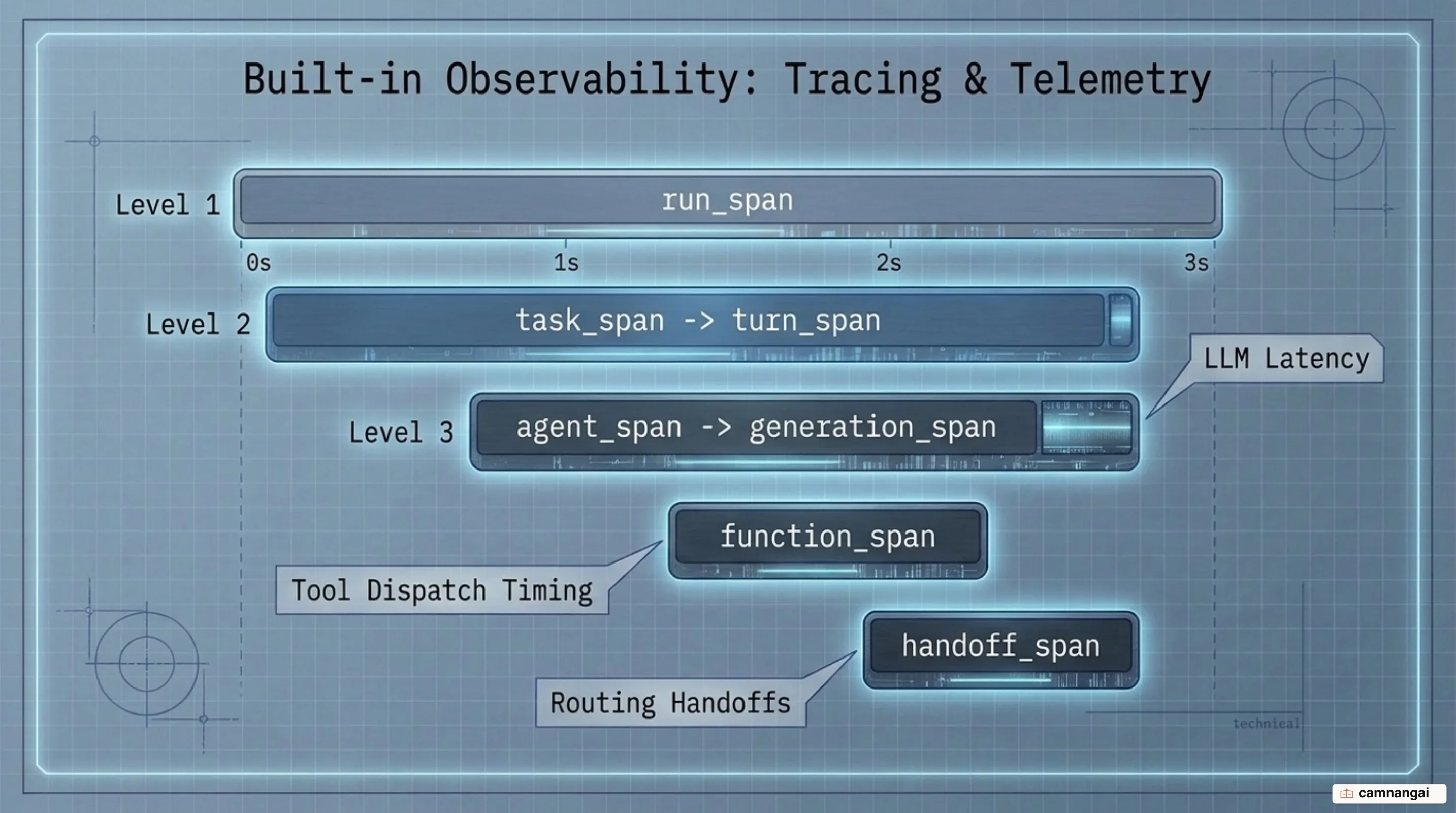
The Agents SDK includes native tracing capabilities that capture execution details without requiring external third-party instrumentations. Tracing records complete execution trees—including span creation, trace contexts, processor interfaces, model latency, tool execution timings, guardrail evaluations, and handoff events.
To observe runs in real time, the SDK provides two distinct scopes of lifecycle hooks: workflow-wide RunHooks (which observe the entire Runner.run lifecycle across all agent handoffs) and agent-scoped AgentHooks (attached directly to an Agent via agent.hooks). Hook callbacks execute across critical operational steps: on_agent_start, on_agent_end, on_llm_start, on_llm_end, on_tool_start, on_tool_end (which receives a ToolContext object exposing metadata such as tool_call_id), and on_handoff.
Native trace telemetry integrates directly into the broader OpenAI developer ecosystem. Structured logs and span records generated during agent runs feed into dataset curation, evaluation pipelines, fine-tuning workflows, and model distillation, allowing you to optimize agent prompts, tool definitions, and operational cost profiles over time.
from agents import Agent, RunHooks, Runner

class SystemTelemetryHooks(RunHooks):
    """Custom hook class printing lifecycle events during execution."""
    async def on_agent_start(self, context, agent):
        print(f"[HOOK] Starting agent execution: {agent.name}")

    async def on_tool_start(self, context, agent, tool):
        print(f"[HOOK] Agent '{agent.name}' executing tool: {tool.name}")

    async def on_tool_end(self, context, agent, tool, result):
        print(f"[HOOK] Tool '{tool.name}' completed execution.")

    async def on_agent_end(self, context, agent, output):
        print(f"[HOOK] Completed {agent.name}. Token usage: {context.usage}")

agent = Agent(name="Monitored Agent", instructions="Summarize system metrics concisely.")
result = Runner.run_sync(
    agent,
    "Report status for node 01.",
    hooks=SystemTelemetryHooks()
)
When to Use the OpenAI Agents SDK (and When Not To)
You should adopt the OpenAI Agents SDK when building multi-turn agentic applications, multi-agent systems requiring handoffs or manager delegation, sandboxed repository or workspace agents, or low-latency voice and realtime pipelines requiring persistent session memory and built-in safety boundaries. The framework excels when you want a standard runtime to handle turn loops, tool validation, context management, lifecycle tracing, and guardrail enforcement with minimal setup code.
You should avoid the SDK in favor of direct API calls (such as the raw OpenAI Responses API) for stateless, single-turn text completions, simple prompt-response scripts, or custom architectures where you already own and maintain the execution loop. If managing an orchestration framework overhead adds unnecessary complexity to a basic API integration, direct client calls remain the lightweight and appropriate choice.