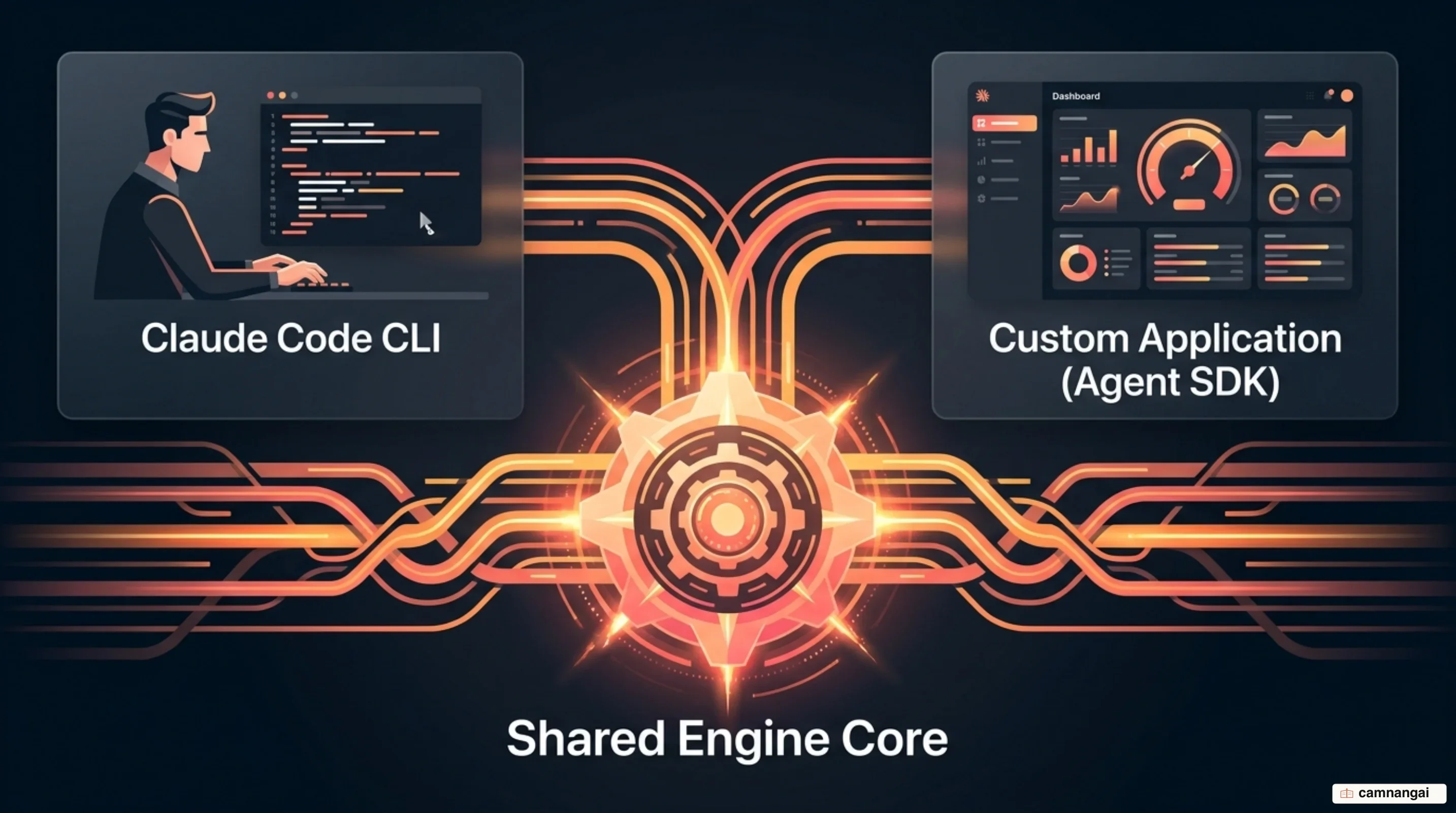
The Claude Agent SDK is the library that powers Claude Code, letting you run the same agent loop inside your own process in Python or TypeScript.
Instead of a human driving the terminal, your application becomes the controller for the engine.
That means file-system operations, terminal commands, and context management all execute on your infrastructure rather than in a remote sandbox. This is not an HTTP wrapper around the Messages API — it is the engine itself, packaged for programmatic use.
What is the Claude Agent SDK?
The Claude Agent SDK is an opinionated runtime where Claude owns the agent loop. It is the same engine the Claude Code CLI runs on, exposed for integration. Your code supplies the environment and the tools; the SDK manages the iterative cycle of model calls, tool execution, and context management.
You need Python 3.10+ or Node.js 18+. Both the TypeScript and Python packages bundle a native Claude Code binary, so you usually do not have to install Claude Code separately. Two cases break that: if pip installs the source distribution instead of a platform wheel (on ARM64 Windows, for example), and if npm skips optional dependencies via npm ci --omit=optional. In either case you install Claude Code natively and point the SDK at it.
You drop the SDK into an unattended pipeline or an internal tool, and the agent works there the way a programmer would. Because it runs in-process, it inherits the permissions and environment of the host, so the agent works on exactly the local files and services you expose to it.
Anthropic's Commercial Terms of Service govern how you use the SDK, including when you build it into products you offer to your own customers.
How does the agent loop work?
The SDK runs the agent loop continuously until a task reaches a terminal state or hits a limit you set. The cycle has four stages:
- Gather context — the agent locates the data it needs, typically through agentic search.
- Take action — the agent executes tools, rewriting code or running a shell script.
- Verify work — the agent validates the output with lints, tests, or visual feedback.
- Repeat — the cycle continues until the goal is satisfied.
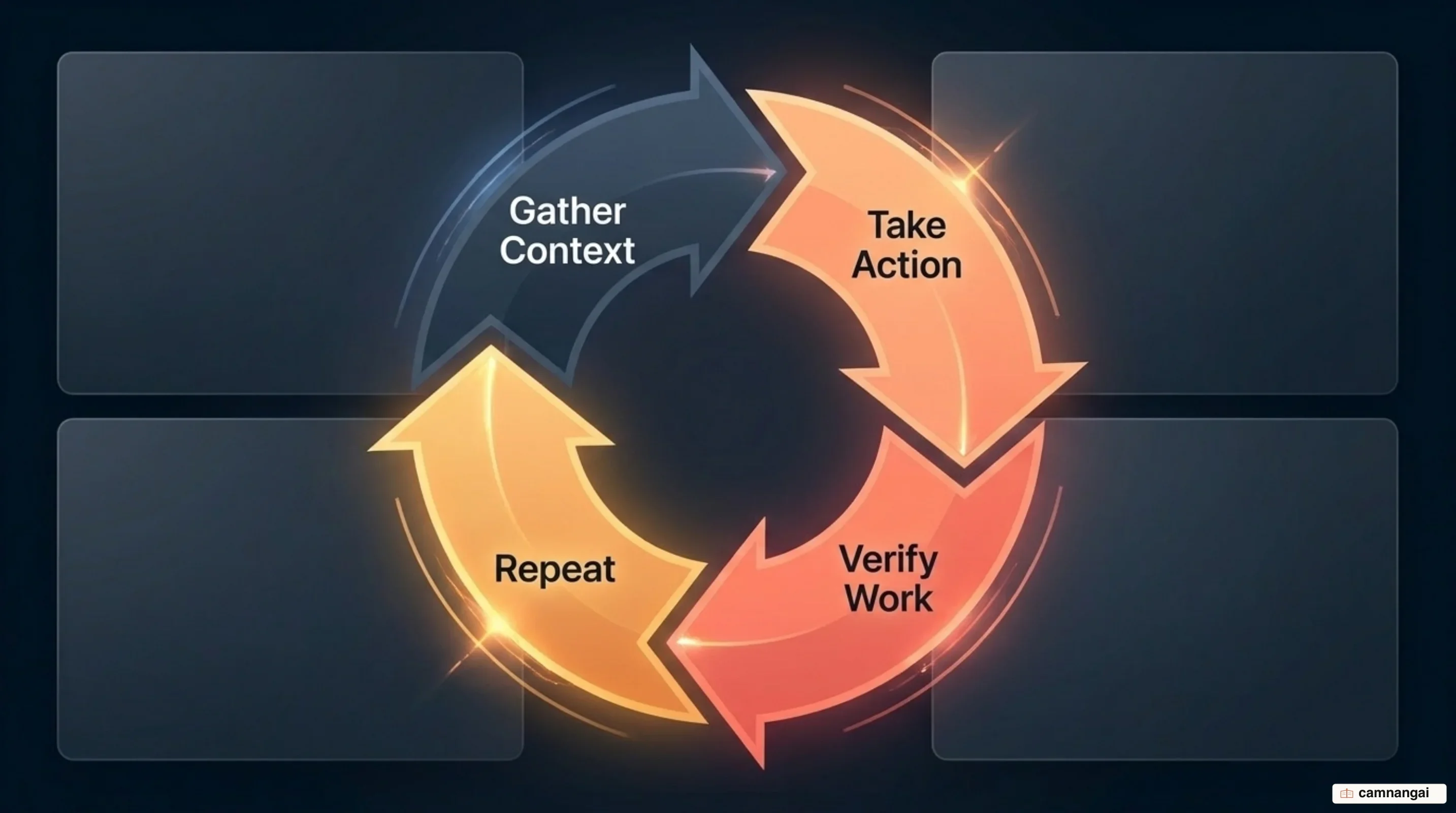
One full cycle is a turn. Turns continue without returning control to your code, and the loop ends when Claude produces a response with no tool calls. You can cap it with max_turns for a hard round-trip limit, or max_budget_usd to stop at a spend threshold. Leaving both unset is fine for well-scoped tasks and risky for open-ended prompts.
Context efficiency comes from two mechanisms. Compaction summarizes older conversation history once the window approaches its limit, preserving key decisions instead of truncating them away. Agentic search keeps the window lean in the first place: Claude reaches for grep and tail to pull specific file segments rather than loading entire multi-megabyte sources.
Verification is where production agents succeed or fail. You can enforce rule-based checks with explicit pass conditions, use visual feedback such as screenshots for UI work, or run a second model as a judge for criteria too fuzzy to assert mechanically.
What does the SDK give you out of the box?
The SDK ships a standardized toolset that executes on your infrastructure: Read, Write, Edit, Bash, Glob, Grep, WebSearch, and WebFetch. Those eight primitives let Claude explore codebases, modify files, and debug terminal output before you have written a line of tool code.
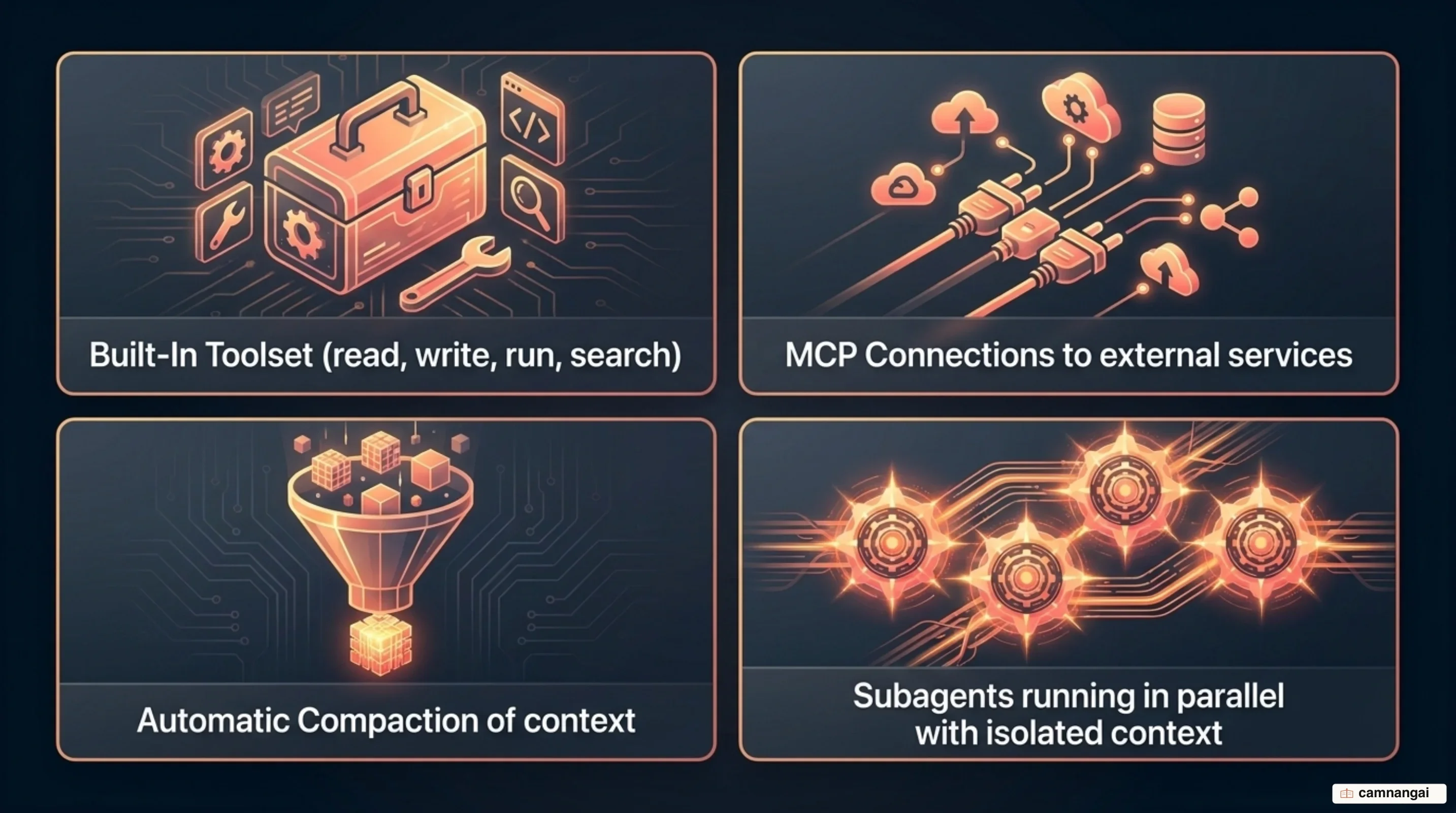
Beyond the basics, the SDK includes subagent machinery for parallelization and context isolation. An orchestrator can spawn specialized subagents for focused tasks; each starts with a fresh conversation and returns only its final response to the parent. The parent's context grows by that summary rather than by the whole subtask transcript.
Connecting to anything external goes through the Model Context Protocol. The SDK is an MCP client, so any MCP server you configure — Slack, GitHub, a database — becomes callable without custom integration code for each API.
You configure what the agent may do through allowed_tools on a ClaudeAgentOptions object. Treat it as your primary allowlist:
const options = {
  allowedTools: ["Read", "Edit", "Bash", "WebSearch"],
  model: "claude-sonnet-5",
};
How does the Agent SDK differ from the CLI, the Client SDK, and other frameworks?
The main difference is who owns the loop. With the Client SDK you implement the while loop that handles tool_use blocks yourself. With the Agent SDK, the library runs that loop in your process. Managed Agents move one step further out: Anthropic hosts the agent and the sandbox, removing your infrastructure from the execution path entirely.
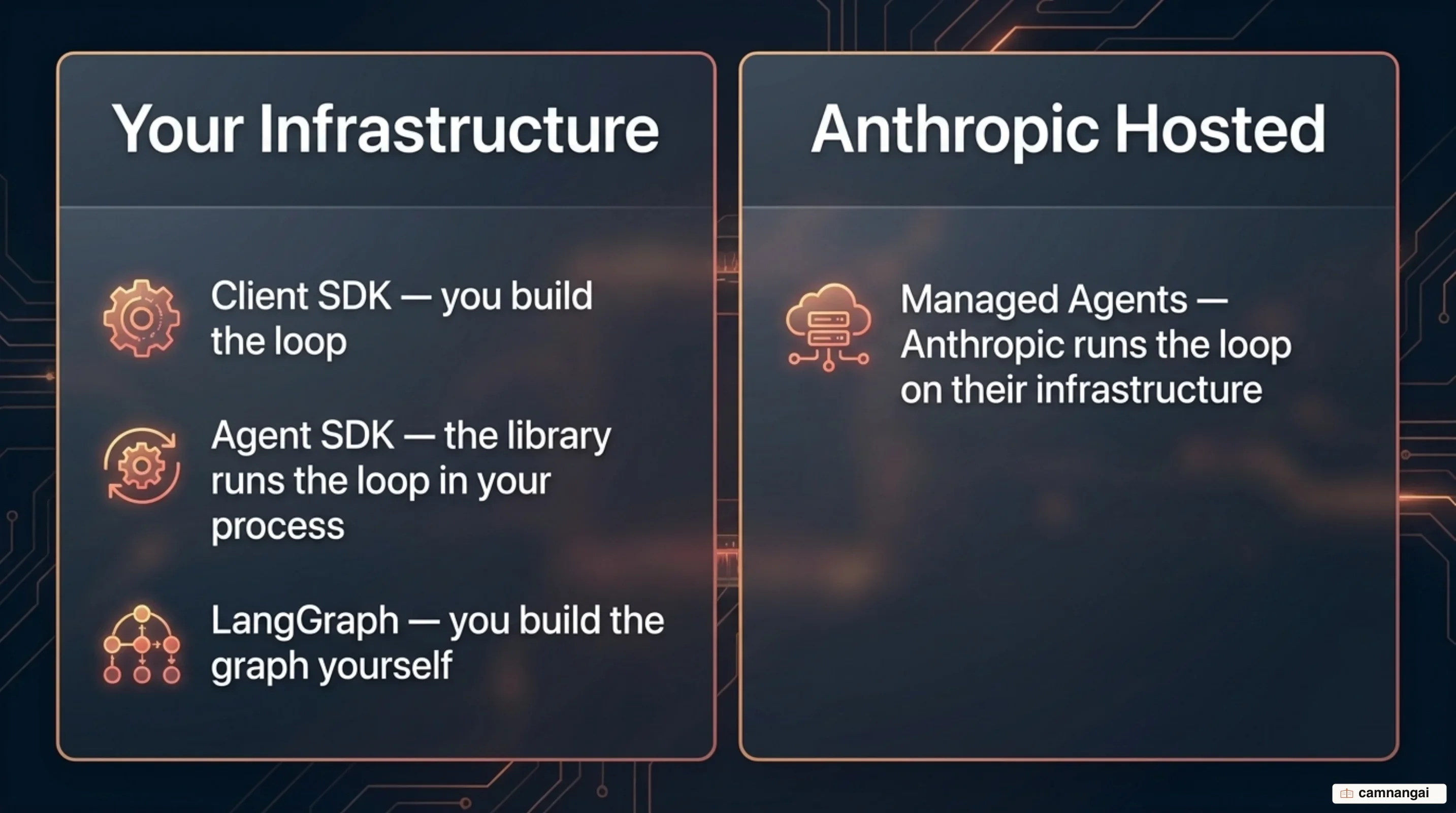
Against the CLI, the distinction is interactive versus embedded. The CLI is built for a developer at a terminal; the SDK is what you reach for when the agent belongs inside a backend service, an IDE plugin, or a CI/CD pipeline.
Compared with frameworks like LangGraph, the Agent SDK is a batteries-included runtime tuned for Claude-centric coding and research work. LangGraph is a lower-level orchestration runtime for arbitrary state graphs. The trade is explicit: LangGraph gives you auditable execution paths and multi-model routing, while the Agent SDK gives you a proven loop and a shorter path to production.
| Feature | Client SDK | Agent SDK | Managed Agents | LangGraph |
|---|---|---|---|---|
| Who runs the loop | You, manually | The SDK, in-process | Anthropic, hosted | You, graph-based |
| Where tools run | Your process | Your process | Anthropic sandbox | Your process |
| Best suited to | Single API calls | Local coding, research | Hosted scale | Multi-model routing |
Why the Claude Code SDK was renamed, and what changed
In September 2025, Anthropic renamed the Claude Code SDK to the Claude Agent SDK. The new name reflects a shift from a developer-only tool to a general-purpose one, used for finance, research, and operational assistant agents.
For anyone maintaining existing code, the rename brought breaking changes to package names and import paths: @anthropic-ai/claude-code became @anthropic-ai/claude-agent-sdk, claude-code-sdk became claude-agent-sdk, and in Python ClaudeCodeOptions became ClaudeAgentOptions.
Two behavioral changes cost more time than the renames, which are a find-and-replace. First, the SDK no longer applies Claude Code's system prompt by default — to get the old behavior you request the claude_code preset explicitly, or supply your own prompt. Second, filesystem settings loading was tightened and then reverted, so the current behavior matches the CLI again; the production implications are covered below.
The engine underneath is still Claude Code. The scope widened: the same Bash execution and file handling now serve non-engineering work such as CSV processing and pipeline management.
Writing your first agent in Python or TypeScript
Choose between query() for stateless, one-shot execution and ClaudeSDKClient for stateful, multi-turn sessions. You register custom tools through MCP, and they must carry the fully-qualified mcp__<server>__<tool> name when you list them in an allowlist.
Python
import asyncio
from claude_agent_sdk import query, ClaudeAgentOptions

async def run_agent():
    options = ClaudeAgentOptions(
        model="claude-sonnet-5",
        allowed_tools=["Bash", "Read", "mcp__utils__save_note"],
        max_turns=20,
    )
    async for message in query("List the files in src/", options=options):
        if hasattr(message, "result"):
            print(message.result)

asyncio.run(run_agent())
TypeScript
import { query } from "@anthropic-ai/claude-agent-sdk";

async function runAgent() {
  const stream = query({
    prompt: "Fix the bug in auth.ts",
    options: {
      allowedTools: ["Read", "Edit", "Bash", "mcp__db__query_logs"],
      model: "claude-sonnet-5",
      maxTurns: 20,
    },
  });
  for await (const message of stream) {
    if (message.type === "result") console.log(message.result);
  }
}
Iterating the async stream gives you results as they arrive, which is what you want for any interface showing live progress. For background jobs and CI pipelines, collect the messages instead and read the final result.
Running in production: permissions, cost, and authentication
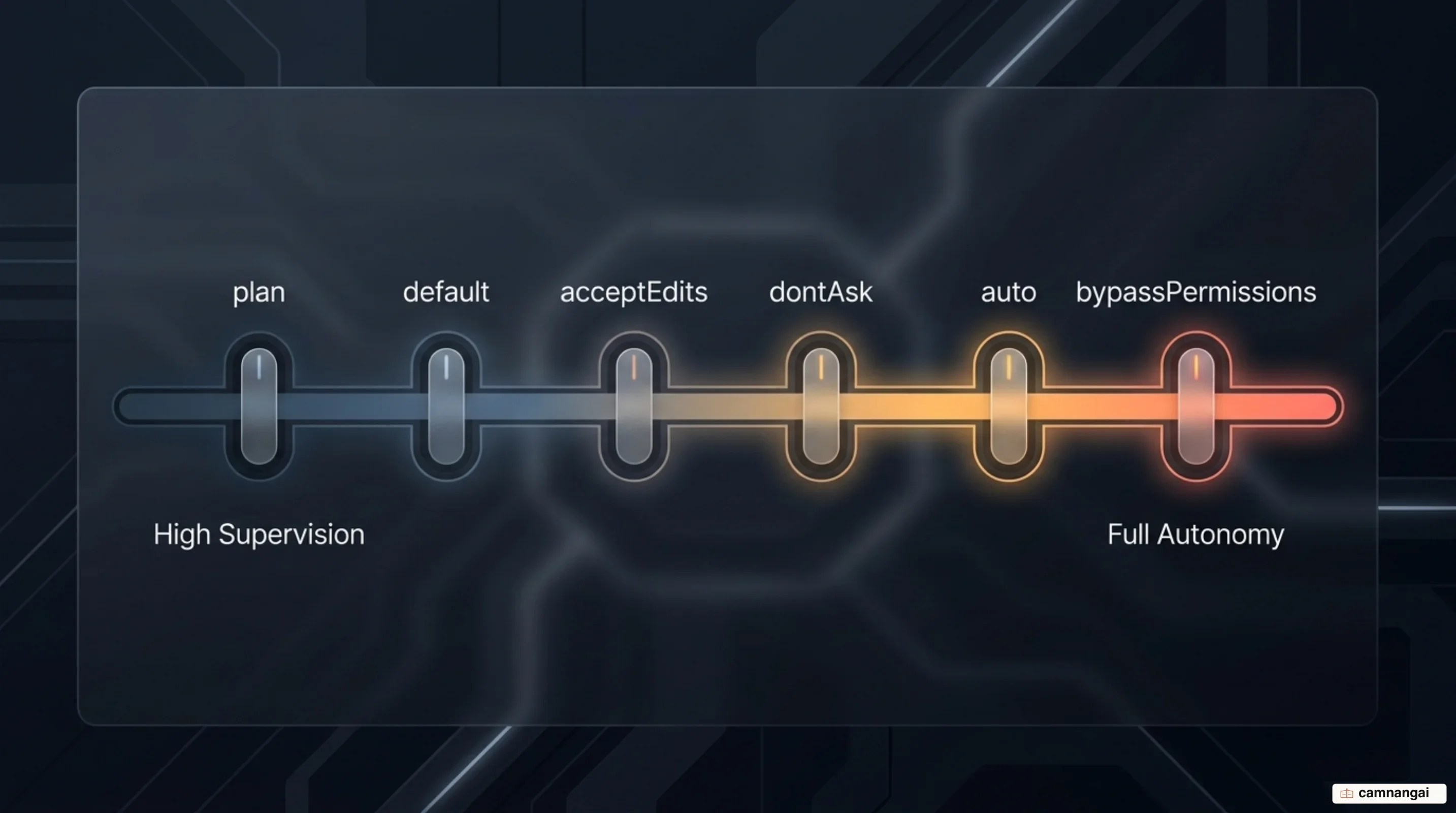
Six permission modes govern operational safety: default routes anything uncovered by allow rules to your canUseTool callback; acceptEdits auto-approves file edits and common filesystem commands; plan explores without editing source files; dontAsk never prompts and denies anything not pre-approved; auto uses a model classifier to decide; and bypassPermissions skips prompting entirely and belongs only in isolated environments like CI or containers. For unattended automation I default to dontAsk, because it fails closed rather than hanging on a prompt that nobody will answer.
Authentication is more permissive than the February 2026 headlines suggested. You may use a Claude subscription — Pro, Max, Team, or Enterprise — to run your own agents through the SDK. What Anthropic does not permit, without prior approval, is a third-party product offering claude.ai login or claude.ai rate limits to its own users. Build a product for other people and you use API keys from the Claude Console, or route through Amazon Bedrock, Google Cloud Vertex AI, or Microsoft Foundry.
Billing had a false alarm. In May 2026 Anthropic announced that Agent SDK and claude -p usage would leave subscription pools on 15 June 2026 in favor of a separate monthly credit. That change was paused before it took effect. As of 15 June 2026, Agent SDK and third-party app usage still draw from your subscription's normal limits, and the separate credit is not available. API key users bill per token as always.
One configuration detail catches teams in production: by default the SDK loads filesystem settings from the host, including ~/.claude/settings.json, project-level settings, and CLAUDE.md files. Set setting_sources=[] in CI and production so a developer's local configuration cannot silently change how your agent behaves.
When should you choose the Claude Agent SDK, and when not?
Reach for the Claude Agent SDK when you want a Claude-centric coding, research, or automation agent backed by the same loop the Claude Code CLI runs on, and you would rather not build tool execution and context management yourself. You are trading fine-grained control of each step for a loop that already works.
Avoid it when your architecture needs multi-model routing or granular, graph-based state control. LangGraph or the base Client SDK give you exactly the flexibility the Agent SDK's opinionated loop trades away for implementation speed.
References
- Agent SDK overview — Claude Code Docs
- How the agent loop works — Claude Code Docs
- Building agents with the Claude Agent SDK — Anthropic
- Migrate to Claude Agent SDK — Claude Code Docs
- anthropics/claude-agent-sdk-python — GitHub
- Claude Agent SDK Tutorial: Create Agents Using Claude Sonnet 4.5 — DataCamp
- Claude Agent SDK Complete Guide: Building Custom Agents Beyond the CLI — Hidekazu Konishi
- Claude Agent SDK vs LangGraph: Choosing Your Agent Stack in 2026 — Developers Digest
- Anthropic officially bans using subscription authentication for third-party Claude use — AlternativeTo