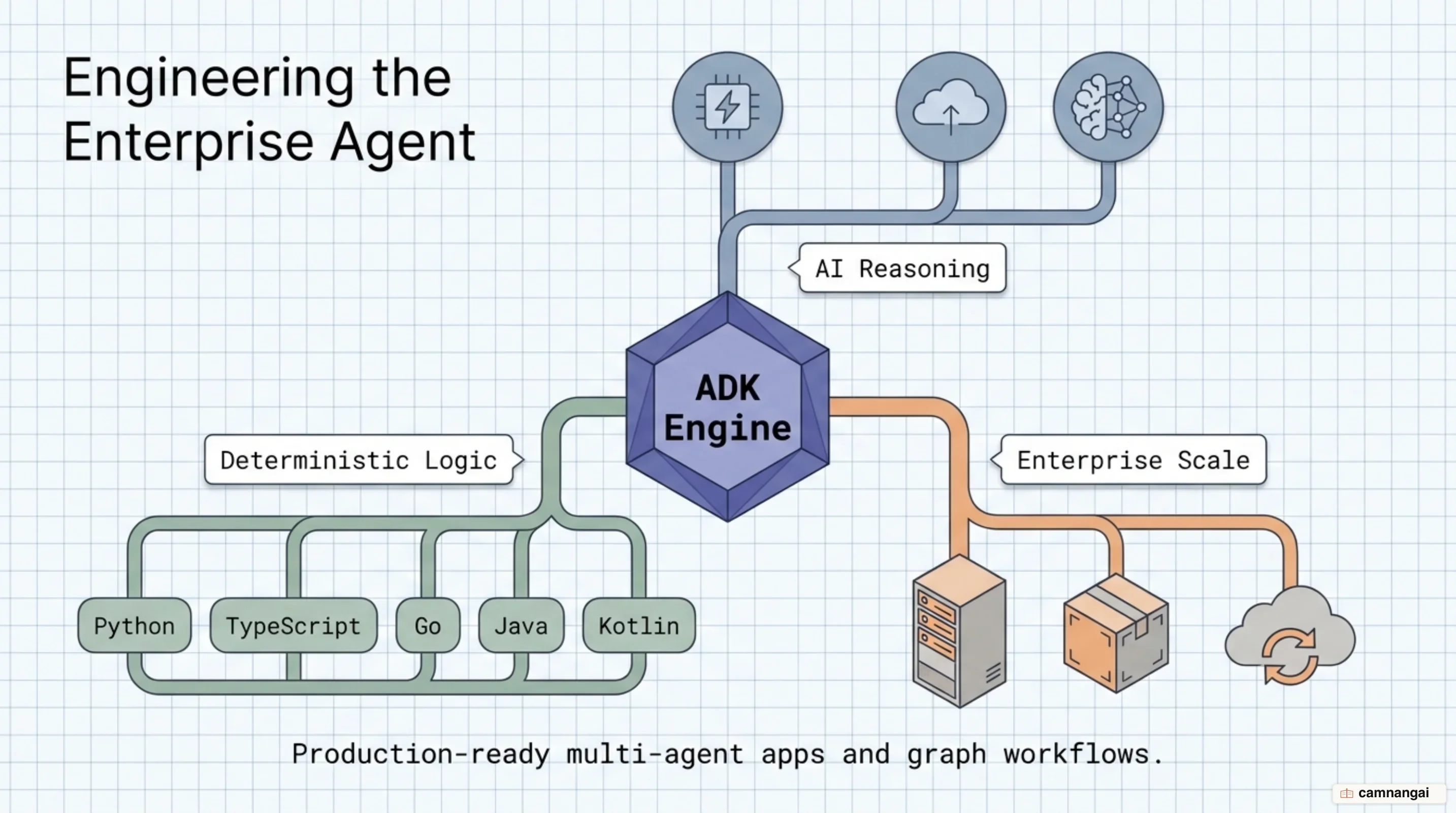
Google ADK (Agent Development Kit) is an open-source, code-first framework designed to build, evaluate, and deploy production-ready applications and graph workflows.
Available across Python, TypeScript, Go, Java, and Kotlin, the framework targets Python 3.11+ for its standard Python runtime.
When you build production AI systems, single-prompt chat loops and string-concatenated context windows break down quickly under real-world software demands.
Google ADK solves this by giving you structured context management, explicit multi-agent orchestration, and native deployment paths to enterprise runtimes.
What Is Google ADK and What Problem Does It Solve?
When you evaluate ADK across the AI system lifecycle, you work with four core pillars: Build, Interact, Evaluate, and Deploy. In the Build phase, you compose modular multi-agent hierarchies and deterministic graph execution engines directly in code. During Interact, you debug execution using the CLI, test interactive visual flows via the local Web UI, or stream real-time bidirectional audio and video dialogue. For Evaluate, you run systematic benchmark suites that score both final output quality and intermediate execution trajectories against dataset test cases. Finally, when you reach Deploy, you target containerized environments, serverless endpoints on Google Cloud Run, Google Kubernetes Engine (GKE), or managed runtimes like the Gemini Enterprise Agent Platform (Agent Runtime).
Model flexibility is built directly into the framework. You get native optimization for Google Gemini models like gemini-2.5-pro and gemini-flash-latest, alongside Vertex AI Model Garden endpoints. If you need to integrate third-party or open-weights models, ADK uses LiteLLM to connect your agents directly to Anthropic Claude, Meta Llama, Mistral AI, OpenAI, Ollama, or local vLLM instances without changing your orchestration code.
The core problem ADK resolves is how you manage context. Naive agent frameworks repeatedly string-concatenate raw conversation histories, tool outputs, and system messages until context limits overflow or inference latency spikes. ADK treats conversational context like source code. It automatically filters out irrelevant events, compacts older conversational turns into summaries, lazy-loads large data artifacts, and tracks consumption per step. This keeps your lean, predictable, and cost-effective across multi-turn runs.
from google.adk.agents.llm_agent import Agent

# Define a root agent with explicit instructions and model configuration
root_agent = Agent(
 name="research_assistant",
 model="gemini-flash-latest",
 instruction="You assist users with technical research by executing structured tool calls.",
)
Event-Sourced Sessions and State Management
When you manage state in ADK, you interact with an event-sourcing model rather than mutable state snapshots. Every user prompt, LLM response, tool invocation, and state mutation is appended as an immutable Event to an append-only session log. This gives you a complete audit trail of execution history and reasoning transitions. Out of the box, you choose from three session persistence backends depending on your environment: InMemorySessionService for ephemeral unit testing, DatabaseSessionService (supporting SQLite, PostgreSQL, and MySQL) for self-managed persistent storage, and VertexAiSessionService for fully managed Google Cloud infrastructure.
To handle long-running or interrupted tasks, you enable session resumability using ResumabilityConfig(is_resumable=True) bound to an invocation_id. When you resume a session, ADK replays the immutable event history, skipping already completed tool calls and restoring the agent's internal execution cursors. Specialized workflow templates rely on this event replay to resume their state—such as restoring times_looped in a LoopAgent, tracking pending concurrent execution branches in a ParallelAgent, or maintaining saved current_sub_agent pointers in a SequentialAgent.
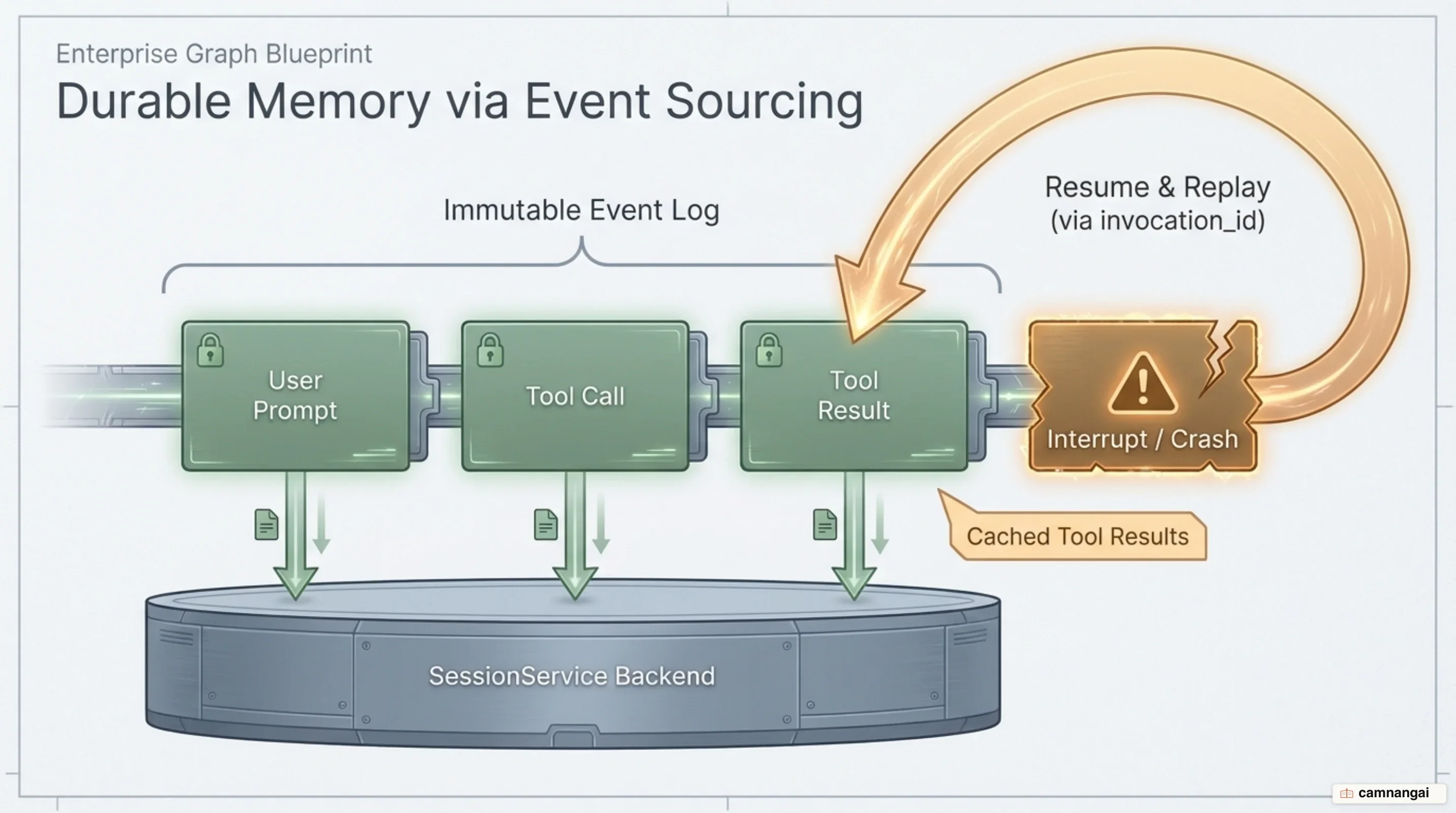
You must understand the systems-level distinction between ADK's checkpoint replay mechanism and true autonomous durable execution. ADK saves event state and replays cached tool returns upon re-invocation, but it does not run an internal background supervisor or process watchdog. If your worker process crashes mid-execution, ADK cannot auto-restart itself. You must deploy an external orchestrator or application layer to capture process crashes, inspect the state store, and issue a resume command using the target invocation_id.
Orchestration Primitives: Sequential, Parallel, and Hierarchical Agents
When you structure multi-agent workflows in ADK, you start with template-based workflow agents that extend from BaseAgent. You use SequentialAgent when you need deterministic, step-by-step processing pipelines where outputs feed directly into subsequent steps. You deploy ParallelAgent when you want to fan out concurrent execution across and fan in their combined outputs. For iterative refinement or polling patterns, you implement LoopAgent, which continues execution cycles until a defined termination condition evaluates to true.
With ADK 2.0, you can move beyond fixed templates by building graph workflows. The graph runtime lets you construct deterministic execution graphs combining and standard code nodes. You can implement explicit graph edges, conditional routing, automatic step retries, configurable timeouts, dynamic node creation, and human-in-the-loop (HITL) approval gates to pause execution before critical operations.
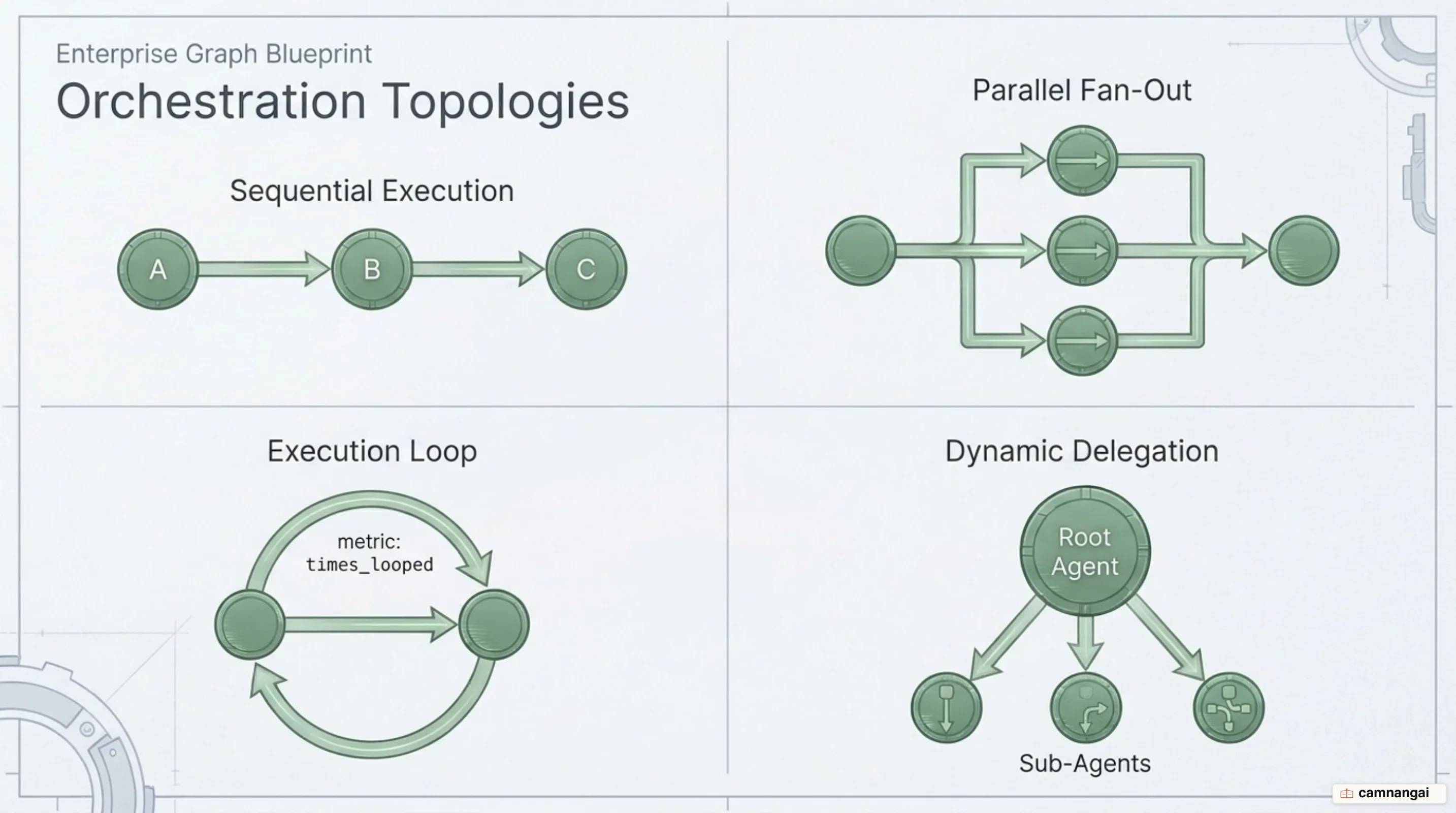
For adaptive, non-linear workflows, you construct hierarchical multi-agent teams using sub_agents and description-driven routing. When you assign child agents to a root agent, the root LLM evaluates incoming user requests against each child agent's description field. If the LLM determines that a child agent's specialized description matches the incoming task better than its own, it dynamically delegates execution and transfers control to that sub-agent.
from google.adk.agents.llm_agent import Agent

greeting_agent = Agent(
 name="greeting_agent",
 model="gemini-flash-latest",
 instruction="Provide a short, professional greeting.",
 description="Handles user greetings and hellos.",
)

root_agent = Agent(
 name="root_coordinator",
 model="gemini-2.0-flash-exp",
 instruction="Route incoming requests. If the user greets, delegate to greeting_agent.",
 sub_agents=[greeting_agent],
)
Extending Capabilities with Function Calling and Model Context Protocol (MCP)
You can extend your agents' capabilities by attaching standard Python functions as tools. ADK automatically parses Python docstrings and type annotations to generate the function-calling JSON schemas expected by the underlying LLM. For standardized system integrations across external data stores and services, ADK supports the (MCP) natively via the McpToolset class (installed via pip install "google-adk[mcp]").
When connecting to MCP servers, you select between two primary connection patterns based on deployment architecture. For local development or local CLI tooling, you use StdioConnectionParams to launch and communicate with local MCP subprocesses via standard I/O (such as running npx -y @modelcontextprotocol/server-filesystem). For cloud or remote enterprise services, you configure remote transport using StreamableHTTPConnectionParams or SseConnectionParams, passing authentication credentials through headers such as X-Goog-Api-Key or Authorization: Bearer.
You must carefully weigh context window trade-offs when choosing how to wire MCP toolsets into your agents. If you attach an McpToolset directly to your root LlmAgent, every tool schema, intermediate reasoning turn, and raw payload return (such as raw file contents or database records) is injected into the primary agent's history, causing context bloat. To solve this, you can encapsulate the McpToolset inside a dedicated child agent and wrap that sub-agent with AgentTool. This isolates high-volume payloads, trial-and-error reasoning steps, and intermediate tool outputs within the sub-agent's local event log, returning only the final synthesized string response to your root coordinator.
import os
from google.adk.agents import LlmAgent
from google.adk.tools.mcp_tool import McpToolset
from google.adk.tools.mcp_tool.mcp_session_manager import StdioConnectionParams
from mcp import StdioServerParameters

target_dir = os.path.abspath("./workspace")

filesystem_agent = LlmAgent(
 name="file_manager",
 model="gemini-flash-latest",
 instruction="Manage local files upon user request.",
 tools=[
 McpToolset(
 connection_params=StdioConnectionParams(
 server_params=StdioServerParameters(
 command="npx",
 args=["-y", "@modelcontextprotocol/server-filesystem", target_dir],
 )
 ),
 tool_filter=["list_directory", "read_file"],
 )
 ],
)
Local Developer Experience with the CLI and ADK Web UI
To set up your local development environment, you start by installing the base package (pip install google-adk), configuring a virtual environment (python3 -m venv.venv), and populating your environment variables in a .env file (e.g., GOOGLE_API_KEY="YOUR_API_KEY"). The adk CLI provides a unified interface for project management: adk create my_agent scaffolds a new agent directory containing agent.py, .env, and __init__.py; adk run my_agent opens an interactive CLI chat session; and adk web --port 8000 launches a local developer server.
For systematic verification, ADK includes built-in offline evaluation tooling driven by the adk eval CLI command and programmatic AgentEvaluator API. You configure structured evaluation sets (such as evalset.json or evaluation.test.json) containing test queries, expected outputs, and golden trajectories. You can execute evaluations directly via the CLI or call AgentEvaluator.evaluate() within custom test suites to run programmatic assertion checks across both final agent responses and intermediate tool-call trajectories. Complementing this, the ADK Web UI provides a visual interface to trace event logs, inspect session state step-by-step, and debug execution paths. Keep in mind that ADK Web is strictly a local engineering tool and must not be exposed in production deployments.
When you are ready to push to production, ADK supports multiple deployment targets. You can build local containers via Docker (adk deploy docker), deploy to serverless endpoints using Google Cloud Run (adk deploy cloud_run), or scale enterprise workloads on Google Kubernetes Engine (GKE) or the Gemini Enterprise Agent Platform (Agent Runtime).
Google ADK vs. LangGraph, CrewAI, and Genkit
Choosing the right framework comes down to your architectural priorities. Genkit supplies general building blocks tied closely to Firebase and Google Cloud, but it lacks ADK's focus on modular multi-agent orchestration, event-sourced session histories, and bidirectional streaming. LangGraph models multi-agent execution as explicit state graphs with external checkpointers in Postgres or Redis; it gives you granular control over complex human-in-the-loop loops, but demands higher upfront setup. CrewAI provides quick, role-based multi-agent prototyping, yet its control flow becomes difficult to maintain once you need non-linear branching or event-sourced recovery.
Google ADK positions itself squarely between low-level state-graph engineering and high-level role playing. Its standout advantage is native multi-language support across Python, TypeScript, Go, Java, and Kotlin, letting enterprise teams integrate AI agents directly into existing backend microservices without being forced into a Python-only deployment.
Choose Google ADK when building production multi-agent systems that demand code-first flexibility, polyglot backend integration, tight Vertex AI ties, or native Model Context Protocol (MCP) tooling.
References
- Agent Development Kit: Making it easy to build multi-agent applications — Google Developers Blog
- Agent Development Kit (ADK) — adk.dev
- Python Quickstart for ADK — adk.dev
- Workflows: Multi-Agent, Multi-Node Applications — adk.dev
- Model Context Protocol Tools — adk.dev
- google/adk-python — GitHub
- Why Checkpoints Aren't Durable Execution: LangGraph, CrewAI, Google ADK — Diagrid
- LangGraph vs CrewAI vs OpenAI Agents SDK: 2026 — Waseem Ahmad