Microsoft Agent Framework is an open, multi-language engine designed to build, orchestrate, and operate production-grade and workflows across .NET, Python, and Go.
It unifies enterprise-ready infrastructure with flexible model context handling, enabling you to construct resilient agentic systems that scale cleanly from local development prototypes to cloud environments.
By standardizing agent execution on unified runtime interfaces, Microsoft Agent Framework abstracts low-level model APIs into structured patterns for reasoning, context management, and tool invocation. You gain fine-grained control over state persistence, graph-based workflow execution, governance screening, and telemetry without locking your codebase to a single model provider or hosting vendor.
Whether you are deploying background processing services or interactive multi-agent topologies, the framework provides the runtime control, durability, and standard hosting primitives needed to transition complex AI software safely into enterprise production environments.
Why Microsoft unified AutoGen and Semantic Kernel
Microsoft Agent Framework represents the unified evolution of two previously fragmented AI libraries: Semantic Kernel and AutoGen. Prior to the release of Microsoft Agent Framework, developers were forced to choose between competing paradigms for building AI systems. Semantic Kernel contributed enterprise-grade orchestration, state management, and robust memory foundations, while AutoGen provided cutting-edge multi-agent collaboration mechanisms, dynamic chat topologies, and research-driven agentic techniques. Unifying these codebases into a single framework eliminates architectural friction and standardizes enterprise agent development under one supported foundation.
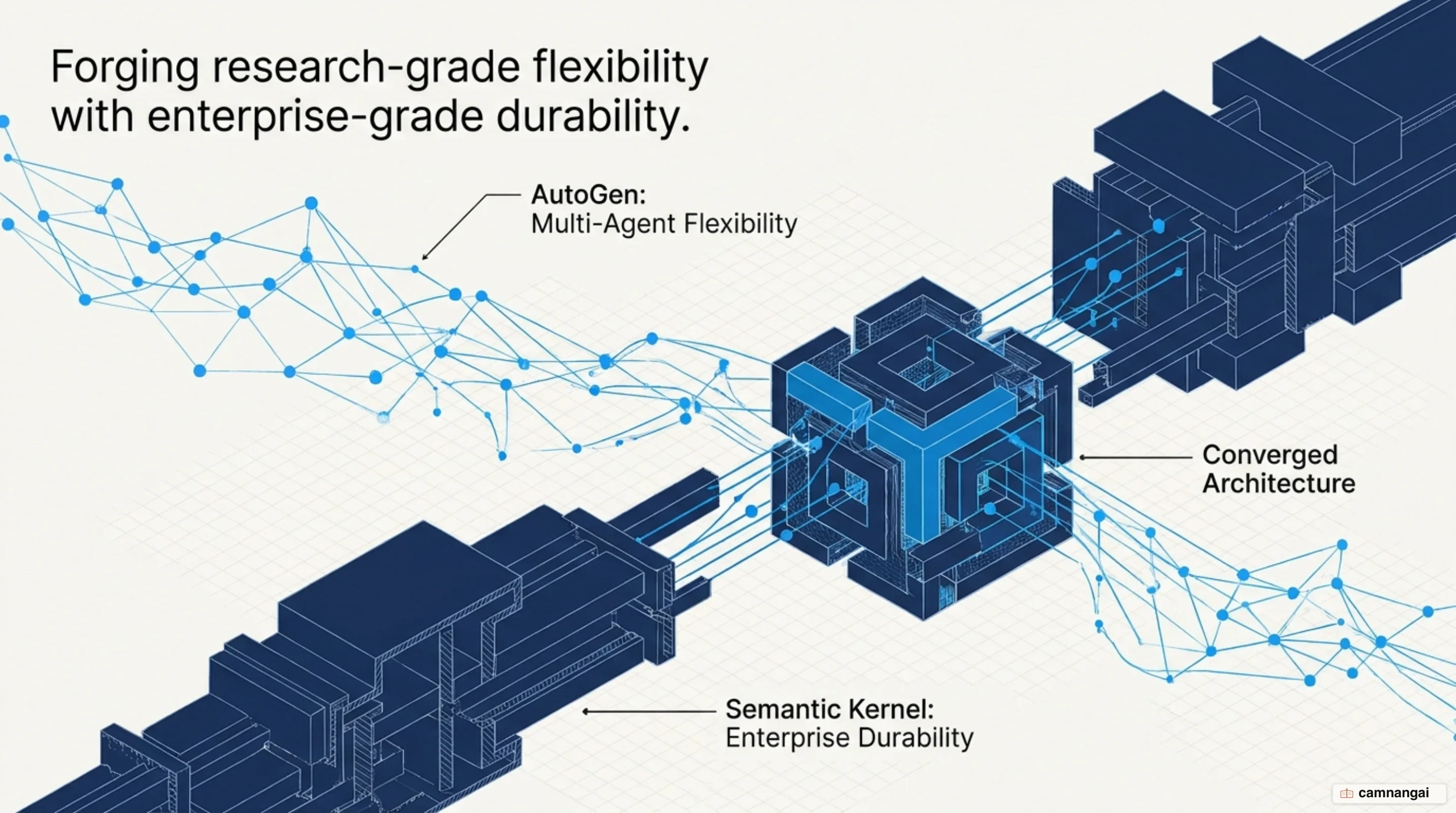
To solve the issue of fragmented SDK choices, Microsoft Agent Framework standardizes its underlying model interactions on Microsoft.Extensions.AI abstractions, primarily through the IChatClient interface. This core abstraction provides complete cross-language API parity across Python, C#/.NET (supporting .NET 9 and higher), and Go (microsoft/agent-framework-go). By building on top of standardized primitives, your application logic remains decoupled from specific underlying model clients, giving your team consistent developer tooling regardless of language choice.
The central architectural goal of this framework is to move engineering teams away from brittle, custom prototype loops and toward production-grade runtime control, durability, and standard hosting infrastructure. Because models are accessed through unified interfaces, you can swap underlying model providers—such as Azure OpenAI, OpenAI, GitHub Models, Foundry Local, or Ollama—by changing configuration parameters without rewriting your core agent instructions, tool bindings, or orchestration workflows.
Core architecture and key building blocks of Agent Framework
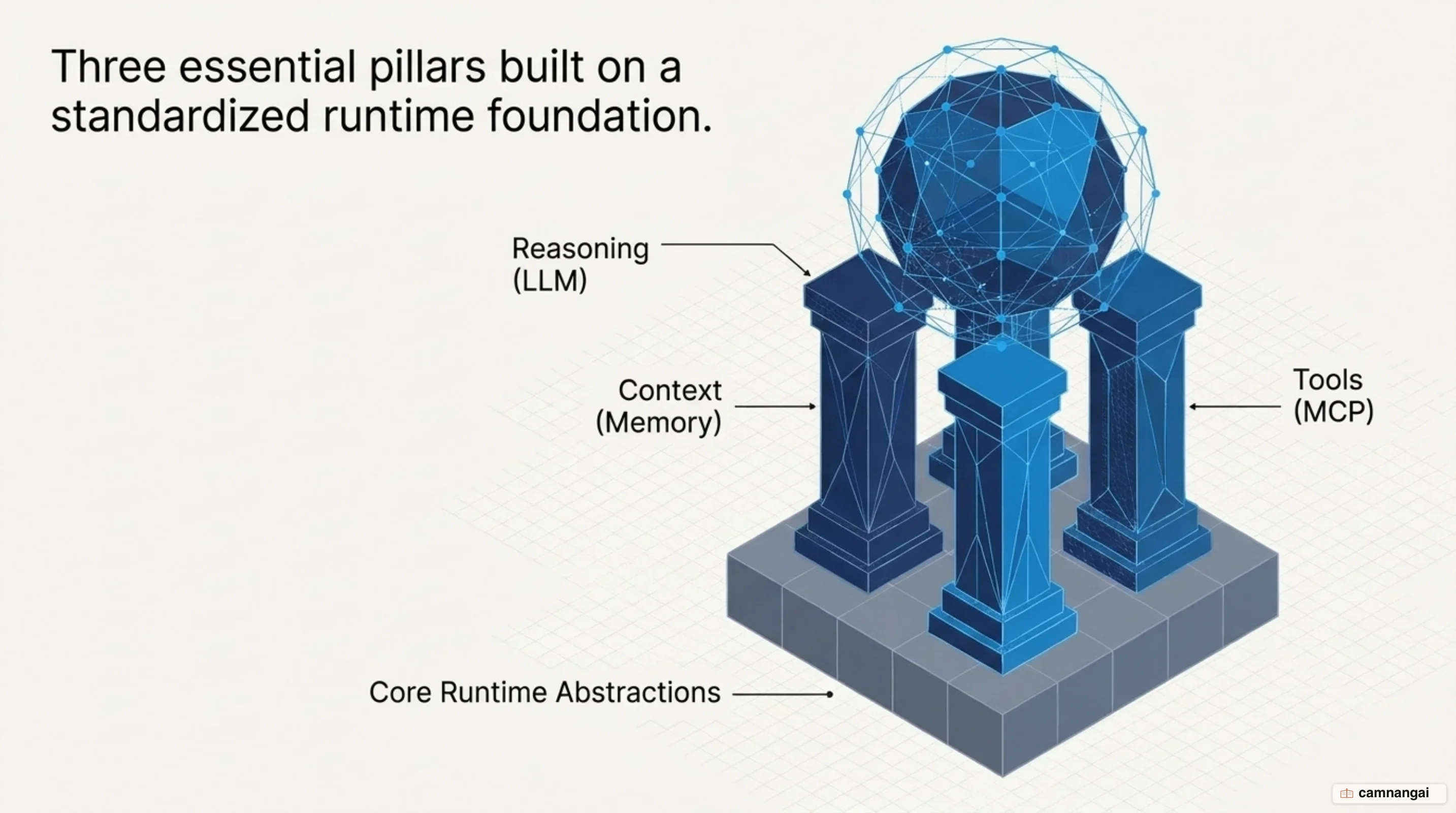
The architecture of Microsoft Agent Framework rests on three core functional pillars that define an agent: Reasoning/Decision-Making, Context Awareness, and Tool Usage. Reasoning and decision-making dictate how an agent evaluates inputs and formulates plans, typically driven by via IChatClient or FoundryChatClient. Context awareness provides external state, conversation history, persisted logs, and knowledge retrieval mechanisms like file search. Tool usage allows agents to invoke discrete, callable APIs—instantiated through factories like AIFunctionFactory.Create—to query external databases or execute computational logic.
At the core of the framework’s object model are the AIAgent and ChatClientAgent abstractions. AIAgent defines the high-level surface area for invoking agent actions, while ChatClientAgent binds an instance of IChatClient to specific system instructions, identifiers, and tool collections. This decoupled design ensures that agent configuration (system prompts, operational constraints, available actions) remains completely independent of the hosting application or the specific cloud environment executing the model requests.
Extensibility is achieved through a pipeline middleware system. Framework middleware wraps request and response streams, allowing developers to inject custom logic for exception handling, request modification, logging, and automated content screening. Middleware executes transparently during agent invocation, making it straightforward to apply operational constraints across single agents or entire multi-agent clusters.
using System.ClientModel;
using System.ComponentModel;
using Microsoft.Agents.AI;
using Microsoft.Extensions.AI;
using OpenAI;

// Initialize the underlying model client abstraction
IChatClient chatClient = new ChatClient("gpt-4o-mini", new ApiKeyCredential("YOUR_API_KEY")).AsIChatClient();

// Define a discrete custom tool
[Description("Calculates risk metrics for a financial portfolio.")]
string CalculateRisk(string portfolioId) => $"Portfolio {portfolioId}: Low Risk";

// Create the ChatClientAgent with bound instructions and tools
AIAgent riskAgent = new ChatClientAgent(
    chatClient,
    new ChatClientAgentOptions
    {
        Name = "RiskAssessor",
        Instructions = "Analyze user portfolios and report risk levels accurately.",
        ChatOptions = new ChatOptions
        {
            Tools = [AIFunctionFactory.Create(CalculateRisk)]
        }
    });
Multi-agent orchestration with graph-based workflows
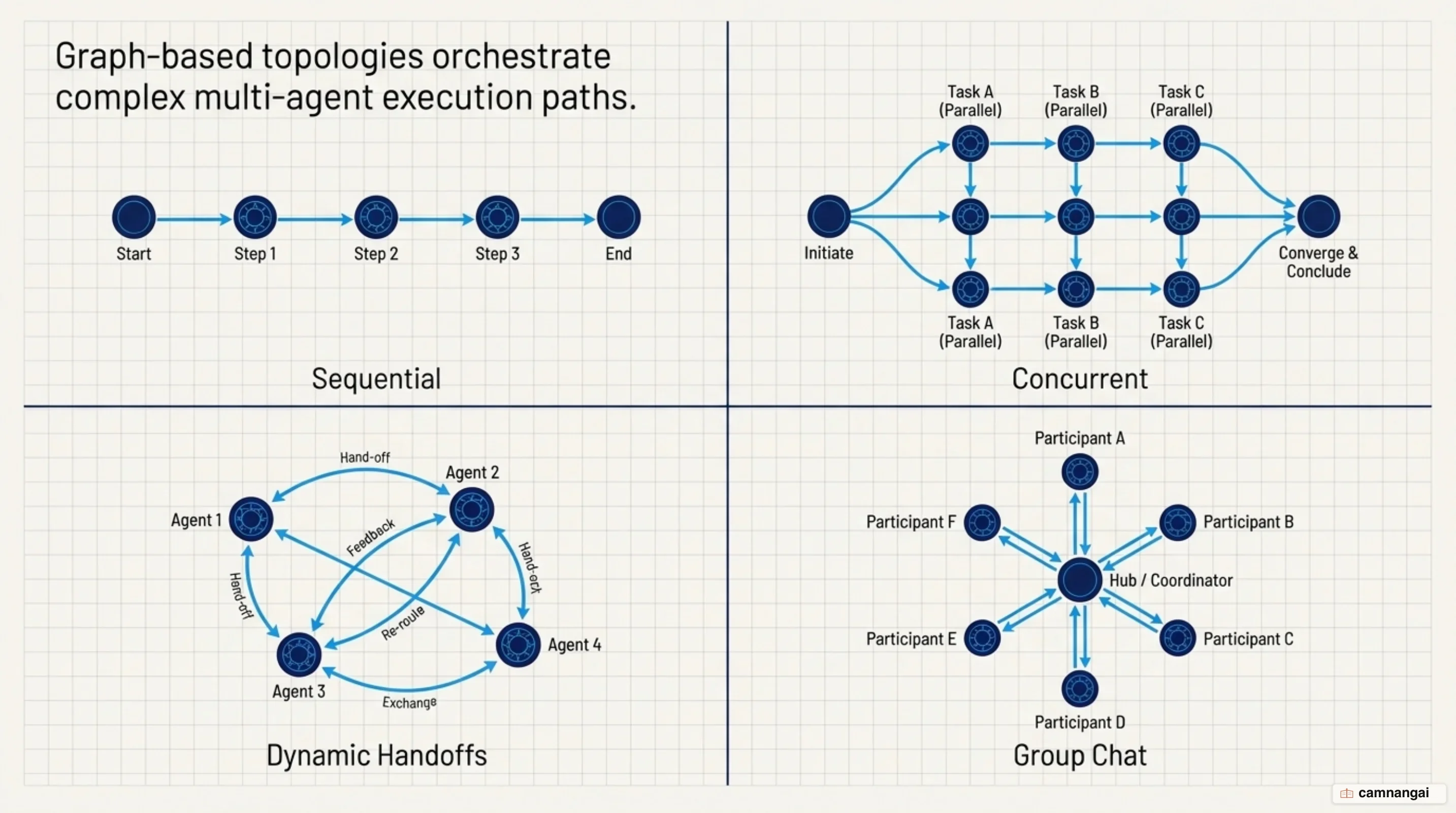
When system objectives grow too complex for a single prompt or agent loop, Microsoft Agent Framework provides multi-agent orchestration via Microsoft.Agents.AI.Workflows and the AgentWorkflowBuilder. This architecture structures complex goals into execution graphs where individual agents act as specialized nodes within a managed state machine. The workflow engine manages node transitions by tracking state changes across agent interactions, evaluating completion criteria, and routing outputs directly into downstream .
The framework supports four primary workflow execution topologies natively. Sequential workflows arrange agents into step-by-step pipelines where the output of one specialist directly feeds the next node, such as passing a draft from a writer agent directly to an editor agent. Concurrent topologies execute multiple specialist agents in parallel across separate context branches, aggregating their outputs into a unified response once all concurrent nodes resolve. Handoff topologies enable dynamic transfers of conversational control between agents based on real-time evaluation of user intent or tool call returns. GroupChat topologies establish shared conversational environments managed by orchestration components like RoundRobinGroupChatManager, which govern turn-taking, evaluate dynamic context, and manage multi-agent bounds.
For production viability, graph execution includes state control mechanisms built directly into the runtime. Checkpointing and state persistence serialize graph context to storage, allowing long-running multi-turn workflows to survive process restarts, container redeployments, or transient cloud outages. Real-time streaming emitters push intermediate graph steps and token streams to downstream client interfaces. Human-in-the-loop nodes pause execution graphs at critical decision points to wait for explicit external approvals, while time-travel debugging lets operators inspect historical state checkpoints, rewind workflow execution to prior nodes, and resume execution with modified inputs.
using Microsoft.Agents.AI;
using Microsoft.Agents.AI.Workflows;

// Define specialized agents
AIAgent writer = new ChatClientAgent(chatClient, new ChatClientAgentOptions { Name = "Writer", Instructions = "Draft content." });
AIAgent editor = new ChatClientAgent(chatClient, new ChatClientAgentOptions { Name = "Editor", Instructions = "Review content." });

// Build a sequential workflow topology
Workflow workflow = AgentWorkflowBuilder.BuildSequential(writer, editor);

// Expose the multi-agent workflow as a single executable AIAgent
AIAgent workflowAgent = await workflow.AsAgentAsync();
AgentRunResponse response = await workflowAgent.RunAsync("Draft a report on cloud infrastructure.");
Extending capabilities with Model Context Protocol and distributed skills
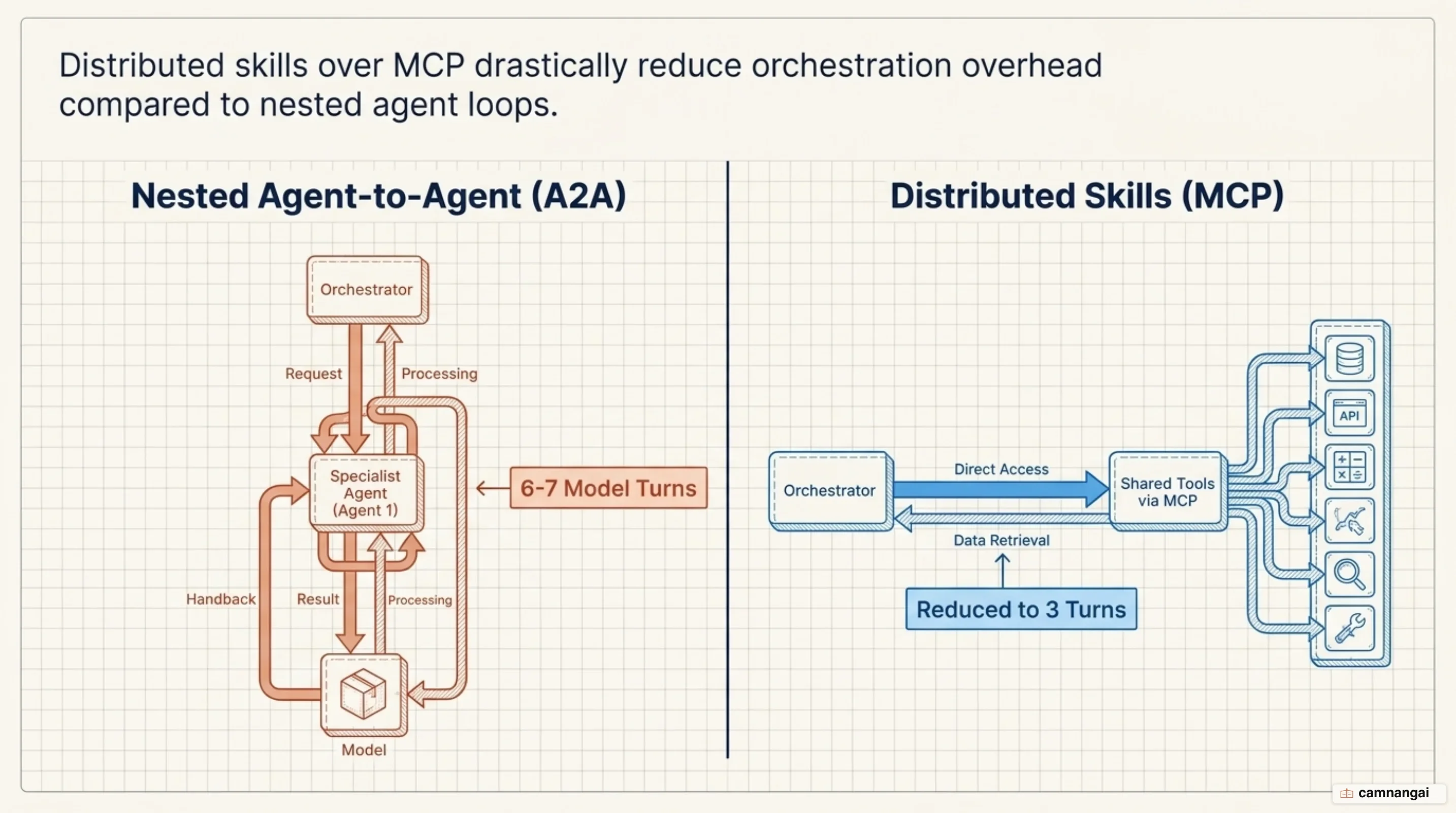
Microsoft Agent Framework supports two distinct multi-agent execution models: Agent-to-Agent () delegation and Distributed Skills over (MCP). In the traditional A2A model, a primary agent delegates an entire domain task to an autonomous remote specialist agent, triggering a nested, remote model reasoning loop with its own context lifecycle. Conversely, Distributed Skills delegate discrete operations while executing domain procedures directly within the parent agent’s single model context, eliminating nested model invocation overhead.
Distributed Skills operate on top of the open Agent Skills specification. Provider services expose their capabilities using SKILL.md procedural guidance documents alongside skill://index.json discovery endpoints, while underlying domain operations are implemented as typed MCP tools annotated with attributes such as [McpServerTool]. When an agent context loads a skill via SkillsProvider and MCPSkillsSource, it ingests procedural guidelines into its system prompt and binds the corresponding MCP tools dynamically into its execution schema.
---
name: weather
description: Assess current resort weather, forecasts, and storm threats.
---

# Weather Procedure

1. Use weather_current_conditions for current temperature, wind, and visibility.
2. Use weather_forecast when the request concerns later conditions (horizon 1-24 hours).
3. Report specific values with units and maintain safety priorities.
Empirical benchmarking across multi-agent scenarios (such as ski resort advisory tasks) demonstrates the quantitative performance differences between these two integration designs:
- Model Call Volume: Traditional A2A multi-agent loops required 6 to 7 model calls across nested specialist loops to fulfill multi-domain requests. Distributed MCP skills collapsed execution down to 3 model calls (initial skill discovery/loading → direct MCP tool execution → final response generation).
- Latency & Execution Time: Eliminating nested reasoning loops reduced wall-clock latency. Distributed MCP skills recorded a mean elapsed latency of 6.348 seconds, compared to 15.480 seconds for A2A multi-agent execution paths across identical benchmark runs.
- Token Consumption Trade-offs: Distributed Skills consumed 13,533 cumulative context tokens compared to 11,134 tokens for A2A execution—a 21.5% token volume increase. This additional token overhead results from aggregating provider tool schemas and procedural instructions directly into the primary agent's context window.
Bringing agents to production with Agent Harness and observability
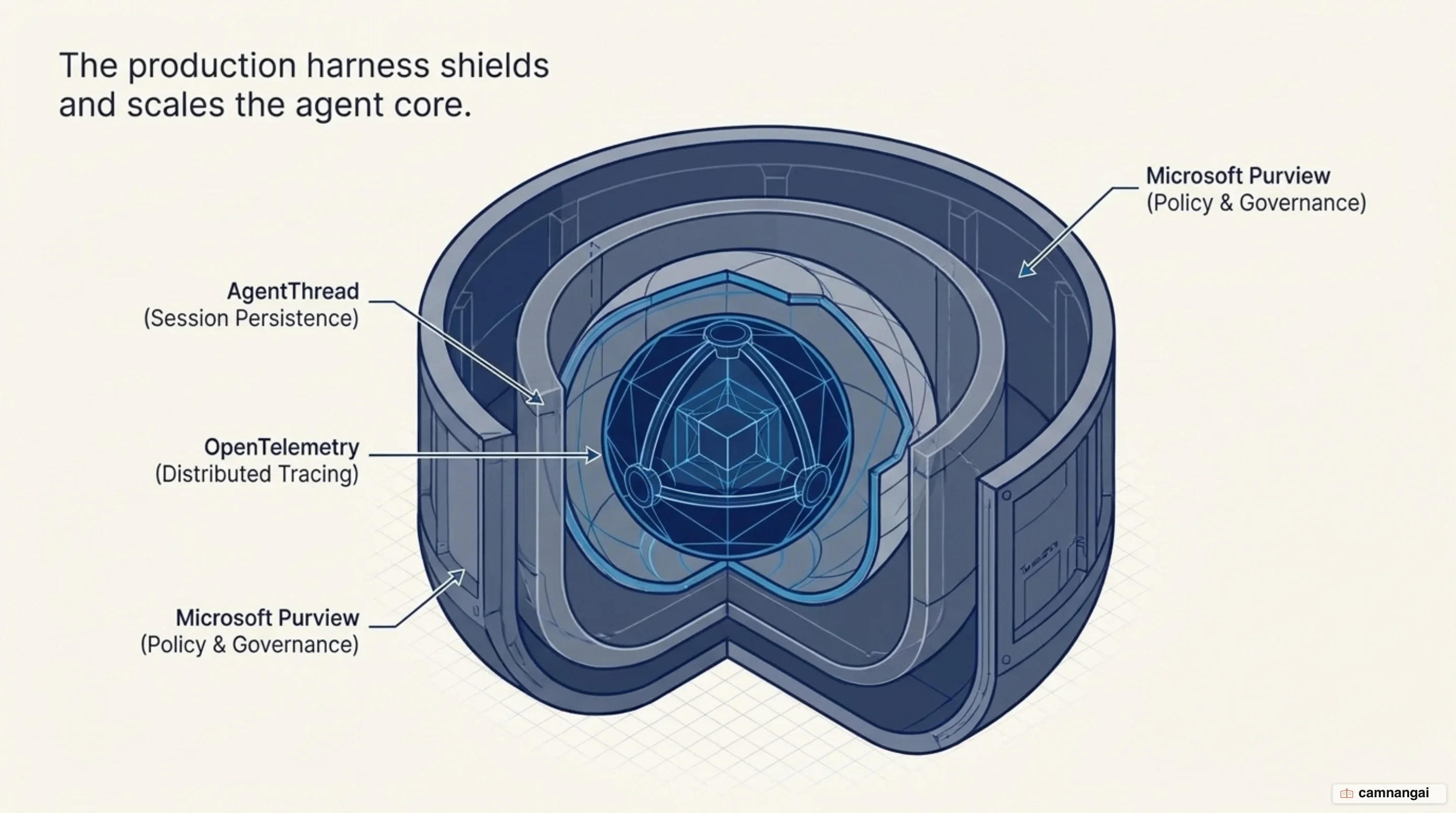
Transitioning agents to production requires decoupling agent configuration from host environments using the Shared Agent Factory Pattern. Centralizing agent instructions, skills, memory settings, and approval policies within a single factory class ensures that console utilities, web API services, and CI/CD evaluation runners instantiate identical agent configurations. This prevents architectural drift between local testing environments and deployed cloud workloads.
Observability is integrated natively into the runtime through OpenTelemetry (OTEL). By setting OpenTelemetrySourceName or calling .WithOpenTelemetry(), the runtime generates distributed traces, token usage metrics, and tool execution logs. During local execution, telemetry outputs to standard OTLP collectors. When hosted on Azure AI Foundry, builder.Services.AddFoundryResponses() automatically configures telemetry exporters to stream diagnostics directly to Azure Application Insights using the injected APPLICATIONINSIGHTS_CONNECTION_STRING.
Governance and security controls wrap directly around the execution runtime. Prompts and model responses are policy-screened in real time by wrapping chat clients with Microsoft Purview (WithPurview in .NET or PurviewChatPolicyMiddleware in Python) to enforce E5 compliance rules and generate audit logs. Code execution safety is managed locally using Hyperlight micro-sandboxes, which isolate guest execution within VM-backed boundaries. Cloud-hosted environments deploy container-isolated LocalCodeAct child processes paired with an external AgentFileStore backed by Azure Blob Storage, insulating container filesystems from untrusted guest code operations.
Automated quality gates validate agent responses prior to deployment. Fast local assertions use LocalEvaluator or @evaluator functions to run programmatic validations against agent outputs in CI/CD pipelines at zero token cost. Comprehensive quality testing integrates FoundryEvals to run model-graded benchmarks for relevance, coherence, and safety metrics across representative query sets.
using Azure.Identity;
using Microsoft.Agents.AI;
using Microsoft.Agents.AI.Foundry.Hosting;
using Microsoft.AspNetCore.Builder;
using Microsoft.Extensions.DependencyInjection;

var builder = WebApplication.CreateBuilder(args);

// Instantiate the shared agent factory configuration
await using ClawAgentBuild build = await ClawAgentFactory.CreateAsync(new ClawAgentFactoryOptions
{
    ProjectEndpoint = Environment.GetEnvironmentVariable("FOUNDRY_PROJECT_ENDPOINT"),
    DeploymentName = Environment.GetEnvironmentVariable("FOUNDRY_MODEL"),
    EnableFileAccess = false, // Secure hosted container settings
    EnableShell = false
});

// Register the agent into ASP.NET dependency injection and expose the Responses API
builder.Services.AddFoundryResponses(build.Agent);

var app = builder.Build();
app.MapFoundryResponses(); // Map live endpoint for Azure AI Foundry
app.Run();
How Microsoft Agent Framework compares to LangGraph and AutoGen
Comparing Microsoft Agent Framework to standalone AutoGen (v0.2/v0.4) highlights a shift from research-oriented multi-agent loops to structured enterprise software. Standalone AutoGen relied on Python-centric conversational loops that often resulted in unconstrained, iterative agent-to-agent chatter. Microsoft Agent Framework replaces these open-ended loops with explicit graph topologies, strict state persistence, native OpenTelemetry instrumentation, and production hosting infrastructure across .NET 9+, Python, and Go.
When evaluated against LangGraph or legacy Semantic Kernel patterns, Microsoft Agent Framework provides multi-language API parity instead of restricting production architectures to Python-only or single-language runtimes. While LangGraph requires custom graph construction for state routing, MAF standardizes model access on Microsoft.Extensions.AI (IChatClient) abstractions. This design allows developers to swap underlying model providers without rewriting graph nodes or orchestration middleware.
Model call efficiency and deployment workflows further distinguish MAF from existing frameworks. By combining graph workflows with Distributed MCP Skills, MAF collapses nested reasoning loops, reducing multi-domain processing flows from 6 or 7 iterative model calls down to 3 turns. For cloud deployment, MAF eliminates custom Web API wrappers by integrating directly into host runtimes via AddFoundryResponses() and MapFoundryResponses(). Developers deploy agents directly to Azure AI Foundry Hosted Agents in 2 steps using azd ai agent init across ZIP and container deployment modes.
When to choose Microsoft Agent Framework
Engineering teams should select Microsoft Agent Framework when building production AI systems that require enterprise governance, structural execution control, and multi-language support. MAF is tailored for organizations requiring Microsoft Purview compliance screening, native OpenTelemetry tracing, cross-language code reuse across .NET, Python, and Go teams, and direct deployment to Azure AI Foundry.
If your architecture demands graph-based workflow control, durable state persistence, low-latency MCP tool integration, and model provider flexibility without code modifications, Microsoft Agent Framework provides the required runtime engine. It converts non-deterministic model outputs into structured, observable, and deployable enterprise software.
References
- Microsoft Agent Framework Documentation Overview — Microsoft Learn
- Microsoft Agent Framework Open Source Repository — GitHub
- Introducing Microsoft Agent Framework: The Open-Source Engine for Agentic AI Apps — Microsoft Foundry Blog
- Agent Framework Workflows: Graph-Based Multi-Agent Orchestration — Microsoft Learn
- Introducing Microsoft Agent Framework (Preview): Making AI Agents Simple for Every Developer — .NET Blog
- From Specialist Agents to Distributed Skills over MCP — Microsoft Agent Framework
- Agent Harness: Making Your Agent Production-Ready — Microsoft Agent Framework
- Microsoft Agent Framework Samples & Reference Topologies — GitHub