A version control system (VCS) tracks the history of changes made to files as people and teams collaborate on projects. Git is a distributed version control system (DVCS) designed specifically for speed, scalability, and stability. In this model, every developer holds a full copy of the project and its entire history on their local machine, allowing you to recover any earlier version of a project at any time.
Unlike previous generations of version control, Git provides you with the full context of a project from the moment you access its history. It surfaces work currently in progress and helps team members stay aligned while working independently. Because you have the entire timeline of decisions and progressions in one place, you can understand the project's evolution without needing constant communication with other contributors.
Git is built so that collaboration happens across different time zones while maintaining strict source code integrity. By using branches, you can safely propose and test changes to production code without the risk of damaging the main project. This distributed approach means you are no longer dependent on a single central server for your daily operations or history lookups.
The tool is widely considered the industry standard for both open-source and commercial software development.
Its efficiency stems from the way it handles data as a stream of snapshots rather than a series of differences. That choice makes Git function more like a high-performance miniature filesystem with versioning tools layered on top, rather than a traditional database of file changes.
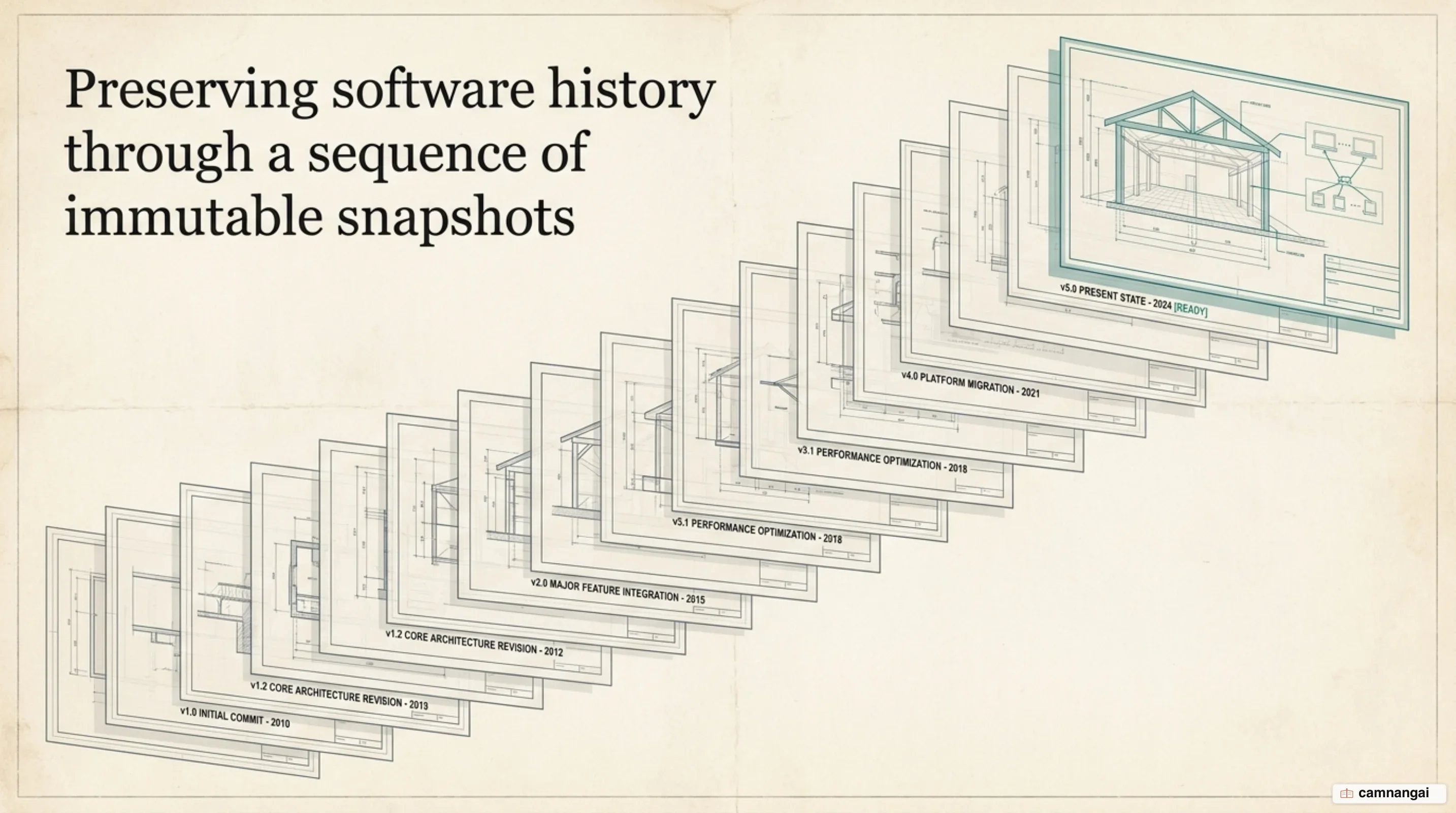
What is Git?
Git is a distributed version control system that functions more like a miniature filesystem than a simple tracking tool. In this model, every developer's local repository is a self-contained unit. When you clone a repository, you are not just checking out the latest version of the code; you are fully mirroring the entire project history and all its associated metadata. This architecture means most operations run locally, without a constant network connection or a central server. Cloning is closer to taking the whole archive home with you than to borrowing one book from it.
Integrity is a fundamental design philosophy in Git. Every file and directory is checksummed before it is stored, making it impossible to change contents without the system knowing. Git uses the SHA-1 hash algorithm to generate a 40-character hexadecimal string based on the content of the files or the directory structure. You cannot lose information in transit or suffer undetected file corruption at the storage layer.
In Git's internal database, objects are referred to by an Object ID (OID), which is the calculated hash of the content. Git stores everything in its database by the hash value of its contents rather than by filename. This content-addressable storage model is why Git can quickly verify data integrity and avoid storing identical files twice across different versions or branches.
Because operations are local, the system avoids the network latency that slows centralized systems. Browsing history, comparing versions, or committing changes happens almost instantaneously because Git reads directly from your local database. By removing the need to talk to a remote server for every command, Git stays responsive even as projects reach the size and complexity of the Linux kernel.
How developers managed code before Git
Before the adoption of distributed systems, developers relied on local and centralized models that were often error-prone. The earliest local approach involved manually copying files into different directories, sometimes using time-stamped names. This was highly susceptible to accidents, such as writing to the wrong file or overwriting important data, and the failure mode was always the same: the copy you needed was the one you had just clobbered. To mitigate this, tools like RCS (Revision Control System) were developed to maintain a simple database of patch sets on disk.
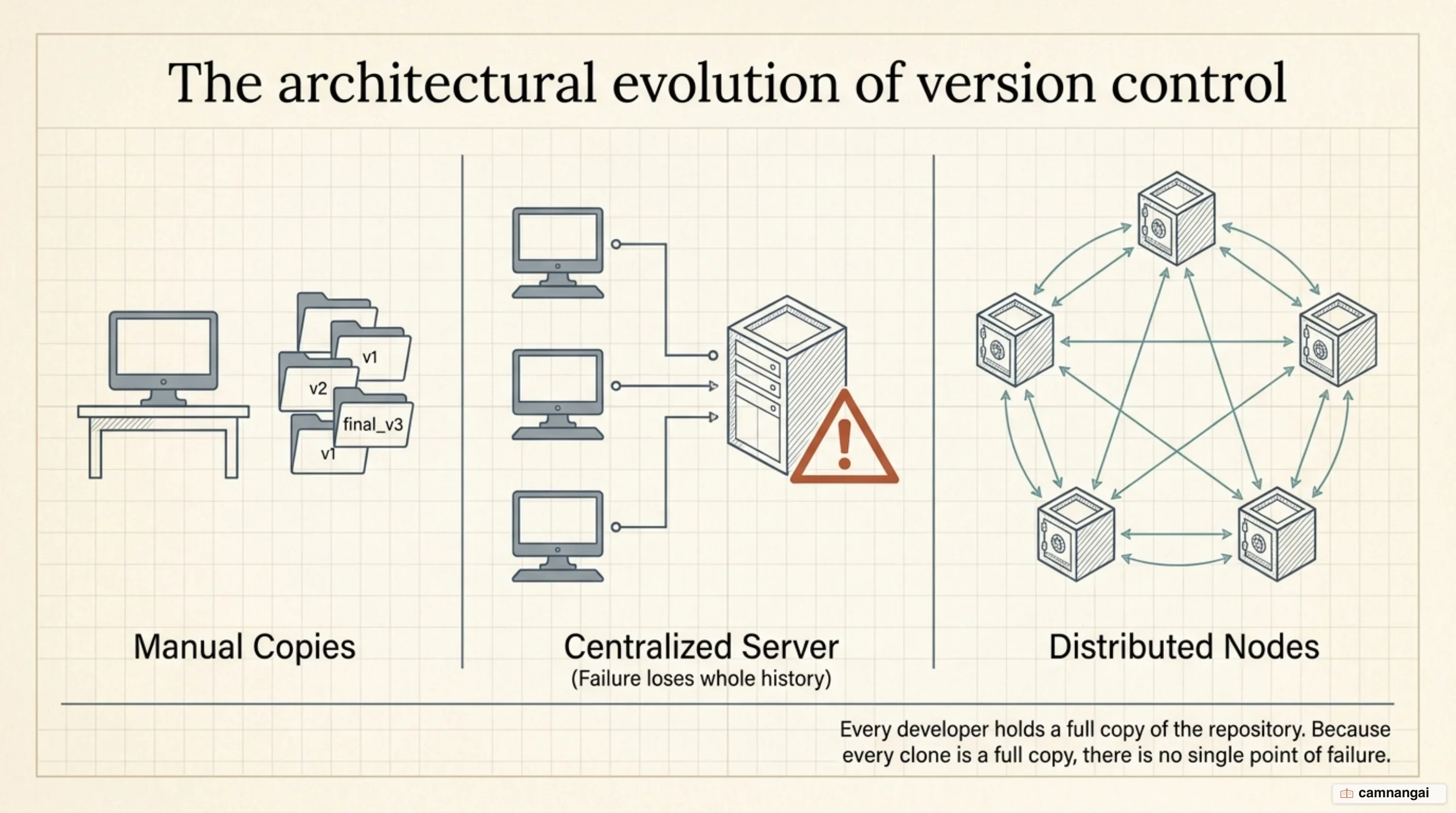
Systems like RCS worked by keeping patch sets — the differences between files — in a special format on disk. To recreate what any file looked like at any point in time, the system had to add up all the individual patches sequentially. While this was an improvement over manual copies, it was limited to single-user environments and became difficult to manage as the number of changes and contributors grew.
The centralized generation (CVCS), including systems like CVS, Subversion, and Perforce, introduced a single server to house all versioned files. While this allowed for better team coordination than local databases, it created a significant single point of failure. If the central server went down, contributors could not save changes. If the central database's hard disk became corrupted without a recent backup, you would lose the entire history of the project except for whatever single snapshots people had on their machines.
Centralized systems also struggled with performance and offline work because the database lived on a remote server. Simple tasks like viewing file history or committing a change required a network connection. In a system like Perforce, you could do very little while disconnected. Git's distributed model solved these issues by making every clone a full backup of the data.
Why Git was created
The creation of Git was triggered by a licensing crisis within the Linux kernel community in early 2005. At the time, kernel developers used a proprietary tool called BitKeeper, which was essentially a wrapper around SCCS (Source Code Control System), a system dating back to the 1960s. While BitKeeper was superior to open-source alternatives like CVS, its commercial nature was a sticking point. The relationship between the kernel community and BitKeeper's owner, Larry McVoy, collapsed after a community member, Andrew Tridgell, reverse-engineered BitKeeper's internal protocols, leading to the revocation of the community's free-use license.
Faced with a lack of suitable open-source alternatives, Linus Torvalds began designing Git in April 2005. He spent months conceptualizing a system that could handle the massive scale of the Linux kernel while avoiding the pitfalls of existing tools. His primary design goals were speed, data integrity, and a fully distributed architecture. He wanted to apply a patch series in about half a minute, even when that series ran to 50 or 100 patches, because that turnaround was a quality-of-life factor for maintainers.
Torvalds developed the initial version of Git in approximately 10 days. By April 7, 2005, the tool was self-hosting enough that he used Git to make the very first commit to its own source tree. The 10 days are the part people quote, but I think the self-hosting date is the better measure, because it says the thing was already trustworthy enough to carry its own history. The design focused on core simplicity influenced by Unix philosophy: a few powerful concepts at the low level, such as using hashes for everything, while complexity stayed in the user interface and implementation details.
The project moved quickly; within months it had reached a stable state and was handed to Junio Hamano for long-term maintenance. Torvalds' focus was a tool that worked for his own needs, but the underlying architecture proved solid enough to take over software development at large. The path from the first line of code to a functional, self-hosting system showed the power of the content-addressable object model he had devised.
Git stores snapshots, not diffs
A major technical distinction between Git and other version control systems is how it perceives data. Most older systems are delta-based, meaning they store information as an initial file followed by a list of subsequent changes or patches. Git treats its data as a stream of snapshots. Every time you commit your work, Git takes a picture of what all your files look like at that moment and stores a reference to that snapshot.
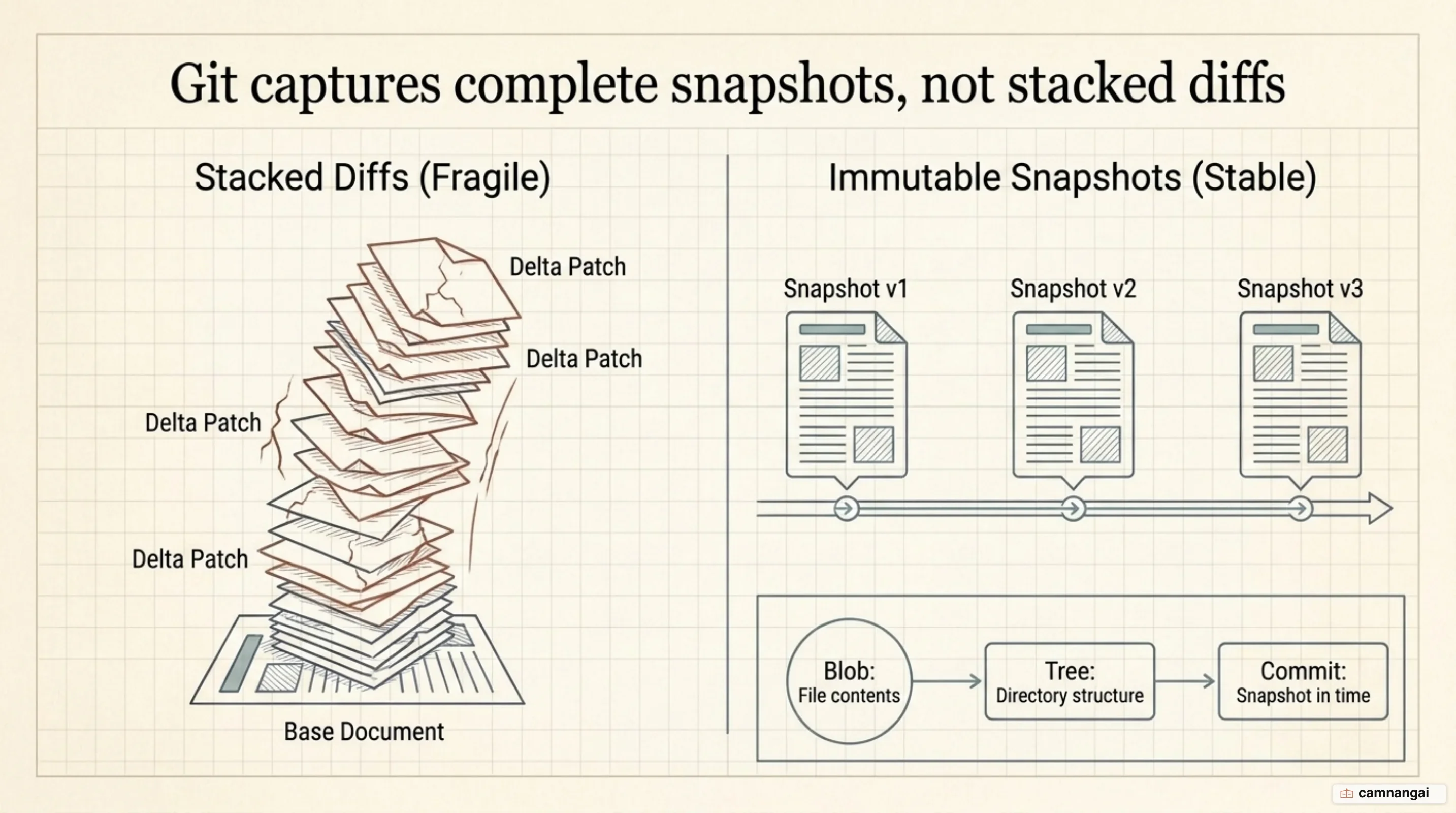
The Git object model is composed of three primary types of objects:
- Blobs: These represent the actual file contents. Blobs do not store filenames, only the data itself.
- Trees: These represent directories. A tree is an ordered list of entries that pairs filenames and modes with the OIDs of blobs or other trees.
- Commits: These are snapshots that point to a root tree and include metadata such as the author and pointers to parent commits.
Internally, Git's object model forms a Merkle tree. This structure makes Git efficient: if a file has not changed between two commits, Git does not store the file again. The new snapshot simply points to the OID of the existing, identical blob already in the database. Many snapshots can therefore coexist without requiring large amounts of redundant disk space.
When you perform a diff between two commits, Git calculates the differences dynamically from these snapshots. The cost of computing a diff is relative to the number of paths with different content, not the total size of the repository. Git skips entire subtrees if their OIDs match, performing a depth-first search only on paths that have actually diverged. That efficiency is what lets Git handle massive repositories and complex rebase operations. If you keep one idea about Git's storage, keep this one: Git saves pictures, and it works out the differences when you ask for them.
The three states of a file in Git
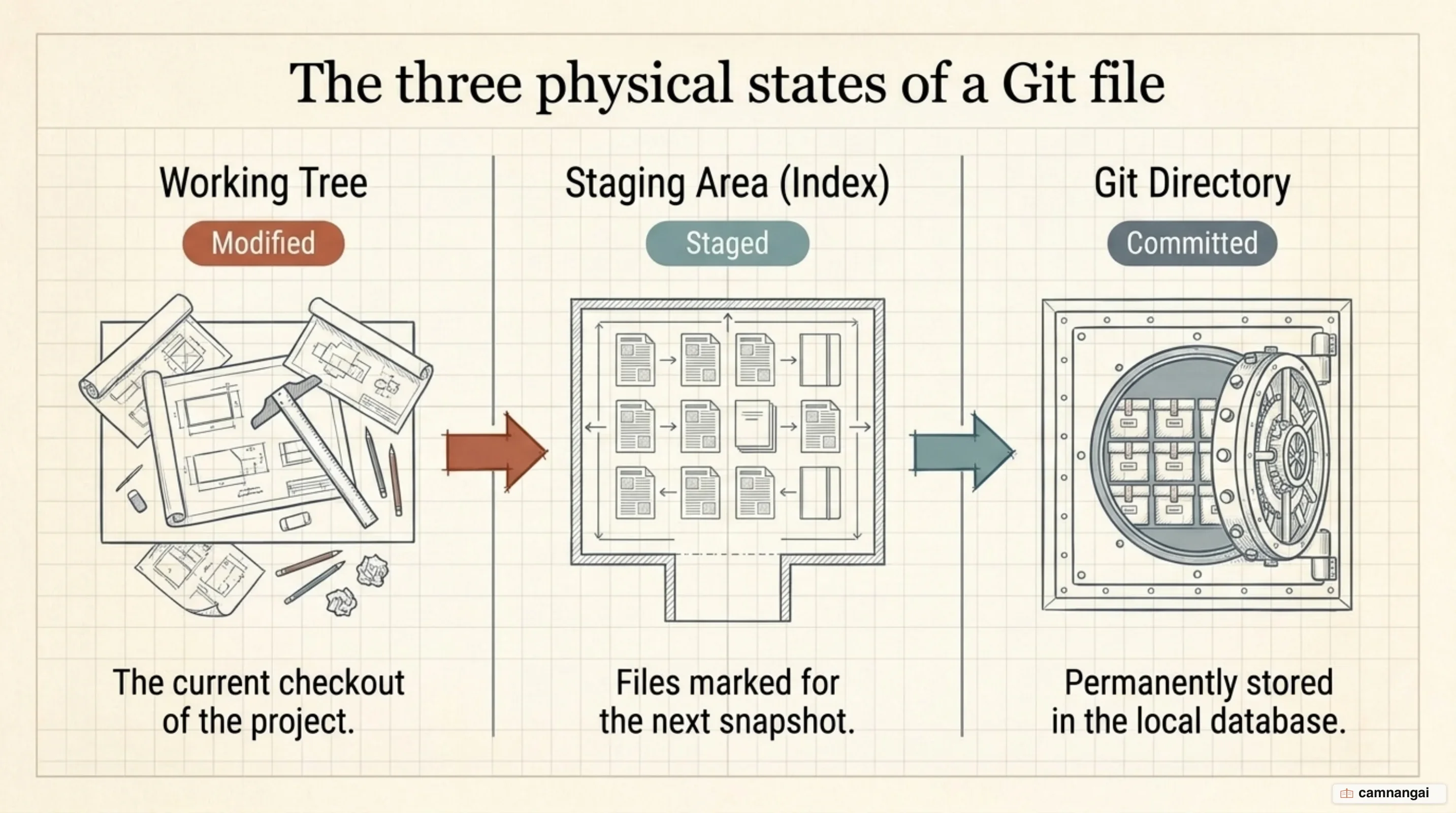
To use Git effectively, you need to understand the three states your files can occupy: modified, staged, and committed. When you change a file but have not yet saved it to the database, it is modified. When you mark a modified file in its current version to go into your next snapshot, it is staged. Once the data is safely stored in your local database, it is committed.
These states correspond to the three main sections of a Git project:
- Working Tree: A single checkout of one version of the project, pulled out of the compressed database and placed on your disk for editing.
- Staging Area (Index): A file, technically known as the Index, that stores information about what changes will be included in the next commit.
- Git Directory: The core of the project, where Git stores the metadata and the object database. This is what is copied when you clone a repository.
You can check the state of your files at any time from the command line:
git statusThe basic workflow involves modifying files in the working tree, selectively adding those changes to the Index, and then committing to permanently store that snapshot in the Git directory. This two-step process of staging and committing gives you control over your project history, letting you build snapshots that include only relevant changes rather than everything on your disk. Staging is also the step that trips up newcomers, because it is the one point in the cycle where Git asks you to make a decision instead of making it for you.
By decoupling the act of editing from the act of recording history, Git allows a more granular workflow. You can experiment freely in your working tree, and if some changes aren't ready, you simply don't add them to the Index. That separation is what keeps Git's history clean compared to systems that send every change to the server immediately.
Why use Git?
Git's technical advantages come down to two things: speed and safety. Because nearly every operation is local, Git is fast. You can browse the timeline of changes, compare different versions of code, and commit new work without waiting for a server response. This local-first approach also enables offline work; you can commit changes while disconnected and push them to a remote repository once you regain network access.
Git is designed to be non-destructive, operating under a philosophy that generally only adds data. This makes it difficult to perform actions that cannot be undone. Once you commit a snapshot into Git, that data is very hard to lose, which is what makes experimentation safe: you can always return to a stable state if a new approach fails.
Branching is another significant advantage. In Git, branches are lightweight pointers to commits, allowing multiple parallel lines of development. You can create a branch to work on a new feature or bug fix in isolation, keeping the main production code stable until the new work is fully reviewed. That isolation lets developers take risks and refine their code without breaking the build for the rest of the team.
The distributed nature of Git also provides an inherent backup strategy. Because every clone is a full mirror of the repository, including its entire history, every developer on the team holds a complete backup. If the central hosting server suffers a catastrophic failure or disk corruption, any client repository can restore the project and its full timeline of changes.
How Git differs from GitHub
People conflate Git and GitHub constantly, and the two do different jobs. Git is the underlying engine used to track changes and manage repositories locally. GitHub is a cloud-based platform that hosts Git repositories and provides a collaboration layer on top of the tool. That layer includes features like Issues for threaded discussions, Pull Requests for code review, and the Marketplace for integrating third-party automation apps.
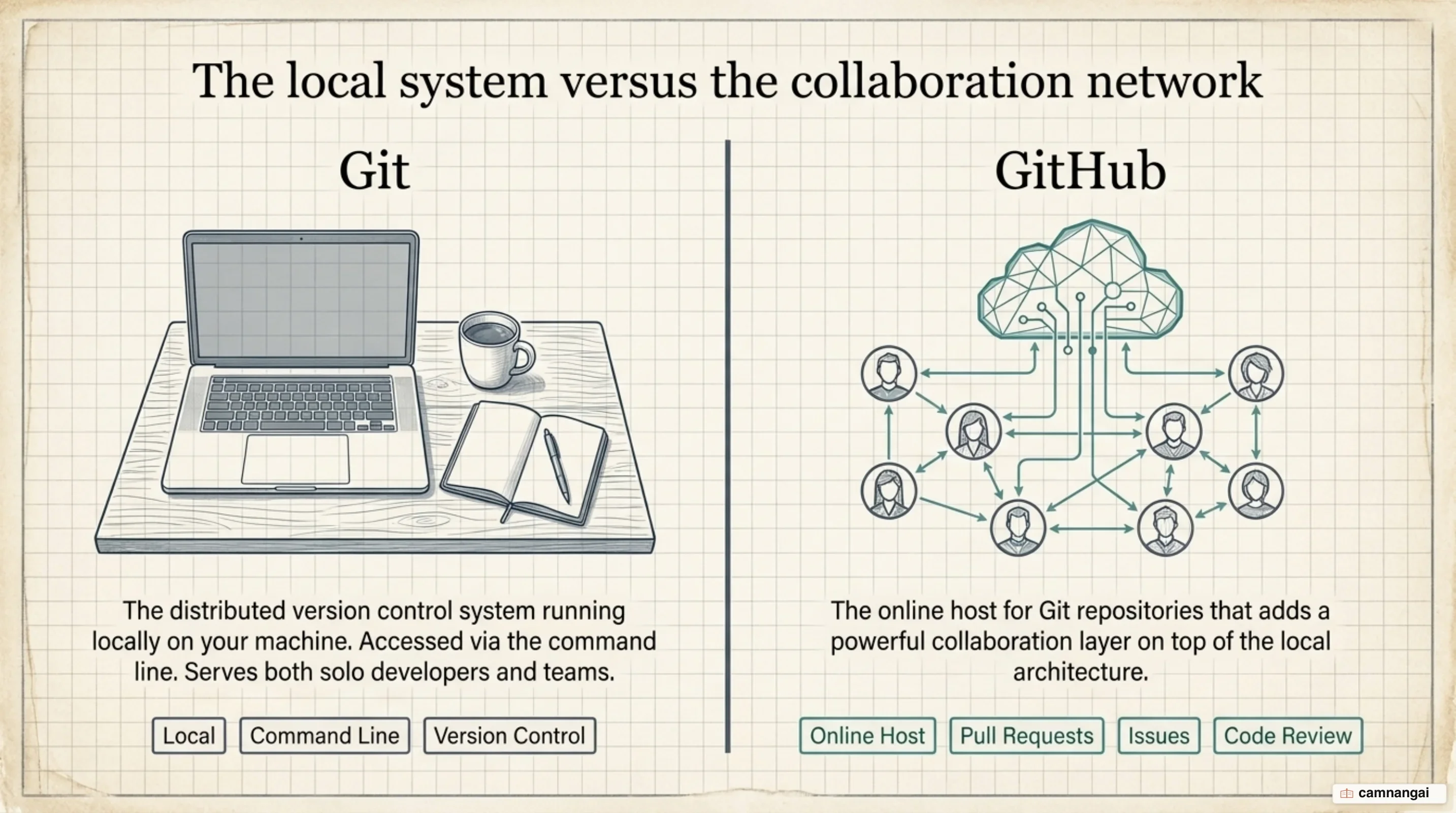
GitHub supports two primary models for collaborative development:
- Shared repository: Common for small teams where individuals are granted explicit read/write access to a single repository.
- Fork and pull: The standard for open-source projects, where developers create their own copies of a project and submit suggested changes back to the original maintainer.
To help teams progress safely, the shared repository model often uses protected branches. These are settings on GitHub that prevent anyone from pushing code directly to the main production branch without meeting specific requirements, such as passing automated status checks or receiving an approving review on a pull request. This adds a layer of governance that Git, by itself, does not enforce locally.
While Git manages the code and its history, GitHub manages the people and processes around that code. It provides transparency and tools for maintainers to review suggested changes, discuss requirements, and set expectations for contributors. By building these collaboration layers on top of the distributed power of Git, GitHub made contributing to software projects of any size far more accessible.
How teams use Git day to day
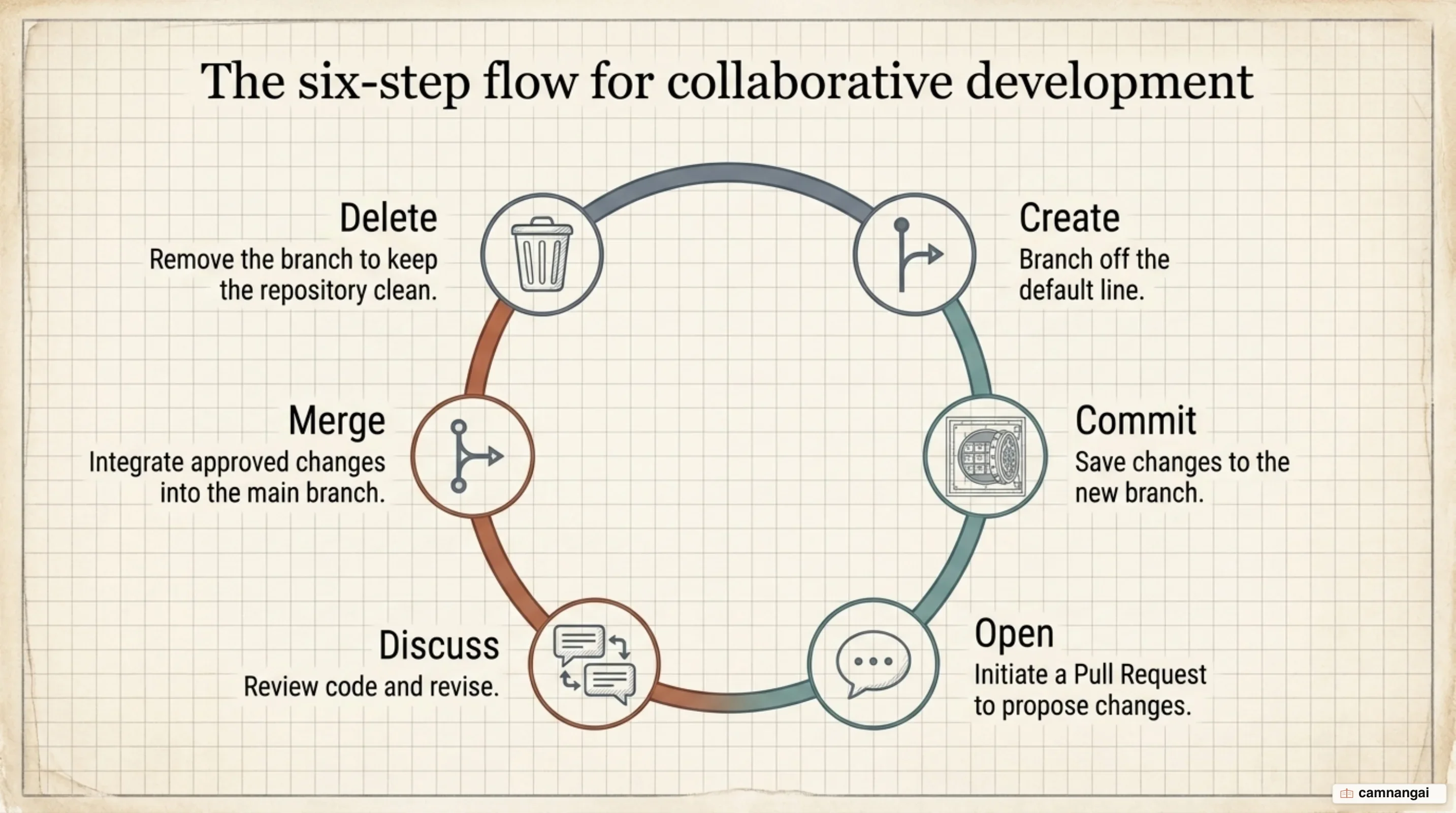
Professional teams typically follow the GitHub flow, a lightweight, branch-based workflow designed for regular collaboration. The process begins by creating a new branch with a short, descriptive name to provide an isolated space for work. Developers make changes locally, then commit and push those changes to the remote branch to back up their work and let others see progress as the feature develops.
Quality in the daily workflow depends on making each commit isolated and complete. This makes it much easier to revert a specific modification later if it causes an issue. For example, if you need to rename a variable and add corresponding tests, put the variable rename in one commit and the tests in another. Then, if you decide to keep the tests but revert the rename, you can target the exact commit without affecting unrelated work.
A standard sequence for creating and saving work on a new feature branch looks like this:
git checkout -b feature-branch
git add .
git commit -m "Describe the specific change"
git push origin feature-branch
Once the work is ready for feedback, the developer opens a pull request. Collaborators review the code, leave comments, and suggest improvements directly on the lines that changed. Once the team is satisfied and all automated checks pass, the pull request is merged into the default branch. This cycle ensures every piece of code is reviewed and tested before it reaches production.
Where to start with Git
The most logical entry point for a new developer is to either initialize a new project or clone an existing one. Running git init creates a brand new repository and a hidden subfolder to house the internal data structure required for version control. Running git clone instead creates a local copy of a remote project, including all its files, branches, and the full history of snapshots.
As you begin, focus on the core cycle of modifying, staging, and committing. Understanding those fundamentals, and the stream-of-snapshots model behind them, is what makes the more advanced Git commands easier as your projects grow. And learn that cycle at the command line rather than through a GUI button, because when a merge goes wrong the thing that saves you is knowing which of the three areas your file is actually sitting in.
References
- Git - About Version Control
- Git - What is Git?
- Git Turns 20: A Q&A with Linus Torvalds — The GitHub Blog
- Why Use Version Control? — Tower Git Ebook
- Commits are snapshots, not diffs — The GitHub Blog
- About Git — GitHub Docs
- GitHub flow — GitHub Docs
- How to undo (almost) anything with Git — The GitHub Blog