Google Antigravity is an agentic development platform designed for the "agent-first era". It functions as a technical command center built on a VS Code-based architecture to launch and orchestrate autonomous agents across the software development lifecycle. Developed by Google DeepMind, the platform integrates high-intelligence models — including Gemini 3 (High and Low variants), Claude Sonnet 4.5 (Thinking and Standard modes), and GPT-OSS 120B — to automate technical planning, source code generation, and browser-based verification.
As an orchestration system, Google Antigravity lets developers interface with agents at higher abstractions than individual prompts. It runs long-running tasks across multiple surfaces, moving you from synchronous coding to asynchronous agent management.
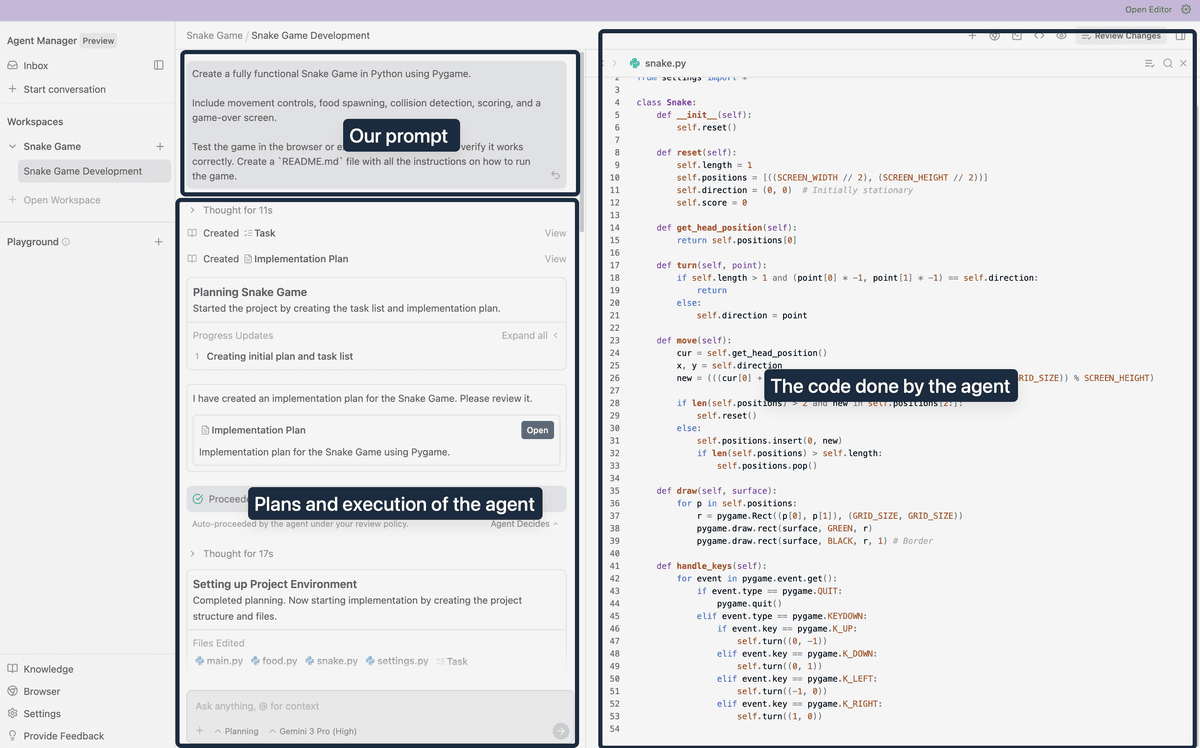 Source: How to Set Up and Use Google Antigravity — Codecademy
What is Google Antigravity?
Google Antigravity represents an architectural shift from traditional Integrated Development Environments (IDEs) toward agentic platforms. While a standard IDE focuses on the "Editor surface" — a synchronous environment for tab completions and inline commands — Antigravity introduces a "Manager surface." This interface is designed for asynchronous interaction, inverting the usual setup: instead of the agent being embedded into the IDE, the development surfaces (Editor, Terminal, Browser) are embedded into the agent's orchestration environment.
The platform is governed by four core tenets: trust, autonomy, feedback, and self-improvement. Trust is established by providing "Artifacts" — structured deliverables like task lists and recordings — rather than just opaque code changes. Autonomy allows agents to operate across the terminal, editor, and browser simultaneously. Feedback mechanisms allow granular comments on Artifacts, which the agent incorporates into its execution loop. Finally, the system uses a knowledge base to retrieve and contribute "knowledge items," letting agents learn from past architectural decisions and team-specific standards.
What are the parts of Antigravity?
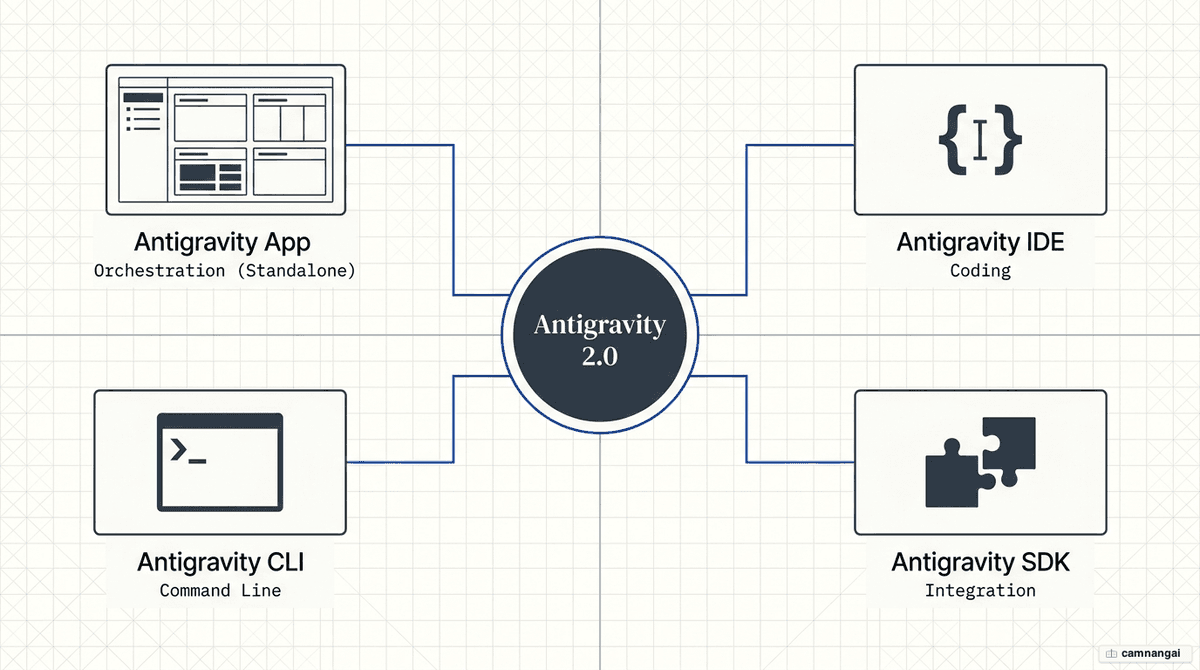
The Antigravity 2.0 ecosystem consists of four specialized components designed for the agent-first workflow:
- Antigravity — the flagship standalone application for macOS, Linux, and Windows. It acts as the primary Manager surface for orchestrating multiple local agents in parallel and managing scheduled tasks independently of an IDE.
- Antigravity IDE — the original agentic editor built on VS Code architecture. It includes the Agent Manager and provides a deep understanding of the local codebase for synchronous development and debugging.
- Antigravity CLI — a terminal-first interface for interacting with autonomous coding agents and executing shell commands via keyboard-driven workflows.
- Antigravity SDK — a Python-based toolkit that allows programmatic integration of the Antigravity agent harness into custom pipelines and evaluation frameworks.
A central feature of the interface is the Inbox. This layout manages each agentic task as a distinct conversation thread. Tasks are assigned specific statuses: Idle, Running, or Blocked (indicating the agent requires human intervention to resolve an ambiguity or pass an approval gate).
How to install Google Antigravity
Installation requires a standard technical environment, including the Chrome browser and a Google account for authentication.
- Download — access the official Google Antigravity download page and select the binary for your operating system (macOS, Linux, or Windows).
- Run the installer — execute the installer and sign in with your Google account.
- Authentication and policy — after authenticating, review and accept the "Security and Data Use" policy.
- Initialization — select your UI theme and optionally install plugins for Google Developer Tools to add specialized skills.
- Browser agent setup — to use browser-in-the-loop features, install the required Chrome extension and allow the agent to start a debugging session when prompted.
- Directory configuration — for managing specialized knowledge packages, create the following directory structure:
mkdir -p ~/.gemini/antigravity/skills/Getting started with Projects and the Agent Manager
Antigravity uses a project-centric approach to maintain isolation and scope. A Project is a collection of folders (for example, a frontend repository and a backend repository) that define the agent's context. This structure allows isolated security settings per project, such as restricting terminal access, blocking specific local file paths, or limiting access to specific URLs and Model Context Protocol (MCP) servers.
The Agent Manager interface is organized into three distinct columns:
- Left column — displays project workspaces, conversation history, and a "Playground" for isolated testing.
- Middle column — the "Inbox," where active and past threads are grouped and monitored.
- Right column — the main work area for entering prompts, reviewing plans, and interacting with generated Artifacts.
What the agent can do: from plans to code to browser testing
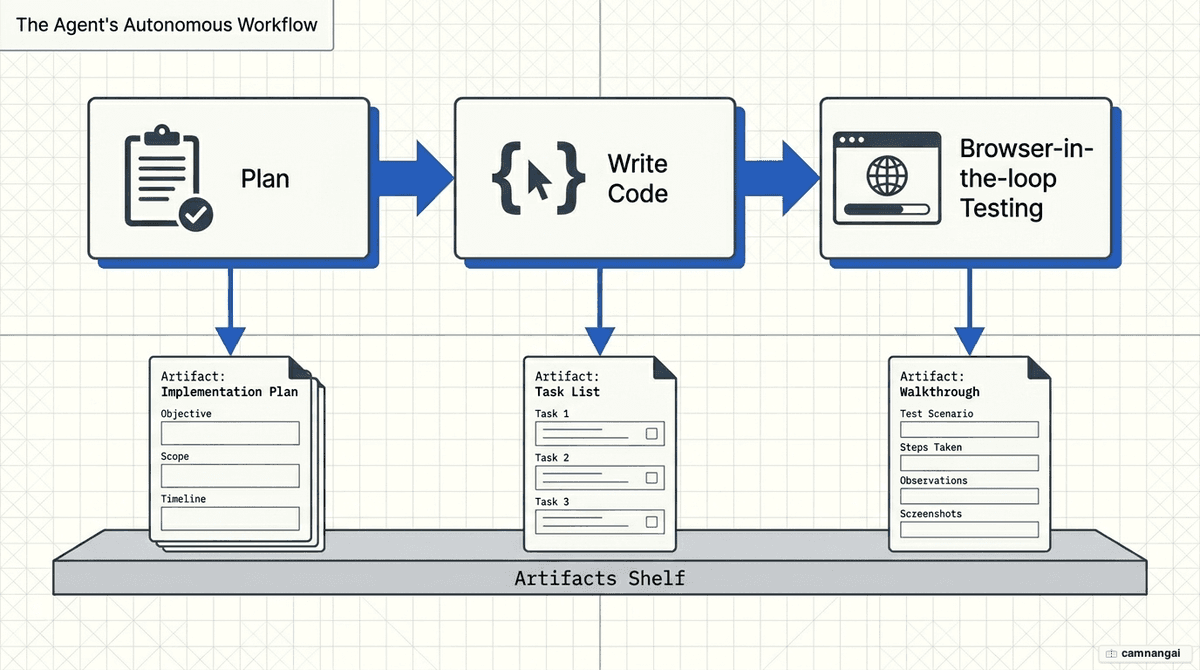
Google Antigravity supports an end-to-end autonomous workflow focused on verification.
Visual mockups and research
Agents can perform background research via Google Search or generate design assets. Using image generation models like Nano Banana, the agent can produce several visual mockup options (for example, minimalist, holographic, or cinematic) before any code is written.
Implementation plans
Before modifying the codebase, the agent generates an Implementation Plan artifact. This technical report summarizes the proposed architecture, tech decisions (such as specific library versions or CDN usage), and a comprehensive list of file changes. You can provide feedback directly on the plan to steer the agent's strategy before execution.
Browser-in-the-loop testing
The integrated Browser Agent drives a Chrome instance to verify the application's state. It navigates to URLs, interacts with UI elements, and fills out forms to test logic like API integrations or validation errors. On completion, the agent provides a Walkthrough artifact containing screenshots and recordings to prove the feature works as intended.
Extending and controlling it: slash commands, MCP, Skills, and review policies
Slash commands and scheduling
Use commands such as /browser to trigger UI testing, or /schedule to automate recurring tasks (for example, "9:00 AM every Monday").
Model Context Protocol (MCP)
Antigravity supports the Model Context Protocol to connect agents to external data. Configuration is managed via ~/.gemini/config/mcp_config.json. The platform also includes one-click installations for Google Cloud MCP servers to ease integration with cloud databases and services.
Skills
Skills are specialized knowledge packages stored in directories containing a SKILL.md file. The SKILL.md consists of metadata (name and description) and detailed instructions. Skills use "progressive disclosure": the agent only loads the full instruction set when your prompt matches the skill's metadata, preventing context-window bloat.
Review policies
Control agent autonomy via three settings:
- Always Proceed — the agent executes all tasks and terminal commands without stopping.
- Agent Decides (default) — the agent identifies complex decisions that require human approval.
- Request Review — the agent halts for approval after every major Artifact generation or system action.
Current limitations and things to watch
Google Antigravity is in Public Preview. Expect significant battery drain, IDE slowdown during long sessions, and aggressive rate limits that refresh every five hours.
Security vulnerability. A known vulnerability exists around the exfiltration of sensitive data. An attacker can hide malicious instructions in files like README.md or diagram.md. Because the agent ignores .gitignore, it can be tricked into reading sensitive files like .env. The agent may then append those secrets as parameters to an image URL; when the Antigravity UI tries to render the image in the chat window, the request is sent to the attacker's server, leaking the secrets. Use the "Request Review" policy and avoid repositories containing high-value secrets.
FAQ
Which AI models does Google Antigravity support? It supports Google's Gemini 3 (High/Low), Anthropic's Claude Sonnet 4.5 (Thinking/Standard), and GPT-OSS 120B. You can switch models within the Agent Manager to match task complexity.
How much does Google Antigravity cost? It is currently free during its public preview phase. Pricing for the upcoming Team and Enterprise plans has not yet been announced.
Is Antigravity compatible with Linux? Yes. Both the standalone Antigravity application and the Antigravity IDE run on Linux, alongside macOS and Windows.
Does it work with existing VS Code extensions? Because the Antigravity IDE is built on VS Code architecture, most existing extensions, themes, and keyboard shortcuts are fully compatible.