Claude Design is an experimental Anthropic Labs project and research preview powered by the Claude Opus 4.7 vision model. This browser-based workspace lets you generate visual assets—websites, slide decks, and interactive prototypes—through natural language. Unlike the standard Claude interface, it runs in a sandboxed environment separate from the production-grade API, built for fast visual iteration.
The tool is accessible only at claude.ai/design and requires a paid subscription (Pro, Max, Team, or Enterprise, starting at $20/month). For Enterprise users, the feature is off by default; an administrator enables it via Organization settings → Capabilities → Anthropic Labs. As a research preview, it gives designers and product teams a dedicated place to turn an idea into a working, if rough, visual artifact.
 Nguồn: Introducing Claude Design by Anthropic Labs — Anthropic
How is Claude Design different from Claude Code and other design tools?
Claude Design and Claude Code play different roles in the engineering lifecycle. Claude Design is a visual-first surface for designers and product managers to explore "what should exist." It generates "vibe-coded" artifacts that look and feel real but lack production-grade architecture. Claude Code, in contrast, is an agentic system for developers that works on local codebases to make file changes and run tests. Design provides the blueprint; Code handles the implementation.
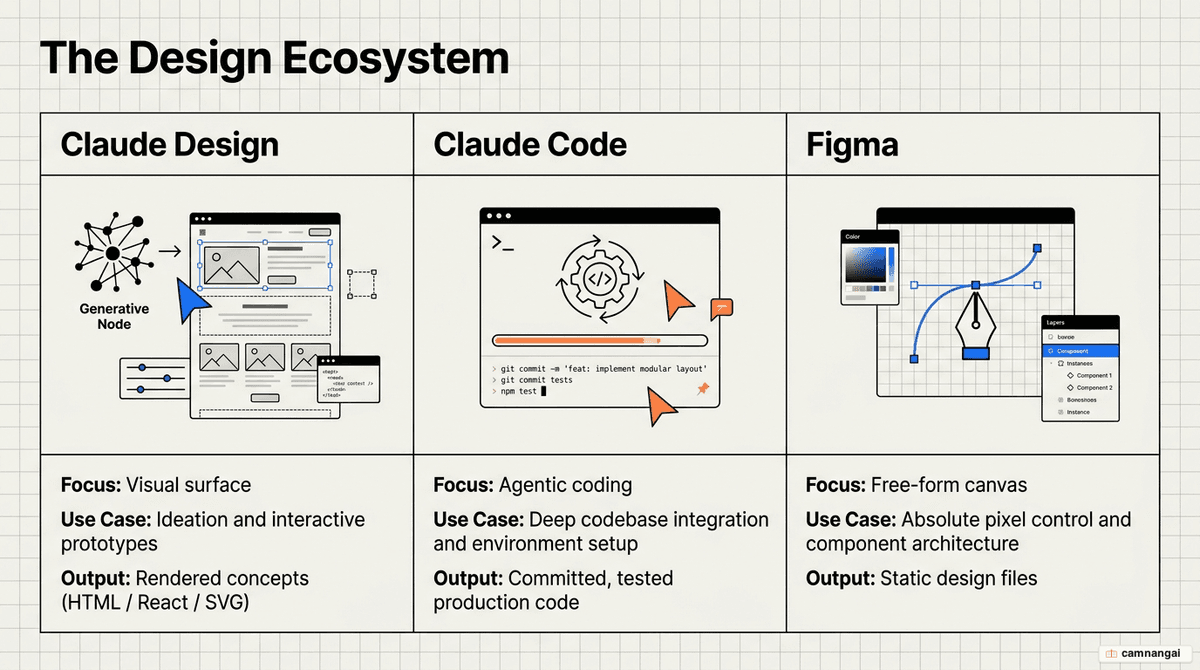
Compared to traditional tools like Figma, Claude Design is not a direct replacement. It lacks a flexible, free-form canvas where you can manually grab and reposition elements. What it does well is high-velocity iteration. Where Figma requires manual execution, Claude Design uses AI to narrow the design space—asking clarifying questions and generating multiple variations based on taste. Note that there is no "round-trip" compatibility: once you export a design, the link between Claude and the asset is gone.
How does Claude Design work?
The interface uses a dual-pane architecture: a chat panel on the left and the "Artifacts" canvas on the right. When you provide a prompt, Claude Design generates code—specifically HTML/CSS/JS, React, or SVG—that renders instantly as a functional preview.
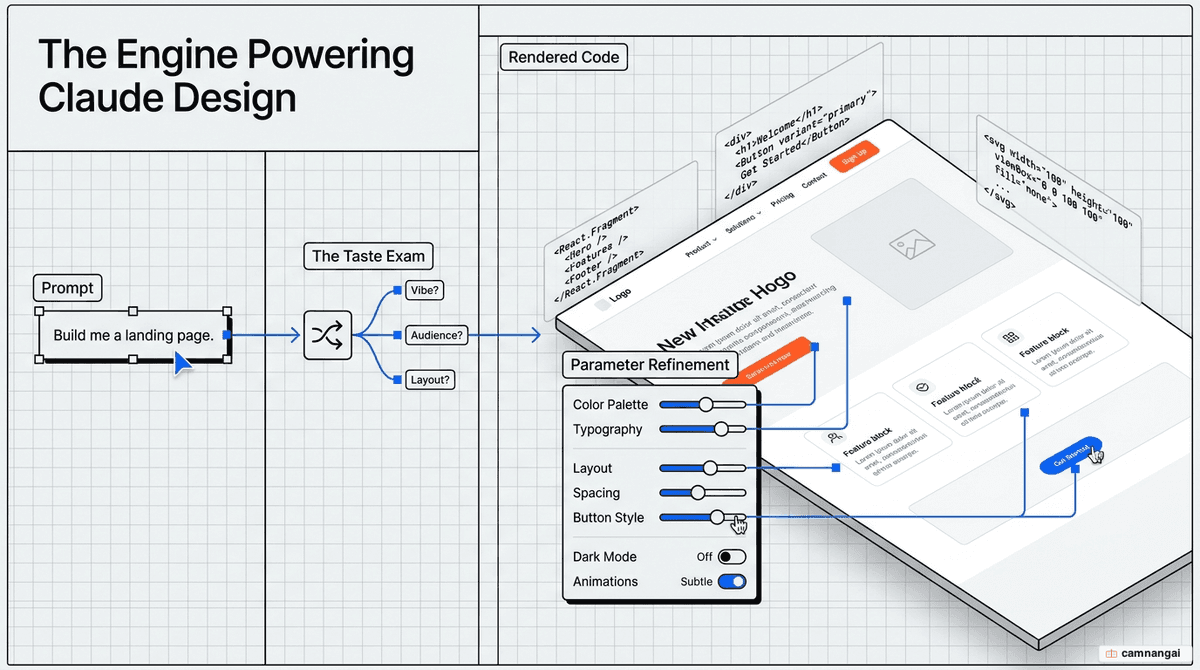
To narrow the creative direction, the tool runs a "Taste Exam." Claude asks clarifying questions about target audience, brand vibe, and color palettes. If you prefer to skip this phase for faster results, just tell the model to "Decide for me."
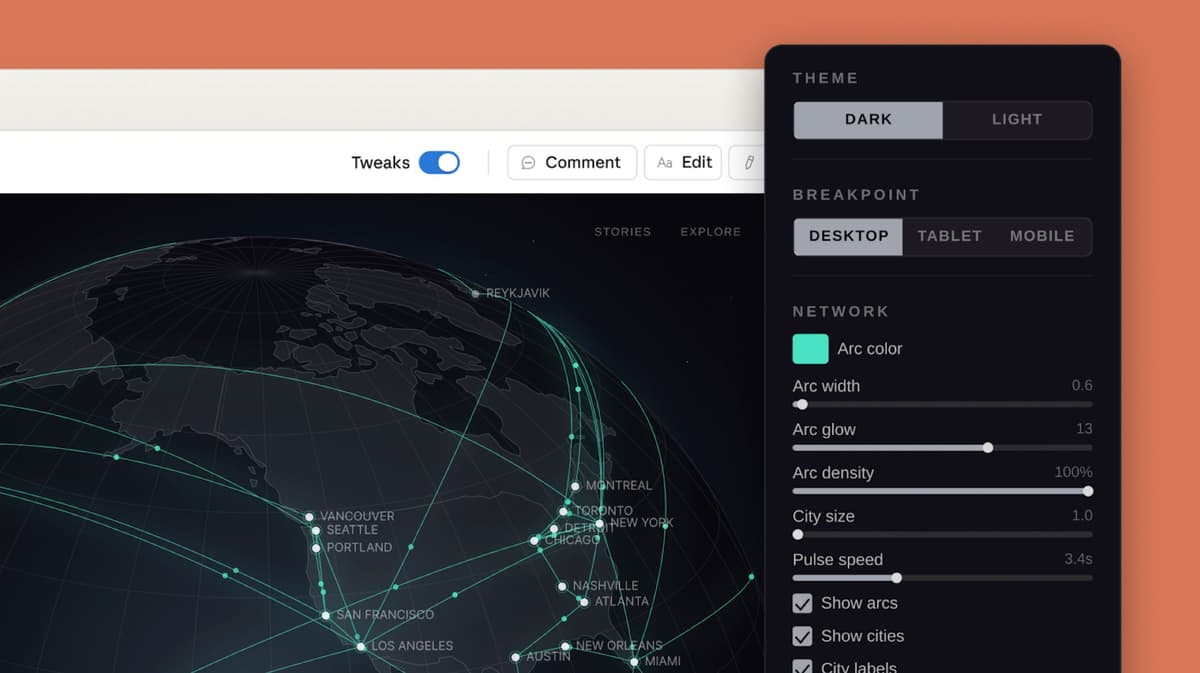
Once a design is rendered, Claude generates "Tweaks"—custom sliders and toggles that let you adjust parameters like spacing, intensity, or color scheme in real time without re-prompting. These tweaks can be buggy and occasionally mutually exclusive, since the underlying generative UI is still experimental.
What can you create with Claude Design?
Claude Design supports a range of visual outputs for product and marketing work:
- High-fidelity prototypes: Interactive web and mobile app mockups with functional navigation and sales dashboards.
- Slide decks: Professional presentations via a dedicated "Slide Deck" mode that handles transitions and formatting.
- Animated pitch decks: Motion-heavy stories and visual presentations designed for investor or stakeholder review.
- Landing pages: Comprehensive layouts with hero sections, pricing tables, and interactive forms.
- Wireframes: Rough sketches for rapid idea exploration before committing to high-fidelity aesthetics.
The workflow from idea to developer handoff
The process follows a four-stage technical workflow:
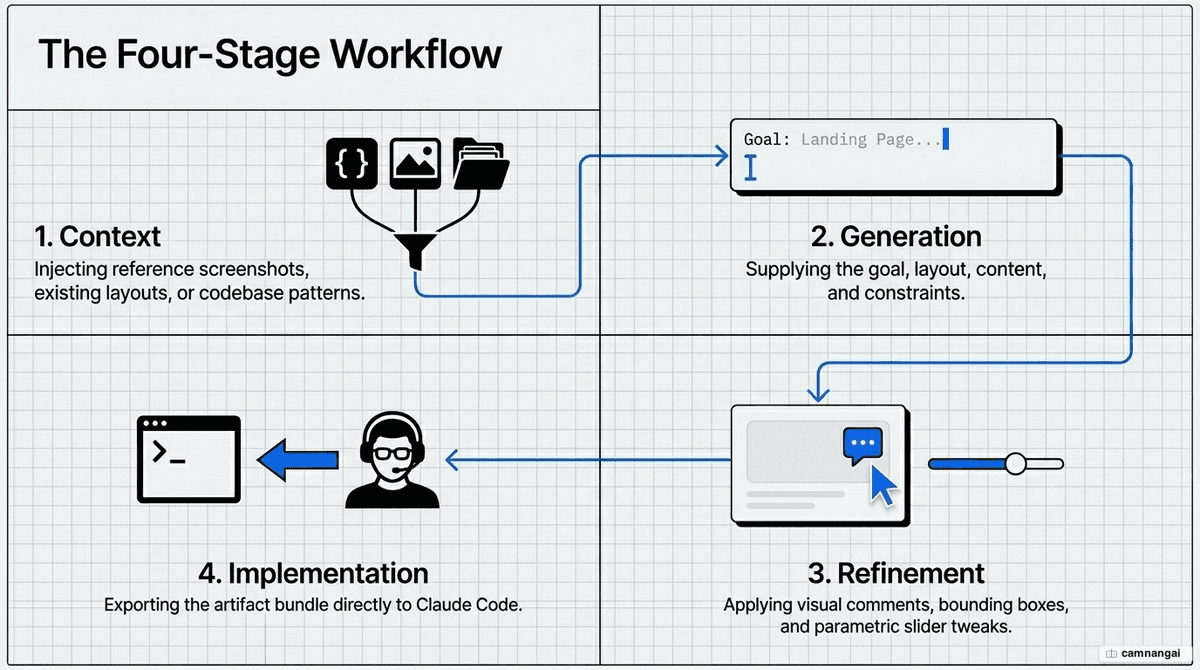
- Setting context: Upload images, PDFs, or link code repositories. To prevent browser lag or performance degradation, link specific subdirectories rather than entire monorepos.
- Prompting: Provide specific goals, layouts, and constraints. You can use the "Cowork" feature to extract brand assets from a folder of images and help initialize the project.
- Iterating: Refinement happens via direct text edits, inline comments, or the "Draw" tool. The Draw tool acts as a layout interpreter—Claude treats your sketches as indicators of structural intent (drawing a rectangle to signify a sidebar, for example).
- Handoff: Export designs as a
.zip, PDF, PPTX, or standalone HTML. A "Send to Canva" option exists but is frequently non-functional in the current preview. For implementation, package the design into a handoff bundle for Claude Code.
To keep output consistent, use a DESIGN.md file as a brand blueprint. It ensures Claude adheres to specific hex codes and typography.
# DESIGN.md - Technical Brand Spec

## Colors

- Primary: #0A0A0A (Rich Black)
- Accent: #00FF41 (Matrix Green)

## Typography

- System: SF Pro, Regular, 14px
- Headings: Inter, Bold, 24px

## Spacing

- Grid: 8px base
- Container: 1280px max-width
Who does Claude Design help, and how?
- Designers: Explore a dozen directions in minutes. It bridges static mockups and interactive prototypes without requiring PRs or code reviews.
- Product managers: Turn rough ideas into shareable prototypes. The platform Brilliant, for instance, cut the effort for complex interactive pages from 20+ prompts to just two.
- Marketers: Rapidly create on-brand landing pages and campaign visuals without deep design-software expertise.
Tips for the best results
- The video hack: For better slide decks, use the "Research" feature to convert a report into markdown, then ask Claude to create an animated video first. This forces "visual thinking" before you convert the video into a static deck.
- Layer complexity: Start with a core layout. Only after the structure is locked should you layer in animations or complex interactions.
- Audit for accessibility: Ask Claude in chat for its own critique on contrast ratios, font legibility, and general usability standards.
- Start small: To manage token limits, build a single component or slide first to calibrate the model's understanding of your
DESIGN.mdbefore attempting a full-site build.
Current limitations and when to consider another tool
As a research preview, Claude Design has significant architectural constraints:
- No persistence: Unlike tools like Builder.io, Claude Design does not sync with live production code. If your app changes, you must re-import context and start fresh; there is no ongoing continuity.
- Fidelity gaps: Visual accuracy to a brand system is typically 50–75%. The output does not use your real code components or tokens.
- Bugs: You'll frequently hit text overlap, UI errors in compact view, and disappearing inline comments. If a comment vanishes, paste the feedback directly into the chat.
- Limited scope: It builds prototypes, not apps. It cannot handle databases, user authentication, or backend logic.
FAQ
Can I export Claude Design projects to Figma? No. There is no native export to Figma. You can export code or flat files, but there is no round-trip compatibility to move designs back into a Figma canvas.
Is Claude Design a separate app? Yes. It is a browser-based project from Anthropic Labs at claude.ai/design. It is not currently integrated into the standard Claude mobile or desktop apps.
Why can't I see Claude Design on my Enterprise plan? Enterprise access is disabled by default. Your admin must go to Organization settings → Capabilities → Anthropic Labs and toggle the feature on.
Does it create production-ready code? No. It generates "vibe-coded" prototypes. The HTML/React is functional, but it lacks production architecture and must be refined by a developer or Claude Code before deployment.
References
- Get started with Claude Design — Claude Help Center
- Claude Design Review — Builder.io
- Claude Design — Ruben Hassid (How to AI)
- What Is Claude Design? Anthropic's AI-Powered Visual Design Tool Explained — MindStudio
- Introducing Claude Design by Anthropic Labs — Anthropic
- Designing with Claude: From prompt to production — YouTube
- Claude Design Basics: Master 95% in 10 Minutes — YouTube