Claude Code is an agentic coding system by Anthropic designed to operate directly within your local development environment. Unlike standard LLM interfaces, it works as an autonomous agent that reads your codebase, edits files across multiple directories, executes terminal commands, and manages Git workflows. You give it natural-language instructions, and it orchestrates the technical execution needed to reach the goal.
Use Claude Code to offload mechanical development tasks like boilerplate generation, dependency updates, and complex refactors. It keeps a comprehensive map of your project structure and dependencies, so changes stay consistent across the architecture. Because it runs locally, it can execute your test suites and use your existing CLI tools to verify its own work.
This shifts your role from line-by-line coding to project-level orchestration. You define the objective — "migrate the auth logic to the new provider" — and the agentic loop handles the implementation. It observes its own actions, reads terminal output, and self-corrects on build errors or test failures, needing you only for high-level architectural decisions.
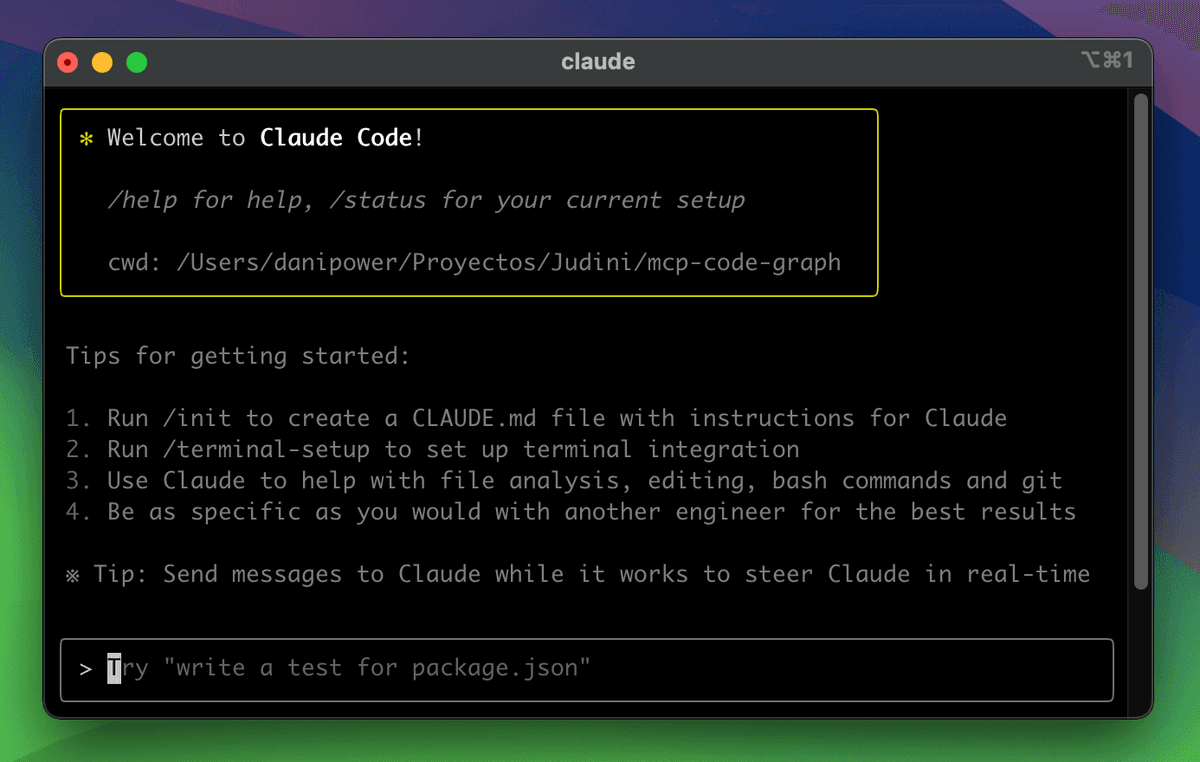 Source: Claude Code: From Zero to Hero — Dan Avila
What makes Claude Code different from a chatbot and autocomplete?
Standard autocomplete tools work at the line or function level, predicting the next few tokens as you type. Claude Code works at the project level. It does not just suggest the next line; it plans and executes a sequence of actions across your entire codebase to reach a specific technical objective. Autocomplete speeds up manual typing, but Claude Code builds features and resolves issues with minimal manual input.
General-purpose chatbots typically lack direct access to your local filesystem and development toolchain. Using one means manually copy-pasting code blocks, file structures, and terminal logs into a browser window. Claude Code removes that friction by working natively in your environment. It searches your directories, traces code dependencies, and runs shell commands like npm test or kubectl directly to validate its progress.
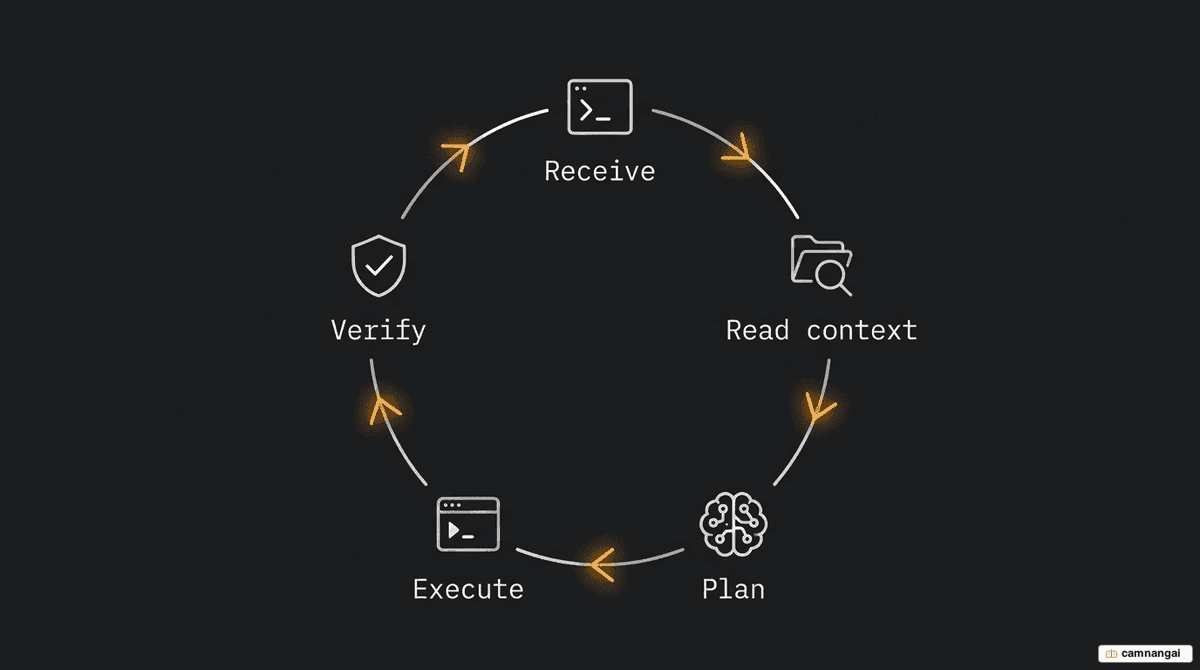
The defining difference is the agentic loop. Where a chatbot responds to individual prompts, an agentic system acts toward a long-term goal through a cycle of observation and action. Claude Code observes the results of its own execution — a failing test, for instance — and adjusts its strategy on its own. You set the target; the system runs the loop until the task is verified as complete.
How does Claude Code work?
Claude Code runs a continuous agentic loop. When you describe a task, it reads your project files and configuration to build context. It then plans using extended thinking — a dedicated reasoning step where the model analyzes complex dependency chains and architectural requirements before acting, which keeps the logic sound across multi-file changes.
Once the plan is set, execution begins. It edits files, creates new modules, and runs shell commands to install dependencies or run build scripts. After making changes, it verifies them by running your test suite. If tests fail, it reads the error logs, finds the root cause, and re-enters the loop to apply a fix — repeating until every check passes.
For long sessions, the system uses auto-compaction to summarize conversation history and stay within the context window. You give it persistent, project-specific instructions through a CLAUDE.md file in your project root: your team's coding standards, preferred libraries, and architectural constraints that the agent follows in every session.
What can Claude Code do?
Claude Code is built for high-impact migrations and routine maintenance alike. Stripe used it to complete a 10,000-line Scala-to-Java migration in four days — a task first estimated at ten engineer-weeks. Wiz migrated a 50,000-line Python library to Go in roughly 20 hours of active development. Ramp cut incident investigation time by 80% by tracing issues through its stack with it.
It automates a wide range of tasks:
- Maintenance — fixing lint errors, resolving merge conflicts, and updating stale dependencies.
- Infrastructure — running Kubernetes commands and monitoring CI/CD pipelines on GitHub or GitLab.
- Integrations — using the Model Context Protocol (MCP) to connect to tools like Jira for tickets, Slack for communication, or Figma for design-to-code work.
For large-scale work, Agent Teams let you spawn multiple Claude Code sessions that coordinate through a shared task list. The agents self-assign work and challenge each other's findings. They consume significantly more tokens than standard subagents, because each teammate runs in its own dedicated context window to stay focused on its sub-task.
Where can you use Claude Code?
You can run Claude Code across five primary environments. The Terminal CLI is the flagship for power users who want Unix-style piping and command-line automation. For integrated development, the extensions for VS Code and JetBrains IDEs add inline diffs and plan reviews inside your editor. Each surface connects to the same engine, so your CLAUDE.md settings and MCP servers stay consistent everywhere.
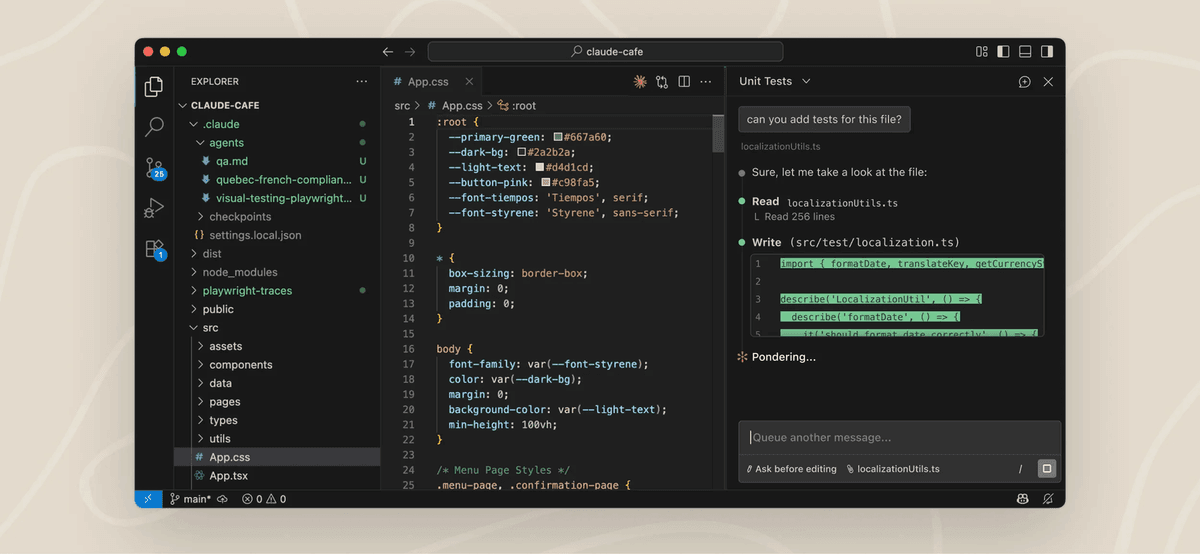 Source: Claude Code Documentation — Anthropic
The Desktop app and Web interface (claude.ai/code) add graphical environments for visual diff review and long-running remote tasks. The Desktop app includes an App Preview for running your dev server inside the application and a visual diff for line-by-line comments. These suit developers who prefer a GUI for reviewing complex changes or running parallel sessions.
Sessions move between surfaces without losing progress. Remote Control lets you monitor and manage a local terminal session from a phone or browser — handy for overseeing long migrations away from your desk. The /teleport command moves active work between the web interface and your local terminal, so you pick up exactly where the agent left off.
How to install and run it the first time
Install Claude Code with the native installer from Anthropic. This method enables automatic background updates, so your environment always has the latest security patches and features without manual work.
On macOS, Linux, or WSL:
curl -fsSL https://claude.ai/install.sh | bashOn Windows (PowerShell):
irm https://claude.ai/install.ps1 | iexThis command downloads an install script and runs it immediately. If you prefer to review it first, open https://claude.ai/install.sh in a browser before running. You can also install via npm if you already have Node.js: npm install -g @anthropic-ai/claude-code.
After the installer finishes, you may need to run a manual export PATH statement (as the script prompts) so your shell can find the claude executable. Then move into your project directory and run claude. On first run, you authenticate with your Anthropic account.
The first-run flow lets you pick CLI color styles, then asks permission to analyze the local directory. From there you start by describing a task — for example, "Find the root cause of the latest CI failure" or "Refactor the database connection logic to use a connection pool."
Pricing and how to get access
As of February 2026, Claude Code uses a four-tier pricing structure. Access requires a paid subscription or an Anthropic Console account for API billing.
| Plan | Price | Usage level |
|---|---|---|
| Pro | $20/month | Standard limits for casual or regular use |
| Max 5x | $100/month | 5x Pro limits for frequent professional use |
| Max 20x | $200/month | 20x Pro limits for heavy daily development |
| API | Pay-per-use | Based on input/output token consumption |
The subscription tiers fit individuals with steady daily workflows. If you regularly hit Pro's rate limits during a normal workday, Max 5x or Max 20x are the recommended upgrades — enough capacity for the extended thinking and high-volume context reading that large repositories need.
For teams, the API pay-per-use model scales best. Teams on the API spend an average of $6 per developer per day, with 90% of users under $12 daily. You can switch any session to API billing by running /login in the CLI and choosing the Anthropic Console option.
FAQ
How does Claude Code handle safety and file permissions? It is cautious by default. Claude Code requires your explicit permission before modifying any file or running a shell command. You review every proposed diff and command before it is applied, so you keep full control over what lands in your repository.
Can non-engineers use Claude Code? Yes. Product managers and designers use the Desktop app and Web interface to build prototypes, analyze data, and generate code from plain-language specs. The CLI is tuned for engineers, but the graphical interfaces give non-technical users an accessible way in.
Is my code used to train Anthropic's models? On the API and paid professional tiers (Pro, Max), your data follows Anthropic's usage policy, under which API data is not used for model training — so your proprietary codebase stays private.