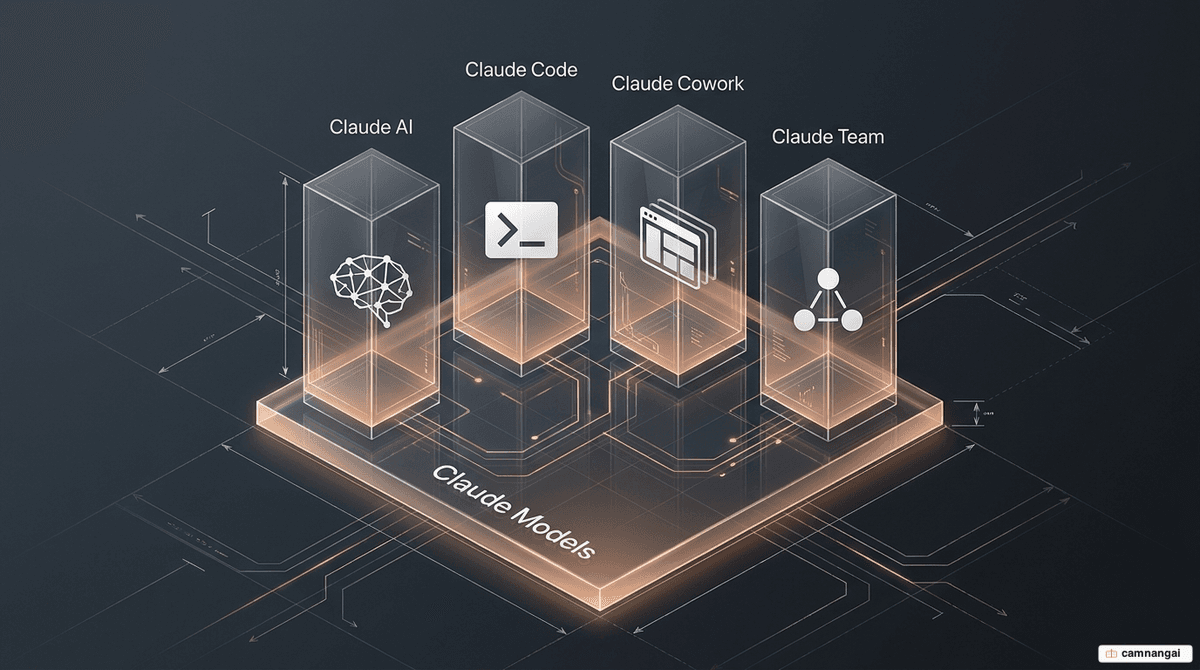
The Anthropic AI stack is a coordinated ecosystem of specialized products—Claude AI, Claude Code, Claude Cowork, and Claude Team—built on top of Anthropic's underlying models, such as Opus 4.7 and Sonnet 4. This architecture handles distinct layers of work: thinking, building, automating, and collaborating. By partitioning these functions, you can deploy AI agents with a capped "blast radius," ensuring that autonomous execution is isolated within secure, task-appropriate environments.
This multi-product approach acknowledges that the interface and environment dictate the utility of the model. Claude AI provides the high-latency reasoning layer, while Claude Code acts as an autonomous agent for software engineering. Claude Cowork automates enterprise workflows via application integration, and Claude Team supplies the infrastructure for shared organizational context.
Why can't a single AI model do everything?
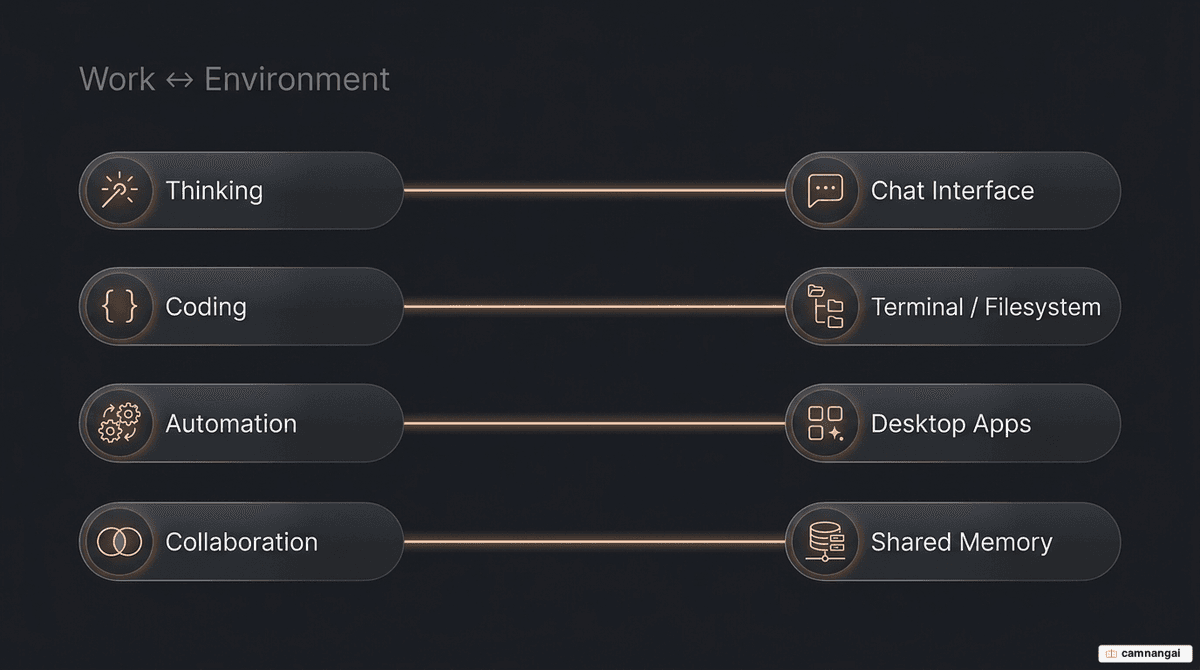
While the underlying model provides raw reasoning capability, using a single chatbot for all organizational functions is architecturally unsound. Just as a hammer and a screwdriver are optimized for different physical interactions, AI agents require specialization based on their operational environment:
- Thinking work requires an interface optimized for natural language and long-context retrieval.
- Coding work requires low-latency access to a terminal, compilers, and a local filesystem.
- Automation work requires deep integration with desktop applications to bridge "manual glue work."
- Teamwork requires a shared context layer where organizational memory persists across users.
A single general-purpose interface cannot safely manage all these permissions simultaneously. Splitting the stack lets you grant specific environment access only where it is required for execution.
What is Claude AI for?
Claude AI is the primary interface for high-latency, long-context retrieval and reasoning. It is the conversational intelligence layer optimized for research and analysis where the primary output is structured data or text.
Its technical capabilities include:
- 1-million-token context window: Available in Opus 4.6 for processing massive document libraries or complex datasets.
- Artifacts: A dedicated UI for rendering and iterating on interactive content like React components and data visualizations.
- Vision understanding: Native analysis of visual inputs, including PDFs, architectural diagrams, and screenshots.
- Real-time web search: Integration for supplementing model knowledge with live web data.
Typical use cases are summarizing 200-page technical reports into actionable briefs, analyzing market research to identify competitive trade-offs, and converting meeting transcripts into structured project plans and status updates.
The trade-off is scope: Claude AI is restricted to a server-side environment. It cannot execute code on your local machine, manipulate your local files, or interact with your desktop applications.
What can Claude Code do?
Claude Code is an autonomous developer agent. Unlike legacy completion tools that suggest lines of code, Claude Code handles task-level execution by navigating codebases and running terminal commands.
To initialize Claude Code in your repository:
npm install -g @anthropic-ai/claude-code
claude-code init
Usage data points to a shift in how engineers rely on it:
- Task autonomy: The agent chains an average of 21.2 consecutive tool calls per task, a 116% increase in autonomy over previous versions.
- Feature implementation: Usage for building new features grew from 14.3% to 36.9% as the agent's ability to plan and execute complex changes improved.
- Papercut remediation: 8.6% of tasks involve fixing minor quality-of-life issues—refactoring, terminal shortcuts—that would otherwise stay in the backlog.
- Full-stack augmentation: Usage data shows researchers using it for front-end visualizations and security engineers using it for deep code understanding of unfamiliar repositories.
How does Claude Cowork automate work?
Claude Cowork is the enterprise workflow automation platform designed to eliminate the "manual glue work" between disparate SaaS applications. Its release contributed to the "SaaSpocalypse," marked by sharp stock declines in legacy providers like IBM (-13.2%) and ServiceNow (-8.5%) as investors realized AI could automate work previously requiring teams of analysts.
Cowork is built on the Model Context Protocol (MCP), an open-source standard donated to the Linux Foundation that provides stable, standardized connections to any data source. It operates as a desktop agent with access to local files and applications including Excel, PowerPoint, Slack, and Gmail.
Representative automation workflows include:
- Extracting tabular data from 50+ PDFs into standardized Excel templates.
- Automatically updating board decks by pulling the latest metrics from Google Sheets into PowerPoint.
- Organizing thousands of local files based on specified naming taxonomies.
How does Claude Team support collaboration?
Claude Team provides the shared intelligence layer, letting organizations scale context and intelligence across groups rather than individual silos.
- Shared projects: Persistent workspaces where team members contribute to and access shared Claude threads.
- Team memory: A repository for organizational context, including terminology, project history, and past decision rationale.
- Knowledge management: Centralized access to documents, so all agents and users operate from a single source of truth.
How the team plan compares to an individual one:
| Feature | Claude Pro (Individual) | Claude Team |
|---|---|---|
| Shared projects | No | Yes |
| Team memory | No | Yes |
| Collaborative drafting | No | Yes |
| Admin controls | No | Yes |
| Usage pooling | No | Yes |
| Minimum users | 1 | 5 |
How does Anthropic contain the risk of these agents?
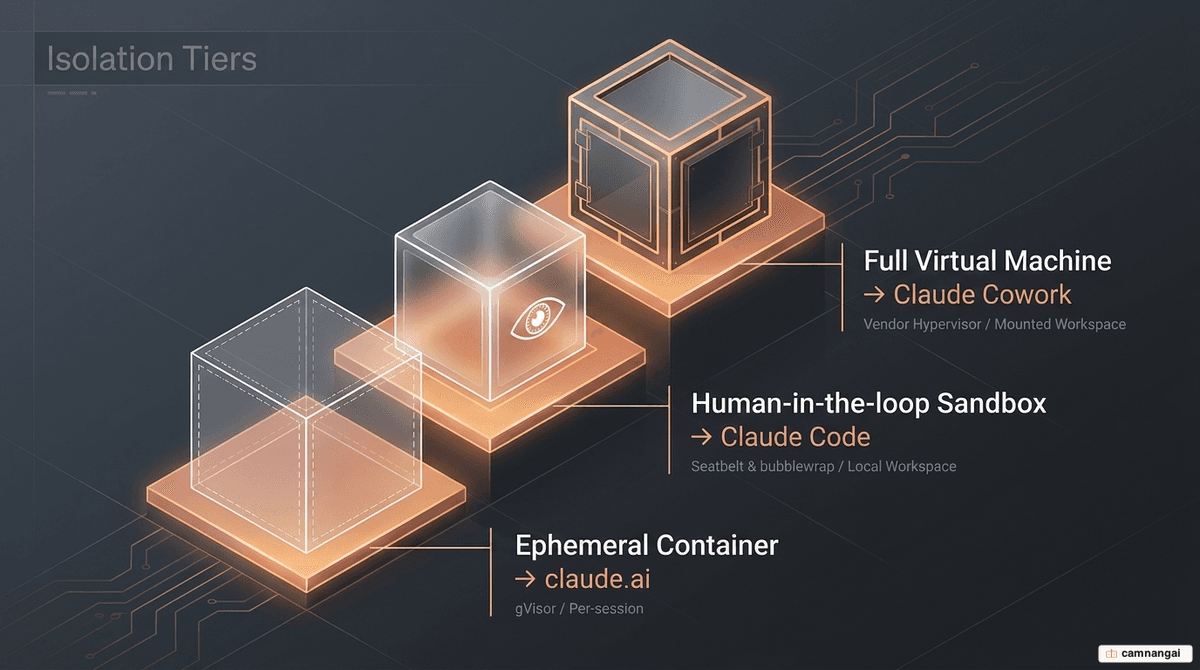
Agentic deployment requires "capping the blast radius" to prevent model misbehavior or external attacks from compromising the host system. Anthropic uses three distinct isolation patterns:
- Ephemeral containers (claude.ai): Code execution occurs in server-side gVisor containers. The filesystem is wiped after every session, protecting infrastructure and isolating tenant data.
- HITL sandbox (Claude Code): Uses a human-in-the-loop model with OS-level sandboxing (Seatbelt on macOS, bubblewrap on Linux). Critically, project-local configurations (e.g.,
.claude/settings.json) are not parsed until after the trust boundary is established, to prevent pre-consent exploits. - Local VM (Claude Cowork): Provides the highest isolation via a full virtual machine (Apple Virtualization / Windows HCS). The VM has its own kernel and only "sees" user-mounted folders.
These boundaries map directly to identified risks:
- Direct prompt injection: Red-teaming showed Claude could be phished into exfiltrating
~/.aws/credentials. The defense relies on environment-layer egress blocks and filesystem boundaries that keep sensitive directories out of the sandbox. - Egress via approved domains: Attackers attempted to use the Anthropic API to upload stolen data to their own accounts. This was fixed with a man-in-the-middle proxy inside the VM that rejects any request not using the VM's specific session token.
- Model security: Using Opus 4.7, attack success on the Gray Swan Red Teaming benchmark is held to approximately 0.1% on single attempts.
Which Claude product should you choose?
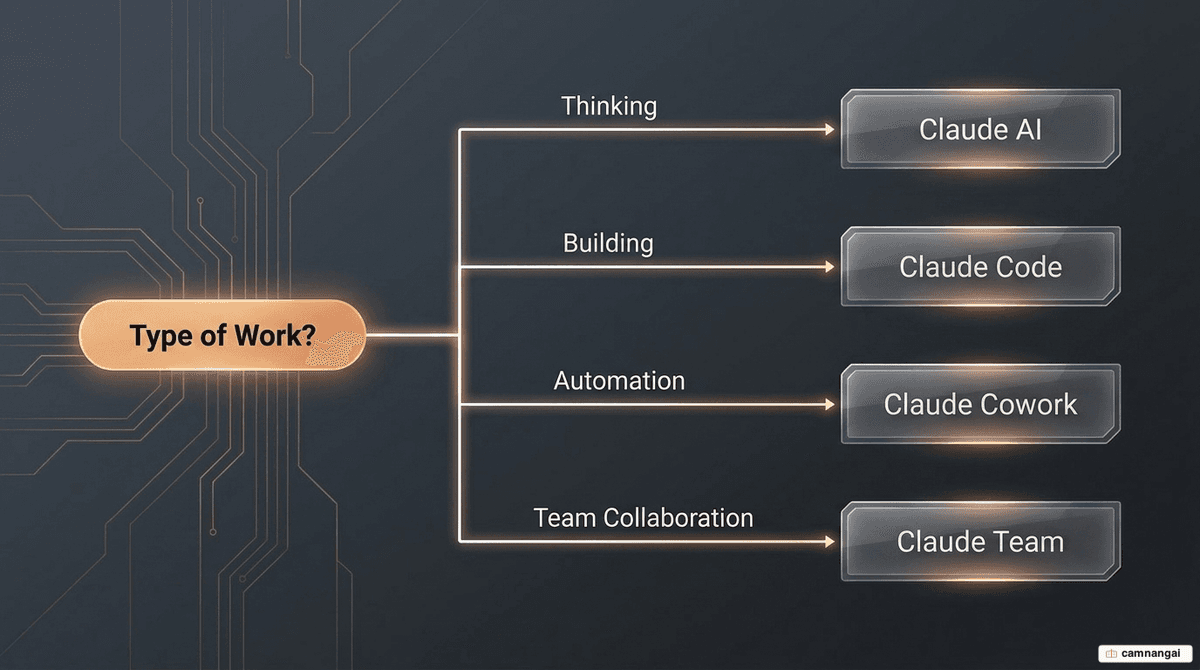
By work type:
- Thinking and analysis: Choose Claude AI. Optimized for high-latency reasoning and synthesis.
- Building and engineering: Choose Claude Code. Optimized for repository-level changes and autonomous terminal tasks.
- Repetitive workflows: Choose Claude Cowork. Optimized for cross-app automation and file management.
- Collective knowledge: Choose Claude Team. Optimized for shared organizational context and usage pooling.
By role, developers lean on Claude Code for autonomous execution inside the dev environment; analysts and operations staff use Claude Cowork for data extraction and SaaS-heavy workflows; and managers use Claude Team for oversight and shared context.
By budget, an individual runs on the free tier (limited) or Claude Pro at $20/month. Teams pay $25–30 per user/month with a five-user minimum, and Enterprise carries custom pricing for SOC2/HIPAA compliance and advanced administrative control.