Vibe coding is the process of using natural language and AI agents to build software.
It is a technical discipline, not a shortcut. The term implies a focus on intuition, but the core discipline that makes it work is rigorous management and engineering design, not just "vibes." You are managing a high-output, zero-context assistant that needs explicit constraints to prevent the immediate accumulation of technical debt.
Treat vibe coding as a way to avoid learning architecture and your project will fail at the first sign of complexity.
The shift in workflow moves the engineer from manual syntax entry to high-level system supervision. It asks you to prioritize verifiable workflows over hype. Successful vibe coding depends on your ability to maintain state across sessions, audit AI-generated logic for silent failures, and enforce architectural boundaries. Without that oversight, the speed of code generation leads straight to high-entropy codebases that are impossible to maintain or extend.
In a production environment, your goal is to replace the tedious parts of engineering—scaffolding, boilerplate, and one-off scripts—while keeping the same rigor you would apply to manual implementations. What follows is the technical standard for engineering-led AI development: the latencies, failure rates, and system states that define professional software.
What is vibe coding, and when does it actually fit?
Vibe coding is a strategic transition from line-by-line manual coding to high-level intent direction. The term, defined by Andrej Karpathy in 2025, describes a workflow where you "say stuff, run stuff, and copy-paste stuff." The human engineer supplies the architectural vision and the constraints; the AI agent executes the implementation details. You are not just writing prompts. You are orchestrating a multi-layer assembly process where the agent manages files, runs terminal commands, and refactors code based on your feedback.
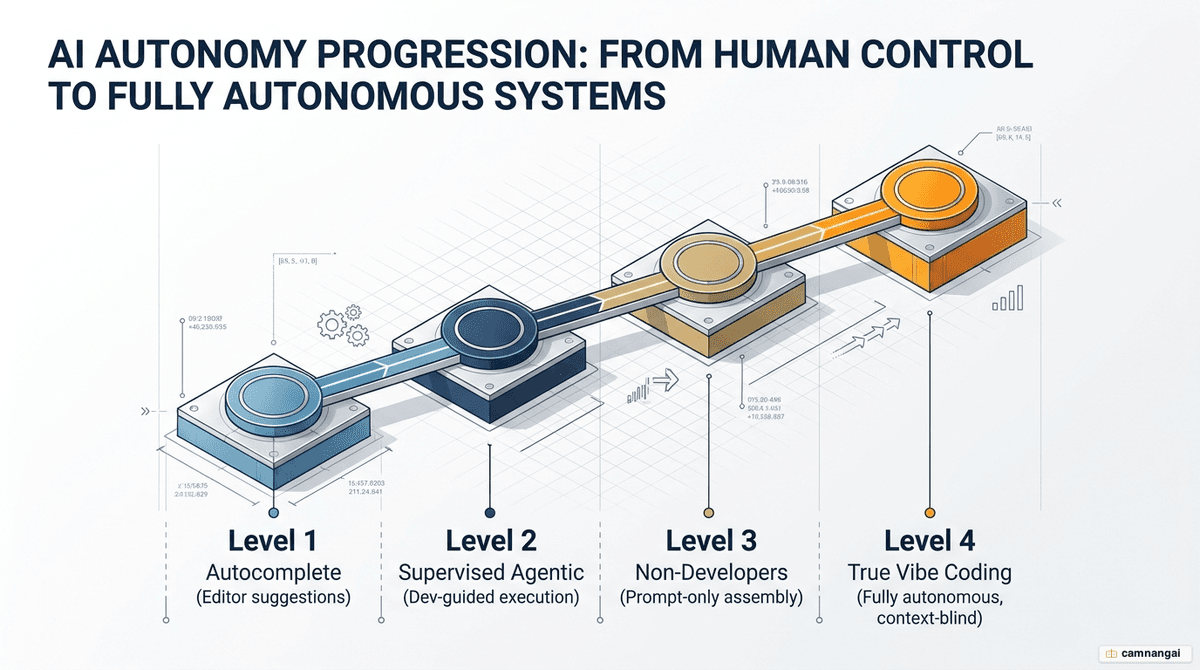
The vibe coding spectrum ranges from simple autocomplete (Tab completion in Cursor) to agentic coding where the AI operates autonomously inside a terminal. At the agentic end, you may choose not to read large portions of the code, treating it as "instant legacy code" that serves a specific, immediate purpose. That works for SaaS prototypes, internal business automations (Salesforce scanners, transcript analyzers), and "personal software" that would never justify the engineering hours of manual development.
The risk profile is higher than traditional development. AI tools hallucinate and drift architecturally when they lack a rigid roadmap. If you reach for these tools because you cannot solve the problem manually, you are in a high-risk position. Vibe coding is a force multiplier for people who understand the fundamentals—it lets them ship functional, secure products 10x to 50x faster by automating the low-value syntax and boilerplate.
Why plan before the AI writes its first line of code?
Iterating directly in code is a technical-debt trap. When you work out the details of a feature during implementation, the AI makes assumptions about your data layer and logic that later requirements contradict. Every mid-stream change leaves vestiges of discarded ideas behind. That residue confuses the agent on the next step, and you get a feedback loop of inconsistent logic and cascading bugs. The fix is the Plan-Review-Fix cycle.
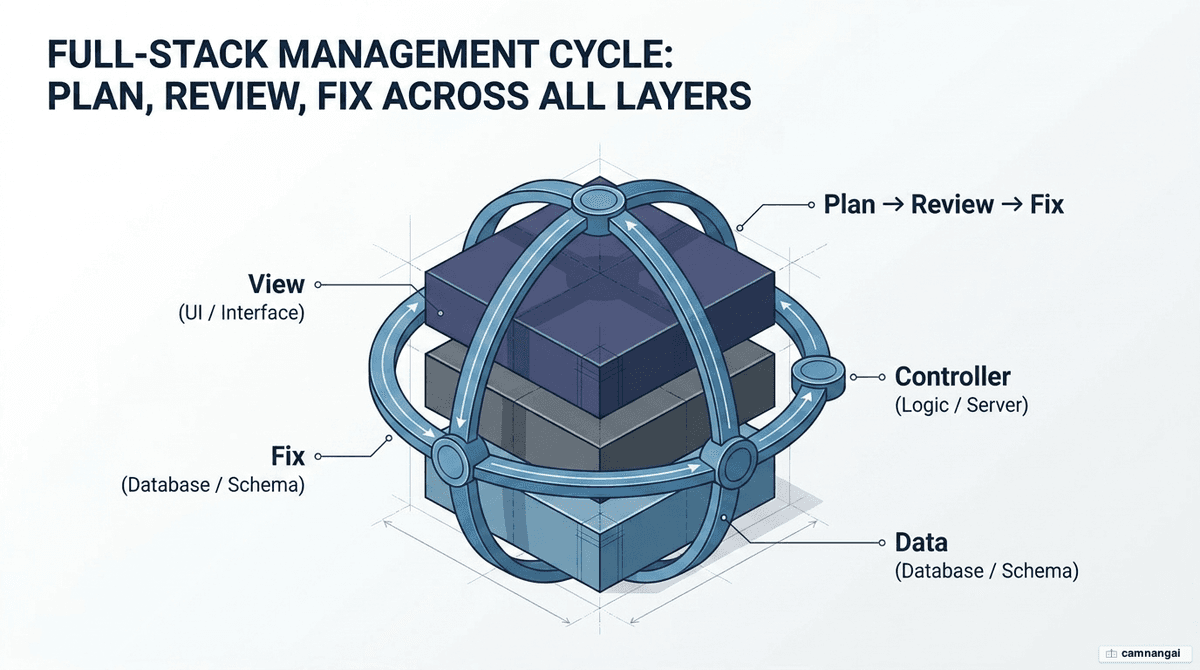
Every project starts with a Product Requirements Document (PRD) or technical specification written in Markdown. That document is the source of truth for the AI. Map the user journeys and technical realizations before any source file is touched. By iterating on the plan in Markdown instead of code, you avoid the high cost of refactoring a broken implementation.
The critical piece is a plan-reviewer step: a separate AI agent, or a specific prompt pattern, tasked with auditing the primary agent's plan. The reviewer checks for logical flaws, architectural drift, and dependency risks. It looks specifically for hallucinated package names and over-engineered solutions that do not fit the existing stack. The goal is a three-party agreement between you, the planning agent, and the reviewer. Once the plan is verified, the AI has a constrained environment to operate in, and the probability of failure drops sharply.
How do you set the rules: convention files for the AI?
AI agents need a persistent source of truth to hold project memory across sessions. Without explicit rules, the agent falls back on generic training-data patterns that conflict with your stack. Configuration files act as the project's long-term memory, keeping naming, structure, and deployment consistent.
| What to include | What to exclude |
|---|---|
| Build, test, and run commands | Bug history from previous sessions |
| High-level folder structure | Temporary notes or sprint deadlines |
| Specific tech stack (e.g. Effect) | Decisions that were recently reversed |
| Declared "off-limits" zones | Long explanations of "why" |
| Naming and style conventions | Experimental code you plan to delete |
Follow the 50-line rule: keep context files lean and focused. Past roughly 50 lines, the agent starts to struggle with instruction priority. Different tools read different filenames for these conventions—CLAUDE.md, .cursorrules, GEMINI.md, or .windsurfrules.
Here is a CLAUDE.md file for a TypeScript stack:
# Project Standards: Product Talk MCP

## Tech Stack

- TypeScript, Node.js, FastMCP
- Vitest for unit/integration tests
- Prisma for ORM

## Rules

- Use PascalCase for classes, camelCase for functions.
- All database operations must include error handling.
- No logic in index.ts; use src/services/.
- Max component length: 150 lines.

## Commands

- Build: npm run build
- Typecheck: npm run typecheck
- Test: npm test
What does building in small end-to-end slices mean?
Vertical slicing is an engineering strategy that lowers error rates by limiting the AI's operational surface. Instead of building horizontally—all database models, then all controllers, then the UI—you build one discrete feature from the database to the interface. That keeps all three layers (data, controller, view) in sync.
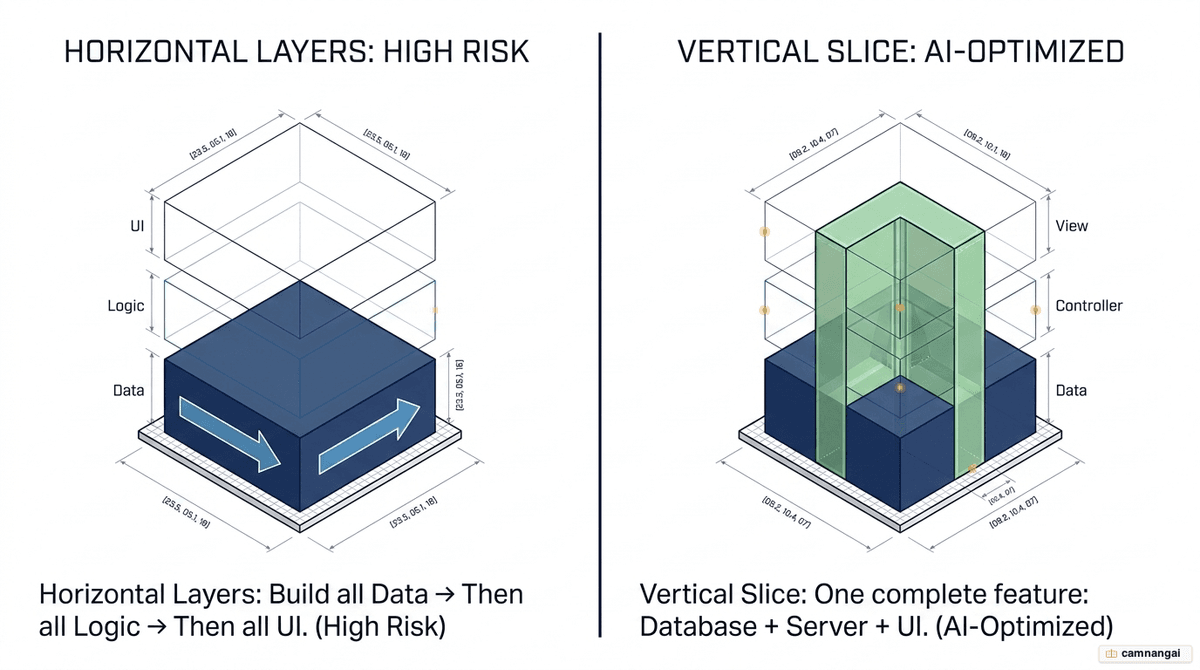
AI agents make fewer mistakes on small, constrained tasks. Ask an AI to build an entire application horizontally and the odds of hallucination in the connections between layers climb fast. "Batteries-included" frameworks like Wasp or Laravel shrink the surface further, because they handle the infrastructure glue and let the AI focus on business logic.
The workflow for one vertical slice:
- Define the DB entity — create the schema for this feature only.
- Define operations — outline the server-side functions and logic.
- Define UI components — build the specific pages or components.
- Connect via hooks — use framework-specific hooks to tie the layers together.
This incremental approach catches architectural mismatches early. If a database schema change breaks a UI component, you find out inside the slice, not days later during a massive integration phase.
How do you manage context so the AI avoids "context rot"?
Context rot is a technical limitation of Large Language Model (LLM) attention. As a session runs on, the context window fills with prompts, file states, and error logs. The AI loses track of earlier constraints and develops "amnesia," repeating mistakes you already corrected. You hold output quality steady by managing context through habit and active commands.
Standard practice is the "one feature, one session" rule. Start a fresh conversation for every new feature to prevent context bleed, where the AI carries patterns over from an unrelated part of the codebase. For repetitive tasks, keep a structured directory like .claude/skills/ with SKILL.md files that define reusable prompt patterns for jobs like security reviews or test generation, so behavior stays consistent across sessions.
In tools like Claude Code, three commands keep context clean:
/clearresets the context window entirely. Use it after any discrete task, and never assume the AI remembers a decision afterward./compactsummarizes the conversation history, preserving important architectural decisions while freeing tokens for new work./rewindrolls back to a checkpoint. If the AI enters a logic loop or takes a wrong architectural turn, restore the codebase and conversation to the last known-good state.
Reviewing AI-generated code: what should you scrutinize?
"It runs" is not a valid metric for production-grade software. AI-generated code often lacks the documentation, security evidence, and architectural alignment a release needs. Run a rigorous Implement-Review-Fix cycle and audit every diff as if it were a pull request from a junior developer.
Scrutinize these high-risk areas:
- Public API changes — renamed endpoints or changed function signatures that break client-side integration.
- File deletions — files the AI deems "redundant" that actually hold vital configuration or documentation.
- Hard-coded secrets — API keys, tokens, or passwords left in source.
- N+1 query patterns — inefficient database loops that crash under production load.
- Logic collisions — new code that ignores domain boundaries or duplicates existing logic.
The review confirms the data, controller, and view layers stay in sync. Use an AI reviewer such as CodeRabbit for the first pass to catch syntax and standard bugs, then a human second pass for architectural fit and security posture.
When the AI gets stuck in a "doom loop", how do you break out?
A doom loop is when the AI fixes one bug and breaks another feature, over and over. It comes from conflicting requirements, stale context, or a fix built on a flawed diagnosis. Because AI follows the patterns it sees, a messy codebase keeps generating more high-entropy, broken code.
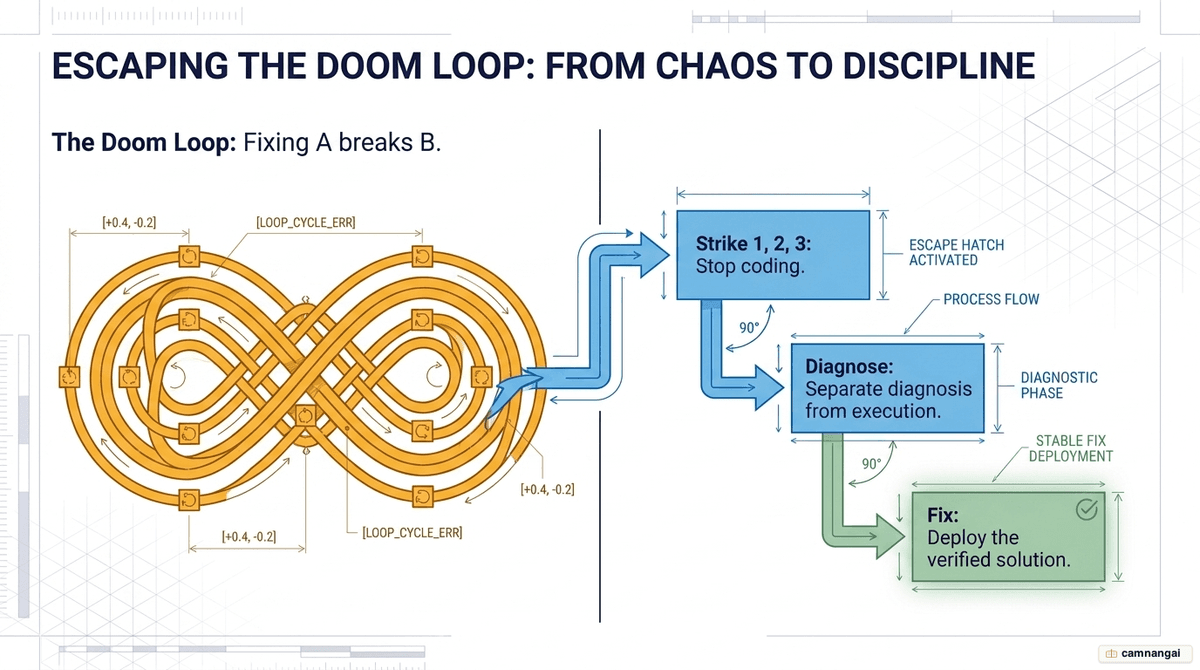
The break-out move is to separate diagnosis from fixing. Stop the AI from writing code. Start a fresh conversation, give it only the error logs and the relevant code, and instruct it: "Diagnose the logical flaw only. Do not write code yet."
Apply the three-strikes rule: if the AI fails to resolve a bug after three attempts, stop—you are digging a deeper hole. Roll back to the last known-good Git commit. Often the fastest fix is to delete the feature and restart with a tighter prompt. Watch, too, for "failover logic": silent bugs where the AI quietly falls back to a keyword search when semantic search fails, so a feature looks like it works while it is technically broken.
Before you deploy, what should you check and protect?
The final stage is where stability and security are won. Run local validation before anything is pushed to production.
- Build and typecheck — run
npm run buildandnpm run typecheckbefore every commit. This catches the bulk of build errors AI agents overlook. - Environment security — keep all sensitive data in
.envfiles and list those files in.gitignore. Never let an AI commit secrets to a repository. - Off-limits zones — declare them explicitly in your config files. Instruct the AI never to modify files governing authentication or payment processing.
- Database safeguards — back up production data before any AI-generated schema migration, and require a written migration plan with a "down" SQL path for rollbacks before the AI touches the database.
Why do core programming skills still decide the outcome?
AI is a force multiplier, not a replacement for engineering fundamentals. If the tools write code you cannot understand or fix, you are a liability to the project. You have to read the diff to confirm the logic is sound and the security boundaries hold.
Engineering expertise is what lets you spot silent bugs—the places where the AI adds failover logic that hides errors, so a feature looks functional while it fails underneath. In complex scenarios, such as asynchronous logic in the Effect framework, be ready to turn the agent off and write the code by hand. Falling for the siren song of AI-generated complexity leads to skill atrophy and unfixable bugs.
The "personal software" movement shows the payoff of these skills. An engineer can use AI to build tailor-made tools—a custom SVG-to-PNG converter, a square-image generator—that solve a specific problem in minutes. These projects are not worth a full team's time, but they are technically sound because an expert who understands the browser and the underlying APIs is guiding them.
FAQ
Should I use Replit or Cursor for vibe coding? Use Replit when you want an integrated platform that handles hosting, databases, and deployment automatically. Use Cursor for a professional IDE with granular control over local files and support for a wider range of AI models through its CLI and agentic modes.
How do I handle AI usage limits effectively? Use separate API keys per project to track cost and stop one broken session from draining your whole budget. Don't spend tokens on trivial tasks like CSS tweaks or copy edits—do those by hand. Reset the context window with /clear to keep token consumption down.
Is a CLAUDE.md file necessary for small projects? Yes. Without a config file the AI lacks the specific memory of your stack and naming conventions, so it reverts to generic patterns and introduces inconsistencies. It is the manual the agent reads before every task.
References
- A Practical Guide to Getting Stuff Done with Vibe Coding — Observe
- A Structured Workflow for Vibe Coding Full-Stack Apps — Wasp
- How to Use Vibe Coding Effectively as a Dev — freeCodeCamp
- The Golden Rules of Full-Stack Vibe Coding — Darren Coxon
- Vibecoding Tips: The Ultimate Collection — Karo Zieminski
- Vibe Coding Best Practices: Avoid the Doom Loop — Product Talk
- Vibe Coding Best Practices — roadmap.sh