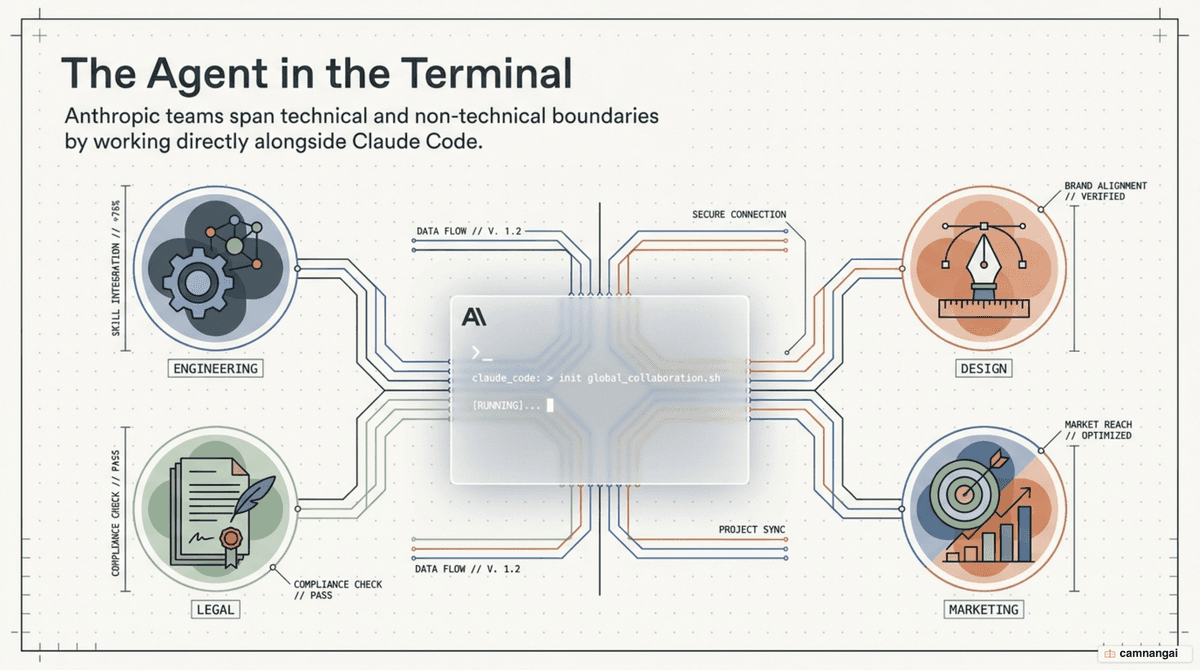
You've likely seen the marketing about AI agents. Here's how Anthropic's teams actually use Claude Code at work. It isn't a magic wand; it's a terminal-integrated tool that handles the low-level heavy lifting of engineering. Teams use it to navigate millions of lines of code, resolve production outages, and build internal tools that would otherwise rot in the backlog.
Whether you're a senior developer or a non-technical lead, the tool acts as a dedicated partner that executes commands and reads documentation. It handles the "janky" parts of the development cycle, moving you from design to verified code faster. Adopting it means shifting your focus from syntax and manual context-gathering to high-level system architecture and strategy.
The sections below break down the specific workflows and metrics teams have established across Anthropic's technical and non-technical groups.
Codebase navigation — the "first stop"
When you rotate into a new project or hit an unfamiliar corner of the monorepo, your first instinct shouldn't be to manually grep through files. Anthropic's Product Engineering team treats Claude Code as the "first stop" for any task. You point it at the codebase to identify relevant files for a fix or a new feature before you even open your IDE, which eliminates the cognitive load of manual context gathering.
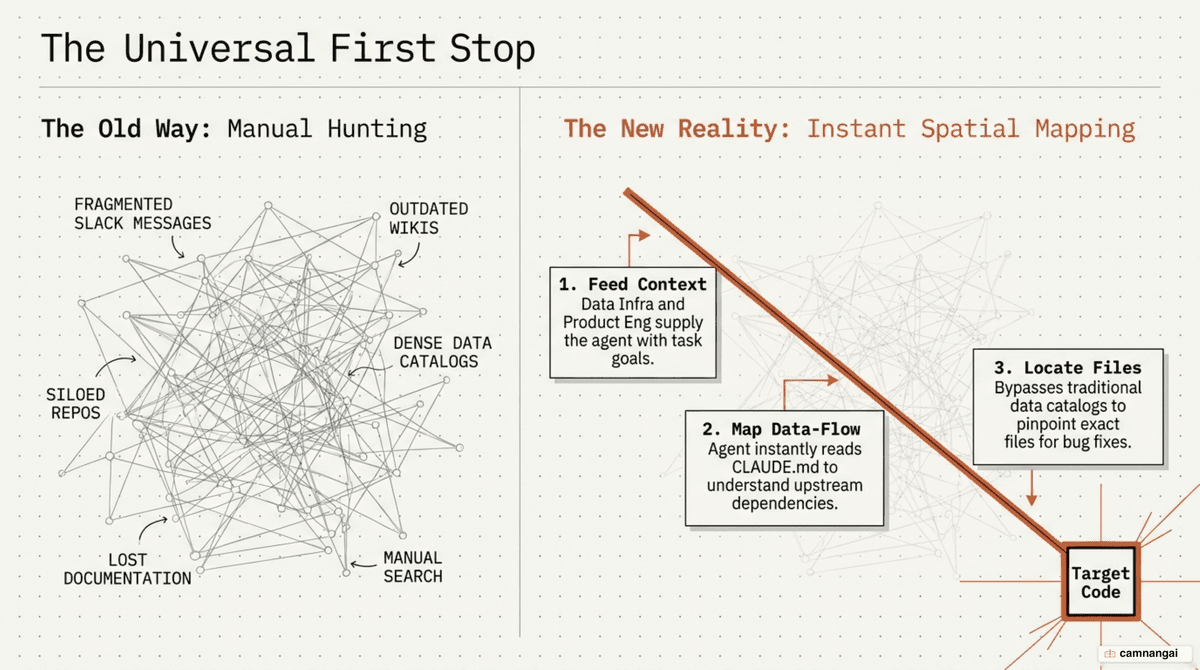
For new data scientists on the Infrastructure team, this has become the default onboarding path. Instead of hunting through often-outdated data catalogs, you feed the tool your entire codebase. It reads the CLAUDE.md files, identifies architectural dependencies, and shows you exactly which upstream sources feed into your dashboards. This has largely replaced traditional data-discovery tools inside the company.
This capability is especially useful for closing skill gaps. Inference team members without a deep machine learning background use the tool to explain model-specific functions. Tasks that previously took an hour of Google searching and documentation review now take 10–20 minutes — an 80% reduction in research time. By making the tool your primary navigation layer, you already have a functional map of the system by the time you start writing code.
It also turns the codebase into a living wiki. Instead of leaving knowledge scattered in a few people's heads or on static doc pages, you can query any piece of business logic straight from the terminal. That matters most in legacy code whose original author has left the team: you ask "Why was this function designed this way?" and Claude Code analyzes the commit history and surrounding logic to give an evidence-backed answer.
Testing and code review
You know the "design doc → janky code → refactor → give up on tests" trap. Anthropic's Security Engineering team flipped it by using the tool for a strict test-driven development (TDD) cycle. You ask the tool for pseudocode based on your design, then guide it through generating a comprehensive test suite before the actual implementation is written. That keeps your code testable and reliable from the first commit.
When you deal with unfamiliar languages, the tool acts as a translator for your logic. The Inference team uses it to verify functionality in Rust — a language not everyone on the team knows fluently. You describe the desired test logic in plain English, and the tool writes the implementation in the codebase's native language, allowing cross-language validation without requiring every developer to be a polyglot.
Automation doesn't stop at authoring. The Product Design team wires the tool into its CI/CD pipelines via GitHub Actions. When a developer opens a PR, the tool can automatically handle comments about formatting, function renaming, or test-case refactoring. This cuts friction from the review process and keeps code-quality standards high without manual intervention.
Beyond that, letting the tool self-verify is a cheap way to hold quality. Many teams configure it to run builds, tests, and lints after every change. If something fails, it reads the stack trace and loops on the fix until everything passes — which saves time and clears out the careless mistakes that manual coding tends to introduce.
Debugging and troubleshooting, faster
Production incidents demand immediate resolution, and your ability to reason about unfamiliar code under pressure is often the bottleneck. Anthropic's Security Engineering team saw a roughly 3x improvement in resolution speed by feeding stack traces and system documentation into Claude Code. Infrastructure debugging that normally took 10–15 minutes of manual scanning now takes about 5, as the tool traces control flow and diagnoses the root cause.
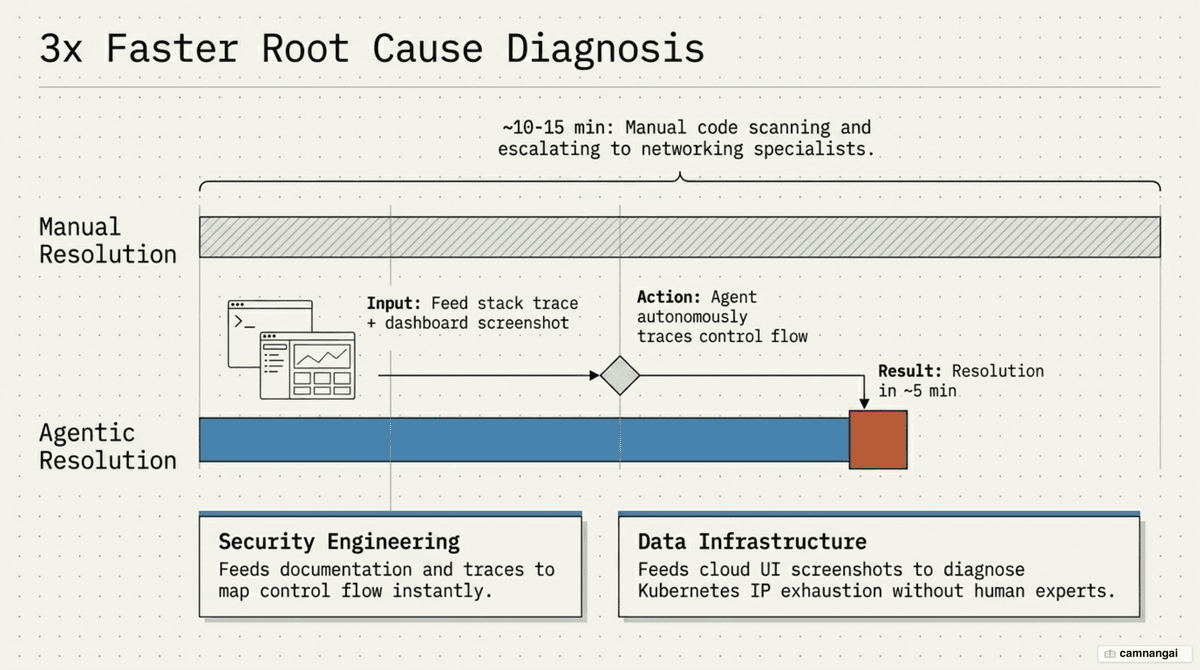
The Data Infrastructure team used the tool's multimodal capabilities during a real Kubernetes incident. When pods stopped scheduling, the team fed screenshots of their monitoring dashboards into the tool. It guided them menu-by-menu through the Google Cloud UI to identify pod IP-address exhaustion, then provided the exact commands to create a new IP pool and add it to the cluster:
gcloud container clusters update production-cluster \
  --add-additional-ip-range pods-range-2=10.4.0.0/14 \
  --region us-central1
Having the precise command ready meant no copy-pasting from Stack Overflow mid-outage. The workflow saved around 20 minutes and bypassed the need to pull in a specialized networking engineer during the incident. By handing the tool observed behavior and logs, you can review proposed fixes for systems you didn't write, which keeps bug resolution moving across the whole stack.
That confidence extends to unfamiliar code. Product Engineering developers no longer hesitate to fix bugs in repos they've never touched. By asking "Can you fix this bug? Here's the behavior I'm seeing," they get proposed changes with detailed explanations. Instead of waiting on a Slack response, they investigate themselves, check the fix for safety, and commit with minimal oversight — which drains the company-wide backlog faster.
Prototyping and autonomous loops (code → test → iterate)
For rapid prototyping, you can enable "auto-accept mode" (Shift+Tab) for a high degree of supervised autonomy. The Product Design team sets up a loop where Claude Code writes code, runs a build, runs tests, and iterates on any errors it hits. This is most effective for peripheral or experimental components, where you can review an 80%-complete solution before applying the final refinements.
A concrete example: data scientists built an entire React application of more than 5,000 lines of TypeScript to visualize reinforcement learning (RL) model performance — despite knowing very little TypeScript. They handed the coding to the tool and still shipped a deep analytics dashboard. These aren't throwaway tools; they're durable, well-structured apps reused across future model evaluations.
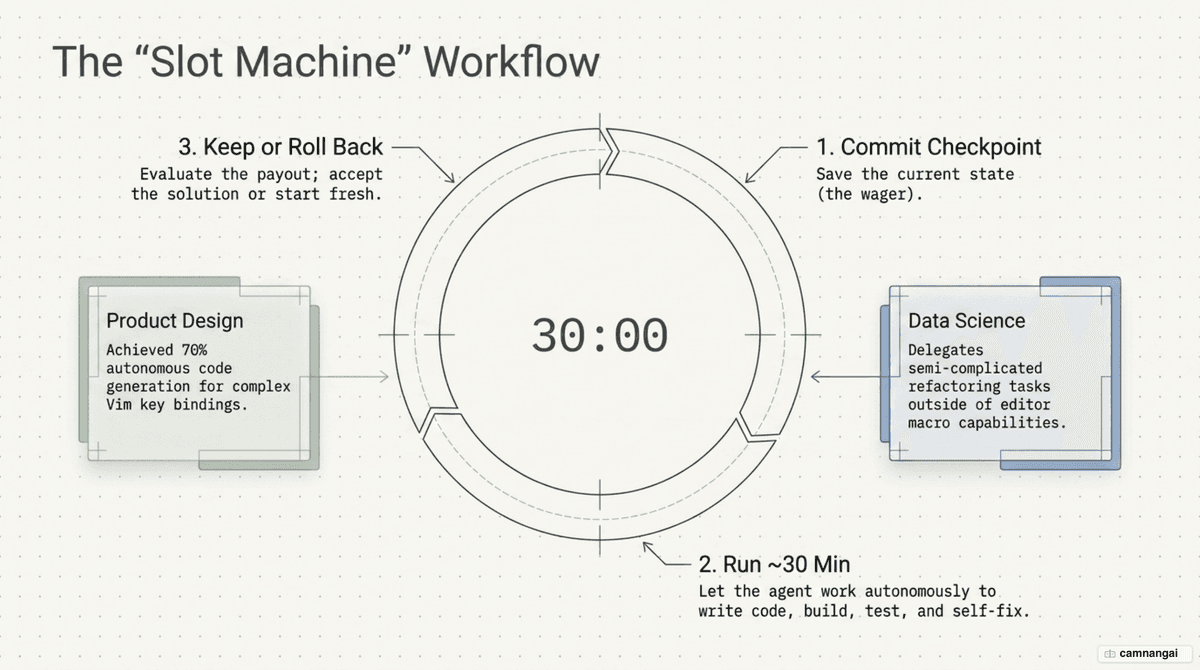
The team calls this the "slot machine" approach. The engineer runs git commit to save a safe checkpoint, issues a complex request, and lets the tool work autonomously for 30 minutes. If the result is good, they keep it; if the tool goes off track or breaks the logic, a single rollback returns them to a clean state. Programming shifts from careful manual typing to setting a goal and supervising the outcome.
The tool is even used to build features for itself. The team asked it to implement Vim key bindings, and roughly 70% of the final implementation came from Claude Code's own autonomous work, needing only a few iterations. Being willing to experiment with peripheral features in autonomous mode surfaces product capabilities that weren't originally on the roadmap.
Automation with sub-agents, slash commands, and MCP servers
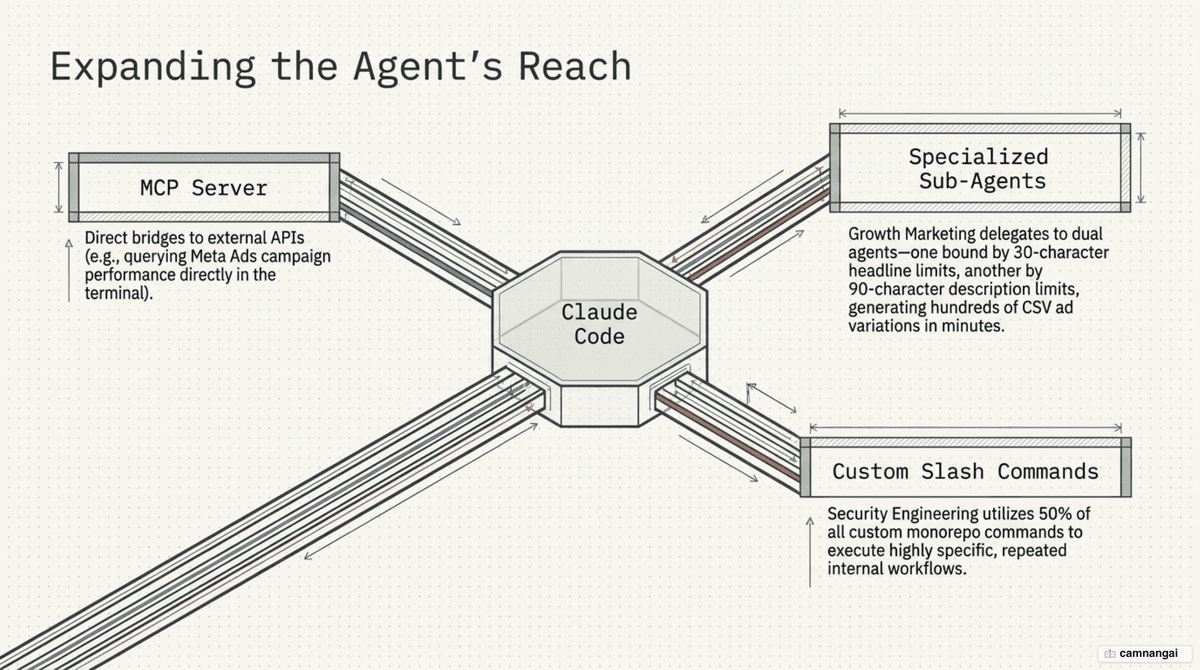
The tool's real power is how far you can extend it with sub-agents and the Model Context Protocol (MCP). Anthropic's Growth Marketing team built a workflow that processes CSV files containing hundreds of ads. Two specialized sub-agents split the work: one focuses on headlines within a 30-character limit, the other on descriptions under 90 characters. The system generates and optimizes hundreds of Google Ads variations in minutes — work that used to take about 2 hours by hand, now down to 15.
On the design side, cloning variations is just as fast. The team built a Figma plugin through the tool that identifies frames and programmatically generates up to 100 design variations by swapping headlines and descriptions. Each batch takes half a second, letting a small team run large-scale social experiments without an army of manual copy-pasting.
Real-time data queries also get simpler with MCP servers. The Marketing team built an MCP server wired directly to the Meta Ads API. Instead of switching tabs and logging into the ad manager, they ask straight from the chat interface: "How's ad spend today?" or "How is campaign X performing?" This deep integration cuts context-switching cost and supports near-instant, data-driven decisions.
Custom slash commands are also widespread — the Security Engineering team alone accounts for 50% of all custom slash-command usage across the monorepo. These commands standardize repeated workflows, from quick security scans to packaging bug reports as markdown for Slack or Google Docs. Personalizing the tool through slash commands and MCP servers turns Claude Code from a general assistant into a specialized toolkit tuned to each department's needs.
CLAUDE.md: the shared foundation for every team
The CLAUDE.md file is the guiding "brain" that gives Claude Code the context it needs about a project. Unlike an ordinary README, it's where you record coding standards, build commands, test commands, and workflow-specific instructions. Every team, from Infrastructure to Product, treats maintaining and updating this file as a priority so the tool stays on track and consistent.
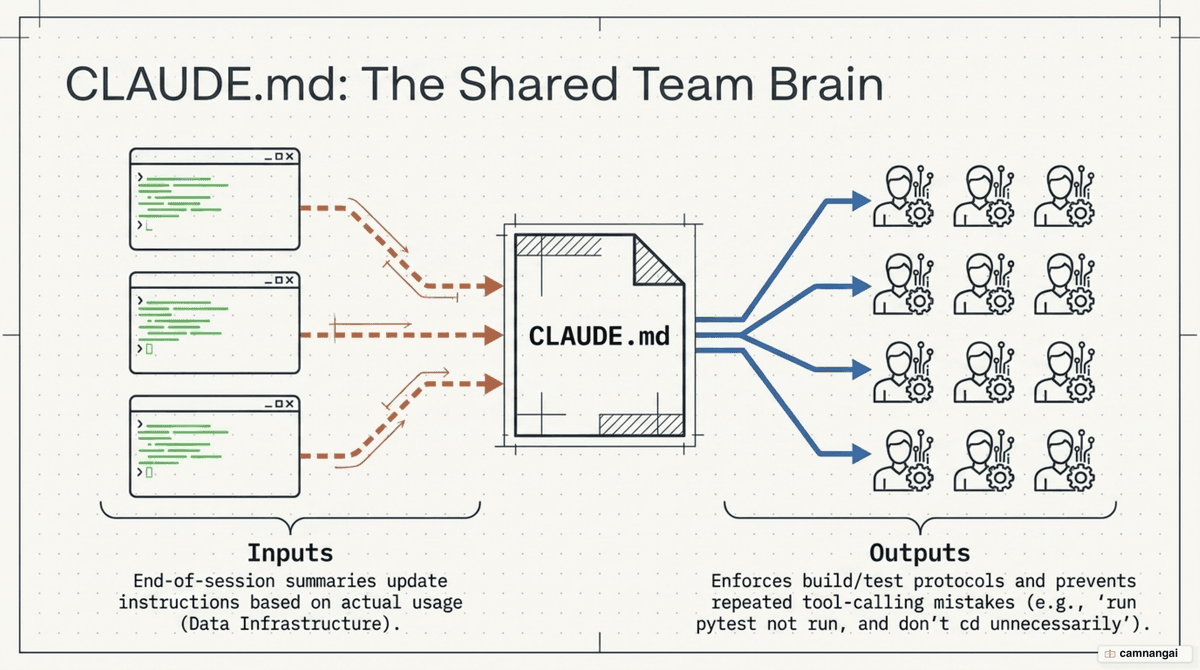
At the end of a session, many teams ask the tool to summarize its work and suggest updates to CLAUDE.md. This creates a self-improving loop: the agent learns from its own work to serve better next time. The RL Engineering team, for instance, added notes telling Claude Code not to cd into directories unnecessarily and to always use absolute paths when running pytest. Small tweaks like these give autonomous tasks a lot more stability.
Here's a minimal CLAUDE.md structure you can adapt:
# CLAUDE.md

- Build: `npm run build`
- Test: `pytest path/to/tests` (use the right path, do not cd)
- Style: write React as functional components
- Rule: no inline styles, always use Tailwind classes
- Deploy: review `terraform plan` before apply
Personalizing this file lets the tool understand the smallest technical nuances of each project. Instead of repeating old mistakes, it follows instructions that have been tuned over time. That matters most in large systems where architecture and security rules must be enforced consistently. CLAUDE.md is the thread that keeps AI and humans speaking one "technical language" toward a shared quality bar.
When non-coders build their own tools
One of the biggest shifts at Anthropic is the Legal team using Claude Code to build its own tools. They stood up a working internal "phone tree" that routes legal requests to the right specialist attorney automatically. It shows that once the syntax barrier disappears, the people who understand a process best can digitize it themselves — no waiting on IT.
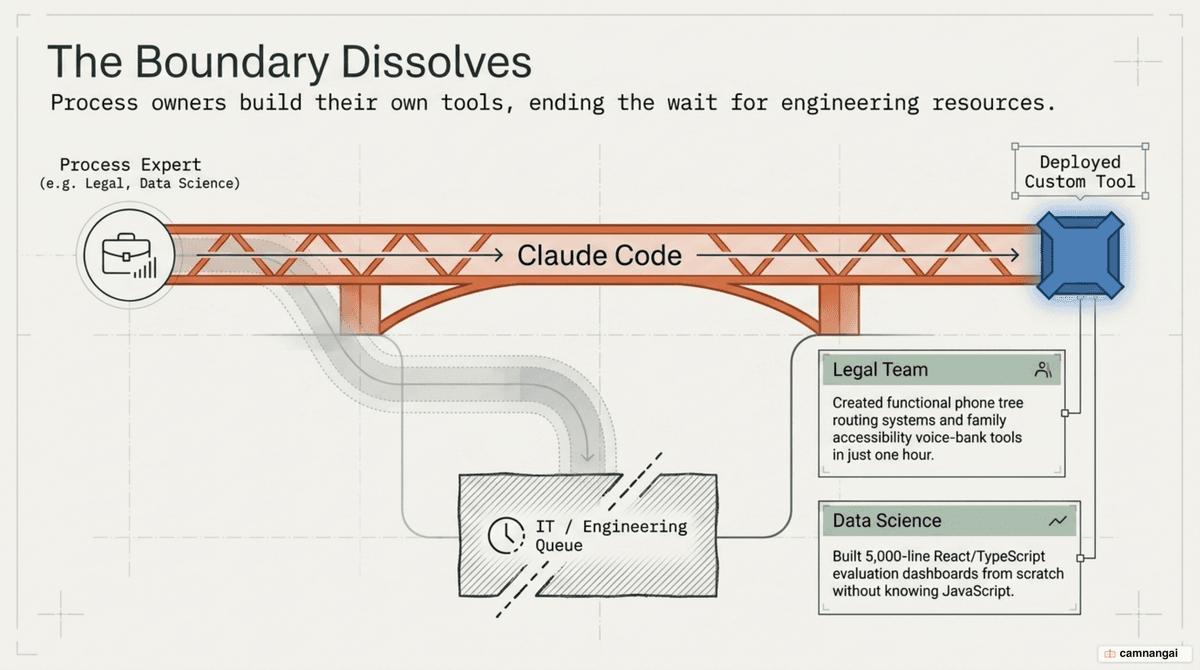
More strikingly, Legal team members built genuinely human tools: a communication aid for people with speech difficulties due to a medical diagnosis, based on speech-to-text. In just one hour, they had a prototype that suggests responses and speaks them through a voice bank, filling gaps that existing accessibility tools hadn't covered. They even took the prototype to specialists at UCSF to validate the idea.
Anthropic actively encourages sharing "toy" prototypes across departments. These small projects are often the seed for larger innovation, helping everyone see the real potential of AI agents. When a lawyer or a marketer shows they can build a working app, the ripple effect pushes other teams to automate the pain points in their own daily work.
The build-it mindset is no longer an engineering privilege. With the tool, a legal staffer can screenshot the interface they want, describe the logic, and have the agent implement it step by step. The process is visual and safe, so non-specialists still feel in control of what they're creating. That's a real step forward for democratizing technology inside a company.
Where should you start?
The first practical piece of advice is to break complex workflows into pieces. Don't ask the tool to build an entire system in a single command. Work in two steps: plan carefully in the Claude.ai interface to talk through the architecture, then bring that plan into Claude Code to implement it piece by piece. Task classification matters too: let the agent run autonomously on peripheral features, and supervise core business logic closely.
Committing frequently is the key to working safely with an agent. Treat every small change as a checkpoint. If the tool refactors something wrong or breaks the system, you roll back to the nearest stable state in seconds. That lets you stay in an experimental mindset — willing to let the agent work deep in the codebase without fear of unrecoverable damage.
Prioritize repetitive tasks that are backed by an API, like optimizing ad copy or managing infrastructure through a CLI. These are where the tool performs best and delivers immediate economic value. Build custom slash commands for those tasks to save daily typing. You can also use custom memory files to tell the agent about your role (for example: "I'm a designer, explain each code change step by step").
Finally, treat Claude Code as an iterative partner, not just a code generator. Interact continuously, ask "Why did you choose this approach?", and request a simpler option when the agent drifts toward over-engineering. The mix of the AI's persistent execution and the human's strategic direction is the formula behind the results Anthropic's teams are seeing.