Anthropic launched Claude Whiteboards, Sheets, and Data on November 10, 2026, shifting Claude's functional surface area from a conversational text assistant into an integrated workspace suite. This release targets core office workflows by embedding interactive spreadsheets, visual planning canvases, and enterprise data analytics natively alongside the chat interface.
You gain access to the three workspace artifact types—Whiteboards, Sheets, and Data—across all paid subscription tiers, including Pro ($20/month), Team, and Enterprise accounts on web, desktop, and mobile platforms. Concurrently, upgraded Interactive Connectors are rolling out across all service tiers, including free accounts, on web and desktop.
Rather than generating static text responses that you must manually copy into external tools, Claude constructs persistent, stateful artifacts within your session. By maintaining direct model access to these live artifacts, Anthropic eliminates the context fragmentation inherent in switching between isolated enterprise applications.
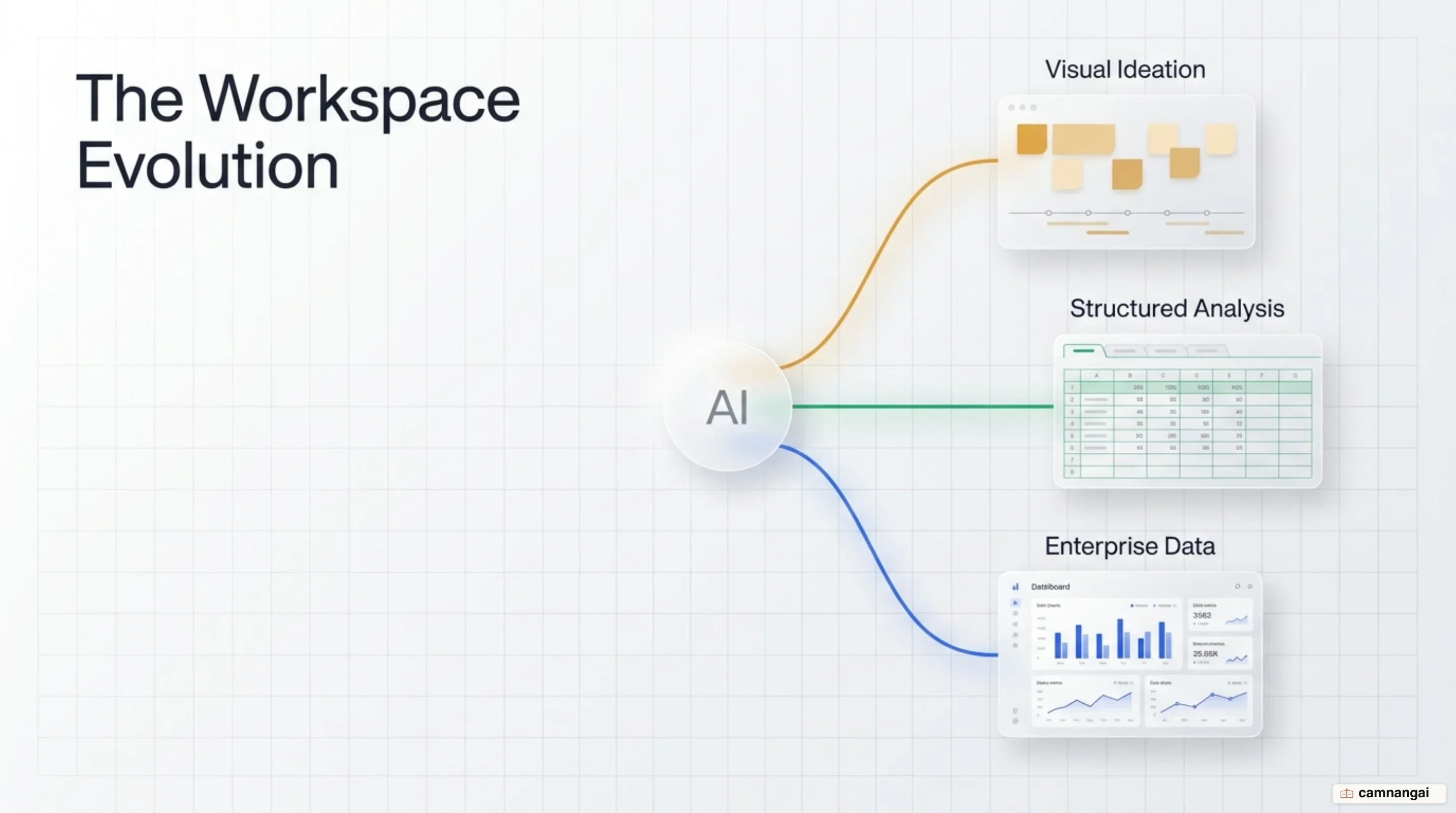
Claude's Workspace Shift: From Conversational Chatbot to Collaborative Suite
Traditional conversational AI interfaces introduce severe context loss during complex engineering and operational workflows. When you query a standard chatbot for architectural planning or data analysis, the resulting outputs must be manually copy-pasted into external software like Microsoft Excel, Google Sheets, or Miro. Once data leaves the chat container, the model loses visibility into subsequent edits, forcing you to re-prompt the system with updated state parameters whenever revisions occur.
Anthropic addresses this structural limitation by deploying a persistent artifact architecture. On November 10, 2026, Anthropic released Claude Whiteboards (beta) and Claude Sheets (beta), while transitioning Claude Dashboards out of beta to general availability under the rebranded name Claude Data. These tools operate as interactive side-by-side workspace artifacts on web, desktop, and mobile platforms for paid tiers (Pro at $20/month, Team, and Enterprise). Meanwhile, upgraded Interactive Connectors roll out across all plan tiers, including free accounts, on web and desktop interfaces.
The primary architectural advantage of this environment is native cross-format state retention. Rather than severing model context when changing representations, a baseline concept developed on a visual whiteboard can be transformed directly into a structured multi-tab spreadsheet, which can then populate an enterprise analytics dashboard. Model sub-agents continuously observe, diff, and adjust state across Whiteboards, Sheets, and Data within a single unified session context without requiring redundant background prompts.
Claude Whiteboards: Turning Raw Brainstorms into Visual Plans
Claude Whiteboards introduces a visual spatial canvas designed to structure unstructured natural language inputs in real time. Instead of rendering long blocks of linear text during architecture reviews or technical strategy sessions, you can talk through complex system requirements and instruct Claude to lay out the components visually. The engine generates structured boards complete with sequence timelines, component ownership assignments, and target delivery dates.
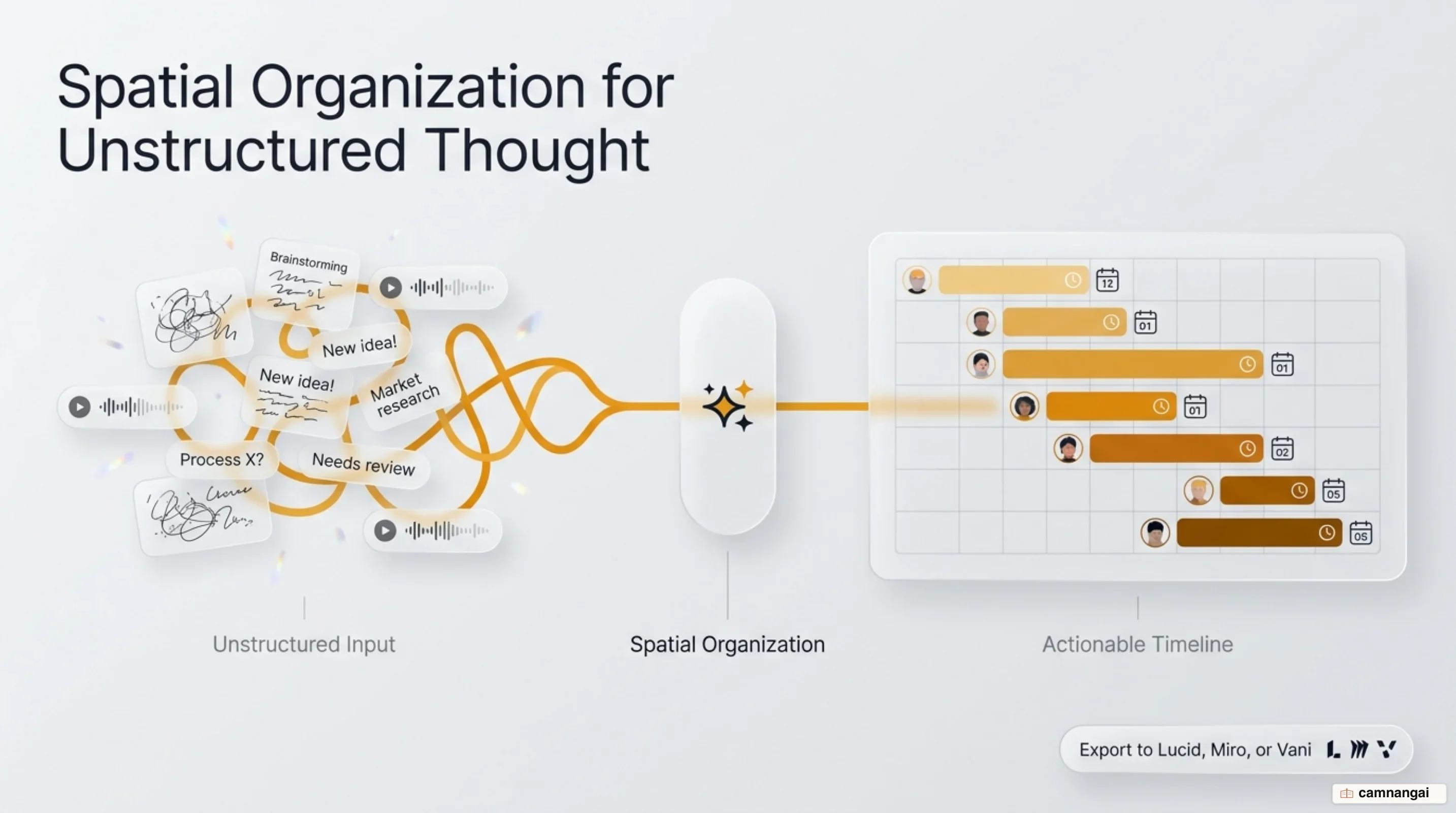
For team operations, Whiteboards handles meeting synthesis and retrospective sorting. During a post-mortem or retrospective meeting, team members populate the shared canvas with unorganized notes. You can prompt Claude to group individual items by root-cause themes, map dependencies, and automatically derive actionable task items assigned to specific engineers.
The UI supports granular element targeting. By drawing a selection box around any subsection of the board, you isolate specific nodes and query Claude regarding those exact components. Once an ideation cycle concludes, the board can be converted natively into a formatted text document or presentation deck, or exported directly to external visual platforms including Lucid, Miro, and Vani by Zoho.
Claude Sheets: Interactive Spreadsheets and Real-Time Co-Editing
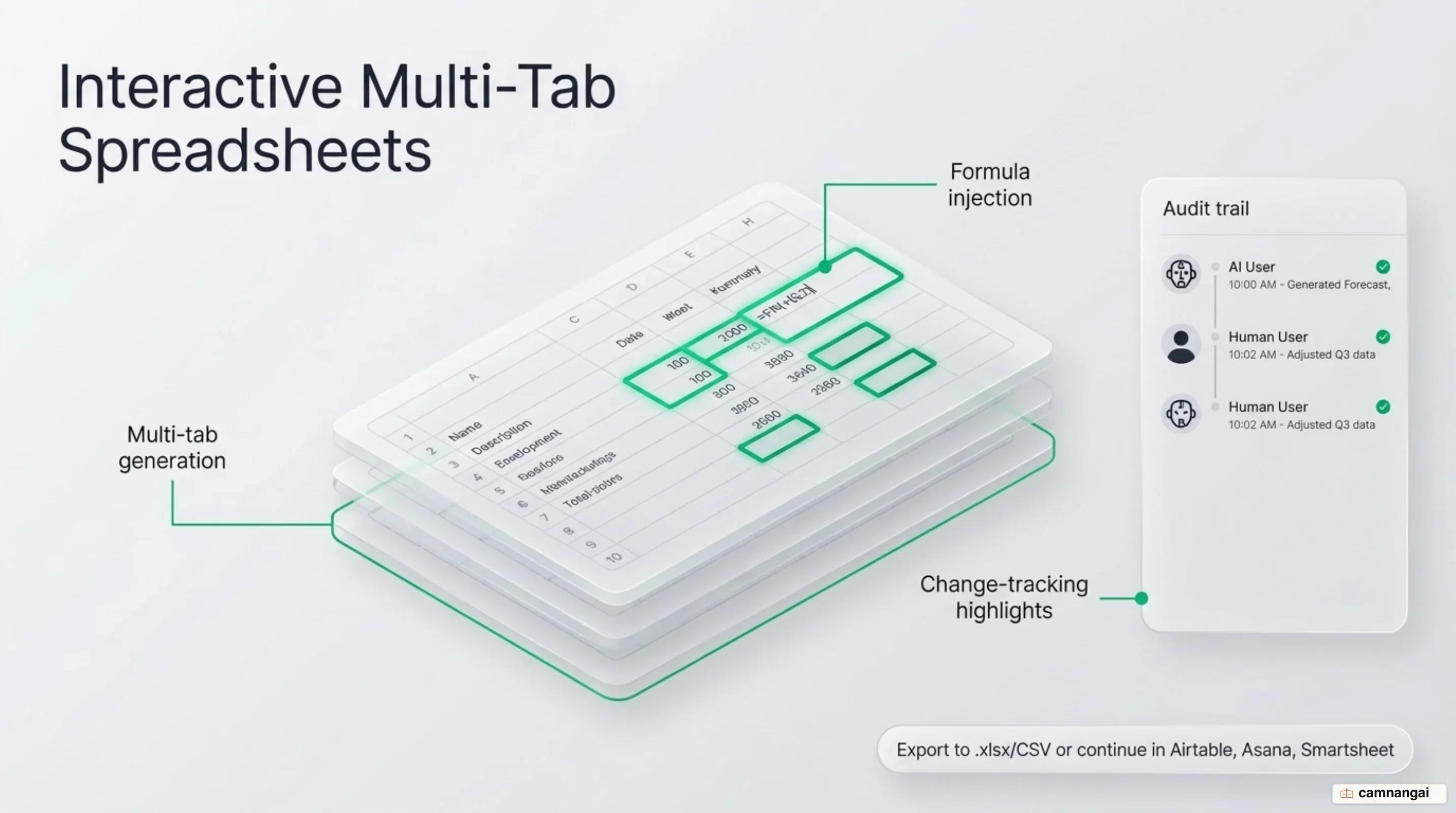
Claude Sheets provides natural language spreadsheet generation directly within the artifact side-panel. You can request operational cost models, capacity planning sheets, or project tracking tables, and Claude constructs multi-tab spreadsheets formatted with native calculations, explicit column data types, and cell-level drop-down menus.
+-----------------------------------------------------------------------+
|                         CLAUDE SHEETS ARTIFACT                        |
+-----------------------------------------------------------------------+
| [Tab 1: Infra Costs]  [Tab 2: Usage Specs]  [Tab 3: Summary]          |
|                                                                       |
| Cell A1: Service     | Cell B1: Allocation | Cell C1: Actual [AI Edit] |
| --------------------------------------------------------------------- |
| Cell A2: Compute VM  | Cell B2: $12,000    | Cell C2: $11,450 [Visual] |
|                                                                       |
| * AI visual highlights outline cell-level edits in real time          |
| * Shared workspace allows simultaneous user and AI co-editing         |
+-----------------------------------------------------------------------+
Co-editing capabilities allow human operators and AI sub-agents to modify cell values concurrently. When Claude updates values or updates formulas across a range, it applies visible cell-level highlights, allowing engineering reviewers to audit math adjustments and structural changes immediately.
Claude Sheets operates under clear technical boundaries:
- It supports simple tabular operations, but lacks native pivot tables, protected cell ranges, custom filter views, and macros.
- Each workbook enforces a hard ceiling of 100,000 cells.
- There is no native execution of cell-level external API calls or dynamic live data fetching inside individual cells.
For analytical workloads requiring heavy financial modeling or macro execution, native simple operations up to the 100,000-cell boundary must be offloaded. You can export workbooks to .xlsx or CSV formats, execute operations via the Claude for Excel add-in, or sync state directly with connected workspace tools including Airtable, Asana, monday.com, and Smartsheet.
Claude Data: Connecting Enterprise Metrics with Certified Queries
Claude Data (formerly Claude Dashboards) functions as the enterprise analytics engine of the suite, establishing direct query connections to production data warehouses and CRMs, including Snowflake, BigQuery, Amazon Redshift, ClickHouse, and Salesforce. It transforms raw database records into interactive visual dashboards, automated data stories, and short narrated executive video summaries.
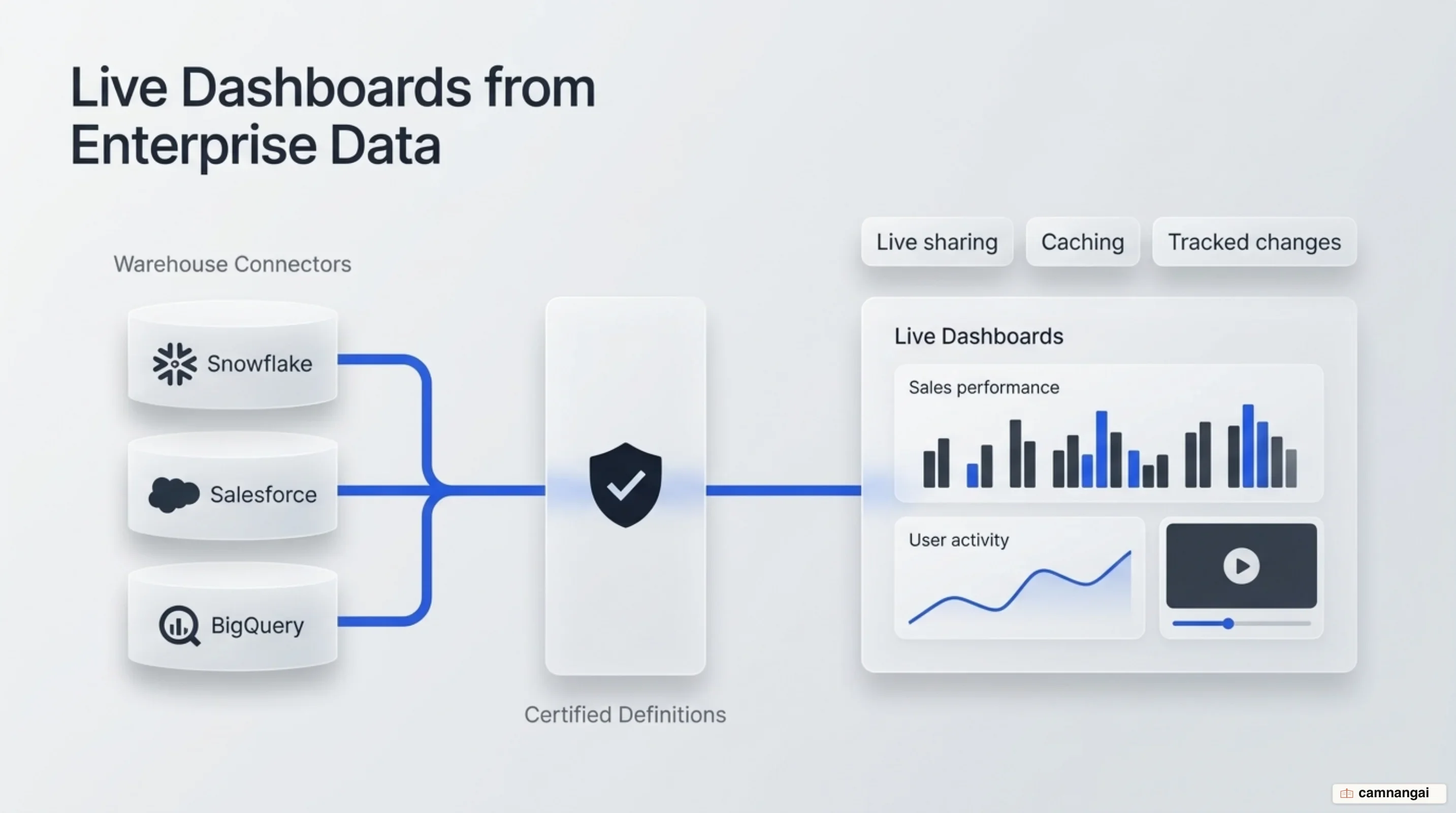
To mitigate metric divergence across business units, Claude Data incorporates certified queries. Data engineering teams can define and lock validated SQL scripts and metric definitions. When non-technical stakeholders generate charts based on these standardized queries, the UI displays a certified badge, confirming that the visualization aligns with central data warehouse definitions.
+-----------------------------------------------------------------------+
|                         CLAUDE DATA DASHBOARD                         |
+-----------------------------------------------------------------------+
| [ Metric: Monthly Active Users ] ---> [ BADGE: Certified Query (Beta) ]|
| Query Source: Snowflake / BigQuery Warehouse                          |
| Caching Cadence: Configured per-dashboard (e.g., 1-hour refresh)      |
|                                                                       |
| Output Formats & Feature Controls:                                    |
|  * Interactive Visual Dashboards & Custom Design Systems              |
|  * Analytics Partners: Amplitude, Mixpanel, Omni, PostHog, Sigma      |
|  * Version History & Rollback Controls                                |
|  * Secure Live Sharing (Restricted execution view for viewers)        |
+-----------------------------------------------------------------------+
The underlying infrastructure provides solid performance and governance controls:
- Dashboards support configurable, per-dashboard caching cadences to restrict repetitive warehouse query execution and control compute costs.
- Visual outputs accept custom CSS and enterprise design to enforce brand compliance natively.
- Complete version logging maintains layout and query delta histories, allowing point-in-time rollbacks.
- Secure live sharing enables non-database users to view live query visualizations while restricting raw database credentials and blocking unapproved arbitrary SQL execution.
Claude Data integrates natively with enterprise BI and analytics platforms, including Amplitude, Mixpanel, Omni, PostHog, Sigma, and ThoughtSpot.
Interactive Connectors and Third-Party Integrations
Anthropic extended its integration framework via (MCP) Apps. Building on the open MCP standard, interactive connectors allow partner applications to open full UI frames directly beside the chat canvas or in full-screen mode. This enables you to inspect and modify state inside external applications while allowing Claude sub-agents to perform authorized mutations without severing session context.
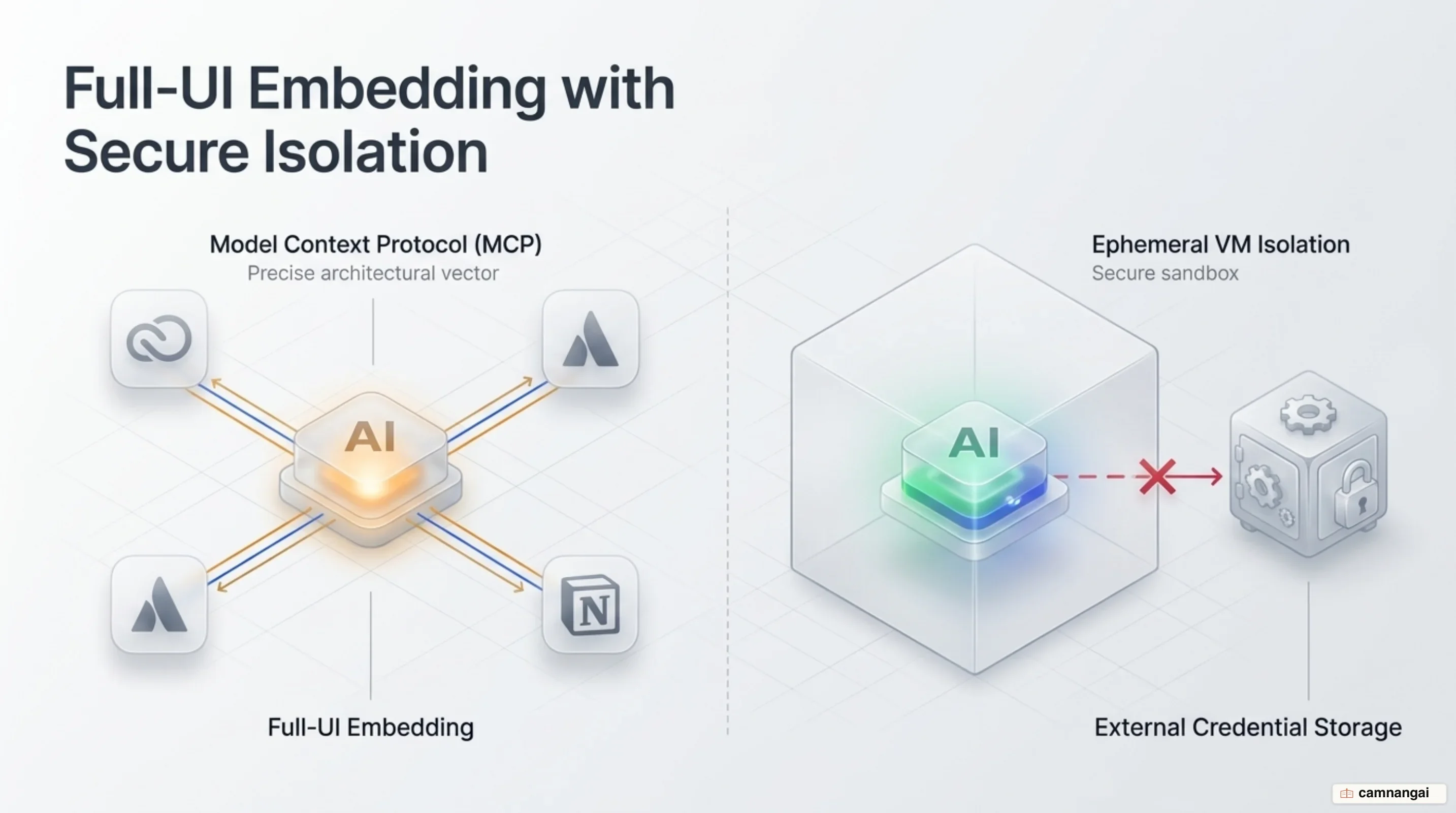
The Claude Marketplace indexes over 9,000 connectors and plugins. Supported interactive application partners include Adobe, Atlassian, Box, Notion, Asana, Canva, Carta, Dropbox, monday.com, Smartsheet, Vercel, and Webflow. Pre-built enterprise plugins include Salesforce, NetSuite, and Workday, with upcoming integrations slated for Figma, Harvey, and Shopify alongside the forthcoming Claude Meetings feature.
+-----------------------------------------------------------------------+
|                    CLAUDE ENTERPRISE SECURITY ARCHITECTURE            |
+-----------------------------------------------------------------------+
| [ User Cloud Session ]                                                |
|   |-- Runs inside isolated Virtual Machine (VM) per session           |
|   |-- Connector Credentials stored strictly OUTSIDE session VM        |
|                                                                       |
| [ Data Security & Auditing ]                                          |
|   |-- Transit Encryption: TLS 1.2+ / At-Rest Encryption: AES-256      |
|   |-- Compliance API Integration -> Splunk, CrowdStrike (100+ tools)  |
|                                                                       |
| [ Admin Control Layer ]                                               |
|   |-- Granular Spending Limits per user/department                    |
|   |-- Action Restrictions (e.g., Allow Slack Read / Block Slack Send) |
|   |-- Claude Auto-Connect (Beta) for domain-wide app provisioning     |
+-----------------------------------------------------------------------+
Enterprise infrastructure enforces strict multi-tenant session isolation. On Enterprise plans, every active cloud session executes within its own isolated virtual machine (VM). External service credentials and API tokens are stored strictly outside the VM execution boundary. Data is encrypted in transit via TLS 1.2+ and at rest using AES-256. Security operations teams can monitor activity using system audit logs and a dedicated Compliance API that integrates with over 100 security tools, including Splunk and CrowdStrike.
Administrative governance tools provide policy enforcement. Administrators configure role-based access for specific connectors, set domain-level spending limits, and restrict granular API actions—such as permitting Claude to read Slack channels while explicitly blocking message transmission permissions. For enterprise deployments, Claude auto-connect enables admins to configure service authentications centrally, automatically provisioning employee access upon their first interaction within Claude.
Hands-On Verdict: Strong for Ideation, Not an Immediate Office Replacement
Production metrics across enterprise deployments demonstrate clear latency reductions for document assembly, code-to-spec drafting, and review workflows:
- Advantage Solutions (FP&A): Automated forecast cycle slide assembly, validation, and variance commentary, reducing preparation time from 10 hours to under 30 minutes.
- Anthropic Legal Team: Deployed an automated Slack-based legal review tool using playbook redlining, cutting marketing review cycles from 3 days to 24 hours.
- Gusto (Commercial Legal): Built an automated contract workflow that transforms negotiated business terms into signature-ready agreements, reducing turnaround from over a week down to hours.
- HubSpot (Customer Success): Automated post-call workflow generation, extracting data from live HubSpot dashboards to compile customer emails within 30 minutes of call completion.
- Datadog (Product Management): Product managers use Claude to compress initial ideation down to feature briefs, PRDs, and testable prototypes within unified sessions.
The primary operational advantage is multi-format state synthesis. A single underlying dataset can concurrently maintain a spreadsheet, populate a visual whiteboard, render an executive presentation deck, and drive an analytics summary without manual data translation steps.
                       +------------------------+
                       | Unified Source Dataset |
                       +-----------+------------+
                                   |
         +-------------------------+-------------------------+
         |                         |                         |
         v                         v                         v
+------------------+     +-------------------+     +--------------------+
|  Claude Sheets   |     | Claude Whiteboards |     |  Claude Data / Deck|
| (100k Cell Max)  |     | (Visual Planning)  |     | (Certified Metric) |
+------------------+     +-------------------+     +--------------------+
However, from an enterprise architecture standpoint, this suite does not immediately supersede dedicated spreadsheet or BI stacks. Claude Sheets lacks the computational depth required for complex financial modeling—specifically missing pivot tables, native macros, custom filter views, and cell-level external data fetching. Similarly, Claude Data requires an established warehouse infrastructure and active certified query maintenance to prevent duplicate metric definitions across operational units.
When Should Your Team Adopt Claude's New Workplace Tools?
Deployment defaults depend on your organization's subscription tier and require explicit administrative management before rollout:
| Plan Tier | Claude Whiteboards | Claude Sheets | Claude Data | Admin Configuration Path |
|---|---|---|---|---|
| Team | Enabled by Default | Enabled by Default | Enabled by Default | Organization settings > Artifacts |
| Enterprise | Disabled by Default | Disabled by Default | Auto-Enables Nov 19, 2026 | Organization settings > Artifacts |
Adopt Claude's workplace tools immediately for cross-functional ideation, rapid prototyping, meeting synthesis, and ad-hoc warehouse query generation. Maintain high-volume transactional processing, complex financial macro modeling, and core corporate reporting inside dedicated stacks such as Excel, Google Sheets, and enterprise BI platforms.
References
- Anthropic adds Claude Sheets & Whiteboards for business — IT Brief
- Introducing Claude Whiteboards, Claude Sheets, and Claude Data — Claude by Anthropic
- Working with Claude Sheets, Whiteboards, and Interactive Connectors — Claude by Anthropic
- Claude now has its own workplace tools, taking on Microsoft Office, Google Workspace — Android Authority
- Claude just got 3 powerful new tools — and they could replace some of your favorite apps — Tom's Guide
- I tried Claude Sheets on 3 tasks - and it saved me hours of work in 10 minutes — ZDNET
- Claude artifacts: Sheets, Whiteboards and Data — Hello Growth
- Claude Whiteboards, Sheets and Data: What's New — CellCog