Finish this guide and you will have a working MCP server written in Python on SDK v2.0, serving a tool that pulls live forecasts from the National Weather Service (NWS) API and answering calls from Claude Desktop.
Before you start, you need Python 3.10 or later, the uv package manager to create the virtual
environment, and Claude Desktop on macOS or Windows.
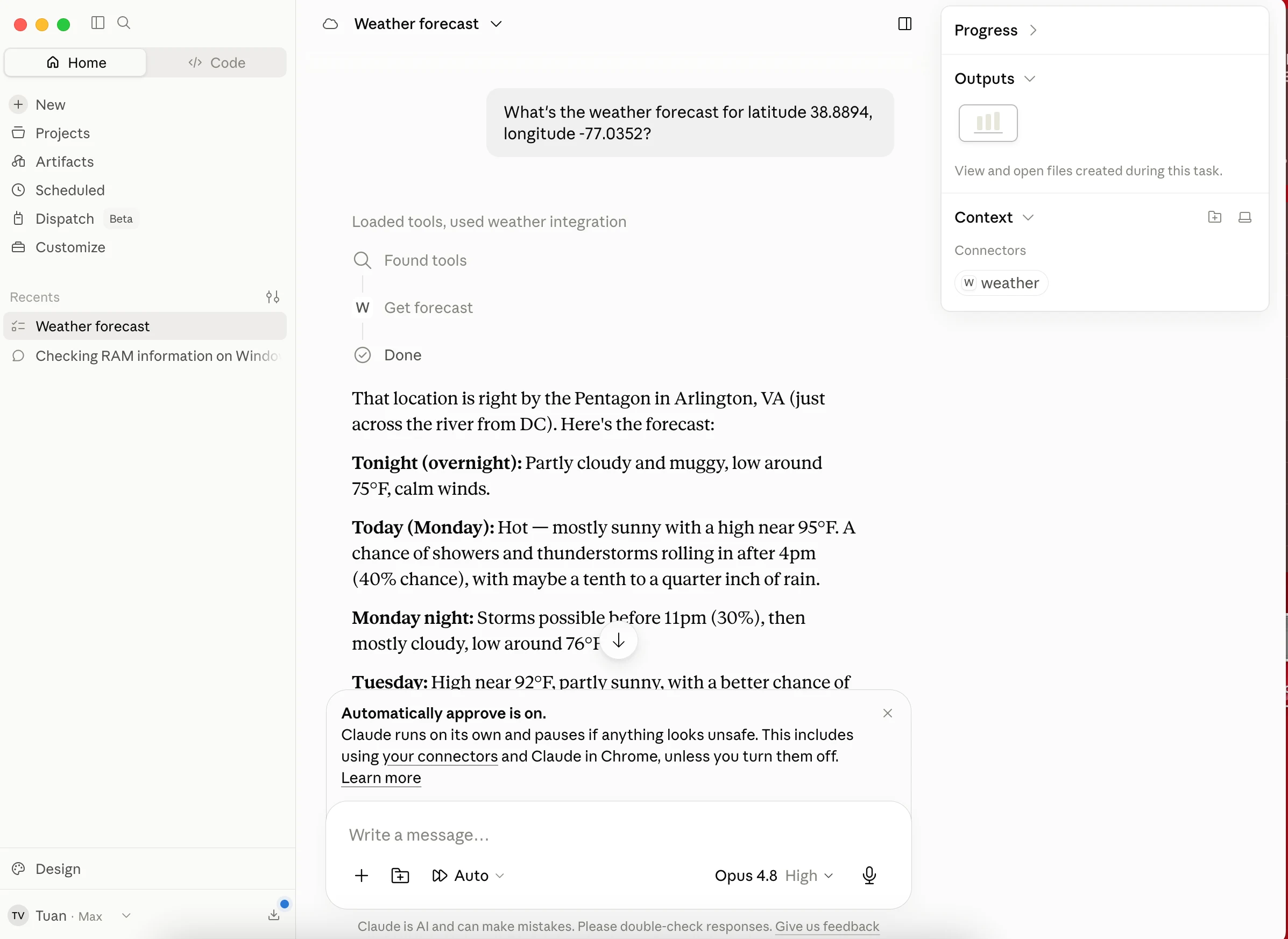
Step 1 — Set up the project and install the MCP Python SDK
Use uv to initialize the project and isolate the virtual environment.
macOS/Linux:
uv init weather
cd weather

uv venv
source .venv/bin/activate

uv add "mcp[cli]"

touch weather.py
Windows:
uv init weather
cd weather

uv venv
.venv\Scripts\activate

uv add "mcp[cli]"

new-item weather.py
That pulls mcp 2.x. SDK v2 moved to httpx2 and no longer installs httpx at all, which is why
the Option 1 code below imports httpx2 — an import httpx carried over from an older tutorial now
fails with ModuleNotFoundError.
Step 2 — Write your first MCP server with one tool
SDK v2.0 brings the stateless 2026-07-28 revision: no initialization handshake, no session state, and cheaper scaling. The server still speaks the older revision, so depending on the client a session may negotiate down to protocol 2025-11-25.
Two approaches follow. Pick one — skip the other.
Option 1: The official SDK
Open weather.py and write the server plus one tool that fetches a forecast.
import logging
from typing import Annotated, Any

import httpx2
from mcp.server import MCPServer
from pydantic import Field

# Log to stderr. Never use print() — stdout carries the JSON-RPC stream.
logging.basicConfig(level=logging.INFO)
logger = logging.getLogger("weather-server")

mcp = MCPServer("weather")

NWS_API_BASE = "https://api.weather.gov"
USER_AGENT = "weather-app/1.0"


async def make_nws_request(url: str) -> dict[str, Any] | None:
    """Send a request to the NWS API."""
    headers = {"User-Agent": USER_AGENT, "Accept": "application/geo+json"}
    async with httpx2.AsyncClient() as client:
        try:
            response = await client.get(url, headers=headers, timeout=30.0)
            response.raise_for_status()
            return response.json()
        except Exception as e:
            logger.error(f"NWS request failed: {e}")
            return None


@mcp.tool()
async def get_forecast(
    latitude: Annotated[float, Field(description="Latitude of the location, e.g. 38.8894")],
    longitude: Annotated[float, Field(description="Longitude of the location, e.g. -77.0352")],
) -> str:
    """Get a detailed weather forecast for a US coordinate."""
    points_url = f"{NWS_API_BASE}/points/{latitude},{longitude}"
    points_data = await make_nws_request(points_url)

    if not points_data:
        return "Error: could not retrieve grid point data for this location."

    forecast_url = points_data["properties"]["forecast"]
    forecast_data = await make_nws_request(forecast_url)

    if not forecast_data:
        return "Error: could not retrieve the detailed forecast."

    periods = forecast_data["properties"]["periods"]
    forecasts = [
        f"{p['name']}: {p['temperature']}°{p['temperatureUnit']}, {p['detailedForecast']}"
        for p in periods[:5]
    ]
    return "\n---\n".join(forecasts)


if __name__ == "__main__":
    mcp.run(transport="stdio")
Option 2: The FastMCP framework
FastMCP is a separate project rather than part of the official SDK, so give it a fresh project of its own:
uv add fastmcpDo not install fastmcp alongside mcp[cli] in the same project. FastMCP 3.x pins mcp<2.0, so
it drags the official SDK back to 1.x and every line of Option 1 breaks at the import.
That pin also flips the HTTP client. This branch resolves mcp 1.x, which ships httpx and not
httpx2, so the import below is the reverse of Option 1 — import httpx2 here fails with
ModuleNotFoundError.
import logging
from typing import Annotated, Any

import httpx
from fastmcp import FastMCP
from pydantic import Field

logging.basicConfig(level=logging.INFO)
logger = logging.getLogger("weather-fast")

mcp = FastMCP("weather-fast")

NWS_API_BASE = "https://api.weather.gov"
USER_AGENT = "weather-app/1.0"


async def make_nws_request(url: str) -> dict[str, Any] | None:
    """Send a request to the NWS API."""
    headers = {"User-Agent": USER_AGENT, "Accept": "application/geo+json"}
    async with httpx.AsyncClient() as client:
        try:
            response = await client.get(url, headers=headers, timeout=30.0)
            response.raise_for_status()
            return response.json()
        except Exception as e:
            logger.error(f"NWS request failed: {e}")
            return None


@mcp.tool
async def get_forecast(
    latitude: Annotated[float, Field(description="Latitude of the location, e.g. 38.8894")],
    longitude: Annotated[float, Field(description="Longitude of the location, e.g. -77.0352")],
) -> str:
    """Get a detailed weather forecast for a US coordinate."""
    points_url = f"{NWS_API_BASE}/points/{latitude},{longitude}"
    points_data = await make_nws_request(points_url)

    if not points_data:
        return "Error: could not retrieve grid point data for this location."

    forecast_url = points_data["properties"]["forecast"]
    forecast_data = await make_nws_request(forecast_url)

    if not forecast_data:
        return "Error: could not retrieve the detailed forecast."

    periods = forecast_data["properties"]["periods"]
    forecasts = [
        f"{p['name']}: {p['temperature']}°{p['temperatureUnit']}, {p['detailedForecast']}"
        for p in periods[:5]
    ]
    return "\n---\n".join(forecasts)


if __name__ == "__main__":
    mcp.run()
Both options end up exposing the same get_forecast, so Steps 3 to 5 work whichever one you picked.
Two details differ: the decorator takes no parentheses, and mcp.run() needs no transport argument.
For a single-tool server the two files are near enough identical, so treat the choice as a starting point rather than a shortcut. FastMCP earns its keep in what it wraps around the server afterwards — authentication, deployment, and composing several servers into one.
Run uv run weather.py to confirm the file has no syntax errors.