Local AI means running a large language model (LLM) on hardware you own, instead of sending every prompt to a third-party API.
The trade is straightforward: you stop paying per token, and your data stops leaving the building.
Open-weight models like Llama 3.1, Qwen3, and Mistral Small ship their trained weights publicly, so you can load them into your own VRAM. Quantization then shrinks those weights enough to fit consumer hardware.
Local AI gives you a different set of trade-offs, not a cheaper copy of the cloud — and knowing which ones you are accepting is the whole skill.
What does running AI locally actually mean?
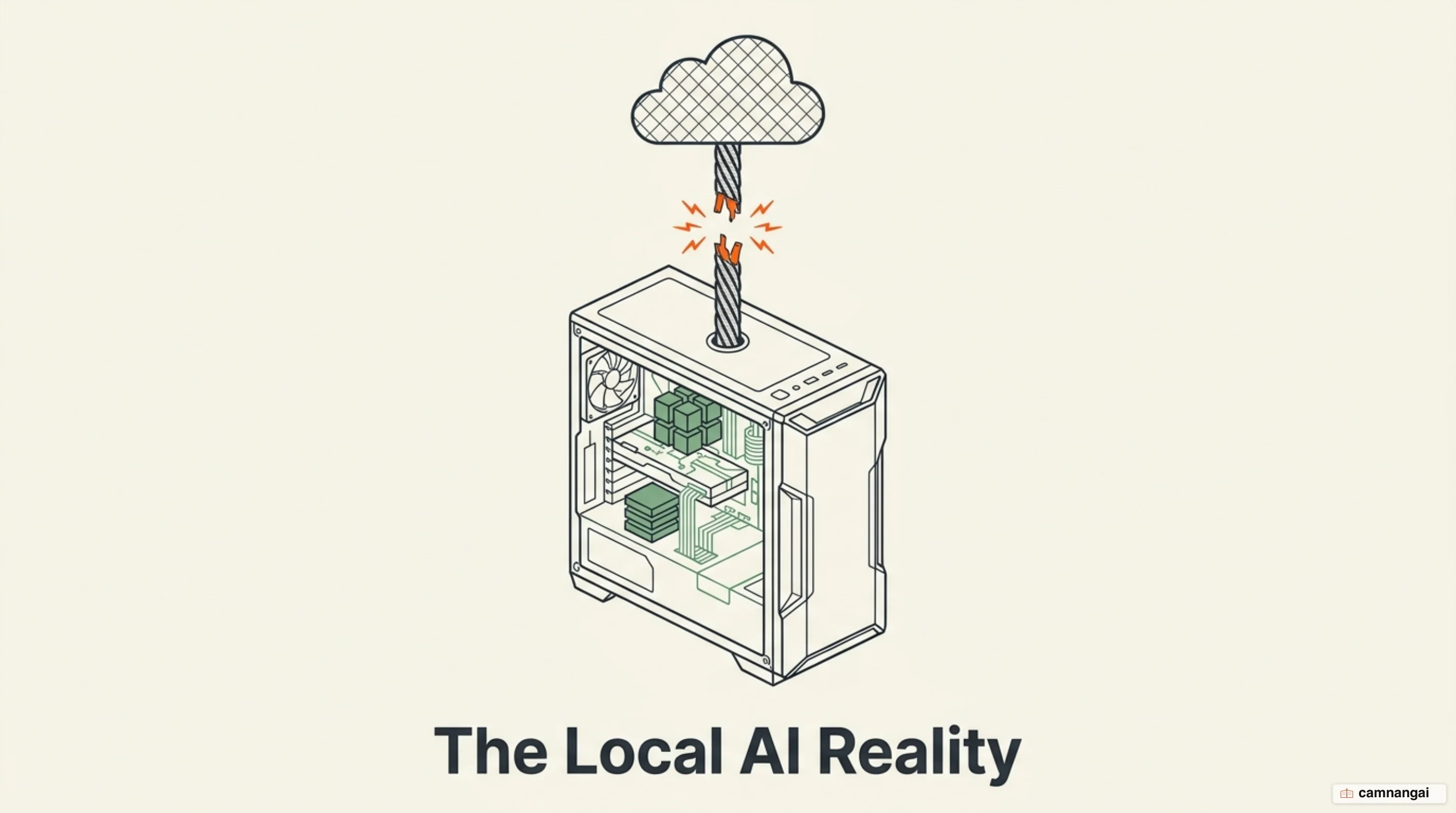
Running AI locally is a technical shift from remote API calls to on-device inference. In the cloud model, your prompts travel to servers you do not control, and computation happens on someone else's silicon. Local AI inverts that: the model file sits on your disk and executes on your own GPU or CPU.
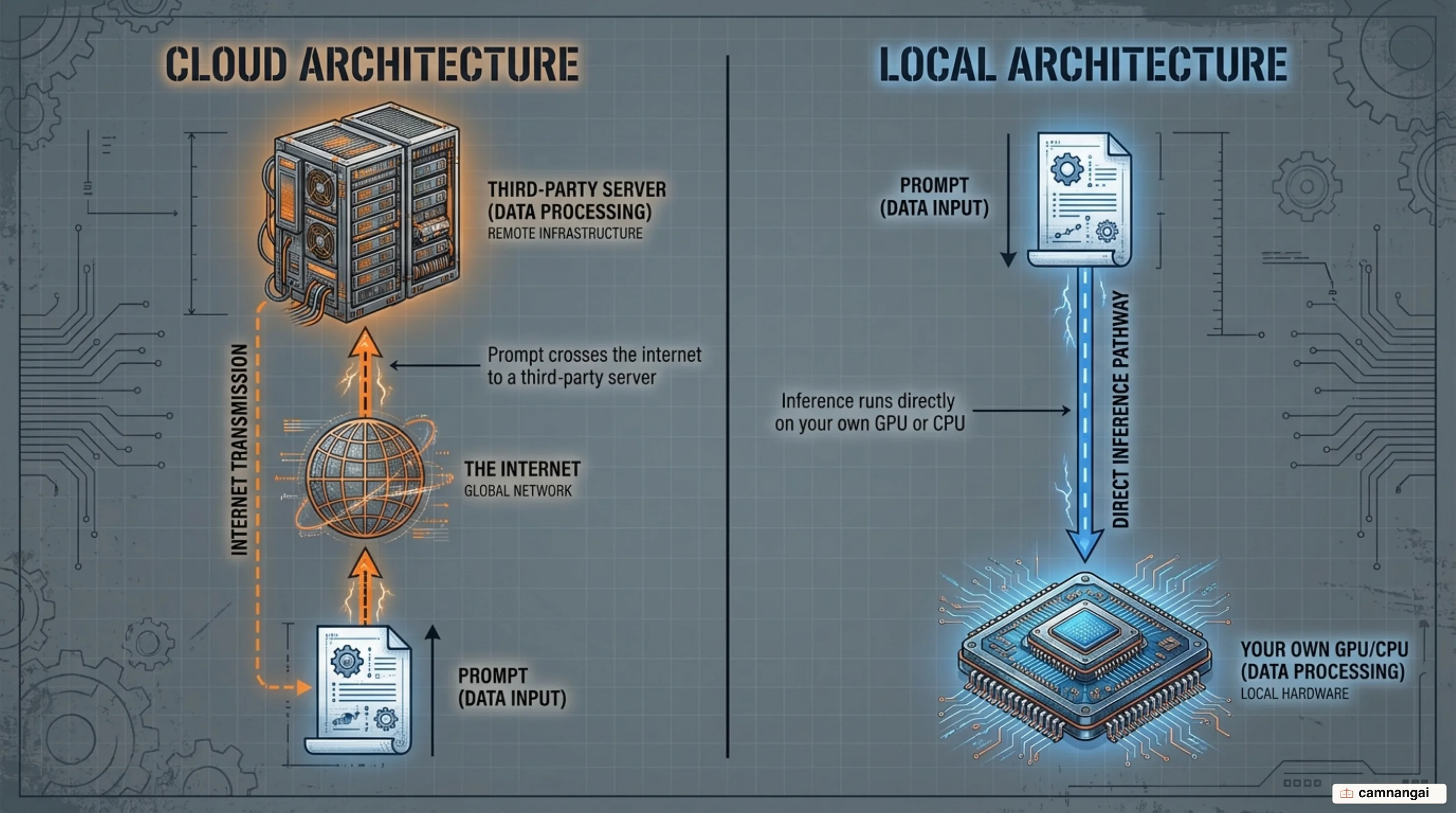
This is possible because of open-weight models. Unlike closed systems, these publish the pre-trained weights, which means you can load them into your own memory and run them under your own rules. That architectural control is what satisfies strict compliance and security requirements — nothing about the request leaves your machine unless you configure it to.
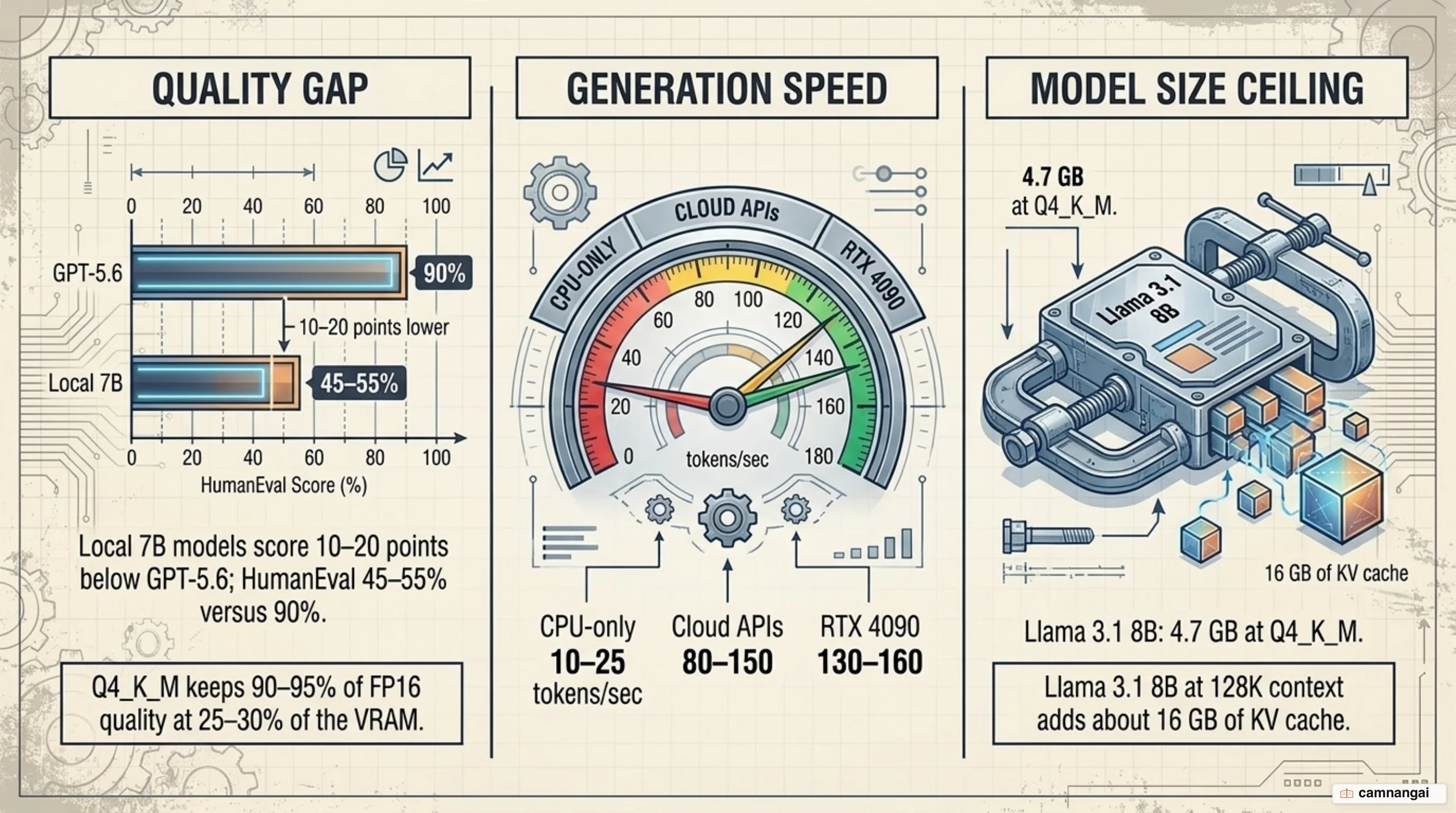
Raw weights are usually too large for consumer hardware, which is where quantization comes in. It reduces the numeric precision of the weights — FP16 down to 8-bit or 4-bit. Q4_K_M is the recommended default for consumer hardware: it retains 90–95% of FP16 quality at 25–30% of the VRAM cost. Concretely, Llama 3.1 8B needs 16 GB of VRAM at FP16 and 4.7 GB at Q4_K_M.
The GGUF file format is what makes this portable. It packs the model and its metadata into a single file that runs across NVIDIA CUDA, Apple Silicon via Metal, and AVX-512 CPUs. It also supports offloading individual layers between RAM and VRAM, so a model that slightly overflows your GPU still runs — just slower.
Why people are moving local
The first reason is cost structure, not cost. A cloud API is an operating expense that scales with every token you send; local hardware is a one-time capital expense after which inference is effectively free. If you run high, repetitive volumes — batch document processing, agent loops that fire thousands of background calls — the arithmetic starts favoring hardware you own.
Reliability is the second. Local AI keeps working in an air-gapped environment and during a provider outage. There is no model deprecation that silently changes your outputs, no rate limit during a busy hour, and no pricing change that rewrites your budget mid-quarter.
Privacy is the third, and it is the one most people start with. Prompts processed on your own machine are not subject to a third party's retention policy or training terms. For proprietary source code, internal documents, and regulated data, that difference is the entire argument — and it is why Ollama alone now sits in 85% of the Fortune 500, with close to 9 million developers using it every month.
The three layers: engine, app, and serving system
Most of the confusion about local tooling comes from comparing things that sit at different layers. There are three, and each does a distinct job.
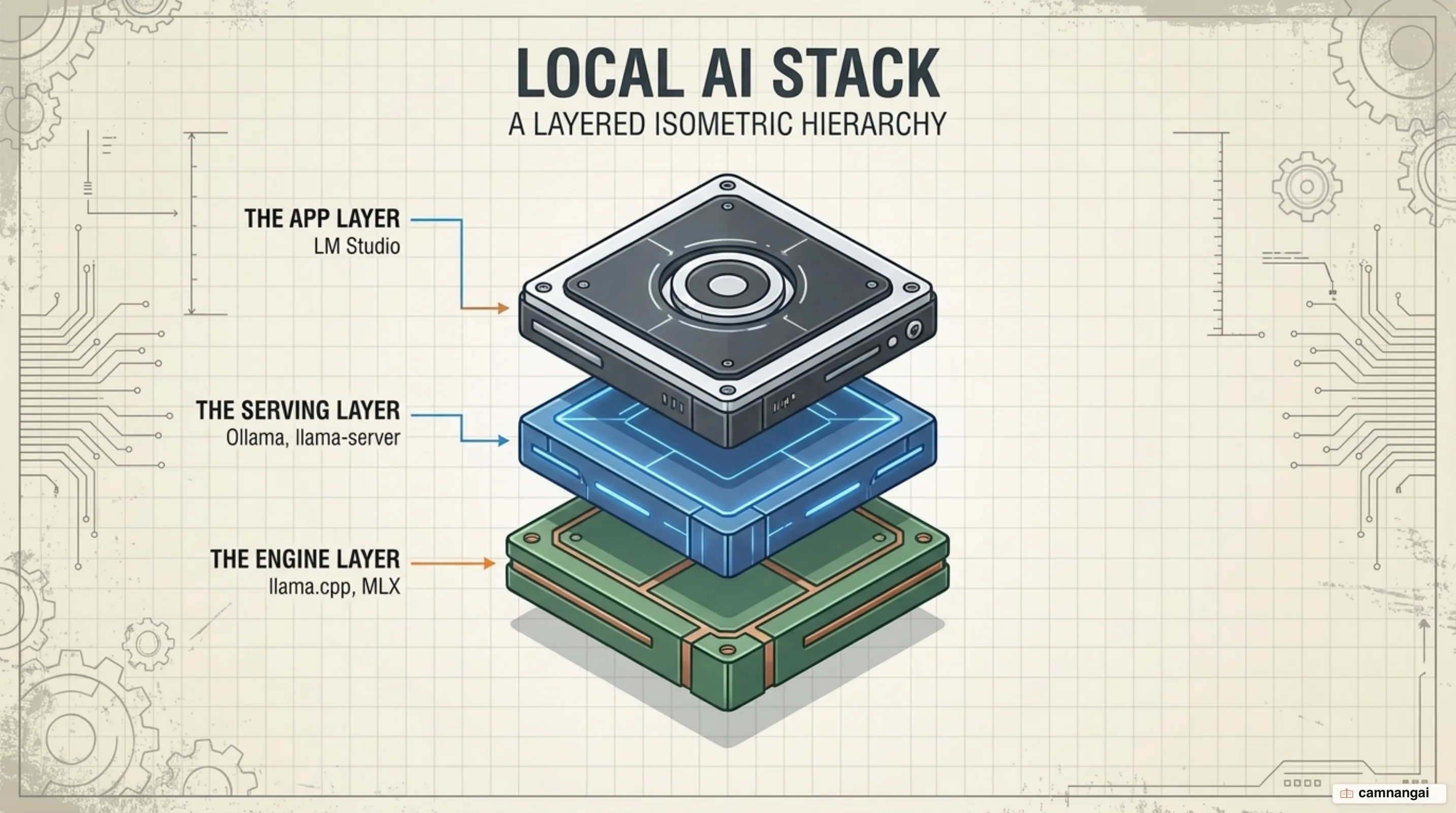
The engine is the compute core, where llama.cpp and MLX dominate. llama.cpp is a plain
C/C++ inference implementation whose stated goal is state-of-the-art performance with minimal setup
across a wide range of hardware — Metal on Apple Silicon, CUDA on NVIDIA, Vulkan, SYCL, and AVX/AVX-512
on CPUs. MLX is Apple's own library, built to exploit unified memory bandwidth on M-series chips.
The app is the interface layer. LM Studio is the best-known example: a GUI that browses and
downloads models, shows you projected VRAM consumption before you load anything, and gives you a
chat window without touching a terminal. It runs the LM Studio runtime with MLX and llama.cpp
underneath.
The serving system turns your machine into a local API host. Through llama-server or Ollama
you expose an OpenAI-compatible endpoint that any other application on your machine can call as if
it were a cloud provider. That is what lets you point an existing tool at your own hardware without
rewriting it:
llama-server -m llama3.1-8b-q4_k_m.gguf --n-gpu-layers 99 --flash-attn --ctx-size 8192 --port 8080Here --n-gpu-layers 99 forces every layer onto the GPU, --flash-attn uses the optimized
attention kernel to cut memory use on long inputs, and --ctx-size 8192 sets the
context window length.
Ollama, LM Studio, or llama.cpp: which should you pick?
Because Ollama and LM Studio both embed llama.cpp, raw throughput between them differs by only a
few percent. The real difference is ergonomics — which one matches how you work.
Ollama is the developer's default. It is CLI-first with Docker-style model management, which makes it easy to drop into automation pipelines and container environments, and its API is stable enough to point an IDE or a local web UI at. The cost of that simplicity is that it hides some of the deeper tuning knobs.
LM Studio is the fastest way to evaluate models. Its projected-VRAM display before load is useful when you are guessing whether a quantization will fit, and the built-in chat means you can judge a model in a minute rather than a scripted afternoon. For most people the honest answer is both: LM Studio to explore, Ollama to serve.
llama.cpp is for when you need control. It exposes every performance flag directly, and it supports GBNF grammars, which constrain a model's output to a format you define — the reliable way to force valid JSON out of a small local model. With hand-tuned offload settings, an RTX 4070 Ti runs Llama 3.1 8B at Q8_0 around 80 tokens/sec.
What size model will your machine run?
VRAM is the binding constraint. A model that fits in GPU memory runs at full speed; one that
overflows spills into system RAM and slows down sharply. The rough sizing formula is
VRAM (GB) = (parameters in billions × quantization bits) / 8, which puts an 8B model at 4-bit
around 4 GB for the weights alone.
The weights are only half the story. The KV cache, which holds your conversation context, grows with context length and it grows fast: Llama 3.1 8B needs 4.7 GB for weights, but running it at a 128K context adds roughly 16 GB of KV cache on top — enough to trigger an out-of-memory error on a 16 GB card that looked comfortable at 8K.
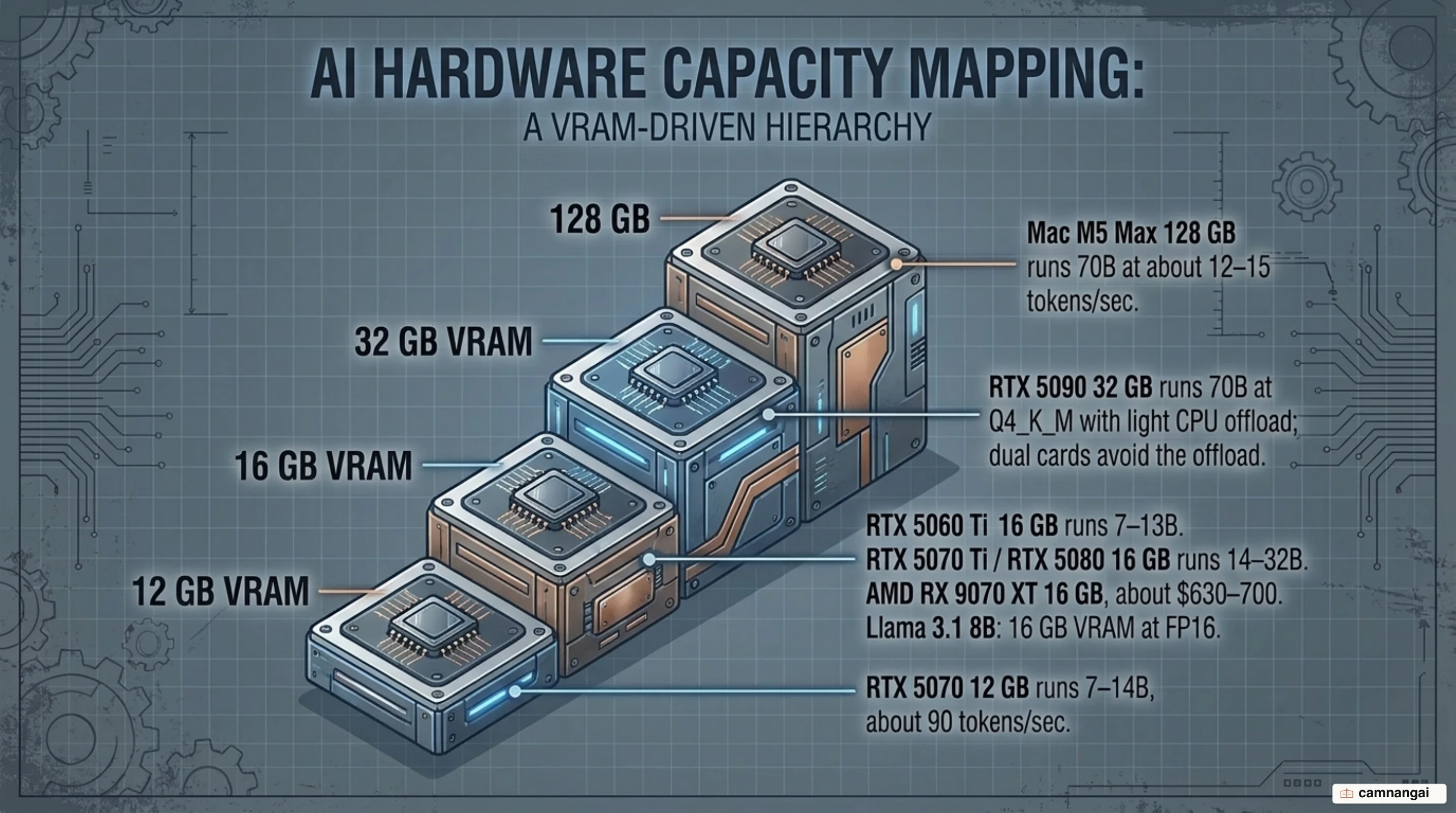
Hardware in 2026 is distorted by a GDDR7 shortage that has worsened rather than eased. RTX 5090 street pricing climbed from about $4,000 in June to $4,300–5,000+ by mid-July, and the RTX 4090 is discontinued.
| Tier | VRAM | Runs | Notes |
|---|---|---|---|
| RTX 5070 | 12 GB | 7–14B | ~90 tok/sec |
| RTX 5060 Ti | 16 GB | 7–13B | More VRAM, less bandwidth |
| RTX 5070 Ti / 5080 | 16 GB | 14–32B | The practical sweet spot |
| AMD RX 9070 XT | 16 GB GDDR6 | 14–32B | ~$630–700; largely dodged the shortage |
| RTX 5090 | 32 GB | 70B at Q4_K_M | Light CPU offload; dual 5090 avoids it |
| Mac M5 Max | 128 GB unified | 70B at Q4_K_M | ~12–15 tok/sec in a laptop |
What you give up when you leave the cloud
The quality gap is real and it is measurable. Local 7B models score 10–20 points below GPT-5.6 on reasoning and coding benchmarks; on HumanEval specifically, a local 7B lands at 45–55% against GPT-5.6's 90%. The gap narrows at 70B, but 70B is exactly where the hardware bill stops being casual.
That gap is also task-dependent. For summarization, simple Q&A, translation, and code explanation, a small local model is hard to distinguish from a frontier one. For complex multi-step reasoning, advanced mathematics, and anything needing current world knowledge, it is not close.
Speed cuts both ways. CPU-only inference gives you 10–25 tokens/sec, well below the 80–150 tokens/sec a cloud API returns. But a local RTX 4090 produces 130–160 tokens/sec, which beats the cloud outright — you simply pay for that throughput up front instead of per request. The largest frontier models, meanwhile, stay out of reach of any desktop no matter how aggressively you quantize.
"Local" no longer means automatically private
The tools matured into businesses, and that changed what the word guarantees. Ollama added paid cloud tiers in 2026 alongside its still-free local mode, and those cloud-connected features route prompts through Ollama's servers rather than keeping them on your machine. The same pattern shows up across the category.
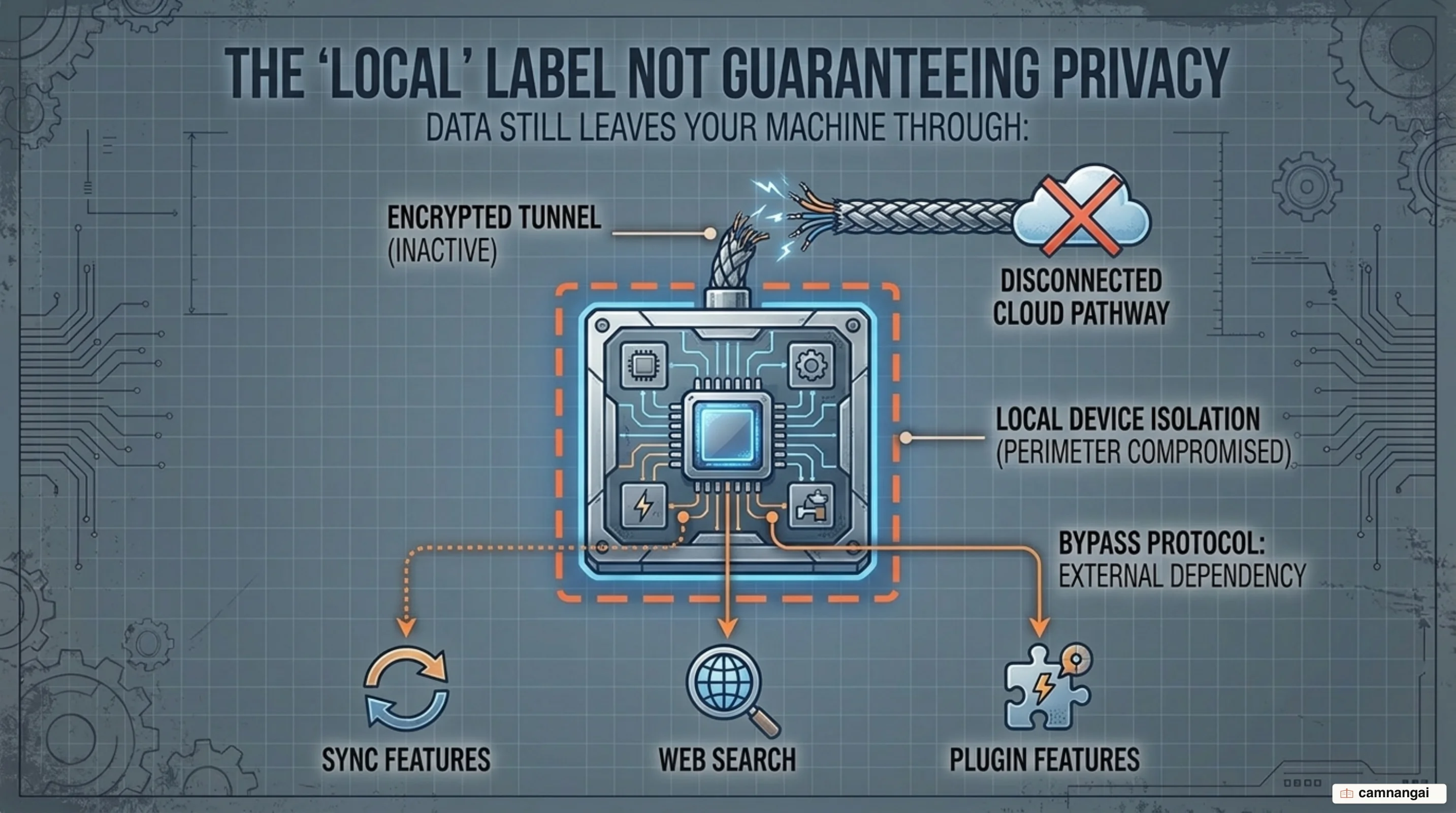
So privacy is now a configuration choice rather than a property of the install. The core local mode may keep everything on-device while an integrated web-search module, a plugin, or a cloud-synced agent feature quietly does not. The distinction is per-feature, not per-application.
The practical response is to verify rather than trust the label. Check what the application actually sends over the network, prefer open-source tools that can be fully air-gapped when the data is genuinely sensitive, and treat any feature that improves results by "reaching out" as a cloud feature until proven otherwise.
When local is the right call, and where to start
Local is the right default when the data is sensitive, when the volume is high and repetitive, or when you are building agent loops whose API bill would otherwise be unpredictable. It is the wrong default when you occasionally need frontier-grade reasoning on a hard problem and would be buying a $4,000 card to do it badly.
A realistic starting point is a 16 GB card — an RTX 5060 Ti, or an RX 9070 XT if NVIDIA pricing is too high — running 7–13B models at Q4_K_M. On a Mac, 16 GB of unified memory handles the same class. Install Ollama, pull one model, and point something you already use at the local endpoint before you spend anything more.
Local AI complements the cloud — it does not replace it
Treat local as the default home for sensitive data and repetitive volume, and the cloud as the place you escalate to when a problem genuinely needs a model bigger than your machine. Framed that way the hardware question gets easy: buy for the workload you run every day, not the one you run twice a year.
The one thing not to skip is the privacy audit. A local stack that quietly routes half its traffic through a vendor's servers gives you the cost of owning hardware without the benefit that justified it.
References
- llama.cpp: LLM inference in C/C++ — ggml-org
- Ollama — The easiest way to build with open models
- LM Studio — An Agent made for Open Models
- Ollama vs LM Studio vs llama.cpp: Which Local LLM Runner Should You Use? — InventiveHQ
- Local LLM Hardware Requirements 2026: 8GB to 70B by VRAM — PromptQuorum
- Local LLM Trade-Offs 2026: Privacy vs Speed vs Quality — PromptQuorum
- Local LLMs 2026: The Hidden Cloud Tiers Privacy Catch — SolidAITech
- Popular open source AI developer tool Ollama raises $65M, grows to nearly 9M users — TechCrunch