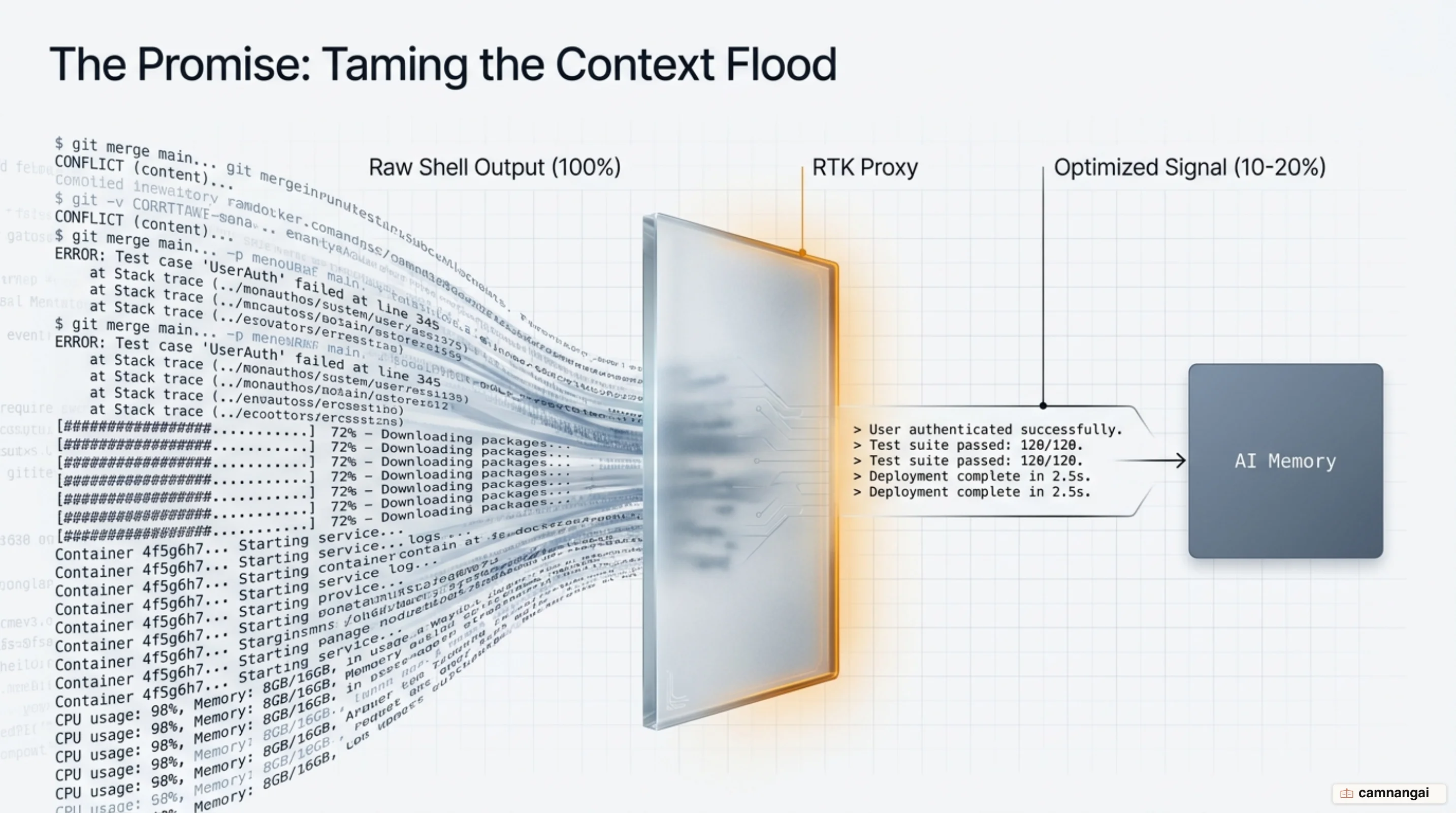
Rust Token Killer (RTK) is a low-latency 4 MB Rust binary that proxies shell commands to reduce the token overhead of AI coding agents by 60–90%. It intercepts tool output and returns compressed, LLM-friendly summaries to the context window. By filtering terminal noise from Git and package managers, Rust Token Killer tries to cut the uncapped context overhead that often leads to runaway API costs.
Context pollution is a structural drain on agent efficiency. Every time an agent runs a verbose command, the output lands in the context. In long-running sessions, you pay to re-read this noisy history on every turn. RTK treats this data as "re-fetchable," summarizing it to keep the context window open for actual reasoning.
What is RTK and where does it cut tokens?
RTK (Rust Token Killer) is a 4 MB Rust binary, distributed under the Apache 2.0 license, that sits between your shell and an AI agent. Its job is to solve context pollution — terminal noise piling up until it displaces useful code in the agent's memory.
RTK targets "re-fetchable" tool results. Most output from git, cargo, or npm does not need to stay in the conversation history in its raw, verbose form. If the agent needs a specific file list again, it can re-run the command. But only 1 in 3 shell commands is currently rewriteable by RTK. Independent benchmarks show that about 50% of agent activity involves python3, local project scripts, or shell loops that fall outside RTK's rulebook.
How does RTK compress command output?
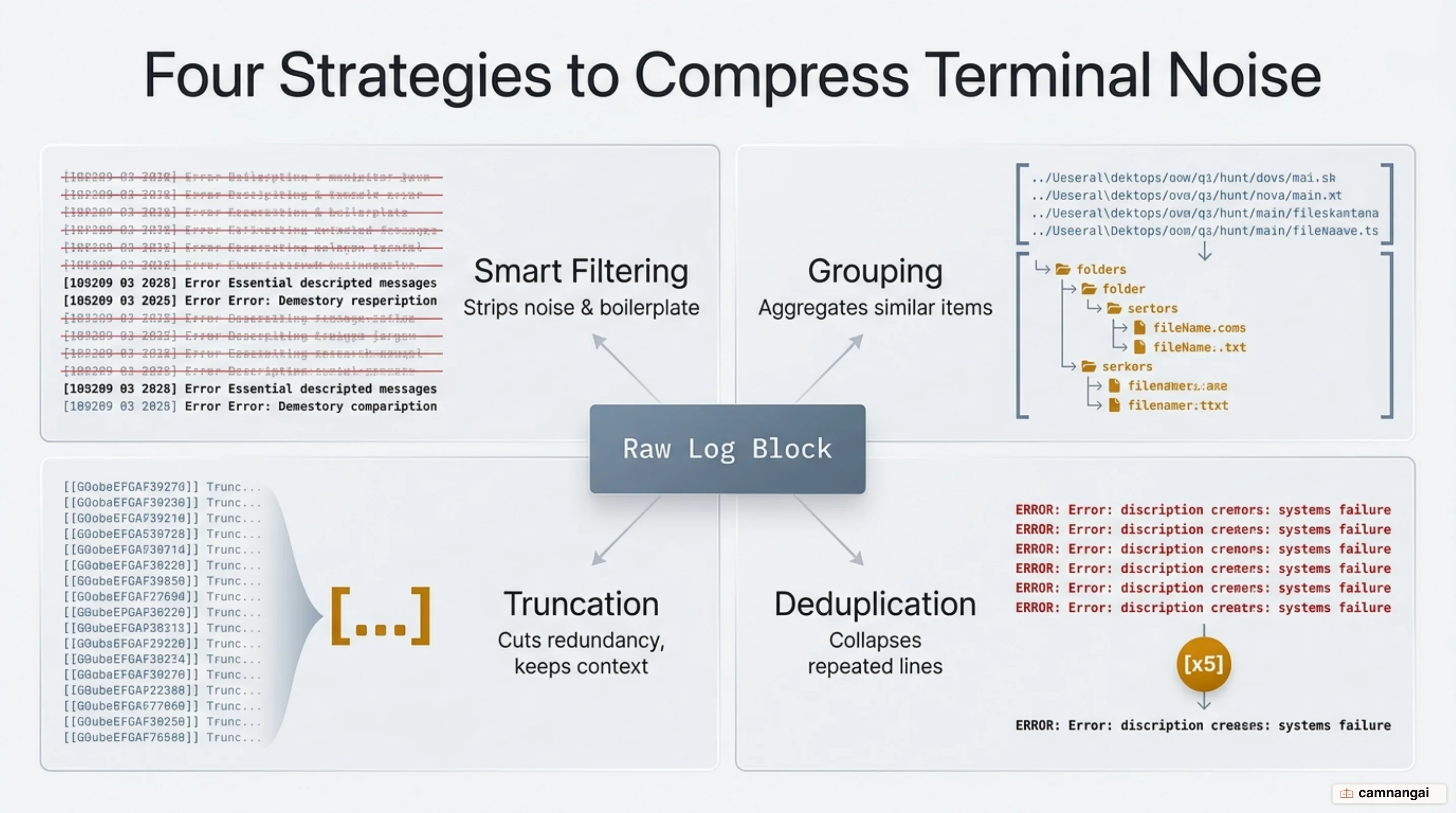
RTK is a CLI proxy. When the agent tries to run a command, RTK intercepts it as rtk <command>. The proxy executes the underlying tool and applies four strategies to the output:
- Smart Filtering: removes boilerplate and advice. For example, it strips Git's suggestions on how to use
git restoreand removes comments or excessive whitespace. - Grouping: aggregates data by state.
git statusbecomes a compact stat format grouped by file state. - Truncation: keeps essential headers while cutting redundant lines.
git logcomes back as just the hash, author, and subject. - Deduplication: collapses repeated log lines into a single entry with a repetition count.
These filters are domain-specific. For cargo test, RTK removes per-test progress indicators and returns only the final summary and specific failure logs. For file searches, it keeps the essential structure while dropping binary-looking lines.
Installing and enabling RTK for Claude Code
On Linux and macOS you install it with Homebrew or a direct curl script.
# Install via Homebrew
brew install rtk-ai/tap/rtk

# Or via curl
curl -fsSL https://raw.githubusercontent.com/rtk-ai/rtk/refs/heads/master/install.sh | sh

# Activate the global hook
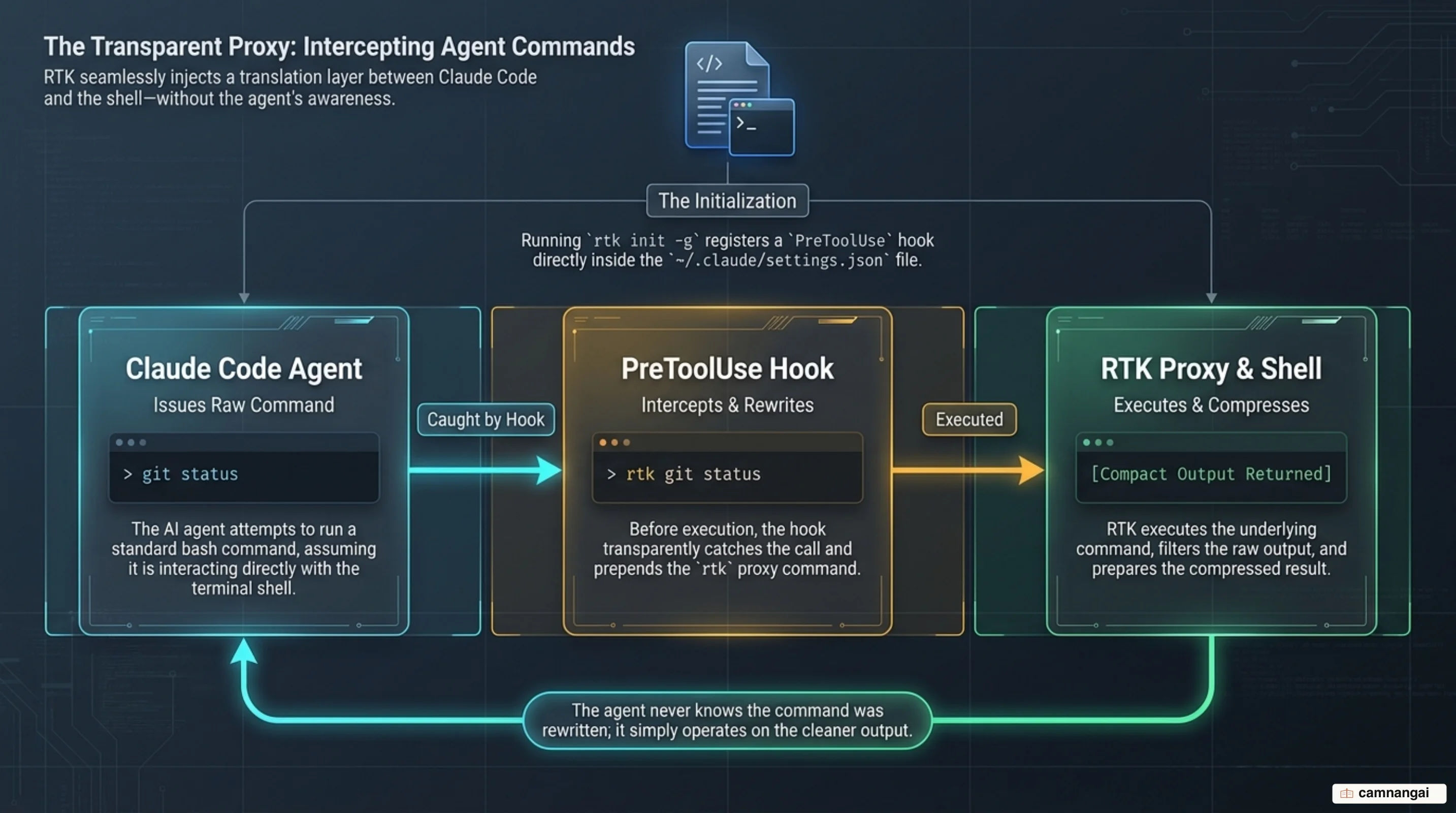
rtk init -g
The rtk init -g command installs a PreToolUse hook in ~/.claude/settings.json. This hook rewrites Bash tool calls transparently.
Windows users: since v0.37.2, the auto-rewrite hook runs as a native binary command (rtk hook claude), so you no longer need a Unix shell. Make sure ripgrep (rg) is on your PATH, because several filters rely on it.
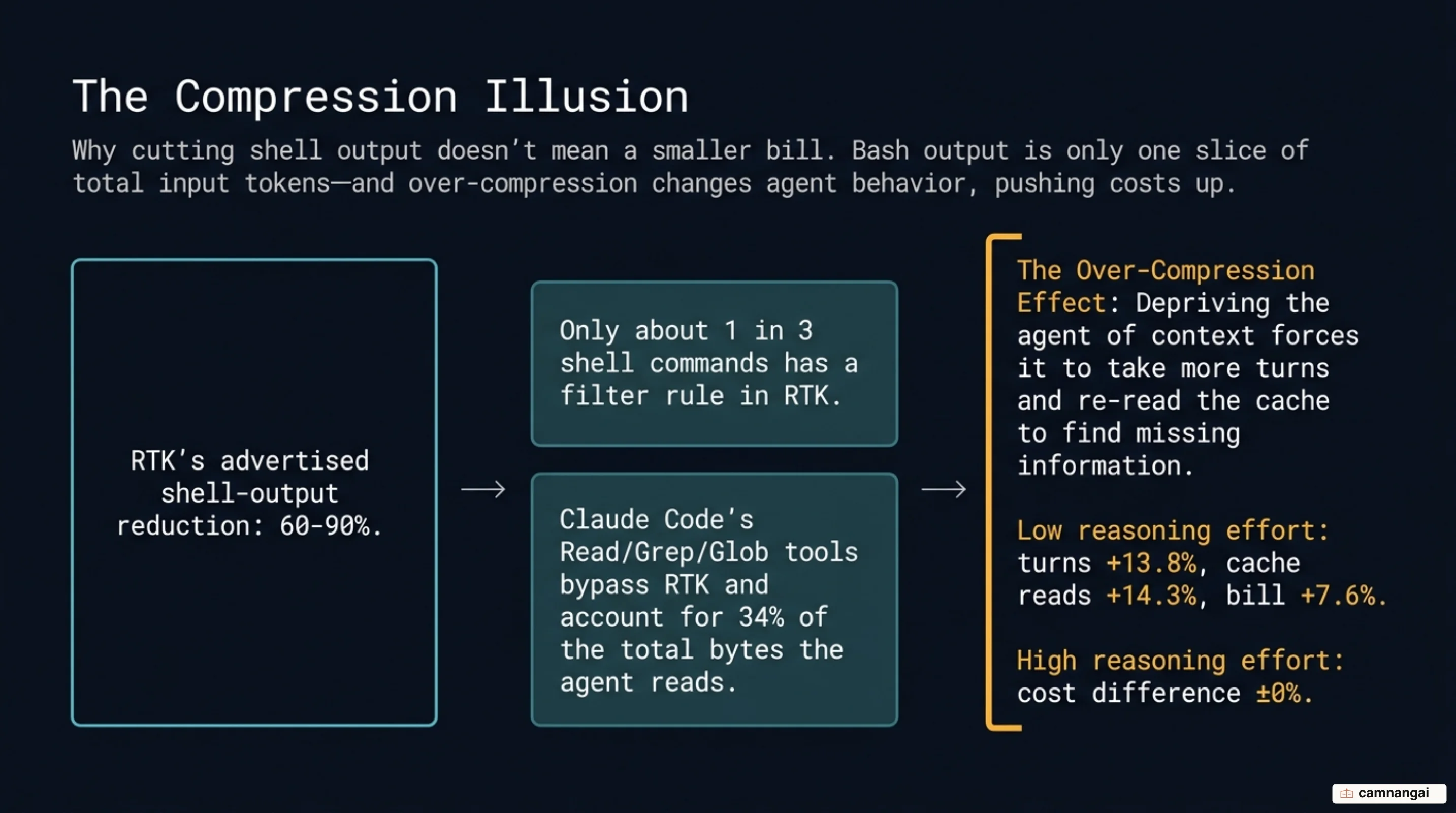
Important: this hook only affects the Bash tool. Built-in tools like Read, Grep, and Glob bypass the shell and do not pass through RTK. JetBrains research shows these built-in tools account for 34% of the total bytes the agent reads — a major slice of context that RTK cannot optimize.
Which commands get cut the most?
RTK is most effective on high-volume, predictable terminal output. The benchmarks below show reductions in raw Bash output:
| Command | Raw Tokens | RTK Tokens | Reduction |
|---|---|---|---|
cargo test | ~25,000 | ~2,500 | 90% |
git status | ~3,000 | ~600 | 80% |
ls -R / tree | ~2,000 | ~400 | 80% |
git diff | ~21,500 | ~1,259 | 94% |
| Total session | ~118,000 | ~23,900 | 80% |
High-leverage workflows include:
- Planning: summarizing directory structures on the first pass over a repo.
- Refactors: filtering progress bars and passing results from test runners like
pytestorjest. - Codebase search: using shell-based
findorgreprather than built-in agent tools, so the proxy filters the matches.
Does 80% less output mean an 80% smaller bill?
Hands-on testing shows the "Token Compression Illusion." While RTK may cut 80% of shell output, Bash results are only a small slice of total input tokens. JetBrains AI benchmarks show that "fresh tokens" — the only class RTK compresses — moved by only +3.2% in real-world tests, which is effectively no change at all.
Worse, RTK can lead to a 7.6% cost increase in some sessions. This happens because of "compression-induced re-reads" and "editorial judgment errors." If RTK's filter drops a line that the model actually needed to solve a task, the agent may get confused, start more conversation turns (+13.8%), and trigger more cache reads (+14.3%). When that happens, the model re-reads its own history more often, which dilutes any savings from the original compression.
When should you turn RTK on — and when not?
RTK is a specialized tool for context engineering, which is the next layer of the agent stack. Use it, but keep a skeptical eye on the cost-versus-performance trade-off.
- Enable for: early-session repo exploration, repetitive Git operations, and large test suites where you only need to see the failure count.
- Disable/bypass for: deep debugging or regression analysis where the agent needs every line of a log to find the specific error. You can bypass the proxy for a single command by using
RTK_DISABLE=1.
Use rtk gain to see a vanity estimate of what was filtered, but cross-check this against the
/cost command in Claude Code.
If your agent is looping or re-running commands frequently, the proxy may be cutting too deep into the signal the model needs.
References
- GitHub - rtk-ai/rtk: CLI proxy that reduces LLM token consumption by 60-90% on common dev commands
- RTK — Rust Token Killer
- What is RTK? | rtk-ai/rtk | DeepWiki
- RTK: Cut Your AI Coding Bill by 80% With One CLI Tool — DEV Community
- Cut Claude Code Token Costs 60-90% With rtk: Hands-On Guide | ComputeLeap
- How I Cut Claude Code Token Usage by 80% — Without Losing Quality | lmmartinb.com
- rtk Claude Code Token Savings: A Skill Trial Benchmark — JetBrains
- The Token Compression Illusion: Why I'm Skeptical of RTK | Hacker News
- Releases · rtk-ai/rtk