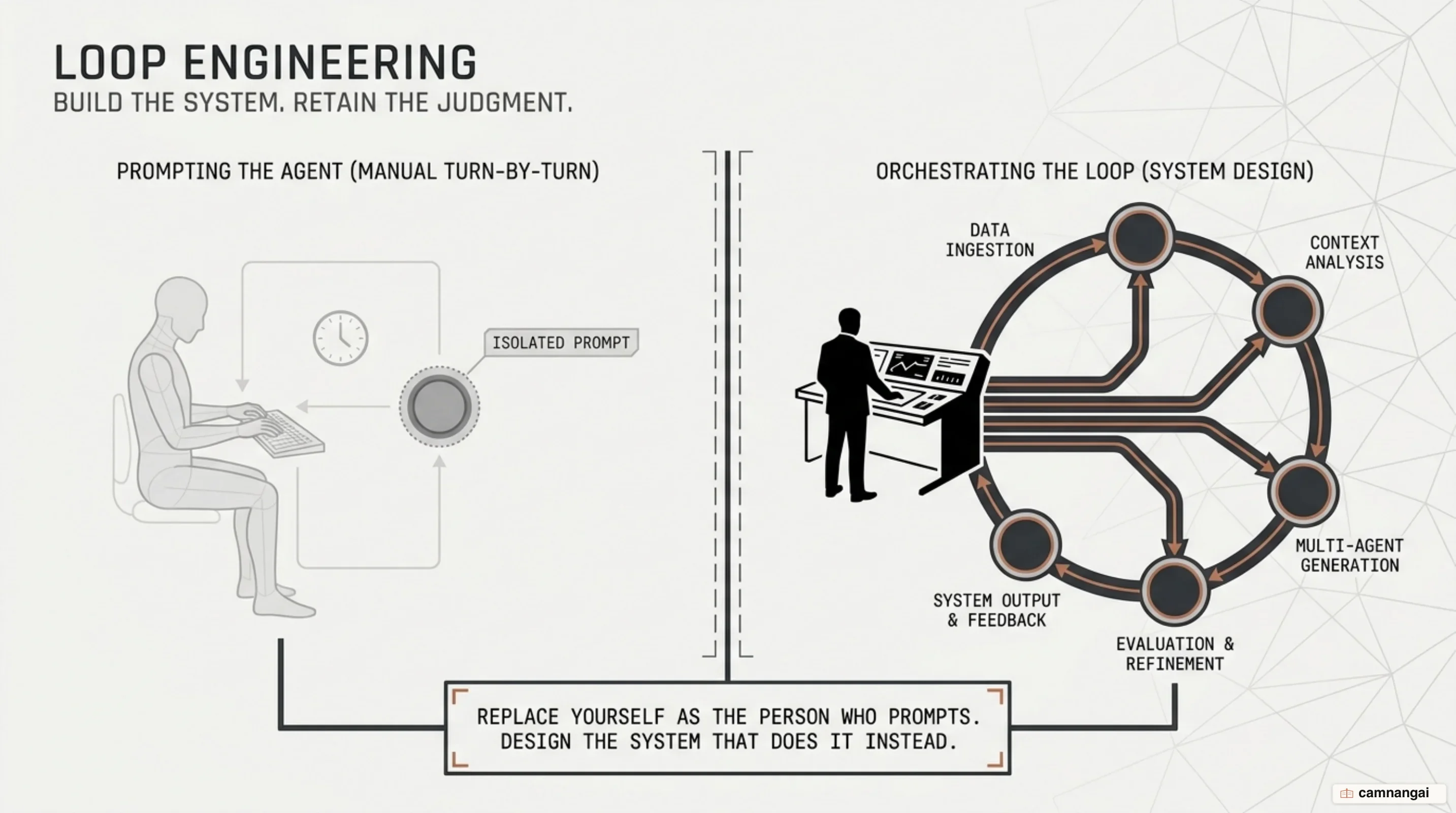
Software engineering is moving away from interactive chatting toward loop engineering. Instead of babysitting a coding assistant turn by turn, you build programmatic control loops that orchestrate agents autonomously. In loop engineering, you step back from active turn-taking and build systems where software prompts agents, evaluates outputs against verifiable criteria, and iterates in self-correcting feedback cycles until tasks satisfy concrete success conditions.
The shift is about scaling throughput without taking on linear monitoring overhead. By running execution loops that inspect the environment, test changes, and persist progress on disk, loop engineering turns probabilistic model output into predictable, unattended workflows that can run real development pipelines.
From single prompts to loops: why engineers are shifting to loop engineering
For two years, working with AI coding assistants meant single-turn interactive prompting. You wrote a prompt, reviewed the diff, and manually typed the next command, holding the model's hand through every step. Loop engineering shifts that responsibility to system-level orchestration: you write code that programmatically discovers work, dispatches agents, verifies results against environmental feedback, records progress, and decides what to do next.
The shift traces back to deceptively simple bash scripts, most notably Geoff Huntley's Ralph loop:
while :; do cat PROMPT.md | claude-code ; doneBy piping a specification file (PROMPT.md) into a coding engine repeatedly alongside a tracking document (fix_plan.md), Ralph showed that agents running in continuous cycles could autonomously build complete codebases or assemble esoteric programming languages like CURSED overnight. Today, those crude bash loops have been codified into native product primitives inside CLI tools like Claude Code and the Codex app. As practitioners like Peter Steinberger and Boris Cherny have noted, the craft has moved from writing prompts to architecting the loops that prompt the agents.
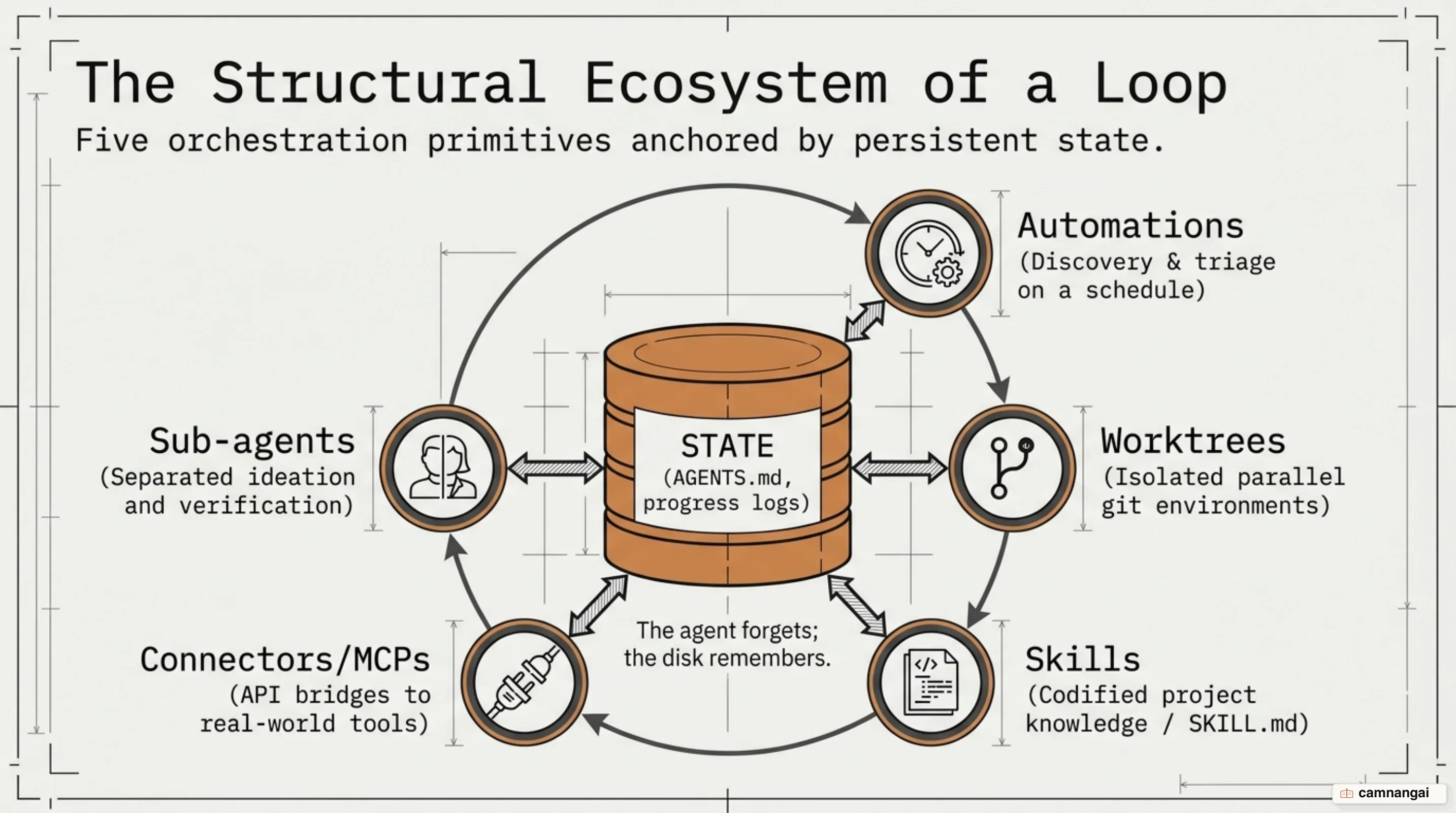
Modern loop engineering rests on five structural primitives supported by on-disk state:
- Automations: Scheduled background jobs or cron tasks that drive autonomous discovery and triage.
- Worktrees: Isolated directories created via Git worktrees that allow concurrent agent execution without file write collisions.
- Skills: Encapsulated project instructions (
SKILL.md) that codify repository architecture, build commands, and explicit constraints. - Plugins and Connectors: Model Context Protocol (MCP) integrations connecting agents directly to issue trackers, databases, and CI pipelines.
- Sub-agents: Specialized agent configurations that isolate execution and ideation from verification.
Because models lose context across discrete runs, state cannot live in volatile model memory. It has to survive on disk in plain markdown files like AGENTS.md or CLAUDE.md, or inside external trackers like Linear.
Two core primitives: distinguishing Goal from Loop
To build reliable orchestration systems, you have to separate condition-bounded execution from interval-bounded execution.
The Goal primitive (/goal) defines a bounded execution cycle that drives a specific task until verifiable success conditions are met. Under the hood, an independent evaluator model reviews the full transcript whenever the working agent tries to stop. If deterministic criteria—such as passing a test suite or hitting a specific performance threshold—remain unfulfilled, the evaluator rejects the stop attempt and kicks the agent back into the loop until the criteria pass or the turn budget runs out.
In contrast, the Loop primitive (/loop, /schedule, or cron routines) operates as an interval-based scheduler. It does not evaluate stopping conditions for a task; instead, it re-executes a prompt on a fixed cadence. Its primary job is monitoring external state changes over time, like polling application logs, checking open pull requests for review comments, or running daily bug triage.
The core distinction comes down to termination mechanics: Goal gives you condition-bounded iteration (stopping only when output passes independent verification), whereas Loop gives you schedule-bounded execution (triggering actions repeatedly on a timer).
/goal Refactor the data-fetching layer in Dashboard.tsx until Lighthouse performance score is >= 92 and LCP is under 1.8s as shown by the Lighthouse CLI output. Do not change the public API of any hooks. Each turn must improve at least one reported metric; abort if two consecutive turns show no improvement. Stop after 10 turns.

/loop every 1h "Check the GitHub repository for any new open issues. Provide a bulleted summary of their urgency."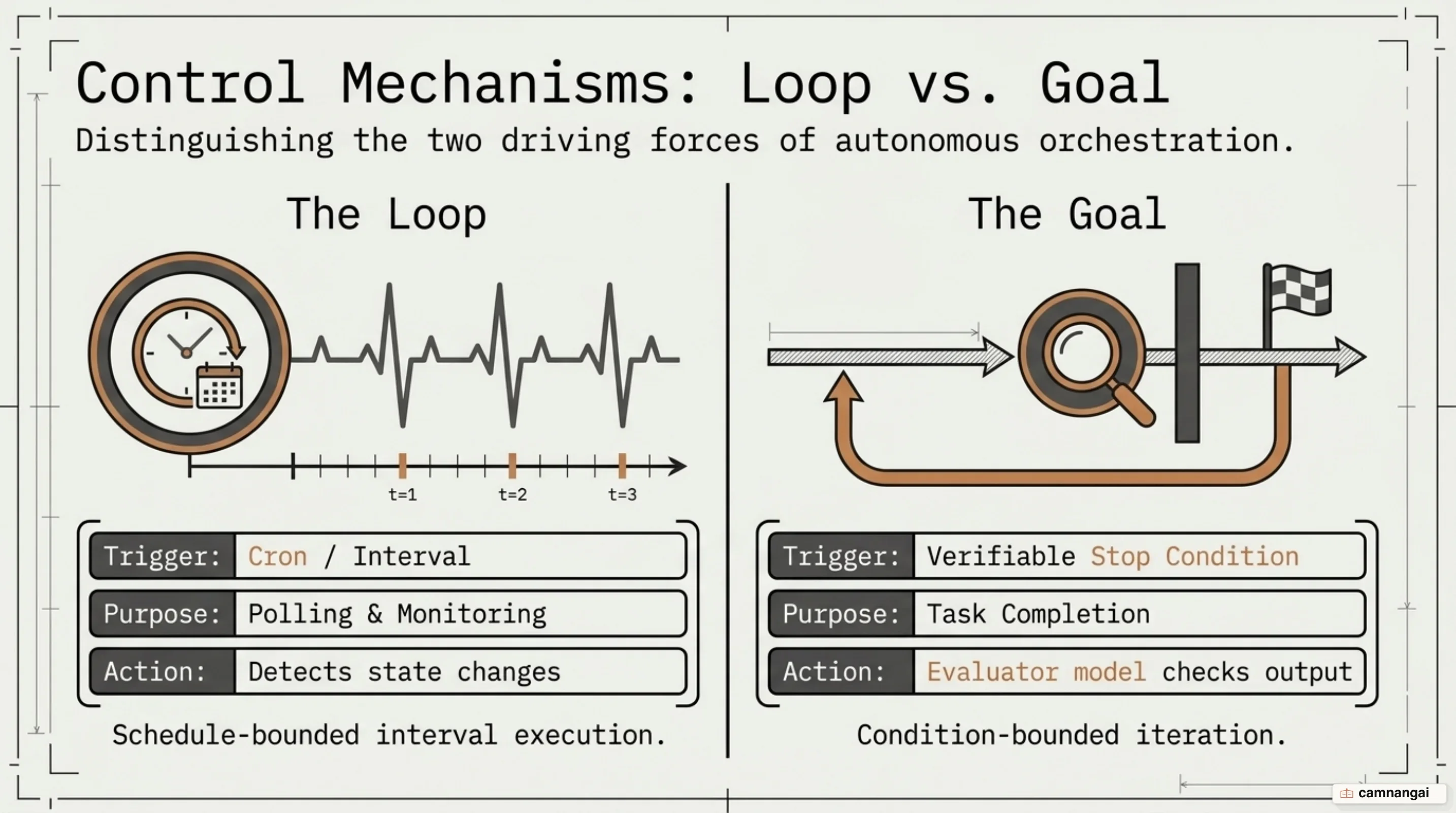
Orchestration in practice: loops for triage, goals for bounded execution
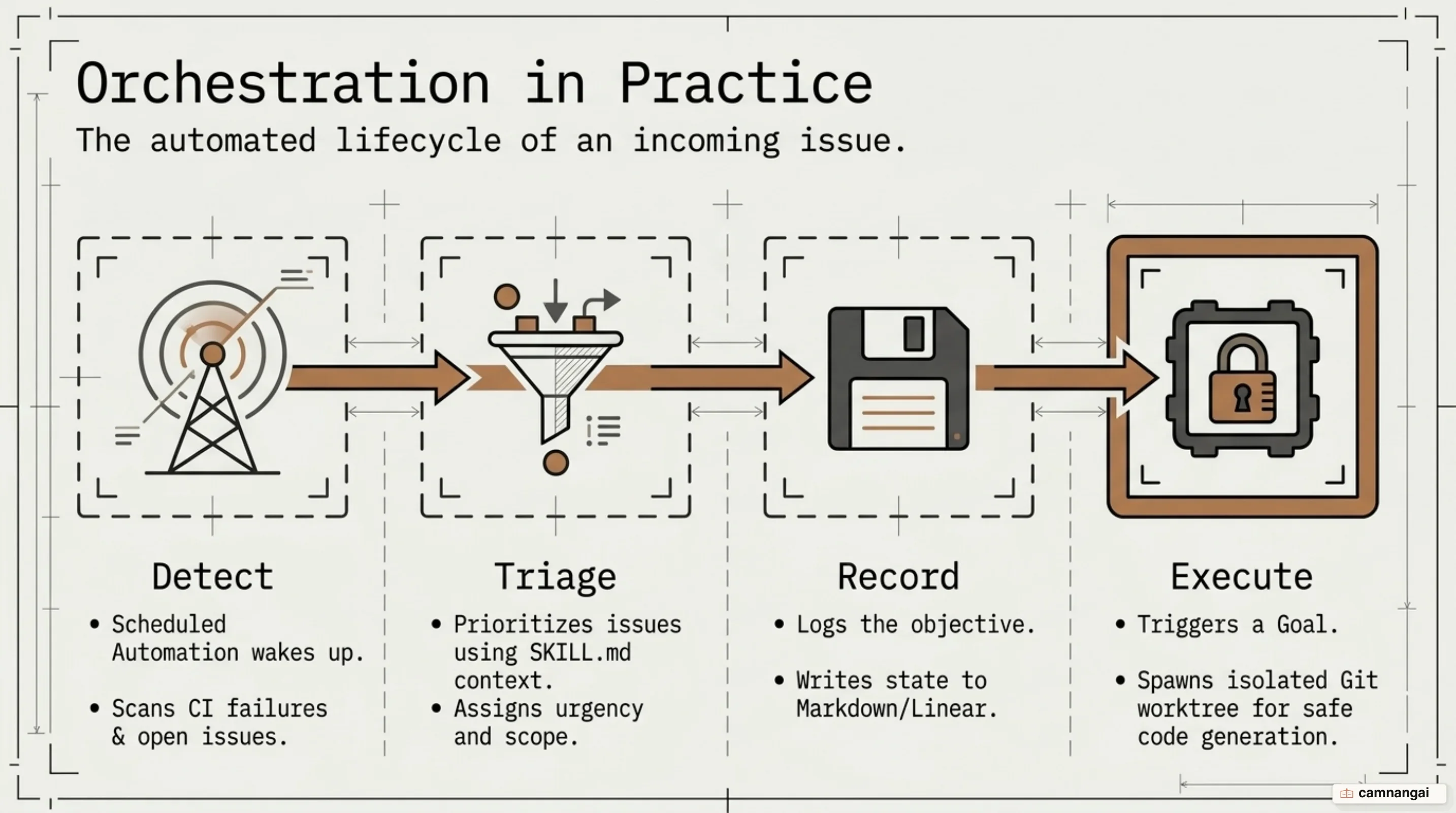
Production workflows rarely pick just one primitive; they combine scheduled loops and goal-driven execution into composite pipelines. A scheduled /loop running on a 12-to-24-hour interval polls issue trackers or CI build logs. When it spots an actionable bug or test failure, the loop dispatches a /goal command to implement a targeted fix in an isolated branch, iterating autonomously until local test suites pass.
This composite model is how high-volume repository maintenance actually scales. Large open-source projects handling 80 to 90 pull requests a day use automated loops to summarize urgency, enforce contribution guidelines (like closing unsupported language translations), and triage incoming feedback without manual intervention. By default, recurring loops automatically expire after 7 days unless re-instantiated or promoted to cloud schedules (/schedule).
Reliability inside loops depends on defensive tool-level error handling and mandatory verification standards. When tools hit logical errors (like a malformed SQL query or a failing subprocess), tool definitions should track consecutive failures (failuresInARow >= 3) and force the agent to stop thrashing or synthesize an answer with existing data. Meanwhile, transient network blips should be handled inside the tool itself using short retries with exponential backoff, without incrementing the logical failure counter. Otherwise, a flaky network connection will prematurely trip your circuit breaker.
To prevent agents from hallucinating completion, skill files (such as verify-frontend-change) enforce strict verification protocols. Agents must launch local servers, inspect browser consoles for zero errors, and use Chrome DevTools MCP integrations to capture DOM screenshots, run performance traces, and audit Core Web Vitals before declaring a task complete.
let failuresInARow = 0;

async function runQueryTool(query: string) {
  // Handle logical tool failures separately from network blips.
  // Network errors should retry internally with exponential backoff.
  if (failuresInARow >= 3) {
    return { error: "Query limit reached. Answer with what you already have." };
  }

  const result = await runQuery(query);

  if (result.ok) {
    failuresInARow = 0;
    return result.rows;
  }

  failuresInARow++;
  if (failuresInARow < 3) {
    return { error: result.error };
  }

  return {
    error: `${result.error} That's 3 failed queries in a row. Stop querying and answer with what you already have.`,
  };
}
Parallel orchestration: running multiple agents without collisions
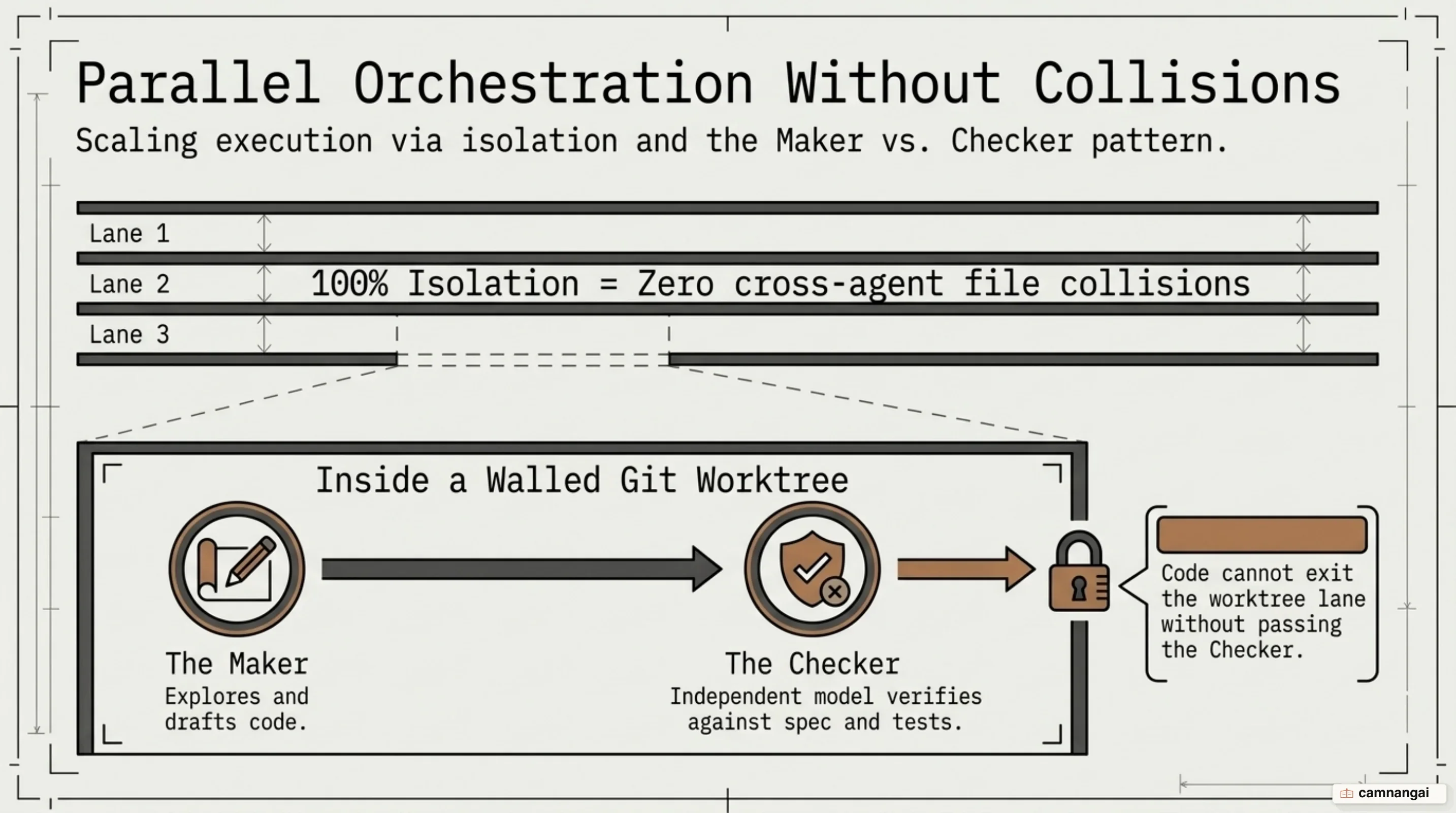
Scaling development output often means running 5 to 10 agent threads in parallel. At that concurrency level, letting agents loose in a single directory guarantees workspace corruption as they overwrite each other's edits.
To avoid write collisions, parallel agents must execute inside isolated Git worktrees. A worktree gives each concurrent sub-agent a dedicated working directory on its own branch while sharing the underlying repository history. Execution engines like Claude Code (via --worktree flags or sub-agent isolation: worktree settings) and the Codex app manage these environments automatically, creating fresh checkouts and tearing them down when the task finishes.
Concurrency management also relies on the "Maker vs. Checker" pattern. A model that writes code is notoriously lenient when grading its own output, which makes self-verification unreliable. To maintain technical quality, orchestration setups spawn separate verifier sub-agents backed by dedicated instruction files (configured in .codex/agents/ via TOML or .claude/agents/ via Markdown). Security during unattended runs is handled through dynamic permission classifiers (such as Sonnet classifiers operating in auto mode) and OS-level sandboxing. For external services, environments use credential injection: API credentials for Datadog or production databases are injected dynamically via an intercepting proxy, allowing agents to run authenticated operations without leaking raw secrets into the model context.
The art of delegation: what to automate and what to watch
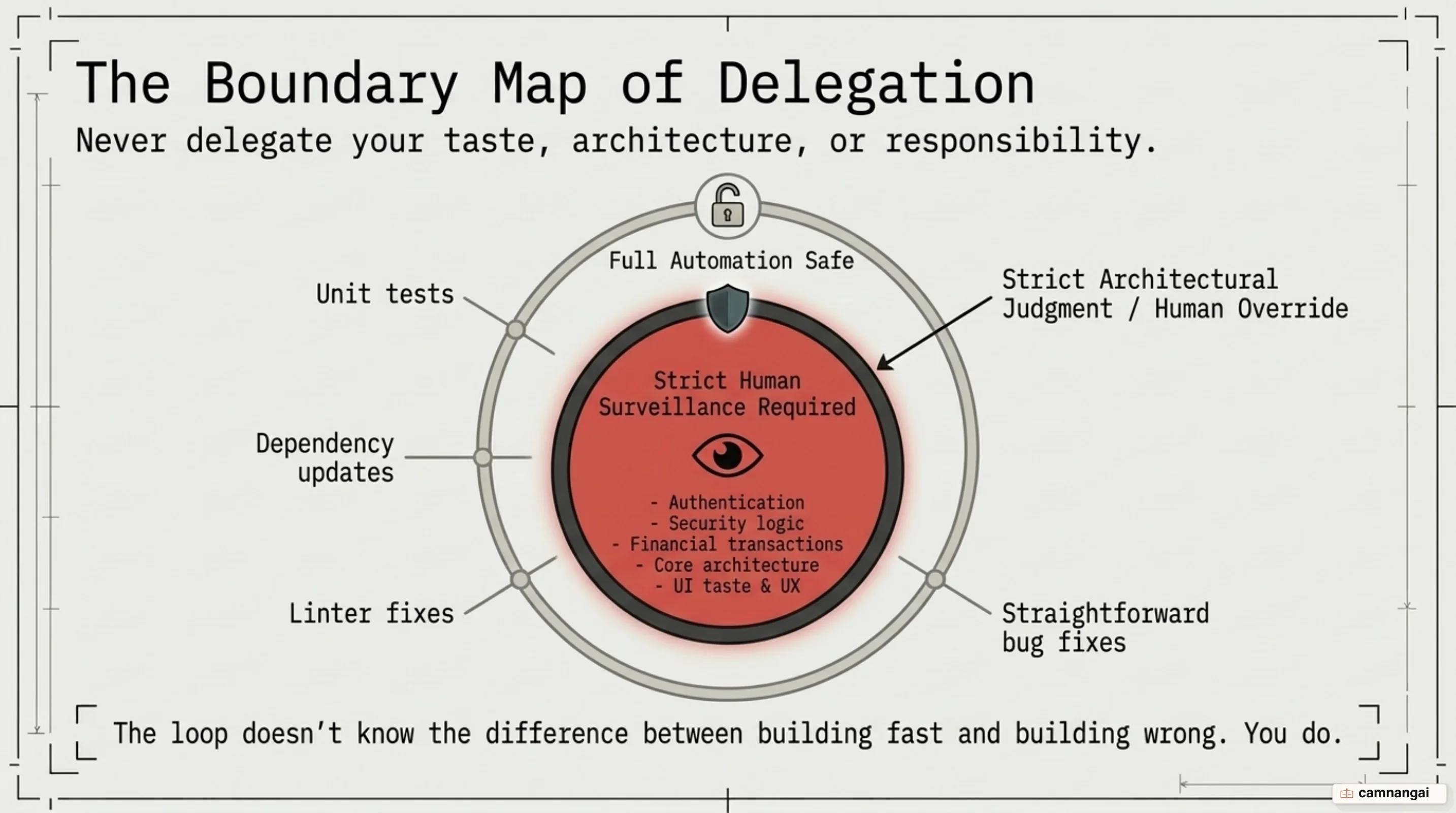
Building dependable loops requires a clear boundary between tasks safe for full delegation and those demanding close human oversight. Tasks suited for full delegation have objective, deterministic verification criteria: writing unit tests for uncovered code paths, updating documentation, fixing lint errors, and bumping routine dependencies. In contrast, high-surveillance tasks sit in sensitive domains touching authentication logic, financial calculations, security boundaries, and legacy infrastructure.
That division dictates a layered code review model. Outer-layer changes (peripheral bug fixes or documentation tweaks) can be reviewed and merged through automated GitHub review bots and model checks. Core architectural modules, security boundaries, and system prompts, however, stay strictly with human code owners who review and approve the pull requests manually.
For frontier models like Opus 4.8 and Fable 5, system prompt design has also changed dramatically. Engineering teams have trimmed system prompt sizes by up to 80% simply by deleting verbose few-shot examples and stripping out negative "don't do X" rules. Frontier models already have strong internal reasoning, so rigid negative constraints frequently clash with direct user instructions or induce execution deadlocks. Giving models leaner prompts provides necessary operational latitude, improves evaluation scores, and cuts total token overhead by up to 66%.
type PromptVersion = {
  id: string;
  version: number;
  model: string;
  text: string;
  override: boolean;
  metadata: {
    temperature?: number;
    changedBy?: string;
    note?: string;
  };
  evalFlags?: {
    grounded: number;
    answered: number;
    concise: number;
    signals: string[];
  };
};

async function savePromptOnDeploy(prompt: PromptVersion): Promise<void> {
  const latest = await db.prompts.latest(prompt.id);
  const changed = latest?.text !== prompt.text || latest?.model !== prompt.model;

  if (changed) {
    await db.prompts.insert({
      ...prompt,
      override: false,
    });
  }
}
What loops cannot buy: the discipline of not delegating your judgment
Loop engineering shifts the center of gravity in software development, letting you automate task discovery, code execution, and programmatic verification at scale. However, loops cannot replace system architecture, engineering taste, or deep code comprehension. Relying blindly on unattended automation introduces two serious engineering risks: comprehension debt, where you ship changes to a codebase you no longer understand, and cognitive surrender, where you uncritically accept flawed architecture or clumsy UX simply because the test suite passed.
Designing effective loops ultimately requires engineering discipline. While automated control loops handle the mechanical grind of building, testing, and triaging, the responsibility for system simplicity, code maintainability, and product experience remains strictly with you.
References
- 7 things we wish we'd known before building an AI chat agent | Trigger.dev
- A Fireside Chat with Cat and Thariq from the Claude Code team
- Building effective AI agents \ Anthropic
- Exploring Generative AI
- Loop Engineering | AddyOsmani.com
- Overview - Claude Code Docs
- Practical Loop Engineering - by Addy Osmani - Elevate
- Ralph Wiggum as a "software engineer"