The /compact command is your primary tool for managing session health in Claude Code: it replaces your verbatim conversation history with a structured summary to fight context rot.
As a conversation grows, the accumulating history of prompts, tool outputs, and code blocks saturates the model's available memory. Left unmanaged, this leads to a predictable failure mode where the model's reasoning and technical precision sharply decline.
Instead of the model struggling to parse thousands of tokens of stale logs and abandoned attempts,
/compact hands it a concise distillation of the most relevant information. You trade absolute
conversation fidelity for context quality, so the model keeps its grasp on foundational architectural
decisions and active goals, even during multi-hour development sessions.
What is context rot, and why does performance decay?
Context rot is the predictable failure mode where an AI's "working memory" becomes saturated, causing foundational information to be compressed or pushed out of the active window. In long-running sessions, Claude Code accumulates noise: stale exploration logs, verbose tool outputs, and resolved error messages. As these tokens fill the window, the model enters the "dumb zone", the upper range of context where the signal-to-noise ratio is poor and the model wastes cycles sorting through stale logs and abandoned attempts on every turn.
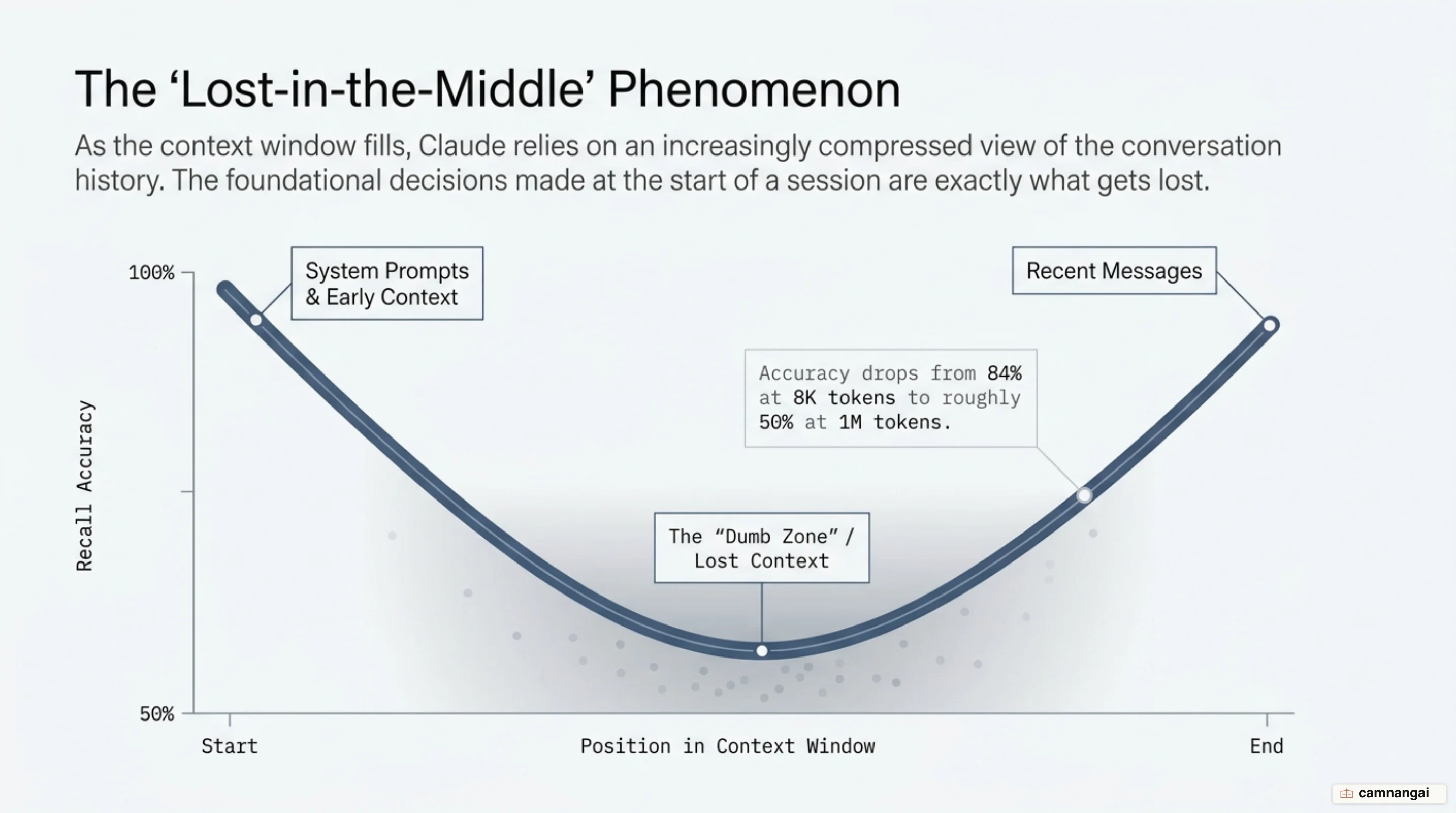
Research on LLM recall identifies a "U-shaped curve" of performance. Models show the highest accuracy for information at the very beginning and very end of the context window, while information in the middle is frequently ignored. OpenAI's MRCR test illustrates this decay, with accuracy dropping from 84% at 8K tokens to as low as 50% at 1M tokens for certain models. Claude models typically decay more slowly, but they remain susceptible to this structural limitation as the window approaches its limit. The number on the spec sheet is a capacity figure, not a promise about attention.
What the /compact command actually does to your session
When you run /compact, Claude reads back the whole conversation, generates a summary wrapped in
<summary> tags, and creates a "compaction block." Everything before that block is then dropped from
the active history, so the model works from the distillation rather than the raw transcript.
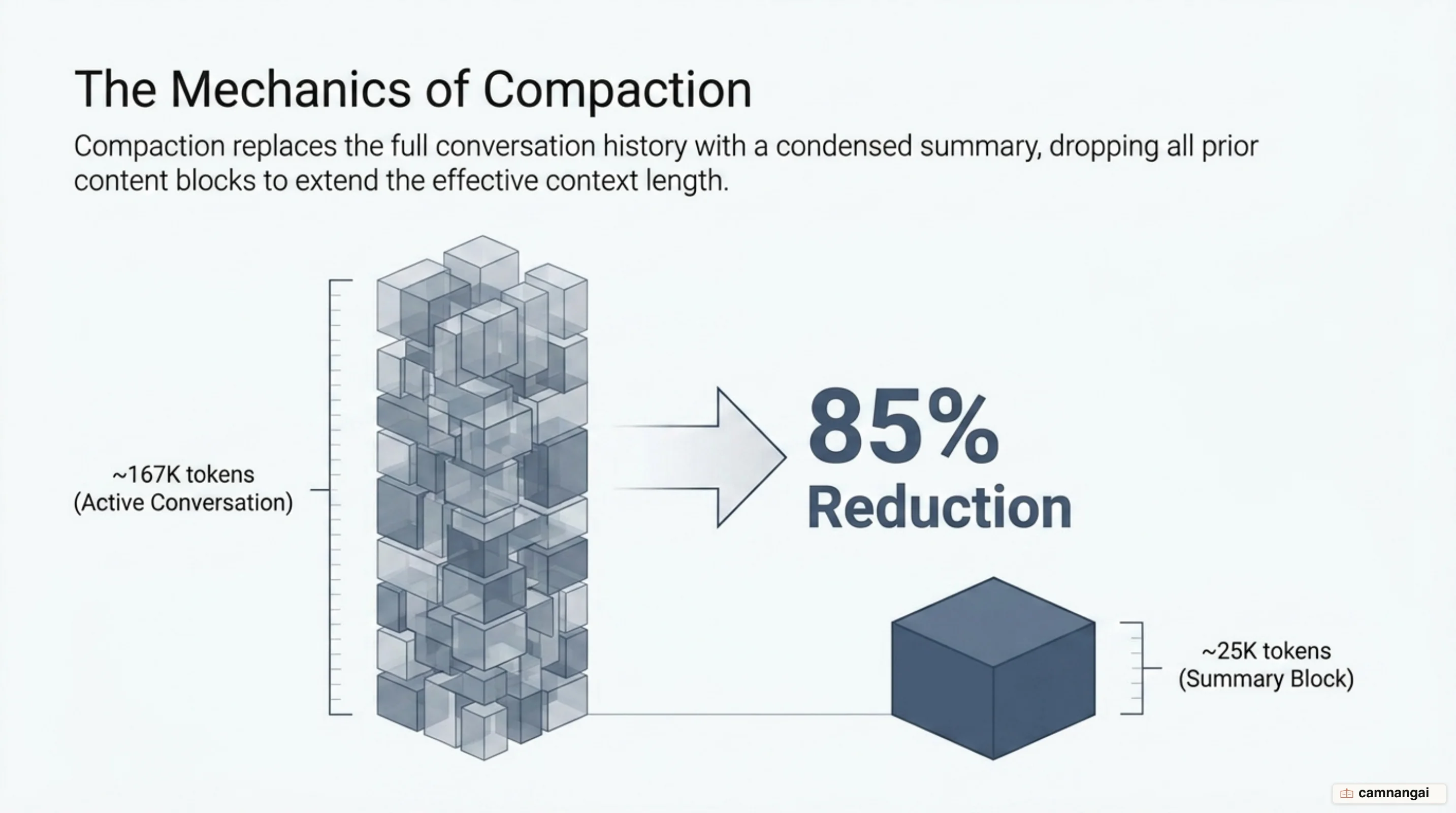
The effect is roughly an 85% reduction in context size, for example shrinking a 167K-token session down to about 25K tokens. All of that reclaimed space becomes fresh short-term memory for the complex logic that comes next.
The key difference between running /compact yourself and letting the system auto-compact is control.
When you compact deliberately, you can hand the summarizer a retention policy. When the system fires
automatically because it hit the memory ceiling, it summarizes blindly, usually favoring the most
recent messages and dropping the architectural constraints you established at the very start of the
session, which are the ones you can least afford to lose.
Automatic compaction (~83%) vs. proactive 60% compaction
By default, Claude Code triggers automatic compaction at roughly 83.5% of the window (about 167,000 tokens of a 200,000-token limit). Waiting for that threshold is often counterproductive. At 83%, the model is already operating in the "dumb zone," which means the summary it generates may be based on a degraded, compressed view of the conversation history.
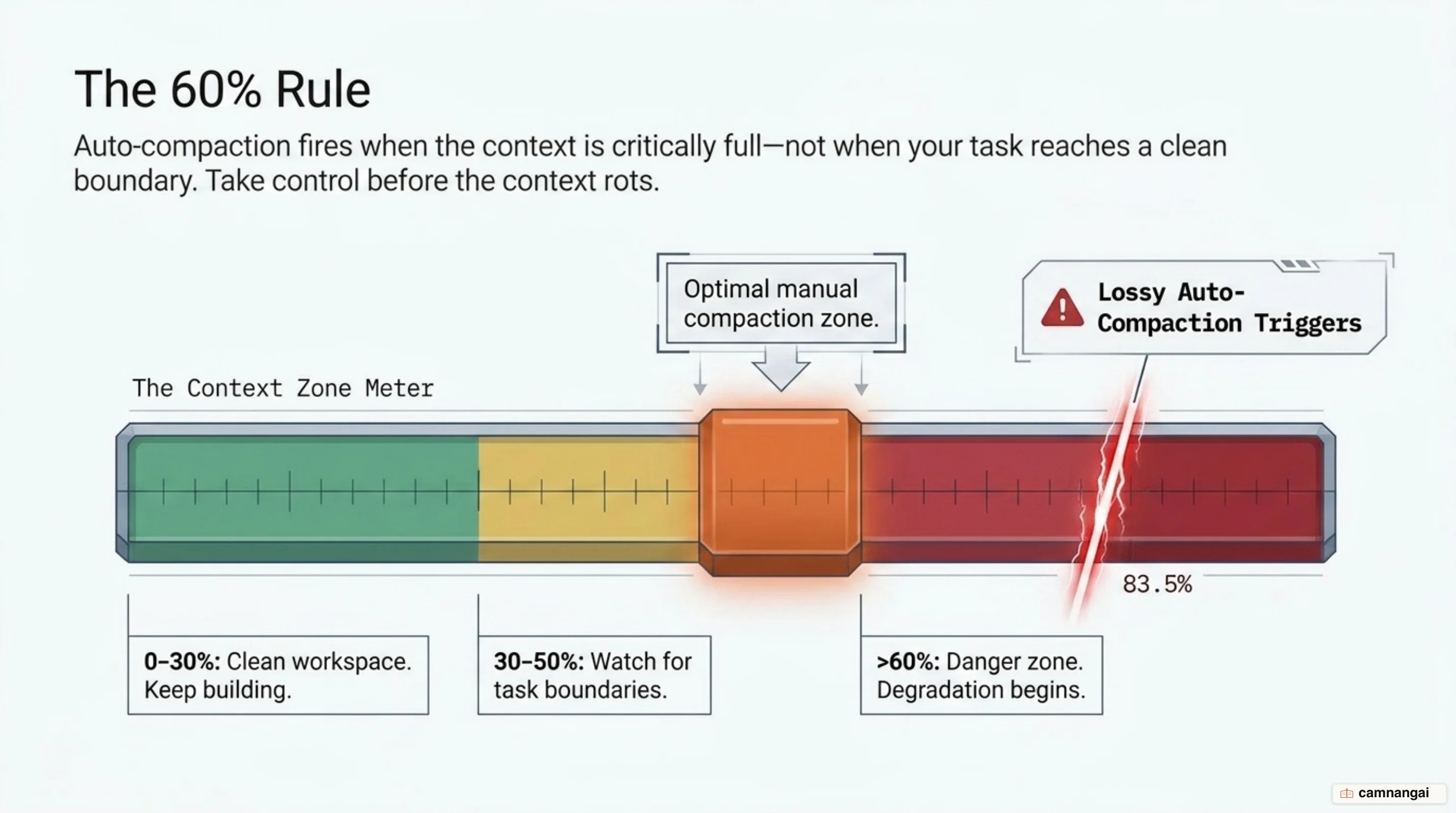
I run /compact by hand once context usage reaches 60%, and I treat that as a deadline rather
than a suggestion. At that threshold, the model still has full, uncompressed access to every message,
so it can produce a high-fidelity summary. It helps to treat the session as a set of zones:
- Green (0–30%): the session is fresh, so let it run naturally.
- Yellow (30–50%): start watching for natural task boundaries.
- Orange (50–60%): the ideal window to run
/compact. Stop starting new features and prepare to compact. - Red (>60%): the danger zone. Don't kick off a complex refactor before you compact.
If you work with a 1M-token window, the percentages need rethinking: 20% of a million is already 200K tokens, enough to dilute any subtle logic. Don't let the big number fool you; signal density matters more than total capacity.
What compacting loses — and the "cascading compaction" trap
Compaction is inherently lossy. Precise technical details are the first casualties: exact values like a 30-second timeout or a 512KB payload cap, specific file paths, and the reasoning chains behind a decision. If the summary describes a "retry mechanism" without preserving the actual 40-line implementation, the model is less useful later.
The more severe risk is "cascading compaction." If a session triggers repeated compactions, Claude summarizes an already-summarized history, and information blurs cumulatively — like photocopying a photocopy. After a few rounds, Claude may still know which project you're working on, but the implicit rules quietly disappear.
Be especially careful with configuration files. A known bug means compaction sometimes fails to
preserve nested CLAUDE.md or project-context.md content, so path-scoped rules vanish after a
compaction until that file is read again. Nothing announces it, so you find out when Claude starts
ignoring a rule you know is still in the file.