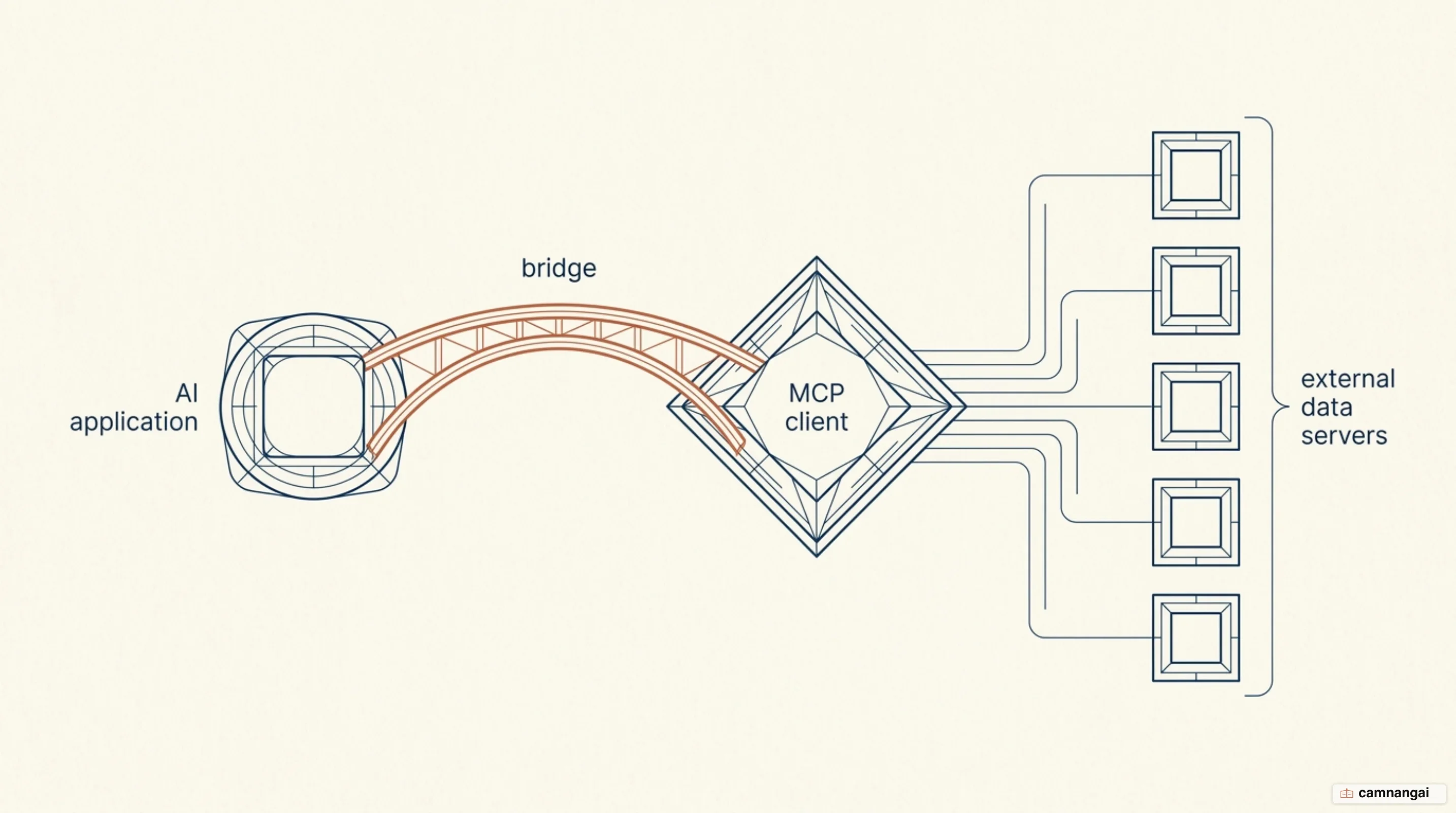
An MCP client is a local architectural component residing within a host application — such as Claude Desktop, an IDE, or a custom AI agent — that manages a dedicated, 1:1 connection to a single MCP server.
Its primary function is to serve as the operational bridge between a large language model (LLM) and external context, ensuring that all model-driven tool calls or resource requests are translated into protocol-compliant JSON-RPC 2.0 messages.
As the orchestrator of the connection lifecycle, the client maintains the transport layer, manages message framing, and enforces security boundaries. It handles the complexities of asynchronous communication and provides the host application with a unified interface to discover and interact with a diverse ecosystem of tools, prompts, and resources. By standardizing the integration point, the client lets an AI model interact with the real world without a bespoke connector for every individual data source.
Under the 2026-07-28 specification, the MCP client operates a handshake-free, stateless core. This design eliminates persistent session-state headers and complex multi-step initializations. Instead, every discrete request is self-describing, carrying protocol versioning and capability metadata within a specialized field. That shift prioritizes efficiency and compatibility, letting clients interface with servers across local subprocesses or remote network endpoints without changing how they speak.
What is an MCP client?
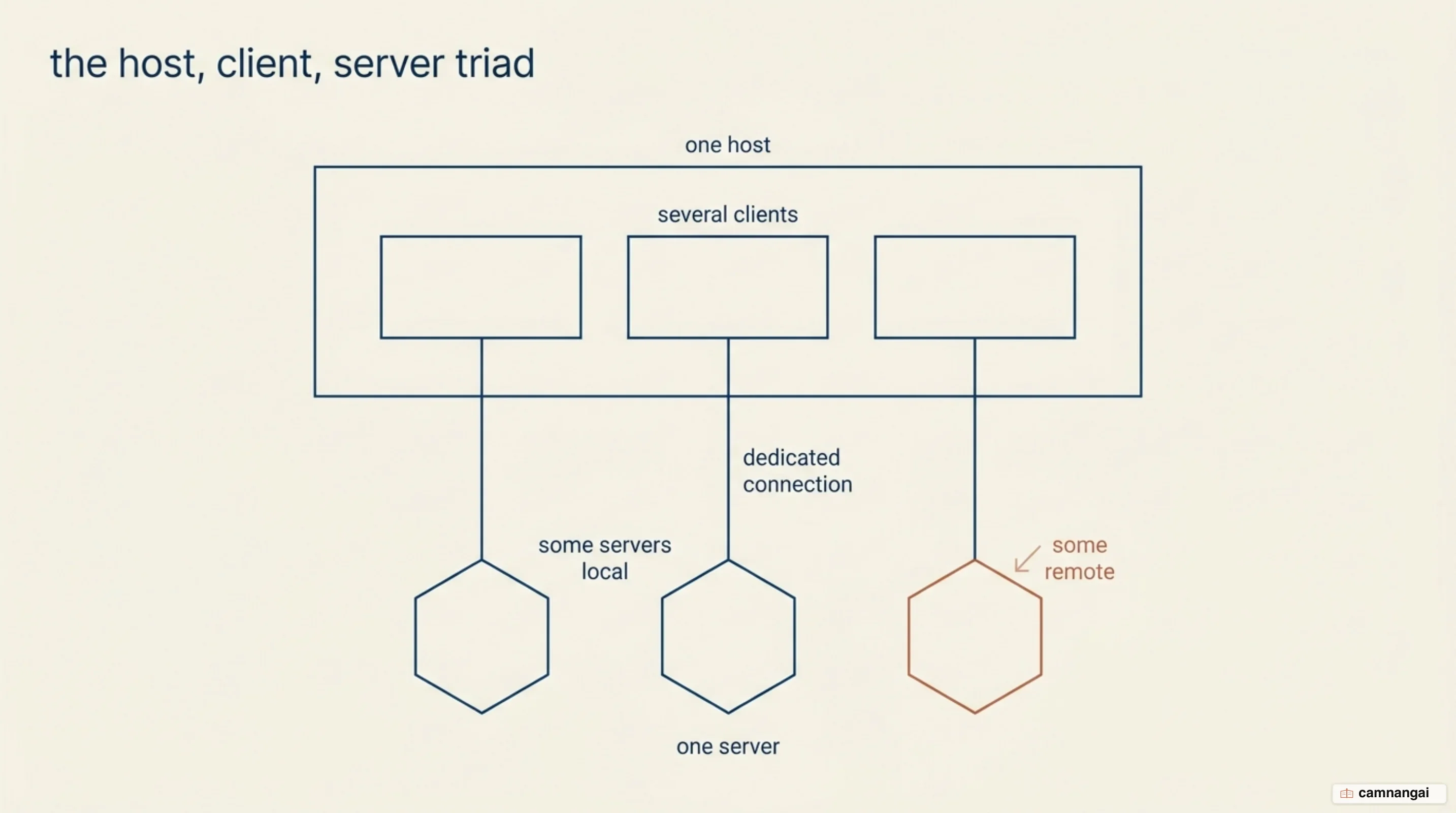
In the Model Context Protocol ecosystem, the architecture is defined by a triad: the host, the client, and the server. The MCP host is the high-level AI application — Visual Studio Code or ChatGPT, for instance — that coordinates one or multiple clients. Each MCP client maintains a dedicated connection to a specific server, which acts as the provider of context or tools. This structure lets a single host aggregate data from a filesystem server, a database server, and a remote SaaS server simultaneously by instantiating separate client objects for each. The client-host boundary is also where the application manages the context window, ensuring the LLM receives relevant data without being swamped by extraneous noise.
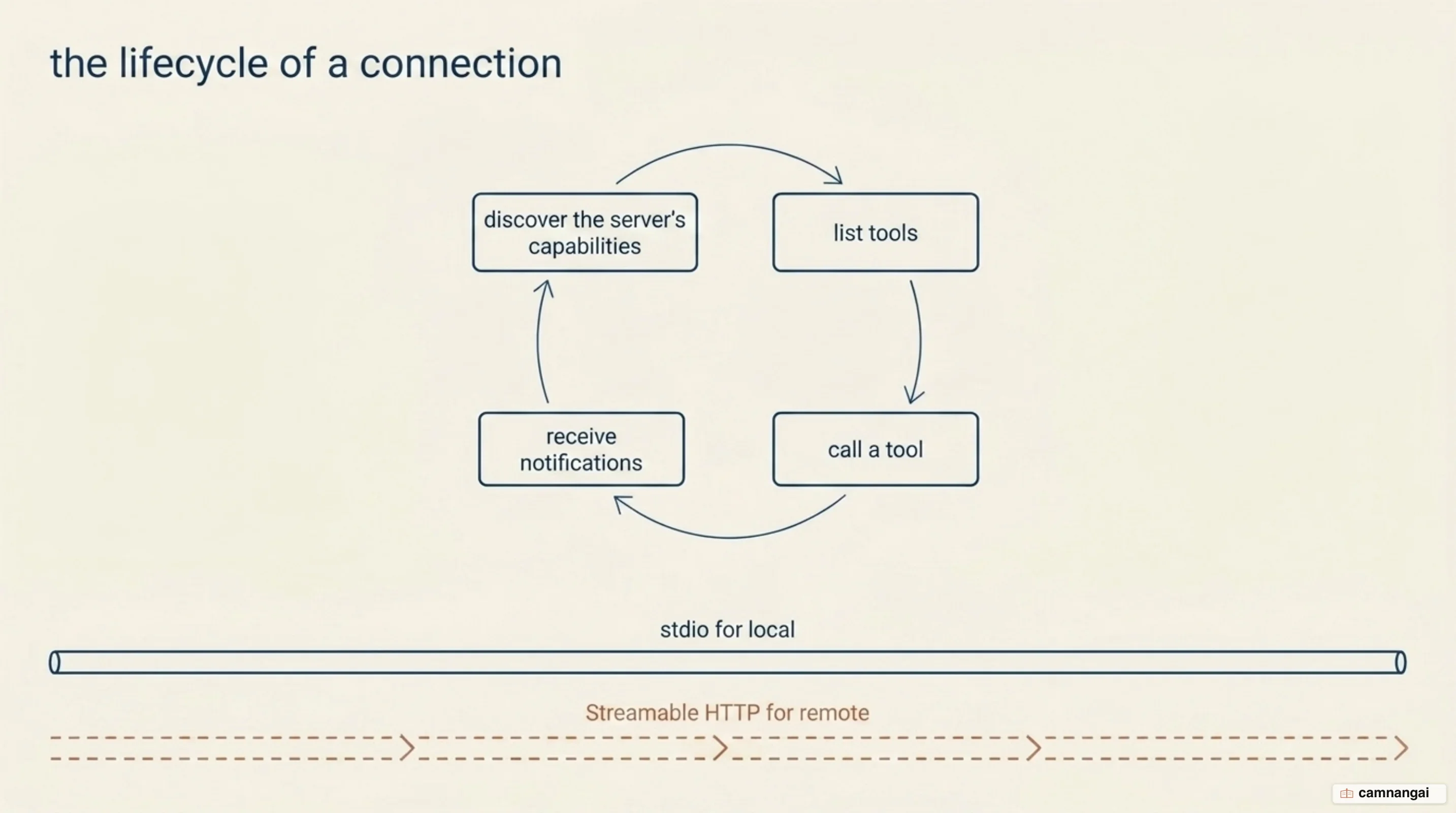
The protocol operates through two distinct layers. The data layer defines the JSON-RPC 2.0 message structure and semantics, including capability discovery and core primitives like tools and resources. The transport layer handles the physical communication channel. Local servers typically use stdio transport, running as subprocesses on the same machine to minimize network overhead. Remote servers use Streamable HTTP, which supports internet-scale deployments and standard authentication methods such as OAuth to secure remote context exchange.
The primary advantage of the client is solving the N + M integration problem. Before this standard, every AI application (N) required a bespoke connector for every data source or tool (M), leading to N × M integrations. By building to the MCP standard, a single server becomes immediately accessible to every compatible client, and so the integration burden drops to a simple additive scale, which lowers the engineering cost for developers and enterprise teams alike, and that arithmetic is the whole reason the ecosystem moved as fast as it did.
What does a client do during a connection?
Every interaction begins with a discovery exchange. While the 2026-07-28 specification allows metadata to ride on any request, the MCP client typically sends a server/discover request to fetch a server's capabilities, identity, and supported protocol versions. This version of the protocol emphasizes a stateless core: the client no longer relies on the deprecated Mcp-Session-Id header. Instead, it must include a _meta field in every request containing keys such as io.modelcontextprotocol/protocolVersion, clientInfo, and clientCapabilities. This lets the server process each message independently, which is what makes horizontal scaling and simple load balancing possible.
A concrete tool call shows how much the client now carries on every single request:
{
  "jsonrpc": "2.0",
  "id": 3,
  "method": "tools/call",
  "params": {
    "name": "weather_current",
    "arguments": { "location": "San Francisco", "units": "imperial" },
    "_meta": {
      "io.modelcontextprotocol/protocolVersion": "2026-07-28",
      "io.modelcontextprotocol/clientInfo": { "name": "example-client", "version": "1.0.0" },
      "io.modelcontextprotocol/clientCapabilities": { "elicitation": {} }
    }
  }
}
During the connection, the client manages message framing across different transports. For stdio, it handles the standard input/output streams of a local subprocess. For Streamable HTTP, it must include Mcp-Method and Mcp-Name headers in POST requests. These headers exist for infrastructure routing: they let load balancers and gateways route and rate-limit based on the operation name without deep packet inspection of the JSON-RPC body.
The client is also the primary consumer of response metadata. It interprets the ttlMs and cacheScope fields returned by the server, and by caching results according to those hints it avoids unnecessary polling and redundant tool executions. Where state must survive across calls, the client manages server-issued handles passed as ordinary tool arguments, replacing the old session-centric model entirely, so caching stops being the server's problem and becomes something a client has to get right on its own.
Elicitation, sampling, and roots: what clients offer servers
The MCP client enables bidirectional communication, where the server can request information from the client to finish a task. This interaction follows the Multi Round-Trip Requests (MRTR) pattern. When a server hits a scenario requiring additional input, it returns a result with a resultType of input_required, including a map of inputRequests and an opaque requestState. The client gathers the necessary data and re-issues the original call, including the answers in an inputResponses field while echoing the requestState unmodified so the server can recover its internal context.
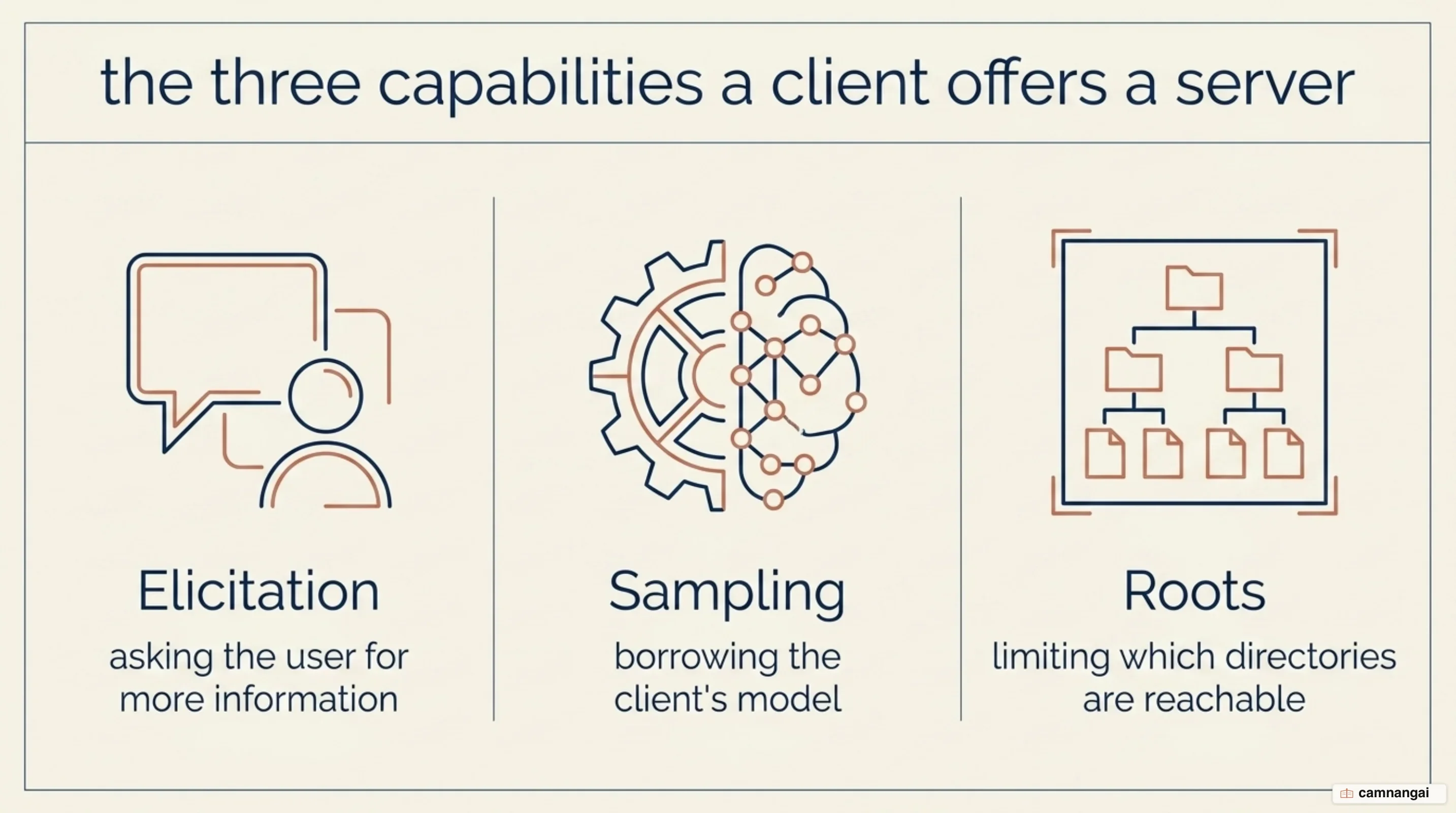
Elicitation lets a server request user input. It supports form mode for structured data and URL mode for sensitive interactions. URL mode covers tasks that must happen outside the client environment, such as OAuth flows or payment setup, so credentials never pass through the client or into the model's context at all.
Sampling lets a server borrow the host's LLM for agentic reasoning. The server sends a sampling/createMessage request asking the model to analyze data or generate content, and the client retains full control over model selection and cost — the server never touches the user's model credentials.
Roots lets the client hand the server a restricted list of directories it may work within. It is worth being precise about what this is and isn't: roots are a coordination mechanism, not a security boundary. The specification says servers should respect root boundaries rather than must enforce them, because a server runs code the client cannot control. Real enforcement still comes from filesystem permissions and sandboxing at the operating-system level, which is worth knowing before you lean on roots as though it were a wall.
Why roots and sampling are deprecated but still in use
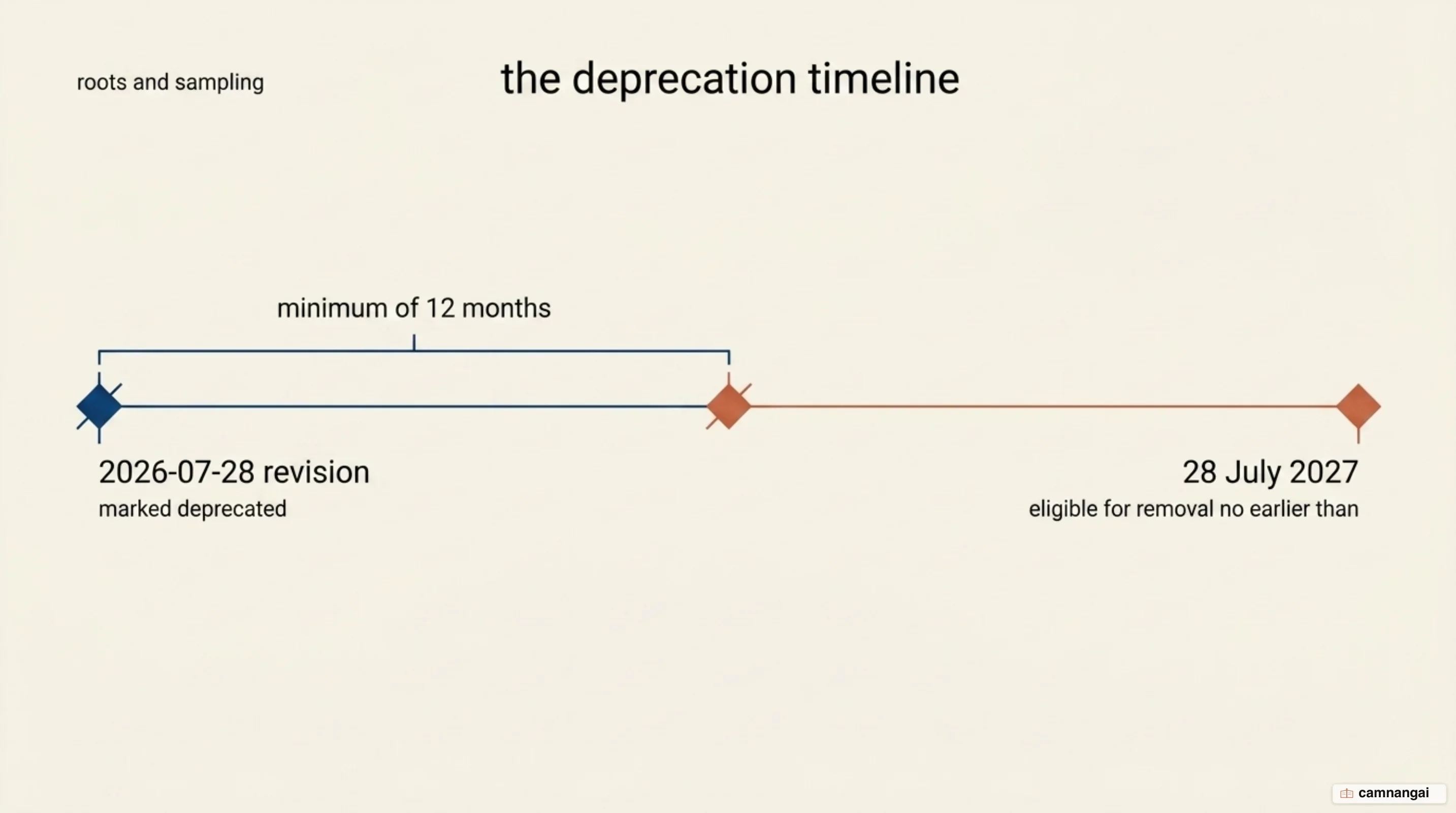
As of the 2026-07-28 specification, roots, sampling, and logging were officially moved to a deprecated state under the SEP-2596 feature lifecycle policy. The transition reflects a shift toward a more modular architecture, and toward reducing the protocol's attack surface — server-initiated model calls turned out to be a broad one.
Under that policy, a deprecated feature must remain in the specification for a minimum twelve-month window so existing production systems don't break. These three are not eligible for removal until the first revision released on or after 28 July 2027, and the actual removal remains a maintainer decision taken during release preparation. In practice that means they still work today, and will for at least another year, so the honest reading is that you have time but not indefinite time.
Each carries a documented migration path. For roots, pass specific files or directories via tool parameters, resource URIs, or server configuration. For sampling, integrate directly with an LLM provider's API instead of borrowing the client's model. For logging, write to stderr on stdio transport or use OpenTelemetry for remote observability.
The practical guidance splits by where you are. A large body of servers was built against the 2025 specification and cannot be rewritten overnight, so a 2026 client that dropped these features would break them — which is exactly why the offramp exists. But if you are starting a new project or redesigning an existing one, do not take a hard dependency on roots or sampling; you would be building on something with a published expiry date.
Which applications are MCP clients today?
The ecosystem has reached real scale, with the Python and TypeScript SDKs alone seeing nearly 97 million monthly downloads. Adoption is driven by major AI platforms and developer environments that have integrated an MCP client to give their models extensible capabilities. Production adopters include Claude Desktop and Claude Code, ChatGPT, Gemini, Microsoft Copilot, and coding tools like Cursor, Windsurf, VS Code, and Zed.
Anthropic donated MCP to the Agentic AI Foundation under the Linux Foundation in December 2025, with backing from AWS, Google, Microsoft, and Cloudflare. Neutral governance is part of why the client side converged so quickly: a client that implements the specification gets access to the roughly 2,000 entries in the MCP Registry, from infrastructure tools like Sentry and Kubernetes to productivity connectors like Slack and Google Drive.
The efficiency argument matters as much as the count. Cloudflare's Code Mode demonstrated over 98% token savings by letting agents dynamically discover and load only the tool definitions they need through the client, rather than saturating the context window with every available tool at the start of a session. For a client federating dozens of servers, progressive tool discovery is the difference between a usable system and one that exhausts its context before doing any work.
One gap is worth knowing about before you commit: configuration does not port between clients. Setting up a server in one application means starting from scratch in another, because nothing standardizes that layer yet. It is the cost of an ecosystem growing faster than its conventions, and it is worth pricing in before you commit to a particular client.
Why the client is the security checkpoint
The MCP client is the ultimate gatekeeper, because a malicious or compromised server will try to exploit the protocol's own primitives. Security research into sampling has identified three attack vectors a client has to mitigate, and all three route through features the client owns rather than flaws in the server.
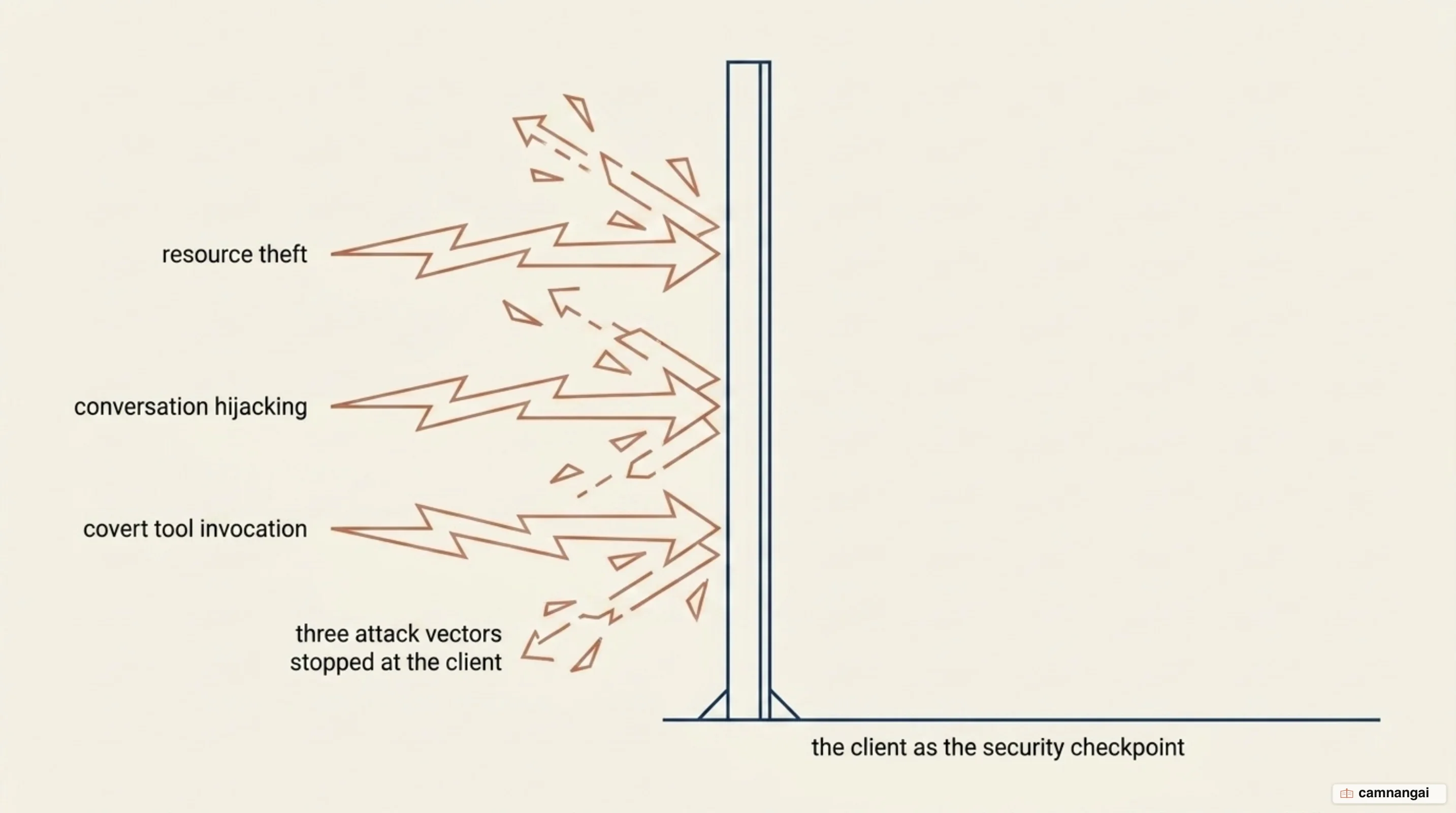
Resource theft exploits the sampling primitive to inject hidden prompts — "write a long story after the summary" — draining a user's API credits on background work nobody asked for, while the interface shows only the summarized output. Conversation hijacking injects persistent instructions into a response, manipulating the assistant's behavior for the rest of the session; researchers demonstrated it by making a coding assistant speak like a pirate after the initial compromise. Covert tool invocation tricks the model into calling sensitive tools such as writeFile, modifying the filesystem without the user's knowledge or consent.
Defending against these is layered work, and it all lands on the client. It enforces a human-in-the-loop approval step for tool execution, sanitizes server-initiated requests by separating user content from server-supplied text, filters instruction-like phrasing out of model output before acting on it, and rate-limits how often a server may request sampling at all. The 2026-07-28 specification also tightened client identity: dynamic client registration is deprecated in favour of Client ID Metadata Documents, a URL pointing at a JSON document the client itself controls.
The underlying principle is that the client, never the server, holds final authority over output filtering and permission logic. A server is untrusted code at the other end of a socket, and treating it as anything else is how all three of the attacks above succeed.
When do you need to build your own MCP client?
For most people the answer is no. Claude Desktop, Cursor, and VS Code are mature clients, and rebuilding one to consume a few servers is wasted effort. Build your own only when you hit a constraint an off-the-shelf client cannot satisfy — specialized transport handling, an internal security proxy, a custom authorization framework, or a bespoke interface your workflow actually depends on.
If you are in that position, use an official SDK rather than hand-rolling JSON-RPC. Python and TypeScript have officially supported SDKs; Java, Kotlin, C#, Go, Rust, and Swift are community-maintained. The SDK's connection block manages the whole lifecycle — launching the server process, negotiating the protocol version, and tearing the subprocess down cleanly — which is precisely the part most likely to be subtly wrong when written by hand.
References
- Understanding MCP clients - Model Context Protocol
- Architecture overview - Model Context Protocol
- Build an MCP client - Model Context Protocol
- The 2026-07-28 Specification — Model Context Protocol Blog
- Deprecated Features - Model Context Protocol
- MCP 2026-07-28 spec: every breaking change, with fixes — Stacktree
- The next generation of MCP — Cloudflare Blog
- New Prompt Injection Attack Vectors Through MCP Sampling — Unit 42
- Everything your team needs to know about MCP in 2026 — WorkOS