Prompt engineering is the systematic work of designing and refining instructions that steer LLMs toward the output you actually want.
For developers, prompt engineering turns a non-deterministic model into a reliable, programmable part of your system. Done well, it cuts latency and API overhead, and spares you the brittle manual clean-up of model output.
Treat prompts as natural-language code: you use in-context learning to build systems that adapt without expensive weight updates.
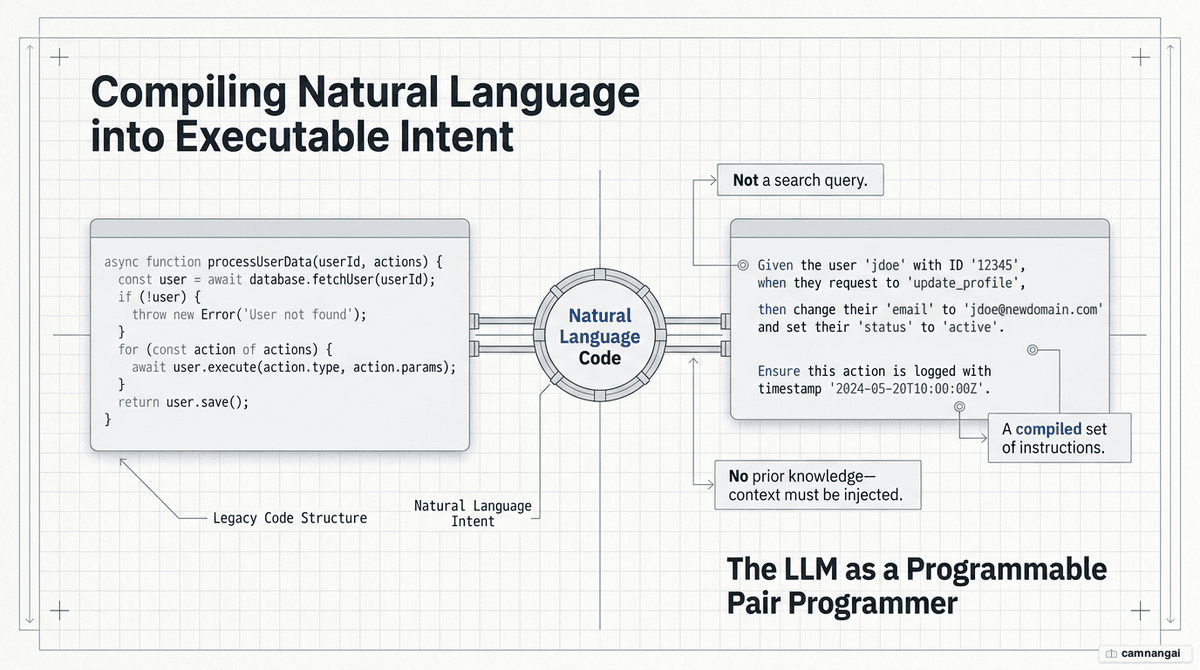
What prompt engineering is and why developers need it
In production, prompts act as "natural-language code." Anyone can type a question; prompt engineering is the discipline where the model adapts through in-context learning — it changes its behavior based on the input you give it, without updating its underlying weights. That hands you something no human collaborator can offer: a restart button. The model returns to a clean state on every run, so you can run independent experiments and trial and error without yesterday's session bleeding into today's.
It also takes a shift in theory of mind. You have to spell out the logic you keep in your head and strip away the assumptions that only make sense inside your project, then treat the model as a highly competent "educated layperson" — intelligent, broadly informed, but without your specific context. The work is to hand it a complete set of facts. You are a designer drawing out the right result with precise, prescriptive instructions, not a negotiator working it with "tips."
Anatomy of an effective prompt
A production-grade prompt rests on four parts. Skip any of them and you invite ambiguity and generic, low-value output.
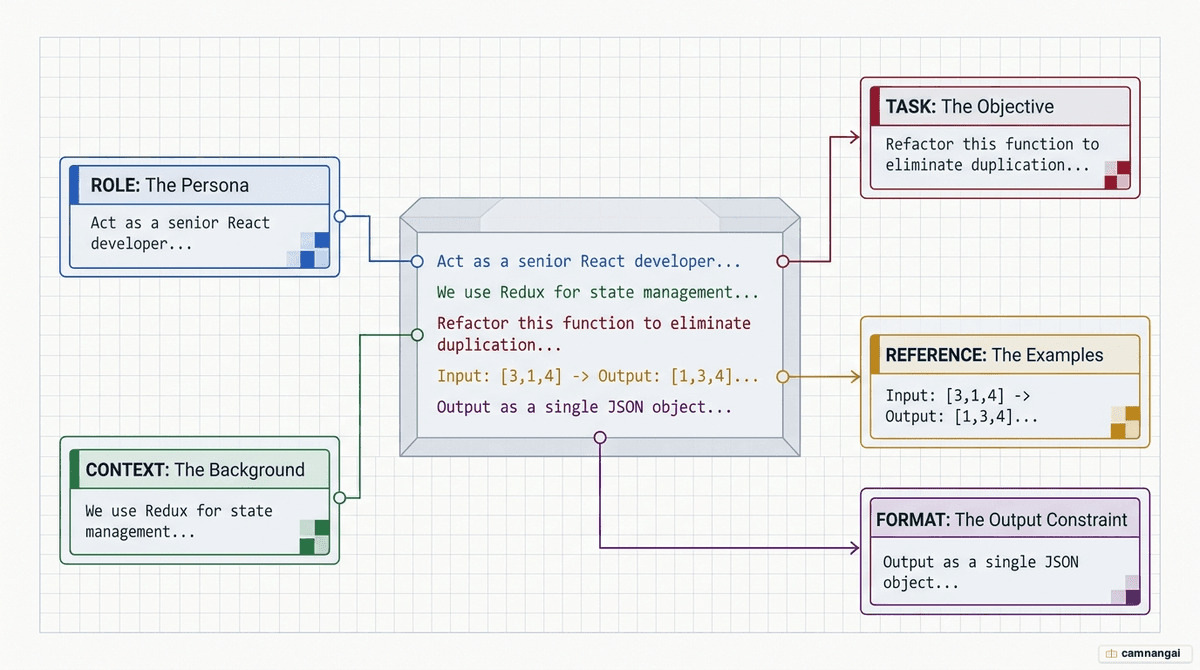
- Task description (persona/role): establishes the expertise level and perspective (e.g. "Senior Systems Architect").
- Context (background): provides the specific domain facts, documentation, or constraints.
- References (examples): demonstrates the desired pattern through sample data.
- Concrete task: defines the specific action and output format.
Developers must distinguish between system prompts (defining persistent behavior and global rules) and user prompts (the dynamic query or data payload).
| Component | Function | Impact on performance | Analogy (educated layperson) |
|---|---|---|---|
| Persona | Sets expert role | Improves tone and technical depth | Hiring a specialized consultant |
| Context | Provides background | Reduces hallucinations/ambiguity | Giving a new hire the project wiki |
| References | Demonstrates pattern | Improves formatting and reliability | Showing a template of past work |
| Task | Defines the action | Ensures specific, high-quality output | The explicit ticket description |
The "needle in a haystack" problem: a model's attention is finite, and it pays the most of it to whatever sits at the very start or end of a prompt. Put your critical instructions at the start — it helps prompt caching and keeps the model from latching onto noise buried in the middle, a failure known as attention drift.
Core prompting techniques: zero-shot, few-shot, chain-of-thought, role, prompt chaining
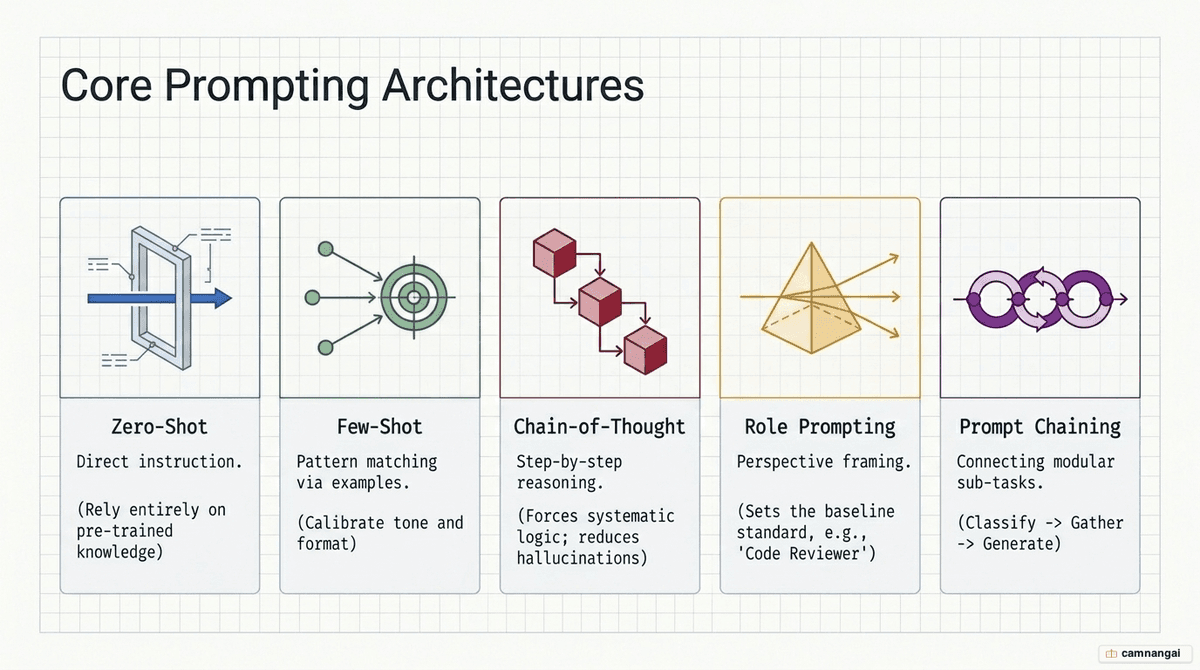
Zero-shot prompting
Zero-shot means giving instructions with no examples attached. It is the most token-efficient method, but it leans entirely on the model's pre-trained knowledge. Great for straightforward summaries or translations; it tends to fall apart on complex formatting or niche architectural logic.
Few-shot prompting
This technique provides 1–5 examples to demonstrate patterns. To maximize efficiency, use condensed,
token-saving syntax: Input: {json_data} -> Output: {optimized_sql}.
Chain-of-thought (CoT)
Asking the model to "think step-by-step" forces it to generate its reasoning along the way. That
reasoning acts as a scratchpad for computation and sharply improves accuracy on logic and math. In
production, ask for the reasoning wrapped in a specific tag (e.g. <thought>) so you can parse it
out easily.
Role prompting
Assigning a persona is a shortcut to the part of the model's knowledge you want. Tell it to act as a "first-grade teacher" and it shifts toward effort-based grading — but modern models respond best to prescriptive honesty. Telling the model you are an "AI researcher running a benchmark" often beats social gimmicks like "tipping."
Prompt chaining
Breaking a complex task into a sequence of prompts (e.g. intent classification → extraction → response) makes it more reliable. Chaining costs you some latency, but it lets you debug each step on its own and mix model tiers — a cheap model for simple classification, an expensive one for generation.
Prompting to debug code
The "rubber duck" method works well for AI debugging: you make the model trace the code step by step until it spots the logic flaw.
// BUGGY CODE
function mapUsersById(users) {
  const userMap = {};
  for (let i = 0; i <= users.length; i++) {
    const user = users[i];
    userMap[user.id] = user;
  }
  return userMap;
}
Poor prompt: "Why isn't my mapUsersById function working?"
Improved prompt: "I have a JavaScript function mapUsersById that converts an array of user objects
into a lookup map. Current behavior: it throws TypeError: Cannot read property 'id' of undefined on the
last iteration. Expected behavior: return an object keyed by user ID. Input: [{id: 1, name: "Alice"}].
Code: [insert code above]. Instruction: walk through the execution line-by-line and track the value of
i and user at each step to find the logic flaw."
Prompting to refactor and optimize code
Refactoring needs an explicit goal — performance or readability, stated up front. Always ask the model to explain what it changed, so you can catch any behavior-altering assumption it made, like parallelizing API calls that were meant to run in sequence.
// BEFORE: O(n^2) nested loop
users.map((user) => {
  return {
    ...user,
    orders: orders.filter((order) => order.userId === user.id),
  };
});

// AFTER: O(n) Map-based lookup
const ordersByUser = new Map();
orders.forEach((order) => {
  if (!ordersByUser.has(order.userId)) ordersByUser.set(order.userId, []);
  ordersByUser.get(order.userId).push(order);
});
users.map((user) => ({
  ...user,
  orders: ordersByUser.get(user.id) || [],
}));
Prompting to build new features
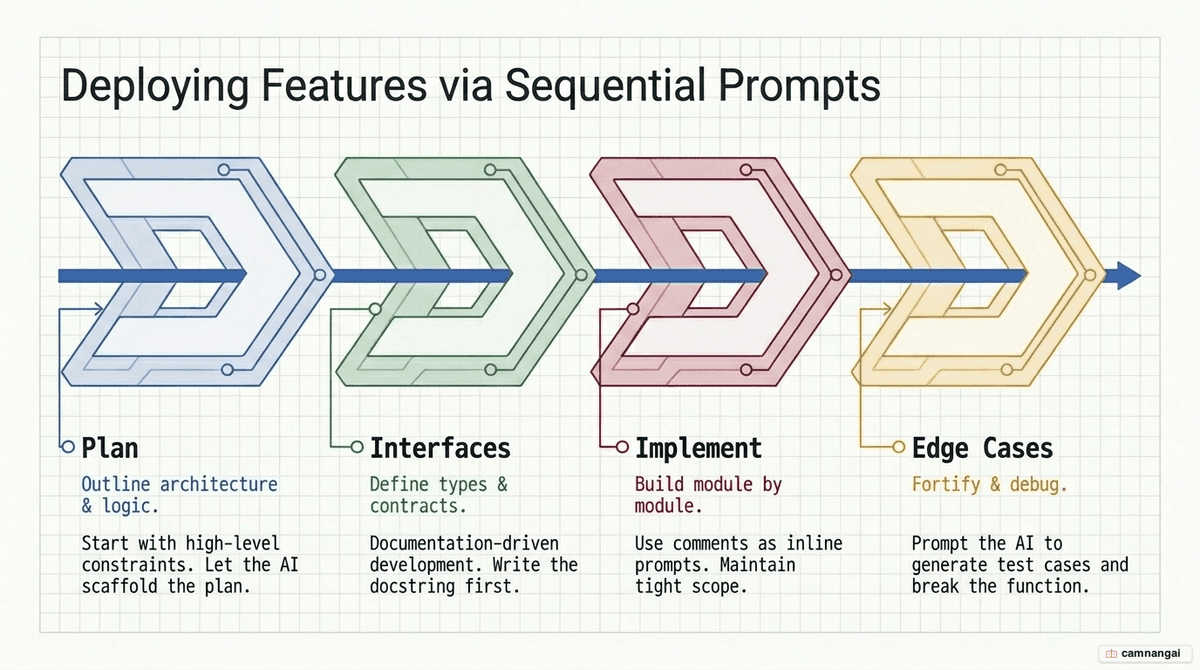
Build incrementally so the model doesn't lose the thread of a complex requirement.
- Plan: "Outline a plan to add a product search filter to a React app using
/api/products." - Build: "Create the
ProductListcomponent based on the plan. Use TypeScript and fetch data inside auseEffecthook." - Refine (documentation-driven): write a docstring first and let the AI fill the implementation:
/** Calculates the total price including a 7% tax. Example: total(100) -> 107 **/
Anti-patterns to avoid
- The vague prompt: assuming the model knows your project's internal tech stack.
- The overloaded prompt: asking for a full MVP in one request; results will be jumbled.
- Vague success criteria: asking to make code "better" without defining metrics like "cyclomatic complexity" or "execution time."
- Ignoring the "escape hatch": failing to give the model a way to decline a request. Use: "If the
input is ambiguous, output
<unsure>." This prevents hallucinations by allowing an "out."
Getting started: iterate and refine your prompts
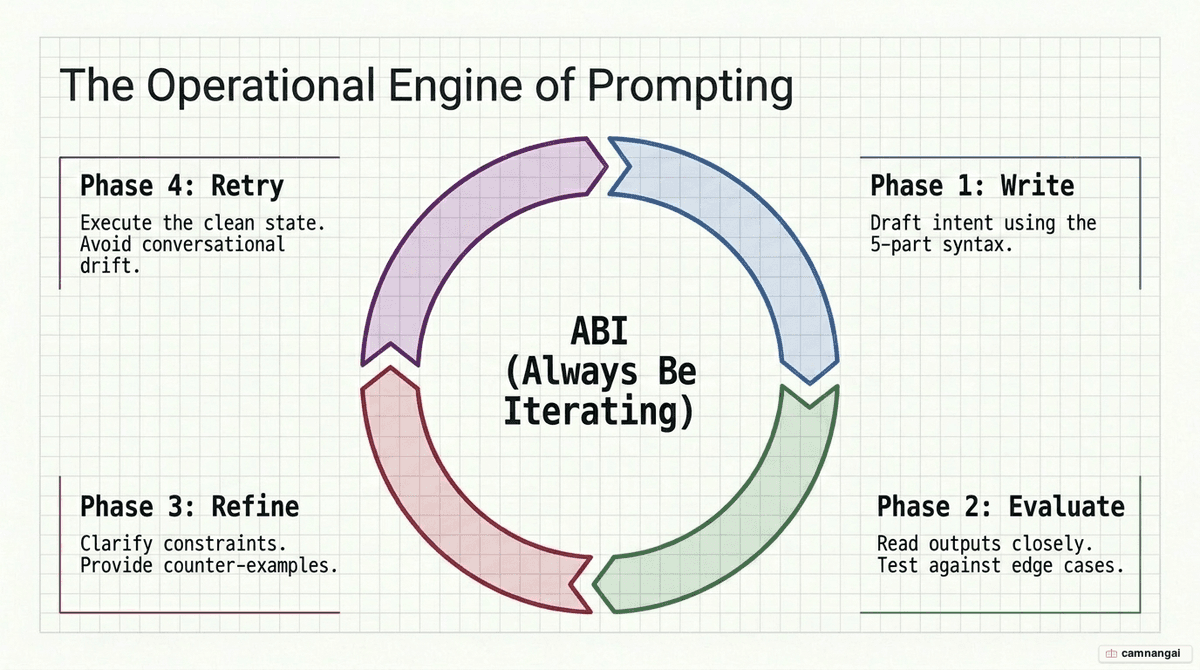
Prompting is a circular process. Follow the ABI rule: Always Be Iterating.
- Write: create a prompt based on the Role–Task–Context frame.
- Evaluate: check the output (does it run? is the format correct?).
- Refine: adjust instruction placement (needle in a haystack), add examples (few-shot), or add constraints.
- Retry: repeat until you reach the stability your production environment needs.
You can also use the model as its own critic: "Identify any ambiguities in these instructions that might lead to a failure in the task."
FAQ
Does grammar and punctuation matter in prompts? For RLHF (reinforcement learning from human feedback) models, what matters most is that the concept is clear. In raw pre-trained models, though, typos make poor, typo-ridden output more likely, because the model imitates the low quality of the input. Either way, use clean punctuation to mark where your data starts and stops, so parsing stays consistent.
Should I lie to the model or offer "tips"? No. Modern models do better with honesty. Treat the LLM as a competent "educated layperson" and give it prescriptive, factual instructions — that beats gimmicks. Lying or "tipping" is an unreliable shortcut next to good context and explicit constraints.
Is prompt engineering just for chat? No. It is essential for agentic workflows and enterprise API integrations, where the AI has to produce structured, predictable, parseable data that other programs downstream can consume.