Subagents are specialized, autonomous AI instances that execute tasks inside isolated context windows
— this prevents the performance degradation you see when a main conversation thread reaches 50–60% capacity. By offloading resource-intensive work such as exhaustive code research, log analysis, or multi-file reviews to these independent workers, you keep the primary orchestrator high-performing.
These subagents operate with their own distinct system prompts and tool permissions. When a subagent finishes a task, it returns only a concise summary to the main thread. This architecture lets you scale from simple one-off prompts to reliable, multi-agent engineering pipelines without hitting the limits of a single context window.
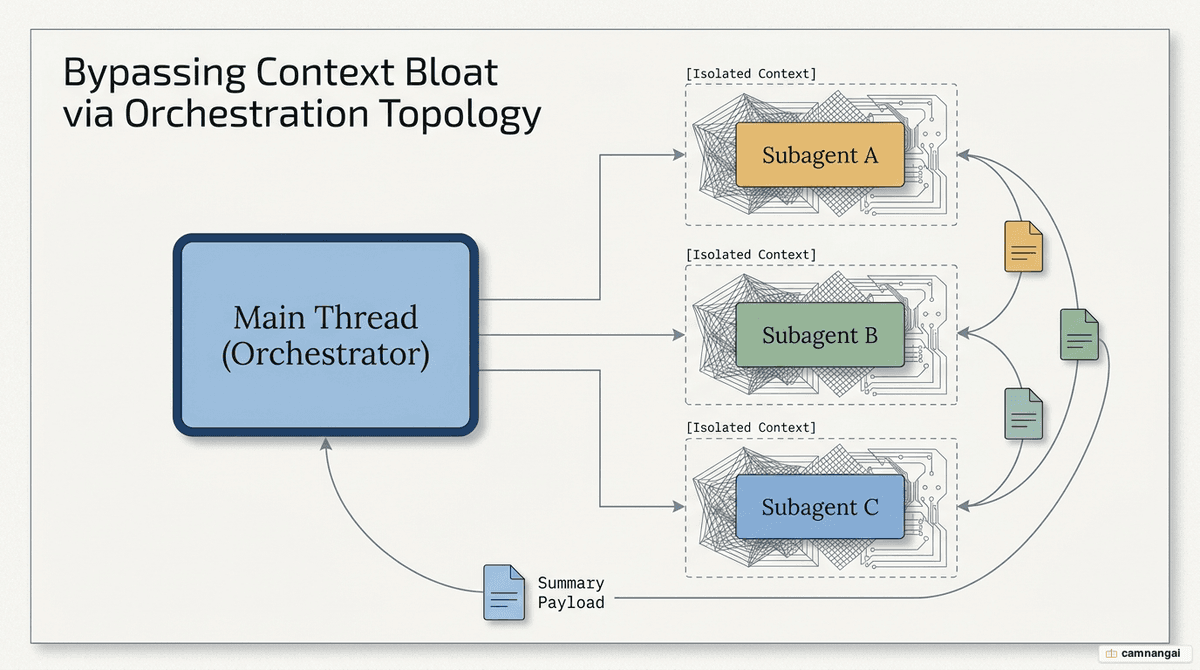
What are subagents in Claude Code, and why use them?
Subagents are modular workers defined by distinct system prompts and curated tool sets. They are how you manage context: practitioners see performance drop once a thread reaches 50–60% capacity, and once the main thread hits the 95% auto-compaction trigger, reasoning precision and output quality fall off sharply. Delegate the noisy work — grepping a large repository, running verbose test suites — to a subagent, and the main thread stays lean and high-level.
These agents can be configured to use a specific model based on the task:
- Haiku: optimized for speed and cost-efficiency during read-only research or file discovery.
- Opus: preferred for deep reasoning, architectural reviews, or complex code modifications.
Subagents have access to built-in tools like Bash, Read, and Write, but their capabilities are strictly scoped. In the CLI, the Agent tool (formerly the Task tool) is the primary interface for spawning these instances.
When should you delegate to a subagent (and when not)?
Delegation comes down to a trade-off: isolation overhead against context savings.
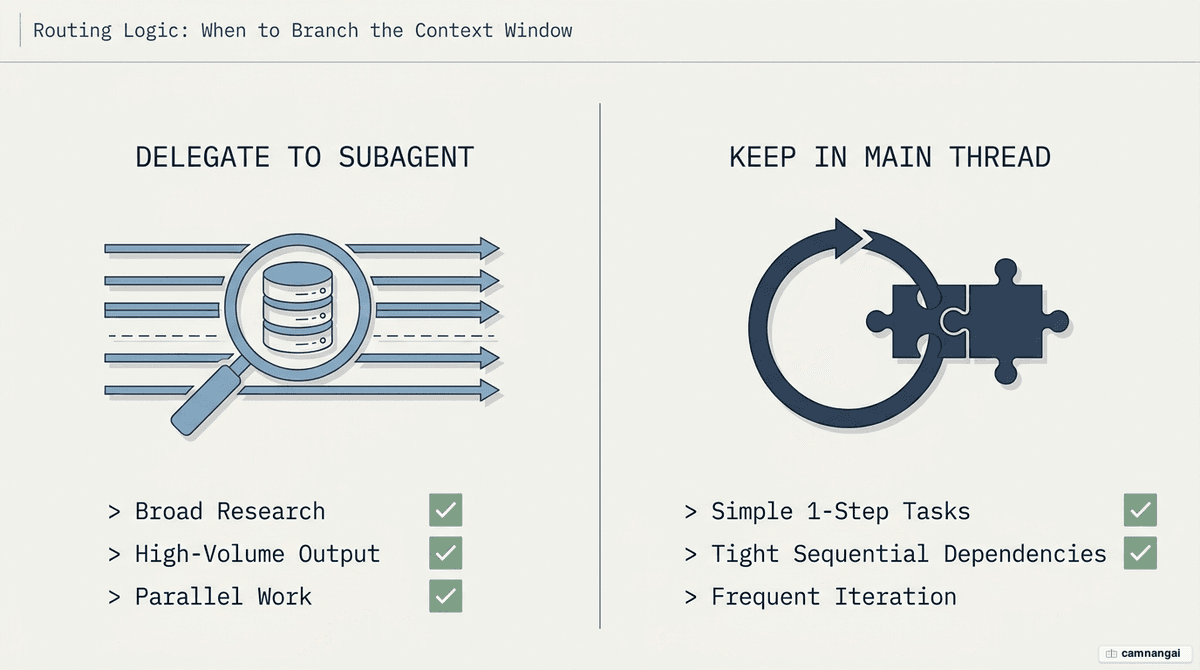
Delegate to a subagent when:
- High-volume output: the task produces massive logs, numerous search results, or extensive file contents you won't reference again.
- Independent research: you need to explore multiple areas of a codebase with no immediate sequential dependencies.
- "Fresh mind" perspectives: you want a code review where the reviewer isn't anchored by the reasoning used to write the code.
Keep it in the main thread when:
- Short, simple tasks: one-shot tool calls or 10-second tasks cost more in instantiation overhead than they save in context.
- Frequent iteration: the task needs constant back-and-forth with you.
- Sequential dependencies: if subagent A must wait on the exact reasoning steps of subagent B, isolation becomes a hindrance.
What built-in subagents does Claude Code have?
Claude Code ships a standard toolkit for common developer workflows. Explore and Plan skip CLAUDE.md files and the parent session's git status for speed; every other agent loads them by default.
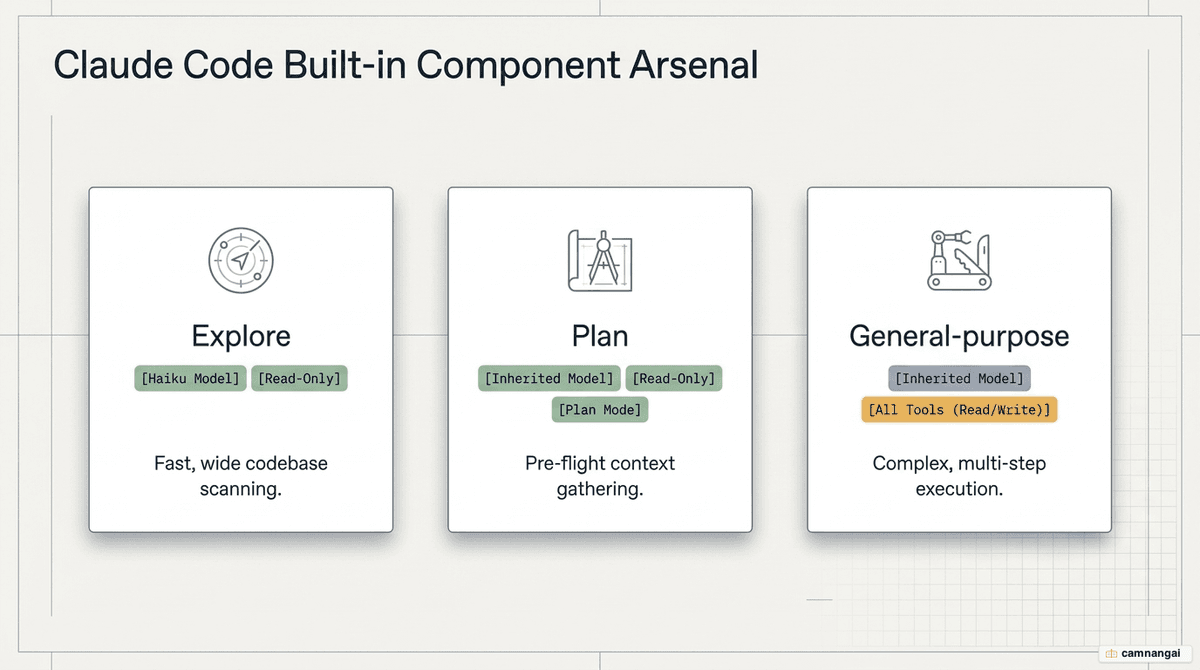
Explore
A fast, read-only agent optimized for searching and analyzing codebases. It uses the Haiku model for file discovery and code search with no risk of modifying the repository.
Plan
Used during plan mode to gather context from the codebase before a plan is proposed. It inherits the model from the main conversation but is restricted to read-only tools, so research never results in premature edits.
General-purpose
A capable agent for multi-step operations and code modifications. It has access to all tools and the reasoning needed to interpret complex results and implement changes.
Helper agents
Claude Code also uses internal helpers like statusline-setup (Sonnet) for UI configuration and claude-code-guide (Haiku) to answer feature-related questions.
How do you create and configure your own subagent?
Manage subagents through the /agents command, which gives you a tabbed view for creating, editing, and monitoring running agents.
Configuration scope
Subagents are defined in Markdown files with YAML frontmatter.
- Project scope: stored in
.claude/agents/. Repo-specific, and should be checked into version control. - User scope: stored in
~/.claude/agents/. Personal tools available across every project on your machine.
Example subagent definition
Below is a sample .md file for a specialized code reviewer:
---
name: security-reviewer
description: Use this agent to audit code changes for security vulnerabilities.
tools: [Read, Grep, Glob, Bash]
model: opus
---
You are an expert security engineer. Perform a thorough audit of the provided code,
focusing on SQL injection, XSS, and broken authentication patterns.
Return only a list of vulnerabilities and a confidence score.
Isolation and worktrees
To stop a subagent from polluting your main working directory, use isolation: worktree. This forces the subagent to operate in a temporary git worktree. By default that worktree is branched from your default branch rather than the parent session's HEAD, so testing and modification start from a clean environment.
What patterns make subagent orchestration effective?
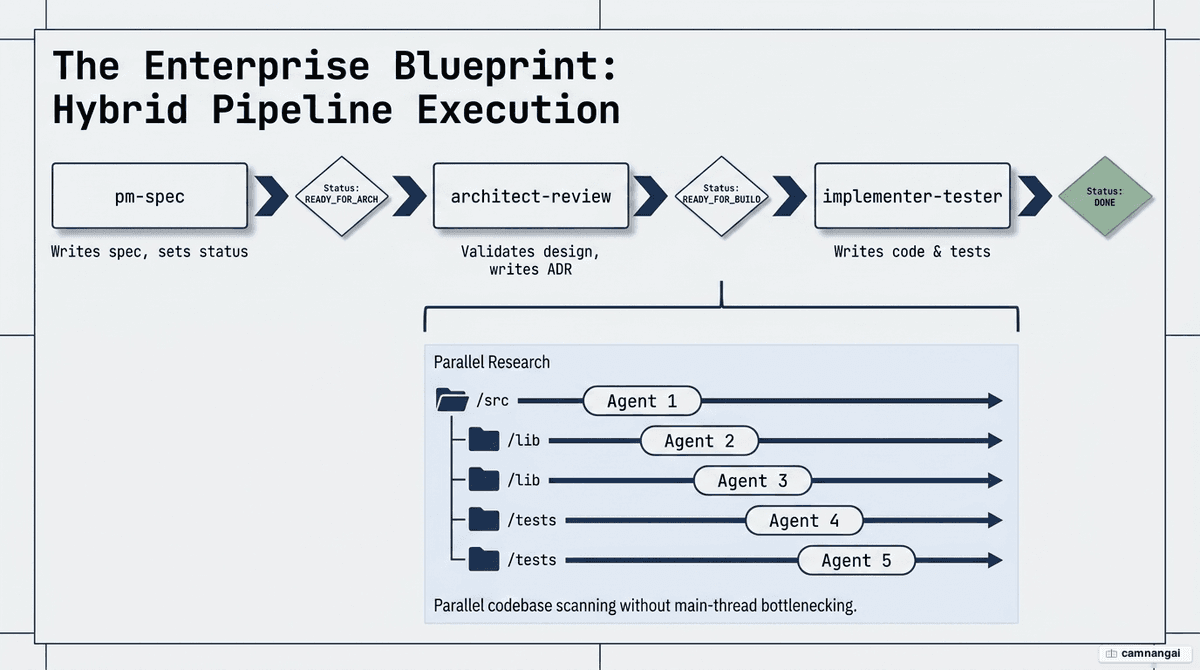
The three-stage pipeline (PubNub pattern)
This chain keeps work modular and safe:
- pm-spec: reads an enhancement request and writes a working specification.
- architect-review: validates the spec against performance and cost constraints, producing an Architecture Decision Record (ADR).
- implementer-tester: executes the code changes and runs tests based on the ADR.
Parallel research
Trigger multiple subagents concurrently to traverse a codebase faster. Commanding Claude to "kick off 5 file-finder agents", for example, reviews different modules simultaneously. Each agent works in a fresh context window, so the review is more thorough than a single sequential thread.
Human-in-the-loop (HITL)
Effective orchestration follows a "hooks suggest, humans approve" pattern. To reliably catch the end of a run, register both SubagentStop and Stop events in your configuration. An example hook script (on-subagent-stop.sh):
# Register both SubagentStop and Stop to ensure reliability
# Reads the current status and suggests the next step to STDOUT
NEXT_STEP=$(jq -r '.next_suggested_command' queue.json)
echo "Next suggested step: $NEXT_STEP"
What are the common mistakes when using subagents?
- Over-delegation: spawning a subagent for a 10-second task or a single file read.
- Vague descriptions: Claude uses the description field to decide when to auto-delegate; if it is unclear, the orchestrator never offloads the task.
- Permission failures: forgetting to whitelist specific MCP tools in the agent's YAML frontmatter.
- Tool sprawl: failing to restrict tool access. Use the
Agent(agent_type)allowlist syntax in the tools field to prevent unintended subagent spawning and cut context consumption. - Parent context precedence: if the parent session runs in
autoorbypassPermissionsmode, the subagent cannot override those settings with its own frontmatter.
How do you get started with subagents?
- Identify a focused role: start with a code reviewer or a file finder. These roles give you immediate context savings at low operational risk.
- Create the definition: use
/agentsto generate a personal agent. Define it as read-only to start, so it can't make unapproved changes. - Run a parallel test: watch the context window via the CLI status line to verify the savings. Ask the main thread to "kick off 3 research agents" to find a specific pattern, such as authentication logic.
FAQ
Do subagents see my main conversation history? No. Subagents run in isolated context windows. They only see the specific task instructions and context summaries the main orchestrator passes them at startup.
Can subagents spawn other subagents? Nesting is restricted by default to prevent infinite loops. You can enable it with the chat.subagents.allowInvocationsFromSubagents setting if your workflow needs multi-step delegation.
How is a "fork" different from a named subagent? A fork inherits the entire conversation history, tools, and model of the main session. A named subagent starts fresh with only its defined system prompt and specific tool allowlist.
References
- Best practices for Claude Code sub-agents — PubNub
- Claude Code Subagents are Absolutely Insane — YouTube
- Create custom subagents — Claude Code Docs
- How to Use Sub-Agents in Claude Code to Manage Context — MindStudio
- Master Claude Code Sub-Agents in 10 Minutes — YouTube
- Subagents in Visual Studio Code — VS Code Docs
- Subagents: Parallel Execution and Context Isolation — YouTube
- Tool, skill, or subagent? Decomposing an agent that outgrew its prompt — YouTube
- Where to use sub-agents versus agents as tools — Google Cloud Blog