Managing the complexity of a modern software system often creates sequential bottlenecks: a single developer or AI session gets overwhelmed by high-entropy work. Claude agent teams solve this by running multiple Claude Code sessions in parallel. A Claude agent team is an orchestrator of subagents where one lead manages multiple teammates that share a task list. This lets you parallelize research, implementation, and review inside one environment, keeping complex work coordinated without overflowing a single context window.
Unlike standard subagents that work in isolation, an agent team shares a stateful task list and uses inter-agent messaging to resolve dependencies. The team lead is the coordinator: it decomposes high-level requirements into discrete work items, which teammates claim, report progress on, and discuss directly with each other. It is the right tool for full-stack features, large refactors, and adversarial debugging — work where independent investigation matters more than raw speed.
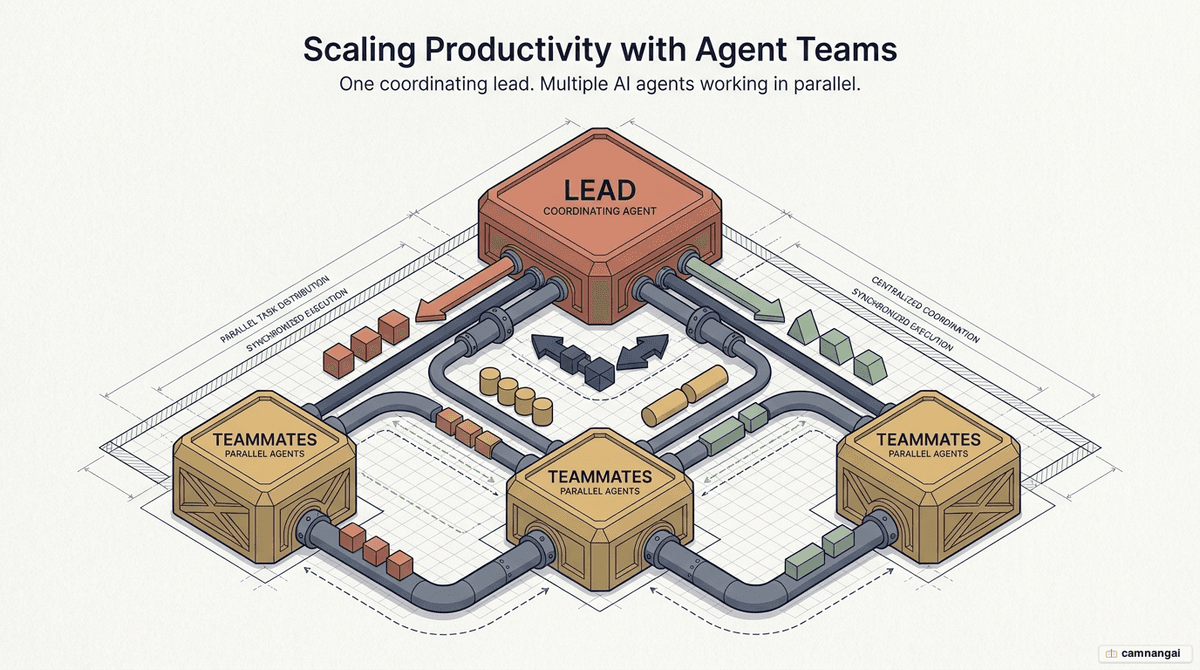
What is an agent team and how does it differ from subagents?
The real distinction between standard subagents and agent teams is autonomy and the communication model. In a typical subagent workflow the worker is a leaf node: it runs one task and reports back to the caller. Its context is fully isolated, and it cannot talk to other subagents.
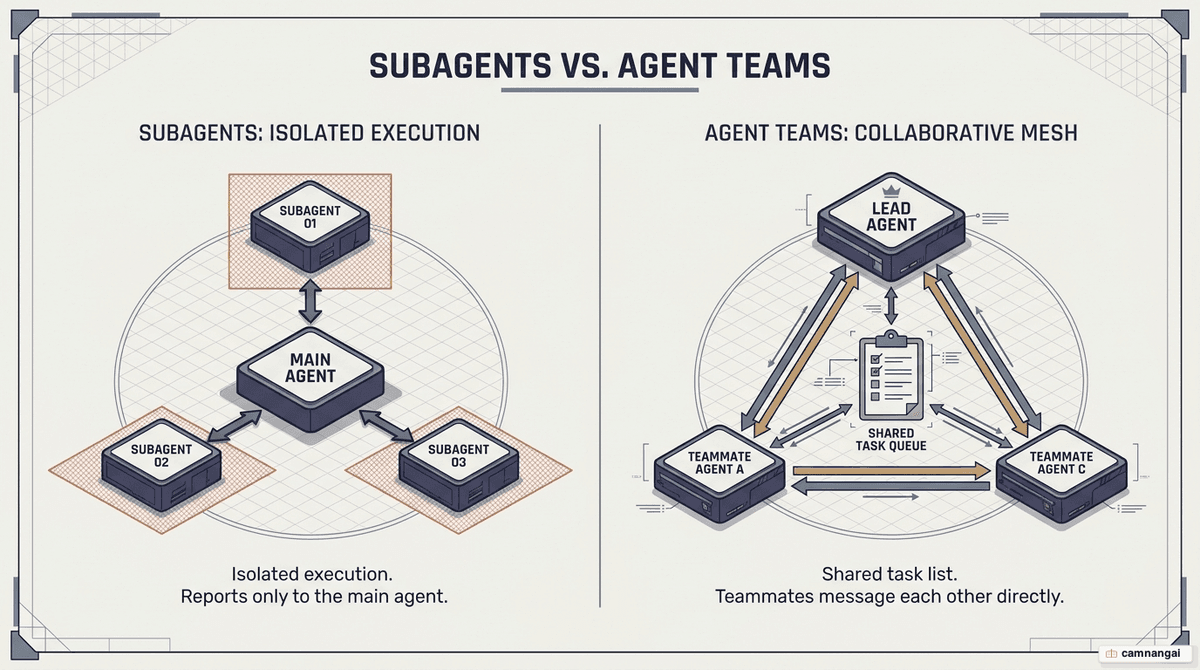
In an agent team, teammates are independent Claude Code instances that act as peers. They communicate through a Mailbox messaging system instead of reading one monolithic conversation history, which keeps each context condensed and task-specific. Every agent loads CLAUDE.md and local MCP servers, but none inherit the lead's full history — so context stays clean.
| Feature | Subagents | Agent Teams |
|---|---|---|
| Context | Isolated instances; results return to the caller | Independent instances with task-specific context |
| Communication | Report only to the calling session | Teammates message each other directly |
| Coordination | Managed entirely by the lead session | Shared task list with self-claiming and dependencies |
| Token cost | Lower (results summarized to the lead) | Higher (linear scaling per active teammate) |
When should you use an agent team, and when not?
Agent teams earn their cost on high-entropy work where parallel exploration adds value. They are strong at bias isolation: when a single agent investigates a security flaw and then moves to performance, its earlier findings anchor its later reasoning. A team sidesteps this by assigning fresh agents to look with new eyes.
Ideal use cases
- Parallel domain exploration: working frontend, backend, and infrastructure for a new feature at once.
- Adversarial debugging: 3–5 teammates pursue competing hypotheses for a bug to break anchoring bias.
- Cross-layer coordination: one agent updates an API contract while another builds the matching frontend and a third writes integration tests.
- Specialized reviews: one teammate runs a security-reviewer definition while another focuses strictly on performance.
When not to use
- Sequential tasks: if step B needs the output of step A to even start, coordination overhead buys you nothing.
- Heavy dependencies: work where changes across domains keep touching the same localized files.
- Same-file edits: multiple agents editing one file cause conflicts or overwrites unless you isolate them with git worktrees.
How do you enable and start an agent team?
Agent teams are experimental and require Claude Code v2.1.32 or later. Enable them explicitly through environment variables or your global settings.json:
{
  "env": {
    "CLAUDE_CODE_EXPERIMENTAL_AGENT_TEAMS": "1"
  }
}
Once enabled, you start a team in natural language by describing its composition and roles — for example: "Create a performance agent team. One teammate focuses on UI jank, another digs into database query latency."
To control cost, assign different models to different roles. You might give the lead Opus for high-level reasoning while directing Haiku or Sonnet for research and documentation teammates; the lead manages model selection per teammate.
How do the team lead, teammates, and shared task list work together?
The architecture rests on three pillars: the lead session, the independent teammates, and the shared task list (persisted under ~/.claude/tasks/).
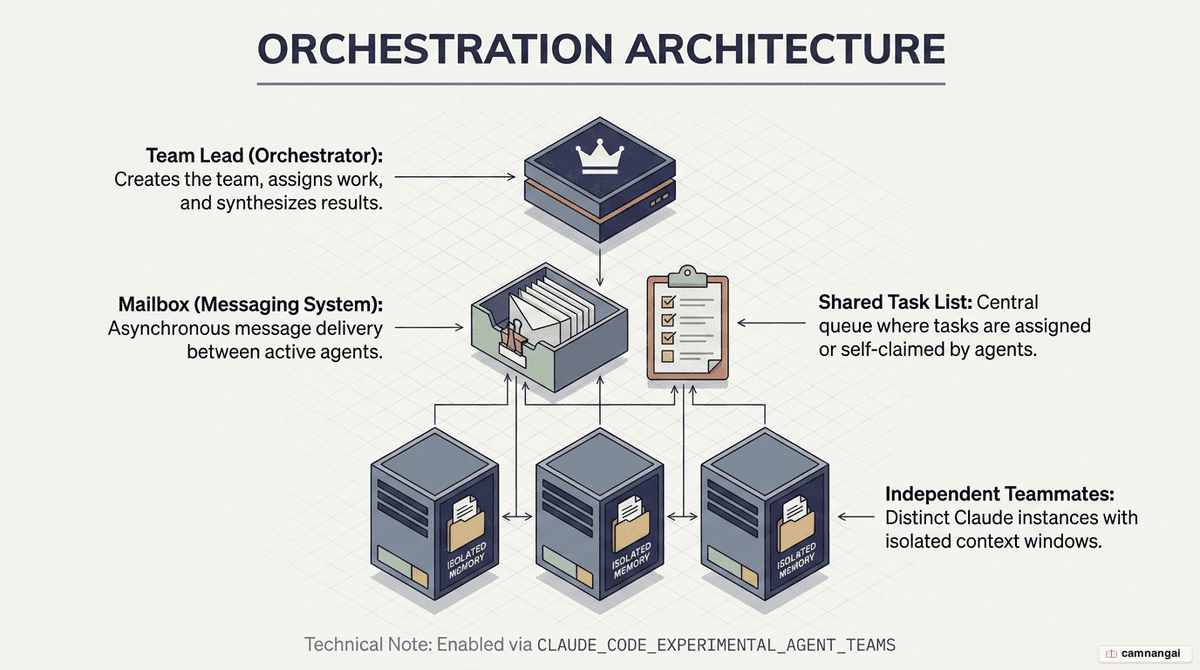
Shared task list and states
The task list is the team's source of truth. Tasks move through states:
- Pending: defined but not yet active.
- In progress: a teammate has claimed it.
- Completed: finished, with results reported.
- Blocked: waiting on unresolved dependencies (for example, the backend API must exist before the frontend teammate can claim the integration task).
The lead manages these dependencies automatically. Teammates self-claim unassigned, unblocked tasks using file locking to prevent race conditions.
Internal mechanics and lifecycle
A team's runtime config lives in ~/.claude/teams/{team-name}/config.json, holding state such as session IDs and pane IDs. Don't edit this file by hand — Claude overwrites it on every state update. The lead also manages teammate lifecycles: idle teammates are grayed out and eventually shut down to save tokens. Always clean up through the lead; killing sessions manually can orphan resources.
Lifecycle hooks
For engineers wiring teams into CI/CD or status reporting, three hook events fire:
- TeammateIdle: when an agent is about to stop work.
- TaskCreated: when a new item is added to the shared list.
- TaskCompleted: when a teammate finishes a task — useful for automated verification or external notifications.
Display modes
Teams support two monitoring modes:
- In-process: every session runs in your main terminal; use
Shift+Downto cycle through agents. - Split panes: requires tmux or iTerm2. This is the preferred senior workflow — you watch all agents at once.
To enable split panes, set this in settings.json:
{
  "teammateMode": "tmux"
}
A real workflow: from issue to pull request
A disciplined workflow with agent teams moves through five stages.
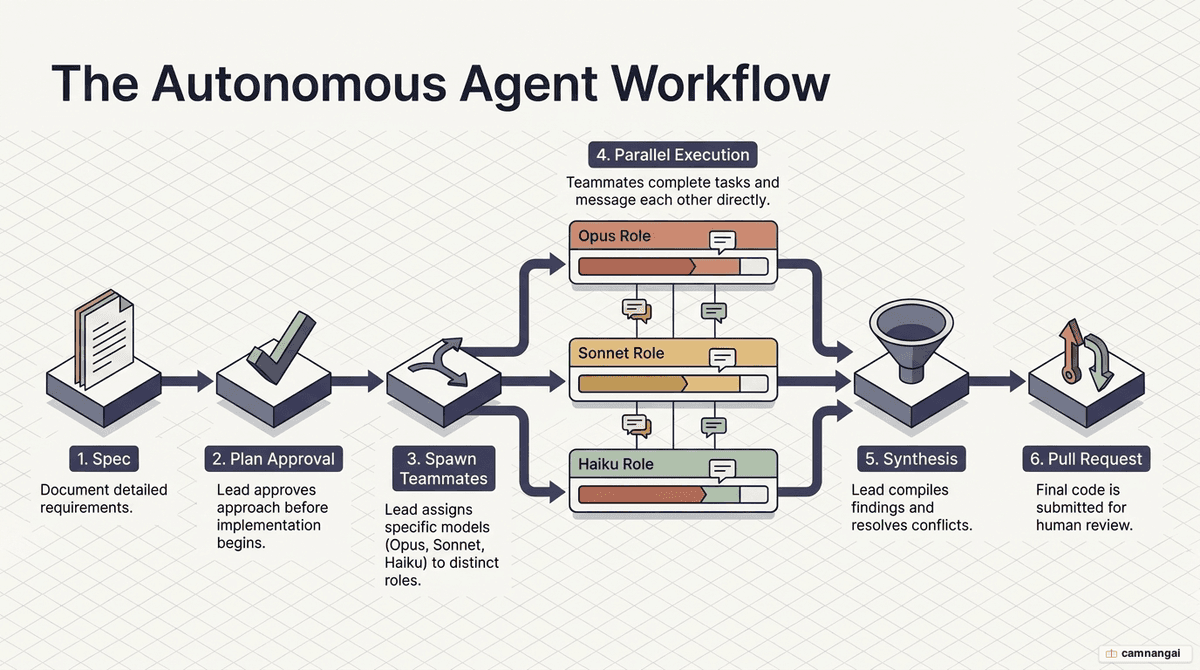
- Specification: before spawning a team, use the lead to generate a detailed spec. A good habit is to have Claude write it to a markdown file under a directory like
tmp/issues/(e.g.003-auth-fix.md), so you review the requirements human-in-the-loop before spending tokens on implementation. - Spawn with worktrees: start the team and isolate its environment to avoid file conflicts. The
--worktreeflag mounts a branch to its own directory — for example,claude --worktree feature-auth "Create an agent team to implement tmp/issues/003-auth-fix.md". - Plan-approval gate: for complex systems, require teammates to enter plan mode. They work read-only to produce a strategy, and the lead reviews each plan against your criteria (for example, "reject plans that lack unit test coverage") before any implementation starts.
- Parallel implementation: as teammates claim tasks, use tmux to watch progress. If an agent errors or drifts from the spec, drop into its pane and course-correct. The
--dangerously-skip-permissionsflag minimizes interruptions, but use it cautiously. - Synthesis and cleanup: once tasks complete, the lead synthesizes the changes, updates documentation, and prepares the pull request. Finally, tell the lead to clean up the team to end all sessions and clear shared resources.
What are the common pitfalls and how do you avoid them?
- The context gap: teammates don't inherit the lead's conversation history. To stop them getting stuck, have the lead embed specific code pointers and contextual summaries directly in each task description.
- File conflicts: if two agents touch the same file, the last write wins. Enforce domain separation — agent A stays in
/backend, agent B in/frontend. - Token scaling: every teammate is a full Claude session, so cost scales linearly. Five active agents burn roughly five times the tokens of a single session.
- Orphaned sessions: manual shutdowns can leave tmux panes alive. Clean up with
tmux lsandtmux kill-session -t <name>if the lead fails to do so after a crash.
Tips to master agent teams
- Hit the sweet spot: keep a team to 3–5 teammates. Past that, coordination overhead and token cost give diminishing returns.
- Assign 5–6 tasks per teammate: enough work to stay productive without excessive context switching inside a teammate's own session.
- Reuse subagent definitions: reference an existing role when spawning — for example, "spawn a teammate using the security-reviewer definition" to inherit its tool allowlist and system prompt.
- Start with read-only tasks: when testing a new team structure, begin with research or code review. Read-only work removes the risk of file conflicts.
- Manage permissions with allow-lists: pre-approve common operations in your
.permissions.allow[]settings, otherwise every teammate's permission prompt bubbles up to the lead and stalls parallel work.
FAQ
What version of Claude Code is required? Version v2.1.32 or later. Check with claude --version.
Can I resume an agent team session? Resumption is limited. You can /resume the lead, but in-process teammates are not restored — be ready for the lead to spawn fresh teammates to replace the lost sessions.
Are nested teams supported? No. Only the lead session manages a team; teammates cannot spawn their own sub-teams or teammates.
How are permissions handled for teammates? Teammates inherit the lead's permission mode. If the lead runs with --dangerously-skip-permissions, so do they; otherwise every request routes back to the lead for approval.
References
- Collaborating with Agent Teams in Claude Code — Heeki Park
- What Is Claude Code Agent Teams? — MindStudio
- Orchestrate Teams of Claude Code Sessions — Claude Code Docs
- 30 Tips for Claude Code Agent Teams — Push to Prod
- Claude Code's Agent Teams Are Insane — YouTube
- Learn 90% of Claude Code Agent Teams in 22 Minutes — YouTube
- How to Build Claude Agent Teams Better Than 99% of People — YouTube