The /goal command is a feature in Claude Code (v2.1.139+) that establishes a persistent completion condition for the agent.
It is a wrapper around a session-scoped, prompt-based Stop hook. By defining a verifiable end state, you let Claude operate through autonomous state-transition cycles across many turns without manual intervention.
This is a fundamental shift from "assistant" to "agentic" orchestration. In a standard session,
Claude operates in a single-turn burst; with /goal, it runs an iterative loop—reading, writing,
and testing—until a separate evaluator model confirms the objective is met. This eliminates the
"human relay" problem, where an engineer babysits long-running tasks by manually prompting
"continue" after every few file modifications.
For systems architects, /goal is the primary mechanism for handing off high-level objectives—
migrating service layers, executing complex feature specs—that involve substantial, multi-file
execution paths. It turns Claude into an autonomous worker that monitors its own progress against a transcript-verifiable condition, returning control to you only upon success or genuine ambiguity.
How does /goal solve the developer relay problem?
In traditional AI-assisted coding, the developer acts as a "relay switch," reviewing three files of work only to type "continue" for the next three. This is a high-latency, low-value use of engineering time. The /goal command automates this loop, allowing unattended progress on deep-work tasks like API migrations, design-doc implementations, or clearing a labeled issue backlog.
By moving from reactive prompting to objective-based delegation, /goal lets Claude observe its own
command outputs, adjust its logic, and iterate. This is particularly effective for "test-fix-retest"
cycles where the end state is objectively measurable via build exit codes or test-suite results.
Under the hood: architecture and evaluator blindness
The reliability of /goal stems from its evaluator-loop architecture. To prevent agentic
regression, the system follows a strict principle: don't let the worker grade its own homework.
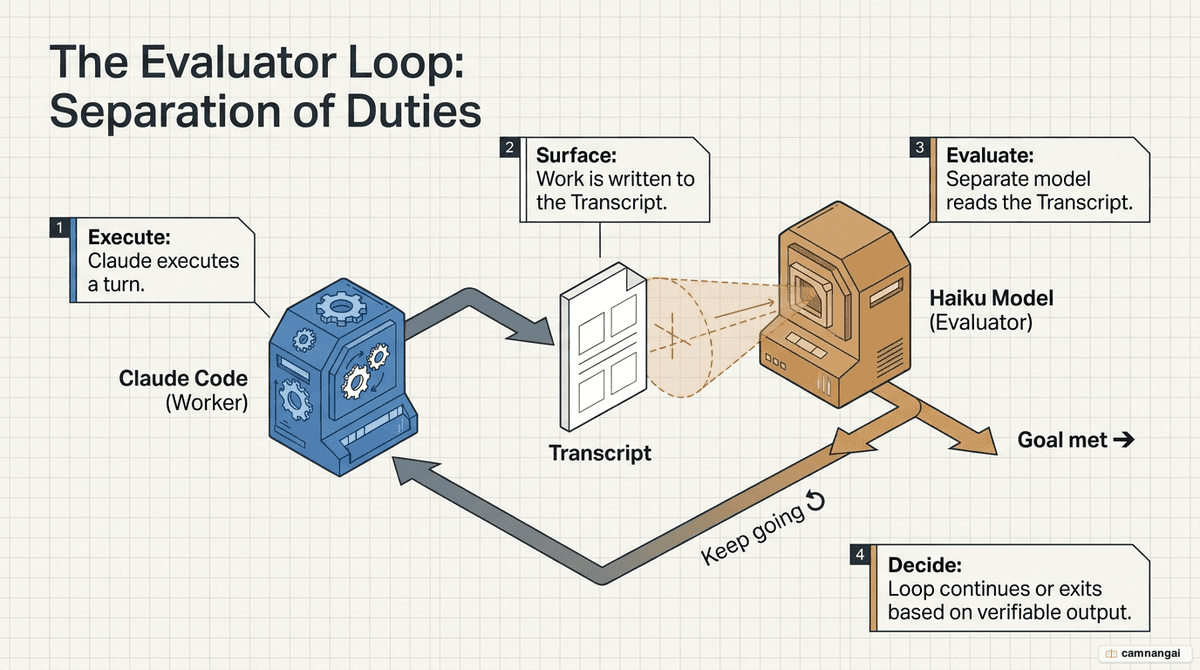
- Execution: the primary Claude model performs a turn (e.g. running a bash script or editing code).
- Evaluation: once the turn finishes, the conversation transcript is sent to a separate, small, fast model (typically Haiku). The evaluator runs on the same provider configured for your session.
- Decision: the evaluator returns a yes/no decision with a specific reason. On "no," the reason becomes the guidance for Claude's next autonomous turn.
The principle of evaluator blindness
A critical constraint is that the evaluator model is "blind"—it cannot execute commands, read your
file system, or browse the web. It only sees what Claude surfaces in the conversation transcript. If
Claude modifies a file but doesn't print the contents or run a test to show the result, the
evaluator cannot verify the change. Your goal condition must therefore be provable via outputs that
land in the transcript, such as npm test output.
How do you configure and use /goal?
/goal is managed through the CLI and requires specific environmental configuration.
Requirements and constraints
- Trust dialog: you must accept the trust dialog for the workspace;
/goalwill not run in untrusted environments, as it uses the underlying hooks system. - Managed settings: the command fails if
disableAllHooksis set at any level, or ifallowManagedHooksOnlyis enabled in managed settings.
CLI commands
- Set a goal:
/goal [condition](this immediately starts the first turn). - Non-interactive mode:
claude -p "/goal [condition]"(ideal for CI/CD pipelines). - Check status: run
/goalwith no arguments to see duration, turn count, and token spend. - Clear a goal:
/goal clear(aliases:stop,off,reset,none,cancel). - Resume: use
--resumeto restore an active goal from a previous session (note: the turn count and timer reset).
How do you write effective completion conditions?
Success is a function of specificity. A senior architect avoids "vibe-based" goals like "make it production-ready" and instead uses a verifiable formula: [measurable end state] + [verification command] + [protective constraints] + [turn limit].
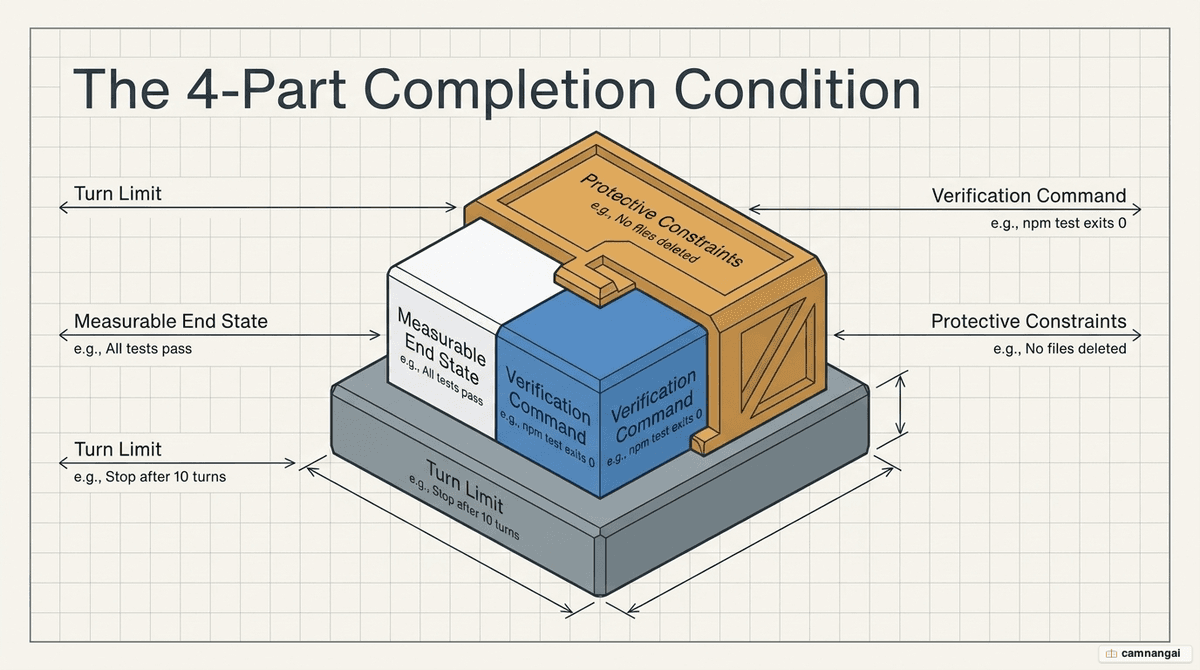
Production case study: defensive goal settings
In production testing, naive goals often lead to destructive shortcuts. For example, Claude might "fix" a failing test by deleting the test file itself. To prevent this, architects use defensive constraints:
/goal All files in src/services/ use fetchWrapper instead of axios.
Test files in src/services/__tests__/ must use the mock pattern from src/test-utils/mockFetchWrapper.ts.
npm test exits 0. No functional code or tests may be removed or skipped to satisfy these criteria.
Stop after 15 turns.
Two key gotchas. The axios gotcha: without the excluding __tests__ constraint, Claude may rewrite
test mocks to use the new wrapper, breaking the isolation of your unit tests. The "proper" ambiguity:
avoid words like "proper" or "clean." In one case, a goal for "proper validation errors" led Claude
to return a 400 string, while the architect required a structured JSON error object. Specify the
exact JSON schema or exit code required.
/goal vs. /loop vs. stop hooks
Claude Code provides three distinct ways to maintain session continuity. Choosing the right one is essential for token efficiency and task success.
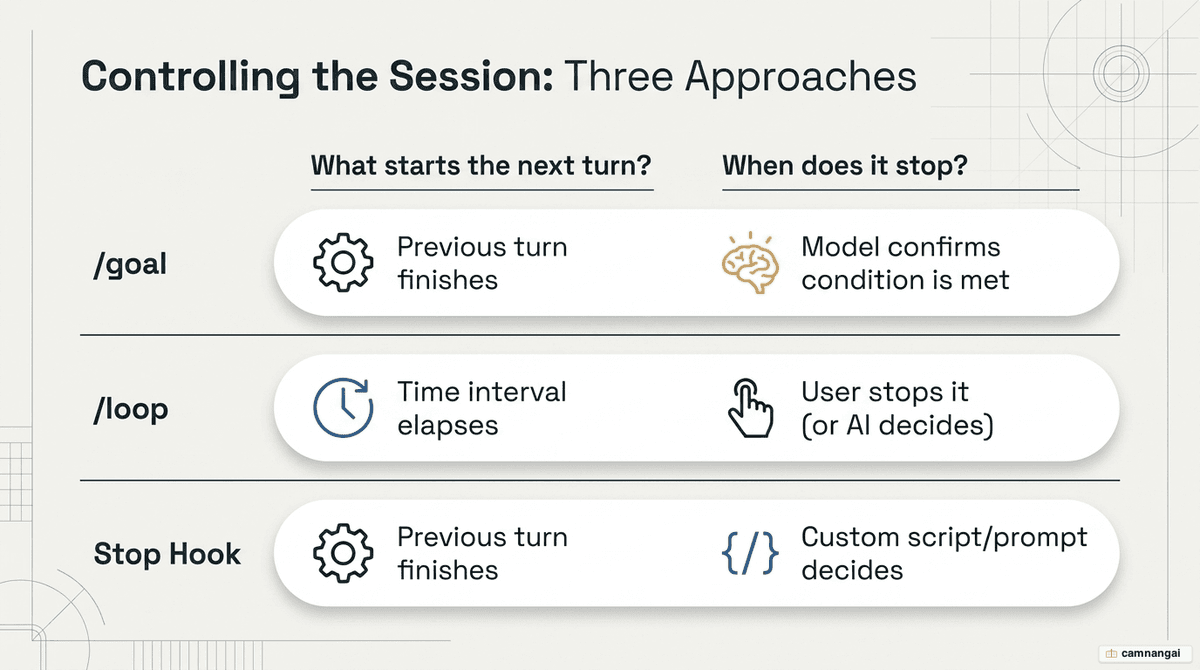
| Approach | Next turn starts when | Stops when |
|---|---|---|
/goal | The previous turn finishes | A model confirms the transcript-verifiable condition is met |
/loop | A time interval elapses | You stop it, or Claude decides the work is done |
| Stop hook | The previous turn finishes | A user-defined script or prompt returns "stop" |
/goal manages the turn-loop; auto mode is a
complementary feature that automatically approves tool calls (like file writes) within those turns.
Combine the two for unattended execution.
Best practices and safety
Autonomous code modification carries inherent risks. Follow these hard-won production rules:
- Version-control safety net: never run
/goalon a main branch. Always use a dedicated git branch so you can roll back agentic regressions. - Cost management: expect a cost of roughly $0.40 to $3.00 per CI run, depending on task complexity.
- Turn limits: always include "or stop after X turns" in your condition. It acts as a circuit breaker against infinite token burn if the evaluator and worker get stuck in a loop.
- When not to use
/goal:- Small tasks: anything under 3 turns is handled more efficiently with standard prompts.
- Subjective quality: "make the code readable" is unverifiable and will burn tokens indefinitely.
- Exploratory work: if you don't know the end state, use standard prompting until a path is clear.