For the past two years, the industry standard for AI interaction has been manual, turn-by-turn prompting. You wrote an instruction, waited for the output, and typed the next step. The human is the bottleneck, and the whole system runs no faster than one person can pay attention.
Loop engineering marks the shift from this hands-on prompting to designing autonomous systems that prompt the agents for you.
It is the transition from being a prompt operator to a systems engineer.A loop is a recursive goal: you define a specific purpose and the AI iterates on its own until the work is done. Instead of driving every step, your job is to build "routines" that manage the discovery, execution, and verification of tasks. A working loop rests on two pillars: an objective goal and a clear verification or stop condition. You are no longer writing one-off prompts — you are building a system that handles the "smart intern" work of software development.
In production, loop engineering is systems design and efficiency, not hype. The direction of travel is a "fleet" model, where one engineer runs several autonomous processes at once. Automate the feedback-and-iteration cycle and the work can already pass a test suite or match a design spec by the time a human first reviews it.
What is loop engineering?
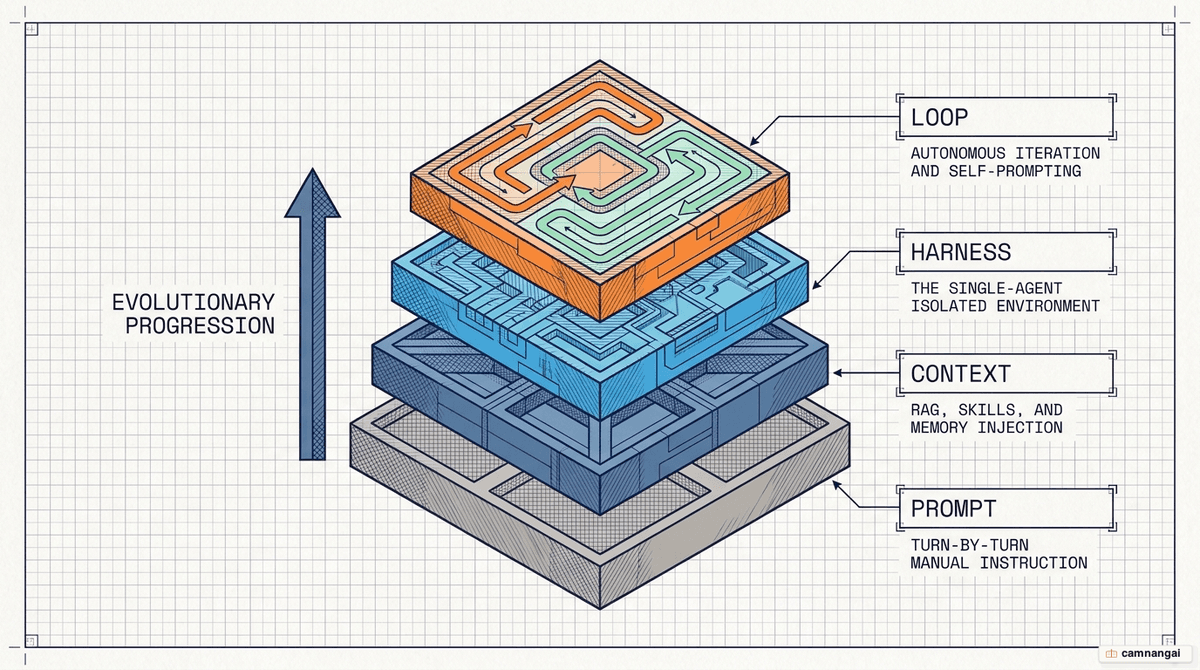
Loop engineering is the latest stage in how we work with AI. We began with plain prompting, moved to context engineering to improve relevance, and then to harness engineering. A harness is the environment a single agent runs inside — the tools and local context it can reach. Loop engineering sits one floor above the harness: it is the orchestration layer that pokes the agents on a schedule, spawns helpers, and manages the flow of work until a recursive goal is met.
Boris Cherny and Addy Osmani frame it plainly: a software engineer's job is shifting from writing code to writing the loops that write the code. You build a system that can find work (discovery), break it into steps (planning), run those steps, and verify the output. If the verification fails, the system tries again. The agent becomes one part inside a larger structure. Instead of "human-in-the-loop," you move to "human-as-designer," where the loop handles the back-and-forth turns.
The "recursive goal" at the heart of this needs two pillars to work: the objective goal (the target state) and the verification condition (the definition of "done"). That is a real break from subjective prompting. Define those two pillars and you get a system that can grade its own progress. Whether it is a "single-agent loop" refining its own draft or a "fleet loop" of specialized sub-agents, the idea is the same: replace yourself as the prompter with a system that manages the agents.
Why is loop engineering taking off now?
What's driving loop engineering now is that the tooling finally caught up. Primitives like /loop and /goal are built straight into Claude Code, the Codex app, and Grok. Building an autonomous loop used to mean maintaining a brittle "pile of bash scripts." Today the infrastructure for scheduling, isolation, and task persistence ships inside the products. The Grok TUI, for instance, now exposes primitives like scheduler_create and isolation: "worktree", so you can orchestrate a loop without wiring up custom infrastructure.
That maturity lets engineers get past the "human bottleneck." A system that runs at the speed of human attention is simply too slow once the work piles up. When you have to review every turn by hand, the agent sits idle most of the time. Move to autonomous loops and the work continues around the clock. Some users now run fleets of 10–15 parallel agents — which only works once the human steps out of the execution path and into an oversight role.
These tools are now built to handle the "orchestration tax." Run several agents and you risk state collisions and "intent debt" — agents making confident but wrong guesses about your project's conventions. Built-in worktree support and persistent skill files let loops run in isolation, with project-specific knowledge on hand. The "loop shape" is also becoming tool-agnostic: in Claude Code, Codex, or Grok, what a working loop needs stays the same.
Open vs closed loops, inner vs outer loops: when a task fits a loop
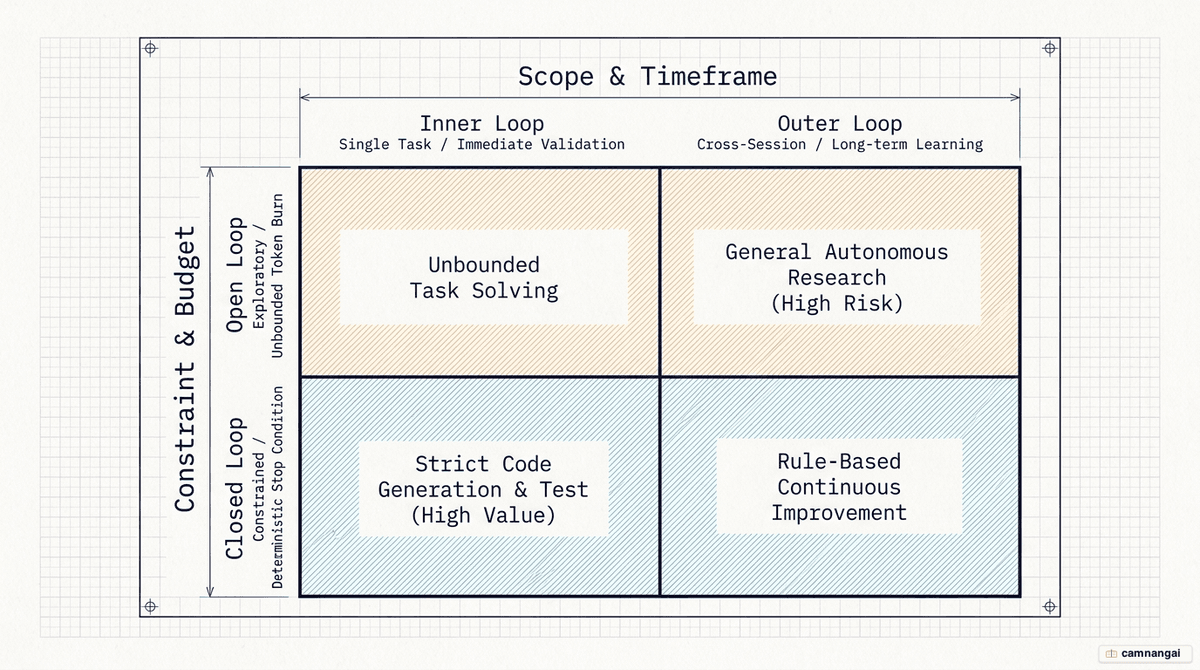
You can sort loops by their boundaries and their scope. Open loops are exploratory and wide-ranging: you give the agent room to roam and find paths you never specified. They're creative, but with loose criteria they turn into "slop machines," and they're notorious for token costs — often burning through 500K to 2M tokens in a single run. Use them for wide discovery, when you don't yet know the exact solution.
Closed loops are bounded and deterministic. They have clear goals, defined steps, and a check at every pass. Most production work happens here, because the path is narrow and the budget stays manageable. A closed loop also gets better over time: the constrained paths mean each pass feeds back into the system's memory, so the loop you run a month from now is sharper than the one you start today.
On the execution axis, there's a second split: inner and outer loops. An inner loop is a validation cycle inside a single task. Tell an agent to fix a bug and the inner loop is the agent editing the file, running a test, watching it fail, and trying again until the test is green — all before it reports back to you. This is about task reliability within a single context window.
An outer loop is a cross-session learning cycle. It uses persistent files like SKILL.md or STATE.md so that what the agent learned in one session — a specific database quirk, a project-specific naming convention — carries into the next. The inner loop keeps the current task correct; the outer loop pays down "intent debt" by building a durable store of project knowledge on disk. That lets the system compound what it knows across days of work.
Tasks suited for loops:
- Discovery and triage: scanning GitHub issues or CI failures on a schedule to identify actionable work.
- Repetitive refactoring: updating data architectures across hundreds of files using parallel sub-agents in isolated worktrees.
- Visual regression: iterating on HTML/CSS by taking screenshots and comparing them to a reference photo until a similarity threshold is met.
- Continuous maintenance: monitoring PRs for comments and automatically spawning sub-agents to address feedback until the PR is approved.
Anatomy of a loop: the 5 core components + memory
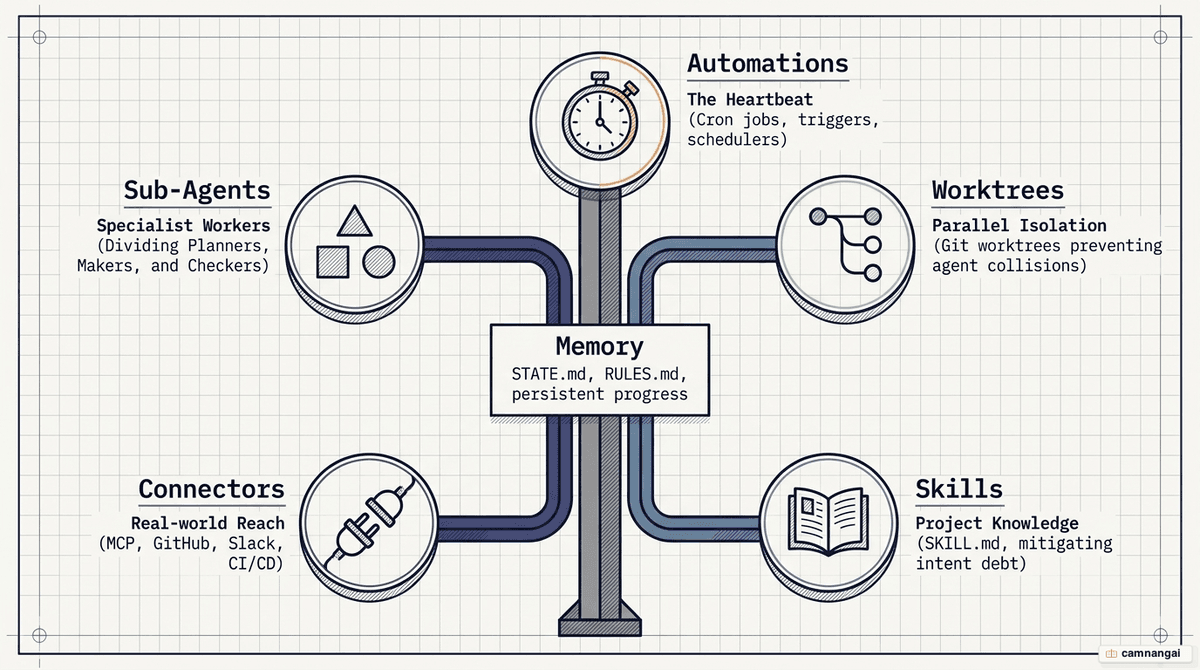
A production loop needs a "5+1" framework to run unattended and safely. The first component is automations, the heartbeat of the loop. These are the triggers — Grok's scheduler_create, Claude's /loop — that start the process. Without a heartbeat, all you have is a one-off run. Automations put the loop on a cadence, doing discovery and triage with no one watching.
The second and third components are worktrees and skills. Isolation matters for parallel work: git worktrees keep 10–15 parallel agents from colliding as they edit the same files at once. Skills hold the project-specific knowledge — conventions, build steps — persisted in a SKILL.md file. That stops the agent from starting every session "cold" and re-deriving your whole project architecture from zero each cycle.
The last two components are plugins/connectors and sub-agents. Through the Model Context Protocol (MCP), loops connect to real-world tools like Jira, Slack, or GitHub — moving past suggestions to actual operations, such as opening a PR. Sub-agents enable the key "maker/checker" split. The agent that writes the code should never be the one that approves it. Put a second, often stronger model in charge of verifying the work and you get an adversarial review that lets you walk away from the loop with confidence.
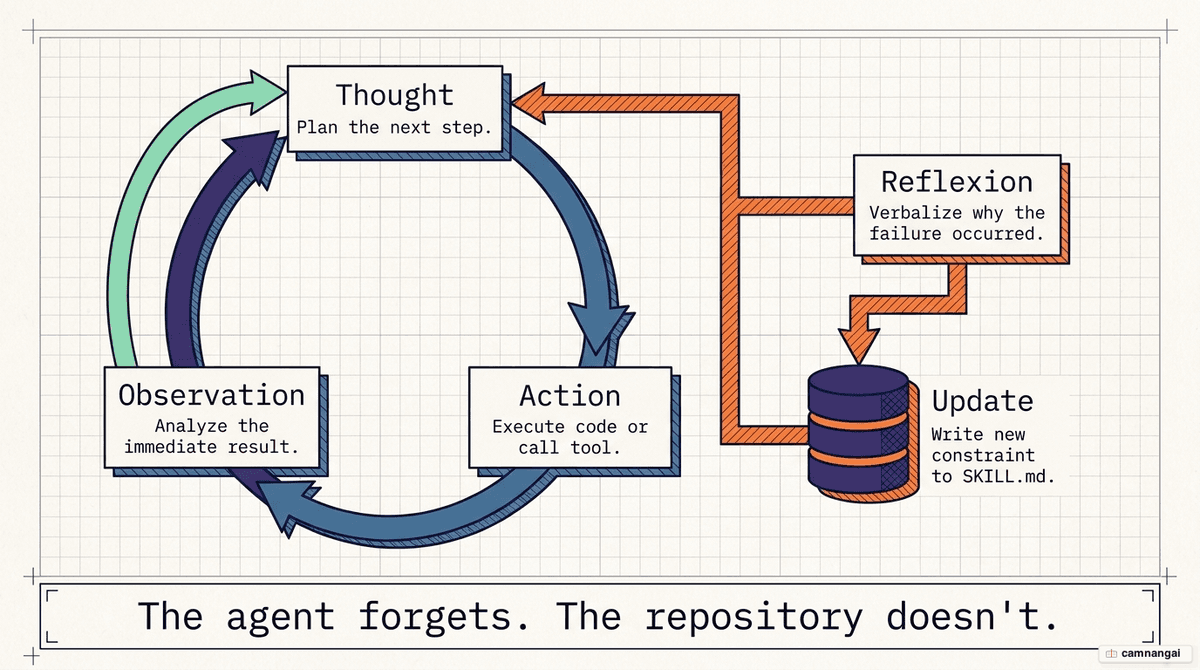
The "plus one" is memory, the durable spine of the system. LLMs keep nothing across sessions, so state has to live on disk. Keep two files separate: SKILL.md holds instructions on how to work, while STATE.md or PROGRESS.md tracks where the loop is in the current task. As the saying goes, "the agent forgets, but the repo doesn't." This external memory records what was tried, what failed, and what is waiting on a human, so the loop picks up exactly where it left off.
How a loop runs in practice (ReAct, Reflexion, a worked example)
Loop engineering relies on the ReAct pattern (Reason + Act), which came out of joint research between Princeton University and Google. It is a cycle of Thought, Action, and Observation. The agent reasons about a goal, runs a tool (Action), observes the result or error (Observation), and loops back to refine its thinking. Every action stays grounded in the feedback from the previous turn.
An advanced extension is Reflexion, where the agent puts its failures into words. Instead of blindly trying again, it reflects in natural language on why something failed and stores that reflection in memory to guide the next attempt. This keeps the loop out of a "death spiral" where it repeats the same mistake forever. By writing its errors down in plain language, the agent turns a failed turn into a sharper constraint for the next one.
Take the 3JS plane generator run in Claude Code. The loop was given a goal to build a 3D model, and it took 37 minutes to finish. It had to write the code, check the rendering in a browser, and iterate until the geometry was right. In the "Abbey Road" HTML recreation, the agent took 7 passes to match the layout. It ran under a hard cap of 8 passes to keep costs down, screenshotting each version and comparing it to the original photo until it hit the quality threshold.
The point is that loops aren't there to produce a perfect result instantly; they get you to roughly 95% quality unattended. In the Abbey Road case, the agent checked by eye that the road, the trees, and the car colors matched the reference. By handing the first seven iterations to the loop, the engineer only had to step in for the last, hardest 5% of the work.
Quality gates, maker/checker, and memory: loops that self-verify and self-learn
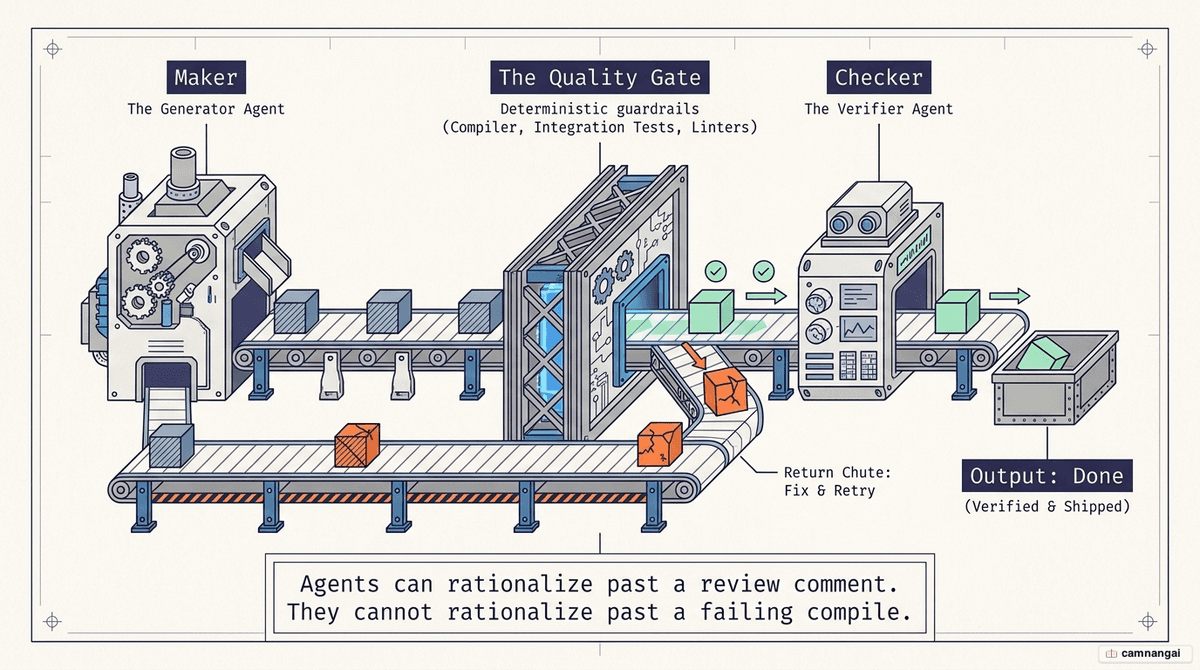
The "maker/checker" split is the most important piece of a production loop. The agent that writes code is biased toward its own logic. Hand a second model — or the /goal primitive, which often uses a separate model to verify — the "checker" role, and you get adversarial review. Now the stopping condition is judged objectively, not by the worker that did the job.
The quality gate is the deterministic stopping condition — something the agent cannot rationalize its way past. Compilers, type systems, mutation tests, linters. If the gate is just a "polite review comment," an agent can argue its implementation is "close enough." It cannot argue with a red test suite or a failed build. The loop keeps iterating until the gate turns green.
Finally, a loop that learns uses a RULES.md file so it stops repeating past mistakes. When the loop fails a quality gate, you write that failure down as a permanent constraint. If it failed because it used an outdated JSON path syntax, that becomes a rule in RULES.md. Now the loop compounds knowledge. Instead of re-learning your project's architecture every morning, the agent reads the rules on disk and avoids yesterday's bugs today.
The limits of loops and the engineer's responsibility
Loop engineering carries a real risk: "comprehension debt." As loops ship code faster than you can write it, a gap opens between the state of the codebase and your actual understanding of it. Ship code you haven't read or confirmed and you're no longer the engineer — you're a passenger. You have to stay the person who understands the "why" behind every change, even when you didn't type the "how."
There's also "cognitive surrender" — the temptation to hand your judgment to the loop. A loop is an accelerant; use it to avoid thinking and it just helps you dig a deeper hole faster. The risk grows when loops run long. One Opus workflow ran for 8 hours and burned 3 million tokens to handle three small comments, all set off by less than 10 minutes of human feedback. With no oversight, a loop can spend your entire API budget on trivia.
Token costs are a hard constraint for any systems engineer. Sub-agents and tight cadences multiply costs fast. A 5-minute loop that spawns an expensive implementer and verifier on every run can blow past subscription limits before breakfast. Pragmatic loop design uses cheap models for triage and discovery, and only spawns high-reasoning "Opus-level" agents when the state flags a high-value task.
Get started: building your first loop with Claude Code / Codex
To build your first loop, use the /goal primitive available in Claude Code, Codex, or Grok. This command lets you define a verifiable stopping condition. Unlike a plain prompt, /goal uses a separate internal process to check whether the "done" criteria — say, "all tests pass and lint is clean" — are met before it stops.
A simple bash-based loop can prototype autonomous behavior using the --system-prompt flag:
while true; do
  # Run a discovery pass to find open issues
  claude --print --system-prompt "$(cat .claude/triage_system.md)" \
  "Check the repo for new issues and draft a fix for the highest priority one." >> loop.log

  # Wait for a defined interval (e.g., 5 minutes)
  sleep 300
done
To set up a professional triage loop, follow these steps:
- Define a trigger: use a cron job or Grok's
scheduler_createto run your script on a cadence. - Discovery: direct the agent to read open GitHub issues and identify work.
- Isolation: configure the agent to use git worktree for each task so parallel runs don't collide.
- Verification: set a
/goalthat requires deterministic pass criteria (e.g., green CI). - Persistence: ensure the agent updates a STATE.md or PROGRESS.md file so you can review the results when you return to your terminal.
FAQ
How do I manage high token costs? Triage should be cheap. Use smaller, faster models for discovery and only spawn expensive sub-agents when the state identifies actionable work. Always set an iteration cap or a hard time limit (e.g., "max 8 passes") to prevent runaway loops from burning your budget.
Should I use a single agent or a fleet? Start with a single agent. It is simpler and cheaper for most tasks. Move to a fleet (orchestrator plus specialists) only when the problem exceeds the context window of a single model or requires adversarial roles, like a dedicated security reviewer.
Can I trust the agent's "done" check? No. "Done" is a claim, not a proof. The /goal primitive uses a separate model to verify completion, which helps, but you must still use deterministic gates like unit tests. The loop is a tool to get you to the final review, not to skip it.
What is the most important file in a loop? The memory file — STATE.md or LOOP-STATE.json. Without a durable spine on disk, the agent starts every session from scratch. That leads to "intent debt," where the agent repeats past mistakes and loses its place in complex, multi-day tasks.
Is loop engineering ready for production? Yes, for repetitive maintenance, bug reproduction, and drafting PRs. But you must avoid "cognitive surrender." The loop accelerates an engineer who understands the work; it digs a hole for one who doesn't. You remain responsible for every line of code landed.