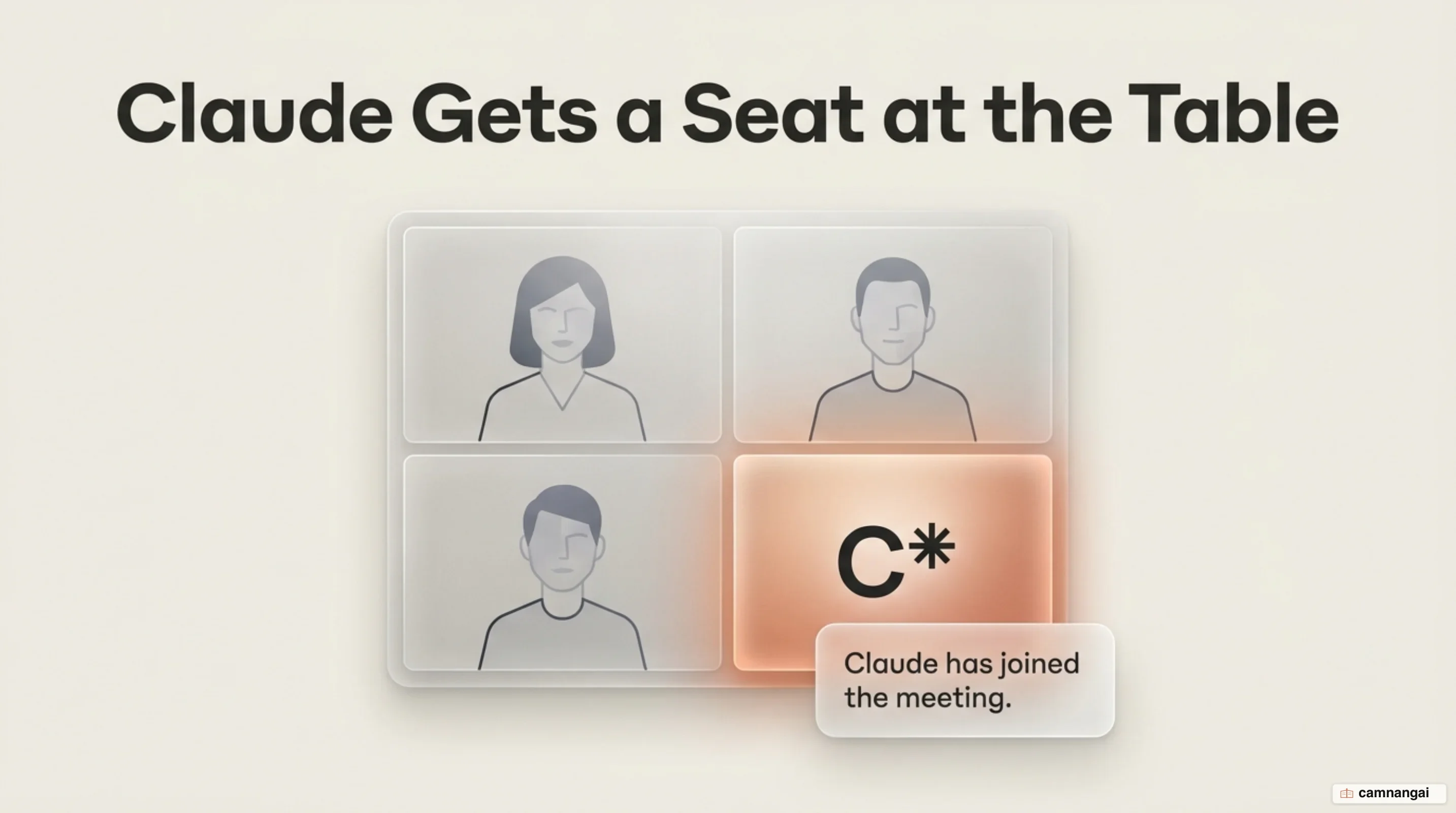
Claude Meetings is Anthropic's beta feature that places Claude directly into video calls as a visible participant. Operating across web and Claude Desktop interfaces, the system transcribes discussions, answers questions in writing, queries connected software tools, and builds live artifacts alongside meeting participants.
Instead of operating solely as a post-call processing script, the assistant handles real-time execution during the session. You can interact with the agent via spoken voice commands or text chat within the video interface to generate structured assets before the call finishes.
At launch, the tool integrates exclusively with Google Meet for eligible paid organizational accounts. It gives engineering and product teams a direct mechanism to eliminate manual administrative overhead while maintaining controlled workspace access.
What is Claude Meetings?
Claude Meetings acts as an in-call operational collaborator, turning video discussions into structured workspace outputs. Rather than acting as a standalone post-meeting recorder, the service integrates into your workspace environment across the web and Claude Desktop app. It allows participants to execute tools, perform queries, and draft technical or operational documentation in real time while the call is actively underway.
Access is restricted to paid organizational tiers in beta, specifically supported on Claude Team and Enterprise subscription plans. Pricing for standard Team plan seats is set at $20 per user per month when billed annually, or $25 per user per month on a monthly billing cycle. Enterprise plan pricing is established at $20 per seat per month with annual billing, governed by a 20-seat minimum requirement ($400 per month minimum base cost), with additional tool or computational usage billed at standard API rates.
At initial deployment, Google Meet is the sole supported videoconferencing platform. Anthropic has indicated that support for Microsoft Teams and other videoconferencing tools is scheduled for future rollout phases. Additionally, Anthropic is developing transcript export integrations with third-party analytical and notes services, including Gong, Attention, Granola, Fireflies.ai, and Otter, allowing teams to route generated text logs into external systems.
How Claude Participates in Live Google Meet Calls
To deploy Claude into a call, you navigate to Meetings within the Claude interface and link your Google Calendar account. This step requires an organization owner to enable Google Calendar integration at the administrative level first. Once connected, you select an upcoming event from your schedule and click "Add Claude." Alternatively, you can configure automatic participant behavior by navigating to Settings > Capabilities > Meetings > Auto-join. Auto-join rules can be configured to add the assistant to all scheduled meetings or to filter out one-on-one calls.
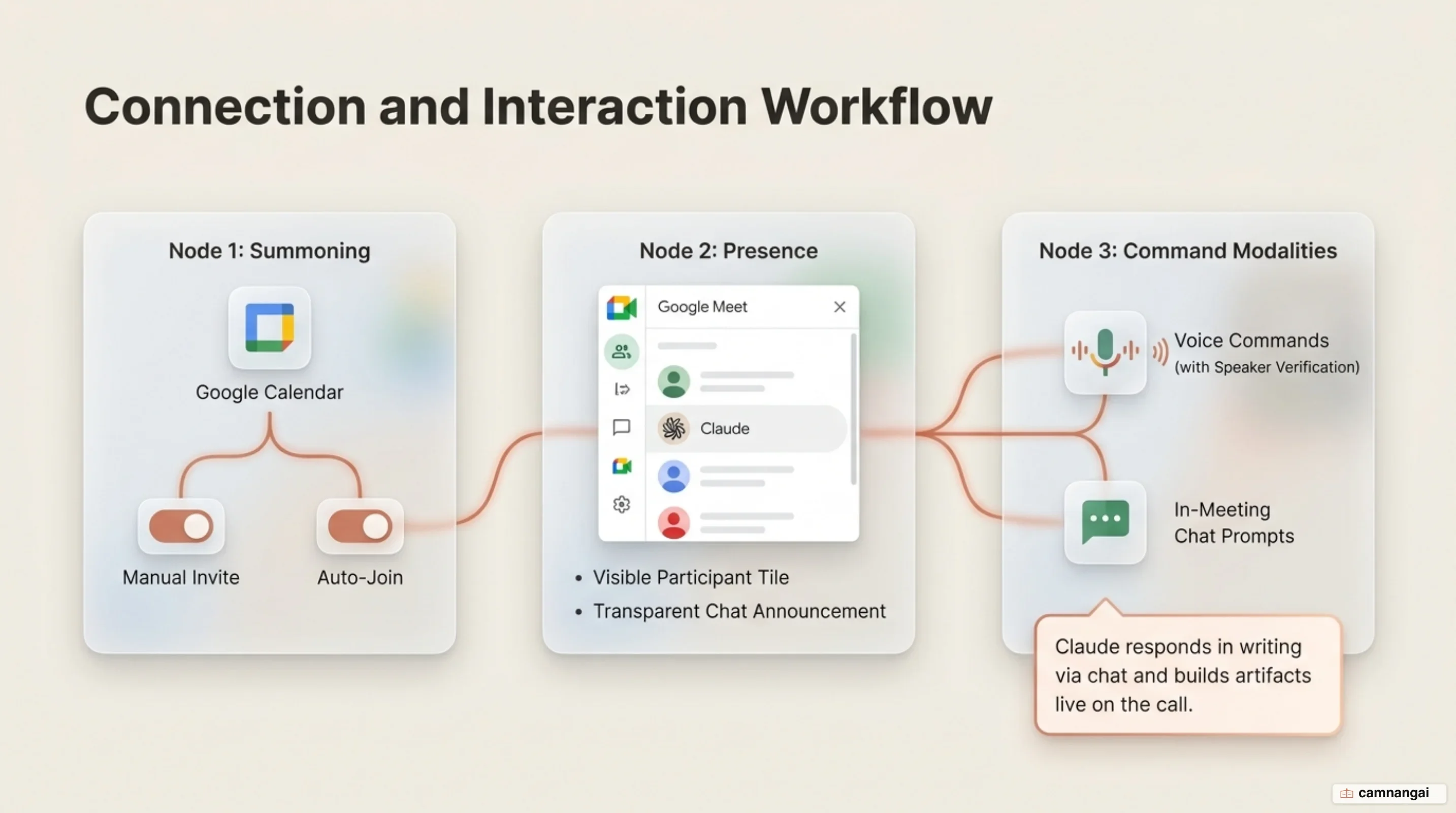
When the scheduled call starts, Claude enters the video room and displays as a visible participant tile in the Google Meet attendee list. This tile indicates current agent state transitions in real time. It immediately posts an automated entry notification message into the Meet chat to ensure operational transparency for all attendees. During active sessions, you interact with the agent using either spoken voice requests (saying "Claude" aloud) or written text prompts submitted in the Meet chat. Spoken interactions require speaker identity confirmation each time to verify who is issuing the instruction. Responses posted by Claude in the Google Meet chat are visible to all meeting attendees, including external guests, whereas conversation on the dedicated claude.ai meeting page remains strictly internal to your organization.
Operational approval logic routes to specific interface surfaces based on action type. Connected tool permission requests render directly in the Meet chat when possible, whereas Claude account and identity confirmation requests render on the claude.ai meeting page. Session lifecycle controls allow you to pause transcription by asking Claude to "stop listening" or clicking pause on the meeting page, and resume via the meeting page at any time. If you select "Remove Claude" and later re-add the bot during the same call, it reattaches to the existing persistent meeting page instance. Claude can remain in a single meeting for up to eight hours and issues an explicit warning alert prior to automatically departing.
# Complete administrative & user configuration model for Claude Meetings
claude_meetings_config:
  organization_defaults:
    enabled_by_default: true # True for Team, False for Enterprise
    external_guests_allowed: false
    connected_tools_in_meetings: true
  user_preferences:
    calendar_integration: google_calendar
    auto_join_rules:
      enabled: true
      scope: "all_except_one_on_ones" # Options: all_meetings | all_except_one_on_ones | disabled
    meetings_with_external_guests: disabled
  in_call_permissions:
    require_speaker_confirmation: true # Requests confirmation per spoken prompt
    allow_connected_tools: true # Consumes API/plan usage quotas
    chat_responses_enabled: true
Real-Time Co-Creation with Artifacts and Whiteboards
Real-time asset creation shifts documentation tasks directly into the live meeting environment. Meeting participants can invoke asset creation by stating explicit vocal commands such as "Claude, make a doc" or "Claude, make a whiteboard." Upon receiving the command, the assistant generates the requested file object and attaches it directly to the designated meeting workspace page. Supported artifact types encompass documents, whiteboards, spreadsheets (Claude Sheets), and slides. Multiple artifacts can be generated during a single session without interrupting the underlying audio stream.
Once generated, team members can collaborate on and co-edit these materials live as the conversation progresses. Teams can map project schedules, task owners, and delivery timelines directly onto shared visual whiteboards, construct operational trackers and budgets with formulas and dropdowns using Claude Sheets, or draft and refine technical specification documents and slide decks. By establishing a shared canvas during active debate, participants can review, revise, and validate complex materials prior to call adjournment.
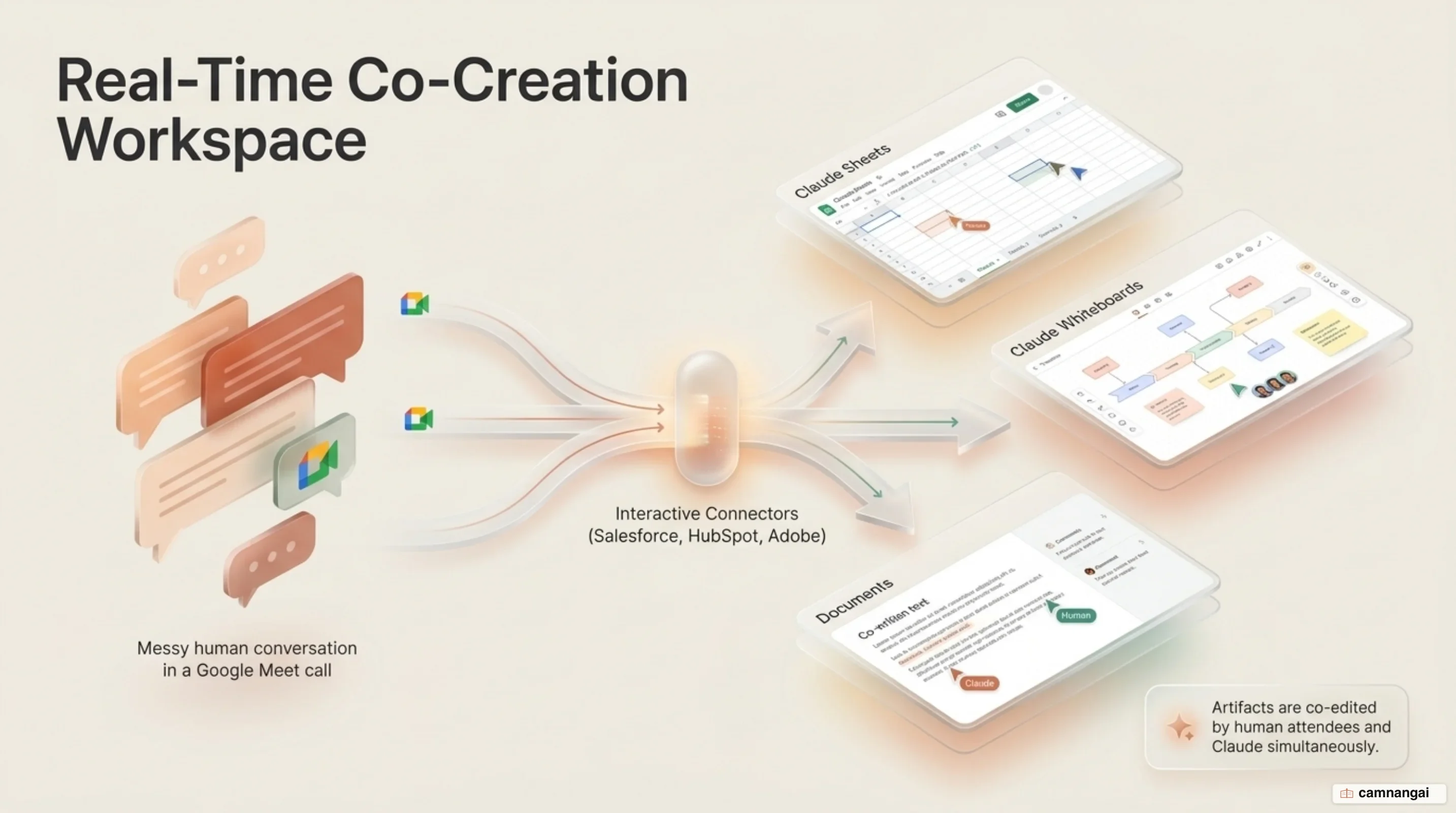
The financial structure for in-call artifacts involves distinct promotional windows during the beta period. Standard meeting outputs—including text notes, raw transcripts, and standard in-chat responses that do not call external connected tools—are included under existing Team and Enterprise subscriptions at no extra cost. In-meeting artifacts, specifically including documents, whiteboards, spreadsheets, and slides, are provided under a separate free-use promotion that extends through February 10, 2027. However, any in-call prompt that invokes a connected tool (e.g., querying a live CRM or data warehouse) draws down directly from user or organization API usage quotas and can incur standard usage charges.
Automated Post-Meeting Pages and Action Tracking
Upon the conclusion of a video call, Claude compiles all session data into a persistent, dedicated claude.ai meeting page. This workspace houses the full written transcript, an executive summary, itemized action items with assigned tasks, detailed text descriptions of material displayed on screen during screen-sharing sessions, and all generated documents, spreadsheets, slides, or whiteboards.
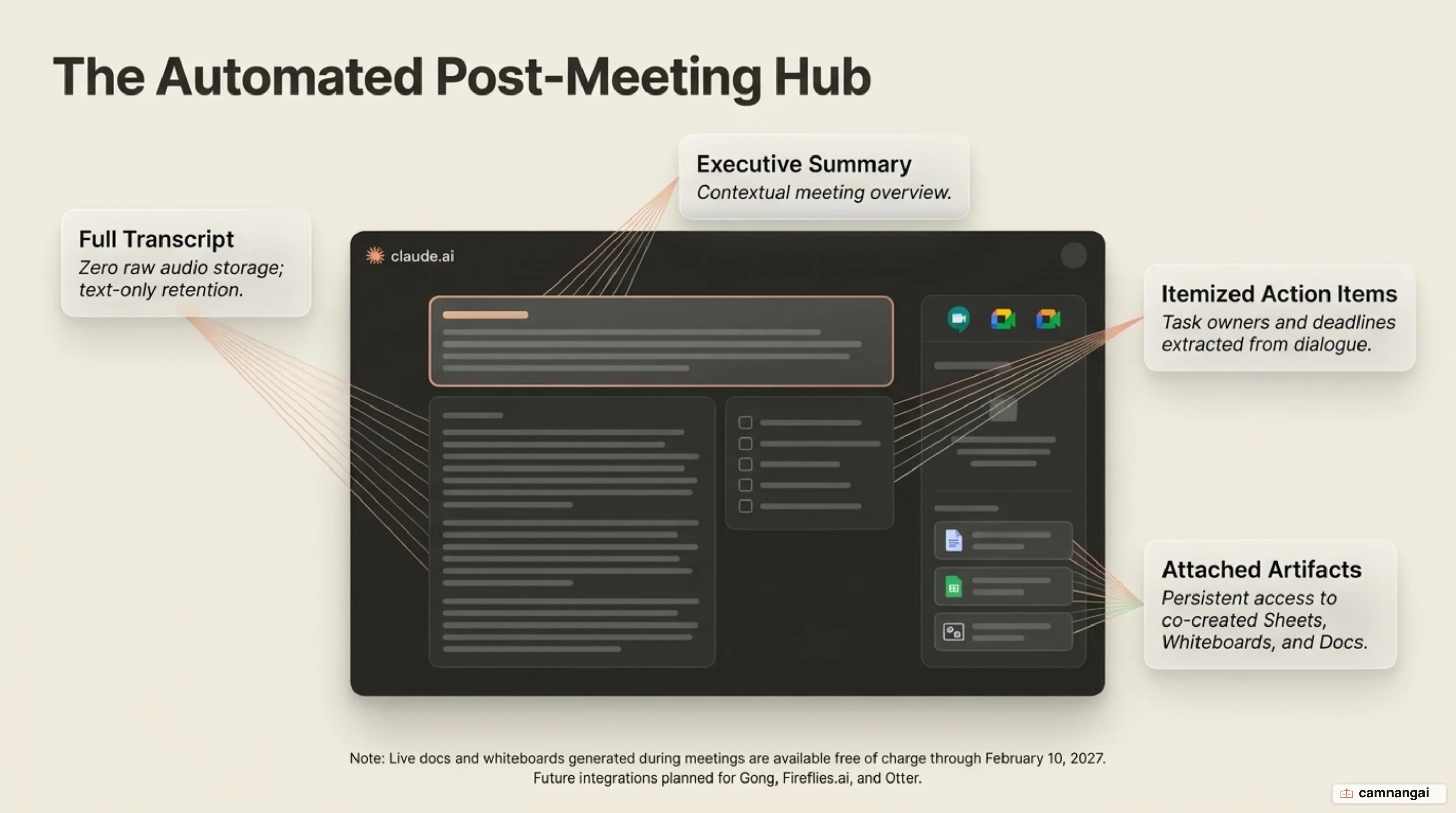
Access and distribution follow strict organizational boundary rules. All internal team members invited to the original calendar event receive an automated recap email containing a direct URL to the meeting page. Internal attendees can access the page to review transcripts, edit created artifacts, or share the persistent URL with other members inside the company organization. Outside guests included on the call invitation are excluded from receiving the recap email or accessing the internal claude.ai meeting page.
The post-meeting architecture integrates directly with standard Claude chat interfaces. After a call terminates, you can reference and query the context of past meetings that you attended within standard claude.ai conversation threads. This enables engineers and managers to extract specific decisions, cross-examine historical meeting notes, or synthesize multi-meeting discussions into broader technical documentation without manually retrieving raw transcript files.
Enterprise Privacy Controls and External Guest Guardrails
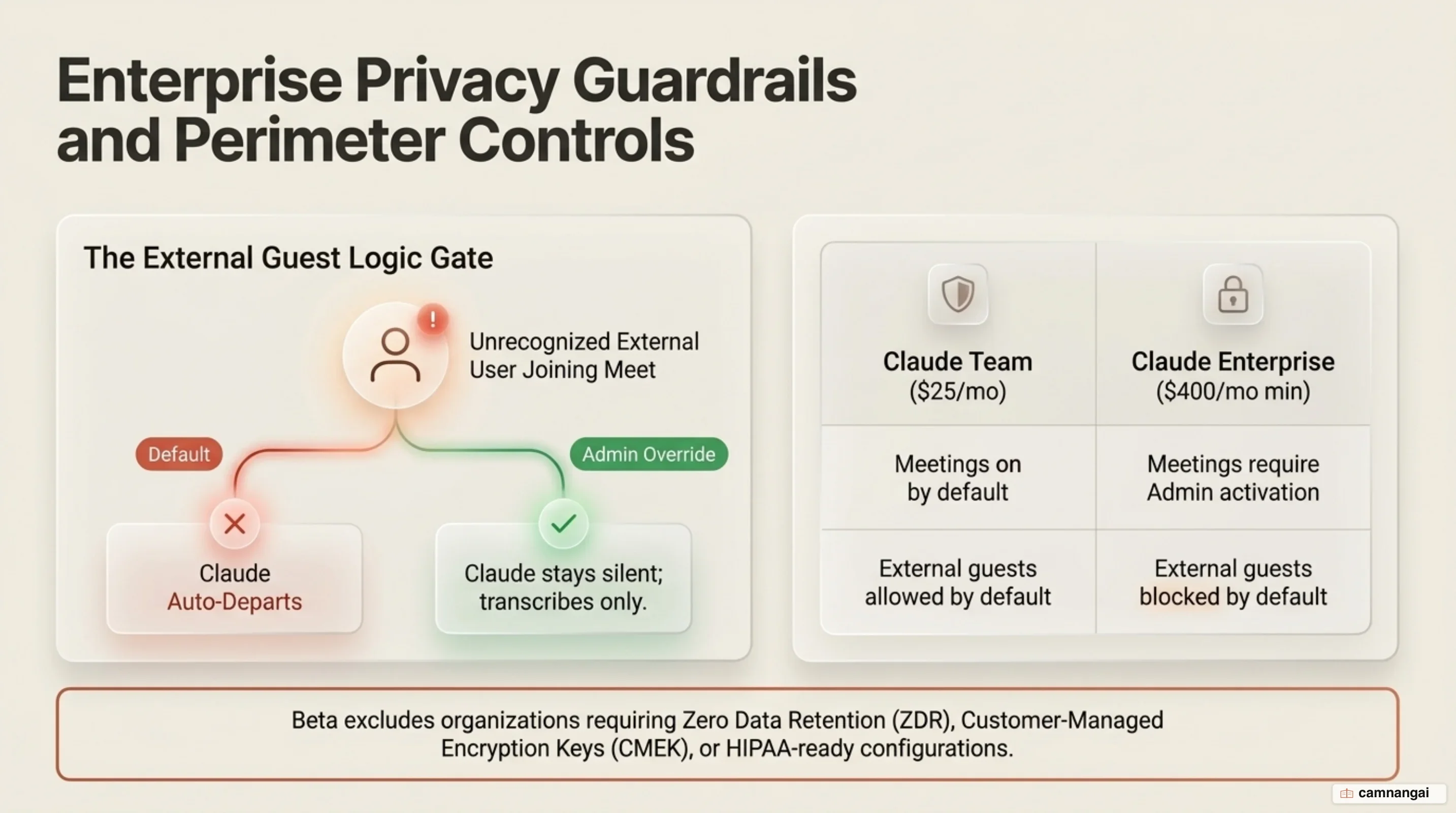
Administrative controls and privacy policies for Claude Meetings vary by plan tier and can be managed under Organization settings > Products > Claude Meetings (beta). On Team plans, the capability is enabled by default across the organization, though account owners retain the option to disable it. On Enterprise plans, the feature is disabled by default; administrative owners must explicitly activate it globally or provision access to specific organizational units using custom role assignments.
Deployment is blocked for organizations subject to specific compliance and data retention constraints. The beta is strictly unavailable to account environments configured with Zero Data Retention (ZDR), HIPAA-ready compliance frameworks, or Customer-Managed Encryption Keys (CMEK). For compliant standard environments, data retention policies dictate that Claude stores text transcripts, executive summaries, and visual screen descriptions, while strictly excluding raw audio recordings from its permanent records.
External guest boundaries are governed by dual organizational and individual policy rules. By default, Claude remains out of any meeting where an external domain invitee is present, and automatically leaves an active call if an unapproved outside guest or external bot enters mid-session. If an administrator explicitly enables external guest calls at the organization level, individual users can manage their own preference under Settings > Capabilities > Meetings > Meetings with external guests. When external calls are permitted, Claude listens and logs notes/transcripts, but live chat replies are automatically disabled in the meeting, and external guests receive no access to the resulting claude.ai meeting page, recap emails, or generated artifacts.
When Should Your Team Adopt Claude Meetings?
Deploy Claude Meetings if your engineering organization relies primarily on Google Meet, operates within standard cloud data retention policies, and seeks to eliminate manual post-meeting synthesis. The system provides immediate efficiency gains for internal architecture reviews, sprint planning sessions, and technical design reviews by converting live verbal agreements into structured workspace artifacts instantly.
Delay deployment if your operational stack depends on Microsoft Teams or alternative video platforms, or if your organization enforces Zero Data Retention (ZDR), HIPAA configurations, or Customer-Managed Encryption Keys (CMEK). Similarly, teams that conduct high volumes of external customer calls without administrative overrides for guest access should wait until granular external security controls and broader platform support mature.
References
- Use Claude Meetings | Claude Help Center
- Release notes | Claude Help Center
- Anthropic targets workplace collaboration with Claude Meetings – Computerworld
- Anthropic Brings Claude Meetings To Google Meet In Beta - Dataconomy
- Anthropic Launches Claude Meetings Beta for Live Video Calls – Unite.AI
- Claude Can Now Join Your Google Meet Calls Like Any Another Team Member | Extremetech
- Claude Meetings Joins Calls Live — Office Suite (2026) | explainx.ai Blog