Dynamic workflows decouple orchestration logic from the model's transient context window. In this "Plan-as-Code" architecture, Claude generates and executes JavaScript orchestration scripts inside an isolated runtime to manage fleets of subagents, giving you stronger state management and isolation during complex operations.
By offloading the "foreman" role to a script, dynamic workflows can coordinate hundreds of parallel agents while keeping the main developer session responsive. The system targets high-concurrency tasks — codebase-wide migrations or security audits — that bypass standard context limits by storing intermediate state in script variables rather than the conversation history. What you get back is a process you can re-run and check, which a turn-by-turn chat session never was.
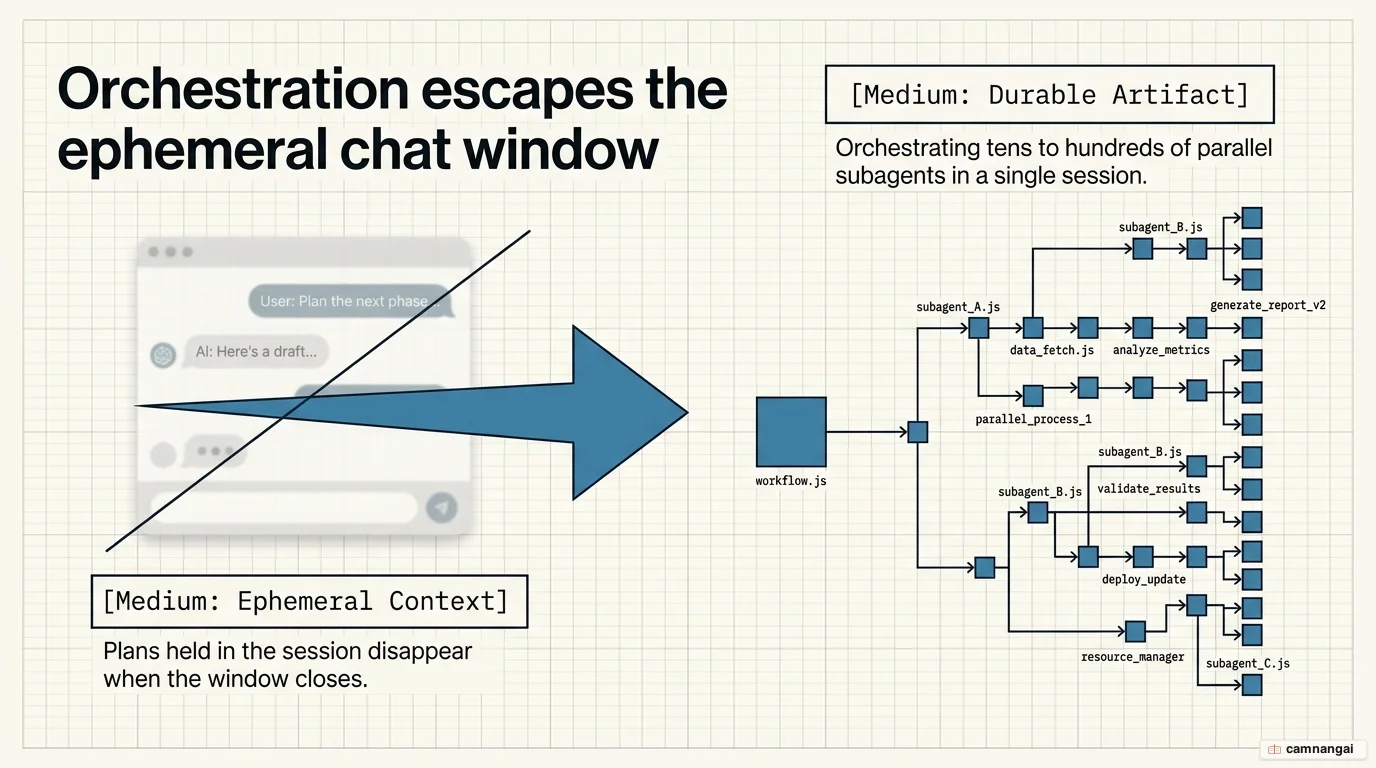
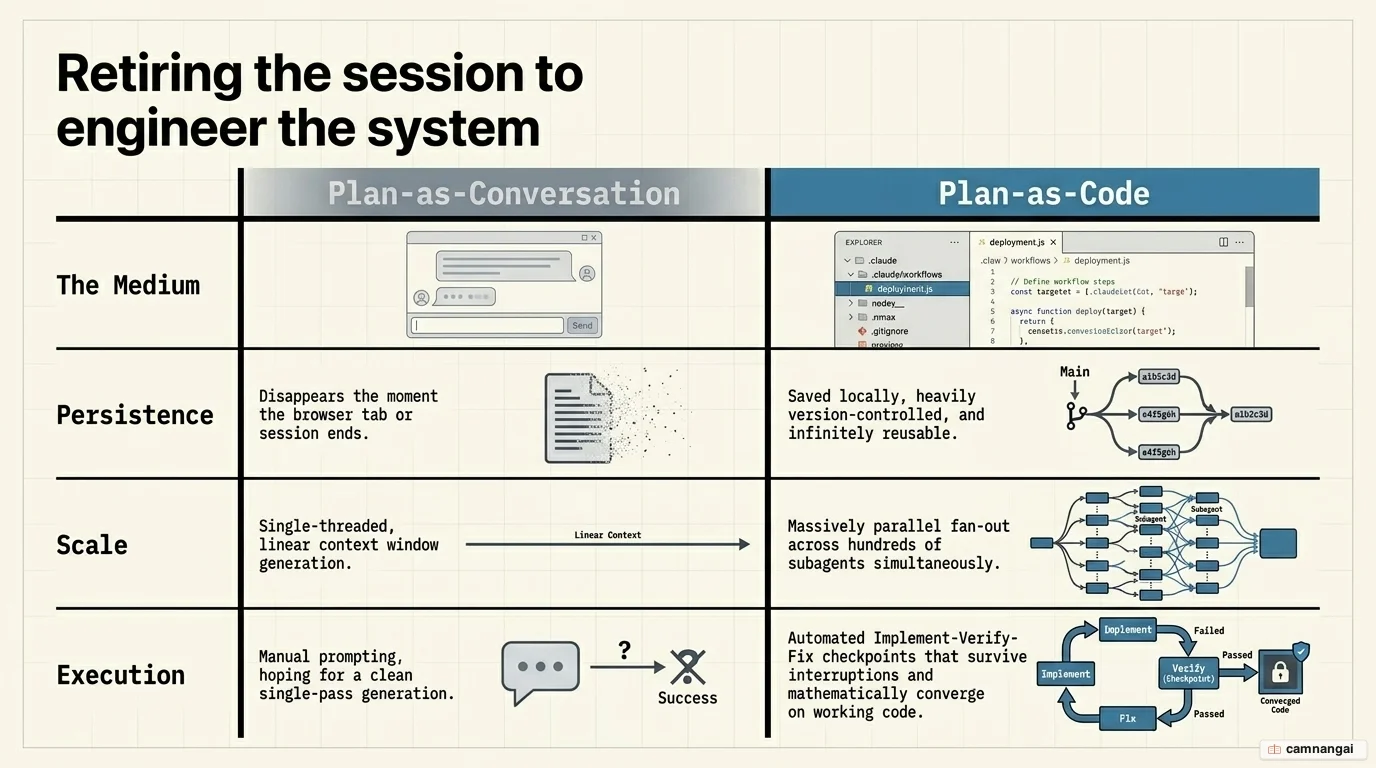
The execution plan moves out of the ephemeral chat history and into a durable, version-controlled code artifact.
What are dynamic workflows in Claude Code?
Dynamic workflows transition Claude Code from "Plan-as-Conversation" to "Plan-as-Code".
Traditionally, AI agents tracked goals inside the chat context, which became a bottleneck as the conversation grew. In a dynamic workflow, Claude generates a JavaScript orchestration script that defines phases, assigns workers, and enforces convergence criteria.
That shift buys a technical lead three things:
- Context management: intermediate results are held in script variables, so the system scales across hundreds of files without bloating the main model's context window.
- Auditability: the JavaScript artifact is a reviewable, version-controlled "recipe." For teams in regulated industries like banking or defense, it gives you an audit trail of every check performed, which a conversation history never could.
- Architectural isolation: unlike standard subagents (parallel workers reporting to the main session) or skills (reusable recipes whose logic stays in context), workflows run in a separate runtime. The orchestration logic is effectively compiled into a script before execution.
How do dynamic workflows work?
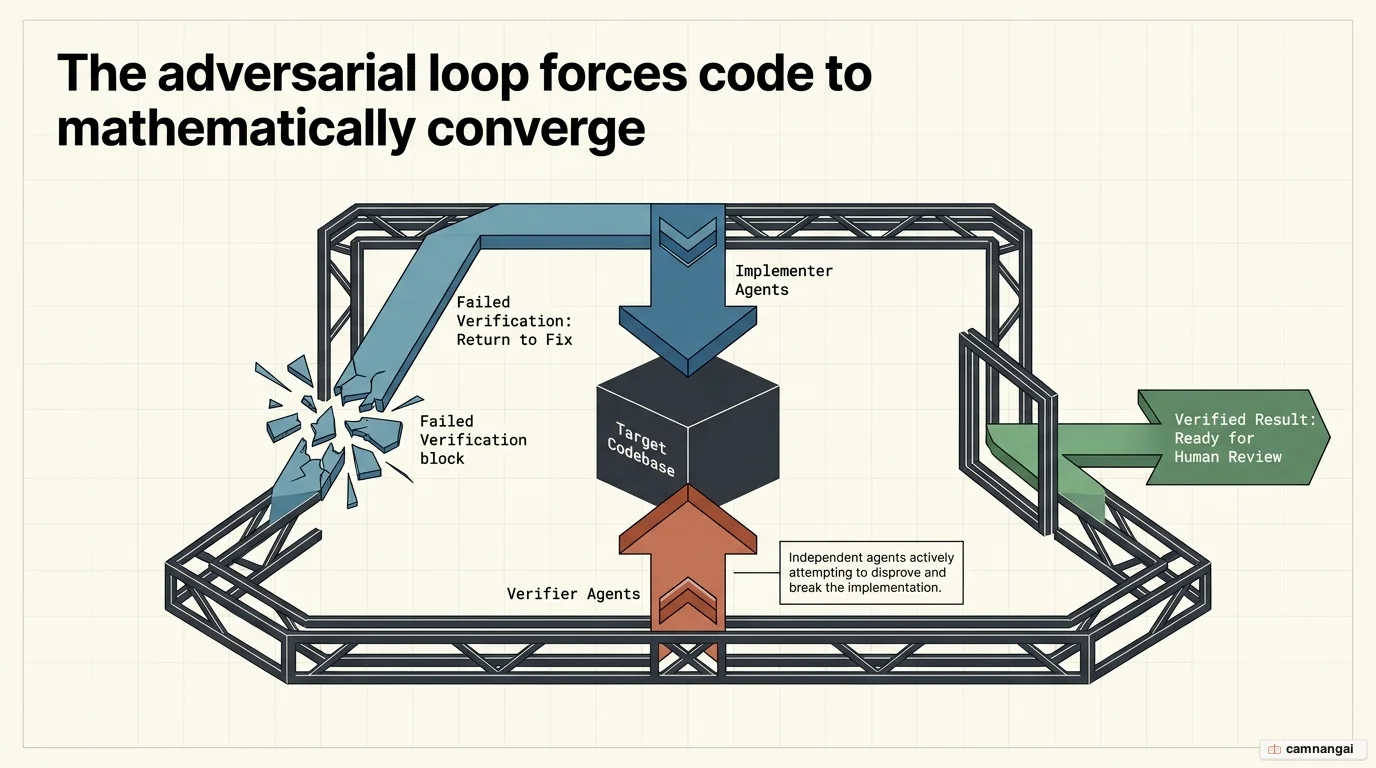
The core engine is an "Implement-Verify-Fix" loop driven by adversarial verification. Instead of a single agent reporting completion, the workflow assigns independent agents to find flaws in the implementation. These reviewers try to refute the implementers' findings or code changes; the script delivers a result only once the agents reach consensus. Making the agents argue is the part of this design that does the real work, because a single agent reporting success is only ever grading its own homework.
Technical constraints:
- Concurrency limit: capped at 16 agents to protect local CPU resources.
- Total agents: a hard limit of 1,000 per run prevents infinite recursive loops.
- Checkpointing: runs are durable within a session — an interrupted job resumes from where it left off.
- Convergence: the loop continues until implementers and verifiers agree on the output.
Typical workflow phases:
- Scan: parallel agents search the codebase to identify relevant modules or specific vulnerabilities.
- Verify: independent agents perform adversarial reviews to disprove or validate the initial scan.
- Fix: a dedicated fixer agent addresses the discrepancies found during verification.
- Report: findings are synthesized into a structured final output.
How do you enable and trigger dynamic workflows?
Dynamic workflows require Claude Code v2.1.154 or later and are currently available in research preview.
Triggering methods:
- Explicit keyword: include the word "workflow" in your prompt (e.g., "Run a workflow to audit...").
- Effort setting: use
/effort ultracode. This sets reasoning effort toxhighand lets Claude decide when a task warrants a workflow.
# Verify version requirement
claude --version

# Enable workflows for all complex tasks
/effort ultracode
Monitoring and controls:
/workflows: monitor active subagents, token usage, and elapsed time.Ctrl+G: view the raw JavaScript orchestration script before approving the run.p: pause a running workflow.s: save the workflow to.claude/workflows/to turn it into a project-wide slash command.
What do you use dynamic workflows for?
Dynamic workflows are built for high-compute, objective engineering tasks where manual supervision is the bottleneck:
- Codebase-wide audits: run security sweeps or profiler-guided optimizations across thousands of files at once.
- Massive migrations: execute framework swaps or language ports (500+ file changes) with automated verification at every step.
- Deep research: the bundled
/deep-researchworkflow fans out searches and uses a voting mechanism to cross-check claims and filter hallucinations. - Institutional knowledge: commit saved workflows to your repository, turning processes like API-layer audits into executable, shared scripts.
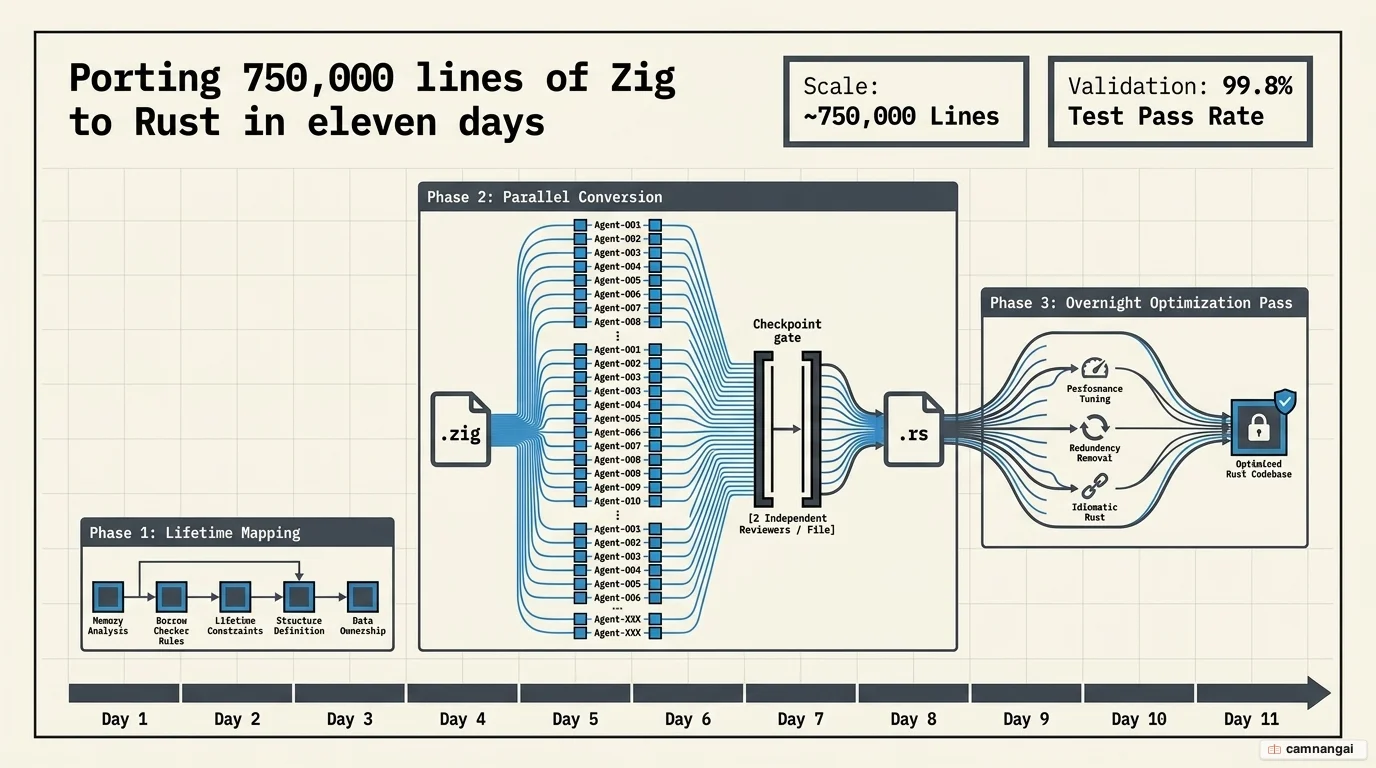
Case study: how Bun rewrote 750,000 lines of Rust in 11 days
The Bun runtime used dynamic workflows to port its codebase from Zig to Rust. The project ran in three phases: mapping lifetimes for every struct, parallelizing file conversion with two independent reviewers per file, and an overnight optimization pass to remove redundant data copies.
Metrics and technical reality:
- Scale: roughly 750,000 lines of Rust generated (some reports cite up to 960,000 lines).
- Timeline: 11 days from first commit to merge (some independent sources cite 6 days of active coding).
- Accuracy: a 99.8% test pass rate.
Critical caveat: despite the high pass rate, Rust specialists have called the resulting code "unsound." The automated port produced over 13,000 unsafe blocks, compared to fewer than 100 in a typical manual implementation. Workflows are good at making the new code behave like the old code, which is not the same thing as writing good Rust, and I would not put a port like this into production on the pass rate alone. Data discrepancies exist between Anthropic's announcement and independent coverage on exact line counts and durations.
How do dynamic workflows differ from Cursor, Copilot, and Codex?
The difference that matters is durability: the plan is still on disk tomorrow.
- Cursor (
/multitask): a visual, interactive sidebar. The orchestration is effective but ephemeral; the plan disappears when the session ends. - GitHub Copilot (
/fleet): a cloud-first, PR-based system. The orchestration lives in a hidden dispatching layer rather than an inspectable file. - OpenAI Codex: delivers results via internal platform coordination but does not expose the "recipe" to the user.
- Claude Code: generates a file-based, version-controlled JavaScript artifact. Teams can review, version, and share the exact blueprint of the work.
When should you NOT use dynamic workflows?
Dynamic workflows are a high-compute tool with real trade-offs:
- Token consumption: these are token black holes. Users have reported burning between 700,000 and 7.2 million tokens on a single prompt — a run can consume a monthly subscription limit in minutes.
- Routine edits: simple bug fixes or single-file changes are faster and cheaper with standard subagents.
- Subjective tasks: workflows need an objective ground truth or test suite to be effective. They are unsuitable for "vibes"-based or creative work.
- Mid-run steering: there is no mechanism for human intervention during execution. If a task needs a judgment call halfway through, workflows are the wrong tool.
- Auto-approval risk: subagents run in
acceptEditsmode and write file changes without per-edit confirmation.