LangGraph is a low-level orchestration framework and runtime designed for building stateful, multi-agent systems using a graph-based architecture.
If you have tried to move beyond simple prompt chaining, you have likely hit the "black box" wall where high-level abstractions fail to recover from edge cases or enter infinite tool-calling loops that are impossible to debug. LangGraph addresses this by moving away from linear chains toward complex, cyclical workflows that require durable state and explicit control.
The core problem in production AI is reliability. Standard tool-calling loops often lack the granular visibility needed to diagnose why an agent hallucinated a transition or failed to terminate. By modeling logic as a directed graph where you define the nodes and edges, LangGraph allows you to hard-code deterministic guardrails around your LLM-driven steps. This ensures that the system behaves as an engineered piece of software rather than an unpredictable script.
How LangGraph works: state, nodes, and edges
LangGraph operates by representing AI logic as a directed graph. In this architecture, Nodes are discrete actions — typically Python functions that call an LLM, execute a tool, or process data. Edges define the transitions between nodes, using conditional logic to determine the next step in the workflow. This structure allows for cycles, enabling agents to self-correct by looping back to a previous node if a tool execution fails or requires refinement.
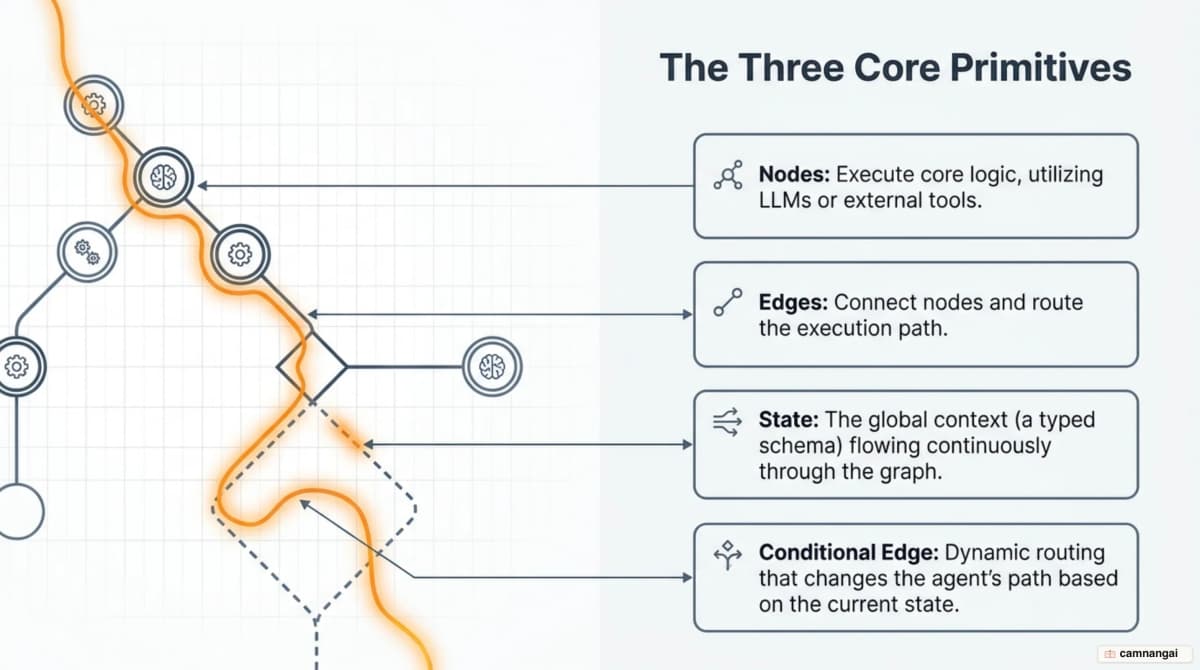
The single source of truth is the State, a typed schema (often a TypedDict) that persists throughout the graph's execution. Unlike stateless chains, every node in LangGraph reads from and writes to this shared state. To manage this state, LangGraph distinguishes between two types of persistence:
- Checkpointers: persist graph state snapshots within a specific thread. They provide short-term memory, enabling conversation continuity, fault tolerance, and "time travel" to previous states.
- Stores: persist application-defined data across different threads. Stores handle long-term memory, such as user preferences, historical facts, or shared knowledge that needs to survive across separate sessions.
The Agent Loop is the standard execution pattern: the system enters the graph at a starting node, an LLM decides which tool to call, and a router edge inspects that decision. Based on the output, the graph either transitions to a tool-execution node or reaches an end state. This explicit routing prevents the "hidden loop" failures common in higher-level frameworks.
from typing import Annotated, Sequence, TypedDict
from langchain_core.messages import BaseMessage
from langgraph.graph import StateGraph, START, END
from langgraph.graph.message import add_messages
from langgraph.checkpoint.memory import InMemorySaver

# Define the shared state
class AgentState(TypedDict):
    messages: Annotated[Sequence[BaseMessage], add_messages]

# Define a node
def call_model(state: AgentState):
    # ... call your model here ...
    return {"messages": ["Model processed context"]}

# Set up persistence
checkpointer = InMemorySaver()

# Assemble the graph
builder = StateGraph(AgentState)
builder.add_node("agent", call_model)
builder.add_edge(START, "agent")
builder.add_edge("agent", END)

# Compile with a checkpointer and a human-in-the-loop interrupt
graph = builder.compile(
    checkpointer=checkpointer,
    interrupt_before=["agent"],  # Pause for review before the agent node runs
)
What makes LangGraph different from other frameworks?
LangGraph is "low-level," prioritizing developer control over ease of prototyping. In production, high-level "black box" agents often fail because they lack transparency in their decision-making. LangGraph forces you to be explicit about state transitions, allowing you to mix deterministic, hand-coded steps with LLM-driven agentic steps. This means you can enforce business logic — like a mandatory compliance check — that an LLM cannot bypass.
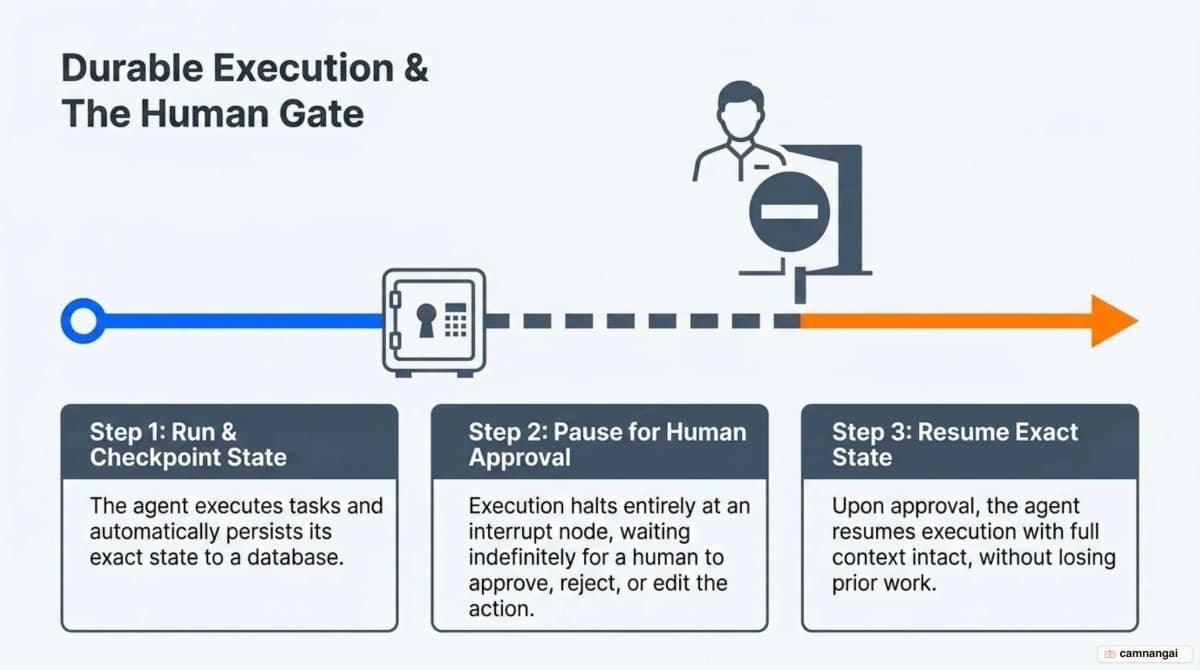
The framework's biggest production feature is durable execution. By using checkpointers, LangGraph persists the agent's state in a database (like PostgreSQL or SQLite) after every node execution. If a server restarts or a long-running process spans several days, the agent can resume from the exact node where it left off. This durability is the foundation for managing multi-step business processes that are too complex for a single request-response cycle.
Human-in-the-loop (HITL) features are treated as first-class citizens through "interrupts." You can configure the graph to pause at any node, parking the agent in a pending state. This allows a human to review, approve, or even edit tool calls before they are executed. Because the state is checkpointed, the agent maintains its full context while waiting, making LangGraph a strong choice for sensitive applications like financial transactions or legal document drafting.
LangGraph, LangChain, and Deep Agents: how do they differ?
To find your way around the ecosystem, you need to know the difference between building blocks, runtimes, and harnesses. LangChain provides the core integrations — model wrappers, tool abstractions, and prompt templates. It is the fastest way to build a standard agent, but it can be restrictive for non-linear logic. LangGraph is the orchestration runtime built on top of LangChain. It provides the graph-based engine that handles state persistence and complex loops.
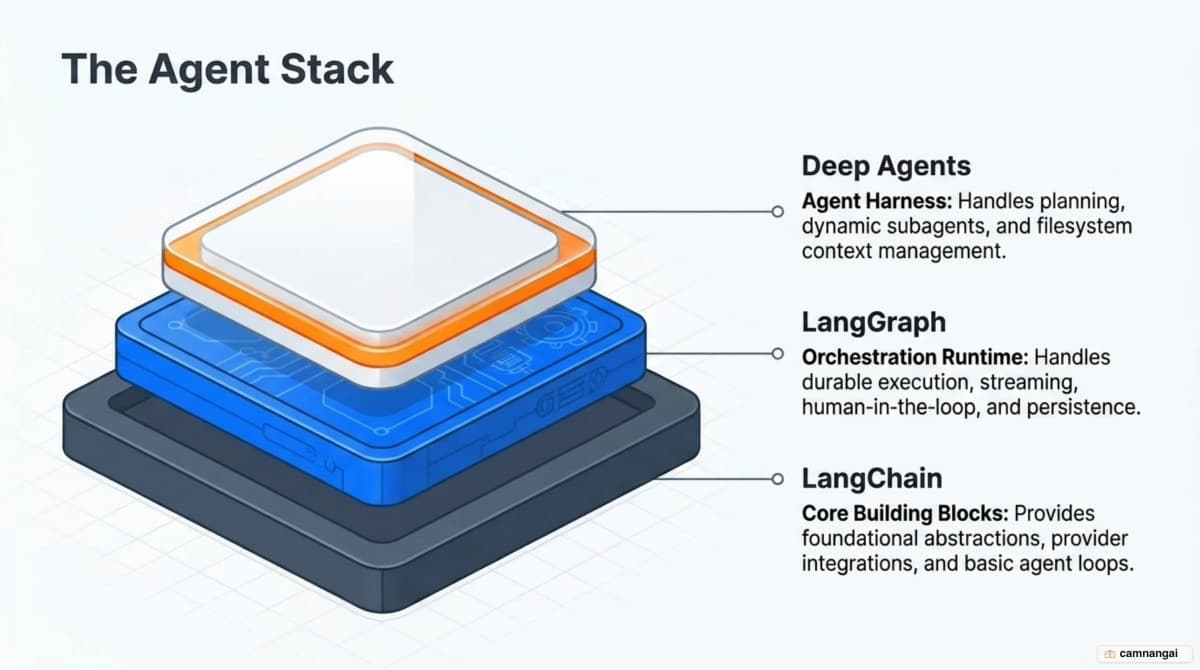
Deep Agents is an "agent harness" built on top of LangGraph. It adds prebuilt capabilities like task planning, subagent spawning, and virtual filesystem access. A key feature of Deep Agents is progressive disclosure of skills: the agent reads only the frontmatter of a skill at startup and loads the full instructions only when a task requires it. This keeps the initial context window compact and efficient, which is critical for maintaining performance in long-running agents.
| Feature | LangChain | LangGraph | Deep Agents |
|---|---|---|---|
| Primary Function | Framework / Integrations | Orchestration Runtime | Agent Harness |
| State Management | Linear / Stateless | Complex Graph-based | Context / File management |
| Skill Loading | All-at-once | Manual/Explicit | Progressive Disclosure |
| Best For | Standard tool-calling loops | Bespoke, durable workflows | High-capability autonomous agents |
Developers typically "drop down" from LangChain to LangGraph when their application requires branching logic or multi-day persistence. While LangChain is excellent for shipping a prototype quickly, LangGraph provides the low-level hooks needed to harden that agent for an enterprise environment where failures must be traceable and recoverable.
Who runs LangGraph in production?
Enterprise adoption of LangGraph is driven by the need for reliability in non-trivial workflows. LinkedIn, for example, uses a hierarchical agent system to automate recruitment tasks. By delegating candidate sourcing and matching to specialized agents, they have streamlined the hiring process while keeping human recruiters in the loop for high-level strategy and final decision-making.
In the developer tools space, Replit and Uber use LangGraph to manage high-complexity automation. Replit powers its AI software-development copilot with LangGraph to ensure transparency; users can see the agent's actions in real-time, from file creation to package installation. Uber employs a network of specialized agents to manage large-scale code migrations and unit test generation, where every step of the migration must be handled with precision to avoid breaking production builds.
Decision-intensive industries like real estate and cybersecurity also rely on the framework. AppFolio uses LangGraph to power property management copilots, which cut application latency and doubled decision accuracy. Similarly, Elastic orchestrates agents for real-time threat detection. By using a graph to manage the investigation of security risks, Elastic can respond to threats more effectively than traditional linear scripts would allow.
These companies choose LangGraph because it offers the observability required for production via LangSmith. When an agent makes an incorrect decision, the engineering team can use LangSmith to trace the exact state transition and node output that led to the failure. This level of auditability is mandatory for long-running processes that handle sensitive data or business-critical infrastructure.
The real cost: learning curve and pricing
The LangGraph framework itself is free and open-source under the MIT License. However, the total cost of ownership includes managed hosting and observability layers. The LangGraph Platform provides managed infrastructure starting at $35/month, which is often preferable to self-hosting the persistence backends and streaming infrastructure.
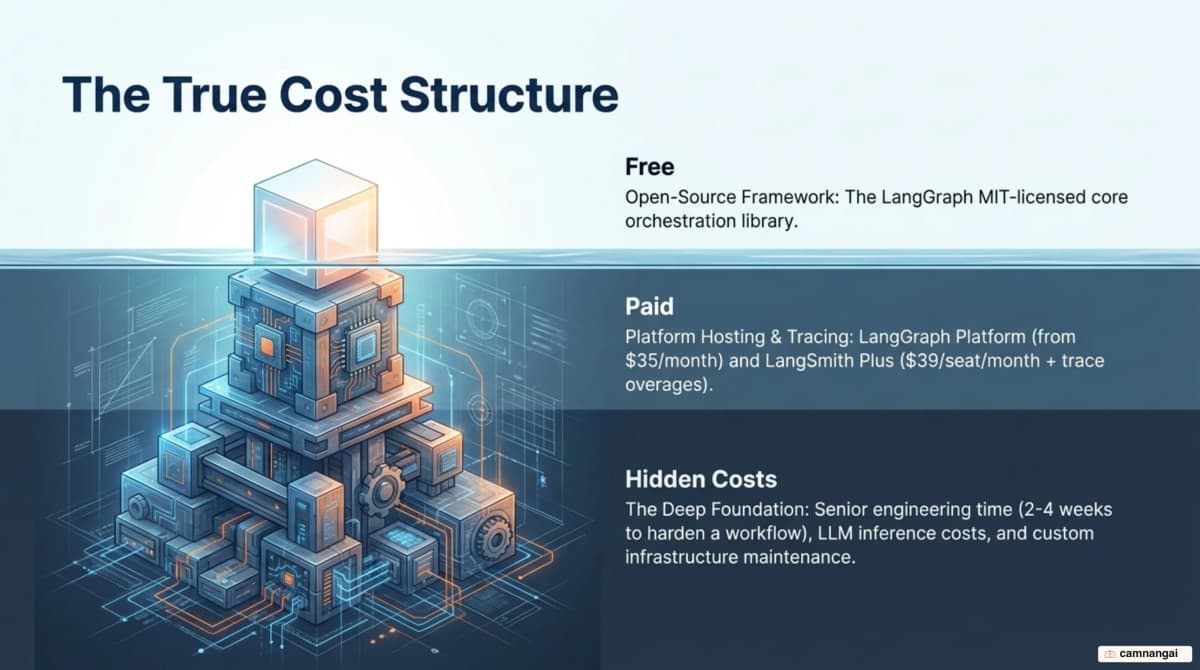
Operational costs are heavily influenced by LangSmith pricing. The LangSmith Plus tier costs $39/seat/month and includes 10,000 traces. For high-volume agents, trace overages cost $2.50 per 1,000 traces. One detail that matters for cost planning is retention: extended 400-day retention — often required for compliance or long-term evaluation — raises that to $5.00 per 1,000 traces.
The "engineering cost" may be the biggest factor. Moving from simple prompt chaining to a state-graph model requires a real shift in how you think about the problem. A senior developer typically needs 2 to 4 weeks to fully harden a complex LangGraph workflow for production. This time is spent designing the state schema, defining edge conditions, and implementing error-recovery loops. No-code tools might ship faster at first, but the LangGraph investment pays off in reduced maintenance and higher reliability at scale.
LangGraph vs CrewAI and AutoGen
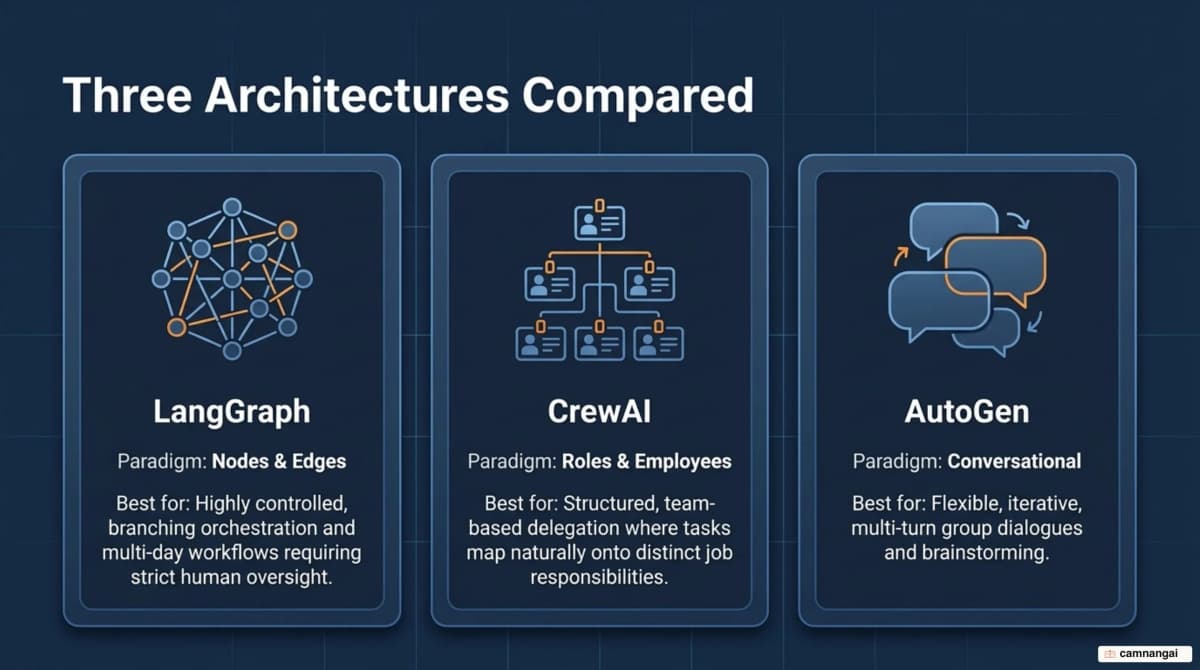
Orchestration philosophies vary widely across agent frameworks. LangGraph is a graph-based orchestrator focusing on explicit state control. CrewAI follows a role-based collaboration metaphor, where agents are treated as "employees" with backstories and specific tasks. AutoGen focuses on a conversational architecture, where the workflow is driven by natural language dialogue between agents and human proxies.
| Feature | LangGraph | CrewAI | AutoGen |
|---|---|---|---|
| Architecture | Directed Graphs | Role-based / Organizational | Conversational / Dialogue |
| Memory Support | State-based / Checkpointing | Role-based / RAG support | Message-based history |
| Scalability | Distributed graph execution | Task parallelization | Conversation sharding |
LangGraph offers the highest degree of modularity and is the best fit for workflows where you need to enforce a specific path of execution. CrewAI is more intuitive for team-like tasks but can be harder to "steer" in complex branching scenarios. AutoGen excels in iterative reasoning and brainstorming but faces unique scalability challenges, such as conversation sharding, where maintaining context across massive chat histories becomes computationally expensive and difficult to manage.
When should you use LangGraph — and when not?
Use LangGraph when your application requires complex branching logic, mandatory human approval gates, or persistence that spans multiple days. It is built for engineers who need "white box" systems where every state transition is visible, every tool call is interceptable, and every server failure is recoverable.
But LangGraph is over-engineered for simple chatbots or linear Q&A tools. If your task fits into a straightforward model-to-tool loop without complex decision trees, a simpler framework or the high-level create_agent abstraction in LangChain will let you ship faster with less overhead. Match the complexity of your framework to what the task actually needs.
References
- LangGraph overview — Docs by LangChain
- Persistence — Docs by LangChain
- LangChain and LangGraph Agent Frameworks Reach v1.0 Milestones
- Deep Agents overview — Docs by LangChain
- Is LangGraph Used In Production? — LangChain
- How to Develop AI Agents Using LangGraph: A Practical Guide — freeCodeCamp
- CrewAI vs LangGraph vs AutoGen: Choosing the Right Multi-Agent AI Framework — DataCamp
- LangGraph: Power and Complexity in Agent Orchestration — Orange ITS
- LangGraph Pricing: A Complete Breakdown for 2026 — TrueFoundry