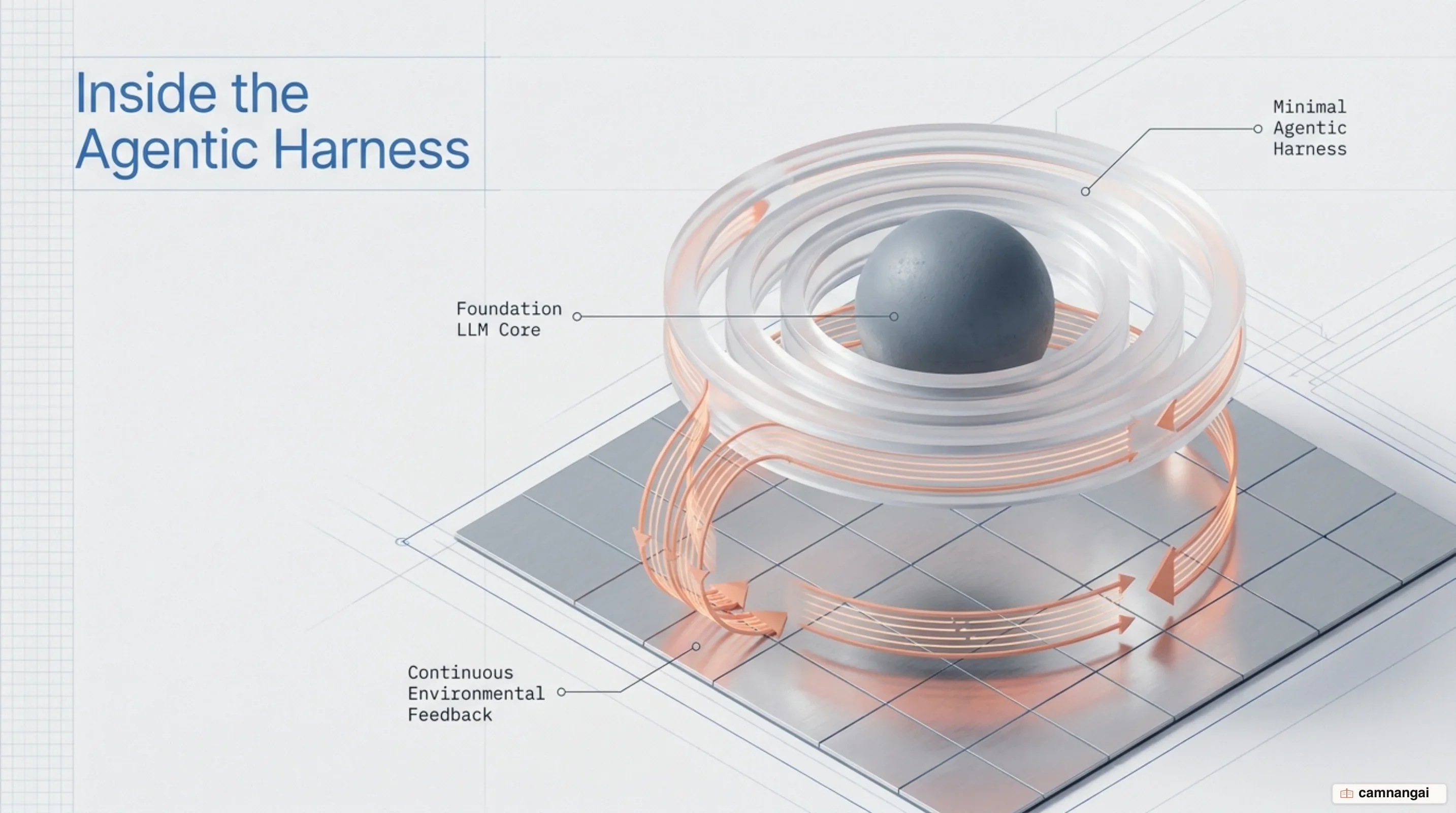
The Claude Code architecture, built by Anthropic, relies on an autonomous agentic loop engineered directly on top of the underlying model using direct API calls, simple tool primitives, and continuous environmental feedback.
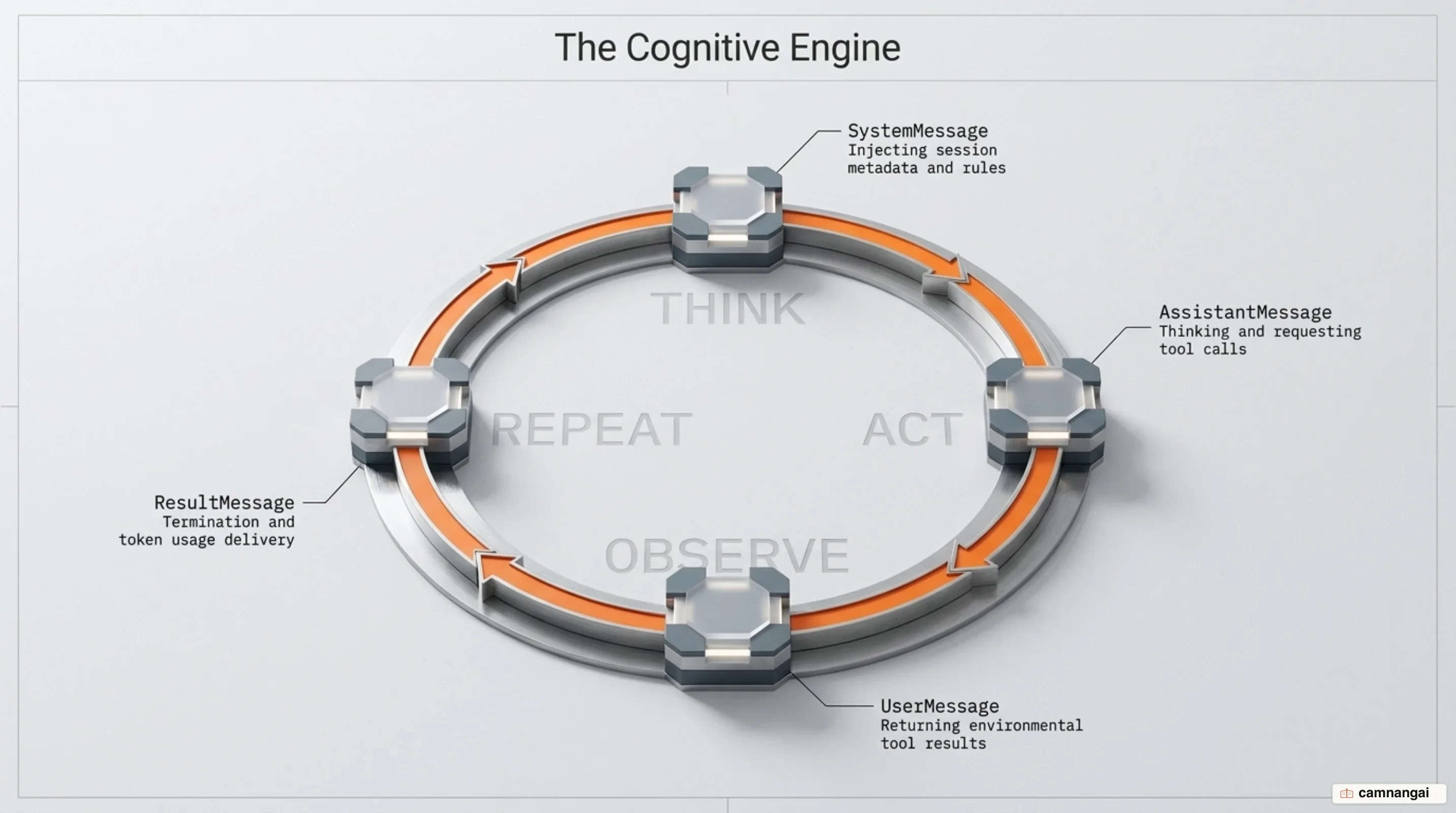
Operating as a tight Thought, Action, Observation, Reaction (TAOR) loop, the system continuously evaluates execution state, requests low-overhead tool executions, ingests environmental outputs, and adjusts its approach until the task completes.
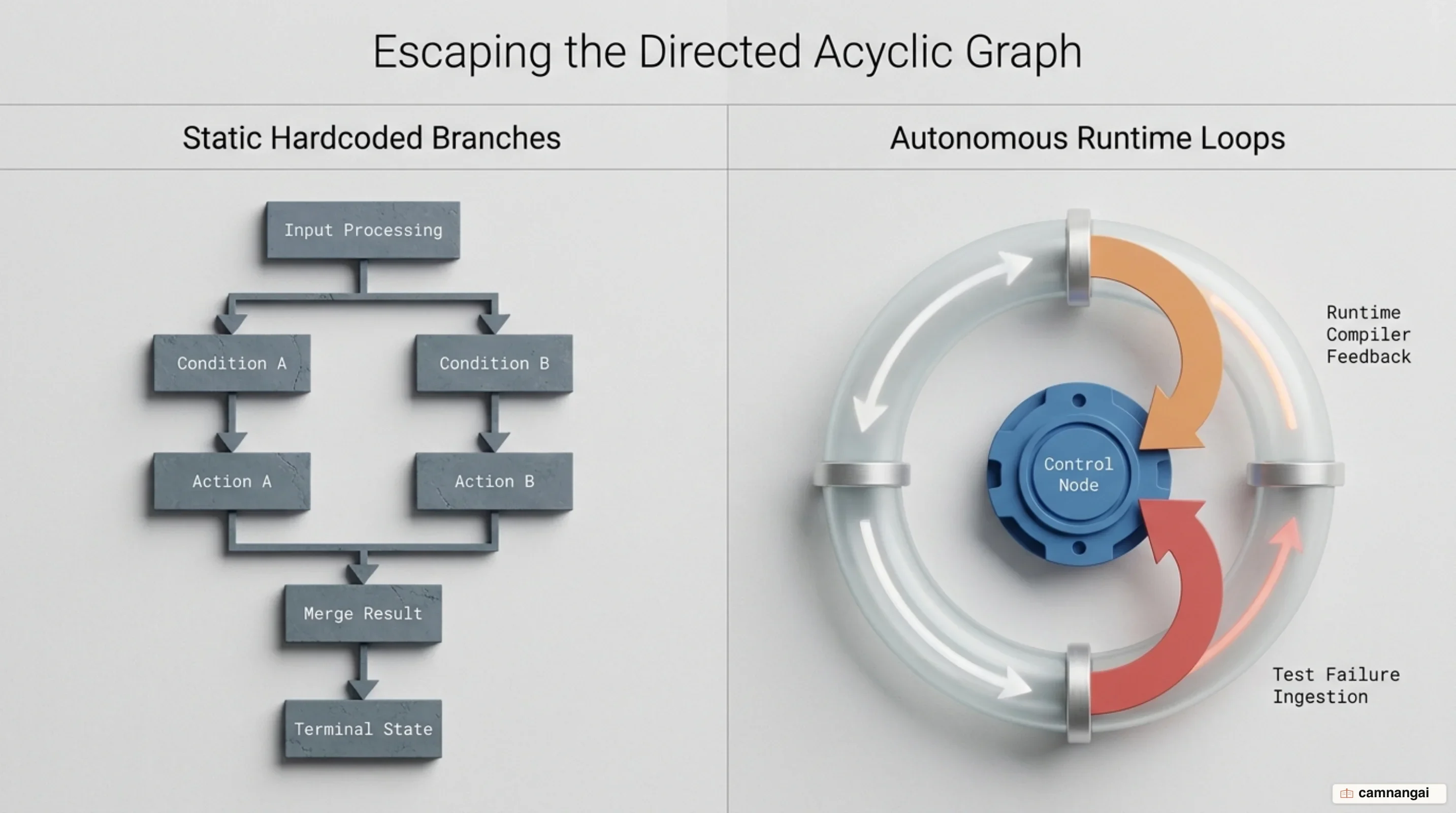
This architectural pattern directly rejects heavy, highly abstracted agentic frameworks that encapsulate model calls inside rigid Directed Acyclic Graphs (DAGs) or multi-layered graph abstractions. High abstraction layers obscure raw model prompts and raw responses, making multi-turn state tracing difficult and compounding intermediate execution errors across turns.
Claude Code trades framework abstraction for direct environmental ground truth by providing the model with simple tools and combining them with explicit context window economics to self-correct using compiler errors, test outputs, and exit codes.
Why most AI agents fail and the shift to autonomous loops
Early agent frameworks fail primarily due to excessive abstraction. Chaining libraries simplify initial prototyping by wrapping model calls, tool parsing, and control flow in deep class hierarchies. However, these class abstractions conceal raw prompts and model responses from the execution context. When an agent encounters failures during a multi-turn task, developer visibility into the internal state degrades. Intermediate parsing failures and prompt formatting drifts compound non-linearly across sequential execution turns when hidden inside class hierarchies, causing the model to derail without a viable mechanism for state recovery.
To build reliable software systems, you must differentiate between Workflows and Agents. Workflows orchestrate LLMs and tools through predefined, hardcoded programmatic code paths. Common workflow patterns include prompt chaining, routing, parallelization (sectioning and voting), and evaluator-optimizer loops. Workflows offer predictability and consistency for well-defined, static tasks. Agents, by contrast, are dynamic systems where the LLM independently directs its own control loop, determines subtasks, selects tools, and evaluates progress dynamically at scale.
Coding environments strongly favor autonomous agentic loops over static workflows. Software engineering tasks are inherently non-deterministic regarding the exact sequence of steps required to reach a solution, but they offer deterministic ground truth at runtime. File modifications, compiler output, test failures, and shell execution exit codes provide immediate, objective environmental feedback. An autonomous agent can execute a tool, observe the raw error payload in its context, and self-correct its implementation in real-time.
This autonomy introduces clear trade-offs in token spend, execution latency, and workspace safety. Operating an autonomous agentic loop consumes significantly more tokens and increases overall completion time compared to single LLM calls or deterministic workflows. Because autonomous agents can run for dozens of turns and risk compounding errors, you must enforce explicit spend limits (max_budget_usd), turn limits (max_turns), and strict process isolation within sandboxed execution environments.
The five architectural pillars of Claude Code
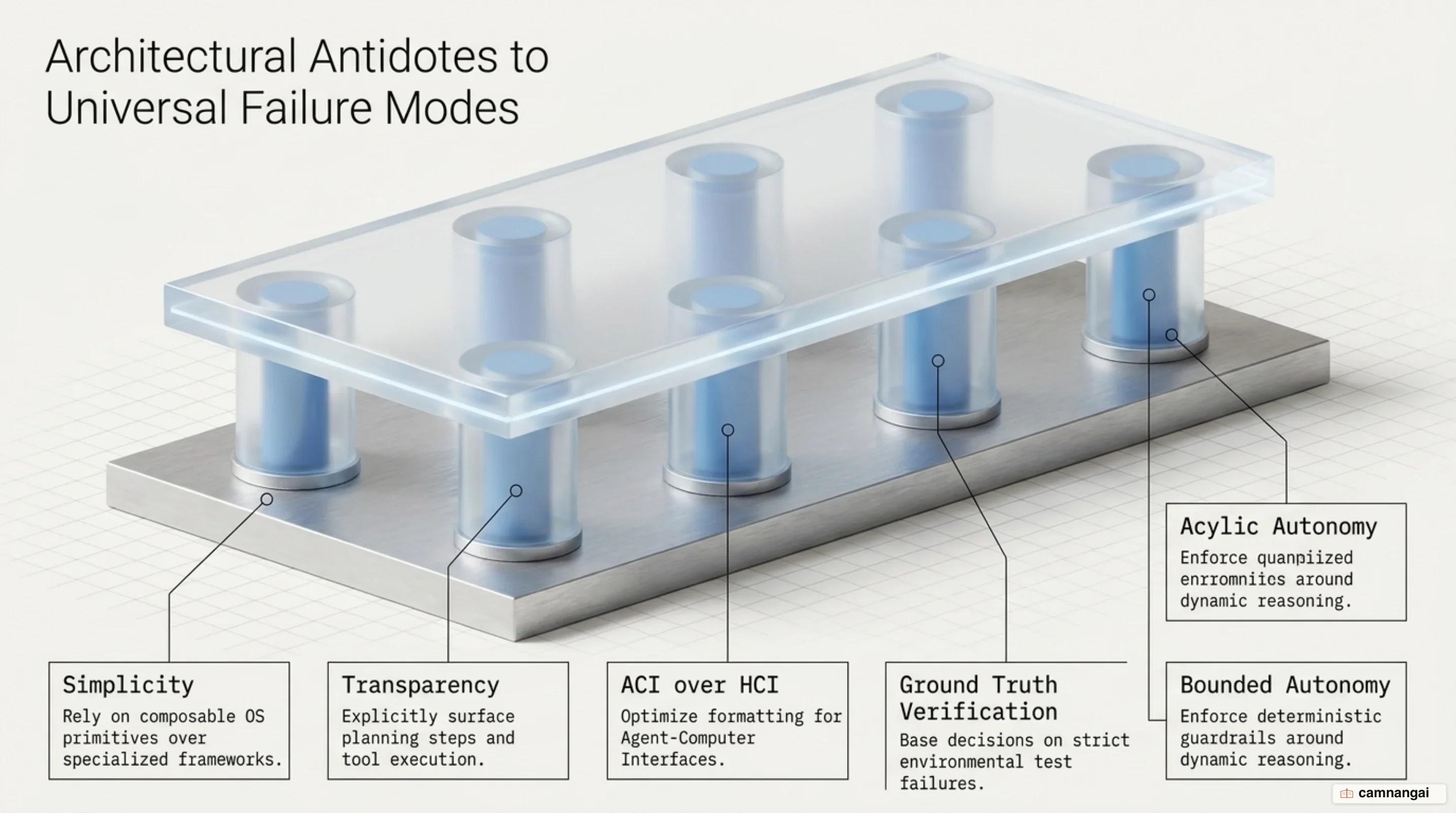
The architecture of Claude Code rests on five core pillars engineered to maximize operational reliability and maintain deterministic system control:
- Radical Simplicity (ACI over HCI): Tool interfaces are designed specifically for LLM token processing rather than human-computer interface (HCI) standards. Human interfaces optimize for visual presentation, whereas agent-computer interfaces (ACI) optimize for token efficiency and deterministic parsing. The system eliminates formatting overhead—such as requiring the model to generate precise chunk headers with exact line-count calculations in git diffs—favoring line-numbered plain text and raw CLI outputs to prevent generation traps.
- Deterministic Environmental Feedback: The agent avoids guessing execution state by gathering ground truth directly from standard command outputs, file diffs, test suite results, and subprocess exit codes.
- Context Economics & Caching: To prevent exponential context bloat across long-running sessions, the harness relies on prompt caching prefixes (
CLAUDE.md, system prompts, tool schemas), transient subagent execution windows, and automated context compaction boundaries (compact_boundary). - Multi-Tier Safety & Permissions: System actions pass through a cascading evaluation hierarchy. Local settings rules, execution permission modes (
default,acceptEdits,plan,dontAsk,auto,bypassPermissions), and pre/post-execution hooks evaluate tool calls before execution. - Modular Extensibility: System capabilities expand dynamically without context bloat through Model Context Protocol (MCP) integrations, lifecycle shell and HTTP hooks, and on-demand subagent delegation.
Inside the harness: the TAOR loop and radical simplicity
The single execution loop driving Claude Code follows a strictly typed lifecycle turn structure. Execution begins when a prompt is ingested alongside system prompts, tool definitions, and project instructions. The SDK yields a SystemMessage with subtype "init" containing session metadata. The model then evaluates the environment and yields one or more AssistantMessage objects containing text or requested tool call blocks. The SDK executes the requested tools, collects execution outputs, and returns them to the model inside a UserMessage payload. This turn cycle repeats until the model returns an AssistantMessage containing no tool calls, ending the loop with a final ResultMessage.
[
  {
    "type": "assistant",
    "message": {
      "content": [
        {
          "type": "tool_use",
          "id": "toolu_01ABC123",
          "name": "Bash",
          "input": { "command": "npm test" }
        }
      ]
    }
  },
  {
    "type": "user",
    "content": [
      {
        "type": "tool_result",
        "tool_use_id": "toolu_01ABC123",
        "content": "Exit code 1\nFAIL src/auth.test.ts\n  ✕ Should validate JWT tokens"
      }
    ]
  }
]
Message typing controls execution flow and real-time observability across language runtimes. SystemMessage instances communicate system state changes, using subtypes like "init" for startup metadata, "compact_boundary" after transcript summarization, "informational" for status banners, and "worker_shutting_down" for host termination. In the TypeScript SDK, subtypes like compaction boundaries are represented as distinct types in the union (e.g., SDKCompactBoundaryMessage), whereas Python uses the .subtype attribute on SystemMessage. When the loop terminates, the SDK emits a ResultMessage detailing session telemetry. In Python, this telemetry uses model_usage (typed as optional dict alongside total_cost_usd and usage), whereas TypeScript uses modelUsage and total_cost_usd. The model's stop_reason is explicitly reported (end_turn, max_tokens, or refusal).
Loop execution limits prevent runaway automation. You can cap execution using max_turns (which counts tool-use round trips) or max_budget_usd. Cap enforcement incorporates explicit budget headroom mechanics: spend checks occur after model responses return token usage payloads. Consequently, session cost can exceed max_budget_usd by up to the cost of one model response plus any spend incurred by active subagents running concurrently before shutdown signals propagate across processes.
Reasoning depth per turn is managed through explicit effort controls (low, medium, high, xhigh, max). Effort levels configure the reasoning token budget per turn, operating independently from output thinking blocks. Lower effort levels minimize reasoning tokens and latency for basic operations like file listing or exact text searches. Higher effort levels allocate deeper reasoning token budgets per response turn, enabling complex architectural refactoring and multi-turn debugging at the expense of higher token consumption per turn.
Primitive tools: the power of radical simplicity
Claude Code achieves operational stability by exposing simple primitive tools to the model rather than high-level specialized abstractions.
| Category | Tools | Description |
|---|---|---|
| File operations | Read, Edit, Write | Read contents, modify via text replacement, and create files |
| Search | Glob, Grep | Search files by pattern or content using regular expressions |
| Execution | Bash | Execute shell commands, scripts, and git operations |
| Web | WebSearch, WebFetch | Perform web queries and fetch parsed web page contents |
| Discovery | ToolSearch | Dynamically discover and load MCP tool schemas on demand |
| Orchestration | Agent, Skill, AskUserQuestion, TaskCreate, TaskUpdate | Spawn subagents, load skills, prompt users, and track task state |
Anthropic's Agent-Computer Interface (ACI) philosophy dictates that tool parameters must minimize formatting friction for LLMs. Human-computer interfaces (HCI) optimize for visual presentation, whereas ACI optimizes for token budget and deterministic parsing. Requiring a model to construct git diff headers with exact line counts forces the model to perform precise mental arithmetic on token spans before generating code, introducing severe failure modes. Primitive tools like Read and Edit eliminate formatting overhead by using plain text line numbers and raw string replacements.
Optimizing tools for model consumption requires addressing practical edge cases discovered in evaluation environments. Benchmarks on SWE-bench revealed that models repeatedly drift when using relative filepaths after executing shell commands that change the working directory (e.g., cd). To eliminate path drift across multi-turn execution, tool contracts for Read, Edit, and Write strictly require absolute filepaths, which the harness automatically expands before tool invocation.
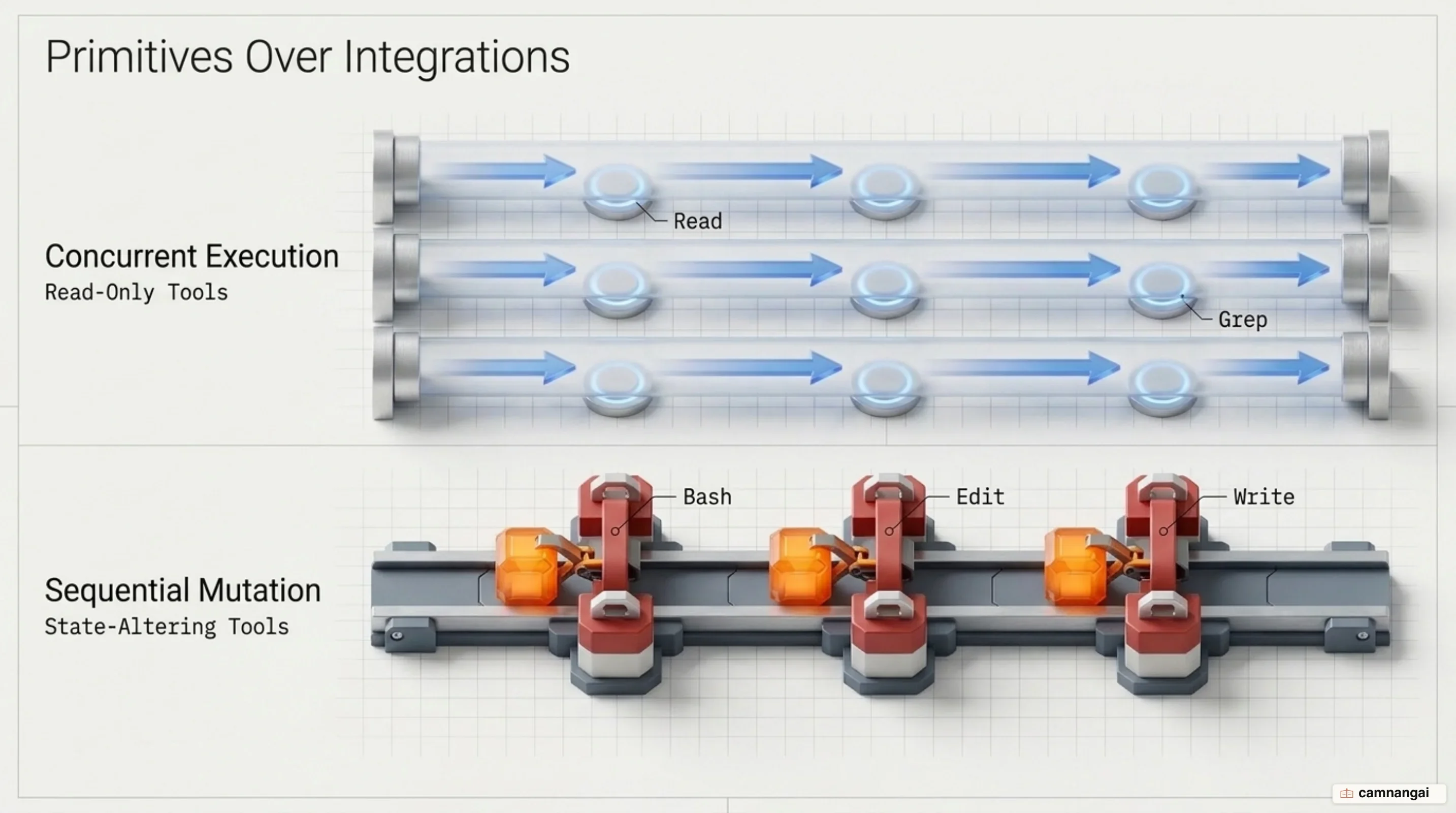
Tool execution strategies split based on state mutability. Tools that modify state (Edit, Write, Bash) run sequentially to prevent filesystem race conditions and workspace corruption. Conversely, built-in read-only tools (Read, Glob, Grep, and MCP tools marked as read-only) execute concurrently in parallel execution batches (PostToolBatch), significantly reducing loop turn latency. Custom tools default to sequential execution unless explicitly annotated with readOnlyHint.
Direct input and output formatting maximizes token efficiency. Read returns line-numbered plain text directly, and Bash streams natural CLI output. Returning plain text avoids JSON double-escaping penalties—such as escaping newlines and quotes inside JSON strings—saving context window capacity and eliminating parsing errors.
Context economics and layered memory architecture
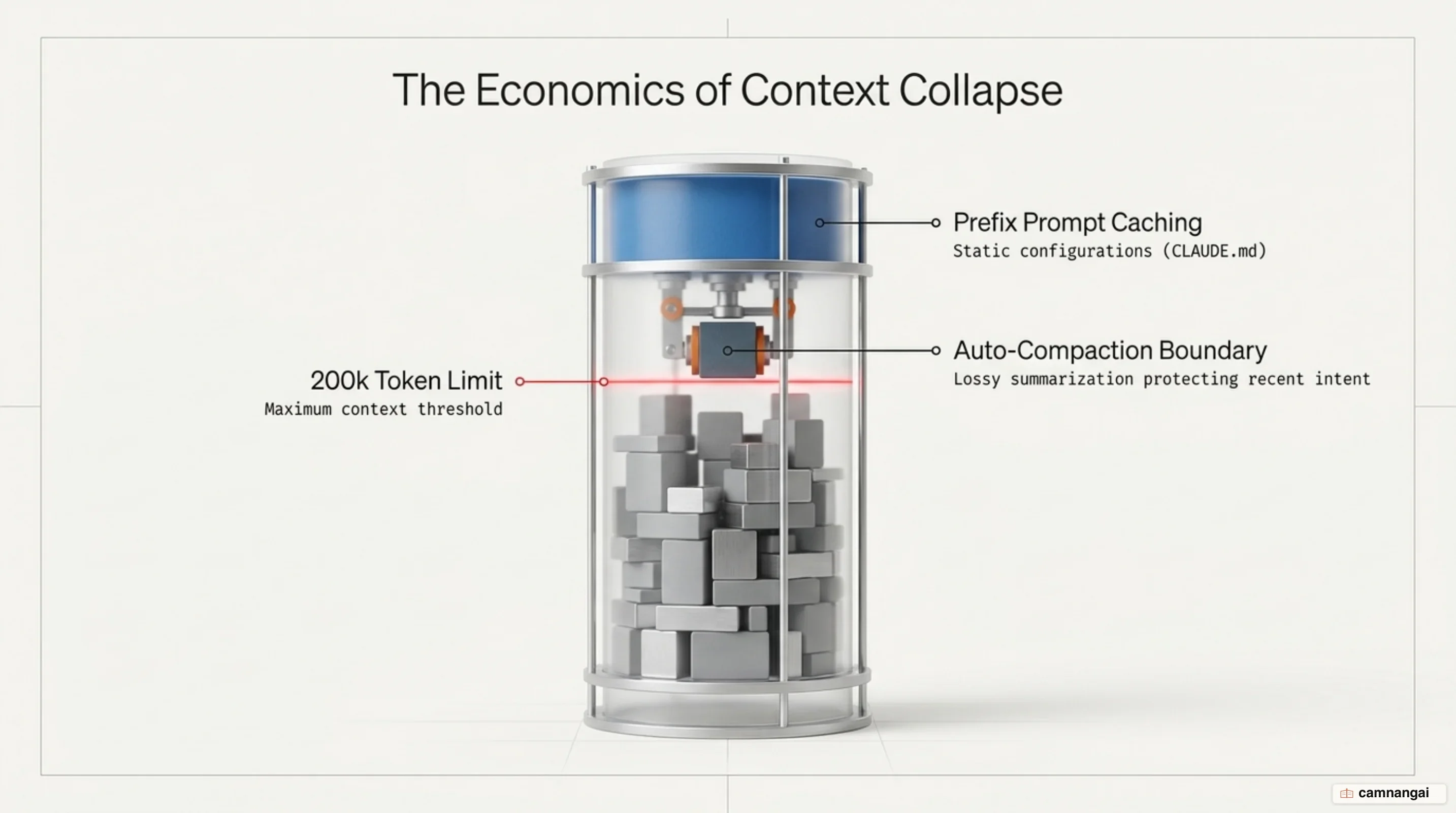
Context window consumption in long-running agent sessions compounds rapidly. Fixed overhead—comprising the system prompt, tool definitions, and project configuration—is sent on every API call. Over sequential turns, conversation history, verbose tool outputs (like large file reads or compiler logs), and intermediate reasoning accumulate, raising latency and operating costs exponentially if left unmanaged.
Prompt caching minimizes cost and latency for static context. Fixed context blocks placed at the beginning of the context window—such as system prompts, built-in tool schemas, and project rules in CLAUDE.md—stay cached across turns via prompt caching prefixes. As long as these static prefixes remain unchanged, subsequent turns read from the prompt cache at a fraction of the token cost and time.
# Summary instructions

When summarizing this conversation, always preserve:

- The current task objective and acceptance criteria
- File paths that have been read or modified
- Test results and error messages
- Decisions made and the reasoning behind them
When transcript growth approaches context thresholds, the SDK initiates automatic compaction. The system summarizes older conversation turns into a consolidated text block, emits a SystemMessage with subtype "compact_boundary" (represented as SDKCompactBoundaryMessage in TypeScript), and replaces the historical message stream. To prevent losing critical operational rules during summarization, persistent instructions are placed inside CLAUDE.md (loaded via settingSources). Because CLAUDE.md is re-injected on every request, its rules survive compaction boundaries intact.
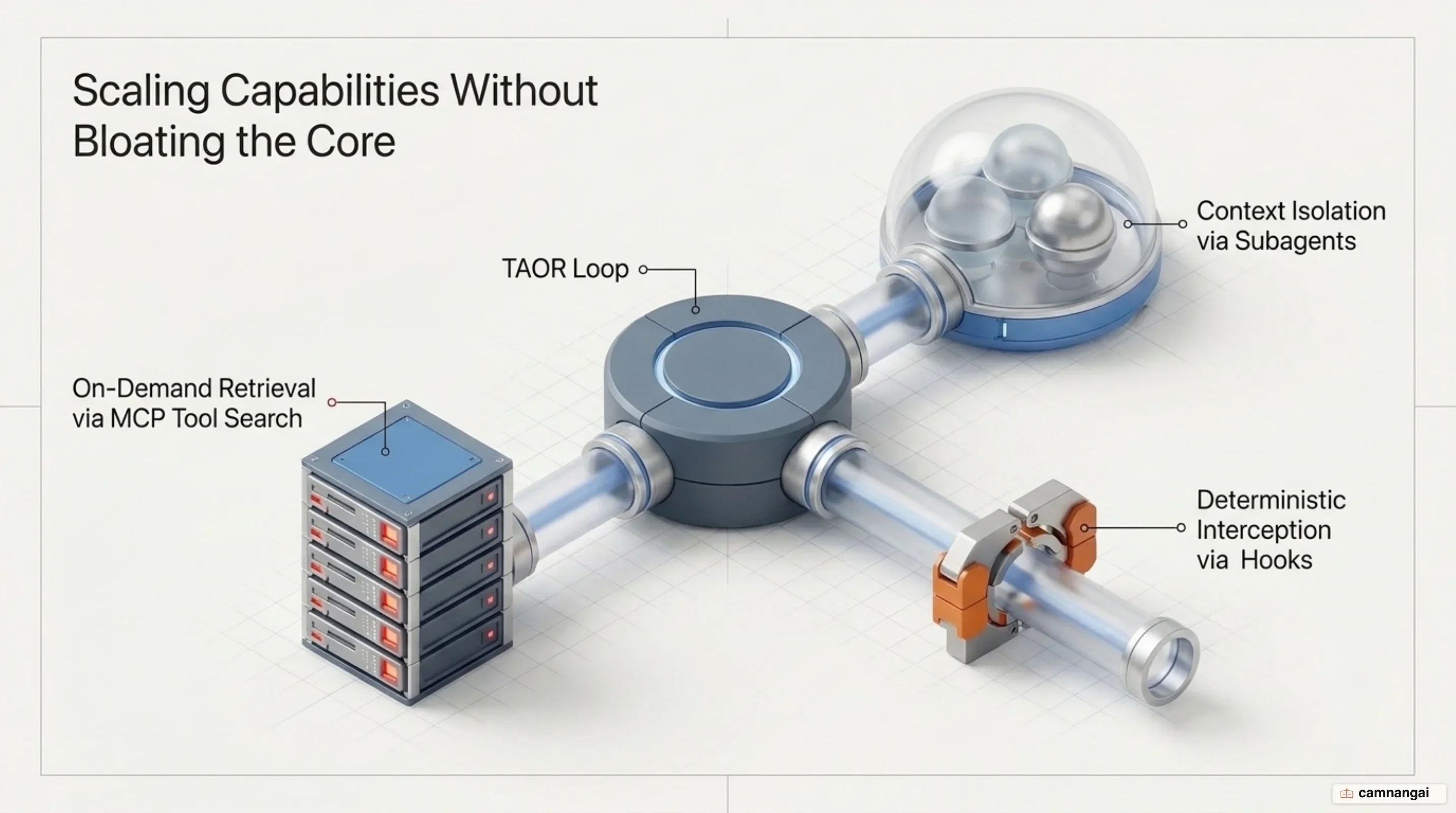
Context isolation using subagents prevents long-running subtasks from polluting the main session transcript. When the agent invokes the Agent tool, it spawns a subagent with a fresh context window containing no prior turn history. The subagent executes its assigned subtask independently—consuming its own context turns—and returns only a final summary payload to the parent session, keeping the parent context window lean.
Extensibility: subagents, hooks, and Model Context Protocol
The harness expands its capabilities dynamically using subagent delegation, lifecycle hooks, and the Model Context Protocol (MCP). Spawning a subagent via the Agent tool creates an isolated execution scope. Subagents inherit project instructions (CLAUDE.md) but start with an empty conversation transcript. You can override configuration settings for a subagent—such as setting lower effort, limiting available tools, or assigning a cheaper model—to execute isolated subtasks efficiently without context clutter.
{
  "hooks": {
    "PreToolUse": [
      {
        "matcher": "Bash",
        "hooks": [
          {
            "type": "command",
            "if": "Bash(rm *)",
            "command": "${CLAUDE_PROJECT_DIR}/.claude/hooks/block-rm.sh",
            "onFailure": "block"
          }
        ]
      }
    ]
  }
}
The lifecycle hook architecture allows external processes to intercept and control agent behavior across key execution points:
- Session hooks manage process lifetimes (
SessionStart,SessionEnd). - Turn hooks intercept prompt execution (
UserPromptSubmit,Stop,StopFailure). - Tool loop hooks govern tool evaluation (
PreToolUse,PermissionRequest,PermissionDenied,PostToolUse,PostToolUseFailure,PostToolBatch).
Hooks run as shell commands, HTTP POST endpoints, MCP tools, LLM prompts, agent subtasks, or native SDK callbacks outside the model's context window, consuming zero context tokens.
Hook handlers execute deterministically based on process exit codes, HTTP statuses, and standard output JSON:
- Exit code 0 indicates successful execution; any returned JSON payload is parsed and applied.
- Exit code 2 signals a blocking policy denial. The hook's
stderris returned directly to the model as an error or displayed to the user as a rejection reason. - JSON control payloads allow handlers to return structured decisions like
permissionDecision("allow","deny","ask","defer"),updatedInput(modifying tool parameters before run), oradditionalContext(injecting system reminders). - Background rewake (
asyncRewake) enables background hooks that exit with code 2 to wake the agent loop and pass theirstderroutput as a system reminder. - Failure gates (
onFailure: "block") force an automatic block if the hook process fails to start, crashes, or exceeds its execution timeout.
Model Context Protocol (MCP) integration enables runtime tool expansion without initial context overhead. Instead of injecting schemas for hundreds of external MCP tools into every request, MCP ToolSearch defers schema loading by default. The agent dynamically searches for and loads specific MCP tool schemas only when required by the task, keeping initial prompts lightweight.
Multi-tier permission and safety architecture
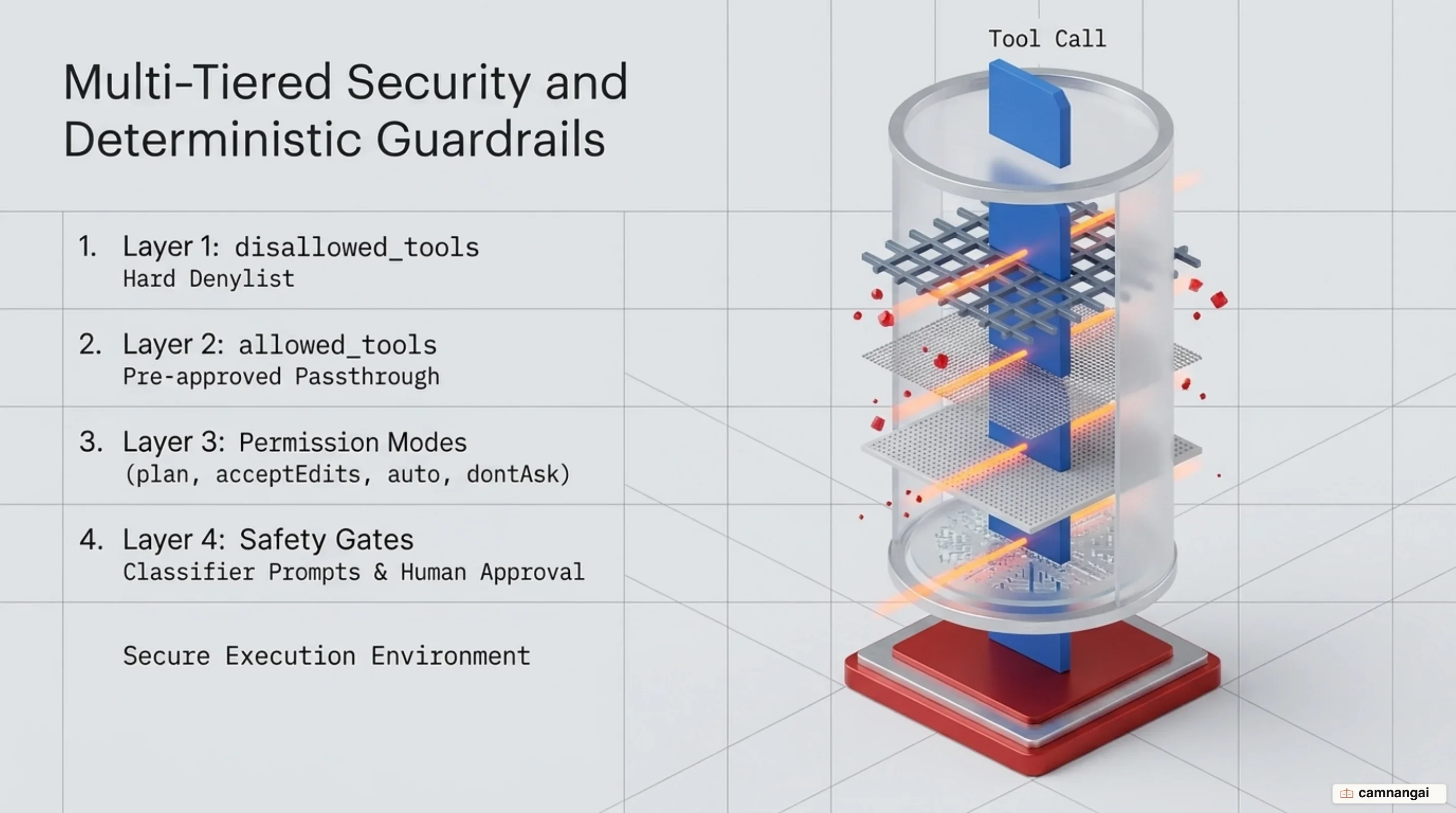
Claude Code enforces safety through a cascading permission hierarchy evaluated before any state-modifying action runs. Tool calls are checked first against explicit deny rules (disallowed_tools), then allow rules (allowed_tools), and finally against the active session permission_mode.
[Tool Call Request]
       │
       ▼
┌──────────────────────────────┐
│ Matches disallowed_tools?    │─── Yes ───► [ DENY Execution ]
└──────────────────────────────┘
       │ No
       ▼
┌──────────────────────────────┐
│ Matches allowed_tools?       │─── Yes ───► [ ALLOW Execution ]
└──────────────────────────────┘
       │ No
       ▼
┌──────────────────────────────┐
│ Evaluate permission_mode     │
└──────────────────────────────┘
The operational profiles of the six permission modes define system autonomy:
defaultrequires explicit approval for any tool call not pre-approved by allow rules. Unhandled prompts trigger the application'scanUseToolcallback or default to deny.acceptEditsautomatically approves file edits and common filesystem commands (mkdir,touch,mv,cp), while routing arbitrary shell commands through standard approval gates.planrestricts operations to read-only exploration and architecture design. File modification tools are strictly blocked from auto-approval and force user confirmation prompts.dontAskprovides a headless execution profile that never prompts a user. Tools explicitly covered by allow rules execute; all unapproved tool calls receive a hard denial without fallback callbacks. Even if a tool is allowed,dontAskstrictly denies calls toAskUserQuestion, connector tools set to ask by organization policy, MCP tools marked withrequiresUserInteraction, and network path reads.autouses a background model classifier to evaluate security risks (such as destructive commands or data exfiltration) for shell commands and network requests, dynamically allowing or denying execution.bypassPermissionsskips all user permission checks for allowed tools. In the TypeScript SDK, enabling this mode requires explicitly settingallowDangerouslySkipPermissions: truein options. Designed strictly for isolated environments like CI/CD runners or ephemeral containers.
In auto mode, the model classifier inspects shell commands before execution. If the classifier detects risk, it denies the call and emits a PermissionDenied event. If a PermissionDenied hook responds with {"hookSpecificOutput": {"retry": true}}, the harness injects a system reminder informing the model that it may adjust its command and attempt a safer variation. However, retry: true is ignored if the classifier produced no verdict (e.g., due to parse failures or upstream safety blocks).
To prevent privilege escalation, security safeguards are hardcoded into the harness. bypassPermissions mode is explicitly disabled when running as the Unix root superuser. Furthermore, connector tools restricted by organizational policies, MCP tools requiring explicit user interaction, and cross-session messaging protections remain strictly enforced regardless of local permission overrides.
Architectural lessons for AI engineers
Building reliable agentic software requires abandoning brittle, deeply abstracted framework graphs that conceal model inputs and amplify intermediate execution errors. Exposing low-overhead tool primitives directly to capable LLMs inside a direct, tight feedback loop yields higher operational accuracy and vastly simplified debugging.
Production-grade agent harnesses succeed not through complex control abstractions, but through careful Agent-Computer Interface (ACI) design, strict permission cascades, explicit spend and turn boundaries, and disciplined context window management via prompt caching and context compaction.
References
- Claude Code Architecture (Reverse Engineered)
- Building Effective Agents — Anthropic
- How Claude Code Works — Claude Code Docs
- How Claude Remembers Your Project — Claude Code Docs
- Hooks Reference — Claude Code Docs
- Create Custom Subagents — Claude Code Docs
- Configure Permissions — Claude Code Docs
- How the Agent Loop Works — Claude Agent SDK Docs