# What Is Vue.js? Reactivity, Single-File Components, and Vapor Mode

> Vue.js is a progressive JavaScript framework for building interfaces using a component-based model, fine-grained reactivity, and declarative rendering.

Source: https://camnangai.com/en/engineering/what-is-vuejs  
Published: 2026-08-07

**Vue.js** is a JavaScript framework for building user interfaces based on standard HTML, CSS, and
  JavaScript.

It provides a declarative, component-based programming model designed to manage UI complexity
through two core mechanisms: declarative rendering and reactivity. By extending
[HTML](https://camnangai.com/en/engineering/what-is-html) with a specialized template syntax, Vue lets you describe the
relationship between state and the final output without writing manual DOM-manipulation logic.

The framework is engineered to be flexible and incrementally adoptable.


  This "progressive" philosophy lets it scale from a drop-in replacement for legacy libraries like
  jQuery to the engine behind a full Single-Page Application.

It stays lightweight by default while offering a mature ecosystem for state management, routing, and
server-side integration.
![Vue.js — the progressive JavaScript framework for building web interfaces](https://camnangai.com/articles/vuejs-la-gi/01-infographic-en.webp)

## What is Vue.js?

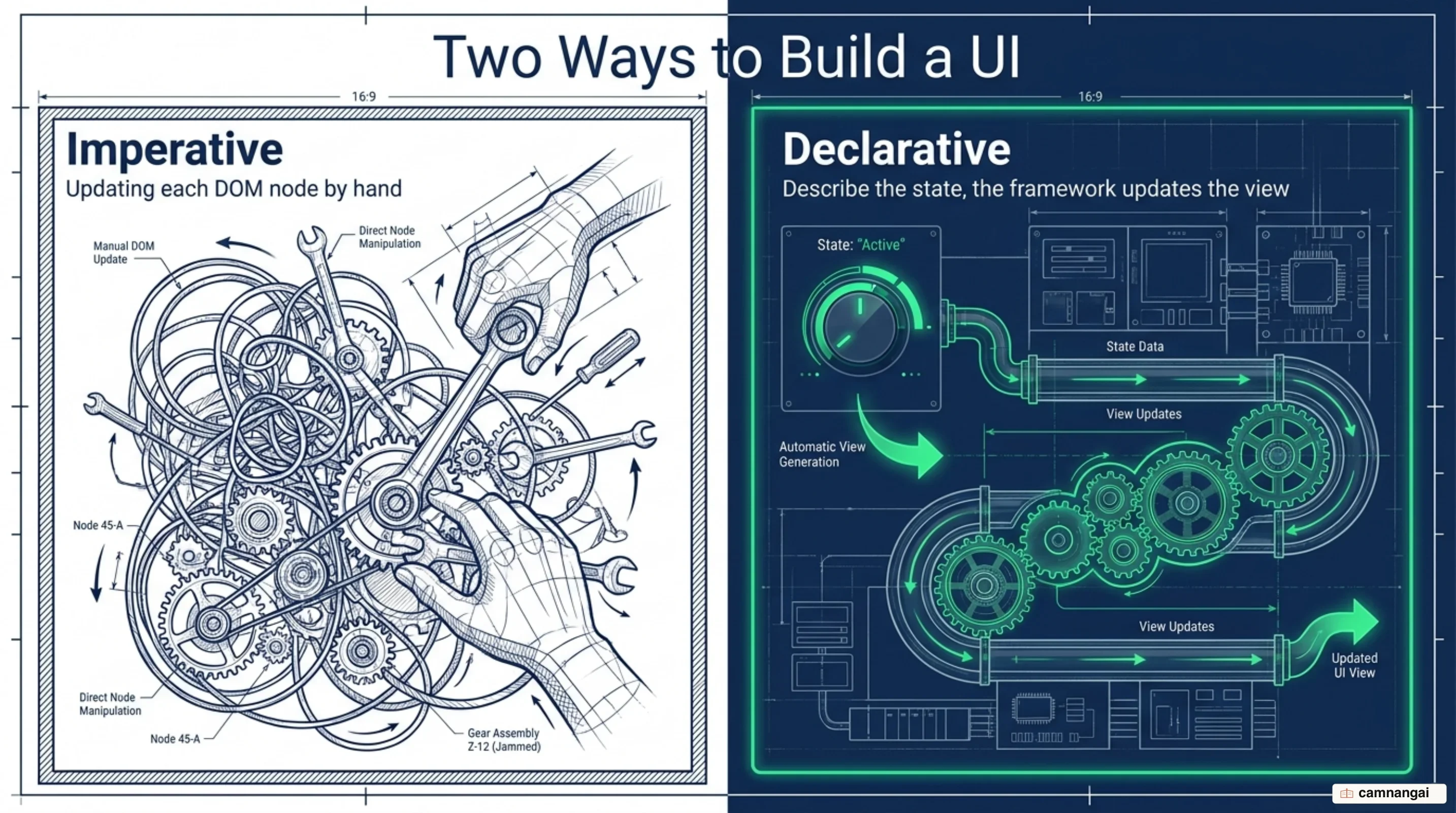
The technical foundation of **Vue.js** rests on its declarative rendering system. Unlike imperative
approaches where you must manually update specific DOM nodes when data changes, Vue uses a template
syntax that extends standard HTML. That syntax describes the desired HTML output as a direct
reflection of the underlying [JavaScript](https://camnangai.com/en/engineering/what-is-javascript) state. At runtime, Vue
compiles these templates into highly optimized render functions that keep the view synchronized with
application state.
![Imperative DOM updates by hand compared with Vue's declarative rendering from state](https://camnangai.com/articles/vuejs-la-gi/02-en.webp)

At the heart of this process is a fine-grained reactivity system. Vue automatically tracks every
reactive property accessed during rendering. When a property is mutated, the framework identifies
exactly which parts of the UI are affected and updates the DOM efficiently. This removes the need
for manual synchronization and prevents a large class of common UI bugs. An application is
initialized from a central entry point, typically mounting an instance to a specific DOM element:

```javascript
import { createApp } from "vue";

createApp({
  data() {
    return {
      count: 0,
    };
  },
}).mount("#app");
```

Adopting Vue requires a baseline familiarity with core web technologies — HTML, CSS, and JavaScript.
Moving beyond simple script-tag integration to modern application development also calls for
experience with terminal environments, Node.js, and package managers like npm or yarn. These tools
enable Single-File Components and the build-time optimizations that matter for production software.

## Why Vue is called a progressive framework

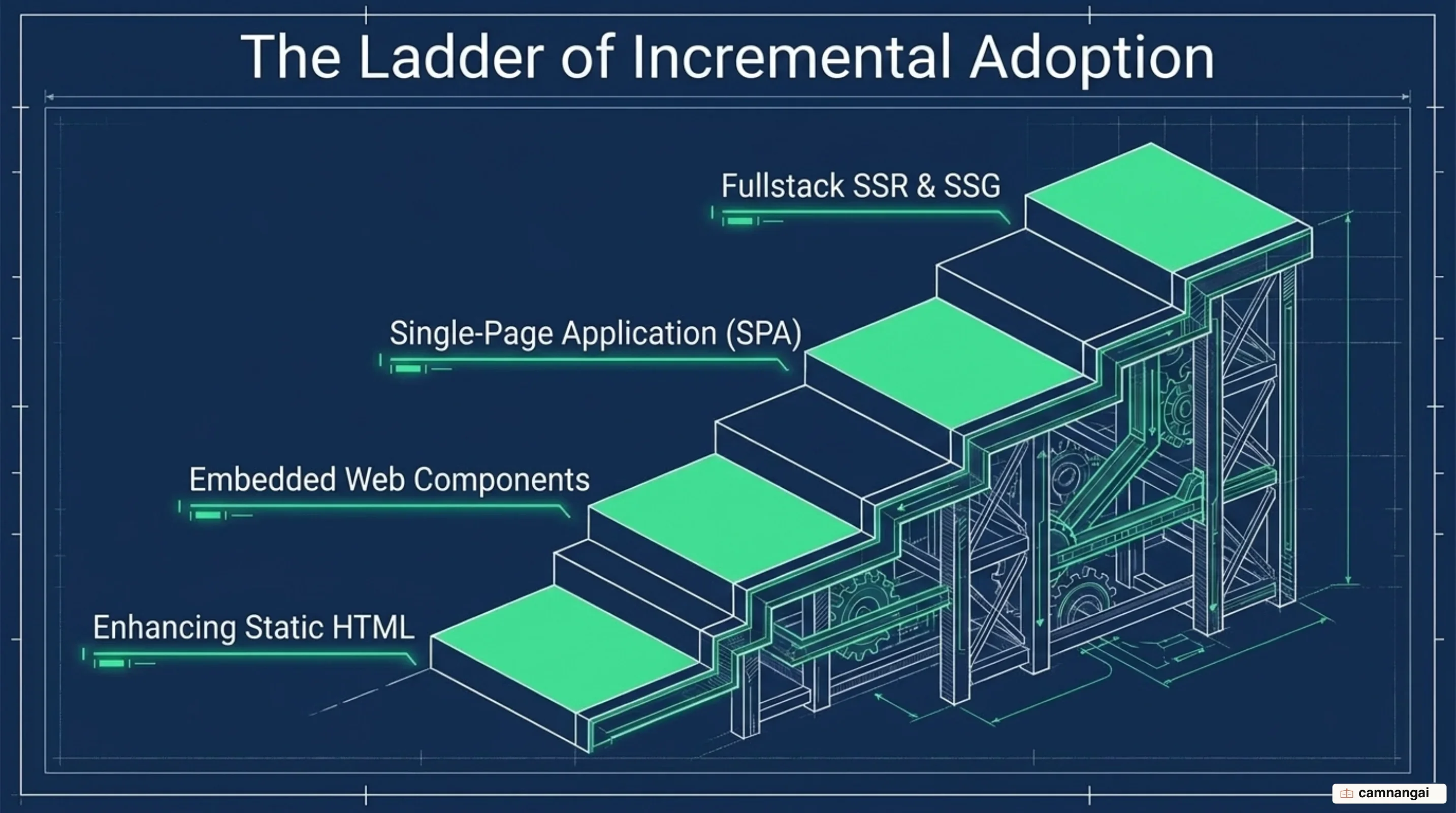
Vue is described as "progressive" because it avoids the all-or-nothing requirement common in
monolithic frameworks. It can act as a lightweight enhancement for static HTML, be embedded as a Web
Component on existing pages, or drive a full Jamstack, Static Site Generation (SSG), or Server-Side
Rendering (SSR) architecture. Teams adopt the framework at the level their current constraints
justify rather than over-engineering from the start.
![Vue's adoption ladder: enhancing static HTML, Web Components, a full SPA, then SSR and SSG](https://camnangai.com/articles/vuejs-la-gi/03-en.webp)

The framework also holds a middle ground on tooling. The core team provides and
maintains suggested libraries for essential concerns like routing (Vue Router) and state management
(Pinia), but these stay unbundled and optional. That keeps the core small and lets you swap out
specific parts of the stack — an external state management solution, for instance — without fighting
the framework's design.

The progression follows a predictable path. A project might begin by importing Vue via a CDN-hosted
`<script>` tag to add interactivity to a legacy application. As requirements grow, the team migrates
to a full build-tool setup using Vite or webpack, enabling `.vue` files and
[TypeScript](https://camnangai.com/en/engineering/what-is-typescript). This incremental path keeps the developer
experience high whether the goal is a minor UI widget or a high-traffic enterprise dashboard.

## Reactivity: why the UI updates when your data changes

Reactivity in Vue is often explained with a spreadsheet analogy. In a spreadsheet, if cell A2
contains the formula `= A0 + A1`, updating A0 makes A2 recalculate immediately. In standard
JavaScript, variables do not observe each other; changing one does not affect its dependents unless
something re-executes manually. Vue solves this by intercepting property access on JavaScript
objects to build a dependency graph.

Vue 3 uses JavaScript Proxies to implement that interception. When a reactive property is read
during the execution of a side effect — rendering a template, say — Vue performs a `track`
operation, adding the current effect as a subscriber to that property. When the property is mutated
later, Vue performs a `trigger` operation, notifying every subscriber to re-run and update the
result, much like the automatic recalculation in a spreadsheet cell.

![Vue's reactivity loop: track collects a dependency on read, trigger updates the UI on write](https://camnangai.com/articles/vuejs-la-gi/04-en.webp)

The following pseudo-code shows the logic of a `reactive()` function using the Proxy API to manage
those internal `track` and `trigger` hooks:

```javascript
function reactive(obj) {
  return new Proxy(obj, {
    get(target, key) {
      // Track the dependency when a property is accessed
      track(target, key);
      return target[key];
    },
    set(target, key, value) {
      // Update the value and notify subscribers
      target[key] = value;
      trigger(target, key);
      return true;
    },
  });
}
```

## Single-File Components: template, script and style in one file

Most modern Vue development centers on the Single-File Component (SFC) format, denoted by the `.vue`
extension. An SFC encapsulates the logic, template, and styling of a component in a single file,
colocating concerns that are inherently coupled. It also improves encapsulation: the `scoped`
attribute on the `<style>` block keeps [CSS](https://camnangai.com/en/engineering/what-is-css) rules isolated to that
component, preventing global style leakage across the application.

![The structure of a .vue file: template, script and style blocks in one Single-File Component](https://camnangai.com/articles/vuejs-la-gi/05-en.webp)

SFCs are not merely a convenience — they are what makes compile-time optimization possible. By
pre-compiling templates into JavaScript via `@vue/compiler-sfc`, Vue avoids the overhead of runtime
compilation. Build tools like Vite use SFCs to provide out-of-the-box Hot-Module Replacement, and
cross-analysis of the template and script blocks lets the compiler generate the most efficient
render functions possible while keeping local development responsive.

A standard SFC integrates all three blocks into one modular structure:

```vue
<script setup>
import { ref } from "vue";
const greeting = ref("Hello World!");
</script>

<template>
  <p class="greeting">{{ greeting }}</p>
</template>

<style scoped>
.greeting {
  color: red;
  font-weight: bold;
}
</style>
```

## Composition API and Options API: which one should you use?

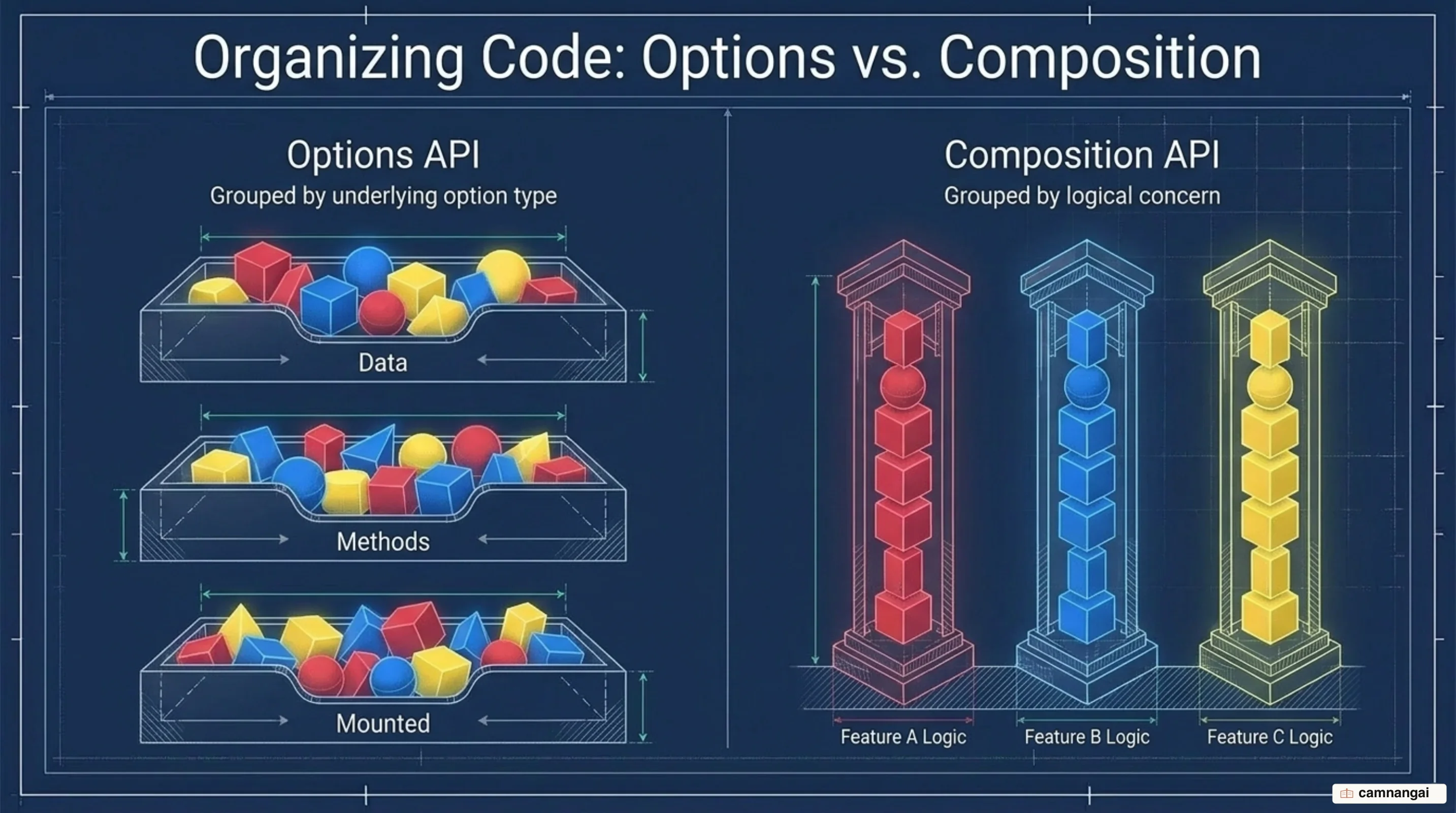
Vue supports two distinct API styles. The Options API is an object-based approach where logic is
organized into predefined buckets such as `data`, `methods`, and `mounted`. It relies on a component
instance context accessed via `this`, which makes it approachable and well-aligned with an
object-oriented mental model. It remains a supported and effective choice for low-to-medium
complexity scenarios.
![Options API groups code by option bucket while Composition API groups it by logical concern](https://camnangai.com/articles/vuejs-la-gi/06-en.webp)

The Composition API, typically written with `<script setup>`, is function-based and focused on logic
composition. You declare reactive state and functions directly in a function scope, which enables
better logic reuse through composables and considerably better TypeScript type inference. Because it
relies on plain variables and functions rather than an instance proxy, minifiers process it more
effectively, producing smaller production bundles.

Its main architectural advantage is more flexible code organization in complex components. Under the
Options API, code serving a single logical concern — tracking folder state versus toggling hidden
files, in a folder explorer — is forced into separate blocks, fragmenting the logic and adding a lot
of scrolling. The Composition API lets you group everything related to one concern together, which
makes large-scale refactoring and maintenance considerably more manageable.

## Where Vue runs: from a script tag to SPA, SSR and Nuxt

Vue offers two primary paths depending on the project's scale. For simple progressive enhancement,
you can include a CDN-hosted `<script>` tag. Core features such as data management and custom
components then work directly in any HTML file with no build step. This path suits migrating legacy
sites that still rely on older libraries for DOM manipulation.

For full-scale application development, the recommended starting point is the `npm create vue@latest`
scaffolding tool. It generates a standardized project structure with a `package.json` for
dependencies, a `vite.config.js` for the build server, and a `src` directory. The entry point is
`src/main.js`, which initializes the Vue app and attaches it to `index.html`, keeping a clean
separation between the host page and the application logic.

Beyond standard browser execution, Vue extends to Server-Side Rendering and Static Site Generation.
These modes render Vue components to HTML on the server before hydrating them on the client, which
matters for SEO and perceived performance in content-heavy applications. The same core knowledge
applies whether you are building a small interactive widget or a complex, globally distributed
application.

## Vue 3.6 and Vapor Mode: dropping the Virtual DOM where speed matters

Vue 3.6 is a performance release. It carries a major reactivity refactor based on `alien-signals`
that improves the reactivity system's memory usage and execution speed across the board. The most ambitious feature in this cycle is Vapor Mode, an opt-in
compilation strategy that maximizes performance by removing the dependency on a Virtual DOM — the
in-memory copy of the UI tree that a framework diffs against before it touches the real page.

Vapor Mode compiles templates into fine-grained DOM updates rather than Virtual DOM nodes. By
bypassing VNode reconciliation, it reduces baseline bundle size and delivers performance comparable
to frameworks like Solid and Svelte in third-party benchmarks. You can enable it per component by
adding the `vapor` marker to the SFC tags, or build entire pure-Vapor applications with
`createVaporApp()` to mount without pulling in any VDOM runtime code.

![The Virtual DOM path compared with Vapor Mode compiling straight to DOM operations](https://camnangai.com/articles/vuejs-la-gi/07-en.webp)

Coexistence between Vapor and VDOM components is handled by `vaporInteropPlugin`. Installed, it
allows Vapor and non-Vapor components to nest inside each other, which is the migration path for
existing applications. Vapor Mode is feature-complete as of the 3.6 RC, but it currently supports a
subset of Vue's features and is specialized for performance-sensitive regions — reach for it on
specific high-performance pages or small specialized applications, not as a blanket replacement for
the VDOM.

## How Vue differs from React

Both frameworks support component-based logic, but Vue's execution model differs in ways you feel
day to day. In Vue, the `setup()` or `<script setup>` block runs exactly once during component
initialization. That model matches standard JavaScript intuition and avoids the stale-closure
problems inherent in [React](https://camnangai.com/en/engineering/what-is-react) Hooks, where variables can be captured
by old closures across repeated re-renders.

![Three differences between Vue and React: setup runs once, automatic dependency tracking, automatic optimization](https://camnangai.com/articles/vuejs-la-gi/08-en.webp)

The run-once model also removes manual dependency management. In React, you maintain dependency
arrays for `useEffect` and `useMemo` so hooks run at the right time. Vue's fine-grained reactivity
system collects the dependencies used in computed properties and watchers automatically, which
prevents a common class of React bugs where an omitted dependency leads to incorrect state or
unnecessary re-renders.

Performance optimization is similarly automated. Because the framework tracks dependencies at a
granular level, child components update only when their specific props change. In React, components
often re-render by default, so you reach for `useCallback` or `useMemo` to prevent unnecessary child
updates by hand. In Vue those optimizations are baked into the runtime.

## When should you choose Vue for your project?

Vue suits projects that need room to scale without a steep entry cost. Its progressive nature lets a
team start with a minimal footprint and adopt SFCs, TypeScript, and SSR only when the application's
complexity justifies the overhead.

For low-to-medium complexity work, or for developers who prefer a class-like mental model, the
Options API remains a solid and fully supported choice. For full-scale applications where logic
reuse and
strict typing are priorities, the Composition API combined with Single-File Components is the
recommended standard — equally effective for legacy migrations and high-performance modern builds.

## References

- [Introduction | Vue.js](https://vuejs.org/guide/introduction)
- [Single-File Components | Vue.js](https://vuejs.org/guide/scaling-up/sfc.html)
- [Reactivity in Depth | Vue.js](https://vuejs.org/guide/extras/reactivity-in-depth.html)
- [Composition API FAQ | Vue.js](https://vuejs.org/guide/extras/composition-api-faq)
- [Ways of Using Vue | Vue.js](https://vuejs.org/guide/extras/ways-of-using-vue.html)
- [Getting started with Vue - Learn web development | MDN](https://developer.mozilla.org/en-US/docs/Learn_web_development/Core/Frameworks_libraries/Vue_getting_started)
- [Vue vs. React in 2026: How to pick the right framework — Vercel](https://vercel.com/i/vue-vs-react)
- [Releases · vuejs/core — GitHub](https://github.com/vuejs/core/releases)
